René Cannaò
Senior DBA PalominoDB
rene@palominodb.com
@rene_cannao
MySQL Cluster
(NDB)
Tutorial
Agenda
Introduction - Presentation
MySQL Cluster Overview
MySQL Cluster Components
Partitioning
Internal Blocks
General Configuration
Transactions
Checkpoints on disk
Handling failure
Disk data
Start Types and Start Phases
Storage Requirements
Backups
NDB and binlog
Native NDB Online Backups
About myself
My name is René Cannaò
Working as DBA since 2005
Starting my experience with NDB in 2007
In 2008 I joined the MySQL Support Engineer
Team at Sun/Oracle
Working as Senior DBA for PalominoDB
We have a booth: please come and visit us!
Questions
If you have questions stop me at any time!
If the answer is short will be answered
immediately.
If the answer it long, we can discuss at the end
of the tutorial
What this course is Not
This course doesn't cover advanced topics like:
Advanced Setup
Performance Tuning
Configuration of multi-threads
Online add nodes
NDBAPI
noSQL access
Geographic Replication
BLOB/TEXT fields
MySQL Cluster Overview
High Availability Storage Engine for MySQL
Provides:
● High Availability
● Clustering
● Horizontal Scalability
● Shared Nothing Architecture
● SQL and noSQL access
High Availability and Clustering
High Availability:
● survives routine failures or maintenance
○ hardware or network failure, software upgrade, etc
● provides continuous services
● no interruption of services
Clustering:
● parallel processing
● increase availability
Scalability
Ability to handle increased number of requests
Vertical:
● replace HW with more powerful one
Horizontal:
● add component to the system
Shared Nothing Architecture
Characterized by:
● No single point of failure
● Redundancy
● Automatic Failover
MySQL Cluster Summary
Shared Nothing Architecture
No Single Point Of Failure (SPOF)
Synchronous replication between nodes
Automatic failover with no data loss
ACID transaction
Durability with NumberOfReplica > 1
READ COMMITTED transaction isolation level
Row level locking
MySQL Cluster
Components
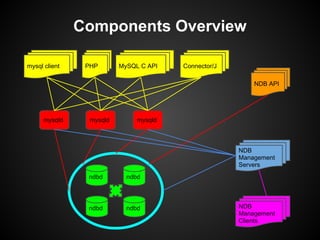
Components Overview
mysql client MySQL C APIPHP Connector/J
NDB API
NDB
Management
Clients
NDB
Management
Servers
mysqld mysqld mysqld
ndbd
ndbd ndbd
ndbd
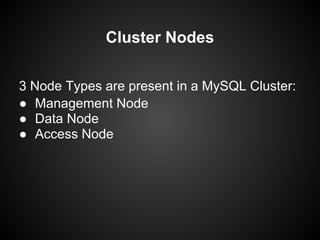
Cluster Nodes
3 Node Types are present in a MySQL Cluster:
● Management Node
● Data Node
● Access Node
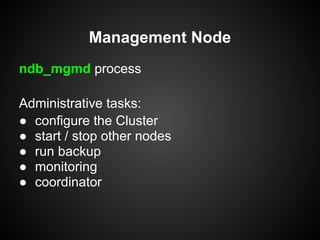
Management Node
ndb_mgmd process
Administrative tasks:
● configure the Cluster
● start / stop other nodes
● run backup
● monitoring
● coordinator
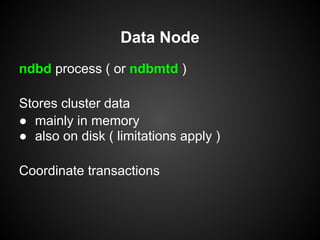
Data Node
ndbd process ( or ndbmtd )
Stores cluster data
● mainly in memory
● also on disk ( limitations apply )
Coordinate transactions
Data Node ( ndbmtd )
What is ndbmtd ?
Multi-threaded equivalent of ndbd
File system compatible with ndbd
By default run in single thread mode
Configured via MaxNoOfExecutionThreads of
ThreadConfig
API Node
Process able to access data stored in Data
Nodes:
● mysqld process with NDBCLUSTER support
● application that connects to the cluster
through NDB API (without mysqld)
Partitioning
Vertical Partitioning
Horizontal Partitioning
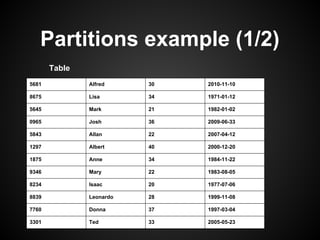
Partitions example (1/2)
5681 Alfred 30 2010-11-10
8675 Lisa 34 1971-01-12
5645 Mark 21 1982-01-02
0965 Josh 36 2009-06-33
5843 Allan 22 2007-04-12
1297 Albert 40 2000-12-20
1875 Anne 34 1984-11-22
9346 Mary 22 1983-08-05
8234 Isaac 20 1977-07-06
8839 Leonardo 28 1999-11-08
7760 Donna 37 1997-03-04
3301 Ted 33 2005-05-23
Table
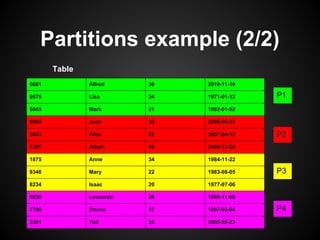
Partitions example (2/2)
5681 Alfred 30 2010-11-10
8675 Lisa 34 1971-01-12
5645 Mark 21 1982-01-02
0965 Josh 36 2009-06-33
5843 Allan 22 2007-04-12
1297 Albert 40 2000-12-20
1875 Anne 34 1984-11-22
9346 Mary 22 1983-08-05
8234 Isaac 20 1977-07-06
8839 Leonardo 28 1999-11-08
7760 Donna 37 1997-03-04
3301 Ted 33 2005-05-23
P1
P2
P3
P4
Table
Partitioning in MySQL Cluster
MySQL Cluster natively supports Partitioning
Distribute portions of individual tables in
different locations
PARTITION BY (LINEAR) KEY is the only
partitioning type supported
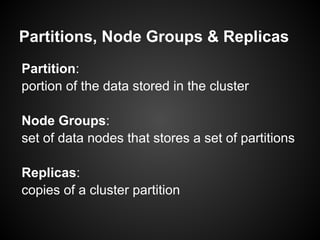
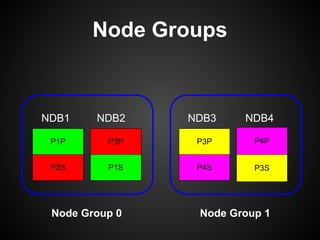
Partitions, Node Groups & Replicas
Partition:
portion of the data stored in the cluster
Node Groups:
set of data nodes that stores a set of partitions
Replicas:
copies of a cluster partition
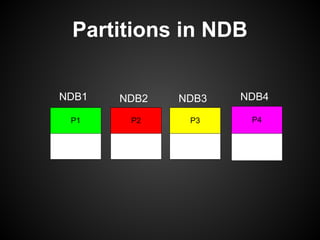
Partitions in NDB
P2P1 P3 P4
NDB1 NDB2 NDB3 NDB4
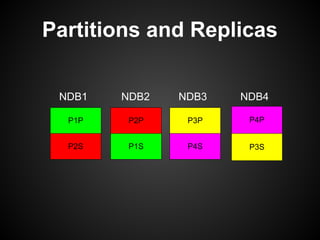
Partitions and Replicas
P2P
P1S
P1P
P2S
P3P
P4S
P4P
P3S
NDB1 NDB2 NDB3 NDB4
Node Groups
P2P
P1S
P1P
P2S
P3P
P4S
P4P
P3S
NDB1 NDB2 NDB3 NDB4
Node Group 0 Node Group 1
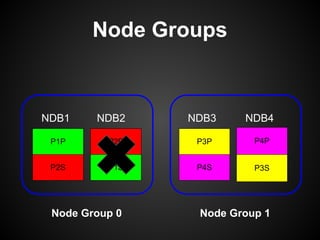
Node Groups
P2P
P1S
P1P
P2S
P3P
P4S
P4P
P3S
NDB1 NDB2 NDB3 NDB4
Node Group 0 Node Group 1
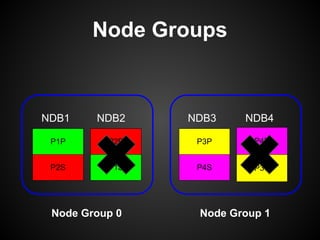
Node Groups
P2P
P1S
P1P
P2S
P3P
P4S
P4P
P3S
NDB1 NDB2 NDB3 NDB4
Node Group 0 Node Group 1
Internal Blocks
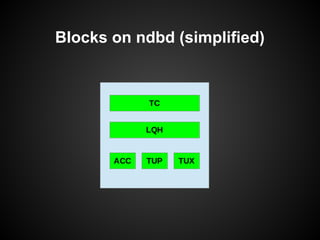
Blocks in Data Node (1/2)
A data node is internally structured in several
blocks/code with different functions:
● Transaction Coordinator (TC) :
○ coordinates transactions
○ starts Two Phase Commit
○ distributes requests to LQH
● Local Query Handler (LQH)
○ allocates local operation records
○ manages the Redo Log
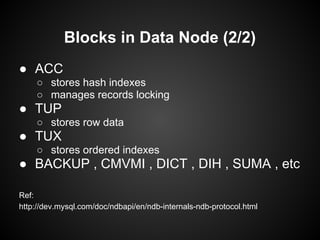
Blocks in Data Node (2/2)
● ACC
○ stores hash indexes
○ manages records locking
● TUP
○ stores row data
● TUX
○ stores ordered indexes
● BACKUP , CMVMI , DICT , DIH , SUMA , etc
Ref:
http://dev.mysql.com/doc/ndbapi/en/ndb-internals-ndb-protocol.html
Blocks on ndbd (simplified)
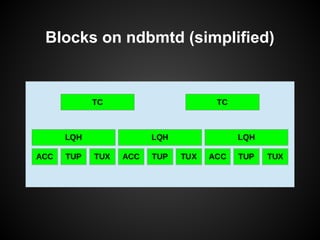
Blocks on ndbmtd (simplified)
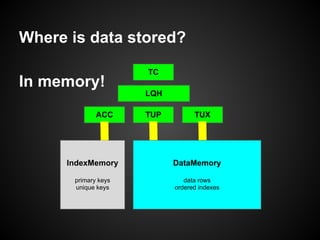
Where is data stored?
In memory!
TUP TUX
LQH
TC
ACC
IndexMemory
primary keys
unique keys
DataMemory
data rows
ordered indexes
General Configuration
Global parameters
NoOfReplicas (mandatory)
Defines the number of replicas for each partition/table
DataDir:
Location for log/trace files and pid file
FileSystemPath:
location for of all files related to MySQL Cluster
Global boolean parameters
LockPagesInMainMemory (0) :
Lock all memory in RAM ( no swap )
StopOnError (1) :
Automatic restart of data node in case of failure
IndexMemory and DataMemory
IndexMemory: defines the amount of memory
for hashes indexes ( PK and UNIQUE )
DataMemory: defines the amount of memory
for:
data
ordered indexes
UNDO information
Metadata Objects
MaxNoOfTables
MaxNoOfOrderedIndexes
MaxNoOfUniqueHashIndexes
Transactions
Transactions Overview
Two Phase Commit
ACID
● Durability with multiple copies
● Committed on memory
READ_COMMITTED
Transaction implementation
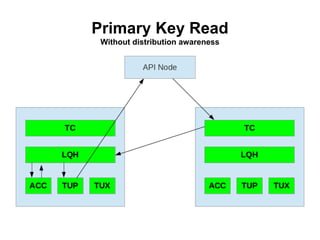
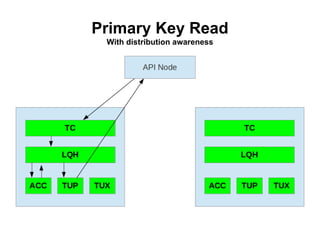
● The API node contacts a TC in one of the Data Node
(round-robin fashion, or Distribution Awareness)
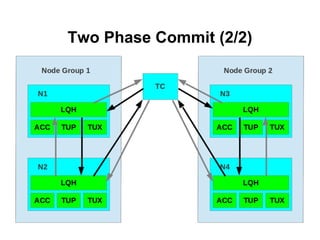
● The TC starts the transaction and the Two Phase
Commit (2PC) protocol
● The TC contacts the LQH of the Data Nodes involved in
the transaction
● LQH handles row level locking:
○ Exclusive lock
○ Shared lock
○ No lock
Two Phase Commit (1/2)
Phase 1 , Prepare :
Node groups get their information updated
Phase 2 , Commit :
the change is committed
Two Phase Commit (2/2)
Rows operations
Primary key operation ( read and write )
Unique index operation ( read )
Ordered index scans ( read only )
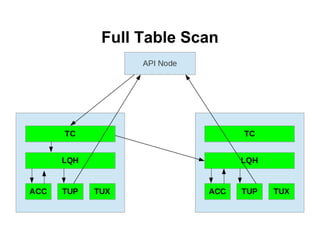
Full-table scans (read only)
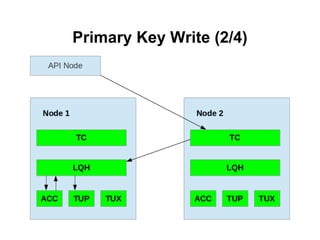
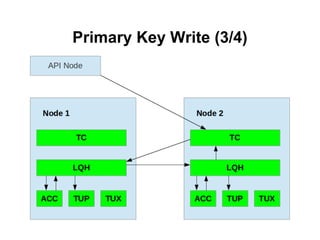
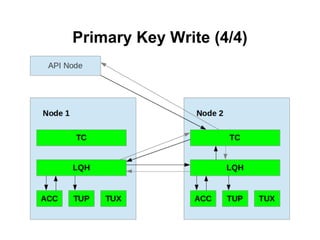
Primary Key Write (1/4)
● API node connects to TC
● TC connects to LQH of the data node with the primary
fragment
● LQH queries ACC to get the row id
● LQH performs the operation on TUP
● LQH connects to the LQH of the data node with the
secondary fragment
● LQH on secondary performs the same operation
● LQH on secondary informs TC that the prepare phase is
completed
● TC starts the commit phase
Primary Key Write (2/4)
Primary Key Write (3/4)
Primary Key Write (4/4)
Primary Key Read
Without distribution awareness
Primary Key Read
With distribution awareness
Unique Index Read (1/2)
Unique Index is internally implemented as a
hidden table with two columns where the PK is
the Unique Key itself and the second column is
the PK of the main table.
To read a Unique index:
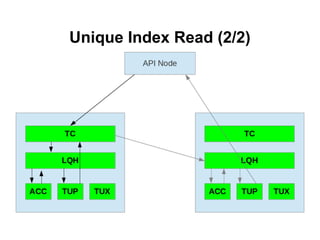
● A PK read is performed on hidden table to
get the value of the PK of main table
● A PK read is performed on main table
Unique Index Read (2/2)
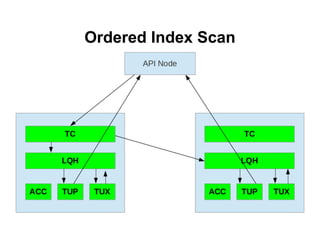
Full Table Scan
Ordered Index Scan
Transaction Parameters (1/3)
MaxNoOfConcurrentTransactions: number of
simultaneous transactions that can run in a node
(maximum number of tables accessed in any
single transaction + 1)
* number of cluster SQL nodes
Transaction Parameters (2/3)
MaxNoOfConcurrentOperations:
Total number of records that at any time can be
updated or locked in data node, and UNDO.
Beside the data node, TC needs information
about all the records involved in a transaction
MaxNoOfLocalOperations: for not too large
transactions, it defaults to
MaxNoOfConcurrentOperationsx1.1
Transaction Parameters (3/3)
MaxDMLOperationsPerTransaction
Limits the number of DML operations
Count is in # of records, not # of statements
TransactionInactiveTimeout
Idle transactions are rolled back
TransactionDeadlockDetectionTimeout
Time based deadlock and lock wait detection
Also possible that the data node is dead or overloaded
Checkpoints on disk
Checkpoints
MySQL Cluster is a in-memory storage engine:
● data is only in memory? WRONG!
● data is regularly saved on disk
When a data node writes on disk is performing
a checkpoint
Exception:
MySQL Cluster can also run in DiskLess mode, with
"reduced durability" and unable to run Native NDB Backup
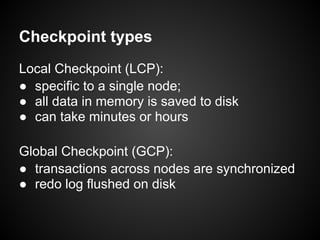
Checkpoint types
Local Checkpoint (LCP):
● specific to a single node;
● all data in memory is saved to disk
● can take minutes or hours
Global Checkpoint (GCP):
● transactions across nodes are synchronized
● redo log flushed on disk
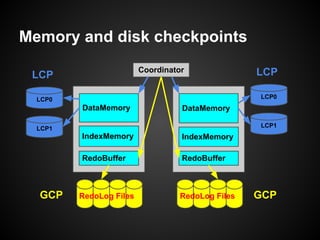
Memory and disk checkpoints
Coordinator
DataMemory
IndexMemory
RedoBuffer
LCP0
LCP1
LCP0
DataMemory
IndexMemory
RedoBuffer
LCP1
RedoLog Files RedoLog Files
LCP LCP
GCP GCP
Undo and Redo Parameters
UndoIndexBuffer and UndoDataBuffer
Buffers used during local checkpoint to perform consistent
snapshot without blocking writes.
RedoBuffer
In memory buffer for REDO log (on disk)
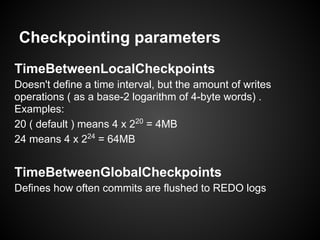
Checkpointing parameters
TimeBetweenLocalCheckpoints
Doesn't define a time interval, but the amount of writes
operations ( as a base-2 logarithm of 4-byte words) .
Examples:
20 ( default ) means 4 x 220
= 4MB
24 means 4 x 224
= 64MB
TimeBetweenGlobalCheckpoints
Defines how often commits are flushed to REDO logs
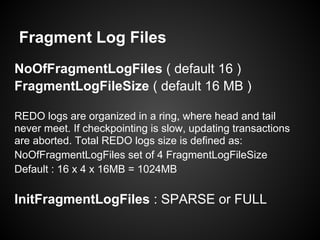
Fragment Log Files
NoOfFragmentLogFiles ( default 16 )
FragmentLogFileSize ( default 16 MB )
REDO logs are organized in a ring, where head and tail
never meet. If checkpointing is slow, updating transactions
are aborted. Total REDO logs size is defined as:
NoOfFragmentLogFiles set of 4 FragmentLogFileSize
Default : 16 x 4 x 16MB = 1024MB
InitFragmentLogFiles : SPARSE or FULL
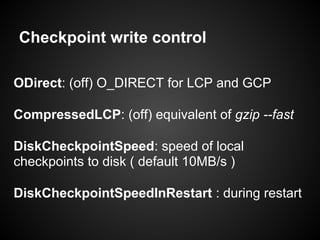
Checkpoint write control
ODirect: (off) O_DIRECT for LCP and GCP
CompressedLCP: (off) equivalent of gzip --fast
DiskCheckpointSpeed: speed of local
checkpoints to disk ( default 10MB/s )
DiskCheckpointSpeedInRestart : during restart
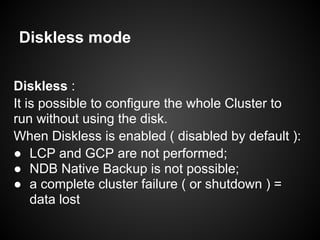
Diskless mode
Diskless :
It is possible to configure the whole Cluster to
run without using the disk.
When Diskless is enabled ( disabled by default ):
● LCP and GCP are not performed;
● NDB Native Backup is not possible;
● a complete cluster failure ( or shutdown ) =
data lost
Handling Failure
Data node failure (1/2)
Failures happen!
HW failure, network issue, OS crash, SW bug, …
MySQL Cluster is constantly monitoring itself
Each data node periodically checks other data nodes via
heartbeat
Each data node periodically checks API nodes via
heartbeat
Data node failure (2/2)
If a node fails to respond to heartbeats, the data node that
detects the failure communicates it to other data nodes
The data nodes stop using the failed node and switch to the
secondary node for the same fragment
Timeouts Parameters
TimeBetweenWatchDogCheck
The watchdog thread checks if the main thread got stuck
HeartbeatIntervalDbDb
Heartbeat interval between data nodes
HeartbeatIntervalDbApi
Heartbeat interval between data nodes and API nodes
Disk Data
Available since MySQL 5.1.6
Store non-indexed columns on disk
Doesn't support variable sized storage
On disk : tablespaces and undo logs
In memory : page buffer ( cache )
Disk Data
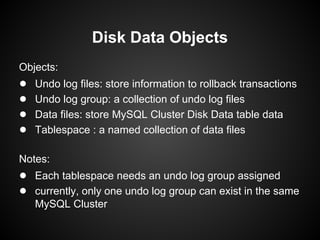
Objects:
● Undo log files: store information to rollback transactions
● Undo log group: a collection of undo log files
● Data files: store MySQL Cluster Disk Data table data
● Tablespace : a named collection of data files
Notes:
● Each tablespace needs an undo log group assigned
● currently, only one undo log group can exist in the same
MySQL Cluster
Disk Data Objects
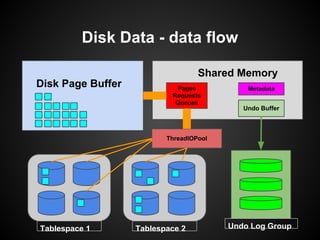
Disk Data - data flow
Disk Page Buffer
Tablespace 1 Tablespace 2 Undo Log Group
ThreadIOPool
Metadata
Shared Memory
Undo Buffer
Pages
Requests
Queues
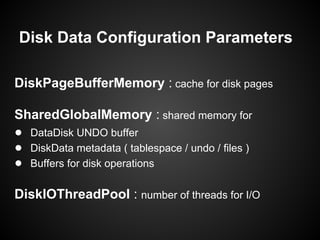
Disk Data Configuration Parameters
DiskPageBufferMemory : cache for disk pages
SharedGlobalMemory : shared memory for
● DataDisk UNDO buffer
● DiskData metadata ( tablespace / undo / files )
● Buffers for disk operations
DiskIOThreadPool : number of threads for I/O
Using SQL statement:
CREATE LOGFILE GROUP logfile_group
ADD UNDOFILE 'undo_file'
[INITIAL_SIZE [=] initial_size]
[UNDO_BUFFER_SIZE [=] undo_buffer_size]
ENGINE [=] engine_name
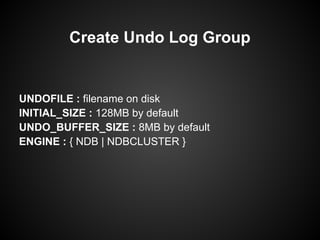
Create Undo Log Group
UNDOFILE : filename on disk
INITIAL_SIZE : 128MB by default
UNDO_BUFFER_SIZE : 8MB by default
ENGINE : { NDB | NDBCLUSTER }
Create Undo Log Group
ALTER LOGFILE GROUP logfile_group
ADD UNDOFILE 'undo_file'
[INITIAL_SIZE [=] initial_size]
ENGINE [=] engine_name
Alter Undo Log Group
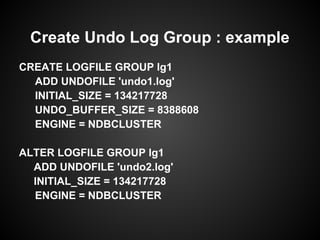
CREATE LOGFILE GROUP lg1
ADD UNDOFILE 'undo1.log'
INITIAL_SIZE = 134217728
UNDO_BUFFER_SIZE = 8388608
ENGINE = NDBCLUSTER
ALTER LOGFILE GROUP lg1
ADD UNDOFILE 'undo2.log'
INITIAL_SIZE = 134217728
ENGINE = NDBCLUSTER
Create Undo Log Group : example
In [NDBD] definition:
InitialLogFileGroup = [name=name;]
[undo_buffer_size=size;] file-specification-list
Example:
InitialLogFileGroup = name=lg1;
undo_buffer_size=8M; undo1.log:128M;undo2.log:128M
Create Undo Log Group
Using SQL statement:
CREATE TABLESPACE tablespace_name
ADD DATAFILE 'file_name'
USE LOGFILE GROUP logfile_group
[INITIAL_SIZE [=] initial_size]
ENGINE [=] engine_name
Create Tablespace
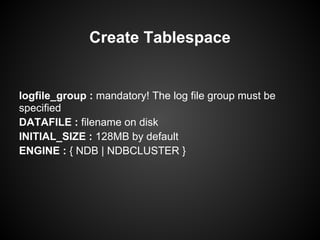
logfile_group : mandatory! The log file group must be
specified
DATAFILE : filename on disk
INITIAL_SIZE : 128MB by default
ENGINE : { NDB | NDBCLUSTER }
Create Tablespace
Using SQL statement:
ALTER TABLESPACE tablespace_name
{ADD|DROP} DATAFILE 'file_name'
[INITIAL_SIZE [=] size]
ENGINE [=] engine_name
Alter Tablespace
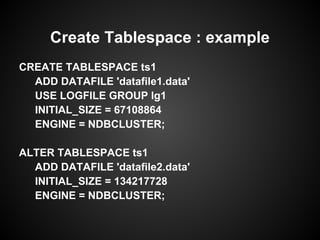
CREATE TABLESPACE ts1
ADD DATAFILE 'datafile1.data'
USE LOGFILE GROUP lg1
INITIAL_SIZE = 67108864
ENGINE = NDBCLUSTER;
ALTER TABLESPACE ts1
ADD DATAFILE 'datafile2.data'
INITIAL_SIZE = 134217728
ENGINE = NDBCLUSTER;
Create Tablespace : example
In [NDBD] definition:
InitialTablespace = [name=name;] [extent_size=size;]
file-specification-list
Example:
InitialTablespace = name=ts1;
datafile1.data:64M; datafile2.data:128M
Note: no need to specify the Undo Log Group
Create Tablespace
Start Types
and
Start Phases
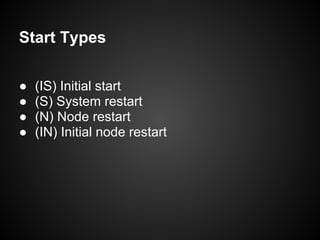
Start Types
● (IS) Initial start
● (S) System restart
● (N) Node restart
● (IN) Initial node restart
Initial start (IS)
All the data nodes start with clean filesystem.
During the very first start, or when all data
nodes are started with --initial
Note:
Disk Data files are not removed from the
filesystem when data node is started with --
initial
System restart (S)
The whole Cluster is restarted after it has been
shutdown .
The Cluster resumes operations from where it
was left before shutdown. No data is lost.
Node restart (N)
The Node is restarted while the Cluster is
running.
This is necessary during upgrade/downgrade,
changing configuration, performing HW/SW
maintenance, etc
Initial node restart (IN)
Similar to node restart (the Cluster is running) ,
but the data node is started with a clean
filesystem.
Use --initial to clean the filesystem .
Note: --initial doesn't delete DiskData files

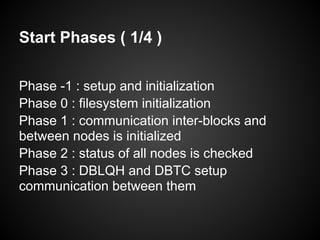
Start Phases ( 1/4 )
Phase -1 : setup and initialization
Phase 0 : filesystem initialization
Phase 1 : communication inter-blocks and
between nodes is initialized
Phase 2 : status of all nodes is checked
Phase 3 : DBLQH and DBTC setup
communication between them
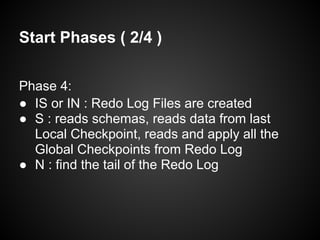
Start Phases ( 2/4 )
Phase 4:
● IS or IN : Redo Log Files are created
● S : reads schemas, reads data from last
Local Checkpoint, reads and apply all the
Global Checkpoints from Redo Log
● N : find the tail of the Redo Log
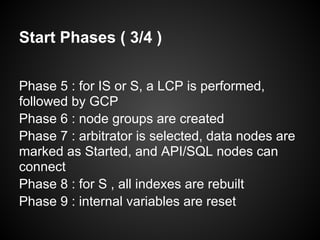
Start Phases ( 3/4 )
Phase 5 : for IS or S, a LCP is performed,
followed by GCP
Phase 6 : node groups are created
Phase 7 : arbitrator is selected, data nodes are
marked as Started, and API/SQL nodes can
connect
Phase 8 : for S , all indexes are rebuilt
Phase 9 : internal variables are reset
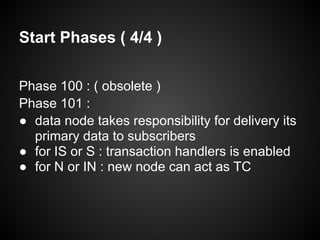
Start Phases ( 4/4 )
Phase 100 : ( obsolete )
Phase 101 :
● data node takes responsibility for delivery its
primary data to subscribers
● for IS or S : transaction handlers is enabled
● for N or IN : new node can act as TC
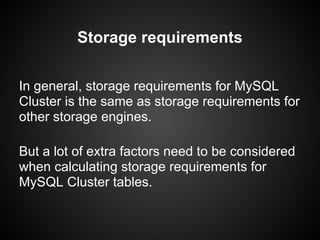
Storage requirements
In general, storage requirements for MySQL
Cluster is the same as storage requirements for
other storage engines.
But a lot of extra factors need to be considered
when calculating storage requirements for
MySQL Cluster tables.
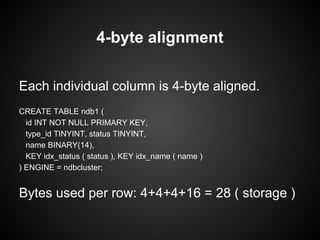
Storage requirements
Each individual column is 4-byte aligned.
CREATE TABLE ndb1 (
id INT NOT NULL PRIMARY KEY,
type_id TINYINT, status TINYINT,
name BINARY(14),
KEY idx_status ( status ), KEY idx_name ( name )
) ENGINE = ndbcluster;
Bytes used per row: 4+4+4+16 = 28 ( storage )
4-byte alignment
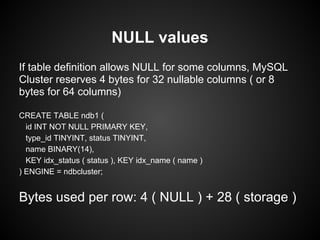
If table definition allows NULL for some columns, MySQL
Cluster reserves 4 bytes for 32 nullable columns ( or 8
bytes for 64 columns)
CREATE TABLE ndb1 (
id INT NOT NULL PRIMARY KEY,
type_id TINYINT, status TINYINT,
name BINARY(14),
KEY idx_status ( status ), KEY idx_name ( name )
) ENGINE = ndbcluster;
Bytes used per row: 4 ( NULL ) + 28 ( storage )
NULL values
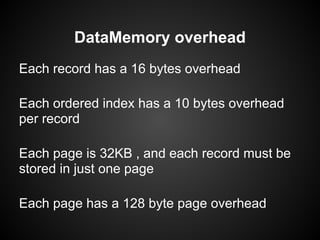
Each record has a 16 bytes overhead
Each ordered index has a 10 bytes overhead
per record
Each page is 32KB , and each record must be
stored in just one page
Each page has a 128 byte page overhead
DataMemory overhead
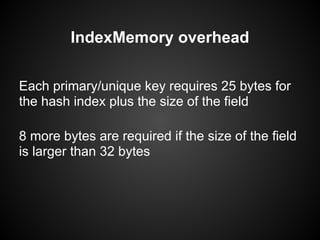
Each primary/unique key requires 25 bytes for
the hash index plus the size of the field
8 more bytes are required if the size of the field
is larger than 32 bytes
IndexMemory overhead
Storage requirement for test table
CREATE TABLE ndb1 (
id INT NOT NULL PRIMARY KEY,
type_id TINYINT, status TINYINT,
name BINARY(14),
KEY idx_status ( status ), KEY idx_name ( name )
) ENGINE = ndbcluster;
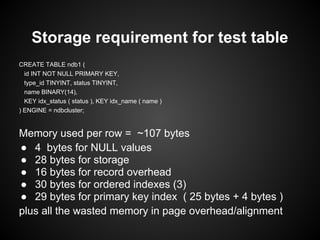
Memory used per row = ~107 bytes
● 4 bytes for NULL values
● 28 bytes for storage
● 16 bytes for record overhead
● 30 bytes for ordered indexes (3)
● 29 bytes for primary key index ( 25 bytes + 4 bytes )
plus all the wasted memory in page overhead/alignment
Hidden Primary Key
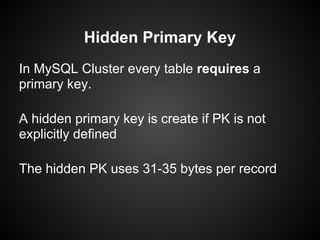
In MySQL Cluster every table requires a
primary key.
A hidden primary key is create if PK is not
explicitly defined
The hidden PK uses 31-35 bytes per record
Backups
Why backup?
● Isn't MySQL Cluster fully redundant?
● Human mistakes
● Application bugs
● Point in time recovery
● Deploy of development/testing envs
● Deploy a DR site
● ... others
Backup methodologies
mysqldump
Native Online NDB Backup
Backup with mysqldump
storage engine agnostic
dumps other objects like triggers, view, SP
connects to any API node
Backup with mysqldump ( cont. )
Usage:
mysqldump [options] db_name [tbl_name ...]
mysqldump [options] --databases db_name ...
mysqldump [options] --all-databases
shell> mysqldump world > world.sql
Question: What about --single-transaction ?
Backup with mysqldump ( cont. )
Bad news:
No write traffic to MySQL Cluster
○ SINGLE USER MODE
○ reduced availability
Backup with mysqldump ( cont. )
Check the content of the dump for:
● CREATE TABLE
● INSERT INTO
● CREATE LOGFILE
● CREATE TABLESPACE
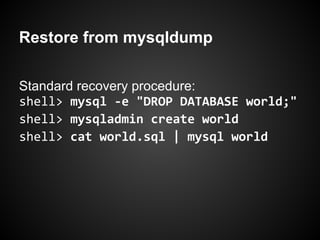
Restore from mysqldump
Standard recovery procedure:
shell> mysql -e "DROP DATABASE world;"
shell> mysqladmin create world
shell> cat world.sql | mysql world
Restore from mysqldump ( cont. )
Point in time recovery?
● shell> mysqldump --master-data ...
● apply binlog : from which API node?
NDB and binlog
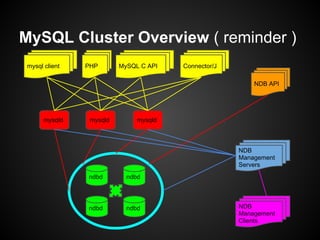
MySQL Cluster Overview ( reminder )
mysql client MySQL C APIPHP Connector/J
NDB API
NDB
Management
Clients
NDB
Management
Servers
mysqld mysqld mysqld
ndbd
ndbd ndbd
ndbd
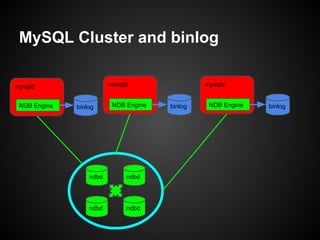
MySQL Cluster and binlog
ndbd
ndbd ndbd
ndbd
mysqld
NDB Engine binlog
mysqld
NDB Engine binlog
mysqld
NDB Engine binlog
NDB binlog injector thread
When connecting to the data nodes,
NDBCluster storage engine subscribes to all
the tables in the Cluster.
When any data changes in the Cluster, the
NDB binlog injection thread gets notified of the
change, and writes to the local binlog.
binlog_format=ROW
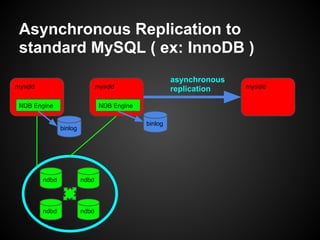
Asynchronous Replication to
standard MySQL ( ex: InnoDB )
ndbd
ndbd ndbd
ndbd
mysqld
NDB Engine
binlog
mysqld
NDB Engine
binlog
mysqld
asynchronous
replication
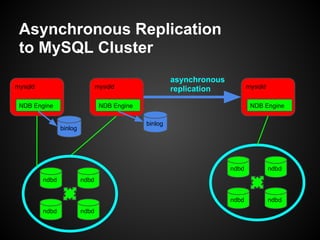
Asynchronous Replication
to MySQL Cluster
ndbd
ndbd ndbd
ndbd
mysqld
NDB Engine
binlog
mysqld
NDB Engine
binlog
mysqld
asynchronous
replication
ndbd
ndbd ndbd
ndbd
ndbd
ndbd ndbd
ndbd
NDB Engine
Native Online
NDB Backups
Native Online NDB Backup
Hot backup
Consistent backup
Initialized by a cluster management node
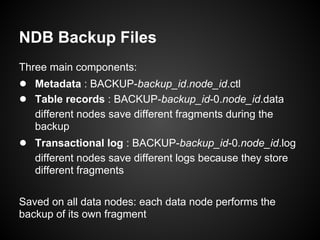
NDB Backup Files
Three main components:
● Metadata : BACKUP-backup_id.node_id.ctl
● Table records : BACKUP-backup_id-0.node_id.data
different nodes save different fragments during the
backup
● Transactional log : BACKUP-backup_id-0.node_id.log
different nodes save different logs because they store
different fragments
Saved on all data nodes: each data node performs the
backup of its own fragment
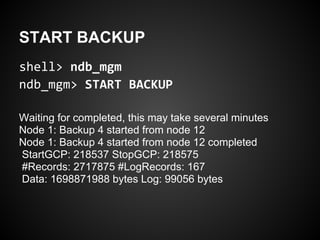
START BACKUP
shell> ndb_mgm
ndb_mgm> START BACKUP
Waiting for completed, this may take several minutes
Node 1: Backup 4 started from node 12
Node 1: Backup 4 started from node 12 completed
StartGCP: 218537 StopGCP: 218575
#Records: 2717875 #LogRecords: 167
Data: 1698871988 bytes Log: 99056 bytes
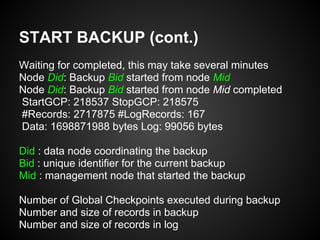
START BACKUP (cont.)
Waiting for completed, this may take several minutes
Node Did: Backup Bid started from node Mid
Node Did: Backup Bid started from node Mid completed
StartGCP: 218537 StopGCP: 218575
#Records: 2717875 #LogRecords: 167
Data: 1698871988 bytes Log: 99056 bytes
Did : data node coordinating the backup
Bid : unique identifier for the current backup
Mid : management node that started the backup
Number of Global Checkpoints executed during backup
Number and size of records in backup
Number and size of records in log
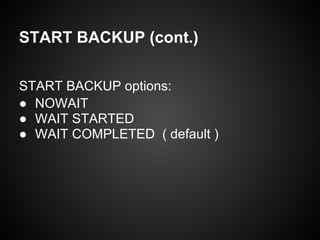
START BACKUP (cont.)
START BACKUP options:
● NOWAIT
● WAIT STARTED
● WAIT COMPLETED ( default )
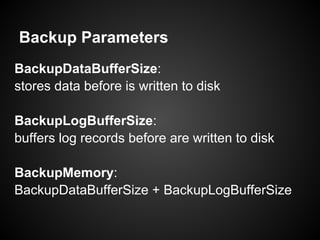
Backup Parameters
BackupDataBufferSize:
stores data before is written to disk
BackupLogBufferSize:
buffers log records before are written to disk
BackupMemory:
BackupDataBufferSize + BackupLogBufferSize
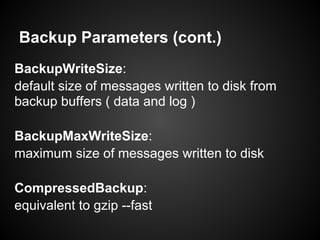
Backup Parameters (cont.)
BackupWriteSize:
default size of messages written to disk from
backup buffers ( data and log )
BackupMaxWriteSize:
maximum size of messages written to disk
CompressedBackup:
equivalent to gzip --fast
Restore from Online backup
ndb_restore: program that performs the restore
Procedure:
● import the metadata from just one node
● import the data from each node
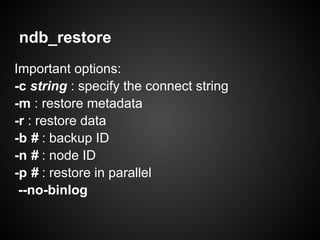
ndb_restore
Important options:
-c string : specify the connect string
-m : restore metadata
-r : restore data
-b # : backup ID
-n # : node ID
-p # : restore in parallel
--no-binlog
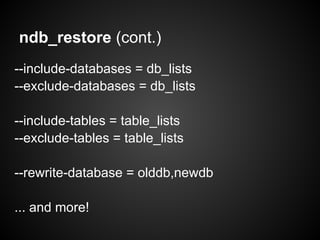
ndb_restore (cont.)
--include-databases = db_lists
--exclude-databases = db_lists
--include-tables = table_lists
--exclude-tables = table_lists
--rewrite-database = olddb,newdb
... and more!
Q & A

Ramp-Tutorial for MYSQL Cluster - Scaling with Continuous Availability

  • 1.
    René Cannaò Senior DBAPalominoDB rene@palominodb.com @rene_cannao MySQL Cluster (NDB) Tutorial
  • 2.
    Agenda Introduction - Presentation MySQLCluster Overview MySQL Cluster Components Partitioning Internal Blocks General Configuration Transactions Checkpoints on disk Handling failure Disk data Start Types and Start Phases Storage Requirements Backups NDB and binlog Native NDB Online Backups
  • 3.
    About myself My nameis René Cannaò Working as DBA since 2005 Starting my experience with NDB in 2007 In 2008 I joined the MySQL Support Engineer Team at Sun/Oracle Working as Senior DBA for PalominoDB We have a booth: please come and visit us!
  • 4.
    Questions If you havequestions stop me at any time! If the answer is short will be answered immediately. If the answer it long, we can discuss at the end of the tutorial
  • 5.
    What this courseis Not This course doesn't cover advanced topics like: Advanced Setup Performance Tuning Configuration of multi-threads Online add nodes NDBAPI noSQL access Geographic Replication BLOB/TEXT fields
  • 6.
  • 7.
    MySQL Cluster Overview HighAvailability Storage Engine for MySQL Provides: ● High Availability ● Clustering ● Horizontal Scalability ● Shared Nothing Architecture ● SQL and noSQL access
  • 8.
    High Availability andClustering High Availability: ● survives routine failures or maintenance ○ hardware or network failure, software upgrade, etc ● provides continuous services ● no interruption of services Clustering: ● parallel processing ● increase availability
  • 9.
    Scalability Ability to handleincreased number of requests Vertical: ● replace HW with more powerful one Horizontal: ● add component to the system
  • 10.
    Shared Nothing Architecture Characterizedby: ● No single point of failure ● Redundancy ● Automatic Failover
  • 11.
    MySQL Cluster Summary SharedNothing Architecture No Single Point Of Failure (SPOF) Synchronous replication between nodes Automatic failover with no data loss ACID transaction Durability with NumberOfReplica > 1 READ COMMITTED transaction isolation level Row level locking
  • 12.
  • 13.
    Components Overview mysql clientMySQL C APIPHP Connector/J NDB API NDB Management Clients NDB Management Servers mysqld mysqld mysqld ndbd ndbd ndbd ndbd
  • 14.
    Cluster Nodes 3 NodeTypes are present in a MySQL Cluster: ● Management Node ● Data Node ● Access Node
  • 15.
    Management Node ndb_mgmd process Administrativetasks: ● configure the Cluster ● start / stop other nodes ● run backup ● monitoring ● coordinator
  • 16.
    Data Node ndbd process( or ndbmtd ) Stores cluster data ● mainly in memory ● also on disk ( limitations apply ) Coordinate transactions
  • 17.
    Data Node (ndbmtd ) What is ndbmtd ? Multi-threaded equivalent of ndbd File system compatible with ndbd By default run in single thread mode Configured via MaxNoOfExecutionThreads of ThreadConfig
  • 18.
    API Node Process ableto access data stored in Data Nodes: ● mysqld process with NDBCLUSTER support ● application that connects to the cluster through NDB API (without mysqld)
  • 19.
  • 20.
  • 21.
  • 22.
    Partitions example (1/2) 5681Alfred 30 2010-11-10 8675 Lisa 34 1971-01-12 5645 Mark 21 1982-01-02 0965 Josh 36 2009-06-33 5843 Allan 22 2007-04-12 1297 Albert 40 2000-12-20 1875 Anne 34 1984-11-22 9346 Mary 22 1983-08-05 8234 Isaac 20 1977-07-06 8839 Leonardo 28 1999-11-08 7760 Donna 37 1997-03-04 3301 Ted 33 2005-05-23 Table
  • 23.
    Partitions example (2/2) 5681Alfred 30 2010-11-10 8675 Lisa 34 1971-01-12 5645 Mark 21 1982-01-02 0965 Josh 36 2009-06-33 5843 Allan 22 2007-04-12 1297 Albert 40 2000-12-20 1875 Anne 34 1984-11-22 9346 Mary 22 1983-08-05 8234 Isaac 20 1977-07-06 8839 Leonardo 28 1999-11-08 7760 Donna 37 1997-03-04 3301 Ted 33 2005-05-23 P1 P2 P3 P4 Table
  • 24.
    Partitioning in MySQLCluster MySQL Cluster natively supports Partitioning Distribute portions of individual tables in different locations PARTITION BY (LINEAR) KEY is the only partitioning type supported
  • 25.
    Partitions, Node Groups& Replicas Partition: portion of the data stored in the cluster Node Groups: set of data nodes that stores a set of partitions Replicas: copies of a cluster partition
  • 26.
    Partitions in NDB P2P1P3 P4 NDB1 NDB2 NDB3 NDB4
  • 27.
  • 28.
    Node Groups P2P P1S P1P P2S P3P P4S P4P P3S NDB1 NDB2NDB3 NDB4 Node Group 0 Node Group 1
  • 29.
    Node Groups P2P P1S P1P P2S P3P P4S P4P P3S NDB1 NDB2NDB3 NDB4 Node Group 0 Node Group 1
  • 30.
    Node Groups P2P P1S P1P P2S P3P P4S P4P P3S NDB1 NDB2NDB3 NDB4 Node Group 0 Node Group 1
  • 31.
  • 32.
    Blocks in DataNode (1/2) A data node is internally structured in several blocks/code with different functions: ● Transaction Coordinator (TC) : ○ coordinates transactions ○ starts Two Phase Commit ○ distributes requests to LQH ● Local Query Handler (LQH) ○ allocates local operation records ○ manages the Redo Log
  • 33.
    Blocks in DataNode (2/2) ● ACC ○ stores hash indexes ○ manages records locking ● TUP ○ stores row data ● TUX ○ stores ordered indexes ● BACKUP , CMVMI , DICT , DIH , SUMA , etc Ref: http://dev.mysql.com/doc/ndbapi/en/ndb-internals-ndb-protocol.html
  • 34.
    Blocks on ndbd(simplified)
  • 35.
    Blocks on ndbmtd(simplified)
  • 36.
    Where is datastored? In memory! TUP TUX LQH TC ACC IndexMemory primary keys unique keys DataMemory data rows ordered indexes
  • 37.
  • 38.
    Global parameters NoOfReplicas (mandatory) Definesthe number of replicas for each partition/table DataDir: Location for log/trace files and pid file FileSystemPath: location for of all files related to MySQL Cluster
  • 39.
    Global boolean parameters LockPagesInMainMemory(0) : Lock all memory in RAM ( no swap ) StopOnError (1) : Automatic restart of data node in case of failure
  • 40.
    IndexMemory and DataMemory IndexMemory:defines the amount of memory for hashes indexes ( PK and UNIQUE ) DataMemory: defines the amount of memory for: data ordered indexes UNDO information
  • 41.
  • 42.
  • 43.
    Transactions Overview Two PhaseCommit ACID ● Durability with multiple copies ● Committed on memory READ_COMMITTED
  • 44.
    Transaction implementation ● TheAPI node contacts a TC in one of the Data Node (round-robin fashion, or Distribution Awareness) ● The TC starts the transaction and the Two Phase Commit (2PC) protocol ● The TC contacts the LQH of the Data Nodes involved in the transaction ● LQH handles row level locking: ○ Exclusive lock ○ Shared lock ○ No lock
  • 45.
    Two Phase Commit(1/2) Phase 1 , Prepare : Node groups get their information updated Phase 2 , Commit : the change is committed
  • 46.
  • 47.
    Rows operations Primary keyoperation ( read and write ) Unique index operation ( read ) Ordered index scans ( read only ) Full-table scans (read only)
  • 48.
    Primary Key Write(1/4) ● API node connects to TC ● TC connects to LQH of the data node with the primary fragment ● LQH queries ACC to get the row id ● LQH performs the operation on TUP ● LQH connects to the LQH of the data node with the secondary fragment ● LQH on secondary performs the same operation ● LQH on secondary informs TC that the prepare phase is completed ● TC starts the commit phase
  • 49.
  • 50.
  • 51.
  • 52.
    Primary Key Read Withoutdistribution awareness
  • 53.
    Primary Key Read Withdistribution awareness
  • 54.
    Unique Index Read(1/2) Unique Index is internally implemented as a hidden table with two columns where the PK is the Unique Key itself and the second column is the PK of the main table. To read a Unique index: ● A PK read is performed on hidden table to get the value of the PK of main table ● A PK read is performed on main table
  • 55.
  • 56.
  • 57.
  • 58.
    Transaction Parameters (1/3) MaxNoOfConcurrentTransactions:number of simultaneous transactions that can run in a node (maximum number of tables accessed in any single transaction + 1) * number of cluster SQL nodes
  • 59.
    Transaction Parameters (2/3) MaxNoOfConcurrentOperations: Totalnumber of records that at any time can be updated or locked in data node, and UNDO. Beside the data node, TC needs information about all the records involved in a transaction MaxNoOfLocalOperations: for not too large transactions, it defaults to MaxNoOfConcurrentOperationsx1.1
  • 60.
    Transaction Parameters (3/3) MaxDMLOperationsPerTransaction Limitsthe number of DML operations Count is in # of records, not # of statements TransactionInactiveTimeout Idle transactions are rolled back TransactionDeadlockDetectionTimeout Time based deadlock and lock wait detection Also possible that the data node is dead or overloaded
  • 61.
  • 62.
    Checkpoints MySQL Cluster isa in-memory storage engine: ● data is only in memory? WRONG! ● data is regularly saved on disk When a data node writes on disk is performing a checkpoint Exception: MySQL Cluster can also run in DiskLess mode, with "reduced durability" and unable to run Native NDB Backup
  • 63.
    Checkpoint types Local Checkpoint(LCP): ● specific to a single node; ● all data in memory is saved to disk ● can take minutes or hours Global Checkpoint (GCP): ● transactions across nodes are synchronized ● redo log flushed on disk
  • 64.
    Memory and diskcheckpoints Coordinator DataMemory IndexMemory RedoBuffer LCP0 LCP1 LCP0 DataMemory IndexMemory RedoBuffer LCP1 RedoLog Files RedoLog Files LCP LCP GCP GCP
  • 65.
    Undo and RedoParameters UndoIndexBuffer and UndoDataBuffer Buffers used during local checkpoint to perform consistent snapshot without blocking writes. RedoBuffer In memory buffer for REDO log (on disk)
  • 66.
    Checkpointing parameters TimeBetweenLocalCheckpoints Doesn't definea time interval, but the amount of writes operations ( as a base-2 logarithm of 4-byte words) . Examples: 20 ( default ) means 4 x 220 = 4MB 24 means 4 x 224 = 64MB TimeBetweenGlobalCheckpoints Defines how often commits are flushed to REDO logs
  • 67.
    Fragment Log Files NoOfFragmentLogFiles( default 16 ) FragmentLogFileSize ( default 16 MB ) REDO logs are organized in a ring, where head and tail never meet. If checkpointing is slow, updating transactions are aborted. Total REDO logs size is defined as: NoOfFragmentLogFiles set of 4 FragmentLogFileSize Default : 16 x 4 x 16MB = 1024MB InitFragmentLogFiles : SPARSE or FULL
  • 68.
    Checkpoint write control ODirect:(off) O_DIRECT for LCP and GCP CompressedLCP: (off) equivalent of gzip --fast DiskCheckpointSpeed: speed of local checkpoints to disk ( default 10MB/s ) DiskCheckpointSpeedInRestart : during restart
  • 69.
    Diskless mode Diskless : Itis possible to configure the whole Cluster to run without using the disk. When Diskless is enabled ( disabled by default ): ● LCP and GCP are not performed; ● NDB Native Backup is not possible; ● a complete cluster failure ( or shutdown ) = data lost
  • 70.
  • 71.
    Data node failure(1/2) Failures happen! HW failure, network issue, OS crash, SW bug, … MySQL Cluster is constantly monitoring itself Each data node periodically checks other data nodes via heartbeat Each data node periodically checks API nodes via heartbeat
  • 72.
    Data node failure(2/2) If a node fails to respond to heartbeats, the data node that detects the failure communicates it to other data nodes The data nodes stop using the failed node and switch to the secondary node for the same fragment
  • 73.
    Timeouts Parameters TimeBetweenWatchDogCheck The watchdogthread checks if the main thread got stuck HeartbeatIntervalDbDb Heartbeat interval between data nodes HeartbeatIntervalDbApi Heartbeat interval between data nodes and API nodes
  • 74.
  • 75.
    Available since MySQL5.1.6 Store non-indexed columns on disk Doesn't support variable sized storage On disk : tablespaces and undo logs In memory : page buffer ( cache ) Disk Data
  • 76.
    Objects: ● Undo logfiles: store information to rollback transactions ● Undo log group: a collection of undo log files ● Data files: store MySQL Cluster Disk Data table data ● Tablespace : a named collection of data files Notes: ● Each tablespace needs an undo log group assigned ● currently, only one undo log group can exist in the same MySQL Cluster Disk Data Objects
  • 77.
    Disk Data -data flow Disk Page Buffer Tablespace 1 Tablespace 2 Undo Log Group ThreadIOPool Metadata Shared Memory Undo Buffer Pages Requests Queues
  • 78.
    Disk Data ConfigurationParameters DiskPageBufferMemory : cache for disk pages SharedGlobalMemory : shared memory for ● DataDisk UNDO buffer ● DiskData metadata ( tablespace / undo / files ) ● Buffers for disk operations DiskIOThreadPool : number of threads for I/O
  • 79.
    Using SQL statement: CREATELOGFILE GROUP logfile_group ADD UNDOFILE 'undo_file' [INITIAL_SIZE [=] initial_size] [UNDO_BUFFER_SIZE [=] undo_buffer_size] ENGINE [=] engine_name Create Undo Log Group
  • 80.
    UNDOFILE : filenameon disk INITIAL_SIZE : 128MB by default UNDO_BUFFER_SIZE : 8MB by default ENGINE : { NDB | NDBCLUSTER } Create Undo Log Group
  • 81.
    ALTER LOGFILE GROUPlogfile_group ADD UNDOFILE 'undo_file' [INITIAL_SIZE [=] initial_size] ENGINE [=] engine_name Alter Undo Log Group
  • 82.
    CREATE LOGFILE GROUPlg1 ADD UNDOFILE 'undo1.log' INITIAL_SIZE = 134217728 UNDO_BUFFER_SIZE = 8388608 ENGINE = NDBCLUSTER ALTER LOGFILE GROUP lg1 ADD UNDOFILE 'undo2.log' INITIAL_SIZE = 134217728 ENGINE = NDBCLUSTER Create Undo Log Group : example
  • 83.
    In [NDBD] definition: InitialLogFileGroup= [name=name;] [undo_buffer_size=size;] file-specification-list Example: InitialLogFileGroup = name=lg1; undo_buffer_size=8M; undo1.log:128M;undo2.log:128M Create Undo Log Group
  • 84.
    Using SQL statement: CREATETABLESPACE tablespace_name ADD DATAFILE 'file_name' USE LOGFILE GROUP logfile_group [INITIAL_SIZE [=] initial_size] ENGINE [=] engine_name Create Tablespace
  • 85.
    logfile_group : mandatory!The log file group must be specified DATAFILE : filename on disk INITIAL_SIZE : 128MB by default ENGINE : { NDB | NDBCLUSTER } Create Tablespace
  • 86.
    Using SQL statement: ALTERTABLESPACE tablespace_name {ADD|DROP} DATAFILE 'file_name' [INITIAL_SIZE [=] size] ENGINE [=] engine_name Alter Tablespace
  • 87.
    CREATE TABLESPACE ts1 ADDDATAFILE 'datafile1.data' USE LOGFILE GROUP lg1 INITIAL_SIZE = 67108864 ENGINE = NDBCLUSTER; ALTER TABLESPACE ts1 ADD DATAFILE 'datafile2.data' INITIAL_SIZE = 134217728 ENGINE = NDBCLUSTER; Create Tablespace : example
  • 88.
    In [NDBD] definition: InitialTablespace= [name=name;] [extent_size=size;] file-specification-list Example: InitialTablespace = name=ts1; datafile1.data:64M; datafile2.data:128M Note: no need to specify the Undo Log Group Create Tablespace
  • 89.
  • 90.
    Start Types ● (IS)Initial start ● (S) System restart ● (N) Node restart ● (IN) Initial node restart
  • 91.
    Initial start (IS) Allthe data nodes start with clean filesystem. During the very first start, or when all data nodes are started with --initial Note: Disk Data files are not removed from the filesystem when data node is started with -- initial
  • 92.
    System restart (S) Thewhole Cluster is restarted after it has been shutdown . The Cluster resumes operations from where it was left before shutdown. No data is lost.
  • 93.
    Node restart (N) TheNode is restarted while the Cluster is running. This is necessary during upgrade/downgrade, changing configuration, performing HW/SW maintenance, etc
  • 94.
    Initial node restart(IN) Similar to node restart (the Cluster is running) , but the data node is started with a clean filesystem. Use --initial to clean the filesystem . Note: --initial doesn't delete DiskData files
  • 95.
    Start Phases (1/4 ) Phase -1 : setup and initialization Phase 0 : filesystem initialization Phase 1 : communication inter-blocks and between nodes is initialized Phase 2 : status of all nodes is checked Phase 3 : DBLQH and DBTC setup communication between them
  • 96.
    Start Phases (2/4 ) Phase 4: ● IS or IN : Redo Log Files are created ● S : reads schemas, reads data from last Local Checkpoint, reads and apply all the Global Checkpoints from Redo Log ● N : find the tail of the Redo Log
  • 97.
    Start Phases (3/4 ) Phase 5 : for IS or S, a LCP is performed, followed by GCP Phase 6 : node groups are created Phase 7 : arbitrator is selected, data nodes are marked as Started, and API/SQL nodes can connect Phase 8 : for S , all indexes are rebuilt Phase 9 : internal variables are reset
  • 98.
    Start Phases (4/4 ) Phase 100 : ( obsolete ) Phase 101 : ● data node takes responsibility for delivery its primary data to subscribers ● for IS or S : transaction handlers is enabled ● for N or IN : new node can act as TC
  • 99.
  • 100.
    In general, storagerequirements for MySQL Cluster is the same as storage requirements for other storage engines. But a lot of extra factors need to be considered when calculating storage requirements for MySQL Cluster tables. Storage requirements
  • 101.
    Each individual columnis 4-byte aligned. CREATE TABLE ndb1 ( id INT NOT NULL PRIMARY KEY, type_id TINYINT, status TINYINT, name BINARY(14), KEY idx_status ( status ), KEY idx_name ( name ) ) ENGINE = ndbcluster; Bytes used per row: 4+4+4+16 = 28 ( storage ) 4-byte alignment
  • 102.
    If table definitionallows NULL for some columns, MySQL Cluster reserves 4 bytes for 32 nullable columns ( or 8 bytes for 64 columns) CREATE TABLE ndb1 ( id INT NOT NULL PRIMARY KEY, type_id TINYINT, status TINYINT, name BINARY(14), KEY idx_status ( status ), KEY idx_name ( name ) ) ENGINE = ndbcluster; Bytes used per row: 4 ( NULL ) + 28 ( storage ) NULL values
  • 103.
    Each record hasa 16 bytes overhead Each ordered index has a 10 bytes overhead per record Each page is 32KB , and each record must be stored in just one page Each page has a 128 byte page overhead DataMemory overhead
  • 104.
    Each primary/unique keyrequires 25 bytes for the hash index plus the size of the field 8 more bytes are required if the size of the field is larger than 32 bytes IndexMemory overhead
  • 105.
    Storage requirement fortest table CREATE TABLE ndb1 ( id INT NOT NULL PRIMARY KEY, type_id TINYINT, status TINYINT, name BINARY(14), KEY idx_status ( status ), KEY idx_name ( name ) ) ENGINE = ndbcluster; Memory used per row = ~107 bytes ● 4 bytes for NULL values ● 28 bytes for storage ● 16 bytes for record overhead ● 30 bytes for ordered indexes (3) ● 29 bytes for primary key index ( 25 bytes + 4 bytes ) plus all the wasted memory in page overhead/alignment
  • 106.
    Hidden Primary Key InMySQL Cluster every table requires a primary key. A hidden primary key is create if PK is not explicitly defined The hidden PK uses 31-35 bytes per record
  • 107.
  • 108.
    Why backup? ● Isn'tMySQL Cluster fully redundant? ● Human mistakes ● Application bugs ● Point in time recovery ● Deploy of development/testing envs ● Deploy a DR site ● ... others
  • 109.
  • 110.
    Backup with mysqldump storageengine agnostic dumps other objects like triggers, view, SP connects to any API node
  • 111.
    Backup with mysqldump( cont. ) Usage: mysqldump [options] db_name [tbl_name ...] mysqldump [options] --databases db_name ... mysqldump [options] --all-databases shell> mysqldump world > world.sql Question: What about --single-transaction ?
  • 112.
    Backup with mysqldump( cont. ) Bad news: No write traffic to MySQL Cluster ○ SINGLE USER MODE ○ reduced availability
  • 113.
    Backup with mysqldump( cont. ) Check the content of the dump for: ● CREATE TABLE ● INSERT INTO ● CREATE LOGFILE ● CREATE TABLESPACE
  • 114.
    Restore from mysqldump Standardrecovery procedure: shell> mysql -e "DROP DATABASE world;" shell> mysqladmin create world shell> cat world.sql | mysql world
  • 115.
    Restore from mysqldump( cont. ) Point in time recovery? ● shell> mysqldump --master-data ... ● apply binlog : from which API node?
  • 116.
  • 117.
    MySQL Cluster Overview( reminder ) mysql client MySQL C APIPHP Connector/J NDB API NDB Management Clients NDB Management Servers mysqld mysqld mysqld ndbd ndbd ndbd ndbd
  • 118.
    MySQL Cluster andbinlog ndbd ndbd ndbd ndbd mysqld NDB Engine binlog mysqld NDB Engine binlog mysqld NDB Engine binlog
  • 119.
    NDB binlog injectorthread When connecting to the data nodes, NDBCluster storage engine subscribes to all the tables in the Cluster. When any data changes in the Cluster, the NDB binlog injection thread gets notified of the change, and writes to the local binlog. binlog_format=ROW
  • 120.
    Asynchronous Replication to standardMySQL ( ex: InnoDB ) ndbd ndbd ndbd ndbd mysqld NDB Engine binlog mysqld NDB Engine binlog mysqld asynchronous replication
  • 121.
    Asynchronous Replication to MySQLCluster ndbd ndbd ndbd ndbd mysqld NDB Engine binlog mysqld NDB Engine binlog mysqld asynchronous replication ndbd ndbd ndbd ndbd ndbd ndbd ndbd ndbd NDB Engine
  • 122.
  • 123.
    Native Online NDBBackup Hot backup Consistent backup Initialized by a cluster management node
  • 124.
    NDB Backup Files Threemain components: ● Metadata : BACKUP-backup_id.node_id.ctl ● Table records : BACKUP-backup_id-0.node_id.data different nodes save different fragments during the backup ● Transactional log : BACKUP-backup_id-0.node_id.log different nodes save different logs because they store different fragments Saved on all data nodes: each data node performs the backup of its own fragment
  • 125.
    START BACKUP shell> ndb_mgm ndb_mgm>START BACKUP Waiting for completed, this may take several minutes Node 1: Backup 4 started from node 12 Node 1: Backup 4 started from node 12 completed StartGCP: 218537 StopGCP: 218575 #Records: 2717875 #LogRecords: 167 Data: 1698871988 bytes Log: 99056 bytes
  • 126.
    START BACKUP (cont.) Waitingfor completed, this may take several minutes Node Did: Backup Bid started from node Mid Node Did: Backup Bid started from node Mid completed StartGCP: 218537 StopGCP: 218575 #Records: 2717875 #LogRecords: 167 Data: 1698871988 bytes Log: 99056 bytes Did : data node coordinating the backup Bid : unique identifier for the current backup Mid : management node that started the backup Number of Global Checkpoints executed during backup Number and size of records in backup Number and size of records in log
  • 127.
    START BACKUP (cont.) STARTBACKUP options: ● NOWAIT ● WAIT STARTED ● WAIT COMPLETED ( default )
  • 128.
    Backup Parameters BackupDataBufferSize: stores databefore is written to disk BackupLogBufferSize: buffers log records before are written to disk BackupMemory: BackupDataBufferSize + BackupLogBufferSize
  • 129.
    Backup Parameters (cont.) BackupWriteSize: defaultsize of messages written to disk from backup buffers ( data and log ) BackupMaxWriteSize: maximum size of messages written to disk CompressedBackup: equivalent to gzip --fast
  • 130.
    Restore from Onlinebackup ndb_restore: program that performs the restore Procedure: ● import the metadata from just one node ● import the data from each node
  • 131.
    ndb_restore Important options: -c string: specify the connect string -m : restore metadata -r : restore data -b # : backup ID -n # : node ID -p # : restore in parallel --no-binlog
  • 132.
    ndb_restore (cont.) --include-databases =db_lists --exclude-databases = db_lists --include-tables = table_lists --exclude-tables = table_lists --rewrite-database = olddb,newdb ... and more!
  • 133.