







Copyright © 2015 Oracle and/or its affiliates. All rights reserved. |
MySQL Cluster
Abel Flórez
Technical Account Manager
abel.florez@oracle.com
Copyright © 2015, Oracle and/or its affiliates. All rights reserved. |
Safe Harbor Statement
The following is intended to outline our general product direction. It is intended for
information purposes only, and may not be incorporated into any contract. It is not a
commitment to deliver any material, code, or functionality, and should not be relied
upon in making purchasing decisions. The development, release, and timing of any
features or functionality described for Oracle’s products remains at the sole discretion of
Oracle.
2
Copyright © 2015, Oracle and/or its affiliates. All rights reserved. |
Program Agenda
History
Overview
Architecture
Internal Replication
Accessing data
Checkpoints
Arbitration
1
2
3
3
4
5
6
7
Copyright © 2015 Oracle and/or its affiliates. All rights reserved. |
History
Copyright © 2015 Oracle and/or its affiliates. All rights reserved. |
History of MySQL Cluster ”NDB”
• MySQL Cluster aka Network DataBase NDB
• Designed/Developed at Ericsson in late 90’s
• Original design paper: ”Design and Modeling of a Parallel Data Server for
Telecom Applications” from 1997 by Mikael Ronström
• Originally written in PLEX (Programming Language for EXchanges) but later
converted to C++.
• MySQL AB acquired Alzato (owned by Ericsson) late 2003.
The Network DataBase NDB
Copyright © 2015 Oracle and/or its affiliates. All rights reserved. |
History of MySQL Cluster ”NDB”
• Databases services back then:
– SCP/SDP (Service Control/Data Point) in Intelligent Networks.
– HLR (Home Location Register) for keeping track of mobile phones/users.
– Databases for network management especially real-time charging information.
The Network DataBase NDB
Copyright © 2015 Oracle and/or its affiliates. All rights reserved. |
History of MySQL Cluster ”NDB”
• NDB was designed to:
– Reliability, the availability class of the telecom databases should be 6 (99.9999%).
This means that downtime must be less than 30 seconds per year: no planned down
time of the system is allowed.
– Performance, designed for high throughput, linear scalability when adding more
servers (data nodes) for simple access patterns (PK lookups).
– Real-time, data is kept in memory and system is designed for memory operations.
The Network DataBase NDB
Copyright © 2015 Oracle and/or its affiliates. All rights reserved. |
When to consider MySQL Cluster
• What are the consequences of downtime or failing to meet
performance requirements?
• How much effort and $ is spent in developing and managing HA in
your applications?
• Are you considering sharding your database to scale write
performance? How does that impact your application and
developers?
• Do your services need to be real-time?
• Will your services have unpredictable scalability demands,
especially for writes?
• Do you want the flexibility to manage your data with more than
just SQL?
8
Copyright © 2015 Oracle and/or its affiliates. All rights reserved. |
When NOT to consider MySQL Cluster
• Most 3rd
party applications
• Long running transactions
• Geospatial indexes
• Huge dataset (>2TB)
• Complex access pattern to data and many full table scans
• When you need a disk based database like InnoDB
9
Copyright © 2015 Oracle and/or its affiliates. All rights reserved. |
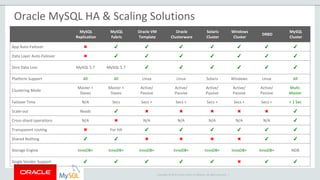
Oracle MySQL HA & Scaling Solutions
MySQL
Replication
MySQL
Fabric
Oracle VM
Template
Oracle
Clusterware
Solaris
Cluster
Windows
Cluster
DRBD
MySQL
Cluster
App Auto-Failover ✖ ✔ ✔ ✔ ✔ ✔ ✔ ✔
Data Layer Auto-Failover ✖ ✔ ✔ ✔ ✔ ✔ ✔ ✔
Zero Data Loss MySQL 5.7 MySQL 5.7 ✔ ✔ ✔ ✔ ✔ ✔
Platform Support All All Linux Linux Solaris Windows Linux All
Clustering Mode
Master +
Slaves
Master +
Slaves
Active/
Passive
Active/
Passive
Active/
Passive
Active/
Passive
Active/
Passive
Multi-
Master
Failover Time N/A Secs Secs + Secs + Secs + Secs + Secs + < 1 Sec
Scale-out Reads ✔ ✖ ✖ ✖ ✖ ✖ ✔
Cross-shard operations N/A ✖ N/A N/A N/A N/A N/A ✔
Transparent routing ✖ For HA ✔ ✔ ✔ ✔ ✔ ✔
Shared Nothing ✔ ✔ ✖ ✖ ✖ ✖ ✔ ✔
Storage Engine InnoDB+ InnoDB+ InnoDB+ InnoDB+ InnoDB+ InnoDB+ InnoDB+ NDB
Single Vendor Support ✔ ✔ ✔ ✔ ✔ ✖ ✔ ✔
Copyright © 2015 Oracle and/or its affiliates. All rights reserved. |
Overview
Copyright © 2015 Oracle and/or its affiliates. All rights reserved. |
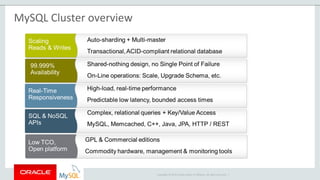
MySQL Cluster overview
Copyright © 2015 Oracle and/or its affiliates. All rights reserved. |
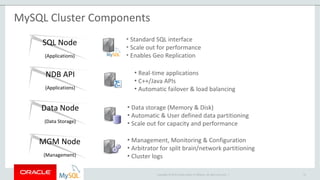
MySQL Cluster Components
13
NDB API
(Applications)
Data Node
(Data Storage)
MGM Node
(Management)
SQL Node
(Applications)
• Standard SQL interface
• Scale out for performance
• Enables Geo Replication
• Real-time applications
• C++/Java APIs
• Automatic failover & load balancing
• Data storage (Memory & Disk)
• Automatic & User defined data partitioning
• Scale out for capacity and performance
• Management, Monitoring & Configuration
• Arbitrator for split brain/network partitioning
• Cluster logs
Copyright © 2015 Oracle and/or its affiliates. All rights reserved. |
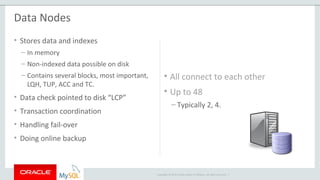
Data Nodes
• Stores data and indexes
– In memory
– Non-indexed data possible on disk
– Contains several blocks, most important,
LQH, TUP, ACC and TC.
• Data check pointed to disk “LCP”
• Transaction coordination
• Handling fail-over
• Doing online backup
• All connect to each other
• Up to 48
– Typically 2, 4.
Copyright © 2015 Oracle and/or its affiliates. All rights reserved. |
Management Nodes
• Distributing configuration
• Logging
• Monitoring
• Act as Arbitrator
– Prevents split-brain
• OK when not running
– Need to start others
• 1 is minimum, 3 too many, 2 is OK
Copyright © 2015 Oracle and/or its affiliates. All rights reserved. |
API Nodes
• Applications written using NDB API
– C / C++ / Java
• Fast
– No SQL parsing
• Examples:
– NDBCluster storage engine
– ndb_restore
Copyright © 2015 Oracle and/or its affiliates. All rights reserved. |
SQL Nodes
• MySQL using NDBCluster engine
– Is also an API Node
• Transparent for most applications
• Used to create tables
• Used for Geographical Replication
– Binary logging all changes
• Can act as Arbitrator
• Connects to all Data Nodes
Copyright © 2015 Oracle and/or its affiliates. All rights reserved. |
Architecture
Copyright © 2015 Oracle and/or its affiliates. All rights reserved. |
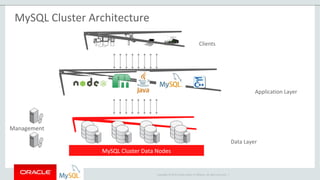
MySQL Cluster Architecture
MySQL Cluster Data Nodes
Clients
Application Layer
Data Layer
Management
Copyright © 2015 Oracle and/or its affiliates. All rights reserved. |
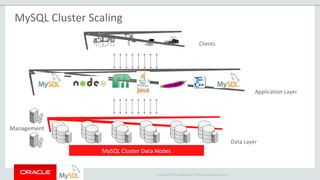
MySQL Cluster Scaling
MySQL Cluster Data Nodes
Clients
Application Layer
Data Layer
Management
Copyright © 2015 Oracle and/or its affiliates. All rights reserved. |
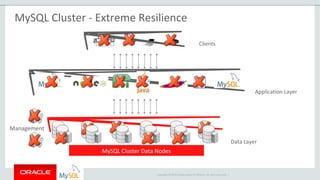
MySQL Cluster - Extreme Resilience
MySQL Cluster Data Nodes
Clients
Application Layer
Data Layer
Management
Copyright © 2015 Oracle and/or its affiliates. All rights reserved. |
Partitioning
Copyright © 2015 Oracle and/or its affiliates. All rights reserved. |
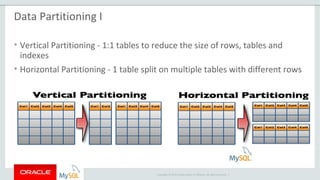
Data Partitioning I
• Vertical Partitioning - 1:1 tables to reduce the size of rows, tables and
indexes
• Horizontal Partitioning - 1 table split on multiple tables with different rows
Copyright © 2015 Oracle and/or its affiliates. All rights reserved. |
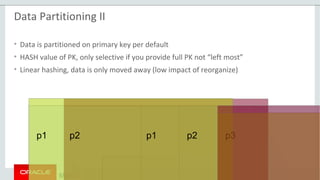
p1 p2 p1 p2 p3
Data Partitioning II
• Data is partitioned on primary key per default
• HASH value of PK, only selective if you provide full PK not “left most”
• Linear hashing, data is only moved away (low impact of reorganize)
Copyright © 2015 Oracle and/or its affiliates. All rights reserved. |
Data Node 1
Data Node 2
Data Node 3
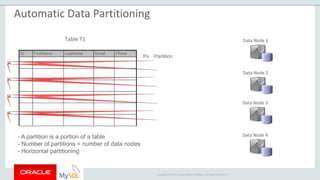
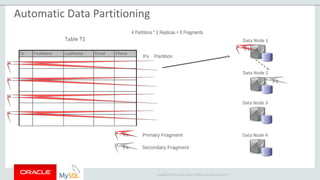
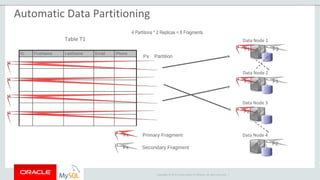
Data Node 4- A partition is a portion of a table
- Number of partitions = number of data nodes
- Horizontal partitioning
Table T1
ID FirstName LastName Email Phone
P2
P3
P4
Px Partition
P1
Automatic Data Partitioning
Copyright © 2015 Oracle and/or its affiliates. All rights reserved. |
Data Node 1
Data Node 2
Data Node 3
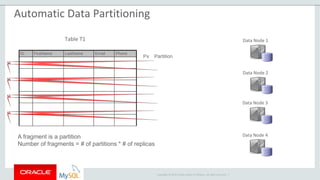
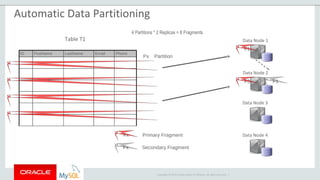
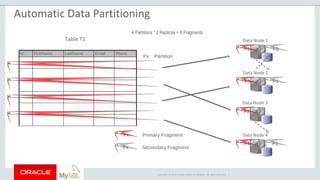
Data Node 4A fragment is a partition
Number of fragments = # of partitions * # of replicas
Table T1
ID FirstName LastName Email Phone
P2
P3
P4
Px Partition
P1
Automatic Data Partitioning
Copyright © 2015 Oracle and/or its affiliates. All rights reserved. |
Data Node 1
Data Node 2
Data Node 3
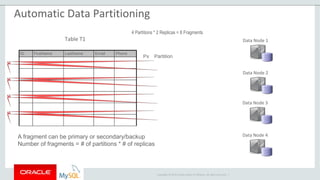
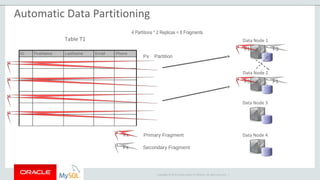
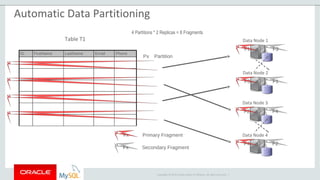
Data Node 4A fragment can be primary or secondary/backup
Number of fragments = # of partitions * # of replicas
Table T1
ID FirstName LastName Email Phone
P2
P3
P4
Px Partition
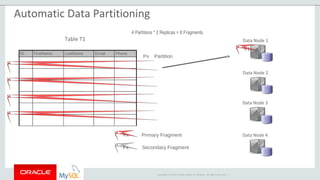
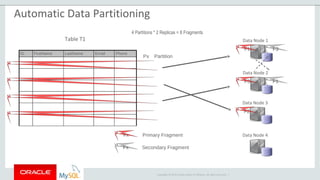
4 Partitions * 2 Replicas = 8 Fragments
P1
Automatic Data Partitioning
Copyright © 2015 Oracle and/or its affiliates. All rights reserved. |
Data Node 1
Data Node 2
F1
Primary Fragment
Secondary Fragment
Data Node 3
Data Node 4Fx
Fx
Table T1
ID FirstName LastName Email Phone
P2
P3
P4
Px Partition
4 Partitions * 2 Replicas = 8 Fragments
P1
Automatic Data Partitioning
Copyright © 2015 Oracle and/or its affiliates. All rights reserved. |
Data Node 1
Data Node 2
F1
Primary Fragment
Secondary Fragment
F1
Data Node 3
Data Node 4Fx
Fx
Table T1
ID FirstName LastName Email Phone
P2
P3
P4
Px Partition
4 Partitions * 2 Replicas = 8 Fragments
P1
Automatic Data Partitioning
Copyright © 2015 Oracle and/or its affiliates. All rights reserved. |
Data Node 1
Data Node 2
F1
Primary Fragment
Secondary Fragment
F3 F1
Data Node 3
Data Node 4Fx
Fx
Table T1
ID FirstName LastName Email Phone
P2
P3
P4
Px Partition
4 Partitions * 2 Replicas = 8 Fragments
P1
Automatic Data Partitioning
Copyright © 2015 Oracle and/or its affiliates. All rights reserved. |
Data Node 1
Data Node 2
F1 F3
Primary Fragment
Secondary Fragment
F3 F1
Data Node 3
Data Node 4Fx
Fx
Table T1
ID FirstName LastName Email Phone
P2
P3
P4
Px Partition
4 Partitions * 2 Replicas = 8 Fragments
P1
Automatic Data Partitioning
Copyright © 2015 Oracle and/or its affiliates. All rights reserved. |
Data Node 1
Data Node 2
F1 F3
Primary Fragment
Secondary Fragment
F3 F1
Data Node 3
Data Node 4
F2
Fx
Fx
Table T1
ID FirstName LastName Email Phone
P2
P3
P4
Px Partition
4 Partitions * 2 Replicas = 8 Fragments
P1
Automatic Data Partitioning
Copyright © 2015 Oracle and/or its affiliates. All rights reserved. |
Data Node 1
Data Node 2
F1 F3
Primary Fragment
Secondary Fragment
F3 F1
Data Node 3
Data Node 4
F2
F2
Fx
Fx
Table T1
ID FirstName LastName Email Phone
P2
P3
P4
Px Partition
4 Partitions * 2 Replicas = 8 Fragments
P1
Automatic Data Partitioning
Copyright © 2015 Oracle and/or its affiliates. All rights reserved. |
Data Node 1
Data Node 2
F1 F3
Primary Fragment
Secondary Fragment
F3 F1
Data Node 3
Data Node 4
F2
F4 F2
4 Partitions * 2 Replicas = 8 Fragments
Fx
Fx
Table T1
ID FirstName LastName Email Phone
P2
P3
P4
Px Partition
P1
Automatic Data Partitioning
Copyright © 2015 Oracle and/or its affiliates. All rights reserved. |
Data Node 1
Data Node 2
F1 F3
Primary Fragment
Secondary Fragment
F3 F1
Data Node 3
Data Node 4
F2 F4
F4 F2
Fx
Fx
Table T1
ID FirstName LastName Email Phone
P2
P3
P4
Px Partition
4 Partitions * 2 Replicas = 8 Fragments
P1
Automatic Data Partitioning
Copyright © 2015 Oracle and/or its affiliates. All rights reserved. |
Data Node 1
Data Node 2
F3
Primary Fragment
Secondary Fragment
F1
Data Node 3
Data Node 4
F2 F4
F4 F2
Node Group 1
Fx
Fx
Table T1
ID FirstName LastName Email Phone
P2
P3
P4
Px Partition
4 Partitions * 2 Replicas = 8 Fragments
P1
F1
F3
Automatic Data Partitioning
Copyright © 2015 Oracle and/or its affiliates. All rights reserved. |
Data Node 1
Data Node 2
F1 F3
Primary Fragment
Secondary Fragment
F3 F1
Data Node 3
Data Node 4
F2 F4
F4 F2
Node Group 1
Node Group 2
Fx
Fx
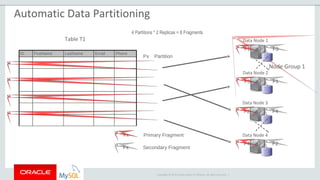
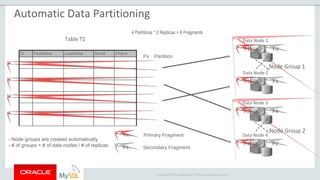
- Node groups are created automatically
- # of groups = # of data nodes / # of replicas
Table T1
ID FirstName LastName Email Phone
P2
P3
P4
Px Partition
4 Partitions * 2 Replicas = 8 Fragments
P1
Automatic Data Partitioning
Copyright © 2015 Oracle and/or its affiliates. All rights reserved. |
Data Node 1
Data Node 2
F1 F3
Primary Fragment
Secondary Fragment
F3 F1
Data Node 3
Data Node 4
F2 F4
F4 F2
Node Group 1
Node Group 2
Fx
Fx
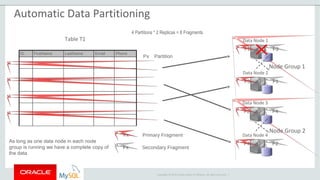
As long as one data node in each node
group is running we have a complete copy of
the data
Table T1
ID FirstName LastName Email Phone
P2
P3
P4
Px Partition
4 Partitions * 2 Replicas = 8 Fragments
P1
Automatic Data Partitioning
Copyright © 2015 Oracle and/or its affiliates. All rights reserved. |
Data Node 1
Data Node 2
F1 F3
Primary Fragment
Secondary Fragment
F3 F1
Data Node 3
Data Node 4
F2 F4
F4 F2
Node Group 1
Node Group 2
Fx
Fx
Table T1
ID FirstName LastName Email Phone
P2
P3
P4
Px Partition
4 Partitions * 2 Replicas = 8 Fragments
P1
Automatic Data Partitioning
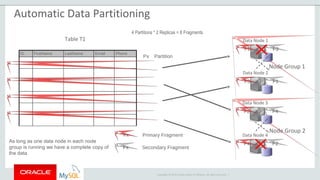
As long as one data node in each node
group is running we have a complete copy of
the data
Copyright © 2015 Oracle and/or its affiliates. All rights reserved. |
Data Node 1
Data Node 2
F1 F3
Primary Fragment
Secondary Fragment
F3 F1
Data Node 3
Data Node 4
F2 F4
F4 F2
Node Group 1
Node Group 2
Fx
Fx
Table T1
ID FirstName LastName Email Phone
P2
P3
P4
Px Partition
4 Partitions * 2 Replicas = 8 Fragments
P1
Automatic Data Partitioning
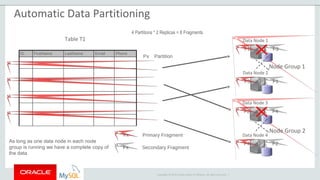
As long as one data node in each node
group is running we have a complete copy of
the data
Copyright © 2015 Oracle and/or its affiliates. All rights reserved. |
Table T1 Data Node 1
Data Node 2
F1 F3
Primary Fragment
Secondary Fragment
ID FirstName LastName Email Phone
P2
P3
P4
Px Partition
F3 F1
Data Node 3
Data Node 4
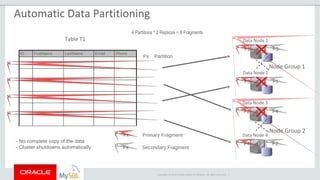
F2 F4
F4 F2
Node Group 1
Node Group 2
4 Partitions * 2 Replicas = 8 Fragments
Fx
Fx
- No complete copy of the data
- Cluster shutdowns automatically
P1
Automatic Data Partitioning
Copyright © 2015 Oracle and/or its affiliates. All rights reserved. |
Data Partitioning III
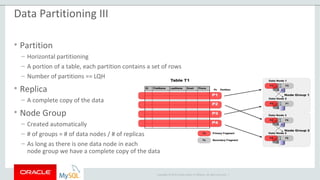
• Partition
– Horizontal partitioning
– A portion of a table, each partition contains a set of rows
– Number of partitions == LQH
• Replica
– A complete copy of the data
• Node Group
– Created automatically
– # of groups = # of data nodes / # of replicas
– As long as there is one data node in each
node group we have a complete copy of the data
Copyright © 2015 Oracle and/or its affiliates. All rights reserved. |
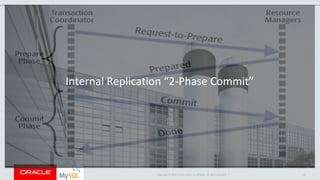
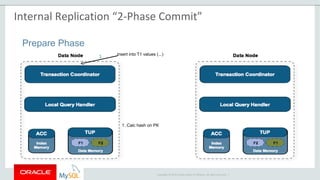
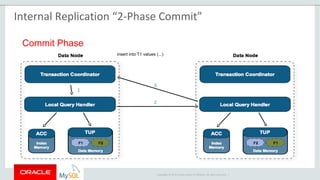
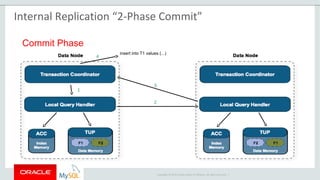
Internal Replication “2-Phase Commit”
43
Copyright © 2015 Oracle and/or its affiliates. All rights reserved. |
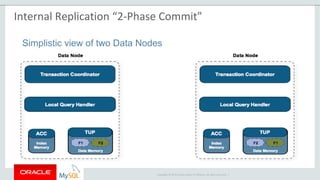
Simplistic view of two Data Nodes
Internal Replication “2-Phase Commit”
Copyright © 2015 Oracle and/or its affiliates. All rights reserved. |
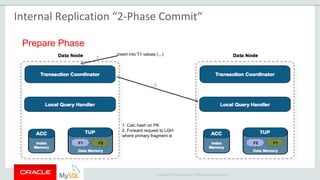
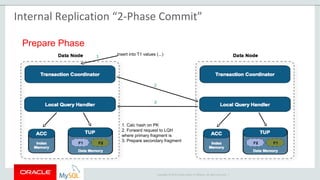
Prepare Phase
insert into T1 values (...)
1. Calc hash on PK
1
Internal Replication “2-Phase Commit”
Copyright © 2015 Oracle and/or its affiliates. All rights reserved. |
Prepare Phase
insert into T1 values (...)
1. Calc hash on PK
2. Forward request to LQH
where primary fragment is
2
1
Internal Replication “2-Phase Commit“
Copyright © 2015 Oracle and/or its affiliates. All rights reserved. |
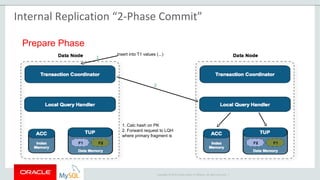
Prepare Phase
insert into T1 values (...)
1. Calc hash on PK
2. Forward request to LQH
where primary fragment is
2
1
Internal Replication “2-Phase Commit”
Copyright © 2015 Oracle and/or its affiliates. All rights reserved. |
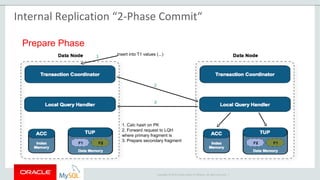
Prepare Phase
insert into T1 values (...)
1. Calc hash on PK
2. Forward request to LQH
where primary fragment is
3. Prepare secondary fragment
2
1
3
Internal Replication “2-Phase Commit“
Copyright © 2015 Oracle and/or its affiliates. All rights reserved. |
Prepare Phase
insert into T1 values (...)
1. Calc hash on PK
2. Forward request to LQH
where primary fragment is
3. Prepare secondary fragment
2
1
3
Internal Replication “2-Phase Commit”
Copyright © 2015 Oracle and/or its affiliates. All rights reserved. |
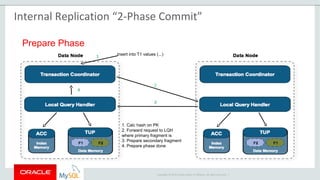
Prepare Phase
insert into T1 values (...)
1. Calc hash on PK
2. Forward request to LQH
where primary fragment is
3. Prepare secondary fragment
4. Prepare phase done
2
1
3
4
Internal Replication “2-Phase Commit”
Copyright © 2015 Oracle and/or its affiliates. All rights reserved. |
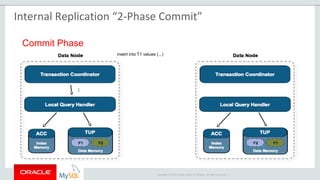
Commit Phase
insert into T1 values (...)
1
Internal Replication “2-Phase Commit”
Copyright © 2015 Oracle and/or its affiliates. All rights reserved. |
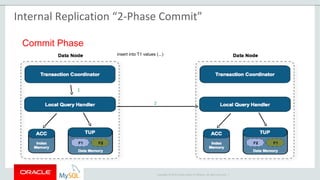
Commit Phase
insert into T1 values (...)
2
1
Internal Replication “2-Phase Commit”
Copyright © 2015 Oracle and/or its affiliates. All rights reserved. |
Commit Phase
insert into T1 values (...)
3
2
1
Internal Replication “2-Phase Commit”
Copyright © 2015 Oracle and/or its affiliates. All rights reserved. |
Commit Phase
insert into T1 values (...)
3
4
2
1
Internal Replication “2-Phase Commit”
Copyright © 2015 Oracle and/or its affiliates. All rights reserved. |
Accessing data
Copyright © 2015 Oracle and/or its affiliates. All rights reserved. |
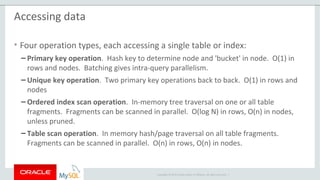
Accessing data
• Four operation types, each accessing a single table or index:
– Primary key operation. Hash key to determine node and 'bucket' in node. O(1) in
rows and nodes. Batching gives intra-query parallelism.
– Unique key operation. Two primary key operations back to back. O(1) in rows and
nodes
– Ordered index scan operation. In-memory tree traversal on one or all table
fragments. Fragments can be scanned in parallel. O(log N) in rows, O(n) in nodes,
unless pruned.
– Table scan operation. In memory hash/page traversal on all table fragments.
Fragments can be scanned in parallel. O(n) in rows, O(n) in nodes.
Copyright © 2015 Oracle and/or its affiliates. All rights reserved. |
D1 D2 D3 D4
API
----------
----------
----------
TC TC TC TC
1
2
3
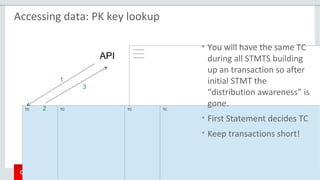
Accessing data: PK key lookup
• You will have the same TC
during all STMTS building
up an transaction so after
initial STMT the
“distribution awareness” is
gone.
• First Statement decides TC
• Keep transactions short!
Copyright © 2015 Oracle and/or its affiliates. All rights reserved. |
D1 D2 D3 D4
API
----------
----------
----------
TC TC TC TC
1
2
3
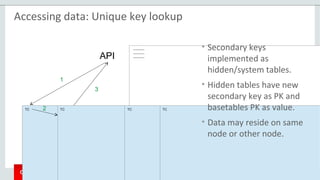
Accessing data: Unique key lookup
• Secondary keys
implemented as
hidden/system tables.
• Hidden tables have new
secondary key as PK and
basetables PK as value.
• Data may reside on same
node or other node.
Copyright © 2015 Oracle and/or its affiliates. All rights reserved. |
D1 D2 D3 D4
API
----------
----------
----------
TC TC TC TC
1 3
2
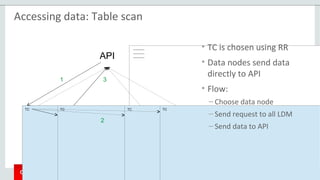
Accessing data: Table scan
• TC is chosen using RR
• Data nodes send data
directly to API
• Flow:
– Choose data node
– Send request to all LDM
– Send data to API
Copyright © 2015 Oracle and/or its affiliates. All rights reserved. |
Checkpoints
Copyright © 2015 Oracle and/or its affiliates. All rights reserved. |
Checkpoints and Logging
Global
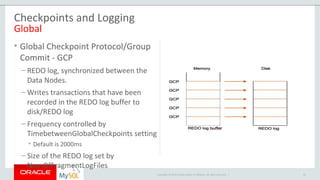
• Global Checkpoint Protocol/Group
Commit - GCP
– REDO log, synchronized between the
Data Nodes.
– Writes transactions that have been
recorded in the REDO log buffer to
disk/REDO log
– Frequency controlled by
TimebetweenGlobalCheckpoints setting
• Default is 2000ms
– Size of the REDO log set by
NumOfFragmentLogFiles
61
Copyright © 2015 Oracle and/or its affiliates. All rights reserved. |
Checkpoints and Logging
Local
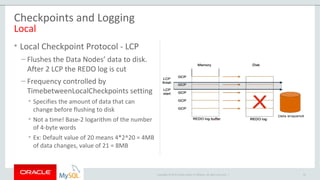
• Local Checkpoint Protocol - LCP
– Flushes the Data Nodes’ data to disk.
After 2 LCP the REDO log is cut
– Frequency controlled by
TimebetweenLocalCheckpoints setting
• Specifies the amount of data that can
change before flushing to disk
• Not a time! Base-2 logarithm of the number
of 4-byte words
• Ex: Default value of 20 means 4*2^20 = 4MB
of data changes, value of 21 = 8MB
62
Copyright © 2015 Oracle and/or its affiliates. All rights reserved. |
Checkpoints and Logging
Local & Redo
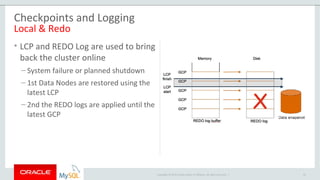
• LCP and REDO Log are used to bring
back the cluster online
– System failure or planned shutdown
– 1st Data Nodes are restored using the
latest LCP
– 2nd the REDO logs are applied until the
latest GCP
63
Copyright © 2015 Oracle and/or its affiliates. All rights reserved. |
Failure detection
Copyright © 2015 Oracle and/or its affiliates. All rights reserved. |
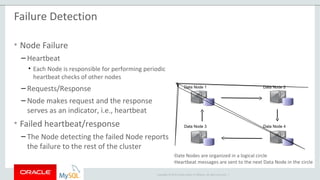
Data Node 1 Data Node 2
Data Node 3 Data Node 4
―Date Nodes are organized in a logical circle
―
Heartbeat messages are sent to the next Data Node in the circle
Failure Detection
• Node Failure
– Heartbeat
• Each Node is responsible for performing periodic
heartbeat checks of other nodes
– Requests/Response
– Node makes request and the response
serves as an indicator, i.e., heartbeat
• Failed heartbeat/response
– The Node detecting the failed Node reports
the failure to the rest of the cluster
Copyright © 2015 Oracle and/or its affiliates. All rights reserved. |
Arbitration
Copyright © 2015 Oracle and/or its affiliates. All rights reserved. |
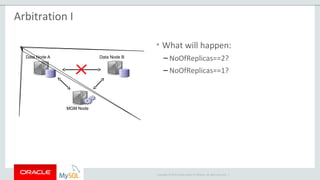
Data Node A Data Node B
MGM Node
Arbitration I
• What will happen:
– NoOfReplicas==2?
– NoOfReplicas==1?
Copyright © 2015 Oracle and/or its affiliates. All rights reserved. |
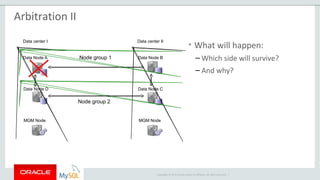
Data Node A
Data Node D
MGM Node
Data center I
Data Node B
Data Node C
MGM Node
Data center II
Node group 1
Node group 2
Arbitration II
• What will happen:
– Which side will survive?
– And why?
Copyright © 2015 Oracle and/or its affiliates. All rights reserved. |
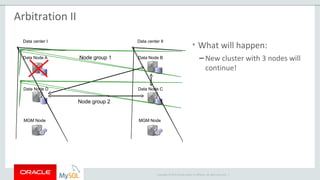
Data Node A
Data Node D
MGM Node
Data center I
Data Node B
Data Node C
MGM Node
Data center II
Node group 1
Node group 2
Arbitration II
• What will happen:
– New cluster with 3 nodes will
continue!
Copyright © 2015 Oracle and/or its affiliates. All rights reserved. |
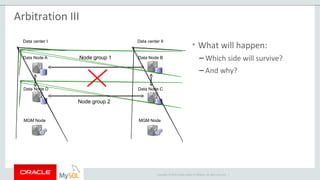
Data Node A
Data Node D
MGM Node
Data center I
Data Node B
Data Node C
MGM Node
Data center II
Node group 1
Node group 2
Arbitration III
• What will happen:
– Which side will survive?
– And why?
Copyright © 2015 Oracle and/or its affiliates. All rights reserved. |
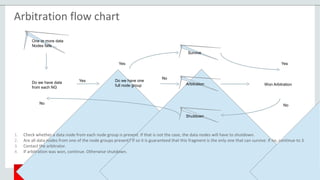
One or more data
Nodes fails …
Yes
Yes
Yes
NoNo
No
Do we have data
from each NG
Do we have one
full node group
Survive
Arbitration
Shutdown
Won Arbitration
Arbitration flow chart
1. Check whether a data node from each node group is present. If that is not the case, the data nodes will have to shutdown.
2. Are all data nodes from one of the node groups present? If so it is guaranteed that this fragment is the only one that can survive. If no, continue to 3.
3. Contact the arbitrator.
4. If arbitration was won, continue. Otherwise shutdown.
Copyright © 2015 Oracle and/or its affiliates. All rights reserved. |
Questions?
MySQL Cluster

MySQL Cluster

  • 1.
    Copyright © 2015Oracle and/or its affiliates. All rights reserved. | MySQL Cluster Abel Flórez Technical Account Manager abel.florez@oracle.com
  • 2.
    Copyright © 2015,Oracle and/or its affiliates. All rights reserved. | Safe Harbor Statement The following is intended to outline our general product direction. It is intended for information purposes only, and may not be incorporated into any contract. It is not a commitment to deliver any material, code, or functionality, and should not be relied upon in making purchasing decisions. The development, release, and timing of any features or functionality described for Oracle’s products remains at the sole discretion of Oracle. 2
  • 3.
    Copyright © 2015,Oracle and/or its affiliates. All rights reserved. | Program Agenda History Overview Architecture Internal Replication Accessing data Checkpoints Arbitration 1 2 3 3 4 5 6 7
  • 4.
    Copyright © 2015Oracle and/or its affiliates. All rights reserved. | History
  • 5.
    Copyright © 2015Oracle and/or its affiliates. All rights reserved. | History of MySQL Cluster ”NDB” • MySQL Cluster aka Network DataBase NDB • Designed/Developed at Ericsson in late 90’s • Original design paper: ”Design and Modeling of a Parallel Data Server for Telecom Applications” from 1997 by Mikael Ronström • Originally written in PLEX (Programming Language for EXchanges) but later converted to C++. • MySQL AB acquired Alzato (owned by Ericsson) late 2003. The Network DataBase NDB
  • 6.
    Copyright © 2015Oracle and/or its affiliates. All rights reserved. | History of MySQL Cluster ”NDB” • Databases services back then: – SCP/SDP (Service Control/Data Point) in Intelligent Networks. – HLR (Home Location Register) for keeping track of mobile phones/users. – Databases for network management especially real-time charging information. The Network DataBase NDB
  • 7.
    Copyright © 2015Oracle and/or its affiliates. All rights reserved. | History of MySQL Cluster ”NDB” • NDB was designed to: – Reliability, the availability class of the telecom databases should be 6 (99.9999%). This means that downtime must be less than 30 seconds per year: no planned down time of the system is allowed. – Performance, designed for high throughput, linear scalability when adding more servers (data nodes) for simple access patterns (PK lookups). – Real-time, data is kept in memory and system is designed for memory operations. The Network DataBase NDB
  • 8.
    Copyright © 2015Oracle and/or its affiliates. All rights reserved. | When to consider MySQL Cluster • What are the consequences of downtime or failing to meet performance requirements? • How much effort and $ is spent in developing and managing HA in your applications? • Are you considering sharding your database to scale write performance? How does that impact your application and developers? • Do your services need to be real-time? • Will your services have unpredictable scalability demands, especially for writes? • Do you want the flexibility to manage your data with more than just SQL? 8
  • 9.
    Copyright © 2015Oracle and/or its affiliates. All rights reserved. | When NOT to consider MySQL Cluster • Most 3rd party applications • Long running transactions • Geospatial indexes • Huge dataset (>2TB) • Complex access pattern to data and many full table scans • When you need a disk based database like InnoDB 9
  • 10.
    Copyright © 2015Oracle and/or its affiliates. All rights reserved. | Oracle MySQL HA & Scaling Solutions MySQL Replication MySQL Fabric Oracle VM Template Oracle Clusterware Solaris Cluster Windows Cluster DRBD MySQL Cluster App Auto-Failover ✖ ✔ ✔ ✔ ✔ ✔ ✔ ✔ Data Layer Auto-Failover ✖ ✔ ✔ ✔ ✔ ✔ ✔ ✔ Zero Data Loss MySQL 5.7 MySQL 5.7 ✔ ✔ ✔ ✔ ✔ ✔ Platform Support All All Linux Linux Solaris Windows Linux All Clustering Mode Master + Slaves Master + Slaves Active/ Passive Active/ Passive Active/ Passive Active/ Passive Active/ Passive Multi- Master Failover Time N/A Secs Secs + Secs + Secs + Secs + Secs + < 1 Sec Scale-out Reads ✔ ✖ ✖ ✖ ✖ ✖ ✔ Cross-shard operations N/A ✖ N/A N/A N/A N/A N/A ✔ Transparent routing ✖ For HA ✔ ✔ ✔ ✔ ✔ ✔ Shared Nothing ✔ ✔ ✖ ✖ ✖ ✖ ✔ ✔ Storage Engine InnoDB+ InnoDB+ InnoDB+ InnoDB+ InnoDB+ InnoDB+ InnoDB+ NDB Single Vendor Support ✔ ✔ ✔ ✔ ✔ ✖ ✔ ✔
  • 11.
    Copyright © 2015Oracle and/or its affiliates. All rights reserved. | Overview
  • 12.
    Copyright © 2015Oracle and/or its affiliates. All rights reserved. | MySQL Cluster overview
  • 13.
    Copyright © 2015Oracle and/or its affiliates. All rights reserved. | MySQL Cluster Components 13 NDB API (Applications) Data Node (Data Storage) MGM Node (Management) SQL Node (Applications) • Standard SQL interface • Scale out for performance • Enables Geo Replication • Real-time applications • C++/Java APIs • Automatic failover & load balancing • Data storage (Memory & Disk) • Automatic & User defined data partitioning • Scale out for capacity and performance • Management, Monitoring & Configuration • Arbitrator for split brain/network partitioning • Cluster logs
  • 14.
    Copyright © 2015Oracle and/or its affiliates. All rights reserved. | Data Nodes • Stores data and indexes – In memory – Non-indexed data possible on disk – Contains several blocks, most important, LQH, TUP, ACC and TC. • Data check pointed to disk “LCP” • Transaction coordination • Handling fail-over • Doing online backup • All connect to each other • Up to 48 – Typically 2, 4.
  • 15.
    Copyright © 2015Oracle and/or its affiliates. All rights reserved. | Management Nodes • Distributing configuration • Logging • Monitoring • Act as Arbitrator – Prevents split-brain • OK when not running – Need to start others • 1 is minimum, 3 too many, 2 is OK
  • 16.
    Copyright © 2015Oracle and/or its affiliates. All rights reserved. | API Nodes • Applications written using NDB API – C / C++ / Java • Fast – No SQL parsing • Examples: – NDBCluster storage engine – ndb_restore
  • 17.
    Copyright © 2015Oracle and/or its affiliates. All rights reserved. | SQL Nodes • MySQL using NDBCluster engine – Is also an API Node • Transparent for most applications • Used to create tables • Used for Geographical Replication – Binary logging all changes • Can act as Arbitrator • Connects to all Data Nodes
  • 18.
    Copyright © 2015Oracle and/or its affiliates. All rights reserved. | Architecture
  • 19.
    Copyright © 2015Oracle and/or its affiliates. All rights reserved. | MySQL Cluster Architecture MySQL Cluster Data Nodes Clients Application Layer Data Layer Management
  • 20.
    Copyright © 2015Oracle and/or its affiliates. All rights reserved. | MySQL Cluster Scaling MySQL Cluster Data Nodes Clients Application Layer Data Layer Management
  • 21.
    Copyright © 2015Oracle and/or its affiliates. All rights reserved. | MySQL Cluster - Extreme Resilience MySQL Cluster Data Nodes Clients Application Layer Data Layer Management
  • 22.
    Copyright © 2015Oracle and/or its affiliates. All rights reserved. | Partitioning
  • 23.
    Copyright © 2015Oracle and/or its affiliates. All rights reserved. | Data Partitioning I • Vertical Partitioning - 1:1 tables to reduce the size of rows, tables and indexes • Horizontal Partitioning - 1 table split on multiple tables with different rows
  • 24.
    Copyright © 2015Oracle and/or its affiliates. All rights reserved. | p1 p2 p1 p2 p3 Data Partitioning II • Data is partitioned on primary key per default • HASH value of PK, only selective if you provide full PK not “left most” • Linear hashing, data is only moved away (low impact of reorganize)
  • 25.
    Copyright © 2015Oracle and/or its affiliates. All rights reserved. | Data Node 1 Data Node 2 Data Node 3 Data Node 4- A partition is a portion of a table - Number of partitions = number of data nodes - Horizontal partitioning Table T1 ID FirstName LastName Email Phone P2 P3 P4 Px Partition P1 Automatic Data Partitioning
  • 26.
    Copyright © 2015Oracle and/or its affiliates. All rights reserved. | Data Node 1 Data Node 2 Data Node 3 Data Node 4A fragment is a partition Number of fragments = # of partitions * # of replicas Table T1 ID FirstName LastName Email Phone P2 P3 P4 Px Partition P1 Automatic Data Partitioning
  • 27.
    Copyright © 2015Oracle and/or its affiliates. All rights reserved. | Data Node 1 Data Node 2 Data Node 3 Data Node 4A fragment can be primary or secondary/backup Number of fragments = # of partitions * # of replicas Table T1 ID FirstName LastName Email Phone P2 P3 P4 Px Partition 4 Partitions * 2 Replicas = 8 Fragments P1 Automatic Data Partitioning
  • 28.
    Copyright © 2015Oracle and/or its affiliates. All rights reserved. | Data Node 1 Data Node 2 F1 Primary Fragment Secondary Fragment Data Node 3 Data Node 4Fx Fx Table T1 ID FirstName LastName Email Phone P2 P3 P4 Px Partition 4 Partitions * 2 Replicas = 8 Fragments P1 Automatic Data Partitioning
  • 29.
    Copyright © 2015Oracle and/or its affiliates. All rights reserved. | Data Node 1 Data Node 2 F1 Primary Fragment Secondary Fragment F1 Data Node 3 Data Node 4Fx Fx Table T1 ID FirstName LastName Email Phone P2 P3 P4 Px Partition 4 Partitions * 2 Replicas = 8 Fragments P1 Automatic Data Partitioning
  • 30.
    Copyright © 2015Oracle and/or its affiliates. All rights reserved. | Data Node 1 Data Node 2 F1 Primary Fragment Secondary Fragment F3 F1 Data Node 3 Data Node 4Fx Fx Table T1 ID FirstName LastName Email Phone P2 P3 P4 Px Partition 4 Partitions * 2 Replicas = 8 Fragments P1 Automatic Data Partitioning
  • 31.
    Copyright © 2015Oracle and/or its affiliates. All rights reserved. | Data Node 1 Data Node 2 F1 F3 Primary Fragment Secondary Fragment F3 F1 Data Node 3 Data Node 4Fx Fx Table T1 ID FirstName LastName Email Phone P2 P3 P4 Px Partition 4 Partitions * 2 Replicas = 8 Fragments P1 Automatic Data Partitioning
  • 32.
    Copyright © 2015Oracle and/or its affiliates. All rights reserved. | Data Node 1 Data Node 2 F1 F3 Primary Fragment Secondary Fragment F3 F1 Data Node 3 Data Node 4 F2 Fx Fx Table T1 ID FirstName LastName Email Phone P2 P3 P4 Px Partition 4 Partitions * 2 Replicas = 8 Fragments P1 Automatic Data Partitioning
  • 33.
    Copyright © 2015Oracle and/or its affiliates. All rights reserved. | Data Node 1 Data Node 2 F1 F3 Primary Fragment Secondary Fragment F3 F1 Data Node 3 Data Node 4 F2 F2 Fx Fx Table T1 ID FirstName LastName Email Phone P2 P3 P4 Px Partition 4 Partitions * 2 Replicas = 8 Fragments P1 Automatic Data Partitioning
  • 34.
    Copyright © 2015Oracle and/or its affiliates. All rights reserved. | Data Node 1 Data Node 2 F1 F3 Primary Fragment Secondary Fragment F3 F1 Data Node 3 Data Node 4 F2 F4 F2 4 Partitions * 2 Replicas = 8 Fragments Fx Fx Table T1 ID FirstName LastName Email Phone P2 P3 P4 Px Partition P1 Automatic Data Partitioning
  • 35.
    Copyright © 2015Oracle and/or its affiliates. All rights reserved. | Data Node 1 Data Node 2 F1 F3 Primary Fragment Secondary Fragment F3 F1 Data Node 3 Data Node 4 F2 F4 F4 F2 Fx Fx Table T1 ID FirstName LastName Email Phone P2 P3 P4 Px Partition 4 Partitions * 2 Replicas = 8 Fragments P1 Automatic Data Partitioning
  • 36.
    Copyright © 2015Oracle and/or its affiliates. All rights reserved. | Data Node 1 Data Node 2 F3 Primary Fragment Secondary Fragment F1 Data Node 3 Data Node 4 F2 F4 F4 F2 Node Group 1 Fx Fx Table T1 ID FirstName LastName Email Phone P2 P3 P4 Px Partition 4 Partitions * 2 Replicas = 8 Fragments P1 F1 F3 Automatic Data Partitioning
  • 37.
    Copyright © 2015Oracle and/or its affiliates. All rights reserved. | Data Node 1 Data Node 2 F1 F3 Primary Fragment Secondary Fragment F3 F1 Data Node 3 Data Node 4 F2 F4 F4 F2 Node Group 1 Node Group 2 Fx Fx - Node groups are created automatically - # of groups = # of data nodes / # of replicas Table T1 ID FirstName LastName Email Phone P2 P3 P4 Px Partition 4 Partitions * 2 Replicas = 8 Fragments P1 Automatic Data Partitioning
  • 38.
    Copyright © 2015Oracle and/or its affiliates. All rights reserved. | Data Node 1 Data Node 2 F1 F3 Primary Fragment Secondary Fragment F3 F1 Data Node 3 Data Node 4 F2 F4 F4 F2 Node Group 1 Node Group 2 Fx Fx As long as one data node in each node group is running we have a complete copy of the data Table T1 ID FirstName LastName Email Phone P2 P3 P4 Px Partition 4 Partitions * 2 Replicas = 8 Fragments P1 Automatic Data Partitioning
  • 39.
    Copyright © 2015Oracle and/or its affiliates. All rights reserved. | Data Node 1 Data Node 2 F1 F3 Primary Fragment Secondary Fragment F3 F1 Data Node 3 Data Node 4 F2 F4 F4 F2 Node Group 1 Node Group 2 Fx Fx Table T1 ID FirstName LastName Email Phone P2 P3 P4 Px Partition 4 Partitions * 2 Replicas = 8 Fragments P1 Automatic Data Partitioning As long as one data node in each node group is running we have a complete copy of the data
  • 40.
    Copyright © 2015Oracle and/or its affiliates. All rights reserved. | Data Node 1 Data Node 2 F1 F3 Primary Fragment Secondary Fragment F3 F1 Data Node 3 Data Node 4 F2 F4 F4 F2 Node Group 1 Node Group 2 Fx Fx Table T1 ID FirstName LastName Email Phone P2 P3 P4 Px Partition 4 Partitions * 2 Replicas = 8 Fragments P1 Automatic Data Partitioning As long as one data node in each node group is running we have a complete copy of the data
  • 41.
    Copyright © 2015Oracle and/or its affiliates. All rights reserved. | Table T1 Data Node 1 Data Node 2 F1 F3 Primary Fragment Secondary Fragment ID FirstName LastName Email Phone P2 P3 P4 Px Partition F3 F1 Data Node 3 Data Node 4 F2 F4 F4 F2 Node Group 1 Node Group 2 4 Partitions * 2 Replicas = 8 Fragments Fx Fx - No complete copy of the data - Cluster shutdowns automatically P1 Automatic Data Partitioning
  • 42.
    Copyright © 2015Oracle and/or its affiliates. All rights reserved. | Data Partitioning III • Partition – Horizontal partitioning – A portion of a table, each partition contains a set of rows – Number of partitions == LQH • Replica – A complete copy of the data • Node Group – Created automatically – # of groups = # of data nodes / # of replicas – As long as there is one data node in each node group we have a complete copy of the data
  • 43.
    Copyright © 2015Oracle and/or its affiliates. All rights reserved. | Internal Replication “2-Phase Commit” 43
  • 44.
    Copyright © 2015Oracle and/or its affiliates. All rights reserved. | Simplistic view of two Data Nodes Internal Replication “2-Phase Commit”
  • 45.
    Copyright © 2015Oracle and/or its affiliates. All rights reserved. | Prepare Phase insert into T1 values (...) 1. Calc hash on PK 1 Internal Replication “2-Phase Commit”
  • 46.
    Copyright © 2015Oracle and/or its affiliates. All rights reserved. | Prepare Phase insert into T1 values (...) 1. Calc hash on PK 2. Forward request to LQH where primary fragment is 2 1 Internal Replication “2-Phase Commit“
  • 47.
    Copyright © 2015Oracle and/or its affiliates. All rights reserved. | Prepare Phase insert into T1 values (...) 1. Calc hash on PK 2. Forward request to LQH where primary fragment is 2 1 Internal Replication “2-Phase Commit”
  • 48.
    Copyright © 2015Oracle and/or its affiliates. All rights reserved. | Prepare Phase insert into T1 values (...) 1. Calc hash on PK 2. Forward request to LQH where primary fragment is 3. Prepare secondary fragment 2 1 3 Internal Replication “2-Phase Commit“
  • 49.
    Copyright © 2015Oracle and/or its affiliates. All rights reserved. | Prepare Phase insert into T1 values (...) 1. Calc hash on PK 2. Forward request to LQH where primary fragment is 3. Prepare secondary fragment 2 1 3 Internal Replication “2-Phase Commit”
  • 50.
    Copyright © 2015Oracle and/or its affiliates. All rights reserved. | Prepare Phase insert into T1 values (...) 1. Calc hash on PK 2. Forward request to LQH where primary fragment is 3. Prepare secondary fragment 4. Prepare phase done 2 1 3 4 Internal Replication “2-Phase Commit”
  • 51.
    Copyright © 2015Oracle and/or its affiliates. All rights reserved. | Commit Phase insert into T1 values (...) 1 Internal Replication “2-Phase Commit”
  • 52.
    Copyright © 2015Oracle and/or its affiliates. All rights reserved. | Commit Phase insert into T1 values (...) 2 1 Internal Replication “2-Phase Commit”
  • 53.
    Copyright © 2015Oracle and/or its affiliates. All rights reserved. | Commit Phase insert into T1 values (...) 3 2 1 Internal Replication “2-Phase Commit”
  • 54.
    Copyright © 2015Oracle and/or its affiliates. All rights reserved. | Commit Phase insert into T1 values (...) 3 4 2 1 Internal Replication “2-Phase Commit”
  • 55.
    Copyright © 2015Oracle and/or its affiliates. All rights reserved. | Accessing data
  • 56.
    Copyright © 2015Oracle and/or its affiliates. All rights reserved. | Accessing data • Four operation types, each accessing a single table or index: – Primary key operation. Hash key to determine node and 'bucket' in node. O(1) in rows and nodes. Batching gives intra-query parallelism. – Unique key operation. Two primary key operations back to back. O(1) in rows and nodes – Ordered index scan operation. In-memory tree traversal on one or all table fragments. Fragments can be scanned in parallel. O(log N) in rows, O(n) in nodes, unless pruned. – Table scan operation. In memory hash/page traversal on all table fragments. Fragments can be scanned in parallel. O(n) in rows, O(n) in nodes.
  • 57.
    Copyright © 2015Oracle and/or its affiliates. All rights reserved. | D1 D2 D3 D4 API ---------- ---------- ---------- TC TC TC TC 1 2 3 Accessing data: PK key lookup • You will have the same TC during all STMTS building up an transaction so after initial STMT the “distribution awareness” is gone. • First Statement decides TC • Keep transactions short!
  • 58.
    Copyright © 2015Oracle and/or its affiliates. All rights reserved. | D1 D2 D3 D4 API ---------- ---------- ---------- TC TC TC TC 1 2 3 Accessing data: Unique key lookup • Secondary keys implemented as hidden/system tables. • Hidden tables have new secondary key as PK and basetables PK as value. • Data may reside on same node or other node.
  • 59.
    Copyright © 2015Oracle and/or its affiliates. All rights reserved. | D1 D2 D3 D4 API ---------- ---------- ---------- TC TC TC TC 1 3 2 Accessing data: Table scan • TC is chosen using RR • Data nodes send data directly to API • Flow: – Choose data node – Send request to all LDM – Send data to API
  • 60.
    Copyright © 2015Oracle and/or its affiliates. All rights reserved. | Checkpoints
  • 61.
    Copyright © 2015Oracle and/or its affiliates. All rights reserved. | Checkpoints and Logging Global • Global Checkpoint Protocol/Group Commit - GCP – REDO log, synchronized between the Data Nodes. – Writes transactions that have been recorded in the REDO log buffer to disk/REDO log – Frequency controlled by TimebetweenGlobalCheckpoints setting • Default is 2000ms – Size of the REDO log set by NumOfFragmentLogFiles 61
  • 62.
    Copyright © 2015Oracle and/or its affiliates. All rights reserved. | Checkpoints and Logging Local • Local Checkpoint Protocol - LCP – Flushes the Data Nodes’ data to disk. After 2 LCP the REDO log is cut – Frequency controlled by TimebetweenLocalCheckpoints setting • Specifies the amount of data that can change before flushing to disk • Not a time! Base-2 logarithm of the number of 4-byte words • Ex: Default value of 20 means 4*2^20 = 4MB of data changes, value of 21 = 8MB 62
  • 63.
    Copyright © 2015Oracle and/or its affiliates. All rights reserved. | Checkpoints and Logging Local & Redo • LCP and REDO Log are used to bring back the cluster online – System failure or planned shutdown – 1st Data Nodes are restored using the latest LCP – 2nd the REDO logs are applied until the latest GCP 63
  • 64.
    Copyright © 2015Oracle and/or its affiliates. All rights reserved. | Failure detection
  • 65.
    Copyright © 2015Oracle and/or its affiliates. All rights reserved. | Data Node 1 Data Node 2 Data Node 3 Data Node 4 ―Date Nodes are organized in a logical circle ― Heartbeat messages are sent to the next Data Node in the circle Failure Detection • Node Failure – Heartbeat • Each Node is responsible for performing periodic heartbeat checks of other nodes – Requests/Response – Node makes request and the response serves as an indicator, i.e., heartbeat • Failed heartbeat/response – The Node detecting the failed Node reports the failure to the rest of the cluster
  • 66.
    Copyright © 2015Oracle and/or its affiliates. All rights reserved. | Arbitration
  • 67.
    Copyright © 2015Oracle and/or its affiliates. All rights reserved. | Data Node A Data Node B MGM Node Arbitration I • What will happen: – NoOfReplicas==2? – NoOfReplicas==1?
  • 68.
    Copyright © 2015Oracle and/or its affiliates. All rights reserved. | Data Node A Data Node D MGM Node Data center I Data Node B Data Node C MGM Node Data center II Node group 1 Node group 2 Arbitration II • What will happen: – Which side will survive? – And why?
  • 69.
    Copyright © 2015Oracle and/or its affiliates. All rights reserved. | Data Node A Data Node D MGM Node Data center I Data Node B Data Node C MGM Node Data center II Node group 1 Node group 2 Arbitration II • What will happen: – New cluster with 3 nodes will continue!
  • 70.
    Copyright © 2015Oracle and/or its affiliates. All rights reserved. | Data Node A Data Node D MGM Node Data center I Data Node B Data Node C MGM Node Data center II Node group 1 Node group 2 Arbitration III • What will happen: – Which side will survive? – And why?
  • 71.
    Copyright © 2015Oracle and/or its affiliates. All rights reserved. | One or more data Nodes fails … Yes Yes Yes NoNo No Do we have data from each NG Do we have one full node group Survive Arbitration Shutdown Won Arbitration Arbitration flow chart 1. Check whether a data node from each node group is present. If that is not the case, the data nodes will have to shutdown. 2. Are all data nodes from one of the node groups present? If so it is guaranteed that this fragment is the only one that can survive. If no, continue to 3. 3. Contact the arbitrator. 4. If arbitration was won, continue. Otherwise shutdown.
  • 72.
    Copyright © 2015Oracle and/or its affiliates. All rights reserved. | Questions?

Editor's Notes

  • #2 &amp;lt;number&amp;gt;
  • #3 &amp;lt;number&amp;gt;
  • #4 &amp;lt;number&amp;gt;
  • #11 When failover time shows secs+, this means seconds to detect and failover but then there may be additional time for the InnoDB recovery &amp;lt;number&amp;gt;
  • #20 Architecture behind cluster. Apears as 1 logical database to app and developers, connect to any node, query is routed Under covers, 3 types of nodes – intelligence in data nodes. Tables auto-sharded across commodity h/w. Each data node manages a shard or fragment of the db. Creates a replica – all updates sync replicated between replicas. If failure, failover less than 1 sec. Data nodes handle all cluster membership, failover and recovery Connect to data nodes via Application layer, via MySQL Server, Could use one of NoSQL APIs, so these are cluster libraries embedded into your app All multi master, so update from any node in app layer instantly available to any other node &amp;lt;number&amp;gt;
  • #21 Arch behind cluster. Apears as 1 logical database to app and developers, connect to any node, query is routed Under covers, 3 types of nodes – intelligence in data nodes. Tables auto-sharded across commodity h/w. Each data node manages a shard or fragment of the db. Creates a replica – all updates sync replicated between replicas. If failure, failover less than 1 sec. Data nodes handle all cluster membership, failover and recovery Connect to data nodes via Application layer, via MySQL Server, Could use one of NoSQL APIs, so these are cluster libraries embedded into your app All multi master, so update from any node in app layer instantly available to any other node &amp;lt;number&amp;gt;
  • #22 Arch behind cluster. Apears as 1 logical database to app and developers, connect to any node, query is routed Under covers, 3 types of nodes – intelligence in data nodes. Tables auto-sharded across commodity h/w. Each data node manages a shard or fragment of the db. Creates a replica – all updates sync replicated between replicas. If failure, failover less than 1 sec. Data nodes handle all cluster membership, failover and recovery Connect to data nodes via Application layer, via MySQL Server, Could use one of NoSQL APIs, so these are cluster libraries embedded into your app All multi master, so update from any node in app layer instantly available to any other node &amp;lt;number&amp;gt;
  • #44 &amp;lt;number&amp;gt;
  • #45 So data nodes consists of modules and these modules send messages between them, I will explain the basics of the most common modules briefly. LQH - This is the Local, low-level Query Handler block, which manages data and transactions local to the cluster&amp;apos;s data nodes, and acts as a coordinator of 2-phase commits. It is responsible (when called on by the transaction coordinator) for performing operations on tuples, accomplishing this task with help of DBACC block (which manages the index structures) and DBTUP (which manages the tuples). ACC - Also referred to as the ACC block, this is the ACcess Control and lock management module. TUP - This is the tuple manager, which manages the physical storage of cluster data. TC - This is the Transaction Coordinator block, which handles distributed transactions and other data operations on a global level.
  • #55 Error handling gets simpler internally. Locks can be released earlier.
  • #66 HeartbeatIntervalDbDb Default in NDB 7.2.0milliseconds5000 One of the primary methods of discovering failed nodes is by the use of heartbeats. This parameter states how often heartbeat signals are sent and how often to expect to receive them. After missing three heartbeat intervals in a row, the node is declared dead. Thus, the maximum time for discovering a failure through the heartbeat mechanism is four times the heartbeat interval.
  • #74 &amp;lt;number&amp;gt;