MySQL installation paula email:  [email_address] C.H. email:  [email_address]
Where can I download DBMS software? MySQL (suggested) MySQL 5.1 — Release Candidate release MySQL 6.0 — Alpha Microsoft Access Download with NTU ip from NTU C&INC:  https://oper.cc.ntu.edu.tw/download/ VPN(for user not in NTU campus):  http://ccnet.ntu.edu.tw/vpn/install.html But the SQL interpreter in ACCESS is not quite the same as the one described in the textbook. You have to try different ways if your queries do not function well.
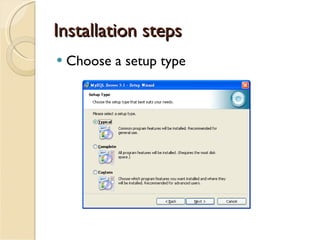
Installation steps Choose a setup type
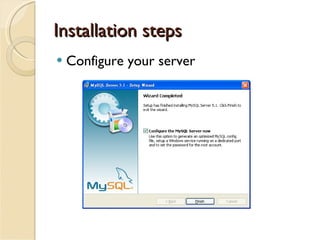
Installation steps Configure your server
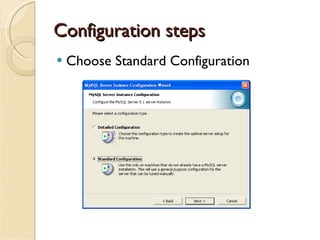
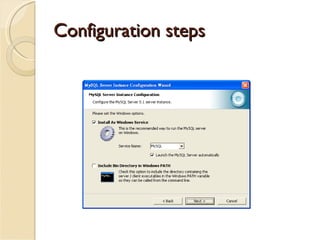
Configuration steps Choose Standard Configuration
Configuration steps
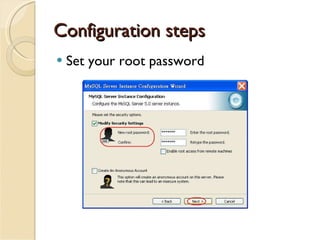
Configuration steps Set your root password
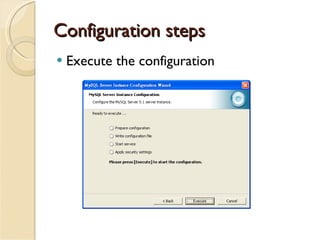
Configuration steps Execute the configuration
Simple test Open program   MySQL   MySQL Server 5.1    MySQL Command Line Client  Enter the root password you set before  Key in some simple instructions Check mysql version   mysql> select version();  Check time   mysql > select now();  Select your database   mysql> use mysql;  If the above instructions work, the installation is completed. If you want to leave   mysql> exit
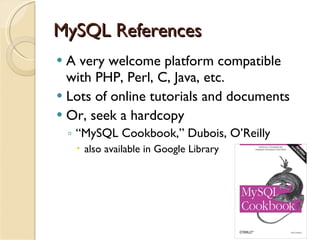
MySQL References A very welcome platform compatible with PHP, Perl, C, Java, etc. Lots of online tutorials and documents Or, seek a hardcopy “ MySQL Cookbook,” Dubois, O’Reilly also available in Google Library
MySQL Tutorials http://dev.mysql.com/doc/ http://twpug.net/docs/mysql323/manual_Tutorial.html   (in Chinese)
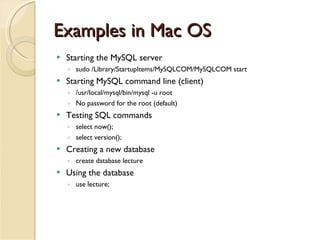
Examples in Mac OS Starting the MySQL server sudo /Library/StartupItems/MySQLCOM/MySQLCOM start Starting MySQL command line (client) /usr/local/mysql/bin/mysql -u root No password for the root (default) Testing SQL commands select now(); select version(); Creating a new database create database lecture  Using the database use lecture;
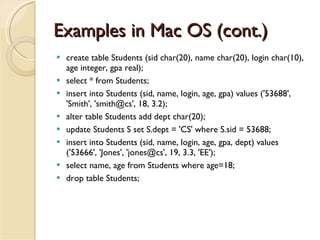
Examples in Mac OS (cont.) create table Students (sid char(20), name char(20), login char(10), age integer, gpa real);  select * from Students; insert into Students (sid, name, login, age, gpa) values ('53688', 'Smith', 'smith@cs', 18, 3.2); alter table Students add dept char(20); update Students S set S.dept = 'CS' where S.sid = 53688; insert into Students (sid, name, login, age, gpa, dept) values ('53666', 'Jones', 'jones@cs', 19, 3.3, 'EE'); select name, age from Students where age=18; drop table Students;

ppt

  • 1.
    MySQL installation paulaemail: [email_address] C.H. email: [email_address]
  • 2.
    Where can Idownload DBMS software? MySQL (suggested) MySQL 5.1 — Release Candidate release MySQL 6.0 — Alpha Microsoft Access Download with NTU ip from NTU C&INC: https://oper.cc.ntu.edu.tw/download/ VPN(for user not in NTU campus): http://ccnet.ntu.edu.tw/vpn/install.html But the SQL interpreter in ACCESS is not quite the same as the one described in the textbook. You have to try different ways if your queries do not function well.
  • 3.
  • 4.
  • 5.
    Configuration steps ChooseStandard Configuration
  • 6.
  • 7.
    Configuration steps Setyour root password
  • 8.
    Configuration steps Executethe configuration
  • 9.
    Simple test Openprogram  MySQL  MySQL Server 5.1  MySQL Command Line Client Enter the root password you set before Key in some simple instructions Check mysql version  mysql> select version(); Check time  mysql > select now(); Select your database  mysql> use mysql; If the above instructions work, the installation is completed. If you want to leave  mysql> exit
  • 10.
    MySQL References Avery welcome platform compatible with PHP, Perl, C, Java, etc. Lots of online tutorials and documents Or, seek a hardcopy “ MySQL Cookbook,” Dubois, O’Reilly also available in Google Library
  • 11.
    MySQL Tutorials http://dev.mysql.com/doc/http://twpug.net/docs/mysql323/manual_Tutorial.html (in Chinese)
  • 12.
    Examples in MacOS Starting the MySQL server sudo /Library/StartupItems/MySQLCOM/MySQLCOM start Starting MySQL command line (client) /usr/local/mysql/bin/mysql -u root No password for the root (default) Testing SQL commands select now(); select version(); Creating a new database create database lecture Using the database use lecture;
  • 13.
    Examples in MacOS (cont.) create table Students (sid char(20), name char(20), login char(10), age integer, gpa real); select * from Students; insert into Students (sid, name, login, age, gpa) values ('53688', 'Smith', 'smith@cs', 18, 3.2); alter table Students add dept char(20); update Students S set S.dept = 'CS' where S.sid = 53688; insert into Students (sid, name, login, age, gpa, dept) values ('53666', 'Jones', 'jones@cs', 19, 3.3, 'EE'); select name, age from Students where age=18; drop table Students;