
31st August,2019: Batch Processing, Anypoint Messaging Queue and
Custom Connectors
Mumbai - India
All contents © MuleSoft Inc.
Agenda
2
2:00 PM Introduction
2:30 PM Technical Session – Anypoint MQ
3:30 PM Technical Session – Batch Processing
4:30 PM Networking & Break: Tea, Coffee and Snack
5:00 PM Technical Sessions - Custom Connectors
5:30 PM Wrap-up and Plan For Next Meetup
All contents © MuleSoft Inc.
Introductions
3
• About the organizer:
– Sudeshna Mitra
– Manish Yadav
– Akshata Sawant
– Ranveer Meel
• About the sponsor:
– 91 SPRINGBOARD & APISERO
A SHOW OF HANDS:
Who is new to this MeetUp?
All contents © MuleSoft Inc.
Speakers
4
All contents © MuleSoft Inc.
Surprises!
5
• Thanks for your positive
enthusiasm …You earned
it ..
• Certification Vouchers
for all!
• Be geared up for the
quiz sessions at the end
of each modules! 
Anypoint MQ
All contents © MuleSoft Inc.
Introduction
7
• Anypoint MQ features:-
- multi-tenant
- Cloud messaging service
- performs async messaging scenarios
- Fully integrated with Anypoint platform
- Role based access control
- Only available in enterprise addition
All contents © MuleSoft Inc.
Type of Queue’s
8
Types :-
• Queue
• FIFO Queue
• Exchange
All contents © MuleSoft Inc.
Queue
9
Configuring Queue:
- ID: a-z, A-Z, 0-9, period (.), and hyphen (-)
- Message TTL - (Time to live)
- Message Lock Default TTL
- Encryption (Optional)- PBE with MD5 and triple DES
- Assign a Dead Letter Queue (Optional)
- Dead Letter Queue Name
- Delivery attempts before reroute
- In-Queue
- In-Flight
All contents © MuleSoft Inc. 10
• An in-flight message is:
- A message received by a queue, but not deleted.
- A message awaiting ACK or NACK.
- A message with an expired Message Lock Default TTL (time-to-live) setting.
• Anypoint MQ supports up to 120,000 in-flight messages per each standard (non-
FIFO) queue.
• For FIFO queues permit is up to 10 in-flight messages per queue due to the extra
processing required for FIFO queues
Note :- A single queue can contain an unlimited number of messages
The maximum duration for any message, either in-flight or not, is 2 weeks, after
which Anypoint MQ deletes the message
In Flight
All contents © MuleSoft Inc.
Queue
11
Constraints :
- maximum 127 characters in name
- maximum 10 mb message size (There is a way to overcome this limit)
- maximum time to live (TTL) for a message is 2 weeks
- maximum time to lock (TTL) is 12 hrs.
- maximum 120,000 in-flight messages for non FIFO queues
- maximum 10 in flight messages for FIFO queues
All contents © MuleSoft Inc.
Queue
12
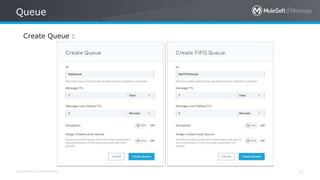
Create Queue :
All contents © MuleSoft Inc.
FIFO Queue
13
WHY?
For applications where the order of messages needs to be strictly preserved and
enforced
All contents © MuleSoft Inc.
FIFO Queue keypoints :
14
- Works on First In First Out principal.
- Strict message ordering.
- Cannot be bound to a message exchange.
- Encryption doesn’t effect ordering.
- Up to 10 inflight messages per queue.
- Supports 300 TPS. Can increase to 3,000 TPS using 10 messages batch.
- Guaranteed exactly once delivery with same message ID
- Deduplication interval is 5 mins.
- Comparatively slow.
All contents © MuleSoft Inc.
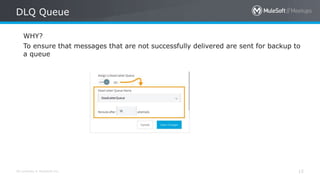
DLQ Queue
15
WHY?
To ensure that messages that are not successfully delivered are sent for backup to
a queue
All contents © MuleSoft Inc.
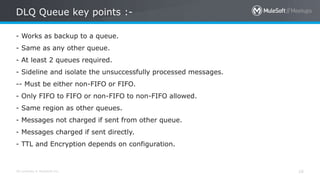
DLQ Queue key points :-
16
- Works as backup to a queue.
- Same as any other queue.
- At least 2 queues required.
- Sideline and isolate the unsuccessfully processed messages.
-- Must be either non-FIFO or FIFO.
- Only FIFO to FIFO or non-FIFO to non-FIFO allowed.
- Same region as other queues.
- Messages not charged if sent from other queue.
- Messages charged if sent directly.
- TTL and Encryption depends on configuration.
All contents © MuleSoft Inc.
DLQ Flow Chart :-
17
All contents © MuleSoft Inc.
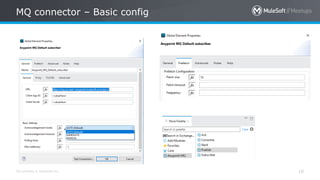
MQ connector – Basic config
18
All contents © MuleSoft Inc.
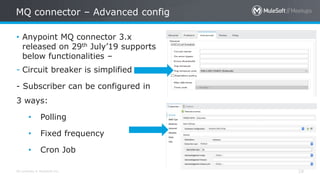
MQ connector – Advanced config
19
• Anypoint MQ connector 3.x
released on 29th July’19 supports
below functionalities –
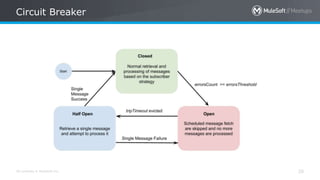
- Circuit breaker is simplified
- Subscriber can be configured in
3 ways:
• Polling
• Fixed frequency
• Cron Job
All contents © MuleSoft Inc. 20
Circuit Breaker
All contents © MuleSoft Inc. 21
• Publish
• Subscribe
• Consume
• Ack
• Nack
Note :- Above operations can also be performed directly from
cloudhub with message send, message browse, return and
delete/purge functionality
MQ Operations :-
All contents © MuleSoft Inc. 22
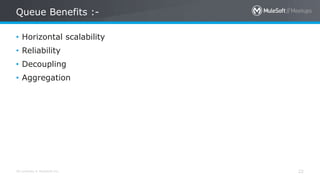
• Horizontal scalability
• Reliability
• Decoupling
• Aggregation
Queue Benefits :-
All contents © MuleSoft Inc. 23
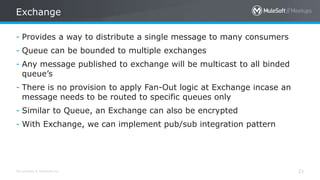
- Provides a way to distribute a single message to many consumers
- Queue can be bounded to multiple exchanges
- Any message published to exchange will be multicast to all binded
queue’s
- There is no provision to apply Fan-Out logic at Exchange incase an
message needs to be routed to specific queues only
- Similar to Queue, an Exchange can also be encrypted
- With Exchange, we can implement pub/sub integration pattern
Exchange
All contents © MuleSoft Inc. 24
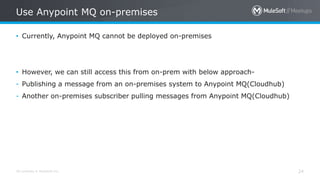
• Currently, Anypoint MQ cannot be deployed on-premises
• However, we can still access this from on-prem with below approach-
- Publishing a message from an on-premises system to Anypoint MQ(Cloudhub)
- Another on-premises subscriber pulling messages from Anypoint MQ(Cloudhub)
Use Anypoint MQ on-premises
All contents © MuleSoft Inc. 25
- The Anypoint MQ APIs let you use REST to send and receive
messages, administer queues and message exchanges, and analyze
results
• Anypoint MQ provides these APIs:
- Anypoint MQ Admin API
- Anypoint MQ Broker API
- Anypoint MQ Stats API
Anypoint MQ REST API
All contents © MuleSoft Inc. 26
Anypoint MQ Admin API
• Browse queues and message exchanges
• Create queues and message exchanges
• Manage bindings for message exchanges
Anypoint MQ Broker API
This API lets you send and receive messages from queues and
message exchanges.
Anypoint MQ REST API
All contents © MuleSoft Inc. 27
Anypoint MQ Stats API
• Anypoint MQ metrics:
- Real time statistics for queues
- Historic statistics for queues
- Historic statistics for message exchanges
• Usage metrics - View your entire organization’s usage of Anypoint MQ for billing
purposes:
- Usage per environment
- Usage per organization
• Browse statistics for queues and message exchanges
• View the number of messages currently in a queue
Anypoint MQ REST API
All contents © MuleSoft Inc. 28
- As per documentation, max payload size is 10 MB while publishing
- If we have message >10MB then we can use below approach to
overcome the limit –
a. Encrypt the message using Gzip module
b. Encode the above output using base64 function in DW
c. Publish this payload to Queue
Note :- While subscribing repeat above process in reverse
Advantage :- Compression ratio achieved vary from 0.8 to 0.95,
thereby we can publish payload of size 80+ MB also safely using above
method
Compression/Decompression
All contents © MuleSoft Inc. 29
• ANYPOINT-MQ:UNKNOWN
• ANYPOINT-MQ:RETRY_EXHAUSTED
• ANYPOINT-MQ:CONNECTIVITY
• ANYPOINT-MQ:RESOURCE_NOT_FOUND
• ANYPOINT-MQ:TIMEOUT
Error Types :-
All contents © MuleSoft Inc. 30
Anypoint MQ Stats :-
All contents © MuleSoft Inc. 31
Different Message brokers
Anypoint MQ Rabbit MQ Active MQ
Availability Licensed open source open source
Infrastructure Available only on cloud Can be on cloud or
on-prem
Can be on cloud or on-
prem
Protocols Only REST Multi-protocol
AMQP,STOMP,MQTT,HT
TP etc.
Multi protocol
AMQP, MQTT, REST,
Stomp etc.
Message size 10 MB limit Theoretical size limit
is 2GB (recommended
not more than 128
MB)
Equivalent to heap
memory size
Filtering support Filtering cannot be
applied directly
Filtering cannot be
applied
Filtering can be applied
Message TTL Message TTL – 2 Weeks Message TTL –>
infinite (By default)
Message TTL –> infinite
(By default)
All contents © MuleSoft Inc. 32
• https://docs.mulesoft.com/release-notes/connector/anypoint-mq-connector-release-
notes-mule-4#connector/mq-connector-release-notes
• https://docs.microsoft.com/en-us/azure/architecture/patterns/circuit-breaker
• https://docs.mulesoft.com/connectors/anypoint-mq/3.x/anypoint-mq-connector
• https://docs.mulesoft.com/mq/mq-understanding
References :-
Batch Processing
All contents © MuleSoft Inc.
• With Batch, Mule aims to simplify integration use cases where basic
ETL functionality is needed
• For example, you can use batch processing when:
- Synchronizing data sets between business applications, such as syncing contacts between
NetSuite and Salesforce.
- Extracting, transforming and loading (ETL) information into a target system, such as
uploading data from a flat file (CSV) to Hadoop.
- Handling large quantities of incoming data from an API into a legacy system.
Introduction
All contents © MuleSoft Inc.
Introduction
Each batch job contains three different phases:
1.Load and Dispatch.
2.Process.
3.On Complete.
All contents © MuleSoft Inc. 36
• Load and Dispatch
- Implicit
- No action required by developer
- Mule splits the message into collection of records for processing
- It also creates batchJobInstanceId variable
- It also creates persistent queue and associate it with batch job
instance
- Each generated record is saved into queue. This activity is – “all or
nothing”
Phase 1
All contents © MuleSoft Inc. 37
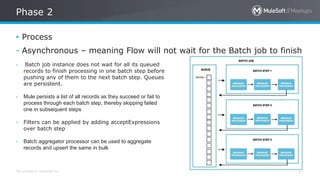
• Process
- Asynchronous – meaning Flow will not wait for the Batch job to finish
Phase 2
- Batch job instance does not wait for all its queued
records to finish processing in one batch step before
pushing any of them to the next batch step. Queues
are persistent.
- Mule persists a list of all records as they succeed or fail to
process through each batch step, thereby skipping failed
one in subsequent steps
- Filters can be applied by adding acceptExpressions
over batch step
- Batch aggregator processor can be used to aggregate
records and upsert the same in bulk
All contents © MuleSoft Inc. 38
• On Complete
- This phase create a report or summary of the records that got
processed in Batch Job Instance
- As Mule execute batch job as an asynchronous, one-way flow. The
result of batch processing(BatchJobResult obj) does not feed back
into the flow which may have triggered it
Phase 3
All contents © MuleSoft Inc. 39
• Batch was a top-level element just like flows in Mule 3. In Mule 4, it
exist as a scope which lives inside a flow
• There was input phase in Mule 3 which is not present in mule 4
• The batch:execute operation doesn’t exist any more
• No more record variable. In mule 4, regular variable can be used in
Batch Steps, with each record having its own copy
• In Mule 3, input phase was required to o/p Java structure in case
input was XML or JSON using DW. In mule 4, this all is done by new
automatic streaming framework and everything will just work out of
the box
• Batch commit is now called as batch aggregator
Batch component Mule 3 vs Mule 4
All contents © MuleSoft Inc. 40
• Every record has its own set of variables which can be new variables
or modification of already existing variables
• These variables are not visible to other records getting processed
parallelly
• For each record, these variables are propagated across batch steps
• In the on Complete phase, none of these variables (not even original
ones) are visible
• Since Batch Job executes in Asynchronously from the rest of flow, no
variable set in within batch step or on complete phase are visible
outside the batch scope
Variable Propagation
All contents © MuleSoft Inc. 41
• Handling error inside the batch job can be complicated considering
the huge amount of data this scope is designed to take
• For any failures in any of batch step, Mule logs stack trace for the
first occurrence of that exception, for e.g. :-
com.mulesoft.mule.runtime.module.batch.internal.DefaultBatchStep: Found exception processing record on step 'batchStep1' for job
instance 'Batch Job Example' of job 'CreateLeadsBatch’.
This is the first record to show this exception on this step for this job instance. Subsequent records with the same failures will not be
logged for performance and log readability reasons:
• Mule logs on a "by step" basis. If another step also raises the same
error, the runtime logs it again for that step.
• when the batch job reaches the On Complete phase, Mule displays an
error summary with every error type, and how many times it
happened in each batch step.
Error Handling
All contents © MuleSoft Inc. 42
• Mule has three options for handling a record-level error :
1. Finish Processing
- stop execution of current job instance
- finish execution of current in-flight records
- do no pull any more records from queue and set job instance to FALIURE state
- Invoke onComplete phase
2. Continue Processing
- continue processing the batch regardless of any failures
- use acceptExpression and acceptPolicy attributes to instruct subsequent batch
steps on how to handle batch failures
- use maxFailedRecords attribute to define threshold value for No of failures
before stopping the batch job instance
Batch Processing Strategies for Error Handling
All contents © MuleSoft Inc. 43
• https://docs.mulesoft.com/mule-runtime/4.2/batch-processing-
concept
• https://docs.mulesoft.com/mule-runtime/4.2/batch-error-handling-
faq
• https://docs.mulesoft.com/mule-runtime/4.2/batch-filters-and-
batch-aggregator
• https://blogs.mulesoft.com/dev/mule-dev/batch-module-mule-4-
improvements/
References :-
Using Mule SDK
Custom Connectors
All contents © MuleSoft Inc.
Why Custom Connector (PART 1)
45
– Act as a reusable component in the integration system.
– Act as an abstract layer between the API’s complexity.
• Don’t want to expose actual connectivity logic
– Developers can focus more on the business logic.
– Your Own Connector.
All contents © MuleSoft Inc.
Why Custom Connector (PART 2)
46
All contents © MuleSoft Inc.
Custom Connectors
47
– It can be built in 2 Ways:
– Mule SDK
– XML SDK
All contents © MuleSoft Inc.
Mule 4:
Mule SDK Vs DevKit
48
• DevKit is not available for Mule 4.
• The Mule SDK is not tightly bound to Anypoint Studio.
– instead of having to install the custom module in Anypoint Studio, you just have to add it
as a Maven dependency.
• Built on the same idea of annotated Java classes.
• The SDK is not a code generator.
– It is just a plain extension mechanism.
<parent>
<groupId>org.mule.extensions</groupId>
<artifactId>mule-modules-parent</artifactId>
<version>1.1.3</version>
</parent>
All contents © MuleSoft Inc.
Prerequisites :
Custom Connector Mule SDK
49
• You must have these components installed.
– Java Development Kit 8 (JDK 8)
– Apache Maven 3.3.9 or higher
– Mule Target Versions:
• Mule ESB 4
• Anypoint Studio 7
All contents © MuleSoft Inc.
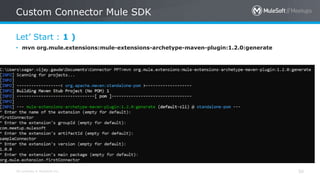
Let’ Start : 1 )
Custom Connector Mule SDK
50
• mvn org.mule.extensions:mule-extensions-archetype-maven-plugin:1.2.0:generate
All contents © MuleSoft Inc.
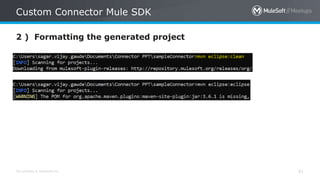
2 ) Formatting the generated project
Custom Connector Mule SDK
51
All contents © MuleSoft Inc.
3.1 ) Import the generated project
Custom Connector Mule SDK
52
All contents © MuleSoft Inc.
3.2 ) Import the generated project
Custom Connector Mule SDK
53
All contents © MuleSoft Inc.
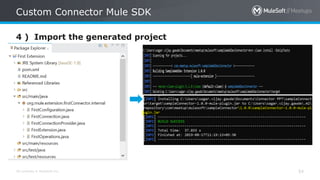
4 ) Import the generated project
Custom Connector Mule SDK
54
All contents © MuleSoft Inc.
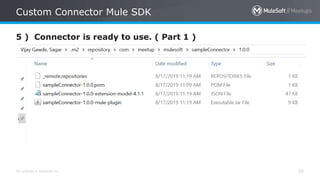
5 ) Connector is ready to use. ( Part 1 )
Custom Connector Mule SDK
55
All contents © MuleSoft Inc.
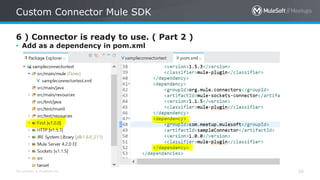
6 ) Connector is ready to use. ( Part 2 )
Custom Connector Mule SDK
56
• Add as a dependency in pom.xml
All contents © MuleSoft Inc.
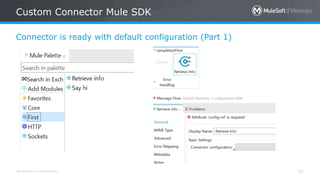
Connector is ready with default configuration (Part 1)
Custom Connector Mule SDK
57
All contents © MuleSoft Inc.
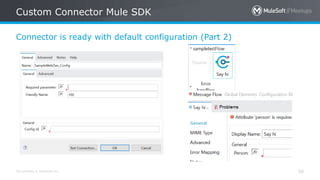
Connector is ready with default configuration (Part 2)
Custom Connector Mule SDK
58
All contents © MuleSoft Inc.
Custom Connector Mule SDK
59
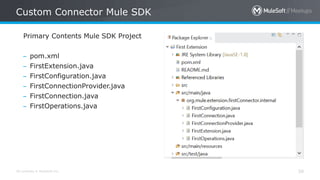
Primary Contents Mule SDK Project
– pom.xml
– FirstExtension.java
– FirstConfiguration.java
– FirstConnectionProvider.java
– FirstConnection.java
– FirstOperations.java
All contents © MuleSoft Inc.
Mule SDK Project
60
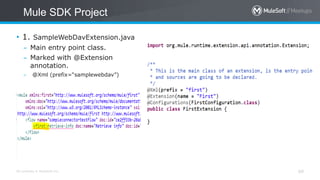
• 1. SampleWebDavExtension.java
– Main entry point class.
– Marked with @Extension
annotation.
– @Xml (prefix=“samplewebdav”)
All contents © MuleSoft Inc.
Mule SDK Project
61
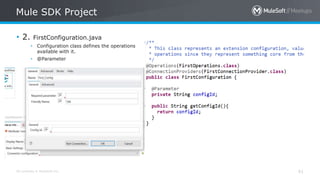
• 2. FirstConfiguration.java
• Configuration class defines the operations
available with it.
• @Parameter
All contents © MuleSoft Inc.
Mule SDK Project
62
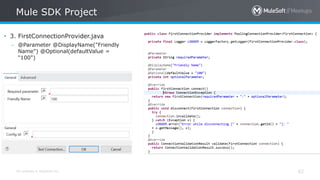
• 3. FirstConnectionProvider.java
– @Parameter @DisplayName("Friendly
Name") @Optional(defaultValue =
"100")
All contents © MuleSoft Inc.
Mule SDK Project
63
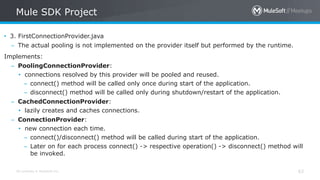
• 3. FirstConnectionProvider.java
– The actual pooling is not implemented on the provider itself but performed by the runtime.
Implements:
– PoolingConnectionProvider:
• connections resolved by this provider will be pooled and reused.
– connect() method will be called only once during start of the application.
– disconnect() method will be called only during shutdown/restart of the application.
– CachedConnectionProvider:
• lazily creates and caches connections.
– ConnectionProvider:
• new connection each time.
– connect()/disconnect() method will be called during start of the application.
– Later on for each process connect() -> respective operation() -> disconnect() method will
be invoked.
All contents © MuleSoft Inc.
Mule SDK Project
64
• 4. FirstConnection.java
• FirstConnection Connection Object
Instance managed by Connection
Provider.
• This class should have any methods
such as invalidate(), and attributes
that makes sense for an instance of a
Connection, once established.
All contents © MuleSoft Inc.
Mule SDK Project
65
5. FirstOperations.java (PART 1)
• Every public method in this class
becomes the operation supported by
this module.
• void: As the name indicates, this
operation will not return anything.
This operation will not modify the
message and next component will
receive the same message.
All contents © MuleSoft Inc.
Mule SDK Project
66
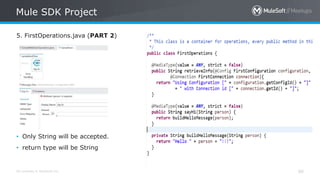
5. FirstOperations.java (PART 2)
• Only String will be accepted.
• return type will be String
All contents © MuleSoft Inc.
Mule SDK Project
67
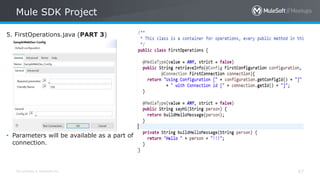
5. FirstOperations.java (PART 3)
• Parameters will be available as a part of
connection.
All contents © MuleSoft Inc.
Mule SDK Project
68
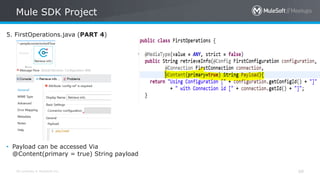
5. FirstOperations.java (PART 4)
• Payload can be accessed Via
@Content(primary = true) String payload
All contents © MuleSoft Inc.
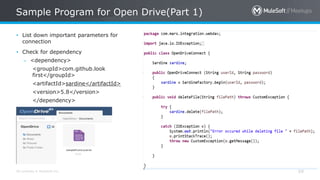
Sample Program for Open Drive(Part 1)
69
• List down important parameters for
connection
• Check for dependency
– <dependency>
<groupId>com.github.look
first</groupId>
<artifactId>sardine</artifactId>
<version>5.8</version>
</dependency>
All contents © MuleSoft Inc.
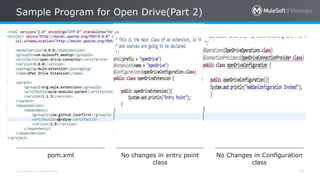
Sample Program for Open Drive(Part 2)
70
pom.xml No changes in entry point
class
No Changes in Configuration
class
All contents © MuleSoft Inc.
Convert Java Program to Mule SDK Connector
(Part 3)
71
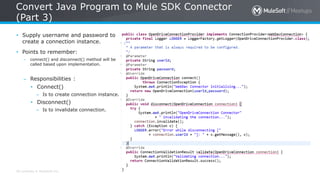
• Supply username and password to
create a connection instance.
• Points to remember:
– connect() and disconnect() method will be
called based upon implementation.
– Responsibilities :
• Connect()
– Is to create connection instance.
• Disconnect()
– Is to invalidate connection.
All contents © MuleSoft Inc.
Convert Java Program to Mule SDK Connector
(Part 4)
72
• Responsibilities:
– Getter method is required
to get the connection
object.
– Make sure you write a code
for invalidating the
connection.
All contents © MuleSoft Inc.
Convert Java Program to Mule SDK Connector
(Part 5)
73
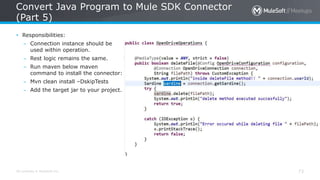
• Responsibilities:
– Connection instance should be
used within operation.
– Rest logic remains the same.
– Run maven below maven
command to install the connector:
– Mvn clean install –DskipTests
– Add the target jar to your project.
All contents © MuleSoft Inc.
Reconnection on Connectors (PART 1)
74
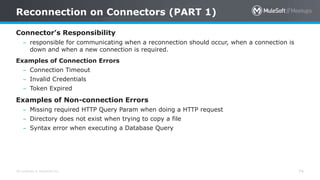
Connector’s Responsibility
– responsible for communicating when a reconnection should occur, when a connection is
down and when a new connection is required.
Examples of Connection Errors
– Connection Timeout
– Invalid Credentials
– Token Expired
Examples of Non-connection Errors
– Missing required HTTP Query Param when doing a HTTP request
– Directory does not exist when trying to copy a file
– Syntax error when executing a Database Query
All contents © MuleSoft Inc.
Reconnection on Connectors (PART 2)
75
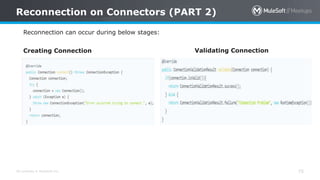
Reconnection can occur during below stages:
Creating Connection Validating Connection
All contents © MuleSoft Inc.
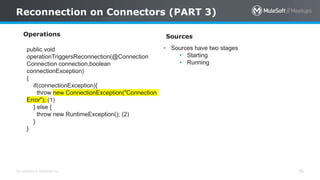
Reconnection on Connectors (PART 3)
76
Operations
public void
operationTriggersReconnection(@Connection
Connection connection,boolean
connectionException)
{
if(connectionException){
throw new ConnectionException("Connection
Error"); (1)
} else {
throw new RuntimeException(); (2)
}
}
Sources
• Sources have two stages
• Starting
• Running
All contents © MuleSoft Inc.
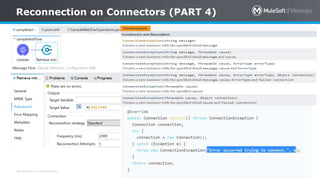
Reconnection on Connectors (PART 4)
77
All contents © MuleSoft Inc.
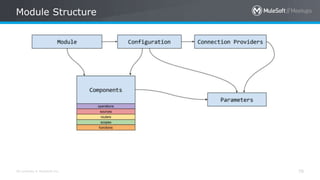
Module Structure
78
All contents © MuleSoft Inc.
More SDK Features (PART 1)
79
Operations Sources Functions Routers Scopes
Operations process
messages.
Sources create messages
and push them to a flow.
Mule SDK contribute
functions to DataWeave
Example:
route can be used to
decide whether or not
the contained processors
should be executed.
Scopes are similar
to Operations, but their
execution includes the
execution of other
child Operations.
A connection is
obtained each time
the operation is
executed.
A connection is obtained
each time the message
source is started or when
reconnection happens.
Config-less and
Connection-less
Routers are required to
extend the Route class.
Config-less and
Connection-less
Sources are required to
extend the Source class.
A Message source must
have start() and stop()
phases
Void Routers: At the
end of its execution
leaves the event and
message the same as it
was before the execution
of the router
Examples of message
sources can be:
• An HTTP listener
• A File watcher
• …
Config-less and
Connection-less
All contents © MuleSoft Inc.
More SDK Features (PART 2)
80
• Transactions
– Connection Provider class should implementing TransactionalConnection interface requires implementation of
the following methods:
• begin() : This method is called, when the transaction must begin.
• commit() : This is called when the transaction finished correctly and must be committed.
• rollback() : This is called then the transaction finished with an error and this one must be be rollbacked.
• Security
– Support for
• TLS Configuration
• OAuth
• Dynamic configurations
– #[attributes.queryParams.encoding]
• Non-blocking operations
• Classloading isolation
All contents © MuleSoft Inc.
Take a stand !
81
• Nominate yourself for
the next meetup speaker
and suggest a topic as
well.
All contents © MuleSoft Inc.
What’s next
82
• Share:
– Tweet your pictures with the hashtag #MuleMeetup #MuleSoftMeetup
– Invite your network to join: https://meetups.mulesoft.com/mumbai/
• Feedback:
– Contact your organizers Manish Yadav, Sudeshna Mitra, Akshata Sawant and Ranveer Meel to
suggest topics
– Tweet your organizers at @SudeshnaMitra14, @Manish_Kyadav, @sawantakshata02 and
@meel_Ranveer
– Contact MuleSoft at meetup@mulesoft.com for ways to improve the program
– Follow us on Instagram (mumbai_mulesoftofficialpage)
– Your Feedback is Food for us
• Our next meetup:
– Date: TBD
– Location: Mumbai
– Topic: TBD
Networking time
Introduce yourself to your neighbors!
See you next time
Please send topic suggestions to the organizer
THANK YOU
Mumbai MuleSoft Meetup:Batch Processing, Anypoint Messaging Queue and Custom Connectors

Mumbai MuleSoft Meetup:Batch Processing, Anypoint Messaging Queue and Custom Connectors

  • 1.
    31st August,2019: BatchProcessing, Anypoint Messaging Queue and Custom Connectors Mumbai - India
  • 2.
    All contents ©MuleSoft Inc. Agenda 2 2:00 PM Introduction 2:30 PM Technical Session – Anypoint MQ 3:30 PM Technical Session – Batch Processing 4:30 PM Networking & Break: Tea, Coffee and Snack 5:00 PM Technical Sessions - Custom Connectors 5:30 PM Wrap-up and Plan For Next Meetup
  • 3.
    All contents ©MuleSoft Inc. Introductions 3 • About the organizer: – Sudeshna Mitra – Manish Yadav – Akshata Sawant – Ranveer Meel • About the sponsor: – 91 SPRINGBOARD & APISERO A SHOW OF HANDS: Who is new to this MeetUp?
  • 4.
    All contents ©MuleSoft Inc. Speakers 4
  • 5.
    All contents ©MuleSoft Inc. Surprises! 5 • Thanks for your positive enthusiasm …You earned it .. • Certification Vouchers for all! • Be geared up for the quiz sessions at the end of each modules! 
  • 6.
  • 7.
    All contents ©MuleSoft Inc. Introduction 7 • Anypoint MQ features:- - multi-tenant - Cloud messaging service - performs async messaging scenarios - Fully integrated with Anypoint platform - Role based access control - Only available in enterprise addition
  • 8.
    All contents ©MuleSoft Inc. Type of Queue’s 8 Types :- • Queue • FIFO Queue • Exchange
  • 9.
    All contents ©MuleSoft Inc. Queue 9 Configuring Queue: - ID: a-z, A-Z, 0-9, period (.), and hyphen (-) - Message TTL - (Time to live) - Message Lock Default TTL - Encryption (Optional)- PBE with MD5 and triple DES - Assign a Dead Letter Queue (Optional) - Dead Letter Queue Name - Delivery attempts before reroute - In-Queue - In-Flight
  • 10.
    All contents ©MuleSoft Inc. 10 • An in-flight message is: - A message received by a queue, but not deleted. - A message awaiting ACK or NACK. - A message with an expired Message Lock Default TTL (time-to-live) setting. • Anypoint MQ supports up to 120,000 in-flight messages per each standard (non- FIFO) queue. • For FIFO queues permit is up to 10 in-flight messages per queue due to the extra processing required for FIFO queues Note :- A single queue can contain an unlimited number of messages The maximum duration for any message, either in-flight or not, is 2 weeks, after which Anypoint MQ deletes the message In Flight
  • 11.
    All contents ©MuleSoft Inc. Queue 11 Constraints : - maximum 127 characters in name - maximum 10 mb message size (There is a way to overcome this limit) - maximum time to live (TTL) for a message is 2 weeks - maximum time to lock (TTL) is 12 hrs. - maximum 120,000 in-flight messages for non FIFO queues - maximum 10 in flight messages for FIFO queues
  • 12.
    All contents ©MuleSoft Inc. Queue 12 Create Queue :
  • 13.
    All contents ©MuleSoft Inc. FIFO Queue 13 WHY? For applications where the order of messages needs to be strictly preserved and enforced
  • 14.
    All contents ©MuleSoft Inc. FIFO Queue keypoints : 14 - Works on First In First Out principal. - Strict message ordering. - Cannot be bound to a message exchange. - Encryption doesn’t effect ordering. - Up to 10 inflight messages per queue. - Supports 300 TPS. Can increase to 3,000 TPS using 10 messages batch. - Guaranteed exactly once delivery with same message ID - Deduplication interval is 5 mins. - Comparatively slow.
  • 15.
    All contents ©MuleSoft Inc. DLQ Queue 15 WHY? To ensure that messages that are not successfully delivered are sent for backup to a queue
  • 16.
    All contents ©MuleSoft Inc. DLQ Queue key points :- 16 - Works as backup to a queue. - Same as any other queue. - At least 2 queues required. - Sideline and isolate the unsuccessfully processed messages. -- Must be either non-FIFO or FIFO. - Only FIFO to FIFO or non-FIFO to non-FIFO allowed. - Same region as other queues. - Messages not charged if sent from other queue. - Messages charged if sent directly. - TTL and Encryption depends on configuration.
  • 17.
    All contents ©MuleSoft Inc. DLQ Flow Chart :- 17
  • 18.
    All contents ©MuleSoft Inc. MQ connector – Basic config 18
  • 19.
    All contents ©MuleSoft Inc. MQ connector – Advanced config 19 • Anypoint MQ connector 3.x released on 29th July’19 supports below functionalities – - Circuit breaker is simplified - Subscriber can be configured in 3 ways: • Polling • Fixed frequency • Cron Job
  • 20.
    All contents ©MuleSoft Inc. 20 Circuit Breaker
  • 21.
    All contents ©MuleSoft Inc. 21 • Publish • Subscribe • Consume • Ack • Nack Note :- Above operations can also be performed directly from cloudhub with message send, message browse, return and delete/purge functionality MQ Operations :-
  • 22.
    All contents ©MuleSoft Inc. 22 • Horizontal scalability • Reliability • Decoupling • Aggregation Queue Benefits :-
  • 23.
    All contents ©MuleSoft Inc. 23 - Provides a way to distribute a single message to many consumers - Queue can be bounded to multiple exchanges - Any message published to exchange will be multicast to all binded queue’s - There is no provision to apply Fan-Out logic at Exchange incase an message needs to be routed to specific queues only - Similar to Queue, an Exchange can also be encrypted - With Exchange, we can implement pub/sub integration pattern Exchange
  • 24.
    All contents ©MuleSoft Inc. 24 • Currently, Anypoint MQ cannot be deployed on-premises • However, we can still access this from on-prem with below approach- - Publishing a message from an on-premises system to Anypoint MQ(Cloudhub) - Another on-premises subscriber pulling messages from Anypoint MQ(Cloudhub) Use Anypoint MQ on-premises
  • 25.
    All contents ©MuleSoft Inc. 25 - The Anypoint MQ APIs let you use REST to send and receive messages, administer queues and message exchanges, and analyze results • Anypoint MQ provides these APIs: - Anypoint MQ Admin API - Anypoint MQ Broker API - Anypoint MQ Stats API Anypoint MQ REST API
  • 26.
    All contents ©MuleSoft Inc. 26 Anypoint MQ Admin API • Browse queues and message exchanges • Create queues and message exchanges • Manage bindings for message exchanges Anypoint MQ Broker API This API lets you send and receive messages from queues and message exchanges. Anypoint MQ REST API
  • 27.
    All contents ©MuleSoft Inc. 27 Anypoint MQ Stats API • Anypoint MQ metrics: - Real time statistics for queues - Historic statistics for queues - Historic statistics for message exchanges • Usage metrics - View your entire organization’s usage of Anypoint MQ for billing purposes: - Usage per environment - Usage per organization • Browse statistics for queues and message exchanges • View the number of messages currently in a queue Anypoint MQ REST API
  • 28.
    All contents ©MuleSoft Inc. 28 - As per documentation, max payload size is 10 MB while publishing - If we have message >10MB then we can use below approach to overcome the limit – a. Encrypt the message using Gzip module b. Encode the above output using base64 function in DW c. Publish this payload to Queue Note :- While subscribing repeat above process in reverse Advantage :- Compression ratio achieved vary from 0.8 to 0.95, thereby we can publish payload of size 80+ MB also safely using above method Compression/Decompression
  • 29.
    All contents ©MuleSoft Inc. 29 • ANYPOINT-MQ:UNKNOWN • ANYPOINT-MQ:RETRY_EXHAUSTED • ANYPOINT-MQ:CONNECTIVITY • ANYPOINT-MQ:RESOURCE_NOT_FOUND • ANYPOINT-MQ:TIMEOUT Error Types :-
  • 30.
    All contents ©MuleSoft Inc. 30 Anypoint MQ Stats :-
  • 31.
    All contents ©MuleSoft Inc. 31 Different Message brokers Anypoint MQ Rabbit MQ Active MQ Availability Licensed open source open source Infrastructure Available only on cloud Can be on cloud or on-prem Can be on cloud or on- prem Protocols Only REST Multi-protocol AMQP,STOMP,MQTT,HT TP etc. Multi protocol AMQP, MQTT, REST, Stomp etc. Message size 10 MB limit Theoretical size limit is 2GB (recommended not more than 128 MB) Equivalent to heap memory size Filtering support Filtering cannot be applied directly Filtering cannot be applied Filtering can be applied Message TTL Message TTL – 2 Weeks Message TTL –> infinite (By default) Message TTL –> infinite (By default)
  • 32.
    All contents ©MuleSoft Inc. 32 • https://docs.mulesoft.com/release-notes/connector/anypoint-mq-connector-release- notes-mule-4#connector/mq-connector-release-notes • https://docs.microsoft.com/en-us/azure/architecture/patterns/circuit-breaker • https://docs.mulesoft.com/connectors/anypoint-mq/3.x/anypoint-mq-connector • https://docs.mulesoft.com/mq/mq-understanding References :-
  • 33.
  • 34.
    All contents ©MuleSoft Inc. • With Batch, Mule aims to simplify integration use cases where basic ETL functionality is needed • For example, you can use batch processing when: - Synchronizing data sets between business applications, such as syncing contacts between NetSuite and Salesforce. - Extracting, transforming and loading (ETL) information into a target system, such as uploading data from a flat file (CSV) to Hadoop. - Handling large quantities of incoming data from an API into a legacy system. Introduction
  • 35.
    All contents ©MuleSoft Inc. Introduction Each batch job contains three different phases: 1.Load and Dispatch. 2.Process. 3.On Complete.
  • 36.
    All contents ©MuleSoft Inc. 36 • Load and Dispatch - Implicit - No action required by developer - Mule splits the message into collection of records for processing - It also creates batchJobInstanceId variable - It also creates persistent queue and associate it with batch job instance - Each generated record is saved into queue. This activity is – “all or nothing” Phase 1
  • 37.
    All contents ©MuleSoft Inc. 37 • Process - Asynchronous – meaning Flow will not wait for the Batch job to finish Phase 2 - Batch job instance does not wait for all its queued records to finish processing in one batch step before pushing any of them to the next batch step. Queues are persistent. - Mule persists a list of all records as they succeed or fail to process through each batch step, thereby skipping failed one in subsequent steps - Filters can be applied by adding acceptExpressions over batch step - Batch aggregator processor can be used to aggregate records and upsert the same in bulk
  • 38.
    All contents ©MuleSoft Inc. 38 • On Complete - This phase create a report or summary of the records that got processed in Batch Job Instance - As Mule execute batch job as an asynchronous, one-way flow. The result of batch processing(BatchJobResult obj) does not feed back into the flow which may have triggered it Phase 3
  • 39.
    All contents ©MuleSoft Inc. 39 • Batch was a top-level element just like flows in Mule 3. In Mule 4, it exist as a scope which lives inside a flow • There was input phase in Mule 3 which is not present in mule 4 • The batch:execute operation doesn’t exist any more • No more record variable. In mule 4, regular variable can be used in Batch Steps, with each record having its own copy • In Mule 3, input phase was required to o/p Java structure in case input was XML or JSON using DW. In mule 4, this all is done by new automatic streaming framework and everything will just work out of the box • Batch commit is now called as batch aggregator Batch component Mule 3 vs Mule 4
  • 40.
    All contents ©MuleSoft Inc. 40 • Every record has its own set of variables which can be new variables or modification of already existing variables • These variables are not visible to other records getting processed parallelly • For each record, these variables are propagated across batch steps • In the on Complete phase, none of these variables (not even original ones) are visible • Since Batch Job executes in Asynchronously from the rest of flow, no variable set in within batch step or on complete phase are visible outside the batch scope Variable Propagation
  • 41.
    All contents ©MuleSoft Inc. 41 • Handling error inside the batch job can be complicated considering the huge amount of data this scope is designed to take • For any failures in any of batch step, Mule logs stack trace for the first occurrence of that exception, for e.g. :- com.mulesoft.mule.runtime.module.batch.internal.DefaultBatchStep: Found exception processing record on step 'batchStep1' for job instance 'Batch Job Example' of job 'CreateLeadsBatch’. This is the first record to show this exception on this step for this job instance. Subsequent records with the same failures will not be logged for performance and log readability reasons: • Mule logs on a "by step" basis. If another step also raises the same error, the runtime logs it again for that step. • when the batch job reaches the On Complete phase, Mule displays an error summary with every error type, and how many times it happened in each batch step. Error Handling
  • 42.
    All contents ©MuleSoft Inc. 42 • Mule has three options for handling a record-level error : 1. Finish Processing - stop execution of current job instance - finish execution of current in-flight records - do no pull any more records from queue and set job instance to FALIURE state - Invoke onComplete phase 2. Continue Processing - continue processing the batch regardless of any failures - use acceptExpression and acceptPolicy attributes to instruct subsequent batch steps on how to handle batch failures - use maxFailedRecords attribute to define threshold value for No of failures before stopping the batch job instance Batch Processing Strategies for Error Handling
  • 43.
    All contents ©MuleSoft Inc. 43 • https://docs.mulesoft.com/mule-runtime/4.2/batch-processing- concept • https://docs.mulesoft.com/mule-runtime/4.2/batch-error-handling- faq • https://docs.mulesoft.com/mule-runtime/4.2/batch-filters-and- batch-aggregator • https://blogs.mulesoft.com/dev/mule-dev/batch-module-mule-4- improvements/ References :-
  • 44.
  • 45.
    All contents ©MuleSoft Inc. Why Custom Connector (PART 1) 45 – Act as a reusable component in the integration system. – Act as an abstract layer between the API’s complexity. • Don’t want to expose actual connectivity logic – Developers can focus more on the business logic. – Your Own Connector.
  • 46.
    All contents ©MuleSoft Inc. Why Custom Connector (PART 2) 46
  • 47.
    All contents ©MuleSoft Inc. Custom Connectors 47 – It can be built in 2 Ways: – Mule SDK – XML SDK
  • 48.
    All contents ©MuleSoft Inc. Mule 4: Mule SDK Vs DevKit 48 • DevKit is not available for Mule 4. • The Mule SDK is not tightly bound to Anypoint Studio. – instead of having to install the custom module in Anypoint Studio, you just have to add it as a Maven dependency. • Built on the same idea of annotated Java classes. • The SDK is not a code generator. – It is just a plain extension mechanism. <parent> <groupId>org.mule.extensions</groupId> <artifactId>mule-modules-parent</artifactId> <version>1.1.3</version> </parent>
  • 49.
    All contents ©MuleSoft Inc. Prerequisites : Custom Connector Mule SDK 49 • You must have these components installed. – Java Development Kit 8 (JDK 8) – Apache Maven 3.3.9 or higher – Mule Target Versions: • Mule ESB 4 • Anypoint Studio 7
  • 50.
    All contents ©MuleSoft Inc. Let’ Start : 1 ) Custom Connector Mule SDK 50 • mvn org.mule.extensions:mule-extensions-archetype-maven-plugin:1.2.0:generate
  • 51.
    All contents ©MuleSoft Inc. 2 ) Formatting the generated project Custom Connector Mule SDK 51
  • 52.
    All contents ©MuleSoft Inc. 3.1 ) Import the generated project Custom Connector Mule SDK 52
  • 53.
    All contents ©MuleSoft Inc. 3.2 ) Import the generated project Custom Connector Mule SDK 53
  • 54.
    All contents ©MuleSoft Inc. 4 ) Import the generated project Custom Connector Mule SDK 54
  • 55.
    All contents ©MuleSoft Inc. 5 ) Connector is ready to use. ( Part 1 ) Custom Connector Mule SDK 55
  • 56.
    All contents ©MuleSoft Inc. 6 ) Connector is ready to use. ( Part 2 ) Custom Connector Mule SDK 56 • Add as a dependency in pom.xml
  • 57.
    All contents ©MuleSoft Inc. Connector is ready with default configuration (Part 1) Custom Connector Mule SDK 57
  • 58.
    All contents ©MuleSoft Inc. Connector is ready with default configuration (Part 2) Custom Connector Mule SDK 58
  • 59.
    All contents ©MuleSoft Inc. Custom Connector Mule SDK 59 Primary Contents Mule SDK Project – pom.xml – FirstExtension.java – FirstConfiguration.java – FirstConnectionProvider.java – FirstConnection.java – FirstOperations.java
  • 60.
    All contents ©MuleSoft Inc. Mule SDK Project 60 • 1. SampleWebDavExtension.java – Main entry point class. – Marked with @Extension annotation. – @Xml (prefix=“samplewebdav”)
  • 61.
    All contents ©MuleSoft Inc. Mule SDK Project 61 • 2. FirstConfiguration.java • Configuration class defines the operations available with it. • @Parameter
  • 62.
    All contents ©MuleSoft Inc. Mule SDK Project 62 • 3. FirstConnectionProvider.java – @Parameter @DisplayName("Friendly Name") @Optional(defaultValue = "100")
  • 63.
    All contents ©MuleSoft Inc. Mule SDK Project 63 • 3. FirstConnectionProvider.java – The actual pooling is not implemented on the provider itself but performed by the runtime. Implements: – PoolingConnectionProvider: • connections resolved by this provider will be pooled and reused. – connect() method will be called only once during start of the application. – disconnect() method will be called only during shutdown/restart of the application. – CachedConnectionProvider: • lazily creates and caches connections. – ConnectionProvider: • new connection each time. – connect()/disconnect() method will be called during start of the application. – Later on for each process connect() -> respective operation() -> disconnect() method will be invoked.
  • 64.
    All contents ©MuleSoft Inc. Mule SDK Project 64 • 4. FirstConnection.java • FirstConnection Connection Object Instance managed by Connection Provider. • This class should have any methods such as invalidate(), and attributes that makes sense for an instance of a Connection, once established.
  • 65.
    All contents ©MuleSoft Inc. Mule SDK Project 65 5. FirstOperations.java (PART 1) • Every public method in this class becomes the operation supported by this module. • void: As the name indicates, this operation will not return anything. This operation will not modify the message and next component will receive the same message.
  • 66.
    All contents ©MuleSoft Inc. Mule SDK Project 66 5. FirstOperations.java (PART 2) • Only String will be accepted. • return type will be String
  • 67.
    All contents ©MuleSoft Inc. Mule SDK Project 67 5. FirstOperations.java (PART 3) • Parameters will be available as a part of connection.
  • 68.
    All contents ©MuleSoft Inc. Mule SDK Project 68 5. FirstOperations.java (PART 4) • Payload can be accessed Via @Content(primary = true) String payload
  • 69.
    All contents ©MuleSoft Inc. Sample Program for Open Drive(Part 1) 69 • List down important parameters for connection • Check for dependency – <dependency> <groupId>com.github.look first</groupId> <artifactId>sardine</artifactId> <version>5.8</version> </dependency>
  • 70.
    All contents ©MuleSoft Inc. Sample Program for Open Drive(Part 2) 70 pom.xml No changes in entry point class No Changes in Configuration class
  • 71.
    All contents ©MuleSoft Inc. Convert Java Program to Mule SDK Connector (Part 3) 71 • Supply username and password to create a connection instance. • Points to remember: – connect() and disconnect() method will be called based upon implementation. – Responsibilities : • Connect() – Is to create connection instance. • Disconnect() – Is to invalidate connection.
  • 72.
    All contents ©MuleSoft Inc. Convert Java Program to Mule SDK Connector (Part 4) 72 • Responsibilities: – Getter method is required to get the connection object. – Make sure you write a code for invalidating the connection.
  • 73.
    All contents ©MuleSoft Inc. Convert Java Program to Mule SDK Connector (Part 5) 73 • Responsibilities: – Connection instance should be used within operation. – Rest logic remains the same. – Run maven below maven command to install the connector: – Mvn clean install –DskipTests – Add the target jar to your project.
  • 74.
    All contents ©MuleSoft Inc. Reconnection on Connectors (PART 1) 74 Connector’s Responsibility – responsible for communicating when a reconnection should occur, when a connection is down and when a new connection is required. Examples of Connection Errors – Connection Timeout – Invalid Credentials – Token Expired Examples of Non-connection Errors – Missing required HTTP Query Param when doing a HTTP request – Directory does not exist when trying to copy a file – Syntax error when executing a Database Query
  • 75.
    All contents ©MuleSoft Inc. Reconnection on Connectors (PART 2) 75 Reconnection can occur during below stages: Creating Connection Validating Connection
  • 76.
    All contents ©MuleSoft Inc. Reconnection on Connectors (PART 3) 76 Operations public void operationTriggersReconnection(@Connection Connection connection,boolean connectionException) { if(connectionException){ throw new ConnectionException("Connection Error"); (1) } else { throw new RuntimeException(); (2) } } Sources • Sources have two stages • Starting • Running
  • 77.
    All contents ©MuleSoft Inc. Reconnection on Connectors (PART 4) 77
  • 78.
    All contents ©MuleSoft Inc. Module Structure 78
  • 79.
    All contents ©MuleSoft Inc. More SDK Features (PART 1) 79 Operations Sources Functions Routers Scopes Operations process messages. Sources create messages and push them to a flow. Mule SDK contribute functions to DataWeave Example: route can be used to decide whether or not the contained processors should be executed. Scopes are similar to Operations, but their execution includes the execution of other child Operations. A connection is obtained each time the operation is executed. A connection is obtained each time the message source is started or when reconnection happens. Config-less and Connection-less Routers are required to extend the Route class. Config-less and Connection-less Sources are required to extend the Source class. A Message source must have start() and stop() phases Void Routers: At the end of its execution leaves the event and message the same as it was before the execution of the router Examples of message sources can be: • An HTTP listener • A File watcher • … Config-less and Connection-less
  • 80.
    All contents ©MuleSoft Inc. More SDK Features (PART 2) 80 • Transactions – Connection Provider class should implementing TransactionalConnection interface requires implementation of the following methods: • begin() : This method is called, when the transaction must begin. • commit() : This is called when the transaction finished correctly and must be committed. • rollback() : This is called then the transaction finished with an error and this one must be be rollbacked. • Security – Support for • TLS Configuration • OAuth • Dynamic configurations – #[attributes.queryParams.encoding] • Non-blocking operations • Classloading isolation
  • 81.
    All contents ©MuleSoft Inc. Take a stand ! 81 • Nominate yourself for the next meetup speaker and suggest a topic as well.
  • 82.
    All contents ©MuleSoft Inc. What’s next 82 • Share: – Tweet your pictures with the hashtag #MuleMeetup #MuleSoftMeetup – Invite your network to join: https://meetups.mulesoft.com/mumbai/ • Feedback: – Contact your organizers Manish Yadav, Sudeshna Mitra, Akshata Sawant and Ranveer Meel to suggest topics – Tweet your organizers at @SudeshnaMitra14, @Manish_Kyadav, @sawantakshata02 and @meel_Ranveer – Contact MuleSoft at meetup@mulesoft.com for ways to improve the program – Follow us on Instagram (mumbai_mulesoftofficialpage) – Your Feedback is Food for us • Our next meetup: – Date: TBD – Location: Mumbai – Topic: TBD
  • 83.
  • 84.
    See you nexttime Please send topic suggestions to the organizer
  • 85.