[11th January 2020]: [MuleSoft Technical Demo]
[Mumbai - India]
All contents © MuleSoft Inc.
Agenda
2
⮚ Introductions
⮚ MuleSoft Clustering
⮚ Implementing Okta OAuth 2.0 With MuleSoft
⮚ Implementing CI/CD Pipeline For MuleSoft Application
⮚ Networking time
All contents © MuleSoft Inc.
Introductions
3
• About the organizers:
– Sudeshna Mitra
– Manish Yadav
– Akshata Sawant
– Ranveer Meel
• About the sponsors:
A SHOW OF HANDS:
Who is new to this MeetUp?
All contents © MuleSoft Inc.
Surprises!
4
• Thanks for your
positive enthusiasm
…You earned it ..☺
• Be geared up for the
quiz sessions at the
end of each modules!
☺
All contents © MuleSoft Inc.
Speaker
5
MuleSoft Clustering
All contents © MuleSoft Inc.
What is MuleSoft Clustering?
7
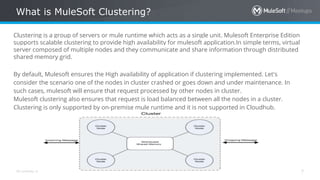
Clustering is a group of servers or mule runtime which acts as a single unit. Mulesoft Enterprise Edition
supports scalable clustering to provide high availability for mulesoft application.In simple terms, virtual
server composed of multiple nodes and they communicate and share information through distributed
shared memory grid.
By default, Mulesoft ensures the High availability of application if clustering implemented. Let's
consider the scenario one of the nodes in cluster crashed or goes down and under maintenance. In
such cases, mulesoft will ensure that request processed by other nodes in cluster.
Mulesoft clustering also ensures that request is load balanced between all the nodes in a cluster.
Clustering is only supported by on-premise mule runtime and it is not supported in Cloudhub.
All contents © MuleSoft Inc.
Benefits Of Clustering?
8
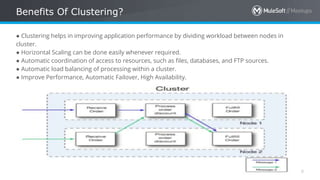
● Clustering helps in improving application performance by dividing workload between nodes in
cluster.
● Horizontal Scaling can be done easily whenever required.
● Automatic coordination of access to resources, such as files, databases, and FTP sources.
● Automatic load balancing of processing within a cluster.
● Improve Performance, Automatic Failover, High Availability.
All contents © MuleSoft Inc.
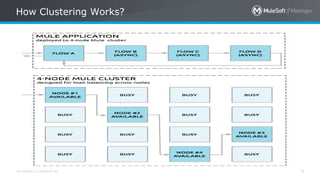
How Clustering Works?
9
All contents © MuleSoft Inc.
Clustering Types
10
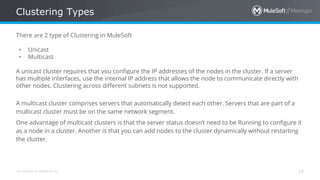
There are 2 type of Clustering in MuleSoft
• Unicast
• Multicast
A unicast cluster requires that you configure the IP addresses of the nodes in the cluster. If a server
has multiple interfaces, use the internal IP address that allows the node to communicate directly with
other nodes. Clustering across different subnets is not supported.
A multicast cluster comprises servers that automatically detect each other. Servers that are part of a
multicast cluster must be on the same network segment.
One advantage of multicast clusters is that the server status doesn’t need to be Running to configure it
as a node in a cluster. Another is that you can add nodes to the cluster dynamically without restarting
the cluster.
All contents © MuleSoft Inc.
Prerequisite For Clustering
11
● Java 8 must be installed on your machine.
● Anypoint Platform Account.
● Mule runtime engine must be running on your machines.
All contents © MuleSoft Inc.
Server Group V/S Clustering
12
Server Group and Clustering both run in multiple distributed nodes. In server group, instances of
application is isolated from each other.
In clustering, nodes are aware of each other, share common information and synchronize status.
All the servers in server group and cluster must be running on same version of mule runtime.
Implementing Okta OAuth 2.0
With MuleSoft
All contents © MuleSoft Inc.
What Okta OAuth 2.0 OIDC?
14
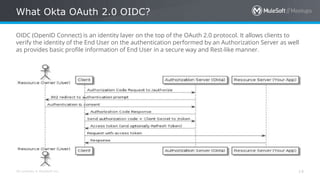
OIDC (OpenID Connect) is an identity layer on the top of the OAuth 2.0 protocol. It allows clients to
verify the identity of the End User on the authentication performed by an Authorization Server as well
as provides basic profile information of End User in a secure way and Rest-like manner.
All contents © MuleSoft Inc.
Other OAuth 2.0 Provides
15
• OKTA OAuth 2.0 OIDC
• Ping Identity Federation
• Open AM
All contents © MuleSoft Inc.
Prerequisites
16
● An Anypoint Platform Account. Click here to create one.
● An Okta Account. Click here to create one.
● An Active API on Mulesoft API Manager (API must be deployed and active on API Manager).
● API must be accessible over the developer portal or exchange.
● POSTMAN Client.
All contents © MuleSoft Inc.
OKTA Demonstration
17
We will be integration OKTA in 2 ways with MuleSoft
• OKTA as a External Identity Provider
• Dynamic Client Registration Using MuleSoft and OKTA
Implementing CI/CD Pipeline
For MuleSoft Application
All contents © MuleSoft Inc.
What is DevOps?
19
DevOps is a culture which promotes collaboration between Development and IT Operations Team to deploy code
to production faster in an automated & repeatable way.
Benefits of DevOps
- Releases/deployment can be done more frequently and quicker.
- Shorter mean time to repair.
- Cost Reduction and Reliable deployment.
- Fault Isolations.
All contents © MuleSoft Inc.
What is CI/CD?
20
Continuous Integration is development practice where developer checked in the code multiple times a day in
shared repository. Each integration is verified by automated build and automated unit testing.
Continuous Deployment is ability to move the changes including Features, Bug Fixes into the production quicker.
Benefits of CI/CD
- Quicker Releases
- Smaller Code Changes.
- Faster Mean Time To Resolution (MTTR).
- Improved Testability.
- Customer Satisfaction.
All contents © MuleSoft Inc.
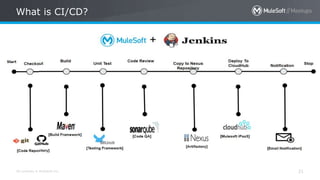
What is CI/CD?
21
All contents © MuleSoft Inc.
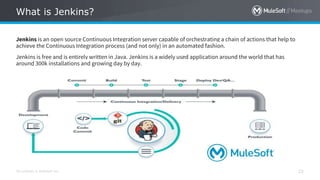
What is Jenkins?
22
Jenkins is an open source Continuous Integration server capable of orchestrating a chain of actions that help to
achieve the Continuous Integration process (and not only) in an automated fashion.
Jenkins is free and is entirely written in Java. Jenkins is a widely used application around the world that has
around 300k installations and growing day by day.
All contents © MuleSoft Inc.
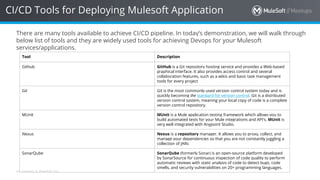
CI/CD Tools for Deploying Mulesoft Application
There are many tools available to achieve CI/CD pipeline. In today’s demonstration, we will walk through
below list of tools and they are widely used tools for achieving Devops for your Mulesoft
services/applications.
Tool Description
Github GitHub is a Git repository hosting service and provides a Web-based
graphical interface. It also provides access control and several
collaboration features, such as a wikis and basic task management
tools for every project
Git Git is the most commonly used version control system today and is
quickly becoming the standard for version control. Git is a distributed
version control system, meaning your local copy of code is a complete
version control repository.
MUnit MUnit is a Mule application testing framework which allows you to
build automated tests for your Mule integrations and API's. MUnit is
very well integrated with Anypoint Studio.
Nexus Nexus is a repository manager. It allows you to proxy, collect, and
manage your dependencies so that you are not constantly juggling a
collection of JARs
SonarQube SonarQube (formerly Sonar) is an open-source platform developed
by SonarSource for continuous inspection of code quality to perform
automatic reviews with static analysis of code to detect bugs, code
smells, and security vulnerabilities on 20+ programming languages.
All contents © MuleSoft Inc.
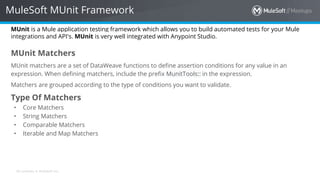
MuleSoft MUnit Framework
MUnit is a Mule application testing framework which allows you to build automated tests for your Mule
integrations and API's. MUnit is very well integrated with Anypoint Studio.
MUnit Matchers
MUnit matchers are a set of DataWeave functions to define assertion conditions for any value in an
expression. When defining matchers, include the prefix MunitTools:: in the expression.
Matchers are grouped according to the type of conditions you want to validate.
Type Of Matchers
• Core Matchers
• String Matchers
• Comparable Matchers
• Iterable and Map Matchers
All contents © MuleSoft Inc.
MUnit Core Matchers
Matcher Description Example
nullValue() Checks that the expression is null. #[MunitTools::nullValue()]
notNullValue() Checks that the expression is not null. #[MunitTools::notNullValue()]
withMediaType(String)
Checks that the expression’s media type is the one specified. #[MunitTools::withMediaType('text/xml')]
withEncoding(String) Checks that the expression’s encoding is the one specified. #[MunitTools::withEncoding('UTF-8')]
both(Matcher, Matcher) Checks that both provided matchers are successful. #[MunitTools::both(MunitTools::notNullValue(),MunitTools::equ
alTo('example'))]
either(Matcher,Matcher)
Checks that at least one of the matchers is successful. #[MunitTools::either(MunitTools::nullValue(),MunitTools::equalT
o(0))]
not(Object)
Checks if the provided matcher is not successful. #[MunitTools::not(0)]
anyOf(Array<Matcher>) Checks if any of the matchers are successful. #[MunitTools::anyOf([MunitTools::notNullValue(),MunitTools::wi
thMediaType('text/xml'),MunitTools::isEmptyString()])]
allOf(Array<Matcher>) Checks if all of the matchers are successful. #[MunitTools::allOf([MunitTools::notNullValue(),MunitTools::wit
hMediaType('text/xml'),MunitTools::isEmptyString()])]
All contents © MuleSoft Inc.
MUnit String Matchers
Matcher Description Example
containsString(String) Checks that the expression contains the specified String. #[MunitTools::containsString('example')]
startsWith(String) Checks that the expression starts with the specified String. #[MunitTools::startsWith('exam')]
endsWith(String) Checks that the expression ends with the specified String. #[MunitTools::endsWith('ple')]
isEmptyString()
Checks that the expression has zero length. #[MunitTools::isEmptyString()]
isEmptyOrNullString() Checks that the expression is null, or has zero length. #[MunitTools::isEmptyOrNullString()]
equalToIgnoringCase(String)
Checks that the expression is equal to the specified String,
ignoring case.
#[MunitTools::equalToIgnoringCase('example')]
equalToIgnoringWhiteSpace(String)
Checks that the expression is equal to the string disregarding
leading and trailing white spaces, and compression all inner
white spaces to a single space.
#[MunitTools::equalToIgnoringWhiteSpace('An Example')]
stringContainsInOrder(Array<String>) Checks that the expression contains all of the specified
substrings, regardless of the order of their appearance.
#[MunitTools::stringContainsInOrder(['an', 'example'])]
All contents © MuleSoft Inc.
MUnit Comparable Matchers
Matcher Description Example
greaterThan(Comparable) Checks that the expression is greater than the specified value. #[MunitTools::greaterThan(|2017-08-09|)]
greaterThanOrEqualTo(Comparable)
Checks that the expression is greater than or equal to the
specified value.
#[MunitTools::greaterThanOrEqualTo(20)]
lessThan(Comparable) Checks that the expression is less than to the specified value. #[MunitTools::lessThanOrEqualTo(20)]
closeTo(Number, Number)
Checks that the expression is close to the first number, using
the second number as a delta value.
In other words, checks that the expression belongs to the
range defined by the first number +/- the second number.
#[MunitTools::closeTo(1, 0.01)]
equalTo(Object) Checks that the expression is equal to a specific value. #[MunitTools::equalTo(0)]
All contents © MuleSoft Inc.
MUnit Map and Iterable Matchers
Matcher Description Example
everyItem(Matcher) Checks that every element in the expression matches the
specified matcher.
#[MunitTools::everyItem(MunitTools::notNullValue())]
hasItem(Object)
Checks that any element in the expression matches the
specified matcher.
#[MunitTools::hasItem('example')]
hasSize(Matcher|Integer) Checks that the size of the expression matches the specified
matcher.
#[MunitTools::hasSize(MUnitTools::greaterThan(2))]
isEmpty()
Checks that the expression is an empty collection. #[MunitTools::isEmpty()]
hasKey(Matcher|String) Checks that the expression has a key that matches the
specified matcher.
#[MunitTools::hasKey(MunitTools::startsWith('a'))]
hasValue(Object) Checks that the expression has a value that matches the
specified matcher.
#[MunitTools::hasValue(MunitTools::startsWith('a'))]
All contents © MuleSoft Inc.
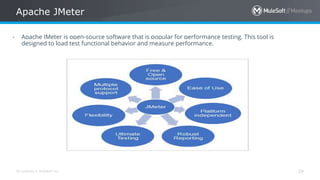
Apache JMeter
29
- Apache JMeter is open-source software that is popular for performance testing. This tool is
designed to load test functional behavior and measure performance.
All contents © MuleSoft Inc.
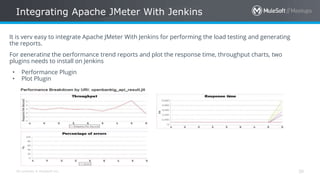
Integrating Apache JMeter With Jenkins
30
It is very easy to integrate Apache JMeter With Jenkins for performing the load testing and generating
the reports.
For generating the performance trend reports and plot the response time, throughput charts, two
plugins needs to install on Jenkins
• Performance Plugin
• Plot Plugin
All contents © MuleSoft Inc.
Postman + Newman CLI
31
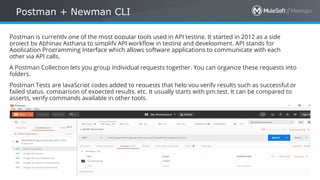
Postman is currently one of the most popular tools used in API testing. It started in 2012 as a side
project by Abhinav Asthana to simplify API workflow in testing and development. API stands for
Application Programming Interface which allows software applications to communicate with each
other via API calls.
A Postman Collection lets you group individual requests together. You can organize these requests into
folders.
Postman Tests are JavaScript codes added to requests that help you verify results such as successful or
failed status, comparison of expected results, etc. It usually starts with pm.test. It can be compared to
asserts, verify commands available in other tools.
All contents © MuleSoft Inc.
Postman + Newman CLI
32
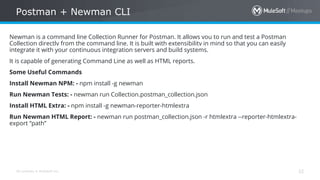
Newman is a command line Collection Runner for Postman. It allows you to run and test a Postman
Collection directly from the command line. It is built with extensibility in mind so that you can easily
integrate it with your continuous integration servers and build systems.
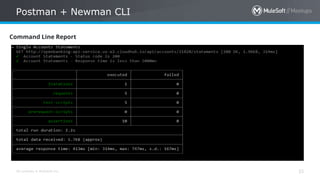
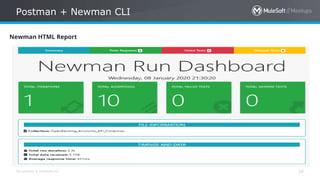
It is capable of generating Command Line as well as HTML reports.
Some Useful Commands
Install Newman NPM: - npm install -g newman
Run Newman Tests: - newman run Collection.postman_collection.json
Install HTML Extra: - npm install -g newman-reporter-htmlextra
Run Newman HTML Report: - newman run postman_collection.json -r htmlextra --reporter-htmlextra-
export “path”
All contents © MuleSoft Inc.
Postman + Newman CLI
33
Command Line Report
All contents © MuleSoft Inc.
Postman + Newman CLI
34
Newman HTML Report
All contents © MuleSoft Inc.
MuleSoft Deployment Options
35
Mulesoft provides various options for deploying your application.
- Standalone (On-premises)
- Cluster
- CloudHub
- Anypoint Runtime Fabric
- Private Cloud
All contents © MuleSoft Inc.
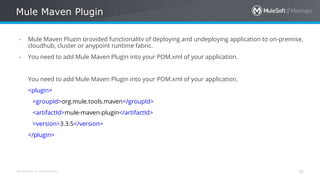
Mule Maven Plugin
36
- Mule Maven Plugin provided functionality of deploying and undeploying application to on-premise,
cloudhub, cluster or anypoint runtime fabric.
- You need to add Mule Maven Plugin into your POM.xml of your application.
You need to add Mule Maven Plugin into your POM.xml of your application.
<plugin>
<groupId>org.mule.tools.maven</groupId>
<artifactId>mule-maven-plugin</artifactId>
<version>3.3.5</version>
</plugin>
All contents © MuleSoft Inc.
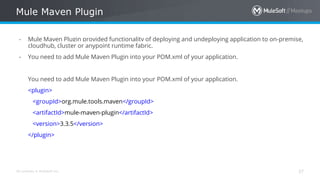
Mule Maven Plugin
37
- Mule Maven Plugin provided functionality of deploying and undeploying application to on-premise,
cloudhub, cluster or anypoint runtime fabric.
- You need to add Mule Maven Plugin into your POM.xml of your application.
You need to add Mule Maven Plugin into your POM.xml of your application.
<plugin>
<groupId>org.mule.tools.maven</groupId>
<artifactId>mule-maven-plugin</artifactId>
<version>3.3.5</version>
</plugin>
All contents © MuleSoft Inc.
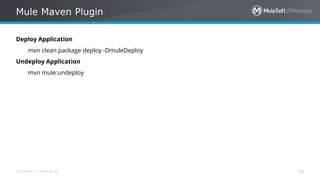
Mule Maven Plugin
38
Deploy Application
mvn clean package deploy -DmuleDeploy
Undeploy Application
mvn mule:undeploy
All contents © MuleSoft Inc.
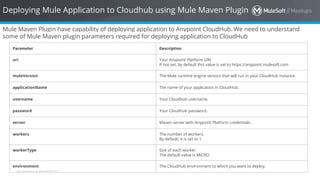
Deploying Mule Application to Cloudhub using Mule Maven Plugin
Mule Maven Plugin have capability of deploying application to Anypoint CloudHub. We need to understand
some of Mule Maven plugin parameters required for deploying application to CloudHub
Parameter Description
uri Your Anypoint Platform URI.
If not set, by default this value is set to https://anypoint.mulesoft.com
muleVersion The Mule runtime engine version that will run in your CloudHub instance.
applicationName The name of your application in CloudHub.
username Your Cloudhub username.
password Your Cloudhub password.
server Maven server with Anypoint Platform credentials.
workers The number of workers.
By default, it is set to 1
workerType Size of each worker.
The default value is MICRO.
environment The CloudHub environment to which you want to deploy.
All contents © MuleSoft Inc.
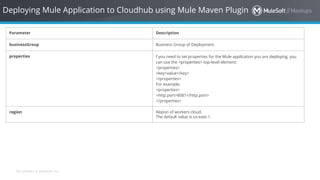
Deploying Mule Application to Cloudhub using Mule Maven Plugin
Parameter Description
businessGroup Business Group of Deployment.
properties f you need to set properties for the Mule application you are deploying, you
can use the <properties> top-level element:
<properties>
<key>value</key>
</properties>
For example:
<properties>
<http.port>8081</http.port>
</properties>
region Region of workers cloud.
The default value is us-east-1.
All contents © MuleSoft Inc.
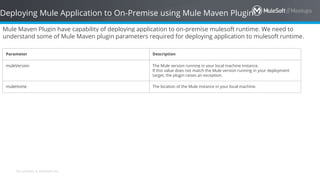
Deploying Mule Application to On-Premise using Mule Maven Plugin
Mule Maven Plugin have capability of deploying application to on-premise mulesoft runtime. We need to
understand some of Mule Maven plugin parameters required for deploying application to mulesoft runtime.
Parameter Description
muleVersion The Mule version running in your local machine instance.
If this value does not match the Mule version running in your deployment
target, the plugin raises an exception.
muleHome The location of the Mule instance in your local machine.
All contents © MuleSoft Inc. 42
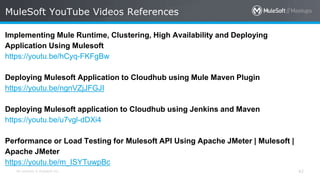
Implementing Mule Runtime, Clustering, High Availability and Deploying
Application Using Mulesoft
https://youtu.be/hCyq-FKFgBw
Deploying Mulesoft Application to Cloudhub using Mule Maven Plugin
https://youtu.be/ngnVZjJFGJI
Deploying Mulesoft application to Cloudhub using Jenkins and Maven
https://youtu.be/u7vgl-dDXi4
Performance or Load Testing for Mulesoft API Using Apache JMeter | Mulesoft |
Apache JMeter
https://youtu.be/m_ISYTuwpBc
MuleSoft YouTube Videos References
All contents © MuleSoft Inc. 43
MUnit Testing With Mulesoft | MUnit Tools | Munit - Part I
https://youtu.be/WDumeWkcLIs
MUnit Testing With Mulesoft | MUnit Tools Matchers | Munit - Part II
https://youtu.be/zwM6lqEJs1w
Configuring Jenkins CI/CD Pipeline For Mulesoft Applications | Mulesoft | GIT |
GitHub - Part I
https://youtu.be/22rd4Gz5SBU
Configuring Jenkins CI/CD Pipeline For Mulesoft Applications | Mulesoft |
CloudHub - Part II
https://youtu.be/GIln9FOnjho
MuleSoft YouTube Videos References
All contents © MuleSoft Inc. 44
Configuring Jenkins CI/CD Pipeline For Mulesoft Applications | Postman | Newman
- Part III
https://youtu.be/5PntSRhOXzQ
Configuring Jenkins CI/CD Pipeline For Mulesoft Applications | Muelsoft |
Jenkinsfile - Part IV
https://youtu.be/ca1bEIz_4sA
Configuring Jenkins CI/CD Pipeline For Mulesoft Applications | Muelsoft |
Jenkinsfile - Part V
https://youtu.be/Eh_L9bIEP9s
MuleSoft YouTube Videos References
All contents © MuleSoft Inc. 45
Encrypt Anypoint Platform password in POM with Maven to deploy application into
CloudHub | Mulesoft
https://youtu.be/Sri7ZZg3HKw
Create Postman Test Collection Suite for Mulesoft API | Mulesoft | Postman
https://youtu.be/Zi5l0-NH0cQ
API Proxy, API Manager, API Policies, SLA's, Exchange using Anypoint Platform
Using Mulesoft
https://youtu.be/W2iLLQXOMR8
Securing Mulesoft API Using Okta OAuth 2.0 OIDC | Mulesoft | Okta OAuth 2.0
OIDC
https://youtu.be/Z9NBip9FLAg
MuleSoft YouTube Videos References
All contents © MuleSoft Inc.
MuleSoft Articles References
Guide to Integrating OKTA OAuth 2.0 OIDC With Mulesoft API Anypoint Platform
(Mule 4)
https://dzone.com/articles/integrating-okta-oauth-20-oidc-with-mulesoft-anypo
Implementing Clustering With MuleSoft Runtime Manager + Anypoint
https://apisero.com/tech-tutorials/f/implementing-clustering-with-mulesoft-runtime-
manager-anypoint
Mule Maven Plugin For Deploying MuleSoft Application
https://apisero.com/tech-tutorials/f/mule-maven-plugin-for-deploying-mulesoft-
application
All contents © MuleSoft Inc.
Take a stand !
47
• Nominate yourself for
the next meetup
speaker and suggest a
topic as well.
All contents © MuleSoft Inc.
What’s next
48
• Share:
– Tweet your pictures with the hashtag #MuleMeetup #MuleSoftMeetup
– Invite your network to join: https://meetups.mulesoft.com/mumbai/
• Feedback:
– Contact your organizers Manish Yadav, Sudeshna Mitra, Akshata Sawant and Ranveer Meel
to suggest topics
– Tweet your organizers at @SudeshnaMitra14, @Manish_Kyadav, @sawantakshata02 and
@meel_Ranveer
– Contact MuleSoft at meetup@mulesoft.com for ways to improve the program
– Follow us on Instagram (mumbai_mulesoftofficialpage)
– Your Feedback is Food for us
• Our next meetup:
– Date: TBD
– Location: Mumbai
– Topic: TBD
Networking time
Introduce yourself to your neighbors!
See you next time
Please send topic suggestions to the organizer
THANK YOU
MuleSoft Clustring, Okta, CI/CD Integration with Jenkins

MuleSoft Clustring, Okta, CI/CD Integration with Jenkins

  • 1.
    [11th January 2020]:[MuleSoft Technical Demo] [Mumbai - India]
  • 2.
    All contents ©MuleSoft Inc. Agenda 2 ⮚ Introductions ⮚ MuleSoft Clustering ⮚ Implementing Okta OAuth 2.0 With MuleSoft ⮚ Implementing CI/CD Pipeline For MuleSoft Application ⮚ Networking time
  • 3.
    All contents ©MuleSoft Inc. Introductions 3 • About the organizers: – Sudeshna Mitra – Manish Yadav – Akshata Sawant – Ranveer Meel • About the sponsors: A SHOW OF HANDS: Who is new to this MeetUp?
  • 4.
    All contents ©MuleSoft Inc. Surprises! 4 • Thanks for your positive enthusiasm …You earned it ..☺ • Be geared up for the quiz sessions at the end of each modules! ☺
  • 5.
    All contents ©MuleSoft Inc. Speaker 5
  • 6.
  • 7.
    All contents ©MuleSoft Inc. What is MuleSoft Clustering? 7 Clustering is a group of servers or mule runtime which acts as a single unit. Mulesoft Enterprise Edition supports scalable clustering to provide high availability for mulesoft application.In simple terms, virtual server composed of multiple nodes and they communicate and share information through distributed shared memory grid. By default, Mulesoft ensures the High availability of application if clustering implemented. Let's consider the scenario one of the nodes in cluster crashed or goes down and under maintenance. In such cases, mulesoft will ensure that request processed by other nodes in cluster. Mulesoft clustering also ensures that request is load balanced between all the nodes in a cluster. Clustering is only supported by on-premise mule runtime and it is not supported in Cloudhub.
  • 8.
    All contents ©MuleSoft Inc. Benefits Of Clustering? 8 ● Clustering helps in improving application performance by dividing workload between nodes in cluster. ● Horizontal Scaling can be done easily whenever required. ● Automatic coordination of access to resources, such as files, databases, and FTP sources. ● Automatic load balancing of processing within a cluster. ● Improve Performance, Automatic Failover, High Availability.
  • 9.
    All contents ©MuleSoft Inc. How Clustering Works? 9
  • 10.
    All contents ©MuleSoft Inc. Clustering Types 10 There are 2 type of Clustering in MuleSoft • Unicast • Multicast A unicast cluster requires that you configure the IP addresses of the nodes in the cluster. If a server has multiple interfaces, use the internal IP address that allows the node to communicate directly with other nodes. Clustering across different subnets is not supported. A multicast cluster comprises servers that automatically detect each other. Servers that are part of a multicast cluster must be on the same network segment. One advantage of multicast clusters is that the server status doesn’t need to be Running to configure it as a node in a cluster. Another is that you can add nodes to the cluster dynamically without restarting the cluster.
  • 11.
    All contents ©MuleSoft Inc. Prerequisite For Clustering 11 ● Java 8 must be installed on your machine. ● Anypoint Platform Account. ● Mule runtime engine must be running on your machines.
  • 12.
    All contents ©MuleSoft Inc. Server Group V/S Clustering 12 Server Group and Clustering both run in multiple distributed nodes. In server group, instances of application is isolated from each other. In clustering, nodes are aware of each other, share common information and synchronize status. All the servers in server group and cluster must be running on same version of mule runtime.
  • 13.
    Implementing Okta OAuth2.0 With MuleSoft
  • 14.
    All contents ©MuleSoft Inc. What Okta OAuth 2.0 OIDC? 14 OIDC (OpenID Connect) is an identity layer on the top of the OAuth 2.0 protocol. It allows clients to verify the identity of the End User on the authentication performed by an Authorization Server as well as provides basic profile information of End User in a secure way and Rest-like manner.
  • 15.
    All contents ©MuleSoft Inc. Other OAuth 2.0 Provides 15 • OKTA OAuth 2.0 OIDC • Ping Identity Federation • Open AM
  • 16.
    All contents ©MuleSoft Inc. Prerequisites 16 ● An Anypoint Platform Account. Click here to create one. ● An Okta Account. Click here to create one. ● An Active API on Mulesoft API Manager (API must be deployed and active on API Manager). ● API must be accessible over the developer portal or exchange. ● POSTMAN Client.
  • 17.
    All contents ©MuleSoft Inc. OKTA Demonstration 17 We will be integration OKTA in 2 ways with MuleSoft • OKTA as a External Identity Provider • Dynamic Client Registration Using MuleSoft and OKTA
  • 18.
    Implementing CI/CD Pipeline ForMuleSoft Application
  • 19.
    All contents ©MuleSoft Inc. What is DevOps? 19 DevOps is a culture which promotes collaboration between Development and IT Operations Team to deploy code to production faster in an automated & repeatable way. Benefits of DevOps - Releases/deployment can be done more frequently and quicker. - Shorter mean time to repair. - Cost Reduction and Reliable deployment. - Fault Isolations.
  • 20.
    All contents ©MuleSoft Inc. What is CI/CD? 20 Continuous Integration is development practice where developer checked in the code multiple times a day in shared repository. Each integration is verified by automated build and automated unit testing. Continuous Deployment is ability to move the changes including Features, Bug Fixes into the production quicker. Benefits of CI/CD - Quicker Releases - Smaller Code Changes. - Faster Mean Time To Resolution (MTTR). - Improved Testability. - Customer Satisfaction.
  • 21.
    All contents ©MuleSoft Inc. What is CI/CD? 21
  • 22.
    All contents ©MuleSoft Inc. What is Jenkins? 22 Jenkins is an open source Continuous Integration server capable of orchestrating a chain of actions that help to achieve the Continuous Integration process (and not only) in an automated fashion. Jenkins is free and is entirely written in Java. Jenkins is a widely used application around the world that has around 300k installations and growing day by day.
  • 23.
    All contents ©MuleSoft Inc. CI/CD Tools for Deploying Mulesoft Application There are many tools available to achieve CI/CD pipeline. In today’s demonstration, we will walk through below list of tools and they are widely used tools for achieving Devops for your Mulesoft services/applications. Tool Description Github GitHub is a Git repository hosting service and provides a Web-based graphical interface. It also provides access control and several collaboration features, such as a wikis and basic task management tools for every project Git Git is the most commonly used version control system today and is quickly becoming the standard for version control. Git is a distributed version control system, meaning your local copy of code is a complete version control repository. MUnit MUnit is a Mule application testing framework which allows you to build automated tests for your Mule integrations and API's. MUnit is very well integrated with Anypoint Studio. Nexus Nexus is a repository manager. It allows you to proxy, collect, and manage your dependencies so that you are not constantly juggling a collection of JARs SonarQube SonarQube (formerly Sonar) is an open-source platform developed by SonarSource for continuous inspection of code quality to perform automatic reviews with static analysis of code to detect bugs, code smells, and security vulnerabilities on 20+ programming languages.
  • 24.
    All contents ©MuleSoft Inc. MuleSoft MUnit Framework MUnit is a Mule application testing framework which allows you to build automated tests for your Mule integrations and API's. MUnit is very well integrated with Anypoint Studio. MUnit Matchers MUnit matchers are a set of DataWeave functions to define assertion conditions for any value in an expression. When defining matchers, include the prefix MunitTools:: in the expression. Matchers are grouped according to the type of conditions you want to validate. Type Of Matchers • Core Matchers • String Matchers • Comparable Matchers • Iterable and Map Matchers
  • 25.
    All contents ©MuleSoft Inc. MUnit Core Matchers Matcher Description Example nullValue() Checks that the expression is null. #[MunitTools::nullValue()] notNullValue() Checks that the expression is not null. #[MunitTools::notNullValue()] withMediaType(String) Checks that the expression’s media type is the one specified. #[MunitTools::withMediaType('text/xml')] withEncoding(String) Checks that the expression’s encoding is the one specified. #[MunitTools::withEncoding('UTF-8')] both(Matcher, Matcher) Checks that both provided matchers are successful. #[MunitTools::both(MunitTools::notNullValue(),MunitTools::equ alTo('example'))] either(Matcher,Matcher) Checks that at least one of the matchers is successful. #[MunitTools::either(MunitTools::nullValue(),MunitTools::equalT o(0))] not(Object) Checks if the provided matcher is not successful. #[MunitTools::not(0)] anyOf(Array<Matcher>) Checks if any of the matchers are successful. #[MunitTools::anyOf([MunitTools::notNullValue(),MunitTools::wi thMediaType('text/xml'),MunitTools::isEmptyString()])] allOf(Array<Matcher>) Checks if all of the matchers are successful. #[MunitTools::allOf([MunitTools::notNullValue(),MunitTools::wit hMediaType('text/xml'),MunitTools::isEmptyString()])]
  • 26.
    All contents ©MuleSoft Inc. MUnit String Matchers Matcher Description Example containsString(String) Checks that the expression contains the specified String. #[MunitTools::containsString('example')] startsWith(String) Checks that the expression starts with the specified String. #[MunitTools::startsWith('exam')] endsWith(String) Checks that the expression ends with the specified String. #[MunitTools::endsWith('ple')] isEmptyString() Checks that the expression has zero length. #[MunitTools::isEmptyString()] isEmptyOrNullString() Checks that the expression is null, or has zero length. #[MunitTools::isEmptyOrNullString()] equalToIgnoringCase(String) Checks that the expression is equal to the specified String, ignoring case. #[MunitTools::equalToIgnoringCase('example')] equalToIgnoringWhiteSpace(String) Checks that the expression is equal to the string disregarding leading and trailing white spaces, and compression all inner white spaces to a single space. #[MunitTools::equalToIgnoringWhiteSpace('An Example')] stringContainsInOrder(Array<String>) Checks that the expression contains all of the specified substrings, regardless of the order of their appearance. #[MunitTools::stringContainsInOrder(['an', 'example'])]
  • 27.
    All contents ©MuleSoft Inc. MUnit Comparable Matchers Matcher Description Example greaterThan(Comparable) Checks that the expression is greater than the specified value. #[MunitTools::greaterThan(|2017-08-09|)] greaterThanOrEqualTo(Comparable) Checks that the expression is greater than or equal to the specified value. #[MunitTools::greaterThanOrEqualTo(20)] lessThan(Comparable) Checks that the expression is less than to the specified value. #[MunitTools::lessThanOrEqualTo(20)] closeTo(Number, Number) Checks that the expression is close to the first number, using the second number as a delta value. In other words, checks that the expression belongs to the range defined by the first number +/- the second number. #[MunitTools::closeTo(1, 0.01)] equalTo(Object) Checks that the expression is equal to a specific value. #[MunitTools::equalTo(0)]
  • 28.
    All contents ©MuleSoft Inc. MUnit Map and Iterable Matchers Matcher Description Example everyItem(Matcher) Checks that every element in the expression matches the specified matcher. #[MunitTools::everyItem(MunitTools::notNullValue())] hasItem(Object) Checks that any element in the expression matches the specified matcher. #[MunitTools::hasItem('example')] hasSize(Matcher|Integer) Checks that the size of the expression matches the specified matcher. #[MunitTools::hasSize(MUnitTools::greaterThan(2))] isEmpty() Checks that the expression is an empty collection. #[MunitTools::isEmpty()] hasKey(Matcher|String) Checks that the expression has a key that matches the specified matcher. #[MunitTools::hasKey(MunitTools::startsWith('a'))] hasValue(Object) Checks that the expression has a value that matches the specified matcher. #[MunitTools::hasValue(MunitTools::startsWith('a'))]
  • 29.
    All contents ©MuleSoft Inc. Apache JMeter 29 - Apache JMeter is open-source software that is popular for performance testing. This tool is designed to load test functional behavior and measure performance.
  • 30.
    All contents ©MuleSoft Inc. Integrating Apache JMeter With Jenkins 30 It is very easy to integrate Apache JMeter With Jenkins for performing the load testing and generating the reports. For generating the performance trend reports and plot the response time, throughput charts, two plugins needs to install on Jenkins • Performance Plugin • Plot Plugin
  • 31.
    All contents ©MuleSoft Inc. Postman + Newman CLI 31 Postman is currently one of the most popular tools used in API testing. It started in 2012 as a side project by Abhinav Asthana to simplify API workflow in testing and development. API stands for Application Programming Interface which allows software applications to communicate with each other via API calls. A Postman Collection lets you group individual requests together. You can organize these requests into folders. Postman Tests are JavaScript codes added to requests that help you verify results such as successful or failed status, comparison of expected results, etc. It usually starts with pm.test. It can be compared to asserts, verify commands available in other tools.
  • 32.
    All contents ©MuleSoft Inc. Postman + Newman CLI 32 Newman is a command line Collection Runner for Postman. It allows you to run and test a Postman Collection directly from the command line. It is built with extensibility in mind so that you can easily integrate it with your continuous integration servers and build systems. It is capable of generating Command Line as well as HTML reports. Some Useful Commands Install Newman NPM: - npm install -g newman Run Newman Tests: - newman run Collection.postman_collection.json Install HTML Extra: - npm install -g newman-reporter-htmlextra Run Newman HTML Report: - newman run postman_collection.json -r htmlextra --reporter-htmlextra- export “path”
  • 33.
    All contents ©MuleSoft Inc. Postman + Newman CLI 33 Command Line Report
  • 34.
    All contents ©MuleSoft Inc. Postman + Newman CLI 34 Newman HTML Report
  • 35.
    All contents ©MuleSoft Inc. MuleSoft Deployment Options 35 Mulesoft provides various options for deploying your application. - Standalone (On-premises) - Cluster - CloudHub - Anypoint Runtime Fabric - Private Cloud
  • 36.
    All contents ©MuleSoft Inc. Mule Maven Plugin 36 - Mule Maven Plugin provided functionality of deploying and undeploying application to on-premise, cloudhub, cluster or anypoint runtime fabric. - You need to add Mule Maven Plugin into your POM.xml of your application. You need to add Mule Maven Plugin into your POM.xml of your application. <plugin> <groupId>org.mule.tools.maven</groupId> <artifactId>mule-maven-plugin</artifactId> <version>3.3.5</version> </plugin>
  • 37.
    All contents ©MuleSoft Inc. Mule Maven Plugin 37 - Mule Maven Plugin provided functionality of deploying and undeploying application to on-premise, cloudhub, cluster or anypoint runtime fabric. - You need to add Mule Maven Plugin into your POM.xml of your application. You need to add Mule Maven Plugin into your POM.xml of your application. <plugin> <groupId>org.mule.tools.maven</groupId> <artifactId>mule-maven-plugin</artifactId> <version>3.3.5</version> </plugin>
  • 38.
    All contents ©MuleSoft Inc. Mule Maven Plugin 38 Deploy Application mvn clean package deploy -DmuleDeploy Undeploy Application mvn mule:undeploy
  • 39.
    All contents ©MuleSoft Inc. Deploying Mule Application to Cloudhub using Mule Maven Plugin Mule Maven Plugin have capability of deploying application to Anypoint CloudHub. We need to understand some of Mule Maven plugin parameters required for deploying application to CloudHub Parameter Description uri Your Anypoint Platform URI. If not set, by default this value is set to https://anypoint.mulesoft.com muleVersion The Mule runtime engine version that will run in your CloudHub instance. applicationName The name of your application in CloudHub. username Your Cloudhub username. password Your Cloudhub password. server Maven server with Anypoint Platform credentials. workers The number of workers. By default, it is set to 1 workerType Size of each worker. The default value is MICRO. environment The CloudHub environment to which you want to deploy.
  • 40.
    All contents ©MuleSoft Inc. Deploying Mule Application to Cloudhub using Mule Maven Plugin Parameter Description businessGroup Business Group of Deployment. properties f you need to set properties for the Mule application you are deploying, you can use the <properties> top-level element: <properties> <key>value</key> </properties> For example: <properties> <http.port>8081</http.port> </properties> region Region of workers cloud. The default value is us-east-1.
  • 41.
    All contents ©MuleSoft Inc. Deploying Mule Application to On-Premise using Mule Maven Plugin Mule Maven Plugin have capability of deploying application to on-premise mulesoft runtime. We need to understand some of Mule Maven plugin parameters required for deploying application to mulesoft runtime. Parameter Description muleVersion The Mule version running in your local machine instance. If this value does not match the Mule version running in your deployment target, the plugin raises an exception. muleHome The location of the Mule instance in your local machine.
  • 42.
    All contents ©MuleSoft Inc. 42 Implementing Mule Runtime, Clustering, High Availability and Deploying Application Using Mulesoft https://youtu.be/hCyq-FKFgBw Deploying Mulesoft Application to Cloudhub using Mule Maven Plugin https://youtu.be/ngnVZjJFGJI Deploying Mulesoft application to Cloudhub using Jenkins and Maven https://youtu.be/u7vgl-dDXi4 Performance or Load Testing for Mulesoft API Using Apache JMeter | Mulesoft | Apache JMeter https://youtu.be/m_ISYTuwpBc MuleSoft YouTube Videos References
  • 43.
    All contents ©MuleSoft Inc. 43 MUnit Testing With Mulesoft | MUnit Tools | Munit - Part I https://youtu.be/WDumeWkcLIs MUnit Testing With Mulesoft | MUnit Tools Matchers | Munit - Part II https://youtu.be/zwM6lqEJs1w Configuring Jenkins CI/CD Pipeline For Mulesoft Applications | Mulesoft | GIT | GitHub - Part I https://youtu.be/22rd4Gz5SBU Configuring Jenkins CI/CD Pipeline For Mulesoft Applications | Mulesoft | CloudHub - Part II https://youtu.be/GIln9FOnjho MuleSoft YouTube Videos References
  • 44.
    All contents ©MuleSoft Inc. 44 Configuring Jenkins CI/CD Pipeline For Mulesoft Applications | Postman | Newman - Part III https://youtu.be/5PntSRhOXzQ Configuring Jenkins CI/CD Pipeline For Mulesoft Applications | Muelsoft | Jenkinsfile - Part IV https://youtu.be/ca1bEIz_4sA Configuring Jenkins CI/CD Pipeline For Mulesoft Applications | Muelsoft | Jenkinsfile - Part V https://youtu.be/Eh_L9bIEP9s MuleSoft YouTube Videos References
  • 45.
    All contents ©MuleSoft Inc. 45 Encrypt Anypoint Platform password in POM with Maven to deploy application into CloudHub | Mulesoft https://youtu.be/Sri7ZZg3HKw Create Postman Test Collection Suite for Mulesoft API | Mulesoft | Postman https://youtu.be/Zi5l0-NH0cQ API Proxy, API Manager, API Policies, SLA's, Exchange using Anypoint Platform Using Mulesoft https://youtu.be/W2iLLQXOMR8 Securing Mulesoft API Using Okta OAuth 2.0 OIDC | Mulesoft | Okta OAuth 2.0 OIDC https://youtu.be/Z9NBip9FLAg MuleSoft YouTube Videos References
  • 46.
    All contents ©MuleSoft Inc. MuleSoft Articles References Guide to Integrating OKTA OAuth 2.0 OIDC With Mulesoft API Anypoint Platform (Mule 4) https://dzone.com/articles/integrating-okta-oauth-20-oidc-with-mulesoft-anypo Implementing Clustering With MuleSoft Runtime Manager + Anypoint https://apisero.com/tech-tutorials/f/implementing-clustering-with-mulesoft-runtime- manager-anypoint Mule Maven Plugin For Deploying MuleSoft Application https://apisero.com/tech-tutorials/f/mule-maven-plugin-for-deploying-mulesoft- application
  • 47.
    All contents ©MuleSoft Inc. Take a stand ! 47 • Nominate yourself for the next meetup speaker and suggest a topic as well.
  • 48.
    All contents ©MuleSoft Inc. What’s next 48 • Share: – Tweet your pictures with the hashtag #MuleMeetup #MuleSoftMeetup – Invite your network to join: https://meetups.mulesoft.com/mumbai/ • Feedback: – Contact your organizers Manish Yadav, Sudeshna Mitra, Akshata Sawant and Ranveer Meel to suggest topics – Tweet your organizers at @SudeshnaMitra14, @Manish_Kyadav, @sawantakshata02 and @meel_Ranveer – Contact MuleSoft at meetup@mulesoft.com for ways to improve the program – Follow us on Instagram (mumbai_mulesoftofficialpage) – Your Feedback is Food for us • Our next meetup: – Date: TBD – Location: Mumbai – Topic: TBD
  • 49.
  • 50.
    See you nexttime Please send topic suggestions to the organizer
  • 51.