


25th May,2019: Non-Blocking Operations In Mule 4,Thread Management
and Auto Tuning in Mule 4,Deep Dive With Mule 4
Mumbai - India
All contents © MuleSoft Inc.
Agenda
2
2:00 PM Introduction
2:30 PM Technical Session : Non-Blocking Operations In
Mule 4,Thread Management and Auto Tuning in
Mule 4,Deep Dive With Mule 4
3:30 PM Technical Session and Demo : Error Handling in
Mule 4
4:30 PM Break: Tea, Coffee and Snack
5:00 PM Networking
5:30 PM Wrap-up and Plan For Next Meetup
All contents © MuleSoft Inc.
Agenda
3
• Introductions
• What’s new with Mule 4
• New Message Structure and Transformation and data Simplified
• DataWeave 2.0 and Seamless Data Access
• Non-blocking operations in Mule 4
• Automatic back pressure in Mule 4
• Manual back pressure in Mule 4
• Thread Management and Auto-tuning
• Error Handling With Mule 4
• Mule 3 Complexity Flow Vs Mule 4 Productivity Flow
All contents © MuleSoft Inc.
Introduction : Organizer, Speaker and You
4
A SHOW OF HANDS:
Who is new to this Meetup?
• About the organizer:
– Sudeshna Mitra
– Manish Yadav
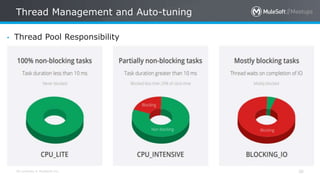
– Ranveer Meel
• About the partner/sponser:
– MuleSoft
All contents © MuleSoft Inc.
Speakers
5
All contents © MuleSoft Inc.
Surprises!
6
• Thanks for your positive
enthusiasm …You earned
it ..
• Be geared up for the
quiz sessions at the end
of each modules! 
With Mule 4
What’s New
All contents © MuleSoft Inc.
What’s New With Mule 4?
8
• Improving speed of delivery and accelerating developer on-ramp
through a simplified language, error handling, and event and
message model.
• Generating connectors automatically from RAML specs with REST
connect.
• Simplifying upgrades with class loader isolation.
• Mule 4 ships with a new reactive, non-blocking execution engine.
• Users no longer need to convert data into a set of objects to access
it.
• Error Handling - Easier and more powerful error handling with a new
Try scope.
All contents © MuleSoft Inc.
What’s New With Mule 4
9
• Expression language - The Mule Expression Language has been
replaced with the DataWeave language so that you work with data
and learn Mule more easily.
• DataWeave - DataWeave includes minor changes to simplify the
syntax and make it easier to learn.
• Studio 7 - Features a simplified palette, improved Maven integration,
and many other usability improvements.
• Runtime engine - The internal execution engine has been updated
with a new self-tuning and non-blocking reactive engine. This allows
for better performance and scalability out-of-the-box.
All contents © MuleSoft Inc.
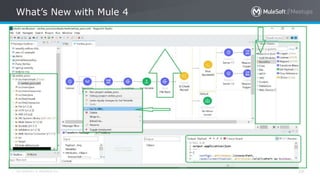
What’s New with Mule 4
10
All contents © MuleSoft Inc.
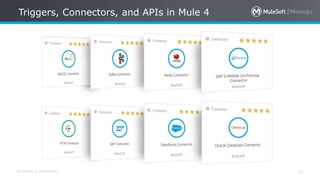
Triggers, Connectors, and APIs in Mule 4
11
All contents © MuleSoft Inc.
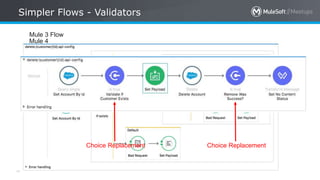
Simpler Flows - Validators
Mule 3 Flow
Mule 4
Choice Replacement Choice Replacement
All contents © MuleSoft Inc.
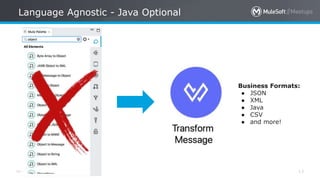
Language Agnostic - Java Optional
13
Business Formats:
● JSON
● XML
● Java
● CSV
● and more!
Mule 4 Event Model
New Message Structure
All contents © MuleSoft Inc.
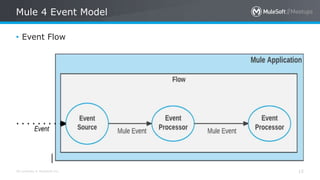
Mule 4 Event Model
15
• Event Flow
All contents © MuleSoft Inc.
Event and Message
16
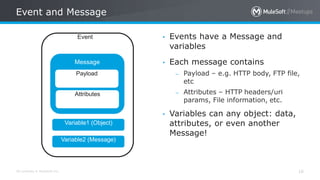
• Events have a Message and
variables
• Each message contains
– Payload – e.g. HTTP body, FTP file,
etc
– Attributes – HTTP headers/uri
params, File information, etc.
• Variables can any object: data,
attributes, or even another
Message!
Message
Event
Payload
Attributes
Variable1 (Object)
Variable2 (Message)
All contents © MuleSoft Inc.
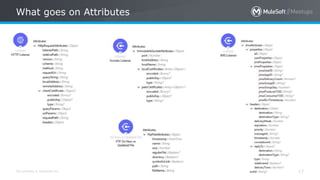
What goes on Attributes
17
All contents © MuleSoft Inc.
Transformation and Data Simplified
18
• Formal type system defined. Types can be
– Binary
– CSV
– JSON
– XML
– Object (and sub types – List, Attributes, etc)
– Scalar – Number, String, etc.
• Binary representation is transparent. Don’t worry about
InputStream/byte[]/etc
• If you feel the need to do Object to Byte Array/String/etc –
you’re doing it wrong or it’s a bug.
With Mule 4
DataWeave 2.0
All contents © MuleSoft Inc.
DataWeave 2.0
20
• Mule 4 introduces DataWeave as the default expression
language,replacing Mule Expression Language (MEL) with a scripting
and transformation engine.
• Java interoperability: Static methods can be executed through
DataWeave.
• Simplified syntax: All operators are now functions, making
DataWeave easier to learn.
• New advanced capabilities: Call Java functions directly,use multi-line
comments, and define function types and variable types with type
inference
All contents © MuleSoft Inc.
DataWeave 2.0
21
• Default expression language of Mule 4.
• More supported data formats such as “application/x-www-
formurlencoded”, and “multipart/*”.
• Data extraction without explicit data conversion.
• More functions and operations for data manipulations
All contents © MuleSoft Inc.
Simplified DataWeave
22
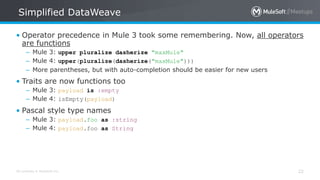
• Operator precedence in Mule 3 took some remembering. Now, all operators
are functions
– Mule 3: upper pluralize dasherize "maxMule"
– Mule 4: upper(pluralize(dasherize("maxMule")))
– More parentheses, but with auto-completion should be easier for new users
• Traits are now functions too
– Mule 3: payload is :empty
– Mule 4: isEmpty(payload)
• Pascal style type names
– Mule 3: payload.foo as :string
– Mule 4: payload.foo as String
All contents © MuleSoft Inc.
DataWeave Enhancements
23
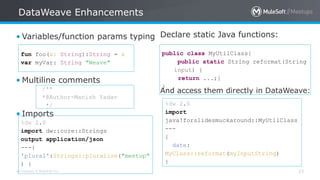
• Variables/function params typing
• Multiline comments
• Imports
%dw 2.0
import dw::core::Strings
output application/json
---{
'plural':Strings::pluralize("meetup"
) }
/**
*@Author-Manish Yadav
*/
fun foo(x: String):String = x
var myVar: String "Weave"
Declare static Java functions:
And access them directly in DataWeave:
public class MyUtilClass{
public static String reformat(String
input) {
return ...;}
}
%dw 2.0
import
java!forslidesmuckaround::MyUtilClass
---
{
date:
MyClass::reformat(myInputString)
}
All contents © MuleSoft Inc.
Seamless Data Access
24
What do you think Here.
• Java Knowledge required ?
• Always Conversion required?
• Access of Payload with transformation?
payload.email
match /([a-z]*)@([a-
z]*).com/
payload map {
name: $.name,
dob: $.dateOfBirth as
:date, title:
lookup($.titleCode),
…
}
All contents © MuleSoft Inc.
Iterating a JSON Array
25
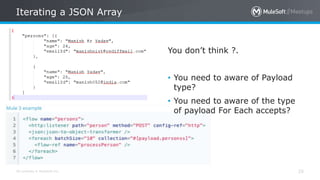
You don’t think ?.
• You need to aware of Payload
type?
• You need to aware of the type
of payload For Each accepts?
All contents © MuleSoft Inc.
Iterating a JSON Array
26
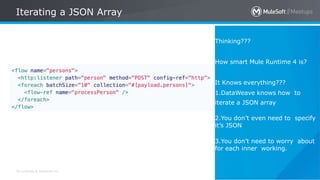
Thinking???
How smart Mule Runtime 4 is?
It Knows everything???
1.DataWeave knows how to
iterate a JSON array
2.You don’t even need to specify
it’s JSON
3.You don’t need to worry about
for each inner working.
With Mule 4
No More Message Enricher
All contents © MuleSoft Inc.
Enrichment: Think Different??
28
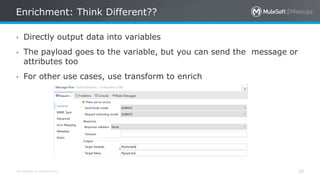
• Directly output data into variables
• The payload goes to the variable, but you can send the message or
attributes too
• For other use cases, use transform to enrich
Mule 4
Non-blocking operations in
All contents © MuleSoft Inc.
Non-blocking operations With Mule 4
30
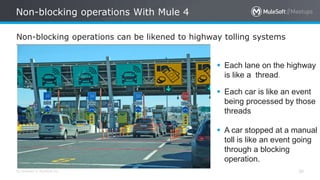
Non-blocking operations can be likened to highway tolling systems
 Each lane on the highway
is like a thread.
 Each car is like an event
being processed by those
threads
 A car stopped at a manual
toll is like an event going
through a blocking
operation.
All contents © MuleSoft Inc.
Non-blocking operations With Mule 4
31
• The e-tolls in contrast allow you to drive straight through. These are
like the non-blocking HTTP Requester.
• It sends off requests on one thread but that same thread is
immediately freed up and does not wait for a response from the
server.
• The net-effect is greater concurrency and throughput–more traffic
flowing on the highway
• To avoid performance problems due to incorrect processing strategy
configurations.
• Every flow always uses a non-blocking processing strategy, and
there is no need to configure processing strategies anymore.
• There is a single, global thread pool for all flows.
All contents © MuleSoft Inc.
Automatic back pressure in Mule 4
32
• Mule 4 applications are automatically configured so that the event
source receives a back pressure signal when all threads are currently
executing and no free threads remain in a required thread pool.
• In practical terms this will trigger the HTTP Listener, for example, to
respond with a 503–“Server busy”,
• out of Memory errors are avoided as a result of this configuration.
This is one the biggest advantage of Mule 4.
All contents © MuleSoft Inc.
Manual back pressure in Mule 4
33
• Mule developers can also configure each event processor to signal
back pressure to the event source through the “maxConcurrency”
attribute.
• This configuration affects the number of events that can pass
through the event processor per second.
• You might set it to 1(“maxConcurrency=1”) to produce the same
behavior as the synchronous processing strategy in Mule 3.
• You can also use it to stop accepting new work while the given
number of requests are getting processed.
in Mule 4
Thread Management and Auto-tuning
All contents © MuleSoft Inc.
Thread Management and Auto-tuning
35
• Mule 4 eradicates the need for manual thread pool configuration as this is
done automatically by the Mule runtime.
• Thread pools are no longer configurable at the level of a Mule application.
• All three are managed by the Mule runtime and shared across all
applications deployed to that runtime.
• A running Mule application will pull threads from each of those pools as
events pass through its processors. The consequence of this is that a
single flow may run in multiple threads.
• We now have three centralized pools
1. CPU_INTENSIVE
2. CPU_LITE
3. BLOCKING_IO
All contents © MuleSoft Inc.
Thread Management and Auto-tuning
36
• Thread Pool Responsibility
All contents © MuleSoft Inc.
Thread Management and Auto-tuning
37
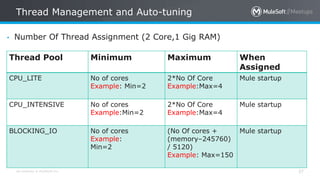
• Number Of Thread Assignment (2 Core,1 Gig RAM)
Thread Pool Minimum Maximum When
Assigned
CPU_LITE No of cores
Example: Min=2
2*No Of Core
Example:Max=4
Mule startup
CPU_INTENSIVE No of cores
Example:Min=2
2*No Of Core
Example:Max=4
Mule startup
BLOCKING_IO No of cores
Example:
Min=2
(No Of cores +
(memory–245760)
/ 5120)
Example: Max=150
Mule startup
All contents © MuleSoft Inc.
Thread Management and Auto-tuning
38
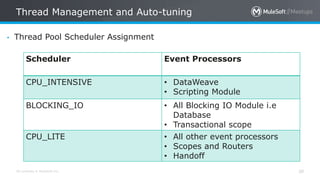
• Thread Pool Scheduler Assignment
Scheduler Event Processors
CPU_INTENSIVE • DataWeave
• Scripting Module
BLOCKING_IO • All Blocking IO Module i.e
Database
• Transactional scope
CPU_LITE • All other event processors
• Scopes and Routers
• Handoff
All contents © MuleSoft Inc.
Thread Management and Auto-tuning
39
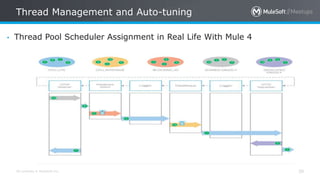
• Thread Pool Scheduler Assignment in Real Life With Mule 4
With Mule 4
Error Handling
All contents © MuleSoft Inc.
Simplified error handling and try scope
41
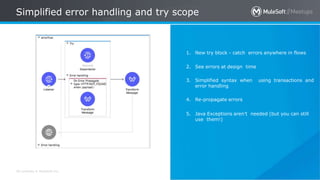
1. New try block - catch errors anywhere in flows
2. See errors at design time
3. Simplified syntax when using transactions and
error handling
4. Re-propagate errors
5. Java Exceptions aren’t needed (but you can still
use them!)
All contents © MuleSoft Inc.
Simplified error handling and try scope
42
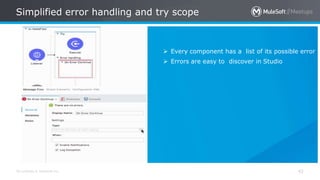
 Every component has a list of its possible error
 Errors are easy to discover in Studio
All contents © MuleSoft Inc.
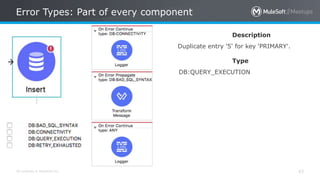
Error Types: Part of every component
43
Description
Duplicate entry '5' for key 'PRIMARY'.
Type
DB:QUERY_EXECUTION
All contents © MuleSoft Inc.
Error Handler
44
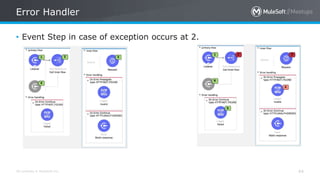
• Event Step in case of exception occurs at 2.
All contents © MuleSoft Inc.
Error Handler
45
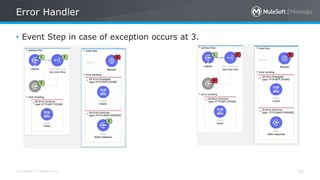
• Event Step in case of exception occurs at 3.
All contents © MuleSoft Inc.
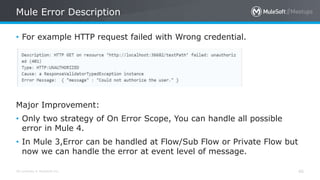
Mule Error Description
46
• For example HTTP request failed with Wrong credential.
Major Improvement:
• Only two strategy of On Error Scope, You can handle all possible
error in Mule 4.
• In Mule 3,Error can be handled at Flow/Sub Flow or Private Flow but
now we can handle the error at event level of message.
Mule 4 Runtime
Self Tuning Engine
All contents © MuleSoft Inc.
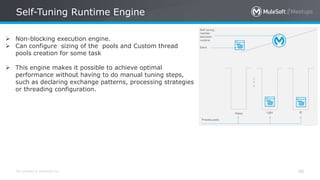
Self-Tuning Runtime Engine
48
 Non-blocking execution engine.
 Can configure sizing of the pools and Custom thread
pools creation for some task
 This engine makes it possible to achieve optimal
performance without having to do manual tuning steps,
such as declaring exchange patterns, processing strategies
or threading configuration.
All contents © MuleSoft Inc.
Self-tuning runtime engine
49
All contents © MuleSoft Inc.
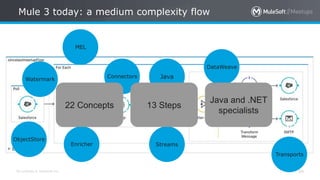
Mule 3 today: a medium complexity flow
50
ObjectStore
Transports
JavaWatermark
Streams
Connectors
Enricher
DataWeave
22 Concepts 13 Steps
Java and .NET
specialists
MEL
All contents © MuleSoft Inc.
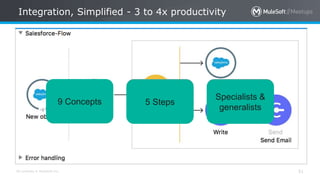
Integration, Simplified - 3 to 4x productivity
51
Java & SFDC
specialists
13 Steps22 Concepts9 Concepts 5 Steps
Specialists &
generalists
All contents © MuleSoft Inc.
Take a stand !
52
• Nominate yourself for
the next meetup speaker
and suggest a topic as
well.
All contents © MuleSoft Inc.
What’s next
53
• Share:
– Tweet your pictures with the hashtag #MuleMeetup #MuleSoftMeetup
– Invite your network to join: https://meetups.mulesoft.com/mumbai/
• Feedback:
– Contact your organizers Ranveer Meel and Sudeshna Mitra to suggest topics
– Tweet your organizers at @SudeshnaMitra14, @Manish_Kyadav and @meel_Ranveer
– Contact MuleSoft at meetup@mulesoft.com for ways to improve the program
– Follow us on Instagram (mumbai_mulesoftofficialpage)
– Your Feedback is Food for us
• Our next meetup:
– Date: TBD
– Location: Mumbai
– Topic: TBD
See you next time
Please send topic suggestions to the organizer
THANK YOU

MuleSoft Meetup Mumbai Mule 4 Presentation Slide

  • 1.
    25th May,2019: Non-BlockingOperations In Mule 4,Thread Management and Auto Tuning in Mule 4,Deep Dive With Mule 4 Mumbai - India
  • 2.
    All contents ©MuleSoft Inc. Agenda 2 2:00 PM Introduction 2:30 PM Technical Session : Non-Blocking Operations In Mule 4,Thread Management and Auto Tuning in Mule 4,Deep Dive With Mule 4 3:30 PM Technical Session and Demo : Error Handling in Mule 4 4:30 PM Break: Tea, Coffee and Snack 5:00 PM Networking 5:30 PM Wrap-up and Plan For Next Meetup
  • 3.
    All contents ©MuleSoft Inc. Agenda 3 • Introductions • What’s new with Mule 4 • New Message Structure and Transformation and data Simplified • DataWeave 2.0 and Seamless Data Access • Non-blocking operations in Mule 4 • Automatic back pressure in Mule 4 • Manual back pressure in Mule 4 • Thread Management and Auto-tuning • Error Handling With Mule 4 • Mule 3 Complexity Flow Vs Mule 4 Productivity Flow
  • 4.
    All contents ©MuleSoft Inc. Introduction : Organizer, Speaker and You 4 A SHOW OF HANDS: Who is new to this Meetup? • About the organizer: – Sudeshna Mitra – Manish Yadav – Ranveer Meel • About the partner/sponser: – MuleSoft
  • 5.
    All contents ©MuleSoft Inc. Speakers 5
  • 6.
    All contents ©MuleSoft Inc. Surprises! 6 • Thanks for your positive enthusiasm …You earned it .. • Be geared up for the quiz sessions at the end of each modules! 
  • 7.
  • 8.
    All contents ©MuleSoft Inc. What’s New With Mule 4? 8 • Improving speed of delivery and accelerating developer on-ramp through a simplified language, error handling, and event and message model. • Generating connectors automatically from RAML specs with REST connect. • Simplifying upgrades with class loader isolation. • Mule 4 ships with a new reactive, non-blocking execution engine. • Users no longer need to convert data into a set of objects to access it. • Error Handling - Easier and more powerful error handling with a new Try scope.
  • 9.
    All contents ©MuleSoft Inc. What’s New With Mule 4 9 • Expression language - The Mule Expression Language has been replaced with the DataWeave language so that you work with data and learn Mule more easily. • DataWeave - DataWeave includes minor changes to simplify the syntax and make it easier to learn. • Studio 7 - Features a simplified palette, improved Maven integration, and many other usability improvements. • Runtime engine - The internal execution engine has been updated with a new self-tuning and non-blocking reactive engine. This allows for better performance and scalability out-of-the-box.
  • 10.
    All contents ©MuleSoft Inc. What’s New with Mule 4 10
  • 11.
    All contents ©MuleSoft Inc. Triggers, Connectors, and APIs in Mule 4 11
  • 12.
    All contents ©MuleSoft Inc. Simpler Flows - Validators Mule 3 Flow Mule 4 Choice Replacement Choice Replacement
  • 13.
    All contents ©MuleSoft Inc. Language Agnostic - Java Optional 13 Business Formats: ● JSON ● XML ● Java ● CSV ● and more!
  • 14.
    Mule 4 EventModel New Message Structure
  • 15.
    All contents ©MuleSoft Inc. Mule 4 Event Model 15 • Event Flow
  • 16.
    All contents ©MuleSoft Inc. Event and Message 16 • Events have a Message and variables • Each message contains – Payload – e.g. HTTP body, FTP file, etc – Attributes – HTTP headers/uri params, File information, etc. • Variables can any object: data, attributes, or even another Message! Message Event Payload Attributes Variable1 (Object) Variable2 (Message)
  • 17.
    All contents ©MuleSoft Inc. What goes on Attributes 17
  • 18.
    All contents ©MuleSoft Inc. Transformation and Data Simplified 18 • Formal type system defined. Types can be – Binary – CSV – JSON – XML – Object (and sub types – List, Attributes, etc) – Scalar – Number, String, etc. • Binary representation is transparent. Don’t worry about InputStream/byte[]/etc • If you feel the need to do Object to Byte Array/String/etc – you’re doing it wrong or it’s a bug.
  • 19.
  • 20.
    All contents ©MuleSoft Inc. DataWeave 2.0 20 • Mule 4 introduces DataWeave as the default expression language,replacing Mule Expression Language (MEL) with a scripting and transformation engine. • Java interoperability: Static methods can be executed through DataWeave. • Simplified syntax: All operators are now functions, making DataWeave easier to learn. • New advanced capabilities: Call Java functions directly,use multi-line comments, and define function types and variable types with type inference
  • 21.
    All contents ©MuleSoft Inc. DataWeave 2.0 21 • Default expression language of Mule 4. • More supported data formats such as “application/x-www- formurlencoded”, and “multipart/*”. • Data extraction without explicit data conversion. • More functions and operations for data manipulations
  • 22.
    All contents ©MuleSoft Inc. Simplified DataWeave 22 • Operator precedence in Mule 3 took some remembering. Now, all operators are functions – Mule 3: upper pluralize dasherize "maxMule" – Mule 4: upper(pluralize(dasherize("maxMule"))) – More parentheses, but with auto-completion should be easier for new users • Traits are now functions too – Mule 3: payload is :empty – Mule 4: isEmpty(payload) • Pascal style type names – Mule 3: payload.foo as :string – Mule 4: payload.foo as String
  • 23.
    All contents ©MuleSoft Inc. DataWeave Enhancements 23 • Variables/function params typing • Multiline comments • Imports %dw 2.0 import dw::core::Strings output application/json ---{ 'plural':Strings::pluralize("meetup" ) } /** *@Author-Manish Yadav */ fun foo(x: String):String = x var myVar: String "Weave" Declare static Java functions: And access them directly in DataWeave: public class MyUtilClass{ public static String reformat(String input) { return ...;} } %dw 2.0 import java!forslidesmuckaround::MyUtilClass --- { date: MyClass::reformat(myInputString) }
  • 24.
    All contents ©MuleSoft Inc. Seamless Data Access 24 What do you think Here. • Java Knowledge required ? • Always Conversion required? • Access of Payload with transformation? payload.email match /([a-z]*)@([a- z]*).com/ payload map { name: $.name, dob: $.dateOfBirth as :date, title: lookup($.titleCode), … }
  • 25.
    All contents ©MuleSoft Inc. Iterating a JSON Array 25 You don’t think ?. • You need to aware of Payload type? • You need to aware of the type of payload For Each accepts?
  • 26.
    All contents ©MuleSoft Inc. Iterating a JSON Array 26 Thinking??? How smart Mule Runtime 4 is? It Knows everything??? 1.DataWeave knows how to iterate a JSON array 2.You don’t even need to specify it’s JSON 3.You don’t need to worry about for each inner working.
  • 27.
    With Mule 4 NoMore Message Enricher
  • 28.
    All contents ©MuleSoft Inc. Enrichment: Think Different?? 28 • Directly output data into variables • The payload goes to the variable, but you can send the message or attributes too • For other use cases, use transform to enrich
  • 29.
  • 30.
    All contents ©MuleSoft Inc. Non-blocking operations With Mule 4 30 Non-blocking operations can be likened to highway tolling systems  Each lane on the highway is like a thread.  Each car is like an event being processed by those threads  A car stopped at a manual toll is like an event going through a blocking operation.
  • 31.
    All contents ©MuleSoft Inc. Non-blocking operations With Mule 4 31 • The e-tolls in contrast allow you to drive straight through. These are like the non-blocking HTTP Requester. • It sends off requests on one thread but that same thread is immediately freed up and does not wait for a response from the server. • The net-effect is greater concurrency and throughput–more traffic flowing on the highway • To avoid performance problems due to incorrect processing strategy configurations. • Every flow always uses a non-blocking processing strategy, and there is no need to configure processing strategies anymore. • There is a single, global thread pool for all flows.
  • 32.
    All contents ©MuleSoft Inc. Automatic back pressure in Mule 4 32 • Mule 4 applications are automatically configured so that the event source receives a back pressure signal when all threads are currently executing and no free threads remain in a required thread pool. • In practical terms this will trigger the HTTP Listener, for example, to respond with a 503–“Server busy”, • out of Memory errors are avoided as a result of this configuration. This is one the biggest advantage of Mule 4.
  • 33.
    All contents ©MuleSoft Inc. Manual back pressure in Mule 4 33 • Mule developers can also configure each event processor to signal back pressure to the event source through the “maxConcurrency” attribute. • This configuration affects the number of events that can pass through the event processor per second. • You might set it to 1(“maxConcurrency=1”) to produce the same behavior as the synchronous processing strategy in Mule 3. • You can also use it to stop accepting new work while the given number of requests are getting processed.
  • 34.
    in Mule 4 ThreadManagement and Auto-tuning
  • 35.
    All contents ©MuleSoft Inc. Thread Management and Auto-tuning 35 • Mule 4 eradicates the need for manual thread pool configuration as this is done automatically by the Mule runtime. • Thread pools are no longer configurable at the level of a Mule application. • All three are managed by the Mule runtime and shared across all applications deployed to that runtime. • A running Mule application will pull threads from each of those pools as events pass through its processors. The consequence of this is that a single flow may run in multiple threads. • We now have three centralized pools 1. CPU_INTENSIVE 2. CPU_LITE 3. BLOCKING_IO
  • 36.
    All contents ©MuleSoft Inc. Thread Management and Auto-tuning 36 • Thread Pool Responsibility
  • 37.
    All contents ©MuleSoft Inc. Thread Management and Auto-tuning 37 • Number Of Thread Assignment (2 Core,1 Gig RAM) Thread Pool Minimum Maximum When Assigned CPU_LITE No of cores Example: Min=2 2*No Of Core Example:Max=4 Mule startup CPU_INTENSIVE No of cores Example:Min=2 2*No Of Core Example:Max=4 Mule startup BLOCKING_IO No of cores Example: Min=2 (No Of cores + (memory–245760) / 5120) Example: Max=150 Mule startup
  • 38.
    All contents ©MuleSoft Inc. Thread Management and Auto-tuning 38 • Thread Pool Scheduler Assignment Scheduler Event Processors CPU_INTENSIVE • DataWeave • Scripting Module BLOCKING_IO • All Blocking IO Module i.e Database • Transactional scope CPU_LITE • All other event processors • Scopes and Routers • Handoff
  • 39.
    All contents ©MuleSoft Inc. Thread Management and Auto-tuning 39 • Thread Pool Scheduler Assignment in Real Life With Mule 4
  • 40.
  • 41.
    All contents ©MuleSoft Inc. Simplified error handling and try scope 41 1. New try block - catch errors anywhere in flows 2. See errors at design time 3. Simplified syntax when using transactions and error handling 4. Re-propagate errors 5. Java Exceptions aren’t needed (but you can still use them!)
  • 42.
    All contents ©MuleSoft Inc. Simplified error handling and try scope 42  Every component has a list of its possible error  Errors are easy to discover in Studio
  • 43.
    All contents ©MuleSoft Inc. Error Types: Part of every component 43 Description Duplicate entry '5' for key 'PRIMARY'. Type DB:QUERY_EXECUTION
  • 44.
    All contents ©MuleSoft Inc. Error Handler 44 • Event Step in case of exception occurs at 2.
  • 45.
    All contents ©MuleSoft Inc. Error Handler 45 • Event Step in case of exception occurs at 3.
  • 46.
    All contents ©MuleSoft Inc. Mule Error Description 46 • For example HTTP request failed with Wrong credential. Major Improvement: • Only two strategy of On Error Scope, You can handle all possible error in Mule 4. • In Mule 3,Error can be handled at Flow/Sub Flow or Private Flow but now we can handle the error at event level of message.
  • 47.
    Mule 4 Runtime SelfTuning Engine
  • 48.
    All contents ©MuleSoft Inc. Self-Tuning Runtime Engine 48  Non-blocking execution engine.  Can configure sizing of the pools and Custom thread pools creation for some task  This engine makes it possible to achieve optimal performance without having to do manual tuning steps, such as declaring exchange patterns, processing strategies or threading configuration.
  • 49.
    All contents ©MuleSoft Inc. Self-tuning runtime engine 49
  • 50.
    All contents ©MuleSoft Inc. Mule 3 today: a medium complexity flow 50 ObjectStore Transports JavaWatermark Streams Connectors Enricher DataWeave 22 Concepts 13 Steps Java and .NET specialists MEL
  • 51.
    All contents ©MuleSoft Inc. Integration, Simplified - 3 to 4x productivity 51 Java & SFDC specialists 13 Steps22 Concepts9 Concepts 5 Steps Specialists & generalists
  • 52.
    All contents ©MuleSoft Inc. Take a stand ! 52 • Nominate yourself for the next meetup speaker and suggest a topic as well.
  • 53.
    All contents ©MuleSoft Inc. What’s next 53 • Share: – Tweet your pictures with the hashtag #MuleMeetup #MuleSoftMeetup – Invite your network to join: https://meetups.mulesoft.com/mumbai/ • Feedback: – Contact your organizers Ranveer Meel and Sudeshna Mitra to suggest topics – Tweet your organizers at @SudeshnaMitra14, @Manish_Kyadav and @meel_Ranveer – Contact MuleSoft at meetup@mulesoft.com for ways to improve the program – Follow us on Instagram (mumbai_mulesoftofficialpage) – Your Feedback is Food for us • Our next meetup: – Date: TBD – Location: Mumbai – Topic: TBD
  • 54.
    See you nexttime Please send topic suggestions to the organizer
  • 55.

Editor's Notes

  • #12 You can also automatically generate a connector from it’s API specification when published to Exchange. We have updated and revamped all connectors. For example, File and FTP connectors have also been significantly enhanced, providing users with the ability to append files, and create directories, and perform other operations. Anypoint Connectors now include new “triggers” for Mule flows. Triggers: Rather than needing to configure logic to perform scheduled queries against target systems, the connector itself contains built-in logic to listen for data changes, such as when a new database row is created, a Salesforce lead is changed, or a file is created.   Anypoint Connector updates Triggers support for: Salesforce Sftp Ftp DB (Email - tbd, NetSuite - tbd) New MuleSoft Certified Connectors: Thru MFT Connector SAP BusinessObjects BI Connector Docker Connector Microsoft Office 365 Connector Google DFP Connector Edifecs XEngine Server Connector Zoho Books Connector [New] Amazon Dynamo DB Connector
  • #13 Previously you would need to have conditional logic using choice router, now Look how the flows are simplified, validators will do the trick of throwing the errors if the conditions does not match.
  • #14 Before, we had to deal with over a dozen components just to coerce Java and work with it in the design time. Now you can manipulate everything with dataweave transformers in standardized data formats like json or xml   Java expertise is optional with DataWeave as Mule’s default expression language
  • #23 With Dataweave 2.0 version, we not only improved runtime integration behavior, but also worked to improve language syntax. In Mule 3 there was confusion between operators and functions, as both the syntaxes looked alike, Now in Mule4 all operators are functions.
  • #24 Also we enhanced dataweave to 2.0 to enable Reusing code broadly : t is easy to now package and import scripts into others, enabling users to reuse and share code One can Access data without transformations: Users no longer need to convert data into a set of objects to access it; instead, they can write expressions to access the data stored in CSV, JSON, XML or other forms directly Static Java methods can be executed through DataWeave . One can Call Java functions directly, use multi-line comments, and define function types and variable types with type inference
  • #50 What does that mean? there are three threadpools and the runtime knows which operation should be executed in which. * It will assess and inform the runtime to say this is a CPU light or CPU intensive OR it is IO process ( at the end of the day, your CPU only has so many cores) * So when a message comes into a message processor, it gets put on the appropriate pool before it gets executed. Then the three pools are dynamically sized automatically users no longer need to fiddle with processing strategies to achieve desired behavior Mule no longer differentiates between request-response and one-way processing or forces sync processing for request-response.
  • #51 The result of all this innovation was that complex integrations could be created and executed with ease. The advent of both DataWeave and MEL made it easy to retrieve, transform, and create custom operations for data and information in any system. Transports and connectors made it easy to establish those connections to any on-premise, hybrid, SaaS/cloud system. You also leveraged Java in lots of use cases, including when you were streaming optimize streams. With streaming, you needed to be aware of the concept and components doing the streaming. With things like watermarking, objectstore, enrichers and more, you were really able to high performant and customized integrations We boiled medium-complex integrations to 22 concepts, 13 steps, and really strengthened what Java integration specialists could do as they connected all their systems together.
  • #52 And with Mule 4…integration has gotten so much easier The same flow requires 9 concepts, 5 steps, and can be executed to the same performance by specialist integrators or generalist integrators. Whether or not you code on a daily basis, you will still have the ability to connect systems together, transform data with ease, and more   As you can see, there is an incredible, rich amount of innovation baked into everything and we’re excited to show you more. Let’s dive right into it.