Problem solving using
Multi Threading
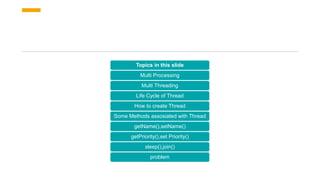
Topics in this slide
Multi Processing
Multi Threading
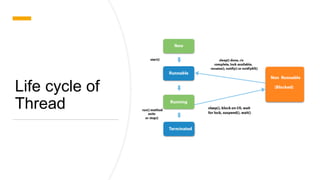
Life Cycle of Thread
How to create Thread
Some Methods assosiated with Thread
getName(),setName()
getPriority(),set Priority()
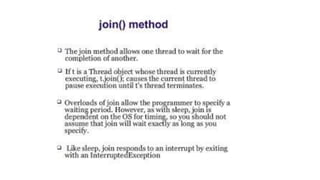
sleep(),join()
problem
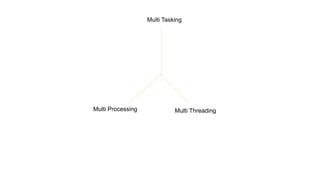
Multi Tasking
Multi Processing Multi Threading
• Multi Processing= It is process based Multi
Tasking and it is OS level Multi Tasking.
• When two independent tasks are performed
simultaneously on system is called Multiprocessing
• Example=In a software industry employees are
used to work by listening to music.
• In this case work may be writing code, designing
reports, sending mail, etc but these Along with music
is running parallelly in background.
Multi Threading=Multi Threading is the program level Multi Tasking
It is the process of executing multiple threads simultaneously.
Multi Threading is used for execution of program in less time.
Defaultly Main Thread is responsible for execution of entire code unless the sub Threads are created
Public class Main{
Public static void main(String[] args){
Statement 1
Statement 2
Statement 3
Statement 4
}
}
In this sample code no
sub threads are created so, the
entire code is executed by Main
thread
Let the time taken by the execution
is 4 sec
Public class Main{
Public static void main(String[] args){
Statement 1-----------t1 executes statement1
Statement 2------------t2 executes statement 2
Statement 3------------t3 executes statement 3
Statement 4-------------t4 executes statement 4
t1,t2,t3,t4;
}
}
In this sample code 4 sub threads are
created(t1,t2,t3,t4) so, the entire code is
executed by Main thread as well as sub
threads
Let the time taken by the execution is less than
the previous case.
Life cycle of
Thread
• Threads can be created in two ways
• Extending Thread class
• Implementing Runnable Interface
• We cannot interpret the order of flow of thread
execution
Thread creation in Java
public class Main extends Thread{
//@ overrided method
public void run(){
System.out.println("Thread name is "+getName());
}
public static void main(String[] args){
Main t1=new Main(); //Thread t1 is created
Main t2=new Main(); // Thread t2 is created
t1.start();
t2.start();
}
}
getName() method returns the name of the Thread
start() method calls the run method
How to set name to the Thread ?
If you want to know which specific thread is executing then you need to set name for the thread. This helps you
to understand which thread is executing.
public class Main extends Thread{
//@ overrided method
public void run(){
System.out.println("Thread name is "+getName());
}
public static void main(String[] args){
Main t1=new Main(); //Thread t1 is created
Main t2=new Main(); // Thread t2 is created
t1.setName("CSE");
t2.setName("ECE");
t1.start();
t2.start();
}
}
Thread
Priority
How to know the priority of Thread ?
public class Main extends Thread{
//@ overrided method
public void run(){
System.out.println("Thread name is "+getName()+" priority is "+getPriority());
}
public static void main(String[] args){
Main t1=new Main(); //Thread t1 is created
Main t2=new Main(); // Thread t2 is created
t1.setName("CSE");
t2.setName("ECE");
t1.start();
t2.start();
}
}
getPriority() method returns the priority of thread
How to set priority to Thread ?
public class Main extends Thread{
//@ overrided method
public void run(){
System.out.println("Thread name is "+getName()+" priority is "+getPriority());
}
public static void main(String[] args){
Main t1=new Main(); //Thread t1 is created
Main t2=new Main(); // Thread t2 is created
t1.setPriority(Thread.MIN_PRIORITY);//Priority is 1
t2.setPriority(Thread.MAX_PRIORITY);//Priority is 10
t1.setName("CSE");
t2.setName("ECE");
t1.start();
t2.start();
}
}
setPriority(Thread.(MAX or MIN or NORM)_PRIORITY) method used to set priority to thread
• Sleep()
• The sleep() method of Thread class is used to sleep a thread for the specified amount of
time.
• public class Main extends Thread{
• //@ overrided method
• public void run(){
• try{
• for(int i=0;i<5;i=i+1){
• sleep(1000) //1000ms=1s
• System.out.println("Thread name is "+getName());
• }
• }
• catch(Exception e){
• }
• }
• public static void main(String[] args){
• Main t1=new Main(); //Thread t1 is created
• t1.start();
• }
• }
Join()
Without join() method
public class Main extends Thread
{
public void run(){
for(int i=0;i<5;i=i+1){
System.out.println(Thread.currentThread().getName()+" "+i);
}
}
public static void main(String[] args) {
Main t1=new Main();
Main t2=new Main();
t1.start();
t2.start();
}
}
With join() method
public class Main extends Thread
{
public void run(){
for(int i=0;i<5;i=i+1){
System.out.println(Thread.currentThread().getName()+" "+i);
}
}
public static void main(String[] args) {
Main t1=new Main();
Main t2=new Main();
t1.start();
try{
t1.join();
}catch(Exception e){
}
t2.start();
}
Problem
Write a program for addition of two numbers and product of two numbers using Threads
Expaination
Sum(a,b) performed by thread t1
Product(a,b) performed by thread t2
Main thread displays the sum and product value of two numbers
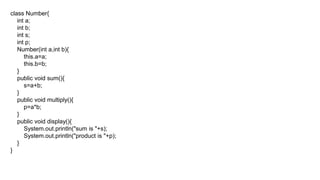
class Number{
int a;
int b;
int s;
int p;
Number(int a,int b){
this.a=a;
this.b=b;
}
public void sum(){
s=a+b;
}
public void multiply(){
p=a*b;
}
public void display(){
System.out.println("sum is "+s);
System.out.println("product is "+p);
}
}
class ThreadA extends Thread{
Number num;
ThreadA(Number num){
this.num=num;
}
}
public class Main{
public static void main(String[] args){
Number num=new Number(1,2);
ThreadA t1=new ThreadA(num){
public void run(){
num.sum();
}
};
ThreadA t2=new ThreadA(num){
public void run(){
num.multiply();
}
};
t1.start();
t2.start();
try{
t2.join();
}catch(Exception e){
}
num.display();
}
}

Multi threading

  • 1.
  • 2.
    Topics in thisslide Multi Processing Multi Threading Life Cycle of Thread How to create Thread Some Methods assosiated with Thread getName(),setName() getPriority(),set Priority() sleep(),join() problem
  • 3.
  • 4.
    • Multi Processing=It is process based Multi Tasking and it is OS level Multi Tasking. • When two independent tasks are performed simultaneously on system is called Multiprocessing • Example=In a software industry employees are used to work by listening to music. • In this case work may be writing code, designing reports, sending mail, etc but these Along with music is running parallelly in background.
  • 5.
    Multi Threading=Multi Threadingis the program level Multi Tasking It is the process of executing multiple threads simultaneously. Multi Threading is used for execution of program in less time. Defaultly Main Thread is responsible for execution of entire code unless the sub Threads are created
  • 6.
    Public class Main{ Publicstatic void main(String[] args){ Statement 1 Statement 2 Statement 3 Statement 4 } } In this sample code no sub threads are created so, the entire code is executed by Main thread Let the time taken by the execution is 4 sec Public class Main{ Public static void main(String[] args){ Statement 1-----------t1 executes statement1 Statement 2------------t2 executes statement 2 Statement 3------------t3 executes statement 3 Statement 4-------------t4 executes statement 4 t1,t2,t3,t4; } } In this sample code 4 sub threads are created(t1,t2,t3,t4) so, the entire code is executed by Main thread as well as sub threads Let the time taken by the execution is less than the previous case.
  • 7.
  • 8.
    • Threads canbe created in two ways • Extending Thread class • Implementing Runnable Interface • We cannot interpret the order of flow of thread execution
  • 9.
    Thread creation inJava public class Main extends Thread{ //@ overrided method public void run(){ System.out.println("Thread name is "+getName()); } public static void main(String[] args){ Main t1=new Main(); //Thread t1 is created Main t2=new Main(); // Thread t2 is created t1.start(); t2.start(); } } getName() method returns the name of the Thread start() method calls the run method
  • 10.
    How to setname to the Thread ? If you want to know which specific thread is executing then you need to set name for the thread. This helps you to understand which thread is executing. public class Main extends Thread{ //@ overrided method public void run(){ System.out.println("Thread name is "+getName()); } public static void main(String[] args){ Main t1=new Main(); //Thread t1 is created Main t2=new Main(); // Thread t2 is created t1.setName("CSE"); t2.setName("ECE"); t1.start(); t2.start(); } }
  • 11.
  • 12.
    How to knowthe priority of Thread ? public class Main extends Thread{ //@ overrided method public void run(){ System.out.println("Thread name is "+getName()+" priority is "+getPriority()); } public static void main(String[] args){ Main t1=new Main(); //Thread t1 is created Main t2=new Main(); // Thread t2 is created t1.setName("CSE"); t2.setName("ECE"); t1.start(); t2.start(); } } getPriority() method returns the priority of thread
  • 13.
    How to setpriority to Thread ? public class Main extends Thread{ //@ overrided method public void run(){ System.out.println("Thread name is "+getName()+" priority is "+getPriority()); } public static void main(String[] args){ Main t1=new Main(); //Thread t1 is created Main t2=new Main(); // Thread t2 is created t1.setPriority(Thread.MIN_PRIORITY);//Priority is 1 t2.setPriority(Thread.MAX_PRIORITY);//Priority is 10 t1.setName("CSE"); t2.setName("ECE"); t1.start(); t2.start(); } } setPriority(Thread.(MAX or MIN or NORM)_PRIORITY) method used to set priority to thread
  • 14.
    • Sleep() • Thesleep() method of Thread class is used to sleep a thread for the specified amount of time.
  • 15.
    • public classMain extends Thread{ • //@ overrided method • public void run(){ • try{ • for(int i=0;i<5;i=i+1){ • sleep(1000) //1000ms=1s • System.out.println("Thread name is "+getName()); • } • } • catch(Exception e){ • } • } • public static void main(String[] args){ • Main t1=new Main(); //Thread t1 is created • t1.start(); • } • }
  • 16.
  • 18.
    Without join() method publicclass Main extends Thread { public void run(){ for(int i=0;i<5;i=i+1){ System.out.println(Thread.currentThread().getName()+" "+i); } } public static void main(String[] args) { Main t1=new Main(); Main t2=new Main(); t1.start(); t2.start(); } }
  • 19.
    With join() method publicclass Main extends Thread { public void run(){ for(int i=0;i<5;i=i+1){ System.out.println(Thread.currentThread().getName()+" "+i); } } public static void main(String[] args) { Main t1=new Main(); Main t2=new Main(); t1.start(); try{ t1.join(); }catch(Exception e){ } t2.start(); }
  • 20.
    Problem Write a programfor addition of two numbers and product of two numbers using Threads Expaination Sum(a,b) performed by thread t1 Product(a,b) performed by thread t2 Main thread displays the sum and product value of two numbers
  • 21.
    class Number{ int a; intb; int s; int p; Number(int a,int b){ this.a=a; this.b=b; } public void sum(){ s=a+b; } public void multiply(){ p=a*b; } public void display(){ System.out.println("sum is "+s); System.out.println("product is "+p); } }
  • 22.
    class ThreadA extendsThread{ Number num; ThreadA(Number num){ this.num=num; } } public class Main{ public static void main(String[] args){ Number num=new Number(1,2); ThreadA t1=new ThreadA(num){ public void run(){ num.sum(); } }; ThreadA t2=new ThreadA(num){ public void run(){ num.multiply(); } }; t1.start(); t2.start(); try{ t2.join(); }catch(Exception e){ } num.display(); } }