11Java Programming
Java Programming II
Concurrent
Programming: Threads
 ( I)
22Java Programming
Contents
What is Thread?
Creating Threads
 Using Runnable
 Sleep, Interrupt, and Join
Methods
 Synchronization
33Java Programming
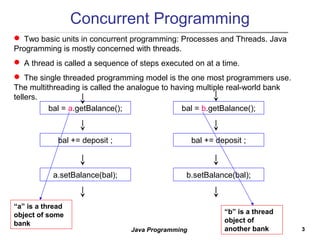
Concurrent Programming
bal = a.getBalance();
bal += deposit ;
a.setBalance(bal);
bal = b.getBalance();
bal += deposit ;
b.setBalance(bal);
“a” is a thread
object of some
bank
“b” is a thread
object of
another bank
 Two basic units in concurrent programming: Processes and Threads. Java
Programming is mostly concerned with threads.
 A thread is called a sequence of steps executed on at a time.
 The single threaded programming model is the one most programmers use.
The multithreading is called the analogue to having multiple real-world bank
tellers.
44Java Programming
An Overview of Threads
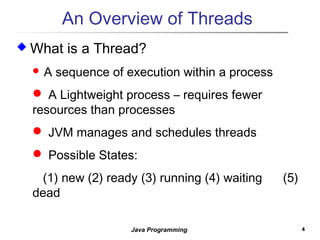
 What is a Thread?
 A sequence of execution within a process
 A Lightweight process – requires fewer
resources than processes
 JVM manages and schedules threads
 Possible States:
(1) new (2) ready (3) running (4) waiting (5)
dead
55Java Programming
An Overview of Threads
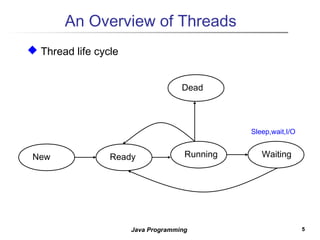
 Thread life cycle
ReadyNew Running Waiting
Dead
Sleep,wait,I/O
66Java Programming
How to Create Threads
 Creating a Thread Object
Thread worker = new Thread();
 Two ways
 Using the Thread Class
 Using the Runnable
interface
 Using the Thread Class
public class PingPong extends Thread {
private String word;
private int delay;
public PingPong(String whatToSay, int
delayTime) {
word = whatToSay;
delay = delayTime;
}
public void run() {
try {
for(;;) {
System.out.print(word + “ “);
Thread.sleep(delay);
}
} catch (InterruptedException e) {
return;
}
}
public static void main(String[] args) {
new PingPong(“ping”, 33).start();
new PingPong(“PONG”,100).start();
}
}
Extend the Thread class
Implement the run
method
77Java Programming
Using Runnable
 Using Runnable Interface
 Create a Thread object to pass
object of implementation of the
Runnable interface into Thread
Constructor.
 Be useful when used with
other application such as GUI
or applet..
public class RunPingPong implements Runnable {
private String word;
private int delay;
public PingPong(String whatToSay, int delayTime) {
word = whatToSay;
delay = delayTime;
}
public void run() {
try {
for(;;) {
System.out.print(word + “ “);
Thread.sleep(delay);
}
} catch (InterruptedException e) {
return;
}
}
public static void main(String[] args) {
Runnable ping = new RunPingPong(“ping”, 33);
Runnable pong = new RunPingPong(“PONG”, 100);
new Thread(ping).start();
new Thread(pong).start();
}
}
Implement Runnable Interface
Implement the run
method
Create Thread object
88Java Programming
Pausing Execution with Sleep
 Thread.sleep method causes
the current thread to suspend
execution for a specified
period.
 Efficient means of making
processor time available to the
other threads of an application
or other applications that might
be running on a computer
system.
 The sleep method can also be
used for pacing and waiting for
another thread with duties that
are understood to have time
requirements.
 Sleep Methods
 static void sleep(long millis)
 static void sleep(long millis, int
nanos)
public class SleepMessages {
public static void main(String args[])
throws InterruptedException {
String importantInfo[] = {
"Mares eat oats",
"Does eat oats",
"Little lambs eat ivy",
"A kid will eat ivy too"
};
for (int i = 0; i < importantInfo.length; i+
+) {
//Pause for 4 seconds
Thread.sleep(4000);
//Print a message
System.out.println(importantInfo[i]);
}
}
} It throws the
InterruptedException.
99Java Programming
Join
 The join method allows one thread
to wait for the completion of
another.
t.join();
causes the current thread to pause
execution until t's thread
terminates.
 Overloaded Methods
 void join() : Waits for this thread to
die.
 void join(long millis)
 void join(long millis, int nanos)
class ThreadM extends Thread {
public void run() {
try {
for (int i = 0; i < 10; i++) {
Thread.sleep(1000);
System.out.println("ThreadM"); }
}
catch (InterruptedException ex) {
ex.printStackTrace(); }
} }
class ThreadN extends Thread {
public void run() {
try {
for (int i = 0; i < 20; i++) {
Thread.sleep(2000);
System.out.println("ThreadN");
}
}
catch(InterruptedException ex) {
ex.printStackTrace();
}
}
}
class JoinDemo1 {
public static void main(String args[]) {
ThreadM tm = new ThreadM();
tm.start();
ThreadN tn = new ThreadN();
tn.start();
try {
tm.join();
tn.join();
System.out.println("Both threads have finished");
}
catch (Exception e) { e.printStackTrace(); }
}
}
join() method:
Waits for this thread to die.
1010Java Programming
Interrupts
 An interrupt is an indication to
a thread that it should stop
what it is doing and do
something else.
 A thread sends an interrupt by
invoking the “interrupt()”
method on the Thread object
for the thread to be interrupted.
 Supporting Interruption
 If the thread is frequently invoking
methods that throw
InterruptedException, it simply
returns from the run method after it
catches that exception.
 Tests for the interrupt and exits the
thread if one has been received.
 In more complex applications, to
throw an InterruptedException
for (int i = 0; i < importantInfo.length; i++) {
try {
Thread.sleep(4000);
} catch (InterruptedException e) {
//We've been interrupted: no more
messages.
return;
}
System.out.println(importantInfo[i]);
}
for (int i = 0; i < inputs.length; i++) {
heavyCrunch(inputs[i]);
if (Thread.interrupted()) {
//We've been interrupted: no more
crunching.
return;
}
}
if (Thread.interrupted()) {
throw new InterruptedException(); }
1111Java Programming
Example: SimpleThreads.java
public class SimpleThreads {
//Display a message, preceded by the
name of the current thread
static void threadMessage(String
message) {
String threadName =
Thread.currentThread().getName();
System.out.format("%s: %s%n",
threadName, message);
}
private static class MessageLoop
implements Runnable {
public void run() {
String importantInfo[] = {
"Mares eat oats", "Does eat oats",
"Little lambs eat ivy",
"A kid will eat ivy too"
};
try {
for (int i = 0; i < importantInfo.length; i++)
{
//Pause for 4 seconds
Thread.sleep(4000);
//Print a message
ThreadMessage(importantInfo[i]); }
} catch (InterruptedException e) {
threadMessage("I wasn't done!"); }
} // end of run
} // end of
public static void main(String args[]) throws
InterruptedException {
//Delay, in milliseconds before we
interrupt MessageLoop
//thread (default one hour).
long patience = 1000 * 60 * 60;
When this thread
receives an interrupt,
it happens.
1212Java Programming
Example: SimpleThreads.java
//If command line argument present, gives
patience in seconds.
if (args.length > 0) {
try {
patience = Long.parseLong(args[0]) * 1000;
} catch (NumberFormatException e) {
System.err.println("Argument must be
an integer.");
System.exit(1);
}
}
threadMessage("Starting MessageLoop thread");
long startTime = System.currentTimeMillis();
Thread t = new Thread(new
MessageLoop());
t.start();
threadMessage("Waiting for MessageLoop
thread to finish");
//loop until MessageLoop thread exits
while (t.isAlive()) {
threadMessage("Still waiting...");
//Wait maximum of 1 second for
MessageLoop thread to finish.
t.join(1000);
if (((System.currentTimeMillis() - startTime)
> patience) && t.isAlive()) {
threadMessage("Tired of waiting!");
t.interrupt();
//Shouldn't be long now -- wait indefinitely
t.join();
}
}
threadMessage("Finally!");
}
}
The source code is at the “/home/course/java2/code/Thread/SimpleThreads.java”
When elapsed time is larger than
the patience, it send interrupt to
the thread “t”.
1313Java Programming
Synchronization
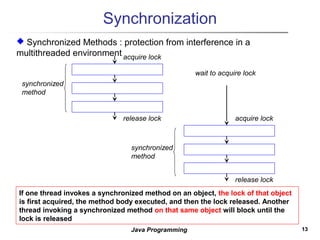
If one thread invokes a synchronized method on an object, the lock of that object
is first acquired, the method body executed, and then the lock released. Another
thread invoking a synchronized method on that same object will block until the
lock is released
 Synchronized Methods : protection from interference in a
multithreaded environment acquire lock
release lock
synchronized
method
acquire lock
release lock
wait to acquire lock
synchronized
method
1414Java Programming
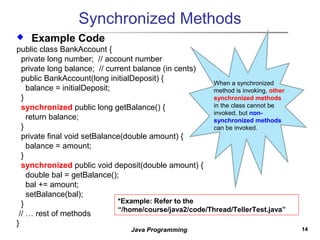
Synchronized Methods
 Example Code
public class BankAccount {
private long number; // account number
private long balance; // current balance (in cents)
public BankAccount(long initialDeposit) {
balance = initialDeposit;
}
synchronized public long getBalance() {
return balance;
}
private final void setBalance(double amount) {
balance = amount;
}
synchronized public void deposit(double amount) {
double bal = getBalance();
bal += amount;
setBalance(bal);
}
// … rest of methods
}
*Example: Refer to the
“/home/course/java2/code/Thread/TellerTest.java”
When a synchronized
method is invoking, other
synchronized methods
in the class cannot be
invoked, but non-
synchronized methods
can be invoked.
1515Java Programming
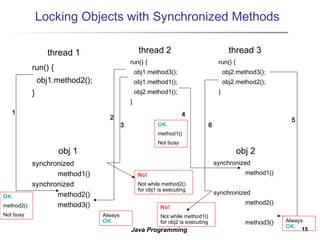
Locking Objects with Synchronized Methods
thread 1
run() {
obj1.method2();
}
thread 2
run() {
obj1.method3();
obj1.method1();
obj2.method1();
}
obj 1
synchronized
method1()
synchronized
method2()
method3()
thread 3
run() {
obj2.method3();
obj2.method2();
}
obj 2
synchronized
method1()
synchronized
method2()
method3()
1
2
3
4
5
6
OK.
method2()
Not busy Always
OK.
No!
Not while method2()
for obj1 is executing
No!
Not while method1()
for obj2 is executing
OK.
method1()
Not busy
Always
OK.

Thread 1

  • 1.
    11Java Programming Java ProgrammingII Concurrent Programming: Threads  ( I)
  • 2.
    22Java Programming Contents What isThread? Creating Threads  Using Runnable  Sleep, Interrupt, and Join Methods  Synchronization
  • 3.
    33Java Programming Concurrent Programming bal= a.getBalance(); bal += deposit ; a.setBalance(bal); bal = b.getBalance(); bal += deposit ; b.setBalance(bal); “a” is a thread object of some bank “b” is a thread object of another bank  Two basic units in concurrent programming: Processes and Threads. Java Programming is mostly concerned with threads.  A thread is called a sequence of steps executed on at a time.  The single threaded programming model is the one most programmers use. The multithreading is called the analogue to having multiple real-world bank tellers.
  • 4.
    44Java Programming An Overviewof Threads  What is a Thread?  A sequence of execution within a process  A Lightweight process – requires fewer resources than processes  JVM manages and schedules threads  Possible States: (1) new (2) ready (3) running (4) waiting (5) dead
  • 5.
    55Java Programming An Overviewof Threads  Thread life cycle ReadyNew Running Waiting Dead Sleep,wait,I/O
  • 6.
    66Java Programming How toCreate Threads  Creating a Thread Object Thread worker = new Thread();  Two ways  Using the Thread Class  Using the Runnable interface  Using the Thread Class public class PingPong extends Thread { private String word; private int delay; public PingPong(String whatToSay, int delayTime) { word = whatToSay; delay = delayTime; } public void run() { try { for(;;) { System.out.print(word + “ “); Thread.sleep(delay); } } catch (InterruptedException e) { return; } } public static void main(String[] args) { new PingPong(“ping”, 33).start(); new PingPong(“PONG”,100).start(); } } Extend the Thread class Implement the run method
  • 7.
    77Java Programming Using Runnable Using Runnable Interface  Create a Thread object to pass object of implementation of the Runnable interface into Thread Constructor.  Be useful when used with other application such as GUI or applet.. public class RunPingPong implements Runnable { private String word; private int delay; public PingPong(String whatToSay, int delayTime) { word = whatToSay; delay = delayTime; } public void run() { try { for(;;) { System.out.print(word + “ “); Thread.sleep(delay); } } catch (InterruptedException e) { return; } } public static void main(String[] args) { Runnable ping = new RunPingPong(“ping”, 33); Runnable pong = new RunPingPong(“PONG”, 100); new Thread(ping).start(); new Thread(pong).start(); } } Implement Runnable Interface Implement the run method Create Thread object
  • 8.
    88Java Programming Pausing Executionwith Sleep  Thread.sleep method causes the current thread to suspend execution for a specified period.  Efficient means of making processor time available to the other threads of an application or other applications that might be running on a computer system.  The sleep method can also be used for pacing and waiting for another thread with duties that are understood to have time requirements.  Sleep Methods  static void sleep(long millis)  static void sleep(long millis, int nanos) public class SleepMessages { public static void main(String args[]) throws InterruptedException { String importantInfo[] = { "Mares eat oats", "Does eat oats", "Little lambs eat ivy", "A kid will eat ivy too" }; for (int i = 0; i < importantInfo.length; i+ +) { //Pause for 4 seconds Thread.sleep(4000); //Print a message System.out.println(importantInfo[i]); } } } It throws the InterruptedException.
  • 9.
    99Java Programming Join  Thejoin method allows one thread to wait for the completion of another. t.join(); causes the current thread to pause execution until t's thread terminates.  Overloaded Methods  void join() : Waits for this thread to die.  void join(long millis)  void join(long millis, int nanos) class ThreadM extends Thread { public void run() { try { for (int i = 0; i < 10; i++) { Thread.sleep(1000); System.out.println("ThreadM"); } } catch (InterruptedException ex) { ex.printStackTrace(); } } } class ThreadN extends Thread { public void run() { try { for (int i = 0; i < 20; i++) { Thread.sleep(2000); System.out.println("ThreadN"); } } catch(InterruptedException ex) { ex.printStackTrace(); } } } class JoinDemo1 { public static void main(String args[]) { ThreadM tm = new ThreadM(); tm.start(); ThreadN tn = new ThreadN(); tn.start(); try { tm.join(); tn.join(); System.out.println("Both threads have finished"); } catch (Exception e) { e.printStackTrace(); } } } join() method: Waits for this thread to die.
  • 10.
    1010Java Programming Interrupts  Aninterrupt is an indication to a thread that it should stop what it is doing and do something else.  A thread sends an interrupt by invoking the “interrupt()” method on the Thread object for the thread to be interrupted.  Supporting Interruption  If the thread is frequently invoking methods that throw InterruptedException, it simply returns from the run method after it catches that exception.  Tests for the interrupt and exits the thread if one has been received.  In more complex applications, to throw an InterruptedException for (int i = 0; i < importantInfo.length; i++) { try { Thread.sleep(4000); } catch (InterruptedException e) { //We've been interrupted: no more messages. return; } System.out.println(importantInfo[i]); } for (int i = 0; i < inputs.length; i++) { heavyCrunch(inputs[i]); if (Thread.interrupted()) { //We've been interrupted: no more crunching. return; } } if (Thread.interrupted()) { throw new InterruptedException(); }
  • 11.
    1111Java Programming Example: SimpleThreads.java publicclass SimpleThreads { //Display a message, preceded by the name of the current thread static void threadMessage(String message) { String threadName = Thread.currentThread().getName(); System.out.format("%s: %s%n", threadName, message); } private static class MessageLoop implements Runnable { public void run() { String importantInfo[] = { "Mares eat oats", "Does eat oats", "Little lambs eat ivy", "A kid will eat ivy too" }; try { for (int i = 0; i < importantInfo.length; i++) { //Pause for 4 seconds Thread.sleep(4000); //Print a message ThreadMessage(importantInfo[i]); } } catch (InterruptedException e) { threadMessage("I wasn't done!"); } } // end of run } // end of public static void main(String args[]) throws InterruptedException { //Delay, in milliseconds before we interrupt MessageLoop //thread (default one hour). long patience = 1000 * 60 * 60; When this thread receives an interrupt, it happens.
  • 12.
    1212Java Programming Example: SimpleThreads.java //Ifcommand line argument present, gives patience in seconds. if (args.length > 0) { try { patience = Long.parseLong(args[0]) * 1000; } catch (NumberFormatException e) { System.err.println("Argument must be an integer."); System.exit(1); } } threadMessage("Starting MessageLoop thread"); long startTime = System.currentTimeMillis(); Thread t = new Thread(new MessageLoop()); t.start(); threadMessage("Waiting for MessageLoop thread to finish"); //loop until MessageLoop thread exits while (t.isAlive()) { threadMessage("Still waiting..."); //Wait maximum of 1 second for MessageLoop thread to finish. t.join(1000); if (((System.currentTimeMillis() - startTime) > patience) && t.isAlive()) { threadMessage("Tired of waiting!"); t.interrupt(); //Shouldn't be long now -- wait indefinitely t.join(); } } threadMessage("Finally!"); } } The source code is at the “/home/course/java2/code/Thread/SimpleThreads.java” When elapsed time is larger than the patience, it send interrupt to the thread “t”.
  • 13.
    1313Java Programming Synchronization If onethread invokes a synchronized method on an object, the lock of that object is first acquired, the method body executed, and then the lock released. Another thread invoking a synchronized method on that same object will block until the lock is released  Synchronized Methods : protection from interference in a multithreaded environment acquire lock release lock synchronized method acquire lock release lock wait to acquire lock synchronized method
  • 14.
    1414Java Programming Synchronized Methods Example Code public class BankAccount { private long number; // account number private long balance; // current balance (in cents) public BankAccount(long initialDeposit) { balance = initialDeposit; } synchronized public long getBalance() { return balance; } private final void setBalance(double amount) { balance = amount; } synchronized public void deposit(double amount) { double bal = getBalance(); bal += amount; setBalance(bal); } // … rest of methods } *Example: Refer to the “/home/course/java2/code/Thread/TellerTest.java” When a synchronized method is invoking, other synchronized methods in the class cannot be invoked, but non- synchronized methods can be invoked.
  • 15.
    1515Java Programming Locking Objectswith Synchronized Methods thread 1 run() { obj1.method2(); } thread 2 run() { obj1.method3(); obj1.method1(); obj2.method1(); } obj 1 synchronized method1() synchronized method2() method3() thread 3 run() { obj2.method3(); obj2.method2(); } obj 2 synchronized method1() synchronized method2() method3() 1 2 3 4 5 6 OK. method2() Not busy Always OK. No! Not while method2() for obj1 is executing No! Not while method1() for obj2 is executing OK. method1() Not busy Always OK.