MULTI-MEDIA
OPTIONS
HOW TO USE TEXT, PHOTOS,
AUDIO AND VIDEO
DR. JIM FOUST
2016 NFL Sports Journalism & Communications Boot Camp
THE WORLD IS YOURS
Online media gives us the ability to do almost
infinite formats and types of media
You are not constricted by television
programming/scheduling requirements,
physical space, or even past practice
You can find something that you like to do and
do well, and do it in the format you wish
Podcasts (video or audio), blogs, multimedia
In-studio or in the field; long-form or short-
form; regularly scheduled or as you feel like it
MULTI-MEDIA STORYTELLING
• Tools for gathering and editing
• Skills
• Presentation
AUDIO
• For studio work, choose a quality
microphone
• Don’t use computer or phone built-in mic
• USB-based options are good
Blue Icicle: allows you to
record from professional XLR
mic through USB.Blue Snowball or Yeti: USB-
based microphones
AUDIO: STUDIO WORK
• Record in a quiet environment
• Drapes and other sound deadening can improve
audio quality
• If you’ve got a friend with a studio, use it!
• Headphones are a great idea for both studio and
field work
AUDIO
• For field audio, you can use a
phone or a low-cost recorder
• Make sure recorder can plug into computer’s
USB port for file sharing
Olympus VN-702PC
AUDIO
• Set recorder for best recording quality
• Ideally, we want to record and edit
uncompressed formats (WAV, AIFF) and then
save finished work as compressed MP3
• Recorder >> PC (Edit >> Export) >> Web
AUDIO
• Get mic/recorder close to the subject (8-10 inches)
• Don’t rely on your ears
• Beware of background noise
• Quiet is best
• Relevant ambient noise is OK, too
• Hold the recorder (still)
• Don’t give the recorder to the subject
• If using a phone, put it in “airplane mode” to prevent
interruptions during interviews
AUDIO
• Consider the end product
• Talk to the person beforehand, but not too much
• Have person say their name and the thing you’re
interviewing them about
• (i.e., “My name is Jane Jones and I organize the BG
Labor day Parade”)
• Get NATURAL SOUND—the sounds of the event,
the ambiance, etc.
AUDIO
• To edit audio, can use the free Audacity program
• Finished programs can be exported as MP3 format
files, then uploaded to Soundcloud.
• Then, you can embed the audio in your Wordpress
blog
STILLS AND VIDEO
• Equipment: Phone v. “point and shoot” v. SLR
STILLS AND VIDEO
• Stills Software
• Adobe Photoshop (or Photoshop Elements)
• Video Software
• iMovie
• Final Cut Pro
• Abode Premiere Pro
• Sony Vegas Studio
SHOT TYPES
Wide Shot
(WS)
Long
Establishing
Medium Shot
(MS)
Close-Up
(CU)
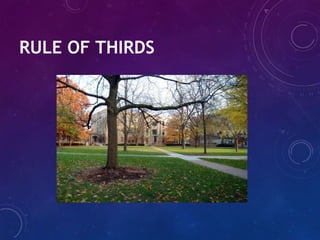
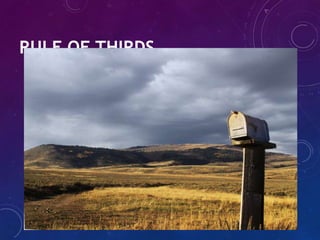
RULE OF THIRDS
RULE OF THIRDS
RULE OF THIRDS
RULE OF THIRDS
RULE OF THIRDS
RULE OF THIRDS
FRAMING PEOPLE
Eyes at or near top
third of frame.
SEQUENCES
• We want to vary shot types in still presentations and
video
• Make sure you have wide shots/medium shots and
close-ups
• Hold the camera steady (especially with video)
• In video, avoid panning and zooming
• Movement 2012
STORY TYPES
• Text, or text plus picture
• Text + links
• Photo gallery or slideshow Guitar Accountant
• Audio/Video
• Interview
• Narrative Story (has your voice on it)
• Profile Story Hinduism Archivist
• Natural Sound piece (audio audio video In Shape UP Radio)
MULTIMEDIA
• Sliders
• Timelines
• Maps (Google, etc.)
• Data Tools
• Mash-Ups
PUTTING IT ALL TOGETHER
• Make web pages from scratch
• Use hosting/design service
• Wordpress
• Embed code is the coin of the realm
• Allows you to integrate content from other places
into your site
QUESTIONS?
• Jim Foust
• jfoust@bgsu.edu
• Files available at:
• http://jamescfoust.com/nfl

Multi media options 2016

  • 1.
    MULTI-MEDIA OPTIONS HOW TO USETEXT, PHOTOS, AUDIO AND VIDEO DR. JIM FOUST 2016 NFL Sports Journalism & Communications Boot Camp
  • 2.
    THE WORLD ISYOURS Online media gives us the ability to do almost infinite formats and types of media You are not constricted by television programming/scheduling requirements, physical space, or even past practice You can find something that you like to do and do well, and do it in the format you wish Podcasts (video or audio), blogs, multimedia In-studio or in the field; long-form or short- form; regularly scheduled or as you feel like it
  • 3.
    MULTI-MEDIA STORYTELLING • Toolsfor gathering and editing • Skills • Presentation
  • 4.
    AUDIO • For studiowork, choose a quality microphone • Don’t use computer or phone built-in mic • USB-based options are good Blue Icicle: allows you to record from professional XLR mic through USB.Blue Snowball or Yeti: USB- based microphones
  • 5.
    AUDIO: STUDIO WORK •Record in a quiet environment • Drapes and other sound deadening can improve audio quality • If you’ve got a friend with a studio, use it! • Headphones are a great idea for both studio and field work
  • 6.
    AUDIO • For fieldaudio, you can use a phone or a low-cost recorder • Make sure recorder can plug into computer’s USB port for file sharing Olympus VN-702PC
  • 7.
    AUDIO • Set recorderfor best recording quality • Ideally, we want to record and edit uncompressed formats (WAV, AIFF) and then save finished work as compressed MP3 • Recorder >> PC (Edit >> Export) >> Web
  • 8.
    AUDIO • Get mic/recorderclose to the subject (8-10 inches) • Don’t rely on your ears • Beware of background noise • Quiet is best • Relevant ambient noise is OK, too • Hold the recorder (still) • Don’t give the recorder to the subject • If using a phone, put it in “airplane mode” to prevent interruptions during interviews
  • 9.
    AUDIO • Consider theend product • Talk to the person beforehand, but not too much • Have person say their name and the thing you’re interviewing them about • (i.e., “My name is Jane Jones and I organize the BG Labor day Parade”) • Get NATURAL SOUND—the sounds of the event, the ambiance, etc.
  • 10.
    AUDIO • To editaudio, can use the free Audacity program • Finished programs can be exported as MP3 format files, then uploaded to Soundcloud. • Then, you can embed the audio in your Wordpress blog
  • 11.
    STILLS AND VIDEO •Equipment: Phone v. “point and shoot” v. SLR
  • 12.
    STILLS AND VIDEO •Stills Software • Adobe Photoshop (or Photoshop Elements) • Video Software • iMovie • Final Cut Pro • Abode Premiere Pro • Sony Vegas Studio
  • 13.
  • 15.
  • 16.
  • 17.
  • 18.
  • 19.
  • 20.
  • 21.
    FRAMING PEOPLE Eyes ator near top third of frame.
  • 22.
    SEQUENCES • We wantto vary shot types in still presentations and video • Make sure you have wide shots/medium shots and close-ups • Hold the camera steady (especially with video) • In video, avoid panning and zooming • Movement 2012
  • 23.
    STORY TYPES • Text,or text plus picture • Text + links • Photo gallery or slideshow Guitar Accountant • Audio/Video • Interview • Narrative Story (has your voice on it) • Profile Story Hinduism Archivist • Natural Sound piece (audio audio video In Shape UP Radio)
  • 24.
    MULTIMEDIA • Sliders • Timelines •Maps (Google, etc.) • Data Tools • Mash-Ups
  • 25.
    PUTTING IT ALLTOGETHER • Make web pages from scratch • Use hosting/design service • Wordpress • Embed code is the coin of the realm • Allows you to integrate content from other places into your site
  • 26.
    QUESTIONS? • Jim Foust •jfoust@bgsu.edu • Files available at: • http://jamescfoust.com/nfl