International Journal of Research and Scientific Innovation (IJRSI) | Volume IV, Issue VIS, June 2017 | ISSN 2321–2705
www.rsisinternational.org Page 137
Multi Banking System using Web Services
Purnima Ahirao1
, Yogita Borse2
, Deepti Patole3
1, 2, 3
Assistant Professor, Information Technology, K. J. Somaiya College of Engineering, Mumbai, India
Abstract—Nowadays the use of bank applications have increased
and many banking operations are done online .In this paper we
proposed a multi banking system using web services(for
transactions). It is developed for those customers who are having
multiple accounts in various banks .Multi-banking interface is a
web based application through which customer can access his/her
multiple accounts with single user id and password .The
customer does not have to remember all the user id and password
for each account he/she has in a banking website. The objective
of this application is to allow the Customers of various Banks
access their accounts and make transactions using this
solution. They need not interact with various bank applications
or web sites.The customer can login with single id and password
.In addition to this ,the customer has certain privileges such as
he/she can view his/her transaction and account details and also
make fund transfers from one bank account to other.
Keywords-Integrated banking, Multi banking, web services.
1.INTRODUCTION
he Multi-banking system acts as an interface between the
clients and all the banks accounts. By using this
application any client who maintain accounts in various banks
can directly log in to Multi Banking System Interface and
make transactions. In the backend, system will take care of all
the operations required in order to carry the transactions
smoothly. The objective of this application to allow the
customers to access various bank accounts and make
transactions accordingly using this solution.There are three
major modules in this application.The modules are the admin
of the application which has control over the banks and
branches,the branch manager has control over the customers
and has various other functions and the customer who actually
uses this banking application. The structure of the paper is
organized in the following manner.The chapter 2 contains a
detailed description of web services and its components.
Chapter 3 contains the existing banking system and its issues.
Chapter 4 with the proposed system and its details and
chapter 5 contains the implementation and the result and
chapter 6 contains the major modules of the system.
II. WEB SERVICES
A web service is accessed using the protocols of the web to be
used by the web based applications. It has a class which
contains the methods which is accessed by the web
application. The client can request a specific service from a
provider but not the service itself. Therefore a request for the
service can be made over the internet using agreed standards.
2.1 Use of Web Services in the proposed system
Databases multiple banks will be integrated, which will then
be accessed online.Whenever a customer wants to transfer
fund from one account to other, a request is sent to the web
service.The role of web service is to make the transactions
requested by the user and update the database accordingly.
III. ESIXTING SYSTEM AND IT’S ISSUES
The existing banking system has multiple servers of different
banks and numerous databases. Every bank has its own
database which maintains all the records of its customers and
branch managers. For accessing different bank accounts the
user has to visit multiple bank websites which requires the
user to remember multiple login credentials. It may not be
easy for all the users to remember all the login id’s and
passwords. Also the current banking system has certain
limitations such as the transactions can be made only between
certain timings and sometimes the user is not provided the
access to many functions in the application.
IV. PROPOSED SYSTEM
Nowadays a lot of research is going on in the online banking
system and many banks provide online services. But it has
certain drawbacks, if for eg. there are many members in a
family , to know their transaction and account details requires
visiting multiple websites which is time consuming and it also
requires remembering the login credentials of many accounts
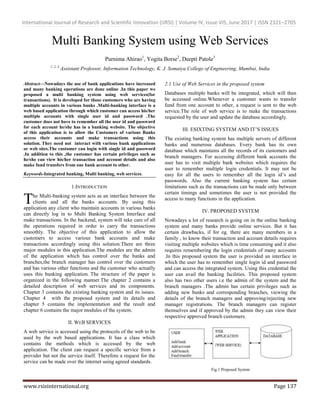
.In this proposed system the user is provided an interface in
which the user has to remember single login id and password
and can access the integrated system. Using this credential the
user can avail the banking facilities. This proposed system
also has two other users i.e the admin of the system and the
branch managers .The admin has certain privileges such as
adding new banks and corresponding branches, viewing the
details of the branch managers and approving/rejecting new
manager registrations. The branch managers can register
themselves and if approved by the admin they can view their
respective approved branch customers.
Fig.1 Proposed System
T
International Journal of Research and Scientific Innovation (IJRSI) | Volume IV, Issue VIS, June 2017 | ISSN 2321–2705
www.rsisinternational.org Page 138
4.1 Process involved in proposed system
Step 1: The user needs to register with the system to use the
banking facilities. He/she has to provide the required details
such as email id, password, account number, address etc. User
has to select the bank and its respective branch.
Step2: The request is sent to the Branch Manager for approval.
The Branch Manager can approve or disapprove the request.
Step 3: The Branch Manager can the request by sending the
confirmation message on the customer’s email id.
Step 4: For the login process the verification code (OTP) is
automatically sent to the respective user via email.
Step 5: Now using that email id, password and verification
code (OTP) the user can enter into integrated system.The
password is first decrypted from the database and then
verified.
Step 6: After entering into the System user can perform the
following operation:
1. Account Summary: Here the customer can see his
account details such as the balance of a particular
bank and its respective branch.
2. Transaction History: Here the customer can see all
the transactions made by him by entering his email
id.
3. View Profile: Here the customer can view his profile
details entered by him during registration.
Step 7: The customer can also update his account profile and
make transaction from one account to other.
V. IMPLEMENTATION AND RESULTS
Implementation part is divided into two phases
1. Registration phase
2. Integrated system
5.1 Registration Phase
The registration phase consist of two processes i.e Registration
process and the administrator process. In registration process
the client registers and selects the required banks. The aim of
the registration process is to add the client to the integrated
banking solution. The new users, who is having account in
various banks has to register . In the registration process users
have to give their personal details like full name, date of birth,
e-mail address, password , phone number etc. Also, the users
have to select the banks in which they have an account. These
details will be saved in the database temporarily and then the
approval request is sent to the respective branch manager.The
password entered by the customer will be encrypted using
base64 string and stored in database.
In the administration phase the details are verified by the
branch manager and the account request is accepted by
sending confirmation mail on the customers email id and all
the details are stored in the database. The same process is used
for new branch manager registration in which the admin can
approve/disapprove manager’s registration.
5.2 Integrated System
In this phase after approving the details the user is integrated
with the system and can perform various functions based on
his needs. User can view the balance, Transaction history on a
single page. The user can use single id and password to use the
integrated system. The user can use the web service to carry
out transaction. The functions provided by the integrated
system are:
1. Account details: The account details function gives the
detail about the email id, bank, branch, account number and
the balance. The user can view all the details on a single page.
Fig 2. Account details
2. Transactions: Transaction function uses the parameter like
the account number of the sender, receiver, and amount to be
transferred and the email id of the sender.it is basically a web
service which is over the internet to transfer the funds between
two banks.
3. Transaction History: This function is used by the user to see
his transaction history.it gives the information like bank names
between which the amount is transferred, account number,
email id and the amount of fund transferred between two
banks.
Fig 3.Transaction History
4. View profile: Here customer can view his profile. The
profile includes the details which is given by him/her at the
time of registration such as name, address, email id, password
,bank ,branch etc.
5. Update Profile: Here the customer can update his/her profile
such as email id, password, bank name its respective branch
and the balance after logging into the system for the first time
after his/her request has been approved by the branch
manager.
VI. MAJOR MODULES
1. Admin:
International Journal of Research and Scientific Innovation (IJRSI) | Volume IV, Issue VIS, June 2017 | ISSN 2321–2705
www.rsisinternational.org Page 139
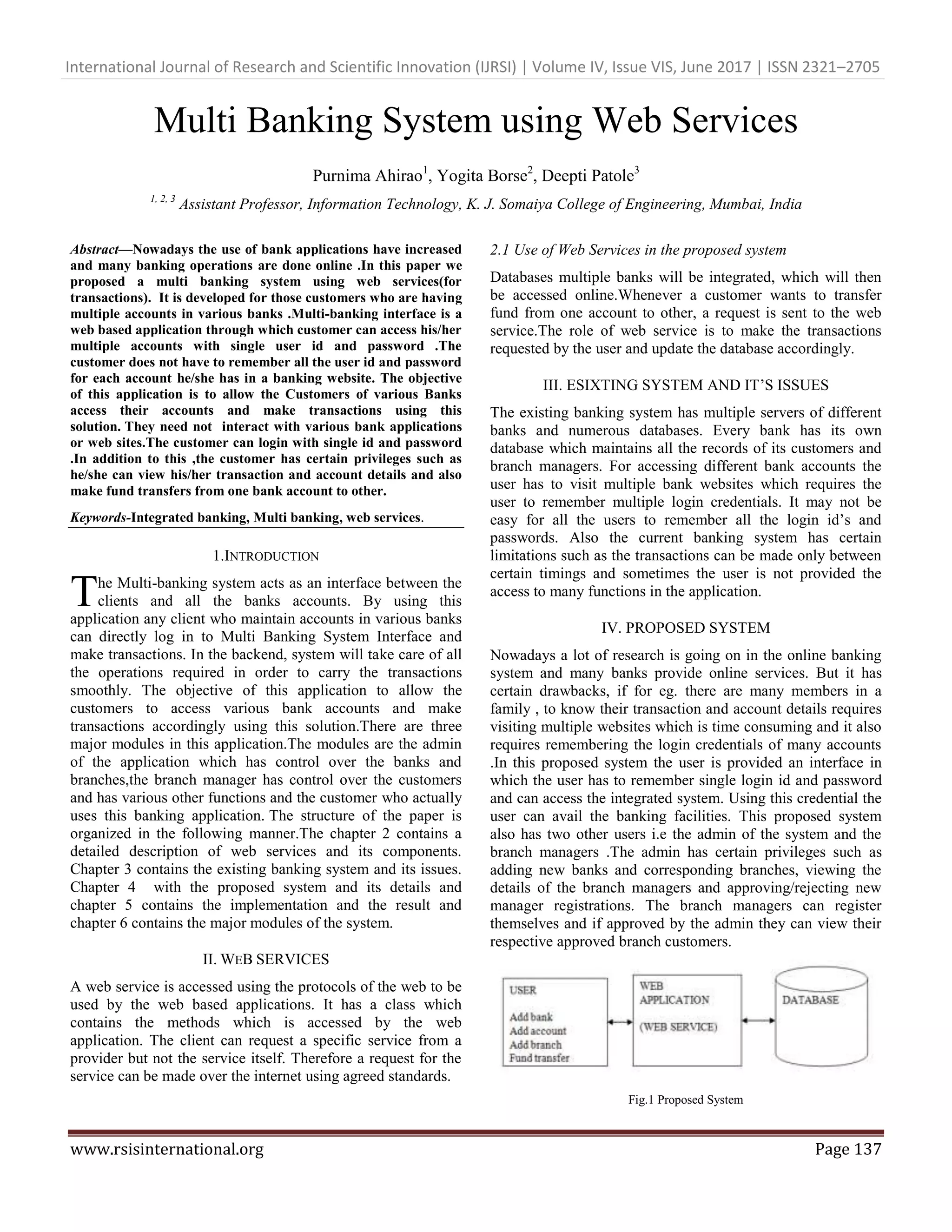
After logging into the system the admin can add banks and
branches into the integrated system. The admin can also do the
mapping of branches and banks. He/she can view new branch
manager registration requests and accept/reject the same. The
acceptance confirmation mail will be sent to the branch
manager on his/her email. The admin can also view the details
of the branch managers registered with the system.
Fig 4.Admin Login
Fig 5.Mapping Page
Fig 6.New Manager Registrations
Fig 7.Send Approval Mail
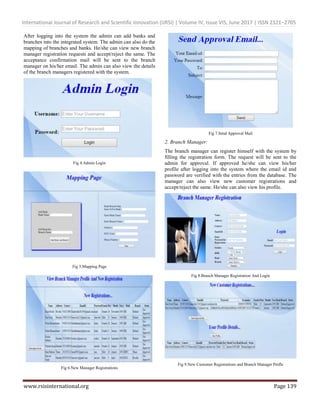
2. Branch Manager:
The branch manager can register himself with the system by
filling the registration form. The request will be sent to the
admin for approval. If approved he/she can view his/her
profile after logging into the system where the email id and
password are verified with the entries from the database. The
manager can also view new customer registrations and
accept/reject the same. He/she can also view his profile.
Fig 8.Branch Manager Registration And Login
Fig 9.New Customer Registrations and Branch Manager Profle
International Journal of Research and Scientific Innovation (IJRSI) | Volume IV, Issue VIS, June 2017 | ISSN 2321–2705
www.rsisinternational.org Page 140
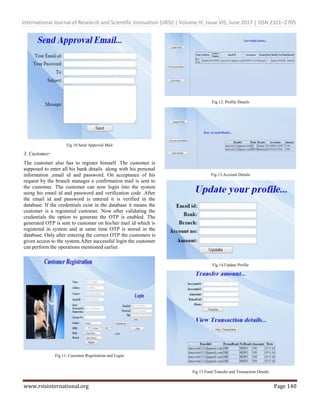
Fig 10.Send Approval Mail
3. Customer:
The customer also has to register himself .The customer is
supposed to enter all his bank details along with his personal
information ,email id and password. On acceptance of his
request by the branch manager a confirmation mail is sent to
the customer. The customer can now login into the system
using his email id and password and verification code .After
the email id and password is entered it is verified in the
database. If the credentials exist in the database it means the
customer is a registered customer. Now after validating the
credentials the option to generate the OTP is enabled. The
generated OTP is sent to customer on his/her mail id which is
registered in system and at same time OTP is stored in the
database. Only after entering the correct OTP the customers is
given access to the system.After successful login the customer
can perform the operations mentioned earlier.
Fig 11. Customer Registration and Login
Fig 12. Profile Details
Fig 13.Account Details
Fig 14.Update Profile
Fig 15.Fund Transfer and Transaction Details
International Journal of Research and Scientific Innovation (IJRSI) | Volume IV, Issue VIS, June 2017 | ISSN 2321–2705
www.rsisinternational.org Page 141
VII. CONCLUSION AND FUTURE WORK
Our integrated system provides a solution to the user to
withdraw the amount from multiple banks when the required
amount is insufficient in single bank. If the client needs to add
one more bank he/she can add the bank details and make our
system to composite with the existing bank services
dynamically. Nowadays various sectors like Internet banking,
electronic-billing in various sectors etc., are facing the security
problem regarding in several perspectives like in transaction
and database related query and responsiveness. We introduced
an enhanced composite Multi-Banking System for the user to
access more than one bank accounts at a same time with a
single user name and password. In Future By doing this
dynamic service composition, security and interoperability are
two main features to focus on when combining more number
of business applications.
REFERENCES
[1] P.Iyappan, Dr.V.Prasanna, R.Amarnath, L. Noor Mouhammed ,
A.Selvamani “An Enhanced Smart Multi-Banking Integrated
System - Service Oriented Approach,” 26th _28th July 2012,
Coimbatore, India.
[2] JOHN B. OLADOSU, FUNMILOLA A. AJALA, AND
OLUKUNLE O. POPOOLA,” JOHN B. OLADOSU,
FUNMILOLA A. AJALA, AND OLUKUNLE O.
POPOOLA”,Computer Science and Engineering Department,
Ladoke Akintola University of Technology, Ogbomoso, Nigeria.
[3] Tony Baer, Ron Schmelzer: “The Elements of Web Services”
(Application Development Trends, 2 December 2002), available
at http://adtmag.com/articles/2002/11/30/the-elements-of-web
services.aspx
[4] G. Sree Rekha, and V. K. Agrawal, "An Architecture for Integrated
Multi-banking Solution", World Academy of Science, Engineering
and Technology, 2011.
[5] Andriancs,”Send Email from Yahoo,Gmail,Hotmail (C#),27
September 2013,Malaysia.
[6] PhiBui’sBlog,”Simple way to encrypt or decrypt password or data
in ASP.NetC#”,March242013.
[7] Lakshmi Ananthamurthy (2008): “Introduction to Web Service.”
Available at
http://www.developer.com/services/article.php/1485821.
[8] Suresh Dasari,”Display data in HTML table from database using
Asp.Net C#”,Dec212014.
[9] Mudassar Khan,”Bind/Fill/Populate dropdown list control from
database inAsp.Net C#, 27 Feb 2015 available at
http://www.aspsnippets.com/Articles/Bind-Fill-Populate-
DropDownList-control-from-database-in-ASPNet-using-C-and-
VBNet.aspx
[10] Vithal Wadje,”Consuming Web Service in an Asp.Net
Application”,June 02 2013 available at http://www.c-
sharpcorner.com/UploadFile/0c1bb2/consuming-web-service-in-
Asp-Net-web-application/

Multi Banking System using Web Services

  • 1.
    International Journal ofResearch and Scientific Innovation (IJRSI) | Volume IV, Issue VIS, June 2017 | ISSN 2321–2705 www.rsisinternational.org Page 137 Multi Banking System using Web Services Purnima Ahirao1 , Yogita Borse2 , Deepti Patole3 1, 2, 3 Assistant Professor, Information Technology, K. J. Somaiya College of Engineering, Mumbai, India Abstract—Nowadays the use of bank applications have increased and many banking operations are done online .In this paper we proposed a multi banking system using web services(for transactions). It is developed for those customers who are having multiple accounts in various banks .Multi-banking interface is a web based application through which customer can access his/her multiple accounts with single user id and password .The customer does not have to remember all the user id and password for each account he/she has in a banking website. The objective of this application is to allow the Customers of various Banks access their accounts and make transactions using this solution. They need not interact with various bank applications or web sites.The customer can login with single id and password .In addition to this ,the customer has certain privileges such as he/she can view his/her transaction and account details and also make fund transfers from one bank account to other. Keywords-Integrated banking, Multi banking, web services. 1.INTRODUCTION he Multi-banking system acts as an interface between the clients and all the banks accounts. By using this application any client who maintain accounts in various banks can directly log in to Multi Banking System Interface and make transactions. In the backend, system will take care of all the operations required in order to carry the transactions smoothly. The objective of this application to allow the customers to access various bank accounts and make transactions accordingly using this solution.There are three major modules in this application.The modules are the admin of the application which has control over the banks and branches,the branch manager has control over the customers and has various other functions and the customer who actually uses this banking application. The structure of the paper is organized in the following manner.The chapter 2 contains a detailed description of web services and its components. Chapter 3 contains the existing banking system and its issues. Chapter 4 with the proposed system and its details and chapter 5 contains the implementation and the result and chapter 6 contains the major modules of the system. II. WEB SERVICES A web service is accessed using the protocols of the web to be used by the web based applications. It has a class which contains the methods which is accessed by the web application. The client can request a specific service from a provider but not the service itself. Therefore a request for the service can be made over the internet using agreed standards. 2.1 Use of Web Services in the proposed system Databases multiple banks will be integrated, which will then be accessed online.Whenever a customer wants to transfer fund from one account to other, a request is sent to the web service.The role of web service is to make the transactions requested by the user and update the database accordingly. III. ESIXTING SYSTEM AND IT’S ISSUES The existing banking system has multiple servers of different banks and numerous databases. Every bank has its own database which maintains all the records of its customers and branch managers. For accessing different bank accounts the user has to visit multiple bank websites which requires the user to remember multiple login credentials. It may not be easy for all the users to remember all the login id’s and passwords. Also the current banking system has certain limitations such as the transactions can be made only between certain timings and sometimes the user is not provided the access to many functions in the application. IV. PROPOSED SYSTEM Nowadays a lot of research is going on in the online banking system and many banks provide online services. But it has certain drawbacks, if for eg. there are many members in a family , to know their transaction and account details requires visiting multiple websites which is time consuming and it also requires remembering the login credentials of many accounts .In this proposed system the user is provided an interface in which the user has to remember single login id and password and can access the integrated system. Using this credential the user can avail the banking facilities. This proposed system also has two other users i.e the admin of the system and the branch managers .The admin has certain privileges such as adding new banks and corresponding branches, viewing the details of the branch managers and approving/rejecting new manager registrations. The branch managers can register themselves and if approved by the admin they can view their respective approved branch customers. Fig.1 Proposed System T
  • 2.
    International Journal ofResearch and Scientific Innovation (IJRSI) | Volume IV, Issue VIS, June 2017 | ISSN 2321–2705 www.rsisinternational.org Page 138 4.1 Process involved in proposed system Step 1: The user needs to register with the system to use the banking facilities. He/she has to provide the required details such as email id, password, account number, address etc. User has to select the bank and its respective branch. Step2: The request is sent to the Branch Manager for approval. The Branch Manager can approve or disapprove the request. Step 3: The Branch Manager can the request by sending the confirmation message on the customer’s email id. Step 4: For the login process the verification code (OTP) is automatically sent to the respective user via email. Step 5: Now using that email id, password and verification code (OTP) the user can enter into integrated system.The password is first decrypted from the database and then verified. Step 6: After entering into the System user can perform the following operation: 1. Account Summary: Here the customer can see his account details such as the balance of a particular bank and its respective branch. 2. Transaction History: Here the customer can see all the transactions made by him by entering his email id. 3. View Profile: Here the customer can view his profile details entered by him during registration. Step 7: The customer can also update his account profile and make transaction from one account to other. V. IMPLEMENTATION AND RESULTS Implementation part is divided into two phases 1. Registration phase 2. Integrated system 5.1 Registration Phase The registration phase consist of two processes i.e Registration process and the administrator process. In registration process the client registers and selects the required banks. The aim of the registration process is to add the client to the integrated banking solution. The new users, who is having account in various banks has to register . In the registration process users have to give their personal details like full name, date of birth, e-mail address, password , phone number etc. Also, the users have to select the banks in which they have an account. These details will be saved in the database temporarily and then the approval request is sent to the respective branch manager.The password entered by the customer will be encrypted using base64 string and stored in database. In the administration phase the details are verified by the branch manager and the account request is accepted by sending confirmation mail on the customers email id and all the details are stored in the database. The same process is used for new branch manager registration in which the admin can approve/disapprove manager’s registration. 5.2 Integrated System In this phase after approving the details the user is integrated with the system and can perform various functions based on his needs. User can view the balance, Transaction history on a single page. The user can use single id and password to use the integrated system. The user can use the web service to carry out transaction. The functions provided by the integrated system are: 1. Account details: The account details function gives the detail about the email id, bank, branch, account number and the balance. The user can view all the details on a single page. Fig 2. Account details 2. Transactions: Transaction function uses the parameter like the account number of the sender, receiver, and amount to be transferred and the email id of the sender.it is basically a web service which is over the internet to transfer the funds between two banks. 3. Transaction History: This function is used by the user to see his transaction history.it gives the information like bank names between which the amount is transferred, account number, email id and the amount of fund transferred between two banks. Fig 3.Transaction History 4. View profile: Here customer can view his profile. The profile includes the details which is given by him/her at the time of registration such as name, address, email id, password ,bank ,branch etc. 5. Update Profile: Here the customer can update his/her profile such as email id, password, bank name its respective branch and the balance after logging into the system for the first time after his/her request has been approved by the branch manager. VI. MAJOR MODULES 1. Admin:
  • 3.
    International Journal ofResearch and Scientific Innovation (IJRSI) | Volume IV, Issue VIS, June 2017 | ISSN 2321–2705 www.rsisinternational.org Page 139 After logging into the system the admin can add banks and branches into the integrated system. The admin can also do the mapping of branches and banks. He/she can view new branch manager registration requests and accept/reject the same. The acceptance confirmation mail will be sent to the branch manager on his/her email. The admin can also view the details of the branch managers registered with the system. Fig 4.Admin Login Fig 5.Mapping Page Fig 6.New Manager Registrations Fig 7.Send Approval Mail 2. Branch Manager: The branch manager can register himself with the system by filling the registration form. The request will be sent to the admin for approval. If approved he/she can view his/her profile after logging into the system where the email id and password are verified with the entries from the database. The manager can also view new customer registrations and accept/reject the same. He/she can also view his profile. Fig 8.Branch Manager Registration And Login Fig 9.New Customer Registrations and Branch Manager Profle
  • 4.
    International Journal ofResearch and Scientific Innovation (IJRSI) | Volume IV, Issue VIS, June 2017 | ISSN 2321–2705 www.rsisinternational.org Page 140 Fig 10.Send Approval Mail 3. Customer: The customer also has to register himself .The customer is supposed to enter all his bank details along with his personal information ,email id and password. On acceptance of his request by the branch manager a confirmation mail is sent to the customer. The customer can now login into the system using his email id and password and verification code .After the email id and password is entered it is verified in the database. If the credentials exist in the database it means the customer is a registered customer. Now after validating the credentials the option to generate the OTP is enabled. The generated OTP is sent to customer on his/her mail id which is registered in system and at same time OTP is stored in the database. Only after entering the correct OTP the customers is given access to the system.After successful login the customer can perform the operations mentioned earlier. Fig 11. Customer Registration and Login Fig 12. Profile Details Fig 13.Account Details Fig 14.Update Profile Fig 15.Fund Transfer and Transaction Details
  • 5.
    International Journal ofResearch and Scientific Innovation (IJRSI) | Volume IV, Issue VIS, June 2017 | ISSN 2321–2705 www.rsisinternational.org Page 141 VII. CONCLUSION AND FUTURE WORK Our integrated system provides a solution to the user to withdraw the amount from multiple banks when the required amount is insufficient in single bank. If the client needs to add one more bank he/she can add the bank details and make our system to composite with the existing bank services dynamically. Nowadays various sectors like Internet banking, electronic-billing in various sectors etc., are facing the security problem regarding in several perspectives like in transaction and database related query and responsiveness. We introduced an enhanced composite Multi-Banking System for the user to access more than one bank accounts at a same time with a single user name and password. In Future By doing this dynamic service composition, security and interoperability are two main features to focus on when combining more number of business applications. REFERENCES [1] P.Iyappan, Dr.V.Prasanna, R.Amarnath, L. Noor Mouhammed , A.Selvamani “An Enhanced Smart Multi-Banking Integrated System - Service Oriented Approach,” 26th _28th July 2012, Coimbatore, India. [2] JOHN B. OLADOSU, FUNMILOLA A. AJALA, AND OLUKUNLE O. POPOOLA,” JOHN B. OLADOSU, FUNMILOLA A. AJALA, AND OLUKUNLE O. POPOOLA”,Computer Science and Engineering Department, Ladoke Akintola University of Technology, Ogbomoso, Nigeria. [3] Tony Baer, Ron Schmelzer: “The Elements of Web Services” (Application Development Trends, 2 December 2002), available at http://adtmag.com/articles/2002/11/30/the-elements-of-web services.aspx [4] G. Sree Rekha, and V. K. Agrawal, "An Architecture for Integrated Multi-banking Solution", World Academy of Science, Engineering and Technology, 2011. [5] Andriancs,”Send Email from Yahoo,Gmail,Hotmail (C#),27 September 2013,Malaysia. [6] PhiBui’sBlog,”Simple way to encrypt or decrypt password or data in ASP.NetC#”,March242013. [7] Lakshmi Ananthamurthy (2008): “Introduction to Web Service.” Available at http://www.developer.com/services/article.php/1485821. [8] Suresh Dasari,”Display data in HTML table from database using Asp.Net C#”,Dec212014. [9] Mudassar Khan,”Bind/Fill/Populate dropdown list control from database inAsp.Net C#, 27 Feb 2015 available at http://www.aspsnippets.com/Articles/Bind-Fill-Populate- DropDownList-control-from-database-in-ASPNet-using-C-and- VBNet.aspx [10] Vithal Wadje,”Consuming Web Service in an Asp.Net Application”,June 02 2013 available at http://www.c- sharpcorner.com/UploadFile/0c1bb2/consuming-web-service-in- Asp-Net-web-application/