Patna MuleSoft Meetup #27
ServiceNow Integration With Mulesoft
AGENDA
● ServiceNow Overview
● ServiceNow Connector
● Demo
● Q/A
● Wrap Up and Networking
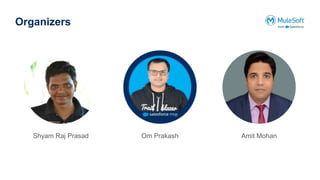
Organizers
Om Prakash
Shyam Raj Prasad Amit Mohan
Safe Harbour Statement
● Both the speaker and the host are organizing this meet-up in individual capacity only. We are
not representing our companies here.
● This presentation is strictly for learning purposes only. Organizer/Presenter do not hold any
responsibility that same solution will work for your business requirements.
● This presentation is not meant for any promotional activities.
A recording of this meetup will be uploaded to events page within 24 hours.
Questions can be submitted/asked at any time in the Chat/Questions & Answers Tab.
Make it more Interactive!!!
Share us the feedback! Rate this meetup session by filling feedback form at the end of the day.
We Love Feedbacks !!
Housekeeping
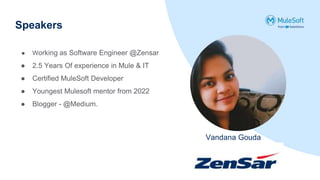
Speakers
Vandana Gouda
● Working as Software Engineer @Zensar
● 2.5 Years Of experience in Mule & IT
● Certified MuleSoft Developer
● Youngest Mulesoft mentor from 2022
● Blogger - @Medium.
ServiceNow Introduction
What is ServiceNow?
● ServiceNow is a cloud IT service management solution
● Transforms enterprise IT by automating and managing IT service relationships to
create a single system of records.
● ServiceNow connector allows business to sync ServiceNow data & extend IT service
management(ITSM)
● ServiceNow enables organizations to streamline processes, improve service delivery,
and enhance collaboration across departments.
● ServiceNow include incident management, change management, asset management,
service catalog, workflow automation, and reporting and analytics.
● It acts as a central hub for IT service delivery and supports the entire service lifecycle
Prerequisites
● ServiceNow Developer Account
● ServiceNow instance and access details
● Mule Servicenow connector
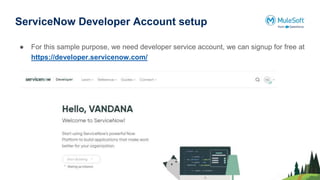
ServiceNow Developer Account setup
● For this sample purpose, we need developer service account, we can signup for free at
https://developer.servicenow.com/
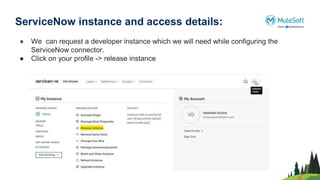
ServiceNow instance and access details:
● We can request a developer instance which we will need while configuring the
ServiceNow connector.
● Click on your profile -> release instance
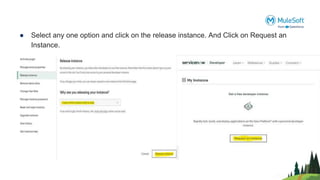
● Select any one option and click on the release instance. And Click on Request an
Instance.
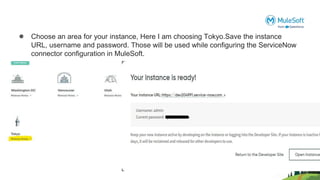
● Choose an area for your instance, Here I am choosing Tokyo.Save the instance
URL, username and password. Those will be used while configuring the ServiceNow
connector configuration in MuleSoft.
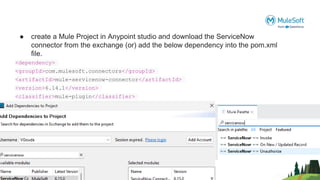
● create a Mule Project in Anypoint studio and download the ServiceNow
connector from the exchange (or) add the below dependency into the pom.xml
file.
<dependency>
<groupId>com.mulesoft.connectors</groupId>
<artifactId>mule-servicenow-connector</artifactId>
<version>6.14.1</version>
<classifier>mule-plugin</classifier>
</dependency>
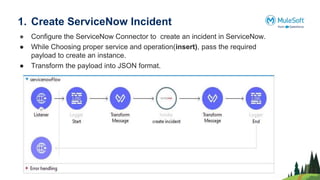
1. Create ServiceNow Incident
● Configure the ServiceNow Connector to create an incident in ServiceNow.
● While Choosing proper service and operation(insert), pass the required
payload to create an instance.
● Transform the payload into JSON format.
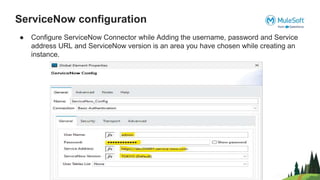
ServiceNow configuration
● Configure ServiceNow Connector while Adding the username, password and Service
address URL and ServiceNow version is an area you have chosen while creating an
instance.
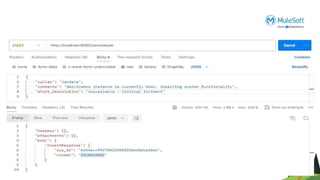
● Deploy the application and send a request in Postman
.
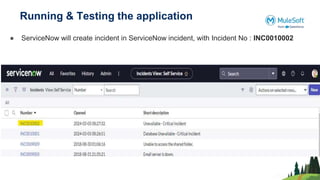
Running & Testing the application
● ServiceNow will create incident in ServiceNow incident, with Incident No : INC0010002
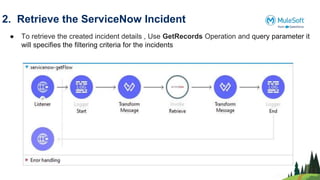
2. Retrieve the ServiceNow Incident
● To retrieve the created incident details , Use GetRecords Operation and query parameter it
will specifies the filtering criteria for the incidents
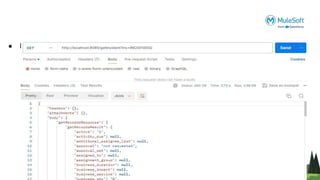
● Deploy the application and send a request in Postman.
Demo
Networking time
Thank You

ServiceNow Integration with MuleSoft.pptx

  • 1.
    Patna MuleSoft Meetup#27 ServiceNow Integration With Mulesoft
  • 2.
    AGENDA ● ServiceNow Overview ●ServiceNow Connector ● Demo ● Q/A ● Wrap Up and Networking
  • 3.
  • 4.
    Safe Harbour Statement ●Both the speaker and the host are organizing this meet-up in individual capacity only. We are not representing our companies here. ● This presentation is strictly for learning purposes only. Organizer/Presenter do not hold any responsibility that same solution will work for your business requirements. ● This presentation is not meant for any promotional activities.
  • 5.
    A recording ofthis meetup will be uploaded to events page within 24 hours. Questions can be submitted/asked at any time in the Chat/Questions & Answers Tab. Make it more Interactive!!! Share us the feedback! Rate this meetup session by filling feedback form at the end of the day. We Love Feedbacks !! Housekeeping
  • 6.
    Speakers Vandana Gouda ● Workingas Software Engineer @Zensar ● 2.5 Years Of experience in Mule & IT ● Certified MuleSoft Developer ● Youngest Mulesoft mentor from 2022 ● Blogger - @Medium.
  • 7.
  • 8.
    What is ServiceNow? ●ServiceNow is a cloud IT service management solution ● Transforms enterprise IT by automating and managing IT service relationships to create a single system of records. ● ServiceNow connector allows business to sync ServiceNow data & extend IT service management(ITSM) ● ServiceNow enables organizations to streamline processes, improve service delivery, and enhance collaboration across departments. ● ServiceNow include incident management, change management, asset management, service catalog, workflow automation, and reporting and analytics. ● It acts as a central hub for IT service delivery and supports the entire service lifecycle
  • 9.
    Prerequisites ● ServiceNow DeveloperAccount ● ServiceNow instance and access details ● Mule Servicenow connector
  • 10.
    ServiceNow Developer Accountsetup ● For this sample purpose, we need developer service account, we can signup for free at https://developer.servicenow.com/
  • 11.
    ServiceNow instance andaccess details: ● We can request a developer instance which we will need while configuring the ServiceNow connector. ● Click on your profile -> release instance
  • 12.
    ● Select anyone option and click on the release instance. And Click on Request an Instance.
  • 13.
    ● Choose anarea for your instance, Here I am choosing Tokyo.Save the instance URL, username and password. Those will be used while configuring the ServiceNow connector configuration in MuleSoft.
  • 14.
    ● create aMule Project in Anypoint studio and download the ServiceNow connector from the exchange (or) add the below dependency into the pom.xml file. <dependency> <groupId>com.mulesoft.connectors</groupId> <artifactId>mule-servicenow-connector</artifactId> <version>6.14.1</version> <classifier>mule-plugin</classifier> </dependency>
  • 15.
    1. Create ServiceNowIncident ● Configure the ServiceNow Connector to create an incident in ServiceNow. ● While Choosing proper service and operation(insert), pass the required payload to create an instance. ● Transform the payload into JSON format.
  • 16.
    ServiceNow configuration ● ConfigureServiceNow Connector while Adding the username, password and Service address URL and ServiceNow version is an area you have chosen while creating an instance.
  • 17.
    ● Deploy theapplication and send a request in Postman .
  • 18.
    Running & Testingthe application ● ServiceNow will create incident in ServiceNow incident, with Incident No : INC0010002
  • 19.
    2. Retrieve theServiceNow Incident ● To retrieve the created incident details , Use GetRecords Operation and query parameter it will specifies the filtering criteria for the incidents
  • 20.
    ● Deploy theapplication and send a request in Postman.
  • 21.
  • 22.
  • 23.