Mon, 27th June 2022 , 09:00 PM (IST)
Nashik MuleSoft Meetup
Json Logger and Externalizing logs
Safe Harbour Statement
● Both the speaker and the host are organizing this meet-up in individual capacity only. We
are
not representing our companies here.
● This presentation is strictly for learning purposes only. Organizer/Presenter do not hold
any responsibility that same solution will work for your business requirements.
● This presentation is not meant for any promotional activities.
2
A recording of this meetup will be uploaded to events page within 24 hours.
Questions can be submitted/asked at any time in the Chat/Questions & Answers Tab.
Make it more Interactive!!!
Give us feedback! Rate this meetup session by filling feedback form at the end of the day.
We Love Feedbacks!!! Its Bread & Butter for Meetup.
Housekeeping
3
Organizers
4
Jitendra Bafna
Senior Solution Architect
EPAM Systems
5
Speakers
Agenda
⮚ Logging and Json Logger
⮚ How to use Json logger
⮚ Externalizing logs
⮚ Demo
CHEERS..!!!
7
We have prizes to give away!
3 Winners a special prize is ready
Logging and Json logger
9
Logging
▪ Logging serves several purposes like
○ Tracking a particular transaction
○ Debugging any errors
○ Creating dashboards
○ Monitoring and troubleshooting applications
10
Json Logger
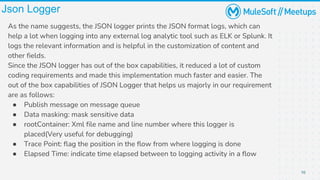
As the name suggests, the JSON logger prints the JSON format logs, which can
help a lot when logging into any external log analytic tool such as ELK or Splunk. It
logs the relevant information and is helpful in the customization of content and
other fields.
Since the JSON logger has out of the box capabilities, it reduced a lot of custom
coding requirements and made this implementation much faster and easier. The
out of the box capabilities of JSON Logger that helps us majorly in our requirement
are as follows:
● Publish message on message queue
● Data masking: mask sensitive data
● rootContainer: Xml file name and line number where this logger is
placed(Very useful for debugging)
● Trace Point: flag the position in the flow from where logging is done
● Elapsed Time: indicate time elapsed between to logging activity in a flow
How to use Json Logger
12
Clone and publish it to your exchange
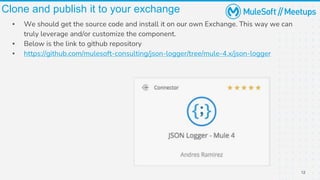
▪ We should get the source code and install it on our own Exchange. This way we can
truly leverage and/or customize the component.
▪ Below is the link to github repository
▪ https://github.com/mulesoft-consulting/json-logger/tree/mule-4.x/json-logger
Add to Mule Palette and start using the
component
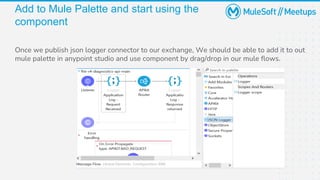
Once we publish json logger connector to our exchange, We should be able to add it to out
mule palette in anypoint studio and use component by drag/drop in our mule flows.
Json logger configurations
Externalizing logs
16
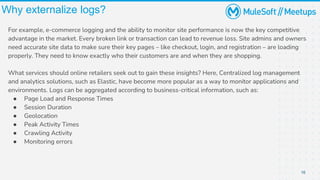
Why externalize logs?
For example, e-commerce logging and the ability to monitor site performance is now the key competitive
advantage in the market. Every broken link or transaction can lead to revenue loss. Site admins and owners
need accurate site data to make sure their key pages – like checkout, login, and registration – are loading
properly. They need to know exactly who their customers are and when they are shopping.
What services should online retailers seek out to gain these insights? Here, Centralized log management
and analytics solutions, such as Elastic, have become more popular as a way to monitor applications and
environments. Logs can be aggregated according to business-critical information, such as:
● Page Load and Response Times
● Session Duration
● Geolocation
● Peak Activity Times
● Crawling Activity
● Monitoring errors
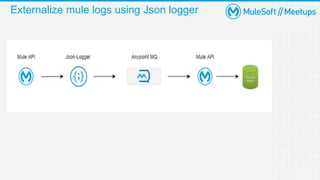
Externalize mule logs using Json logger
18
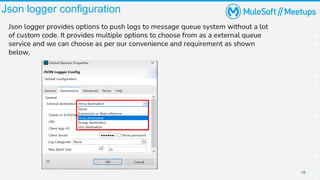
Json logger configuration
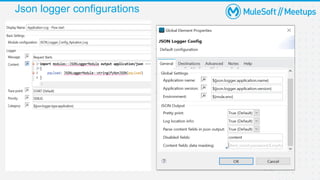
Json logger provides options to push logs to message queue system without a lot
of custom code. It provides multiple options to choose from as a external queue
service and we can choose as per our convenience and requirement as shown
below,
19
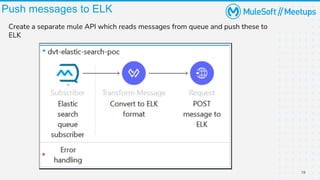
Push messages to ELK
Create a separate mule API which reads messages from queue and push these to
ELK
20
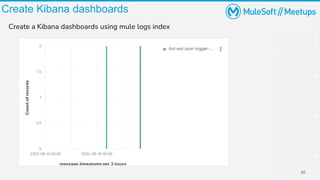
Create Kibana dashboards
Create a Kibana dashboards using mule logs index
DEMO
Best Practices
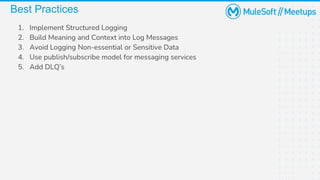
Best Practices
1. Implement Structured Logging
2. Build Meaning and Context into Log Messages
3. Avoid Logging Non-essential or Sensitive Data
4. Use publish/subscribe model for messaging services
5. Add DLQ’s
Trivia quiz
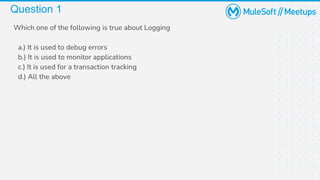
Question 1
Which one of the following is true about Logging
a.) It is used to debug errors
b.) It is used to monitor applications
c.) It is used for a transaction tracking
d.) All the above
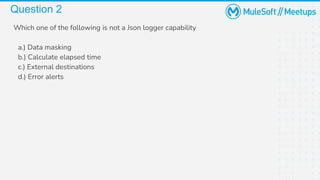
Question 2
Which one of the following is not a Json logger capability
a.) Data masking
b.) Calculate elapsed time
c.) External destinations
d.) Error alerts
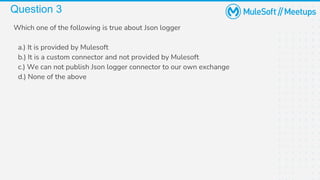
Question 3
Which one of the following is true about Json logger
a.) It is provided by Mulesoft
b.) It is a custom connector and not provided by Mulesoft
c.) We can not publish Json logger connector to our own exchange
d.) None of the above
Q & A
Take a stand !
18
●Nominate yourself for the next meetup speaker and suggest a topic as
well.
20
● Share:
○ Tweet using the hashtag #MuleSoftMeetups
○ Invite your network to join:
https://meetups.mulesoft.com/nashik/
● Feedback:
○ Fill out the survey feedback and suggest topics for upcoming events
○ Contact MuleSoft at meetups@mulesoft.com for ways to improve the
program
What’s next?
Thanks

MuleSoft Nashik Meetup#5 - JSON Logger and Externalize Logs

  • 1.
    Mon, 27th June2022 , 09:00 PM (IST) Nashik MuleSoft Meetup Json Logger and Externalizing logs
  • 2.
    Safe Harbour Statement ●Both the speaker and the host are organizing this meet-up in individual capacity only. We are not representing our companies here. ● This presentation is strictly for learning purposes only. Organizer/Presenter do not hold any responsibility that same solution will work for your business requirements. ● This presentation is not meant for any promotional activities. 2
  • 3.
    A recording ofthis meetup will be uploaded to events page within 24 hours. Questions can be submitted/asked at any time in the Chat/Questions & Answers Tab. Make it more Interactive!!! Give us feedback! Rate this meetup session by filling feedback form at the end of the day. We Love Feedbacks!!! Its Bread & Butter for Meetup. Housekeeping 3
  • 4.
  • 5.
  • 6.
    Agenda ⮚ Logging andJson Logger ⮚ How to use Json logger ⮚ Externalizing logs ⮚ Demo
  • 7.
    CHEERS..!!! 7 We have prizesto give away! 3 Winners a special prize is ready
  • 8.
  • 9.
    9 Logging ▪ Logging servesseveral purposes like ○ Tracking a particular transaction ○ Debugging any errors ○ Creating dashboards ○ Monitoring and troubleshooting applications
  • 10.
    10 Json Logger As thename suggests, the JSON logger prints the JSON format logs, which can help a lot when logging into any external log analytic tool such as ELK or Splunk. It logs the relevant information and is helpful in the customization of content and other fields. Since the JSON logger has out of the box capabilities, it reduced a lot of custom coding requirements and made this implementation much faster and easier. The out of the box capabilities of JSON Logger that helps us majorly in our requirement are as follows: ● Publish message on message queue ● Data masking: mask sensitive data ● rootContainer: Xml file name and line number where this logger is placed(Very useful for debugging) ● Trace Point: flag the position in the flow from where logging is done ● Elapsed Time: indicate time elapsed between to logging activity in a flow
  • 11.
    How to useJson Logger
  • 12.
    12 Clone and publishit to your exchange ▪ We should get the source code and install it on our own Exchange. This way we can truly leverage and/or customize the component. ▪ Below is the link to github repository ▪ https://github.com/mulesoft-consulting/json-logger/tree/mule-4.x/json-logger
  • 13.
    Add to MulePalette and start using the component Once we publish json logger connector to our exchange, We should be able to add it to out mule palette in anypoint studio and use component by drag/drop in our mule flows.
  • 14.
  • 15.
  • 16.
    16 Why externalize logs? Forexample, e-commerce logging and the ability to monitor site performance is now the key competitive advantage in the market. Every broken link or transaction can lead to revenue loss. Site admins and owners need accurate site data to make sure their key pages – like checkout, login, and registration – are loading properly. They need to know exactly who their customers are and when they are shopping. What services should online retailers seek out to gain these insights? Here, Centralized log management and analytics solutions, such as Elastic, have become more popular as a way to monitor applications and environments. Logs can be aggregated according to business-critical information, such as: ● Page Load and Response Times ● Session Duration ● Geolocation ● Peak Activity Times ● Crawling Activity ● Monitoring errors
  • 17.
    Externalize mule logsusing Json logger
  • 18.
    18 Json logger configuration Jsonlogger provides options to push logs to message queue system without a lot of custom code. It provides multiple options to choose from as a external queue service and we can choose as per our convenience and requirement as shown below,
  • 19.
    19 Push messages toELK Create a separate mule API which reads messages from queue and push these to ELK
  • 20.
    20 Create Kibana dashboards Createa Kibana dashboards using mule logs index
  • 21.
  • 22.
  • 23.
    Best Practices 1. ImplementStructured Logging 2. Build Meaning and Context into Log Messages 3. Avoid Logging Non-essential or Sensitive Data 4. Use publish/subscribe model for messaging services 5. Add DLQ’s
  • 24.
  • 25.
    Question 1 Which oneof the following is true about Logging a.) It is used to debug errors b.) It is used to monitor applications c.) It is used for a transaction tracking d.) All the above
  • 26.
    Question 2 Which oneof the following is not a Json logger capability a.) Data masking b.) Calculate elapsed time c.) External destinations d.) Error alerts
  • 27.
    Question 3 Which oneof the following is true about Json logger a.) It is provided by Mulesoft b.) It is a custom connector and not provided by Mulesoft c.) We can not publish Json logger connector to our own exchange d.) None of the above
  • 28.
  • 29.
    Take a stand! 18 ●Nominate yourself for the next meetup speaker and suggest a topic as well.
  • 30.
    20 ● Share: ○ Tweetusing the hashtag #MuleSoftMeetups ○ Invite your network to join: https://meetups.mulesoft.com/nashik/ ● Feedback: ○ Fill out the survey feedback and suggest topics for upcoming events ○ Contact MuleSoft at meetups@mulesoft.com for ways to improve the program What’s next?
  • 31.