Mule ESB
Input and output flow: using http and
java component
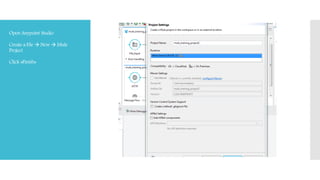
Open Anypoint Studio
Create a File  New  Mule
Project
Click «Finish»
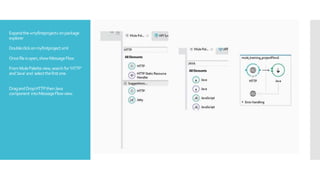
Expandthe«myfirstproject»onpackage
explorer
Doubleclickonmyfirstproject.xml
Oncefileisopen,showMessageFlow
FromMulePaletteview,searchfor‘HTTP’
and‘Java’and selectthefirstone.
DragandDropHTTPthenJava
component intoMessageFlowview.
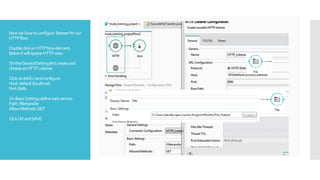
Nowwehavetoconfigure listenerforour
HTTPflow.
DoubleclickonHTTPblueelement.
BelowitwillappearHTTPview.
OntheGeneralSettinglet’screateand
chooseanHTTPListener.
ClickonAdd(+)andconfigure:
Host:default(localhost)
Port:8081
OnBasicSettingsdefinewebservice:
Path:/filetransfer
Allow.Methods:GET
ClickOKandSAVE
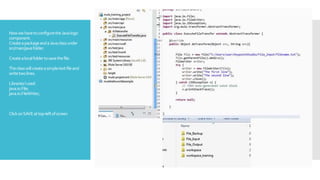
NowwehavetoconfiguretheJavalogic
component.
CreateapackageandaJavaclassunder
src/main/javafolder.
Createalocalfoldertosavethefile.
Theclasswillcreateasimpletextfileand
writetwolines.
LibrariesIused:
java.io.File;
java.io.FileWriter;
ClickonSAVEattop-leftofscreen
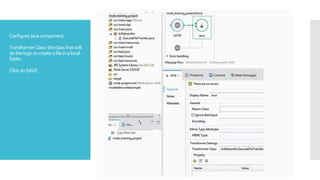
ConfigureJavacomponent.
TransformerClass:theclassthatwill
dothelogictocreateafileinalocal
folder.
ClickonSAVE.
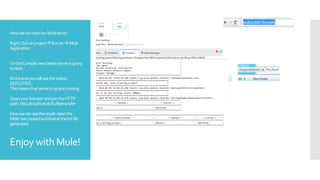
NowwecanstartourMuleserver
RightClickonprojectRunAsMule
Application
OntheConsoleviewbelowserverisgoing
tostart.
Attheendyouwillseethestatus
DEPLOYED.
Thismeansthatserverisupandrunning
OpenyourbrowserandjointheHTTP
path:http://localhost:8081/filetransfer
Nowwecanseetheresult:openthe
folderwecreatedandlookatthetxtfile
generated.
Enjoy with Mule!