MSR- iOS Training
(Duration: 4 days)

Presented By
Prabin Kumar Datta
Software Engineer

Copyright (C) 2013 MSR IT Solution Pvt. Ltd.
Topics

Introduction (1st Day)
Application design and Screen
Resolutions. (1st Day)
Mobile Apps (2nd and 3rd Day)
App Store (3rd Day)
Application Security. (4th Day)
Introduction
(1st Day)
iOS
iOS is a mobile operating system developed and distributed
by Apple Inc.
Originally unveiled in 2007 for the iPhone, it has been
extended to support other Apple devices such as the iPod
Touch (September 2007), iPad (January 2010), iPad Mini
(November 2012) and second-generation Apple TV
(September 2010)
Apple does not license iOS for installation on non-Apple
hardware.

Continue...
iOS (Continued...)
Major versions of iOS are released annually.
The current release, iOS 7, was released on September 18,
2013.
In iOS, there are four abstraction layers: the Core OS layer, the
Core Services layer, the Media layer, and the Cocoa Touch
layer.
iOS is derived from OS X, with which it shares the Darwin
foundation and various application frameworks. iOS is Apple's
mobile version of the OS X operating system used on Apple
computers.
Objective-C

Objective-C is the primary programming language you use
when writing software for OS X and iOS.
It’s a superset of the C programming language and provides
object-oriented capabilities and a dynamic runtime.
Objective-C inherits the syntax, primitive types, and flow
control statements of C and adds syntax for defining classes and
methods.
It also adds language-level support for object graph
management and object literals while providing dynamic typing
and binding, deferring many responsibilities until runtime.
Setup
Get the Tools:
Before you can start developing great apps, set up a
development environment to work in and make sure you have
the right tools.
To develop iOS apps, we need:
A Mac computer running OS X 10.7 (Lion) or later
Xcode
iOS SDK
Application design and Screen
Resolutions.
(1st Day)
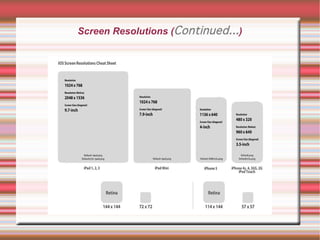
Screen Resolutions
iPhone:
iPhone 3G (Resolution - 320x480)
iPhone 4 (3.5' inch) (Resolution - 640x960)
iPhone 5 (4 inch) (Resolution - 640x1136)
iPad:
iPad 2 (Resolution – 768x1024)
iPad 3-Retina (Resolution - 1536x2048)

Continue..
.
Screen Resolutions (Continued...)
Questions And Answers
References
http://en.wikipedia.org/wiki/Objective-C

https://developer.apple.com/library/mac/documentation/cocoa/conce
http://en.wikipedia.org/wiki/IOS

https://developer.apple.com/library/ios/design/index.html#//apple_ref

https://developer.apple.com/library/ios/documentation/UserExperienc
THE END
Mobile Apps
(2nd Day)
Types Of Mobile Apps

Native App
Web App
Hybrid App
Native App
Native apps live on the device and are accessed through icons
on the device home screen. Native apps are installed through
an application store (such as Google Play or Apple’s App
Store). They are developed specifically for one platform, and
can take full advantage of all the device features–they can use
the camera, the GPS, the accelerometer, the compass, the list
of contacts, and so on. They can also incorporate gestures
(either standard operating-system gestures or new, appdefined gestures). And native apps can use the device’s
notification system and can work offline.
Mobile Web Apps
Web apps are not real apps; they are really websites that, in
many ways, look and feel like native applications. They are run
by a browser and typically written in HTML5. Users first access
them as they would access any web page: they navigate to a
special URL and then have the option of “installing” them on
their home screen by creating a bookmark to that page.
Hybrid apps
Hybrid apps are part native apps, part web apps. (Because of
that, many people incorrectly call them “web apps”). Like
native apps, they live in an app store and can take advantage
of the many device features available. Like web apps, they rely
on HTML being rendered in a browser, with the caveat that the
browser is embedded within the app.
App Development Process
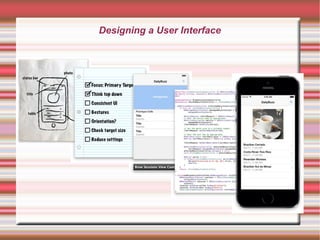
Designing a User Interface
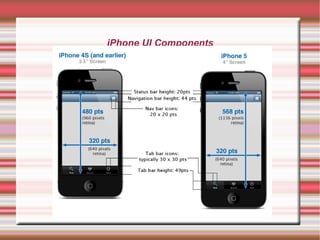
iPhone UI Components
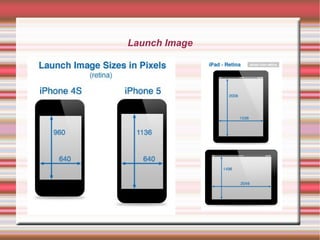
Launch Image
SetUp Development Env.
Linux
GNUstep
clang (llvm)
Note: To install GNUstep and clang in Ubuntu, refer to
Reference Page 3rd Link.
Mac
Install Xcode
First Example Program (main.m)









#import <Foundation/Foundation.h>
int main (int argc, const char * argv[])
{
NSAutoreleasePool * pool = [[NSAutoreleasePool alloc] init];
NSLog (@"Programming is fun!");
[pool drain];
return 0;
}
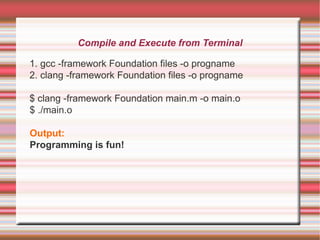
Compile and Execute from Terminal
1. gcc -framework Foundation files -o progname
2. clang -framework Foundation files -o progname
$ clang -framework Foundation main.m -o main.o
$ ./main.o
Output:
Programming is fun!
Questions And Answers
References

https://developer.apple.com/library/ios/referencelibrary/GettingStarte
http://www.idev101.com/

http://blog.tlensing.org/2013/02/24/objective-c-on-linux-setting-up-gn
http://www.gnustep.org/experience/apps.html
THE END
Mobile Apps and App Store
(3rd Day)
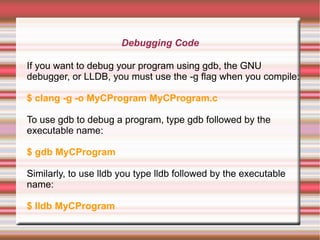
Debugging Code
If you want to debug your program using gdb, the GNU
debugger, or LLDB, you must use the -g flag when you compile:
$ clang -g -o MyCProgram MyCProgram.c
To use gdb to debug a program, type gdb followed by the
executable name:
$ gdb MyCProgram
Similarly, to use lldb you type lldb followed by the executable
name:
$ lldb MyCProgram
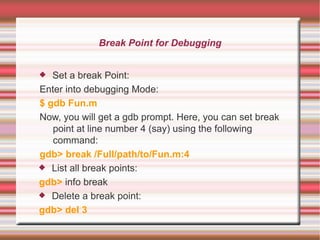
Break Point for Debugging
Set a break Point:
Enter into debugging Mode:
$ gdb Fun.m
Now, you will get a gdb prompt. Here, you can set break
point at line number 4 (say) using the following
command:
gdb> break /Full/path/to/Fun.m:4
 List all break points:
gdb> info break
 Delete a break point:
gdb> del 3

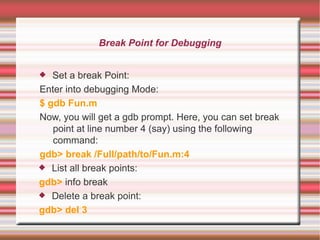
Break Point for Debugging
Set a break Point:
Enter into debugging Mode:
$ gdb Fun.m
Now, you will get a gdb prompt. Here, you can set break
point at line number 4 (say) using the following
command:
gdb> break /Full/path/to/Fun.m:4
 List all break points:
gdb> info break
 Delete a break point:
gdb> del 3

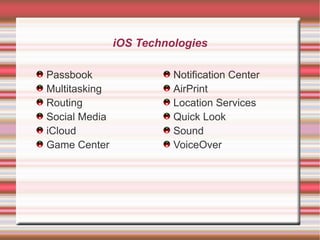
iOS Technologies
Passbook
Multitasking
Routing
Social Media
iCloud
Game Center

Notification Center
AirPrint
Location Services
Quick Look
Sound
VoiceOver
App Store
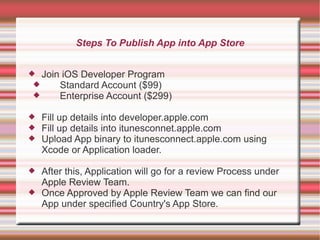
Steps To Publish App into App Store
 Join iOS Developer Program

Standard Account ($99)

Enterprise Account ($299)




Fill up details into developer.apple.com
Fill up details into itunesconnet.apple.com
Upload App binary to itunesconnect.apple.com using
Xcode or Application loader.



After this, Application will go for a review Process under
Apple Review Team.
Once Approved by Apple Review Team we can find our
App under specified Country's App Store.


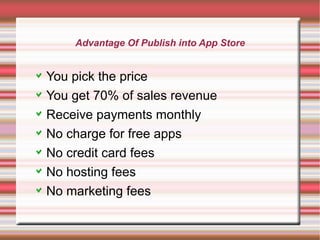
Advantage Of Publish into App Store

You pick the price
You get 70% of sales revenue
Receive payments monthly
No charge for free apps
No credit card fees
No hosting fees
No marketing fees
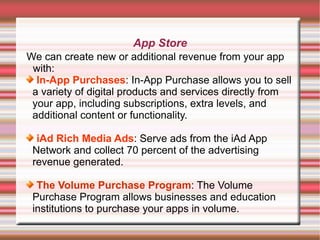
App Store
We can create new or additional revenue from your app
with:
In-App Purchases: In-App Purchase allows you to sell
a variety of digital products and services directly from
your app, including subscriptions, extra levels, and
additional content or functionality.
iAd Rich Media Ads: Serve ads from the iAd App
Network and collect 70 percent of the advertising
revenue generated.
The Volume Purchase Program: The Volume
Purchase Program allows businesses and education
institutions to purchase your apps in volume.
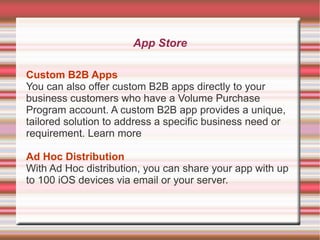
App Store
Custom B2B Apps
You can also offer custom B2B apps directly to your
business customers who have a Volume Purchase
Program account. A custom B2B app provides a unique,
tailored solution to address a specific business need or
requirement. Learn more
Ad Hoc Distribution
With Ad Hoc distribution, you can share your app with up
to 100 iOS devices via email or your server.
Questions And Answers
References

https://developer.apple.com/library/ios/documentation/UserExperien
THE END
Application Security
(4th Day)
Application Security
Now days, smartphones and tablets are most the popular
gadgets. If we see recent stats, global PC sale has also been
decreasing for the past few months. The reason behind this is
that people utilize tablets for most of their work. And there is
no need to explain that Mobile is ruling global smartphone and
tablet markets.
So, companies are now focusing on bringing their software
as a mobile app for iOS and Android. These apps include
office apps, photo editing apps, instant messaging apps and
penetration testing apps. If you have an iOS or Android
smartphone, you can start your next penetration testing
project from your Mobile phone.
Application Security (Continued...)

The good news is:
Apple does it for you automatically. When you submit
your app to the App Store, Apple encrypts your binary
with FairPlay encryption – the same type of encryption
used for some iTunes content. Running class-dump-z on
an encrypted binary will result in complete gibberish.
The bad news:
it’s a fairly trivial matter to circumvent this defense. The
process can be completed manually in about 10 minutes
time and there are even tools that exist to automate it.
Data Security
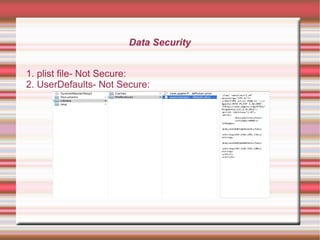
Data Security
1. plist file- Not Secure:
2. UserDefaults- Not Secure:
Keychain best practices
Encrypt the data: Although Keychain Access is more
secure, it is also a high-priority target. For jailbroken iOS
devices there are command line utilities that print out the
Keychain Access database’s contents. Make sure you make
an attacker’s life a little harder by encrypting the data using
Apple’s Common Crypto APIs found in the Security
Framework.
Do NOT hardcode your encryption key to the app: A long
string found in the binary data section could potentially be
interesting to an attacker. Not only that, if the encryption key is
hardcoded, the attacker can post it online and have this attack
apply to anyone using the app. You need to make a unique
encryption key for the device.
Keychain best practices (Continued...)
Be aware of your methods and how an attacker can use
them: Your beautiful encryption/decryption method could be
the best thing out there, but attackers can control the runtime
and run your decryption method on your encrypted data.
Question yourself: Do you need to store it?: Since the
attacker can search, modify and execute portions of your
binary you did not intend, you should ask yourself, do I really
have to store this on the device?
Network Penetration
Proxy Connection:

a) We can use this to track down all network activities.
b) Retrieve important unsecured data.
c) Modify http request and response data.
d) Hijack sessions and miss use user information and
more.
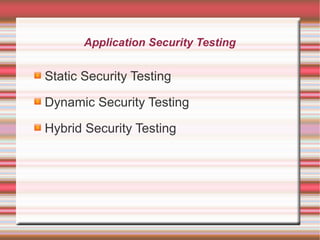
Application Security Testing

Static Security Testing
Dynamic Security Testing
Hybrid Security Testing
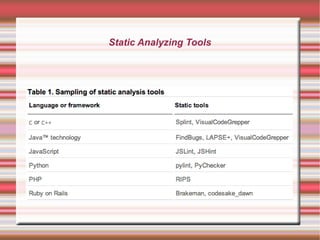
Static Analyzing Tools
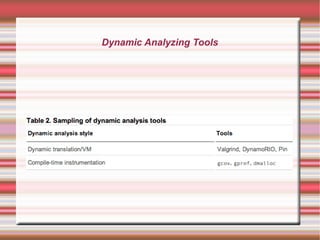
Dynamic Analyzing Tools
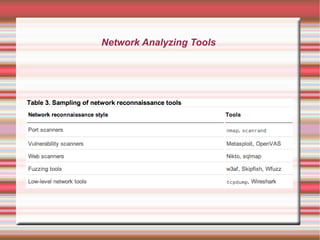
Network Analyzing Tools
Questions And Answers
References
http://www.raywenderlich.com/45645
http://www.raywenderlich.com/46223/ios-app-security-analysispart-2
http://www.ibm.com/developerworks/library/se-testing/
http://www.apple.com/business/accelerator/develop/security.html
THE END

MSR iOS Tranining

  • 1.
    MSR- iOS Training (Duration:4 days) Presented By Prabin Kumar Datta Software Engineer Copyright (C) 2013 MSR IT Solution Pvt. Ltd.
  • 2.
    Topics Introduction (1st Day) Applicationdesign and Screen Resolutions. (1st Day) Mobile Apps (2nd and 3rd Day) App Store (3rd Day) Application Security. (4th Day)
  • 3.
  • 4.
    iOS iOS is amobile operating system developed and distributed by Apple Inc. Originally unveiled in 2007 for the iPhone, it has been extended to support other Apple devices such as the iPod Touch (September 2007), iPad (January 2010), iPad Mini (November 2012) and second-generation Apple TV (September 2010) Apple does not license iOS for installation on non-Apple hardware. Continue...
  • 5.
    iOS (Continued...) Major versionsof iOS are released annually. The current release, iOS 7, was released on September 18, 2013. In iOS, there are four abstraction layers: the Core OS layer, the Core Services layer, the Media layer, and the Cocoa Touch layer. iOS is derived from OS X, with which it shares the Darwin foundation and various application frameworks. iOS is Apple's mobile version of the OS X operating system used on Apple computers.
  • 6.
    Objective-C Objective-C is theprimary programming language you use when writing software for OS X and iOS. It’s a superset of the C programming language and provides object-oriented capabilities and a dynamic runtime. Objective-C inherits the syntax, primitive types, and flow control statements of C and adds syntax for defining classes and methods. It also adds language-level support for object graph management and object literals while providing dynamic typing and binding, deferring many responsibilities until runtime.
  • 7.
    Setup Get the Tools: Beforeyou can start developing great apps, set up a development environment to work in and make sure you have the right tools. To develop iOS apps, we need: A Mac computer running OS X 10.7 (Lion) or later Xcode iOS SDK
  • 8.
    Application design andScreen Resolutions. (1st Day)
  • 9.
    Screen Resolutions iPhone: iPhone 3G(Resolution - 320x480) iPhone 4 (3.5' inch) (Resolution - 640x960) iPhone 5 (4 inch) (Resolution - 640x1136) iPad: iPad 2 (Resolution – 768x1024) iPad 3-Retina (Resolution - 1536x2048) Continue.. .
  • 10.
  • 11.
  • 12.
  • 13.
  • 14.
  • 15.
    Types Of MobileApps Native App Web App Hybrid App
  • 16.
    Native App Native appslive on the device and are accessed through icons on the device home screen. Native apps are installed through an application store (such as Google Play or Apple’s App Store). They are developed specifically for one platform, and can take full advantage of all the device features–they can use the camera, the GPS, the accelerometer, the compass, the list of contacts, and so on. They can also incorporate gestures (either standard operating-system gestures or new, appdefined gestures). And native apps can use the device’s notification system and can work offline.
  • 17.
    Mobile Web Apps Webapps are not real apps; they are really websites that, in many ways, look and feel like native applications. They are run by a browser and typically written in HTML5. Users first access them as they would access any web page: they navigate to a special URL and then have the option of “installing” them on their home screen by creating a bookmark to that page.
  • 18.
    Hybrid apps Hybrid appsare part native apps, part web apps. (Because of that, many people incorrectly call them “web apps”). Like native apps, they live in an app store and can take advantage of the many device features available. Like web apps, they rely on HTML being rendered in a browser, with the caveat that the browser is embedded within the app.
  • 19.
  • 20.
  • 21.
  • 22.
  • 23.
    SetUp Development Env. Linux GNUstep clang(llvm) Note: To install GNUstep and clang in Ubuntu, refer to Reference Page 3rd Link. Mac Install Xcode
  • 24.
    First Example Program(main.m)         #import <Foundation/Foundation.h> int main (int argc, const char * argv[]) { NSAutoreleasePool * pool = [[NSAutoreleasePool alloc] init]; NSLog (@"Programming is fun!"); [pool drain]; return 0; }
  • 25.
    Compile and Executefrom Terminal 1. gcc -framework Foundation files -o progname 2. clang -framework Foundation files -o progname $ clang -framework Foundation main.m -o main.o $ ./main.o Output: Programming is fun!
  • 26.
  • 27.
  • 28.
  • 29.
    Mobile Apps andApp Store (3rd Day)
  • 30.
    Debugging Code If youwant to debug your program using gdb, the GNU debugger, or LLDB, you must use the -g flag when you compile: $ clang -g -o MyCProgram MyCProgram.c To use gdb to debug a program, type gdb followed by the executable name: $ gdb MyCProgram Similarly, to use lldb you type lldb followed by the executable name: $ lldb MyCProgram
  • 31.
    Break Point forDebugging Set a break Point: Enter into debugging Mode: $ gdb Fun.m Now, you will get a gdb prompt. Here, you can set break point at line number 4 (say) using the following command: gdb> break /Full/path/to/Fun.m:4  List all break points: gdb> info break  Delete a break point: gdb> del 3 
  • 32.
    Break Point forDebugging Set a break Point: Enter into debugging Mode: $ gdb Fun.m Now, you will get a gdb prompt. Here, you can set break point at line number 4 (say) using the following command: gdb> break /Full/path/to/Fun.m:4  List all break points: gdb> info break  Delete a break point: gdb> del 3 
  • 33.
    iOS Technologies Passbook Multitasking Routing Social Media iCloud GameCenter Notification Center AirPrint Location Services Quick Look Sound VoiceOver
  • 34.
  • 35.
    Steps To PublishApp into App Store  Join iOS Developer Program  Standard Account ($99)  Enterprise Account ($299)    Fill up details into developer.apple.com Fill up details into itunesconnet.apple.com Upload App binary to itunesconnect.apple.com using Xcode or Application loader.  After this, Application will go for a review Process under Apple Review Team. Once Approved by Apple Review Team we can find our App under specified Country's App Store. 
  • 36.
    Advantage Of Publishinto App Store You pick the price You get 70% of sales revenue Receive payments monthly No charge for free apps No credit card fees No hosting fees No marketing fees
  • 37.
    App Store We cancreate new or additional revenue from your app with: In-App Purchases: In-App Purchase allows you to sell a variety of digital products and services directly from your app, including subscriptions, extra levels, and additional content or functionality. iAd Rich Media Ads: Serve ads from the iAd App Network and collect 70 percent of the advertising revenue generated. The Volume Purchase Program: The Volume Purchase Program allows businesses and education institutions to purchase your apps in volume.
  • 38.
    App Store Custom B2BApps You can also offer custom B2B apps directly to your business customers who have a Volume Purchase Program account. A custom B2B app provides a unique, tailored solution to address a specific business need or requirement. Learn more Ad Hoc Distribution With Ad Hoc distribution, you can share your app with up to 100 iOS devices via email or your server.
  • 39.
  • 40.
  • 41.
  • 42.
  • 43.
    Application Security Now days,smartphones and tablets are most the popular gadgets. If we see recent stats, global PC sale has also been decreasing for the past few months. The reason behind this is that people utilize tablets for most of their work. And there is no need to explain that Mobile is ruling global smartphone and tablet markets. So, companies are now focusing on bringing their software as a mobile app for iOS and Android. These apps include office apps, photo editing apps, instant messaging apps and penetration testing apps. If you have an iOS or Android smartphone, you can start your next penetration testing project from your Mobile phone.
  • 44.
    Application Security (Continued...) Thegood news is: Apple does it for you automatically. When you submit your app to the App Store, Apple encrypts your binary with FairPlay encryption – the same type of encryption used for some iTunes content. Running class-dump-z on an encrypted binary will result in complete gibberish. The bad news: it’s a fairly trivial matter to circumvent this defense. The process can be completed manually in about 10 minutes time and there are even tools that exist to automate it.
  • 45.
  • 46.
    Data Security 1. plistfile- Not Secure: 2. UserDefaults- Not Secure:
  • 47.
    Keychain best practices Encryptthe data: Although Keychain Access is more secure, it is also a high-priority target. For jailbroken iOS devices there are command line utilities that print out the Keychain Access database’s contents. Make sure you make an attacker’s life a little harder by encrypting the data using Apple’s Common Crypto APIs found in the Security Framework. Do NOT hardcode your encryption key to the app: A long string found in the binary data section could potentially be interesting to an attacker. Not only that, if the encryption key is hardcoded, the attacker can post it online and have this attack apply to anyone using the app. You need to make a unique encryption key for the device.
  • 48.
    Keychain best practices(Continued...) Be aware of your methods and how an attacker can use them: Your beautiful encryption/decryption method could be the best thing out there, but attackers can control the runtime and run your decryption method on your encrypted data. Question yourself: Do you need to store it?: Since the attacker can search, modify and execute portions of your binary you did not intend, you should ask yourself, do I really have to store this on the device?
  • 49.
    Network Penetration Proxy Connection: a)We can use this to track down all network activities. b) Retrieve important unsecured data. c) Modify http request and response data. d) Hijack sessions and miss use user information and more.
  • 50.
    Application Security Testing StaticSecurity Testing Dynamic Security Testing Hybrid Security Testing
  • 51.
  • 52.
  • 53.
  • 54.
  • 55.
  • 56.