Mastering the Secrets to Success in Managed Security


              Mastering the Secrets to Success
                   in Managed Security
                             Special Guest: David Castro, Kaseya
                    Host: Michael Siggins, Publisher ChannelPro Magazine


                                                       1
Success Series of Webinars
Mastering the Secrets to Success in Managed Security


      How to Participate: Audio Options
     1. Turn on the volume on your computer.
        To join the audio broadcast during an event, choose “Join
        Audio Broadcasting” on the Communicate menu.

     2. Dial in to our teleconference line.
        Phone: 1-408-792-6300
        Meeting Number: 660 618 127

     If you are having difficulty with WebEx, please contact technical
     support: 866-229-3239.


                                                       2
Success Series of Webinars
Mastering the Secrets to Success in Managed Security


      How to Participate: Ask Questions
     1. To ask questions of the panelists:
        Submit your questions via the Q&A area in the bottom right
        area of your screen.

     2. To ask about technical issues:
        Use the Chat area in the middle right area of your screen.
        Submit your questions to the Host, EH Publishing.

     If you are having difficulty with WebEx, please contact technical
     support: 866-229-3239.


                                                       3
Success Series of Webinars
Mastering the Secrets to Success in Managed Security


      Agenda
     •    Four keys to safe computing
     •    Common managed security challenges
     •    Five proven managed security best practices
     •    Choosing the right RMM tool
     •    Four examples of best practices in action
     •    Benefits of following best practices


                                                       4
Success Series of Webinars
Mastering the Secrets to Success in Managed Security


    The Managed Security Opportunity
     • Security is still a major issue for SMBs
                   • Kaspersky Lab identified > 1 billion threats and ~89.5 million
                     malicious URLs in 2Q 2012 alone

     • SMBs spend heavily on security
                   • IDC says U.S. SMB security spending will top $5.6 billion in
                     2015 and grow twice as fast as overall IT spending

     • Spending on managed security services is
       growing fast
                   • Infonetics says global managed security service revenue
                     grew 12% in 2011 to $11.7 billion and will reach nearly $18
                     billion by 2016

                                                       5
Success Series of Webinars
Mastering the Secrets to Success in Managed Security


     What SMBs and MSPs Want from
     Managed Security Services
     SMBs:
            – End-to-end protection
            – Guaranteed service levels
            – Minimal disruption to user productivity and core
              business processes
     MSPs:
            –    High customer satisfaction rates
            –    Low administrative expenses
            –    Strong profits
            –    A scalable foundation for long-term growth
                                                       6
Success Series of Webinars
Mastering the Secrets to Success in Managed Security


   The Four Keys to Secure Computing
     • Properly install reputable security software on
       every end point
     • Keep the software up to date with the latest
       revisions and containments
     • Ensure that the software performs system
       scans regularly
     • Verify that the software successfully patches
       OS’s and applications
                                                       7
Success Series of Webinars
Mastering the Secrets to Success in Managed Security


  Why MSPs Struggle with Managed Security
   • Inconsistent execution due to lack of
     centralized oversight and control
                 Multiple security products with different interfaces
                 complicate management

   • Reactive technical processes
                 Security software or vendor must notify MSP of problems
                 and new updates and patches

   • Labor-intensive processes
                 Manual updating, installation, and patching—often in
                 person and device-by-device.
                                                       8
Success Series of Webinars
Mastering the Secrets to Success in Managed Security


   Managed Security Best Practices
     How best-in-class managed security providers do
     business

     1. Sell security, not security products
                   • Business owners care about security, not tools
                   • Emphasize the end result—comprehensive security—
                     rather than the tools used to achieve it

     2. Choose the security tools your customers use
                   • Build it into you SLA

                                                       9
Success Series of Webinars
Mastering the Secrets to Success in Managed Security


    Managed Security Best Practices
     3. Employ centralized, proactive security processes
            – Manage all products through one console
            – Actively confirm installations, updates, scans, and
              patching

     4. Automate your security processes wherever
     possible

     5. Deliver thorough, regular reports
            – Demonstrate value you add by listing updates,
              patching, and scans
                                                       10
Success Series of Webinars
Mastering the Secrets to Success in Managed Security


  Features to Look For in an RMM Tool
     • Extensive built-in automation
                   System should search websites for updates and patches,
                   determine which devices need them, then install
                   automatically as instructed

     • Robust scripting
                  System should be capable of automating anything you
                  can do at the command line


                                                       11
Success Series of Webinars
Mastering the Secrets to Success in Managed Security


  Features to Look For in an RMM Tool
     • Proactive security features
                  System should actively confirm installs, updates, scans,
                  and patches rather than react to input from security
                  software

     • Tight integration with leading security
       products
                  Close, two-way communication, not just a click-through

     • Strong reporting functionality
                  Ability to compile detailed data easily
                                                       12
Success Series of Webinars
Mastering the Secrets to Success in Managed Security


 Example 1: Patching a PC Running Msft Windows
   1. Use RMM software to specify in advance:
                 • Which patches to install on which PCs
                 • Installation dates and times
                 • How to handle issue like rebooting

   2. Patch Windows devices automatically

   Results:
          – Patch nearly unlimited Windows devices with
            minimal human intervention
          – No WSUS required
                                                       13
Success Series of Webinars
Mastering the Secrets to Success in Managed Security


  Example 2: Applying an Anti-Virus Update
   1. Use RMM software to find security updates
      automatically
   2. Install them automatically through one
      console at the click of a button

   Results:
          – No need to check websites yourself
          – No need for manual installation
          – More effectively keep clients current on latest
            updates
                                                       14
Success Series of Webinars
Mastering the Secrets to Success in Managed Security


  Example 3: Deploying a Malware Containment

     1. Use RMM software to acquire new
        containments automatically as they appear
     2. Install them automatically where and as you
        specify

     Results:
            – Faster response times to new threats
            – No need for manual searches or installation


                                                       15
Success Series of Webinars
Mastering the Secrets to Success in Managed Security


Example 4: Deploying Non-Microsoft, Non-Malware Update

    1. Use RMM software to find updates for
       common technologies like Java, Flash, Zip,
       etc.
    2. Install them automatically based on highly
       configurable policies

    Results:
           – More comprehensive security
           – Minimal incremental effort

                                                       16
Success Series of Webinars
Mastering the Secrets to Success in Managed Security


 Benefits of Using Managed Security Best Practices
    • Lower overhead
                  Centralization + automation = major savings of time and
                  effort

    • Higher profits
                  Lower overhead translates to a bigger bottom line

    • Better security
                  Automated, proactive processes reduce human error, keep
                  customers safer

    • Reduced risk of SLA failure
                   Better security means fewer SLA violations
                                                       17
Success Series of Webinars
Mastering the Secrets to Success in Managed Security


  Benefits of Using Managed Security Best Practices
   • More time for strategic consulting and project
     work
                Because you’re spending less time on routine security
                maintenance

   • Enhanced customer satisfaction
                 Clients appreciate vendors who keep them secure and
                 provide strategic guidance

   • Greater ability to scale your business
                 Grow customer base faster than payroll thanks to
                 automated processes
                                                       18
Success Series of Webinars
Mastering the Secrets to Success in Managed Security


   Summary
    • Managed security is a significant opportunity if
      you deliver it efficiently and effectively
    • Best-in-class MSPs use state-of-the-art RMM
      software to:
           – Build their managed security practice around
             automated, centralized, and proactive security
             processes
           – Sell security as an end result rather than a set of
             products
           – Secure and satisfy their clients more completely
           – Earn consistently high profits

                                                       19
Success Series of Webinars
Mastering the Secrets to Success in Managed Security


    About Kaseya
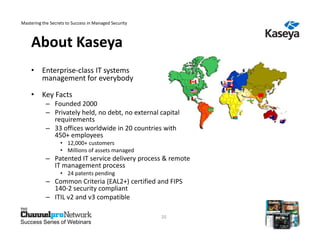
    • Enterprise-class IT systems
      management for everybody

    • Key Facts
            – Founded 2000
            – Privately held, no debt, no external capital
              requirements
            – 33 offices worldwide in 20 countries with
              450+ employees
                   • 12,000+ customers
                   • Millions of assets managed
            – Patented IT service delivery process & remote
              IT management process
                   • 24 patents pending
            – Common Criteria (EAL2+) certified and FIPS
              140-2 security compliant
            – ITIL v2 and v3 compatible

                                                       20
Success Series of Webinars
Mastering the Secrets to Success in Managed Security


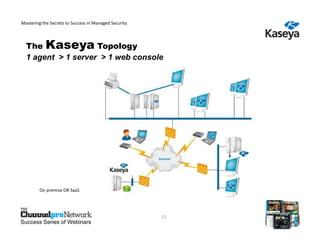
  The Kaseya Topology
  1 agent > 1 server > 1 web console


         On premise OR SaaS


                                                       21
Success Series of Webinars
Mastering the Secrets to Success in Managed Security


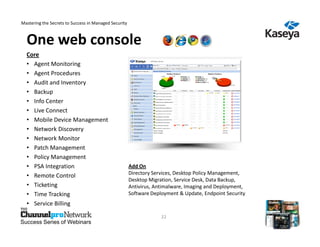
  One web console
  Core
  • Agent Monitoring
  • Agent Procedures
  • Audit and Inventory
  • Backup
  • Info Center
  • Live Connect
  • Mobile Device Management
  • Network Discovery
  • Network Monitor
  • Patch Management
  • Policy Management
  • PSA Integration                                    Add On
  • Remote Control                                     Directory Services, Desktop Policy Management,
                                                       Desktop Migration, Service Desk, Data Backup,
  • Ticketing                                          Antivirus, Antimalware, Imaging and Deployment,
  • Time Tracking                                      Software Deployment & Update, Endpoint Security
  • Service Billing

                                                                    22
Success Series of Webinars
Mastering the Secrets to Success in Managed Security

  3
  r


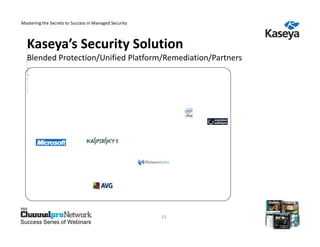
  Kaseya’s Security Solution
  d
  O
  p
  P
  e
  a
  r
  a
  y
   S
   c
  re
   M
   h
   K
   o
   e
  tA
   a
  tK
   n
   d
    S
    e
    r
    v
     K
     a
     s

     y
    ia
     g

  Blended Protection/Unified Platform/Remediation/Partners
  is
   na
    c
   ie
   u
  ne
   As
  *tE
   ln
  gr
   n
   yA
    e
   in
   o t
  Ss
   an
   td
    D
    yP
   r
   n
  o
  Sit
    e
    ap
   iP
   g
  y-t
  fio
   A
   /s r
   n r
  tc
   n
  st
   M
   g
   &
    k
    -
    Ai
     o
   R
   a
  tV
  wtn
    nh
     c
  a
  ee
   lt
   i&ie
     t
   &
   M e
   M
   m
   w
  rd
  m r
    in
   a
  ee
   aR
    u
    vg
     Ss
  MM
   n u
   d
   ls
   re
    ie
  So
   a r
  Dir
   e
   wpc
   b
   g e
  eao
    u
  Oiu
   e s
  pt
   rs
   lr
   m
  ft
  lii
   e
   e
  fi
   o
  o  t
  in
   n
  yty
  c g
  m
  e
  e
  n
  t


                                                       23
Success Series of Webinars
Mastering the Secrets to Success in Managed Security


  Why MSPs Choose Kaseya


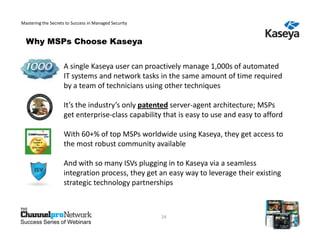
                    A single Kaseya user can proactively manage 1,000s of automated
                    IT systems and network tasks in the same amount of time required
                    by a team of technicians using other techniques

                    It’s the industry’s only patented server-agent architecture; MSPs
                    get enterprise-class capability that is easy to use and easy to afford

                    With 60+% of top MSPs worldwide using Kaseya, they get access to
                    the most robust community available

                    And with so many ISVs plugging in to Kaseya via a seamless
                    integration process, they get an easy way to leverage their existing
                    strategic technology partnerships


                                                       24
Success Series of Webinars
Mastering the Secrets to Success in Managed Security


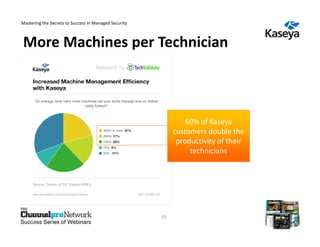
More Machines per Technician


                                                                60% of Kaseya
                                                            customers double the
                                                             productivity of their
                                                                 technicians


                                                       25
Success Series of Webinars
   25
Mastering the Secrets to Success in Managed Security


 Attendees – Q3 ’12 Get started with Kaseya
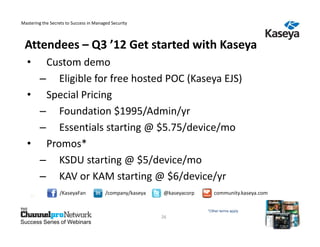
  •  Custom demo
    – Eligible for free hosted POC (Kaseya EJS)
  • Special Pricing
    – Foundation $1995/Admin/yr
    – Essentials starting @ $5.75/device/mo
  • Promos*
    – KSDU starting @ $5/device/mo
    – KAV or KAM starting @ $6/device/yr
    26
                  /KaseyaFan             /company/kaseya   @kaseyacorp      community.kaseya.com


                                                                         *Other terms apply
                                                           26
Success Series of Webinars

MSP Mastering the Secrets to Succuss in Managed Security

  • 1.
    Mastering the Secretsto Success in Managed Security Mastering the Secrets to Success in Managed Security Special Guest: David Castro, Kaseya Host: Michael Siggins, Publisher ChannelPro Magazine 1 Success Series of Webinars
  • 2.
    Mastering the Secretsto Success in Managed Security How to Participate: Audio Options 1. Turn on the volume on your computer. To join the audio broadcast during an event, choose “Join Audio Broadcasting” on the Communicate menu. 2. Dial in to our teleconference line. Phone: 1-408-792-6300 Meeting Number: 660 618 127 If you are having difficulty with WebEx, please contact technical support: 866-229-3239. 2 Success Series of Webinars
  • 3.
    Mastering the Secretsto Success in Managed Security How to Participate: Ask Questions 1. To ask questions of the panelists: Submit your questions via the Q&A area in the bottom right area of your screen. 2. To ask about technical issues: Use the Chat area in the middle right area of your screen. Submit your questions to the Host, EH Publishing. If you are having difficulty with WebEx, please contact technical support: 866-229-3239. 3 Success Series of Webinars
  • 4.
    Mastering the Secretsto Success in Managed Security Agenda • Four keys to safe computing • Common managed security challenges • Five proven managed security best practices • Choosing the right RMM tool • Four examples of best practices in action • Benefits of following best practices 4 Success Series of Webinars
  • 5.
    Mastering the Secretsto Success in Managed Security The Managed Security Opportunity • Security is still a major issue for SMBs • Kaspersky Lab identified > 1 billion threats and ~89.5 million malicious URLs in 2Q 2012 alone • SMBs spend heavily on security • IDC says U.S. SMB security spending will top $5.6 billion in 2015 and grow twice as fast as overall IT spending • Spending on managed security services is growing fast • Infonetics says global managed security service revenue grew 12% in 2011 to $11.7 billion and will reach nearly $18 billion by 2016 5 Success Series of Webinars
  • 6.
    Mastering the Secretsto Success in Managed Security What SMBs and MSPs Want from Managed Security Services SMBs: – End-to-end protection – Guaranteed service levels – Minimal disruption to user productivity and core business processes MSPs: – High customer satisfaction rates – Low administrative expenses – Strong profits – A scalable foundation for long-term growth 6 Success Series of Webinars
  • 7.
    Mastering the Secretsto Success in Managed Security The Four Keys to Secure Computing • Properly install reputable security software on every end point • Keep the software up to date with the latest revisions and containments • Ensure that the software performs system scans regularly • Verify that the software successfully patches OS’s and applications 7 Success Series of Webinars
  • 8.
    Mastering the Secretsto Success in Managed Security Why MSPs Struggle with Managed Security • Inconsistent execution due to lack of centralized oversight and control Multiple security products with different interfaces complicate management • Reactive technical processes Security software or vendor must notify MSP of problems and new updates and patches • Labor-intensive processes Manual updating, installation, and patching—often in person and device-by-device. 8 Success Series of Webinars
  • 9.
    Mastering the Secretsto Success in Managed Security Managed Security Best Practices How best-in-class managed security providers do business 1. Sell security, not security products • Business owners care about security, not tools • Emphasize the end result—comprehensive security— rather than the tools used to achieve it 2. Choose the security tools your customers use • Build it into you SLA 9 Success Series of Webinars
  • 10.
    Mastering the Secretsto Success in Managed Security Managed Security Best Practices 3. Employ centralized, proactive security processes – Manage all products through one console – Actively confirm installations, updates, scans, and patching 4. Automate your security processes wherever possible 5. Deliver thorough, regular reports – Demonstrate value you add by listing updates, patching, and scans 10 Success Series of Webinars
  • 11.
    Mastering the Secretsto Success in Managed Security Features to Look For in an RMM Tool • Extensive built-in automation System should search websites for updates and patches, determine which devices need them, then install automatically as instructed • Robust scripting System should be capable of automating anything you can do at the command line 11 Success Series of Webinars
  • 12.
    Mastering the Secretsto Success in Managed Security Features to Look For in an RMM Tool • Proactive security features System should actively confirm installs, updates, scans, and patches rather than react to input from security software • Tight integration with leading security products Close, two-way communication, not just a click-through • Strong reporting functionality Ability to compile detailed data easily 12 Success Series of Webinars
  • 13.
    Mastering the Secretsto Success in Managed Security Example 1: Patching a PC Running Msft Windows 1. Use RMM software to specify in advance: • Which patches to install on which PCs • Installation dates and times • How to handle issue like rebooting 2. Patch Windows devices automatically Results: – Patch nearly unlimited Windows devices with minimal human intervention – No WSUS required 13 Success Series of Webinars
  • 14.
    Mastering the Secretsto Success in Managed Security Example 2: Applying an Anti-Virus Update 1. Use RMM software to find security updates automatically 2. Install them automatically through one console at the click of a button Results: – No need to check websites yourself – No need for manual installation – More effectively keep clients current on latest updates 14 Success Series of Webinars
  • 15.
    Mastering the Secretsto Success in Managed Security Example 3: Deploying a Malware Containment 1. Use RMM software to acquire new containments automatically as they appear 2. Install them automatically where and as you specify Results: – Faster response times to new threats – No need for manual searches or installation 15 Success Series of Webinars
  • 16.
    Mastering the Secretsto Success in Managed Security Example 4: Deploying Non-Microsoft, Non-Malware Update 1. Use RMM software to find updates for common technologies like Java, Flash, Zip, etc. 2. Install them automatically based on highly configurable policies Results: – More comprehensive security – Minimal incremental effort 16 Success Series of Webinars
  • 17.
    Mastering the Secretsto Success in Managed Security Benefits of Using Managed Security Best Practices • Lower overhead Centralization + automation = major savings of time and effort • Higher profits Lower overhead translates to a bigger bottom line • Better security Automated, proactive processes reduce human error, keep customers safer • Reduced risk of SLA failure Better security means fewer SLA violations 17 Success Series of Webinars
  • 18.
    Mastering the Secretsto Success in Managed Security Benefits of Using Managed Security Best Practices • More time for strategic consulting and project work Because you’re spending less time on routine security maintenance • Enhanced customer satisfaction Clients appreciate vendors who keep them secure and provide strategic guidance • Greater ability to scale your business Grow customer base faster than payroll thanks to automated processes 18 Success Series of Webinars
  • 19.
    Mastering the Secretsto Success in Managed Security Summary • Managed security is a significant opportunity if you deliver it efficiently and effectively • Best-in-class MSPs use state-of-the-art RMM software to: – Build their managed security practice around automated, centralized, and proactive security processes – Sell security as an end result rather than a set of products – Secure and satisfy their clients more completely – Earn consistently high profits 19 Success Series of Webinars
  • 20.
    Mastering the Secretsto Success in Managed Security About Kaseya • Enterprise-class IT systems management for everybody • Key Facts – Founded 2000 – Privately held, no debt, no external capital requirements – 33 offices worldwide in 20 countries with 450+ employees • 12,000+ customers • Millions of assets managed – Patented IT service delivery process & remote IT management process • 24 patents pending – Common Criteria (EAL2+) certified and FIPS 140-2 security compliant – ITIL v2 and v3 compatible 20 Success Series of Webinars
  • 21.
    Mastering the Secretsto Success in Managed Security The Kaseya Topology 1 agent > 1 server > 1 web console On premise OR SaaS 21 Success Series of Webinars
  • 22.
    Mastering the Secretsto Success in Managed Security One web console Core • Agent Monitoring • Agent Procedures • Audit and Inventory • Backup • Info Center • Live Connect • Mobile Device Management • Network Discovery • Network Monitor • Patch Management • Policy Management • PSA Integration Add On • Remote Control Directory Services, Desktop Policy Management, Desktop Migration, Service Desk, Data Backup, • Ticketing Antivirus, Antimalware, Imaging and Deployment, • Time Tracking Software Deployment & Update, Endpoint Security • Service Billing 22 Success Series of Webinars
  • 23.
    Mastering the Secretsto Success in Managed Security 3 r Kaseya’s Security Solution d O p P e a r a y S c re M h K o e tA a tK n d S e r v K a s y ia g Blended Protection/Unified Platform/Remediation/Partners is na c ie u ne As *tE ln gr n yA e in o t Ss an td D yP r n o Sit e ap iP g y-t fio A /s r n r tc n st M g & k - Ai o R a tV wtn nh c a ee lt i&ie t & M e M m w rd m r in a ee aR u vg Ss MM n u d ls re ie So a r Dir e wpc b g e eao u Oiu e s pt rs lr m ft lii e e fi o o t in n yty c g m e e n t 23 Success Series of Webinars
  • 24.
    Mastering the Secretsto Success in Managed Security Why MSPs Choose Kaseya A single Kaseya user can proactively manage 1,000s of automated IT systems and network tasks in the same amount of time required by a team of technicians using other techniques It’s the industry’s only patented server-agent architecture; MSPs get enterprise-class capability that is easy to use and easy to afford With 60+% of top MSPs worldwide using Kaseya, they get access to the most robust community available And with so many ISVs plugging in to Kaseya via a seamless integration process, they get an easy way to leverage their existing strategic technology partnerships 24 Success Series of Webinars
  • 25.
    Mastering the Secretsto Success in Managed Security More Machines per Technician 60% of Kaseya customers double the productivity of their technicians 25 Success Series of Webinars 25
  • 26.
    Mastering the Secretsto Success in Managed Security Attendees – Q3 ’12 Get started with Kaseya • Custom demo – Eligible for free hosted POC (Kaseya EJS) • Special Pricing – Foundation $1995/Admin/yr – Essentials starting @ $5.75/device/mo • Promos* – KSDU starting @ $5/device/mo – KAV or KAM starting @ $6/device/yr 26 /KaseyaFan /company/kaseya @kaseyacorp community.kaseya.com *Other terms apply 26 Success Series of Webinars