EE-222 Microprocessor Systems
Basics of Serial Communication
Week8-Lecture2
Dr. Sara Shakil Qureshi
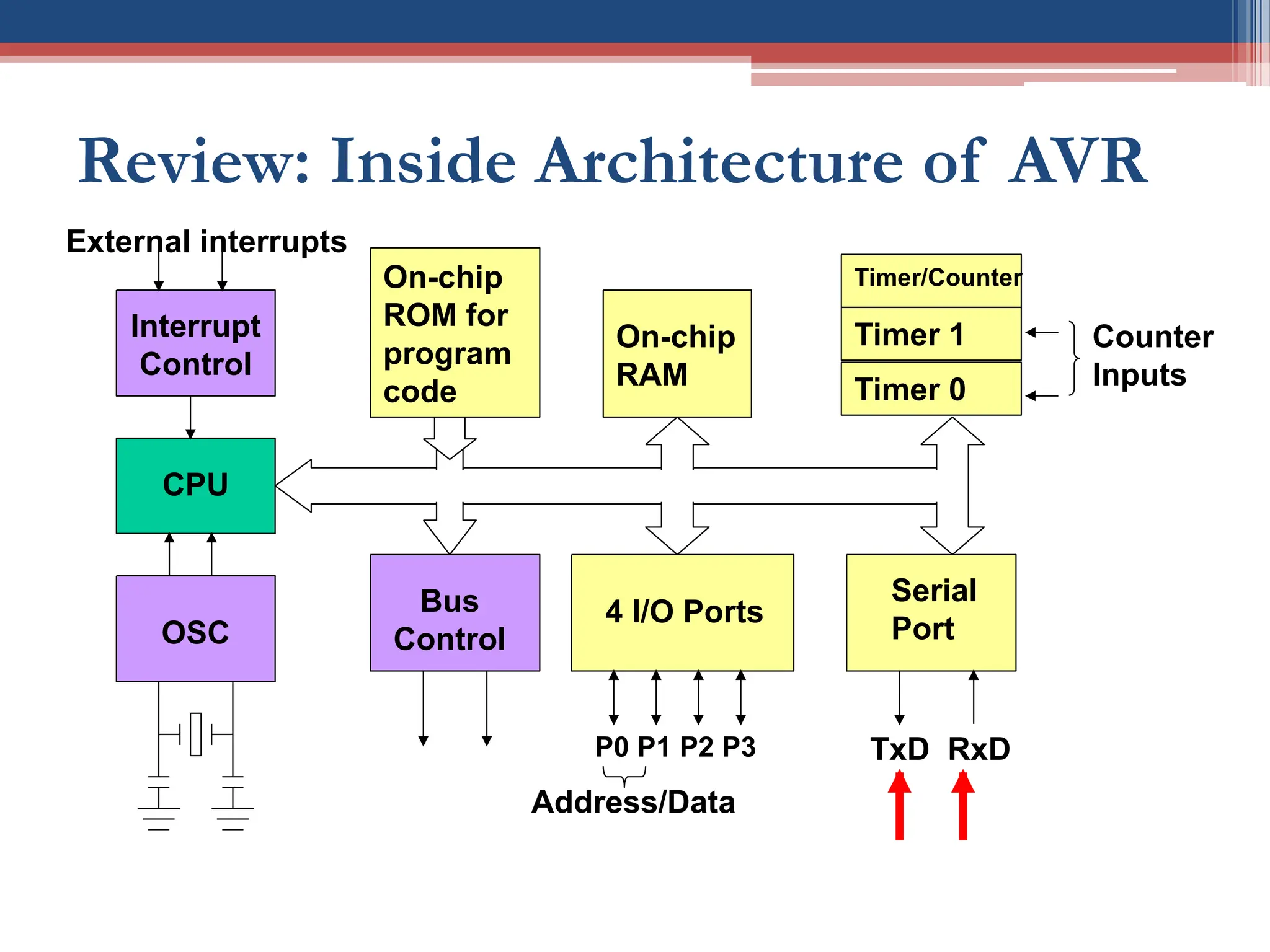
Review: Inside Architecture of AVR
CPU
On-chip
RAM
On-chip
ROM for
program
code
4 I/O Ports
Timer 0
Serial
Port
OSC
Interrupt
Control
External interrupts
Timer 1
Timer/Counter
Bus
Control
TxD RxD
P0 P1 P2 P3
Address/Data
Counter
Inputs
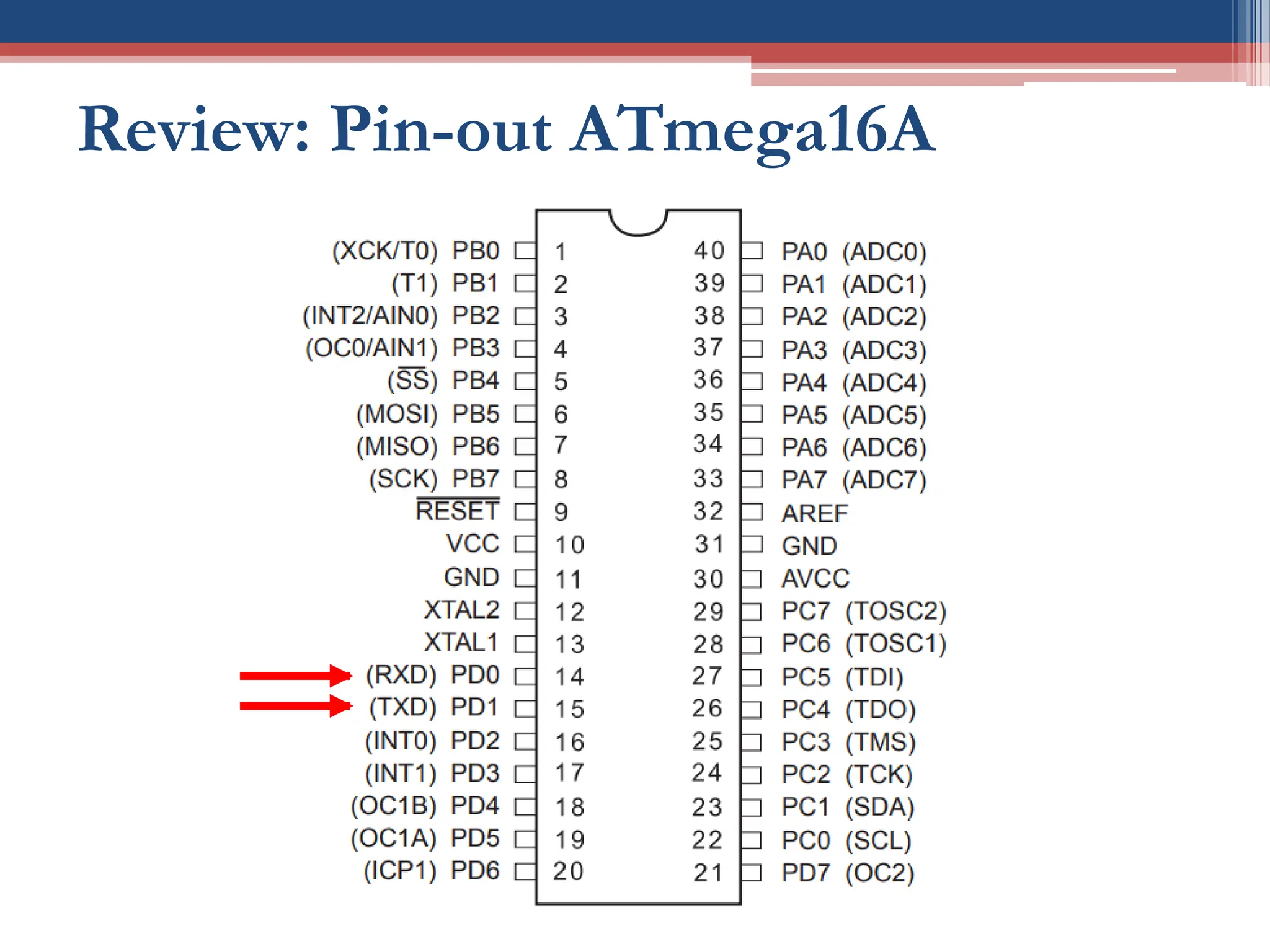
Review: Pin-out ATmega16A
http://ww1.microchip.com/downloads/en/devicedoc/atmel-8154-8-bit-avr-atmega16a_datasheet.pdf
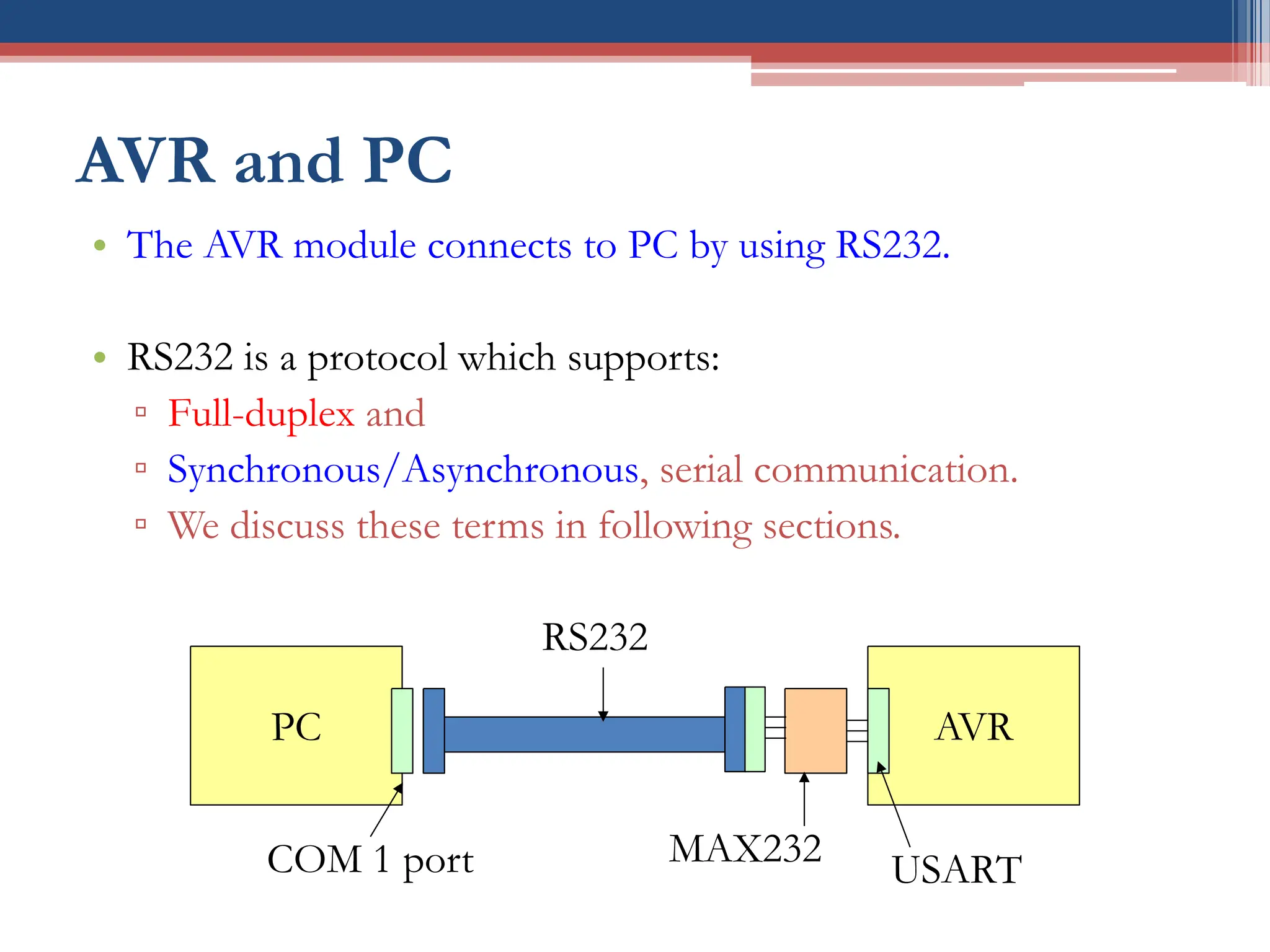
AVR and PC
• The AVR module connects to PC by using RS232.
• RS232 is a protocol which supports:
▫ Full-duplex and
▫ Synchronous/Asynchronous, serial communication.
▫ We discuss these terms in following sections.
PC AVR
COM 1 port
RS232
MAX232
USART
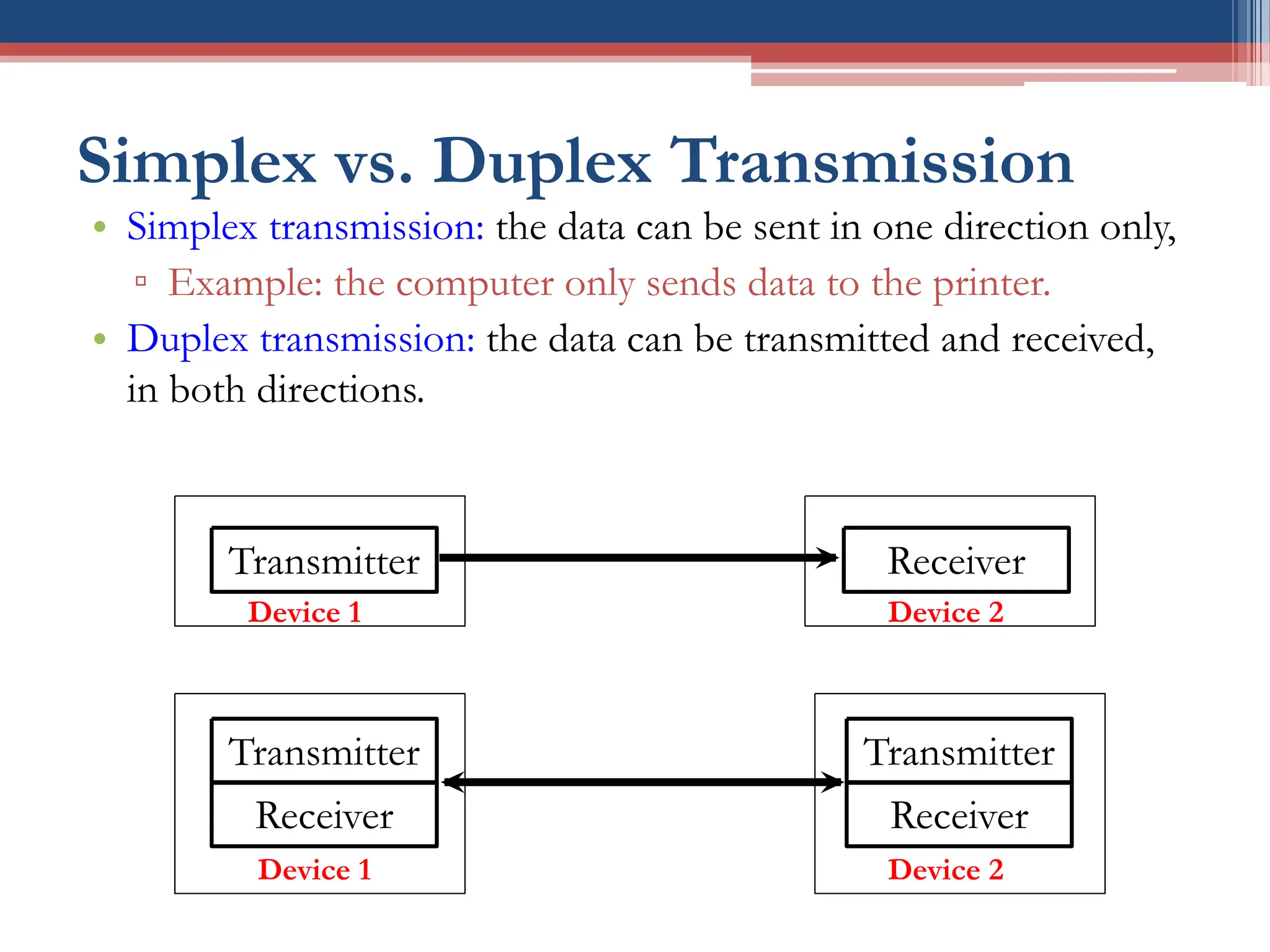
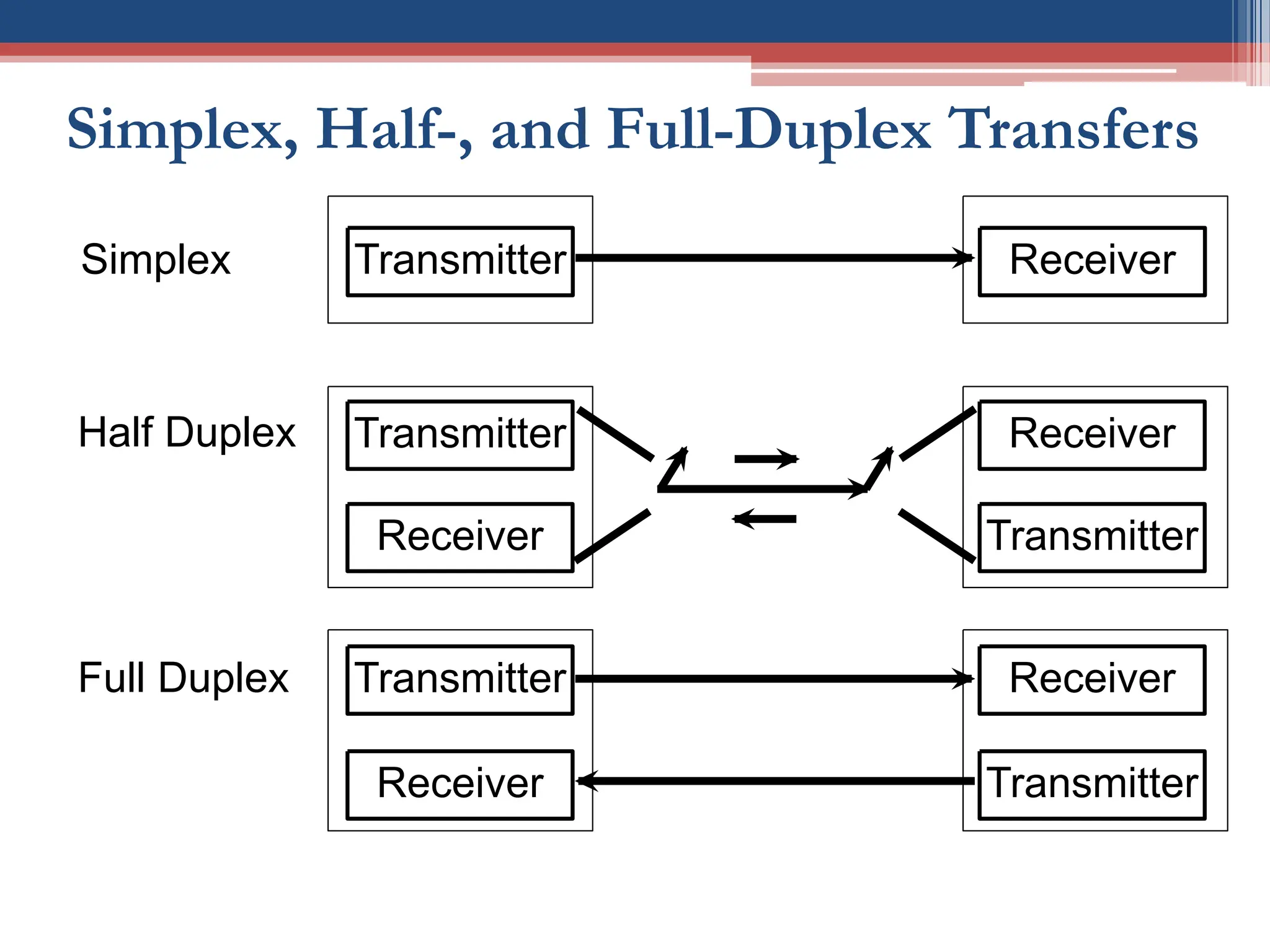
Simplex vs. Duplex Transmission
• Simplex transmission: the data can be sent in one direction only,
▫ Example: the computer only sends data to the printer.
• Duplex transmission: the data can be transmitted and received,
in both directions.
Transmitter Receiver
Transmitter
Receiver
Receiver
Transmitter
Device 1 Device 2
Device 2
Device 1
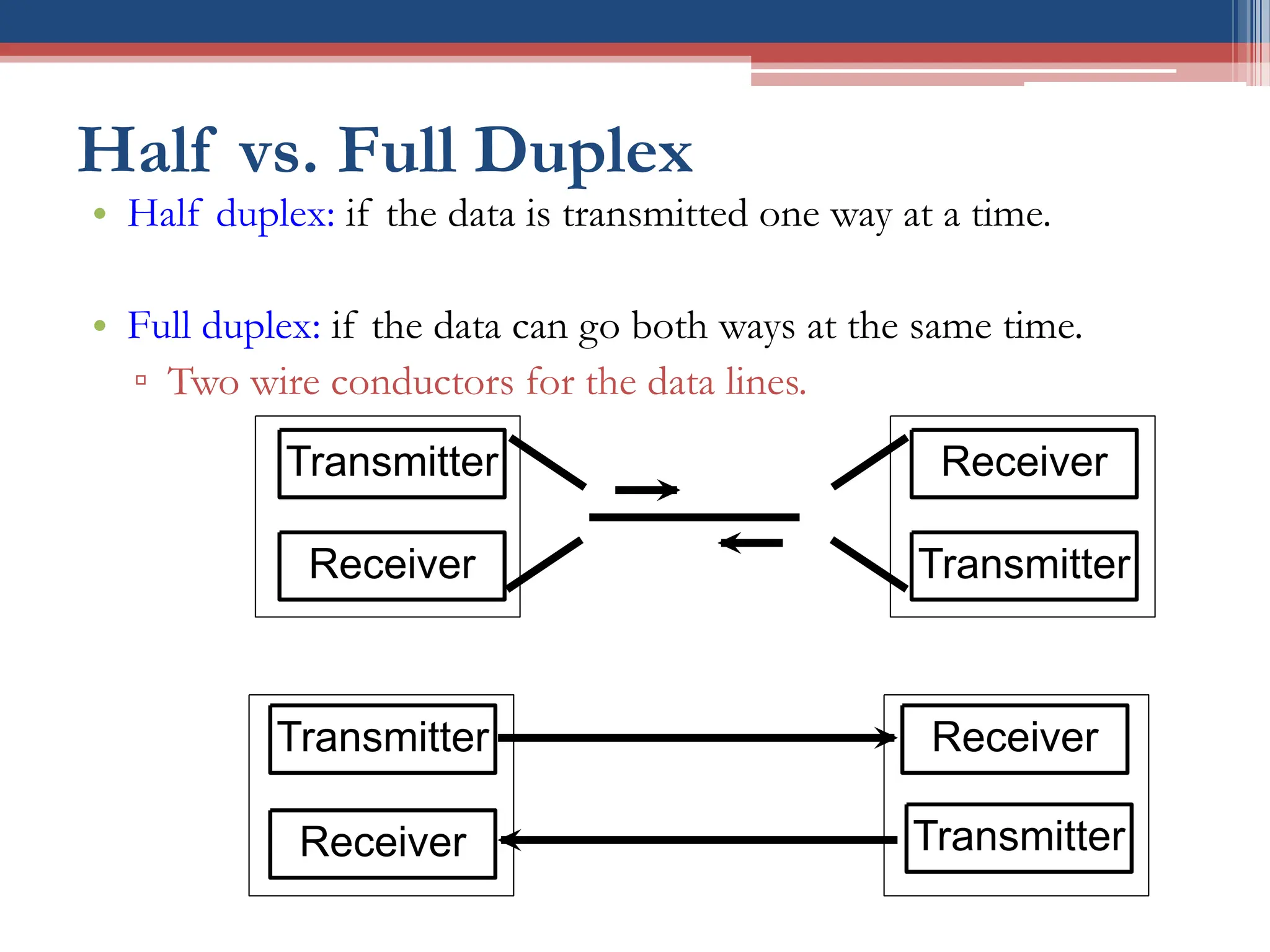
Half vs. Full Duplex
• Half duplex: if the data is transmitted one way at a time.
• Full duplex: if the data can go both ways at the same time.
▫ Two wire conductors for the data lines.
Transmitter
Receiver
Receiver
Transmitter
Transmitter
Receiver
Receiver
Transmitter
Simplex, Half-, and Full-Duplex Transfers
Half Duplex
Full Duplex
Transmitter
Receiver
Transmitter
Receiver
Receiver
Transmitter
Receiver
Transmitter
Transmitter Receiver
Simplex
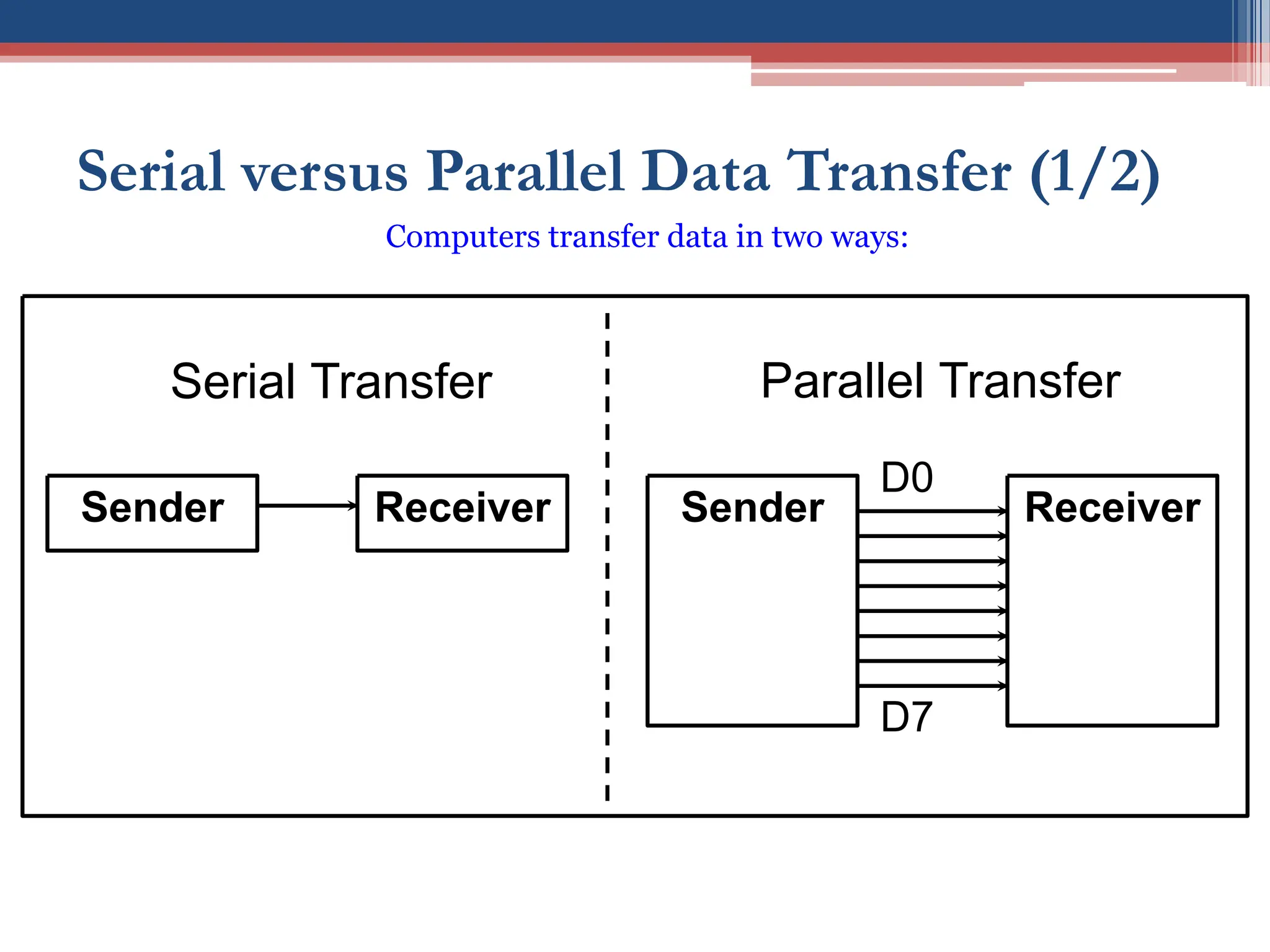
Serial versus Parallel Data Transfer (1/2)
Sender Receiver Sender Receiver
Serial Transfer Parallel Transfer
D0
D7
Computers transfer data in two ways:
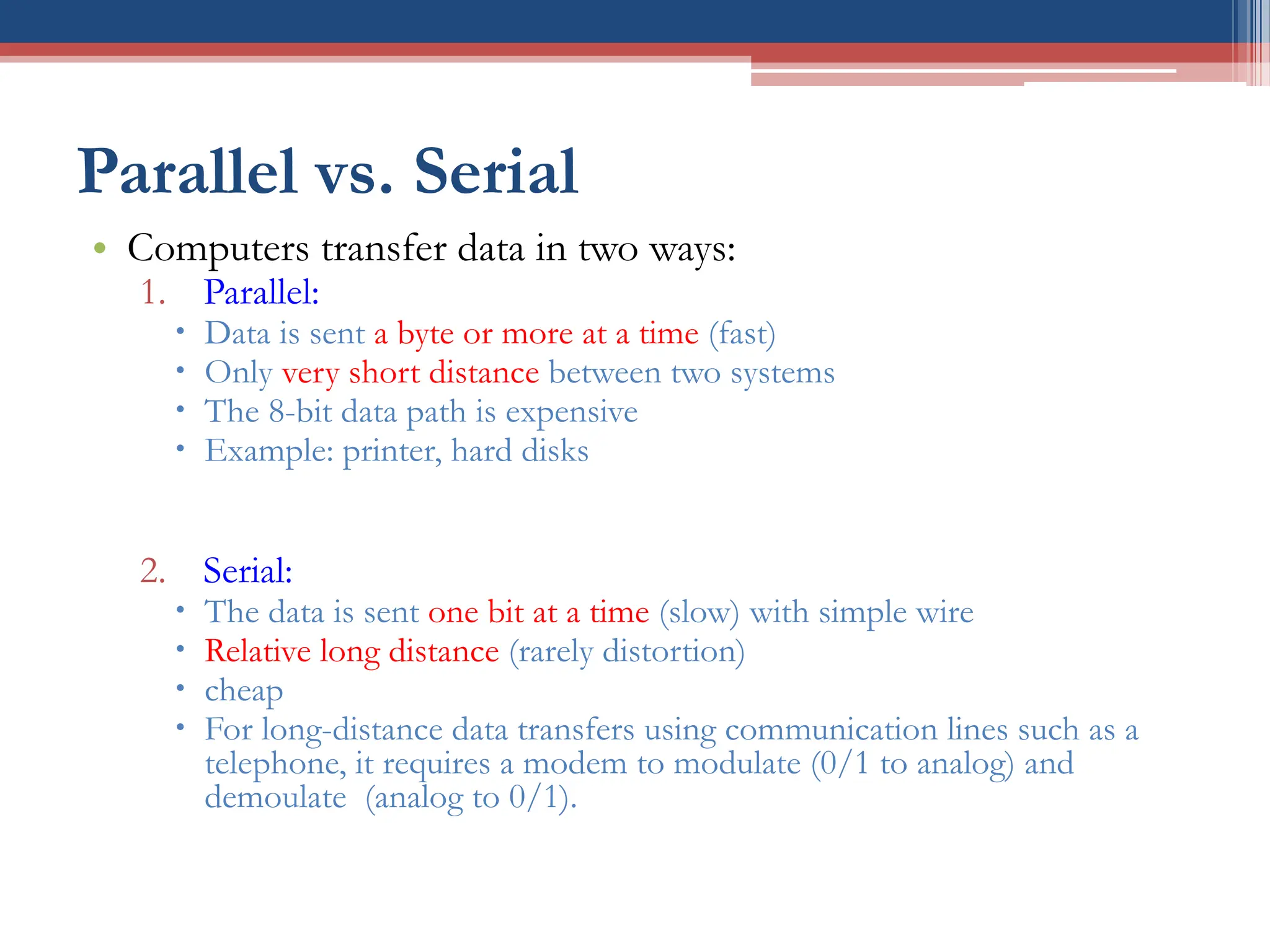
Parallel vs. Serial
• Computers transfer data in two ways:
1. Parallel:
 Data is sent a byte or more at a time (fast)
 Only very short distance between two systems
 The 8-bit data path is expensive
 Example: printer, hard disks
2. Serial:
 The data is sent one bit at a time (slow) with simple wire
 Relative long distance (rarely distortion)
 cheap
 For long-distance data transfers using communication lines such as a
telephone, it requires a modem to modulate (0/1 to analog) and
demoulate (analog to 0/1).
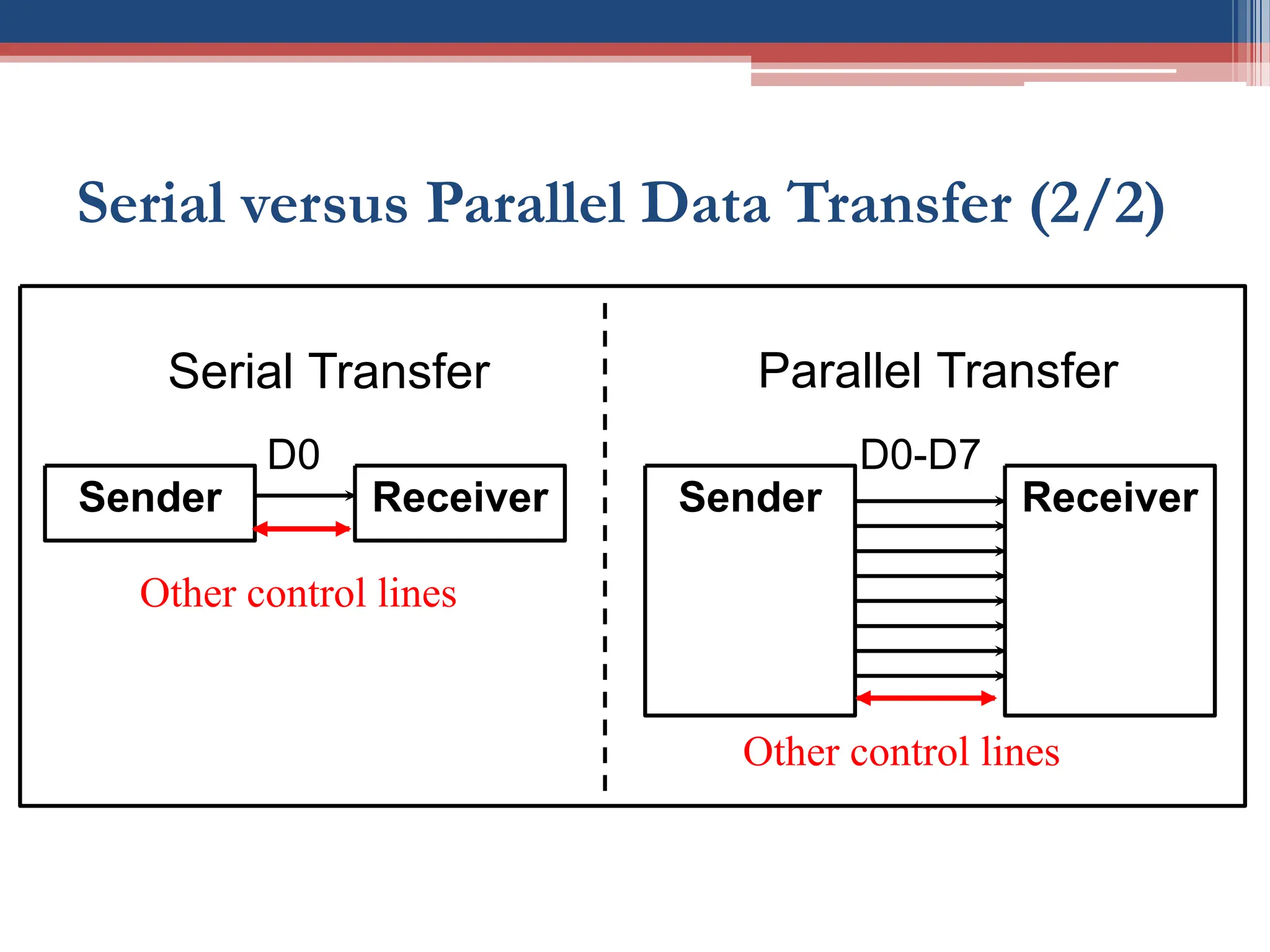
Serial versus Parallel Data Transfer (2/2)
Sender Receiver Sender Receiver
Serial Transfer Parallel Transfer
D0-D7
D0
Other control lines
Other control lines
Serial Communication
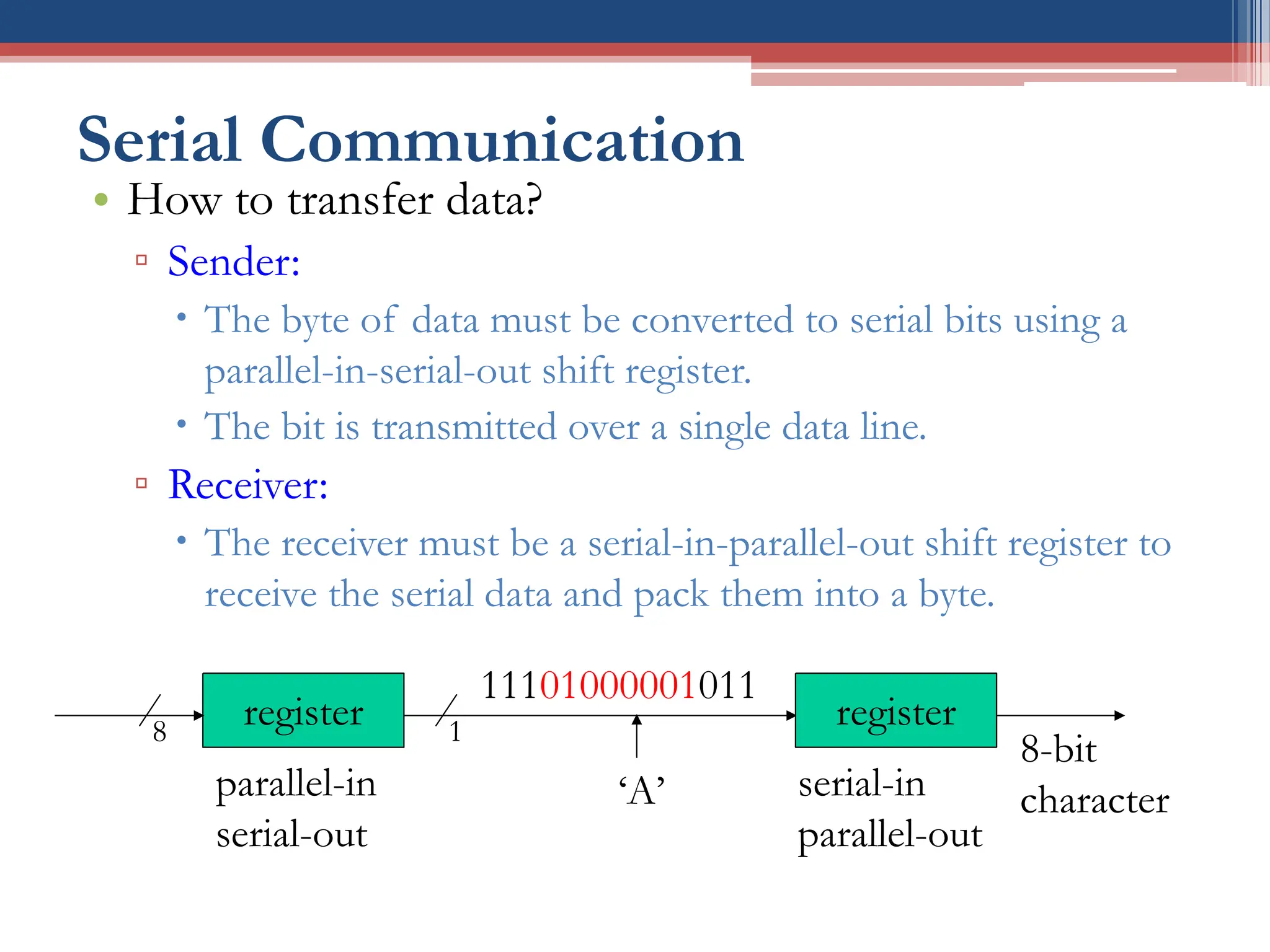
• How to transfer data?
▫ Sender:
 The byte of data must be converted to serial bits using a
parallel-in-serial-out shift register.
 The bit is transmitted over a single data line.
▫ Receiver:
 The receiver must be a serial-in-parallel-out shift register to
receive the serial data and pack them into a byte.
11101000001011
‘A’
register
8-bit
character
register
8 1
parallel-in
serial-out
serial-in
parallel-out
Asynchronous vs. Synchronous
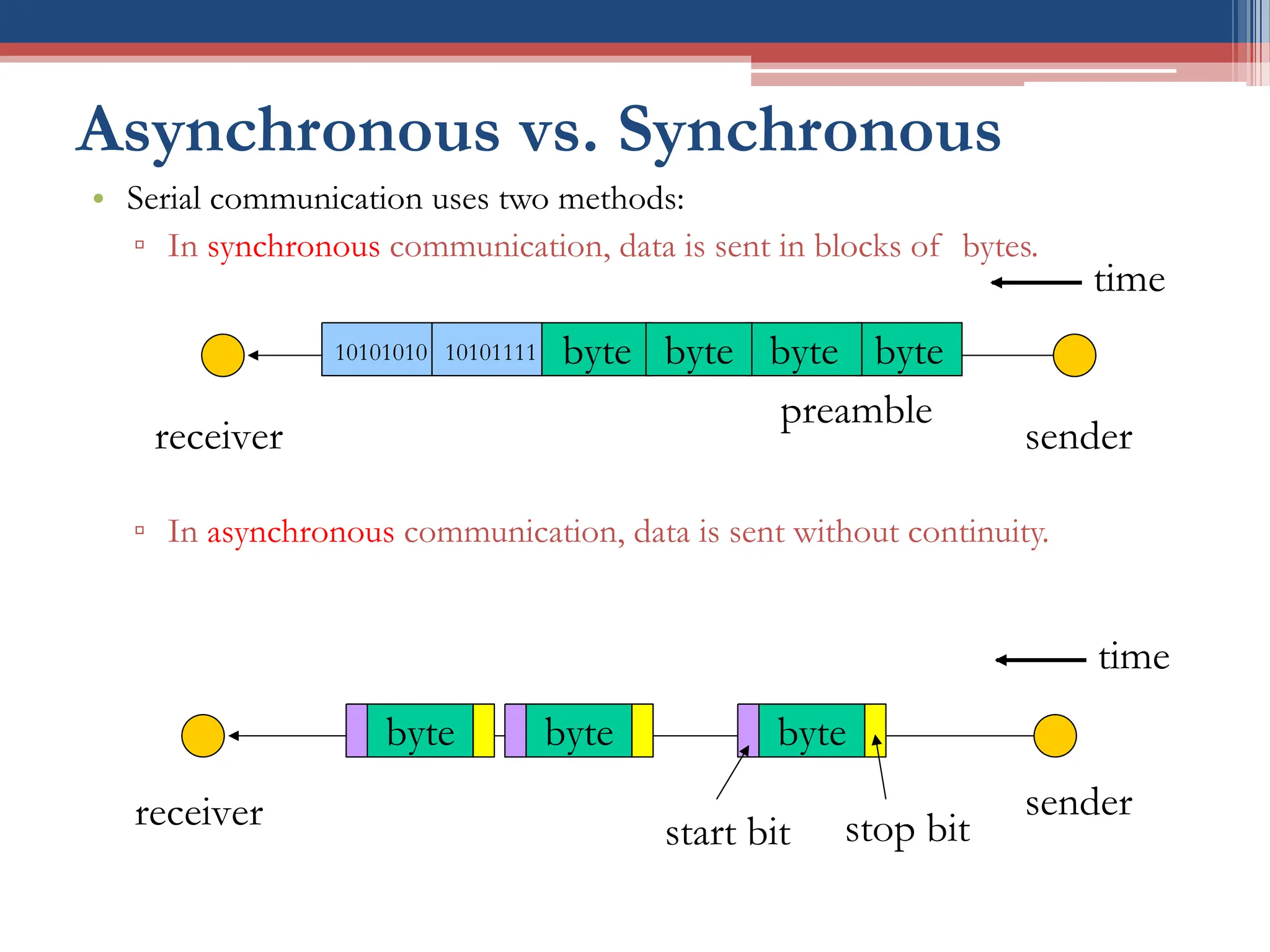
• Serial communication uses two methods:
▫ In synchronous communication, data is sent in blocks of bytes.
▫ In asynchronous communication, data is sent without continuity.
byte
byte
10101111
preamble
10101010
sender
receiver
byte byte
time
byte
sender
receiver start bit stop bit
byte
byte
time
UART & USART
• It is possible to write software to use both methods,
but the programs can be tedious and long.
• Special IC chips are made for serial communication:
▫ USART (universal synchronous-asynchronous receiver-
transmitter)
▫ UART (universal asynchronous receiver-transmitter)
• The AVR chip has a built-in USART.
AVR Serial Communication
• The AVR has serial communication capability built into
it:
▫ Full-duplex
▫ Asynchronous and Synchronous mode supported.
• How to detect that a character is sent via the line in the
asynchronous mode?
▫ Answer: Data framing!
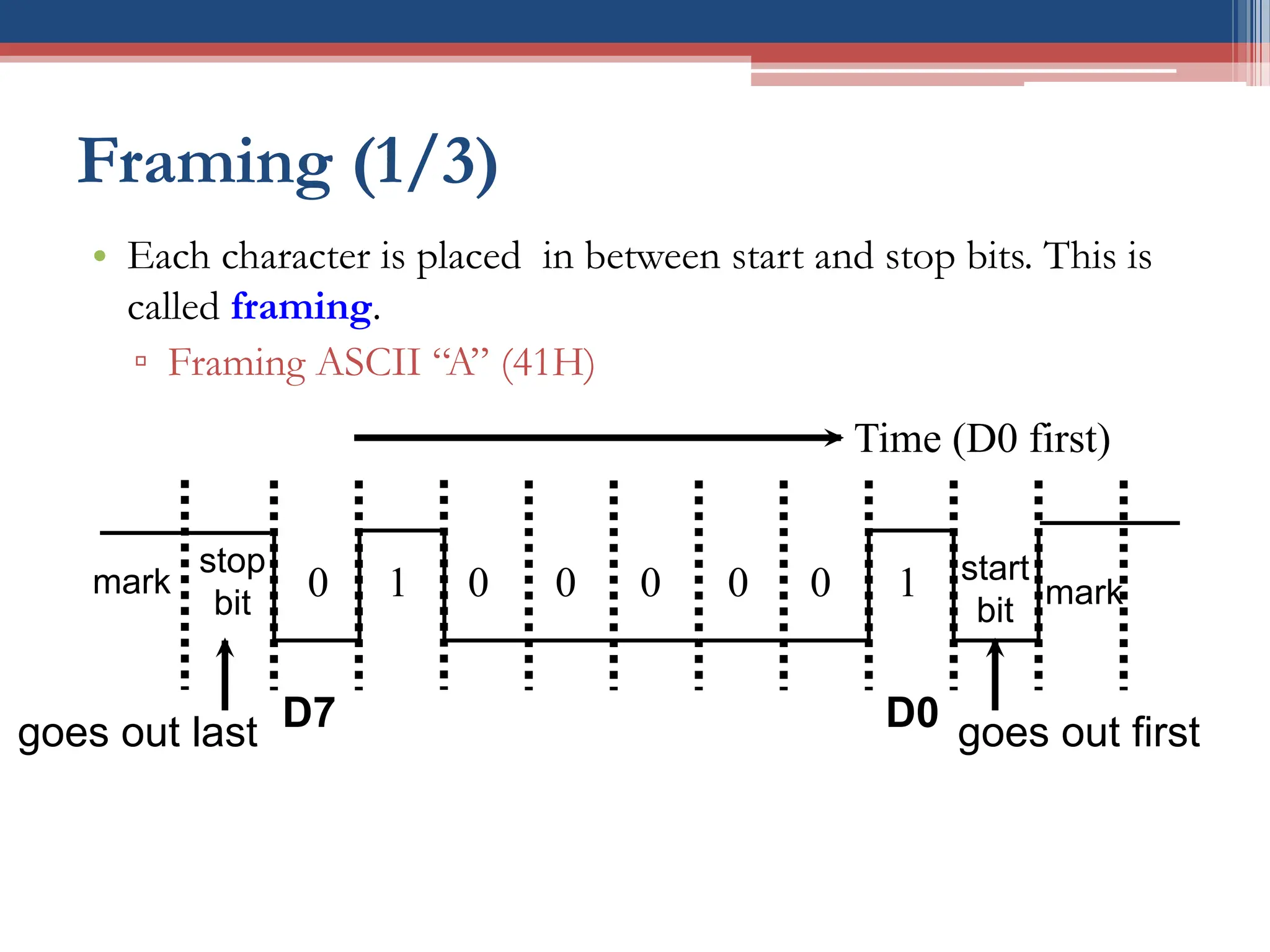
Framing (1/3)
• Each character is placed in between start and stop bits. This is
called framing.
▫ Framing ASCII “A” (41H)
stop
bit
start
bit
mark
0 0 0 0 0 0
1 1
D7 D0
goes out last goes out first
Time (D0 first)
mark
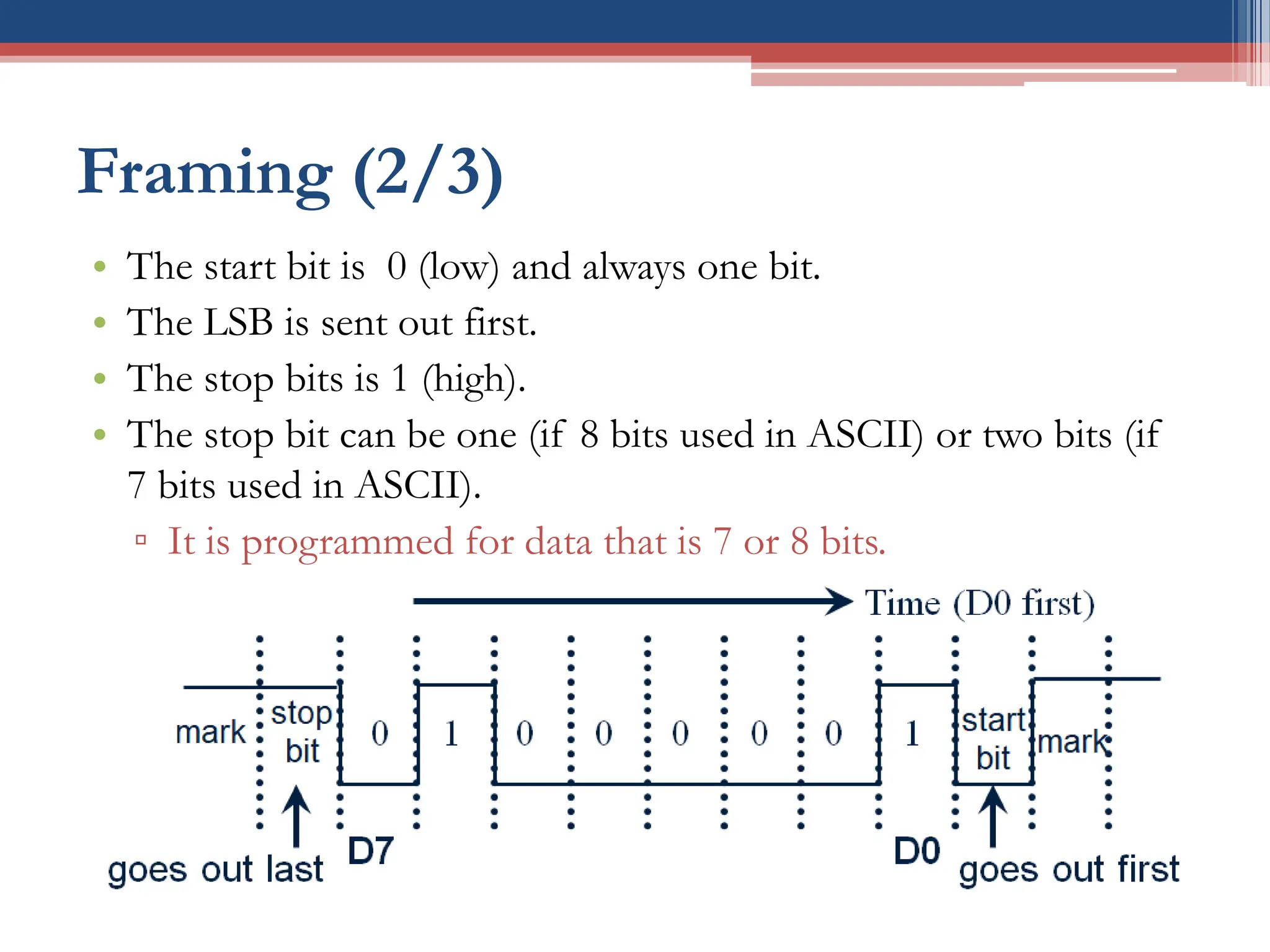
Framing (2/3)
• The start bit is 0 (low) and always one bit.
• The LSB is sent out first.
• The stop bits is 1 (high).
• The stop bit can be one (if 8 bits used in ASCII) or two bits (if
7 bits used in ASCII).
▫ It is programmed for data that is 7 or 8 bits.
• When there is no transfer, the signal is 1 (high), which is
referred to as mark.
Framing (3/3)
• We have a total of 10 bits for each character:
▫ 8-bits for the ASCII code
▫ 2-bits for the start and stop bits
▫ 20% overhead
• In some systems in order to maintain data integrity, the parity bit
is included in the data frame.
▫ Even-parity and Odd-parity
▫ In an odd-parity bit system the total number of bits, including the
parity bit, is odd.
▫ UART chips allow programming of the parity bit for odd-, even-,
and no-parity options.
Data Transfer Rate
• How fast is the data transferred?
• Two methods to describe the speed:
1. Data rate is defined as the number of bits transferred per second.
 Each signal has several voltage levels.
 The rate of data transfer is stated in bps (bits per second).
2. Baud rate is defined as the number of signal changes per second.
 The rate of data transfer is stated in Hz (used in modem).
• Data rate and Baud rate are not necessarily equal.
▫ But as far the conductor goes both are same
 Therefore (in this course) we use the terms interchangeably.
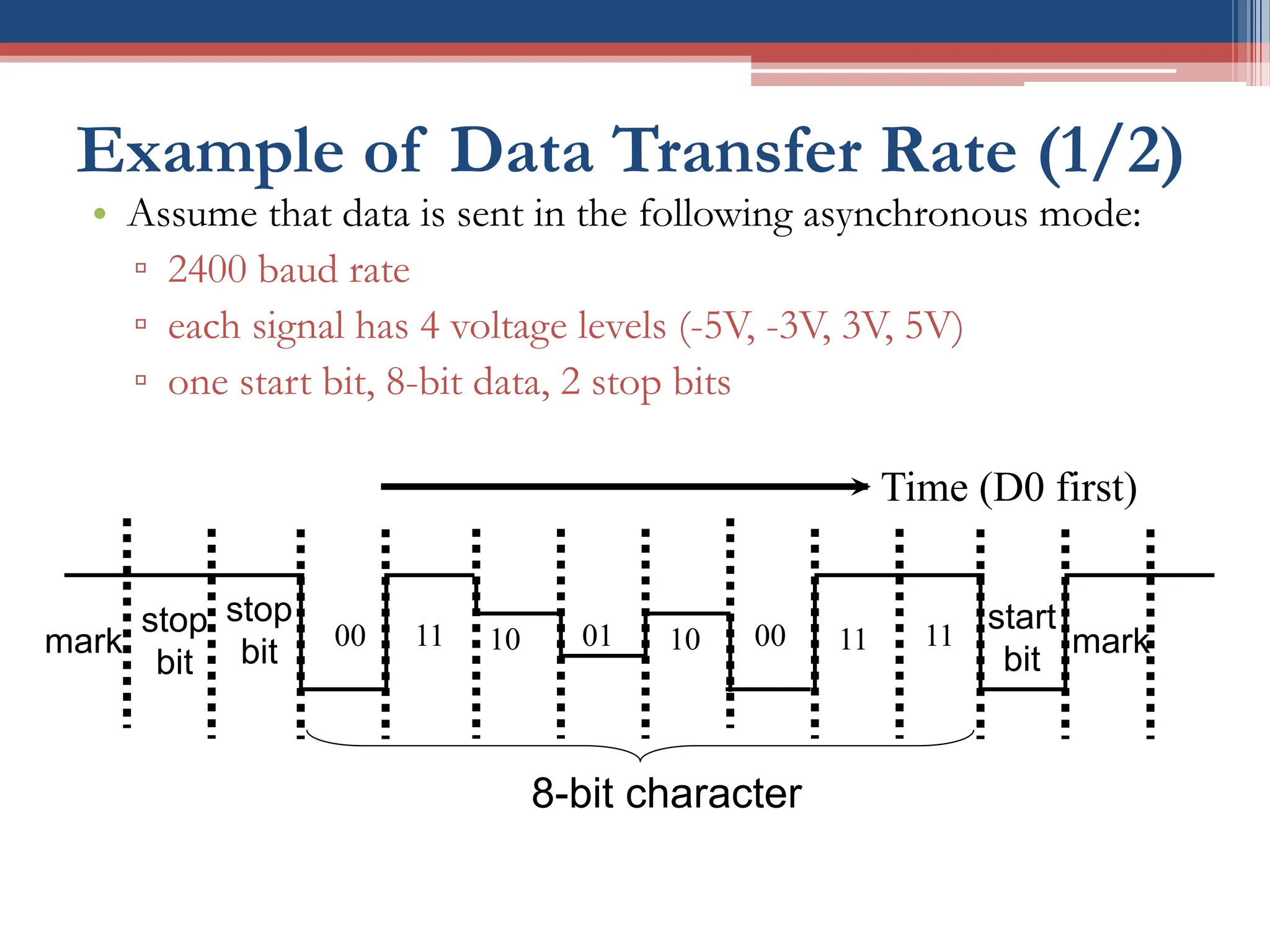
Example of Data Transfer Rate (1/2)
• Assume that data is sent in the following asynchronous mode:
▫ 2400 baud rate
▫ each signal has 4 voltage levels (-5V, -3V, 3V, 5V)
▫ one start bit, 8-bit data, 2 stop bits
mark
stop
bit
start
bit
mark
00 10 01 10 00 11
11 11
Time (D0 first)
8-bit character
stop
bit
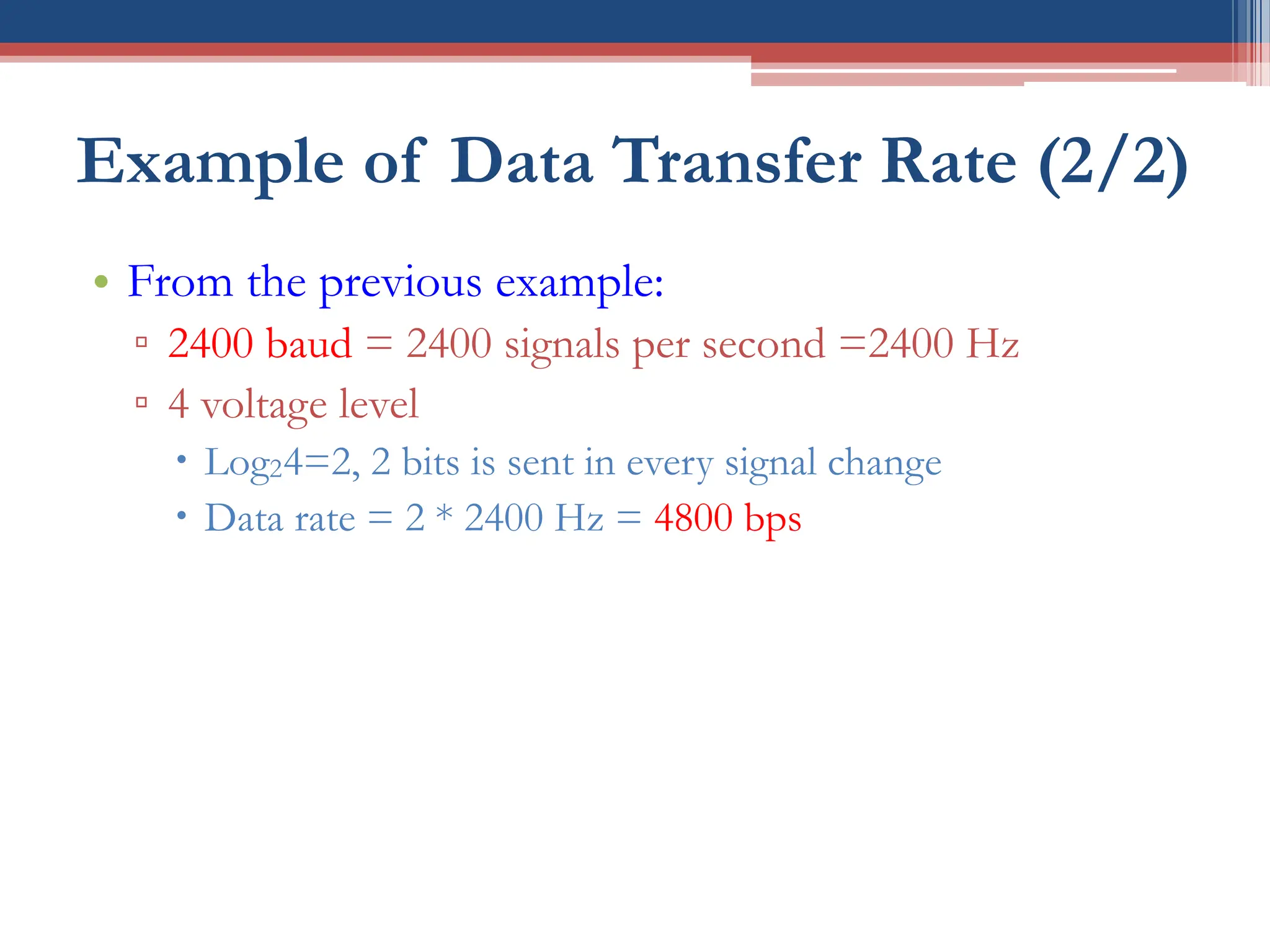
Example of Data Transfer Rate (2/2)
• From the previous example:
▫ 2400 baud = 2400 signals per second =2400 Hz
▫ 4 voltage level
 Log24=2, 2 bits is sent in every signal change
 Data rate = 2 * 2400 Hz = 4800 bps
RS232 Standard
• RS232 (Recommended Standard 232) is an interfacing standard:
▫ which is set by the Electronics Industries Association (EIA) in
1960:
▫ RS232 is the most widely used serial I/O interfacing standard.
▫ RS232A (1963), RS232B (1965) and RS232C (1969), now is RS232E
▫ RS-232 is a standard for connecting between a DTE (Data Terminal
Equipment) and a DCE (Data Circuit-terminating Equipment).
• Define the voltage level, pin functionality, baud rate, signal
meaning, communication distance.
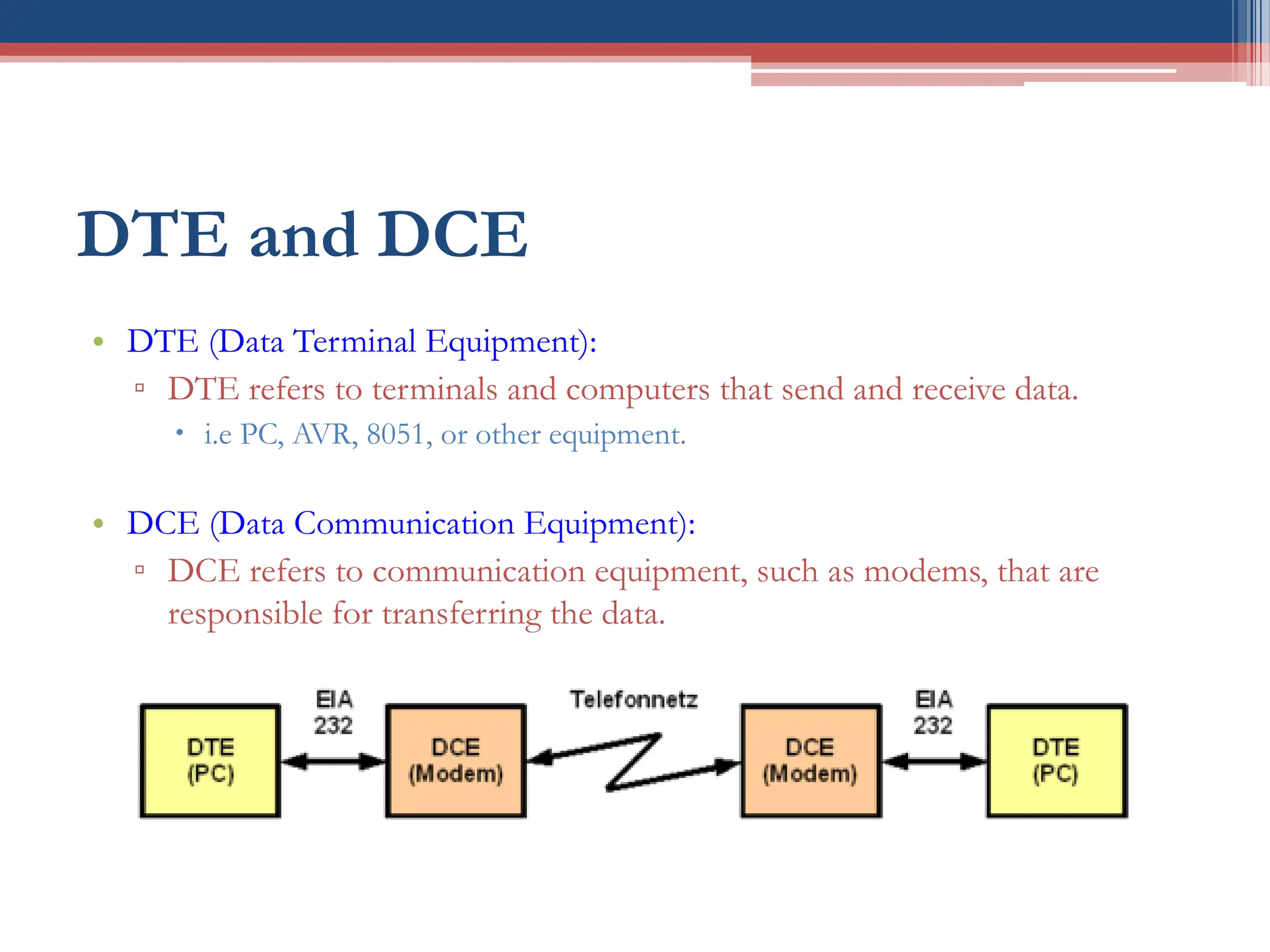
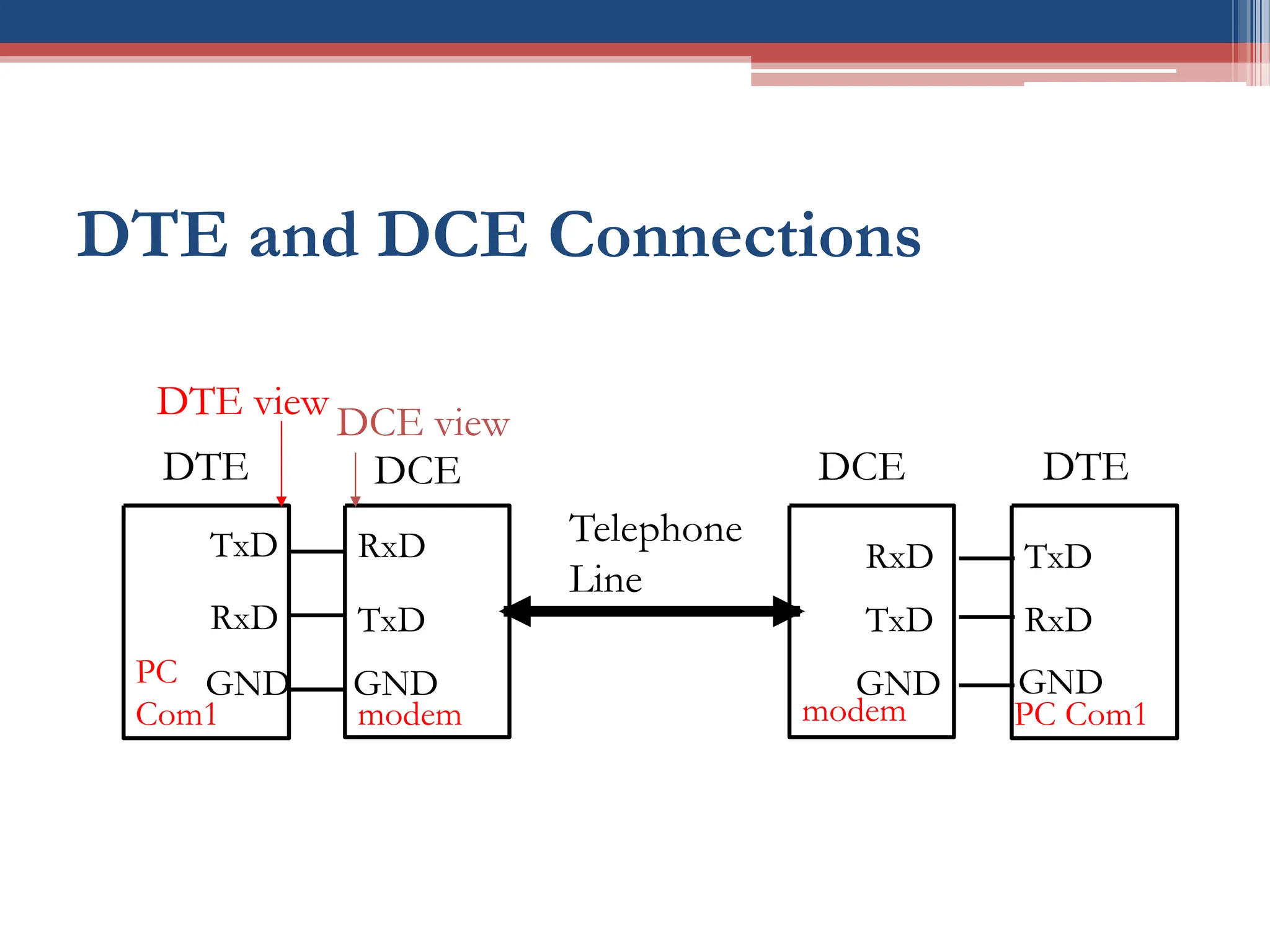
DTE and DCE
• DTE (Data Terminal Equipment):
▫ DTE refers to terminals and computers that send and receive data.
 i.e PC, AVR, 8051, or other equipment.
• DCE (Data Communication Equipment):
▫ DCE refers to communication equipment, such as modems, that are
responsible for transferring the data.
DTE and DCE Connections
TxD
RxD
DTE
RxD
TxD
DCE
GND
PC
Com1 modem
GND
TxD
RxD
DTE
RxD
TxD
DCE
GND
PC Com1
modem
GND
Telephone
Line
DTE view
DCE view
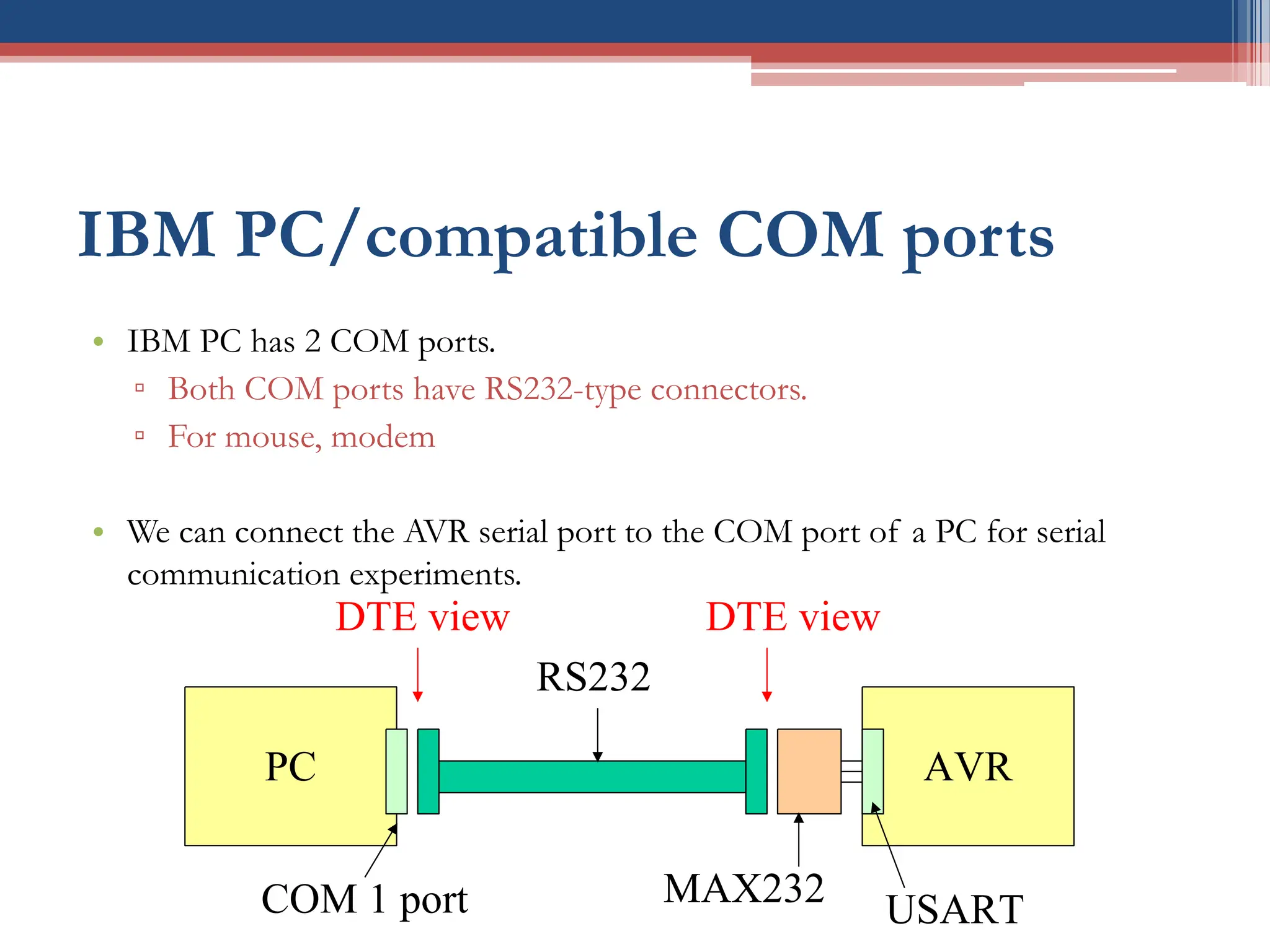
IBM PC/compatible COM ports
• IBM PC has 2 COM ports.
▫ Both COM ports have RS232-type connectors.
▫ For mouse, modem
• We can connect the AVR serial port to the COM port of a PC for serial
communication experiments.
PC AVR
COM 1 port
RS232
MAX232
USART
DTE view DTE view
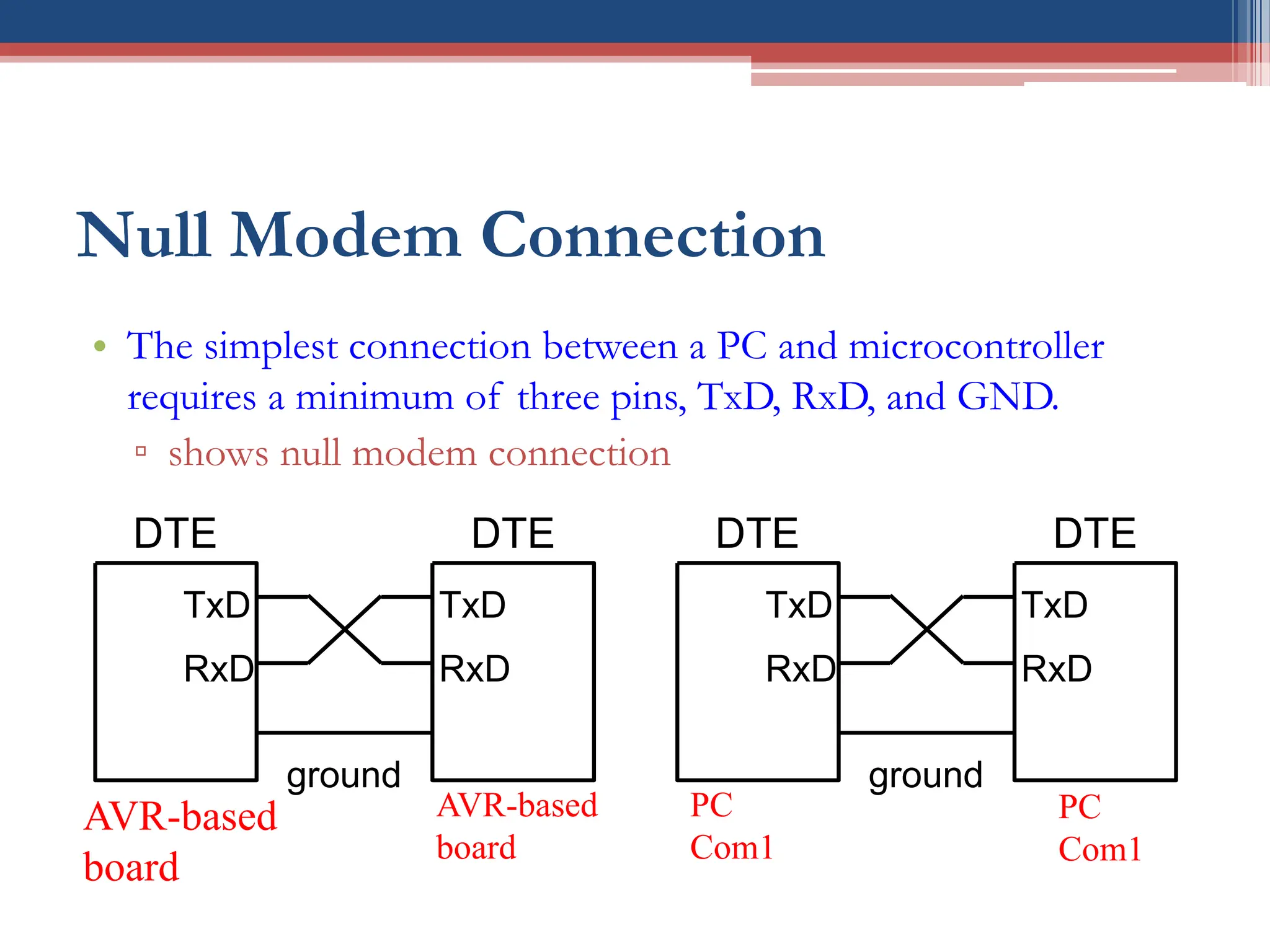
Null Modem Connection
• The simplest connection between a PC and microcontroller
requires a minimum of three pins, TxD, RxD, and GND.
▫ shows null modem connection
TxD
RxD
DTE
TxD
RxD
DTE
ground
AVR-based
board
AVR-based
board
TxD
RxD
DTE
TxD
RxD
DTE
ground
PC
Com1
PC
Com1
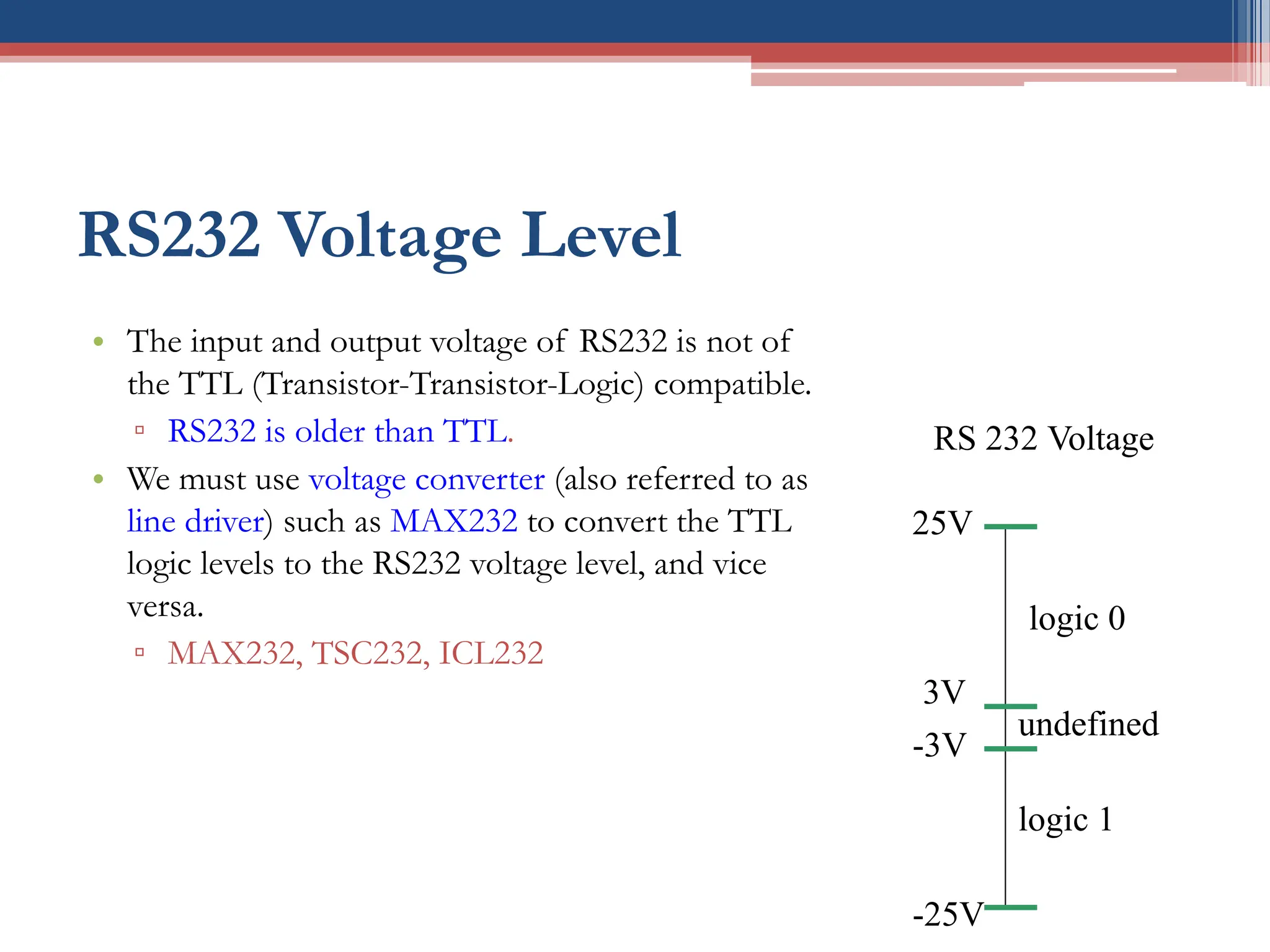
RS232 Voltage Level
• The input and output voltage of RS232 is not of
the TTL (Transistor-Transistor-Logic) compatible.
▫ RS232 is older than TTL.
• We must use voltage converter (also referred to as
line driver) such as MAX232 to convert the TTL
logic levels to the RS232 voltage level, and vice
versa.
▫ MAX232, TSC232, ICL232
logic 0
-3V
-25V
3V
25V
logic 1
undefined
RS 232 Voltage
MAX232
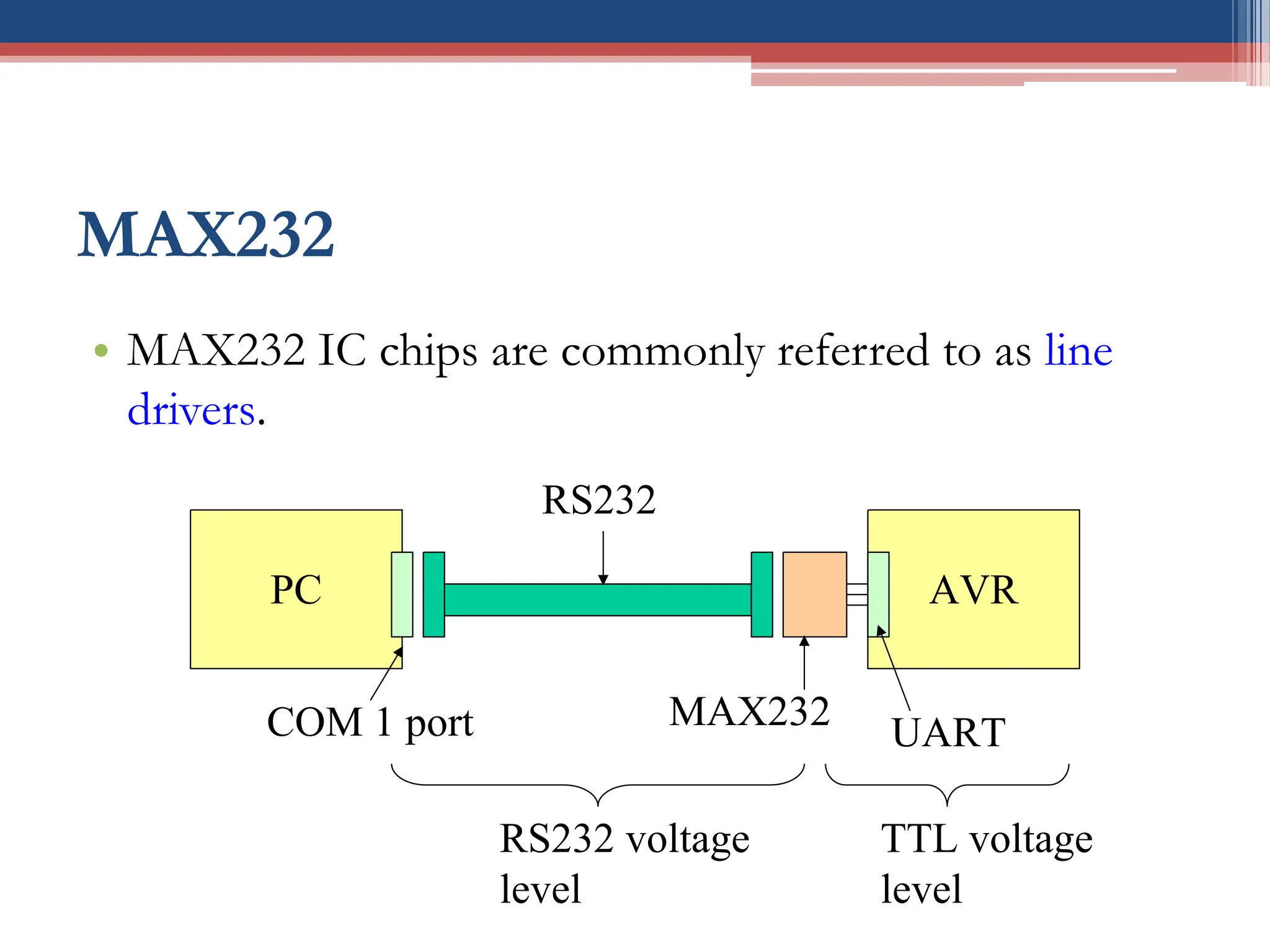
• MAX232 IC chips are commonly referred to as line
drivers.
PC AVR
COM 1 port
RS232
MAX232
UART
RS232 voltage
level
TTL voltage
level
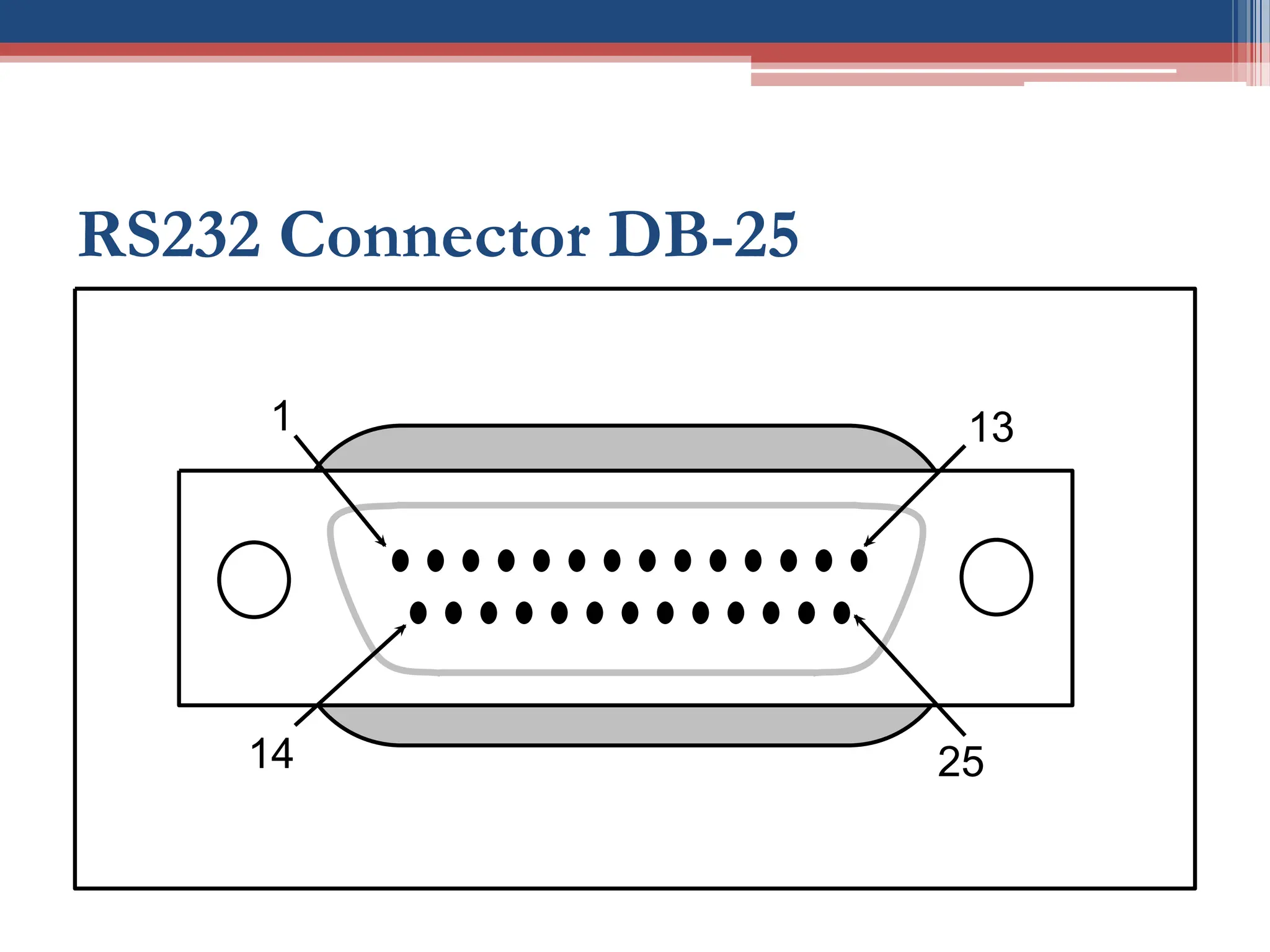
RS232 Connector DB-25
14
1
25
13
29
Conclusion
• Serial communication basics
▫ Simplex vs. duplex communication
▫ Synchronous & asynchronous communication
▫ Data rate & Baud rate.
▫ Connection between PC and AVR
Reading Material
• Textbook:
▫ Chapter 11
30
31
Questions?

MPS W8-L2L3 Programming AVR Serial Port Ia (in C).pdf

  • 1.
    EE-222 Microprocessor Systems Basicsof Serial Communication Week8-Lecture2 Dr. Sara Shakil Qureshi
  • 2.
    Review: Inside Architectureof AVR CPU On-chip RAM On-chip ROM for program code 4 I/O Ports Timer 0 Serial Port OSC Interrupt Control External interrupts Timer 1 Timer/Counter Bus Control TxD RxD P0 P1 P2 P3 Address/Data Counter Inputs
  • 3.
  • 4.
    AVR and PC •The AVR module connects to PC by using RS232. • RS232 is a protocol which supports: ▫ Full-duplex and ▫ Synchronous/Asynchronous, serial communication. ▫ We discuss these terms in following sections. PC AVR COM 1 port RS232 MAX232 USART
  • 5.
    Simplex vs. DuplexTransmission • Simplex transmission: the data can be sent in one direction only, ▫ Example: the computer only sends data to the printer. • Duplex transmission: the data can be transmitted and received, in both directions. Transmitter Receiver Transmitter Receiver Receiver Transmitter Device 1 Device 2 Device 2 Device 1
  • 6.
    Half vs. FullDuplex • Half duplex: if the data is transmitted one way at a time. • Full duplex: if the data can go both ways at the same time. ▫ Two wire conductors for the data lines. Transmitter Receiver Receiver Transmitter Transmitter Receiver Receiver Transmitter
  • 7.
    Simplex, Half-, andFull-Duplex Transfers Half Duplex Full Duplex Transmitter Receiver Transmitter Receiver Receiver Transmitter Receiver Transmitter Transmitter Receiver Simplex
  • 8.
    Serial versus ParallelData Transfer (1/2) Sender Receiver Sender Receiver Serial Transfer Parallel Transfer D0 D7 Computers transfer data in two ways:
  • 9.
    Parallel vs. Serial •Computers transfer data in two ways: 1. Parallel:  Data is sent a byte or more at a time (fast)  Only very short distance between two systems  The 8-bit data path is expensive  Example: printer, hard disks 2. Serial:  The data is sent one bit at a time (slow) with simple wire  Relative long distance (rarely distortion)  cheap  For long-distance data transfers using communication lines such as a telephone, it requires a modem to modulate (0/1 to analog) and demoulate (analog to 0/1).
  • 10.
    Serial versus ParallelData Transfer (2/2) Sender Receiver Sender Receiver Serial Transfer Parallel Transfer D0-D7 D0 Other control lines Other control lines
  • 11.
    Serial Communication • Howto transfer data? ▫ Sender:  The byte of data must be converted to serial bits using a parallel-in-serial-out shift register.  The bit is transmitted over a single data line. ▫ Receiver:  The receiver must be a serial-in-parallel-out shift register to receive the serial data and pack them into a byte. 11101000001011 ‘A’ register 8-bit character register 8 1 parallel-in serial-out serial-in parallel-out
  • 12.
    Asynchronous vs. Synchronous •Serial communication uses two methods: ▫ In synchronous communication, data is sent in blocks of bytes. ▫ In asynchronous communication, data is sent without continuity. byte byte 10101111 preamble 10101010 sender receiver byte byte time byte sender receiver start bit stop bit byte byte time
  • 13.
    UART & USART •It is possible to write software to use both methods, but the programs can be tedious and long. • Special IC chips are made for serial communication: ▫ USART (universal synchronous-asynchronous receiver- transmitter) ▫ UART (universal asynchronous receiver-transmitter) • The AVR chip has a built-in USART.
  • 14.
    AVR Serial Communication •The AVR has serial communication capability built into it: ▫ Full-duplex ▫ Asynchronous and Synchronous mode supported. • How to detect that a character is sent via the line in the asynchronous mode? ▫ Answer: Data framing!
  • 15.
    Framing (1/3) • Eachcharacter is placed in between start and stop bits. This is called framing. ▫ Framing ASCII “A” (41H) stop bit start bit mark 0 0 0 0 0 0 1 1 D7 D0 goes out last goes out first Time (D0 first) mark
  • 16.
    Framing (2/3) • Thestart bit is 0 (low) and always one bit. • The LSB is sent out first. • The stop bits is 1 (high). • The stop bit can be one (if 8 bits used in ASCII) or two bits (if 7 bits used in ASCII). ▫ It is programmed for data that is 7 or 8 bits. • When there is no transfer, the signal is 1 (high), which is referred to as mark.
  • 17.
    Framing (3/3) • Wehave a total of 10 bits for each character: ▫ 8-bits for the ASCII code ▫ 2-bits for the start and stop bits ▫ 20% overhead • In some systems in order to maintain data integrity, the parity bit is included in the data frame. ▫ Even-parity and Odd-parity ▫ In an odd-parity bit system the total number of bits, including the parity bit, is odd. ▫ UART chips allow programming of the parity bit for odd-, even-, and no-parity options.
  • 18.
    Data Transfer Rate •How fast is the data transferred? • Two methods to describe the speed: 1. Data rate is defined as the number of bits transferred per second.  Each signal has several voltage levels.  The rate of data transfer is stated in bps (bits per second). 2. Baud rate is defined as the number of signal changes per second.  The rate of data transfer is stated in Hz (used in modem). • Data rate and Baud rate are not necessarily equal. ▫ But as far the conductor goes both are same  Therefore (in this course) we use the terms interchangeably.
  • 19.
    Example of DataTransfer Rate (1/2) • Assume that data is sent in the following asynchronous mode: ▫ 2400 baud rate ▫ each signal has 4 voltage levels (-5V, -3V, 3V, 5V) ▫ one start bit, 8-bit data, 2 stop bits mark stop bit start bit mark 00 10 01 10 00 11 11 11 Time (D0 first) 8-bit character stop bit
  • 20.
    Example of DataTransfer Rate (2/2) • From the previous example: ▫ 2400 baud = 2400 signals per second =2400 Hz ▫ 4 voltage level  Log24=2, 2 bits is sent in every signal change  Data rate = 2 * 2400 Hz = 4800 bps
  • 21.
    RS232 Standard • RS232(Recommended Standard 232) is an interfacing standard: ▫ which is set by the Electronics Industries Association (EIA) in 1960: ▫ RS232 is the most widely used serial I/O interfacing standard. ▫ RS232A (1963), RS232B (1965) and RS232C (1969), now is RS232E ▫ RS-232 is a standard for connecting between a DTE (Data Terminal Equipment) and a DCE (Data Circuit-terminating Equipment). • Define the voltage level, pin functionality, baud rate, signal meaning, communication distance.
  • 22.
    DTE and DCE •DTE (Data Terminal Equipment): ▫ DTE refers to terminals and computers that send and receive data.  i.e PC, AVR, 8051, or other equipment. • DCE (Data Communication Equipment): ▫ DCE refers to communication equipment, such as modems, that are responsible for transferring the data.
  • 23.
    DTE and DCEConnections TxD RxD DTE RxD TxD DCE GND PC Com1 modem GND TxD RxD DTE RxD TxD DCE GND PC Com1 modem GND Telephone Line DTE view DCE view
  • 24.
    IBM PC/compatible COMports • IBM PC has 2 COM ports. ▫ Both COM ports have RS232-type connectors. ▫ For mouse, modem • We can connect the AVR serial port to the COM port of a PC for serial communication experiments. PC AVR COM 1 port RS232 MAX232 USART DTE view DTE view
  • 25.
    Null Modem Connection •The simplest connection between a PC and microcontroller requires a minimum of three pins, TxD, RxD, and GND. ▫ shows null modem connection TxD RxD DTE TxD RxD DTE ground AVR-based board AVR-based board TxD RxD DTE TxD RxD DTE ground PC Com1 PC Com1
  • 26.
    RS232 Voltage Level •The input and output voltage of RS232 is not of the TTL (Transistor-Transistor-Logic) compatible. ▫ RS232 is older than TTL. • We must use voltage converter (also referred to as line driver) such as MAX232 to convert the TTL logic levels to the RS232 voltage level, and vice versa. ▫ MAX232, TSC232, ICL232 logic 0 -3V -25V 3V 25V logic 1 undefined RS 232 Voltage
  • 27.
    MAX232 • MAX232 ICchips are commonly referred to as line drivers. PC AVR COM 1 port RS232 MAX232 UART RS232 voltage level TTL voltage level
  • 28.
  • 29.
    29 Conclusion • Serial communicationbasics ▫ Simplex vs. duplex communication ▫ Synchronous & asynchronous communication ▫ Data rate & Baud rate. ▫ Connection between PC and AVR
  • 30.
  • 31.