Let’s Get to Know
Mozilla’s Internet of Things (IoT)
dan Smart Home
Dwika Sudrajat
vide.inc@gmail.com
IT Consultant
Florida - Hong Kong – Jakarta
Office: +62-8161108571
Mobile: +852-54152971, +1-407-2502812
Dwika Sudrajat
vide.inc@gmail.com
IT Consultant
Florida - Hong Kong – Jakarta
Office: +62-8161108571
Mobile: +852-54152971, +1-407-2502812
Internet of Things (IoT)
A Seminar by
Dwika Sudrajat.
IT Consultant
Florida - Hong Kong - Jakarta
Concept
3
Home Automation
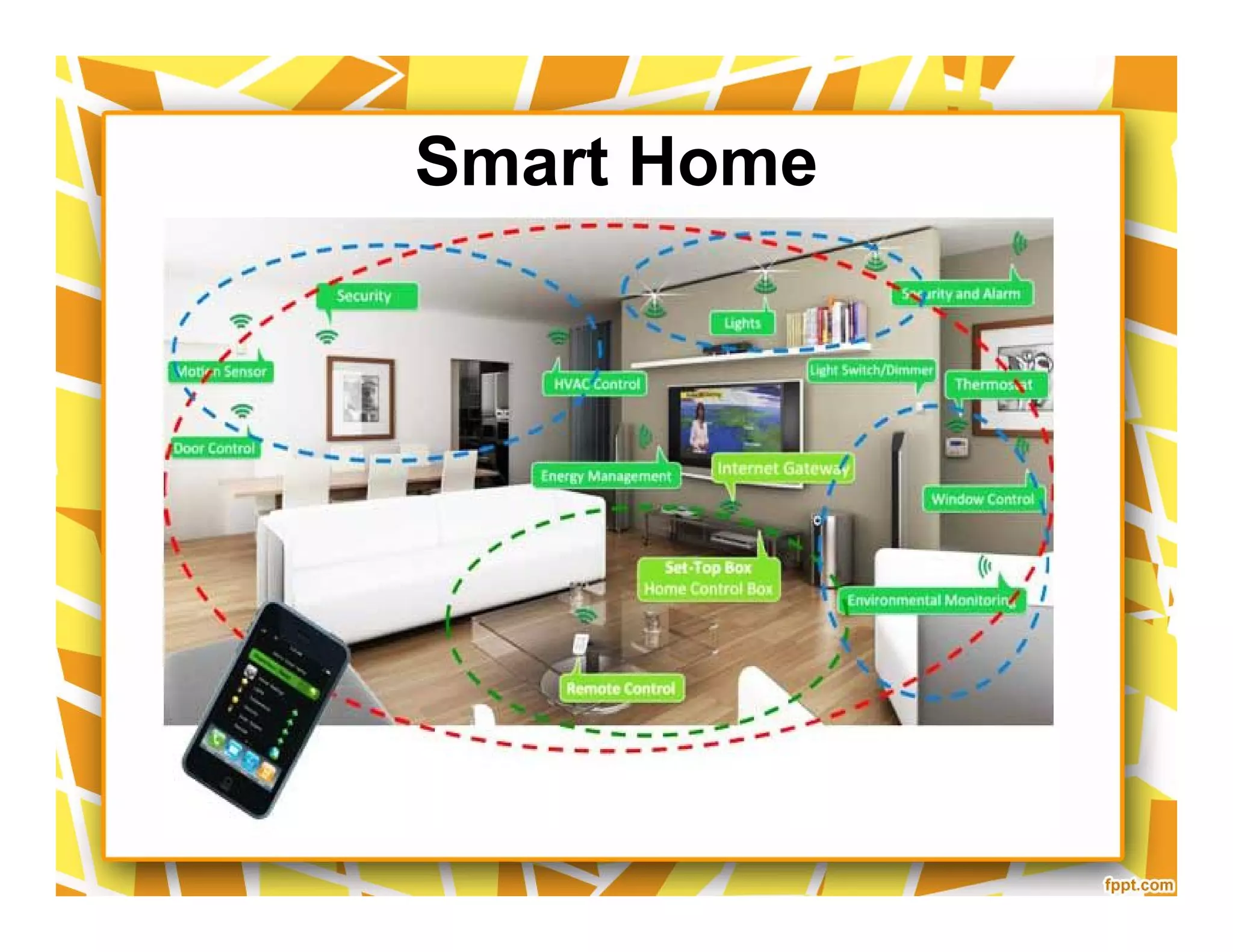
Smart Home
Smart Home
Smart Home RF (US)
Smart Home Technologies & Acronyms
Development
10
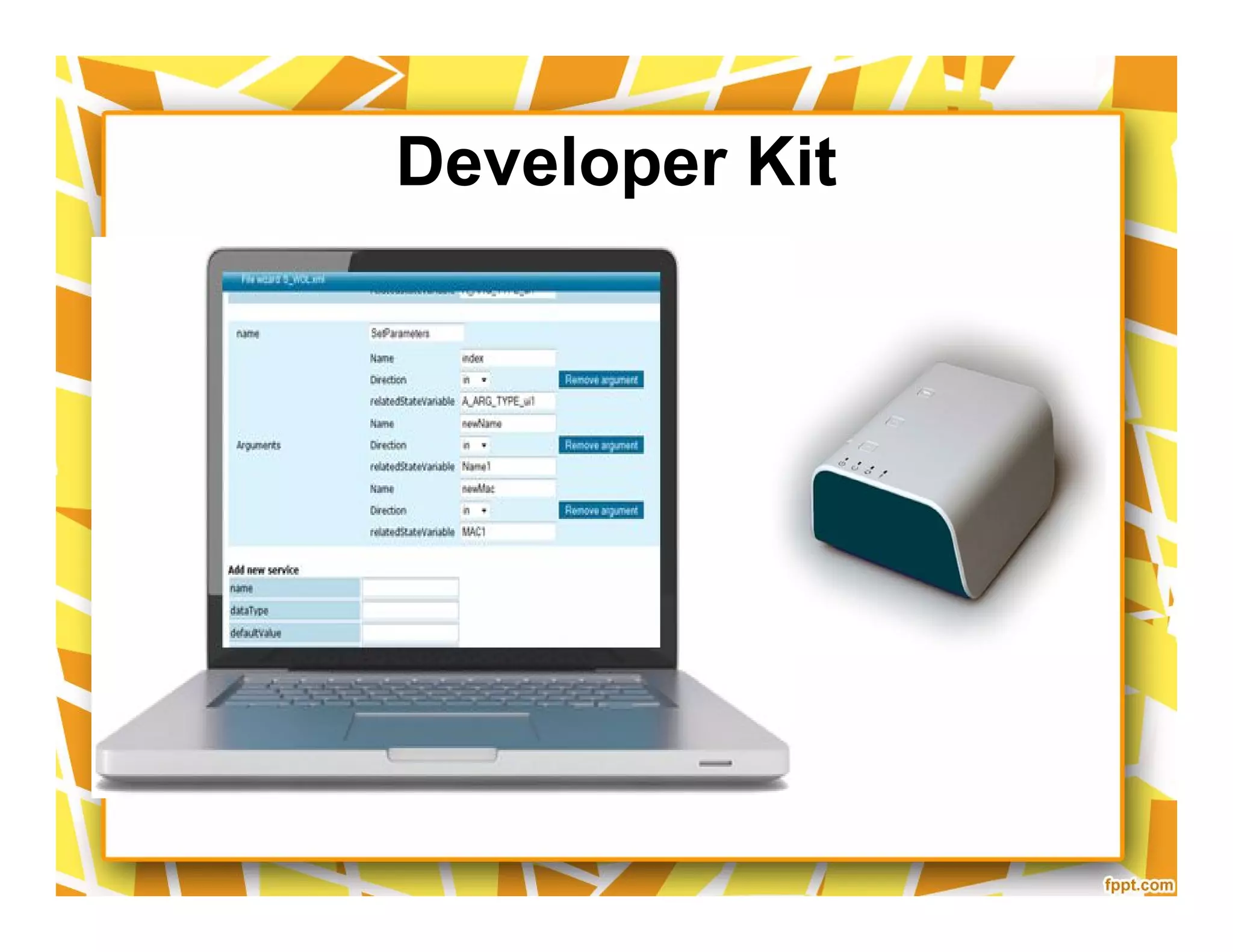
Developer Kit
Home Automation Architecture
Light
Sensors
Thermostat
Module
Module
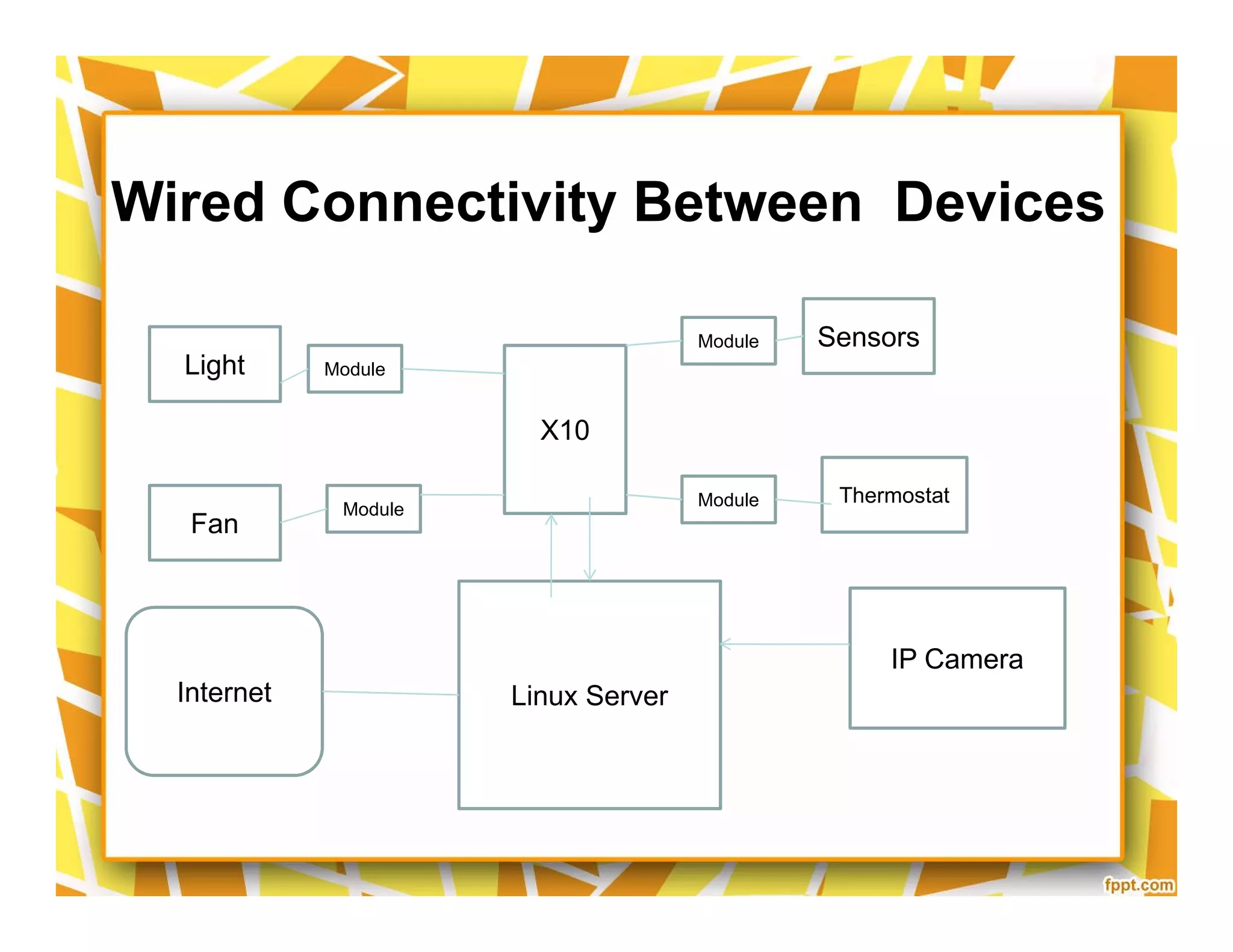
X10
Wired Connectivity Between Devices
Fan
Thermostat
Module Module
Linux ServerInternet
IP Camera
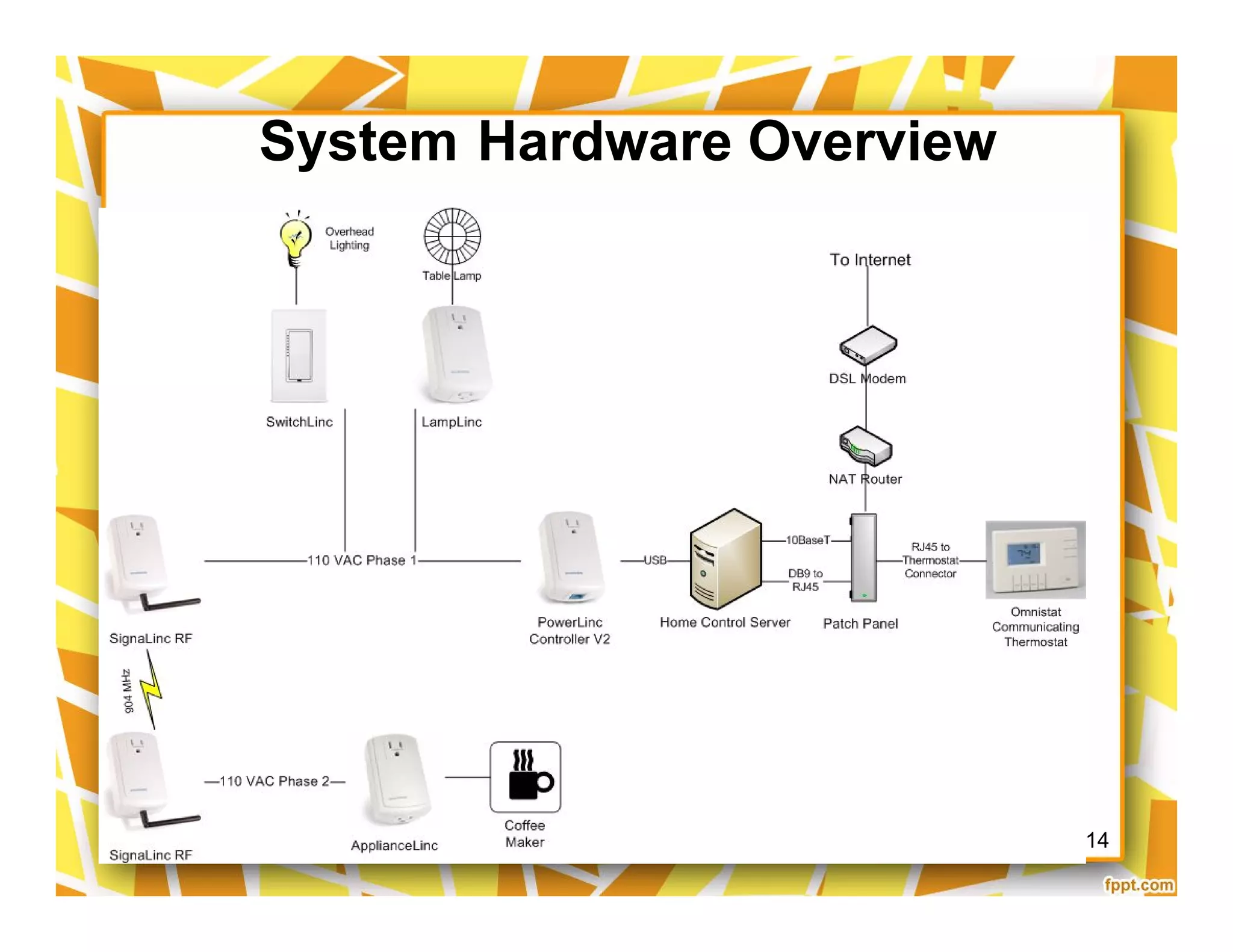
System Hardware Overview
2/19/2008 14
Internal Networking (Wireless)
Linux (as a server)
Web Interface
Web Interface written in Perl.
Control X10 Devive
a command-line control home’s via
X10 devices.
written in the C
Software's:
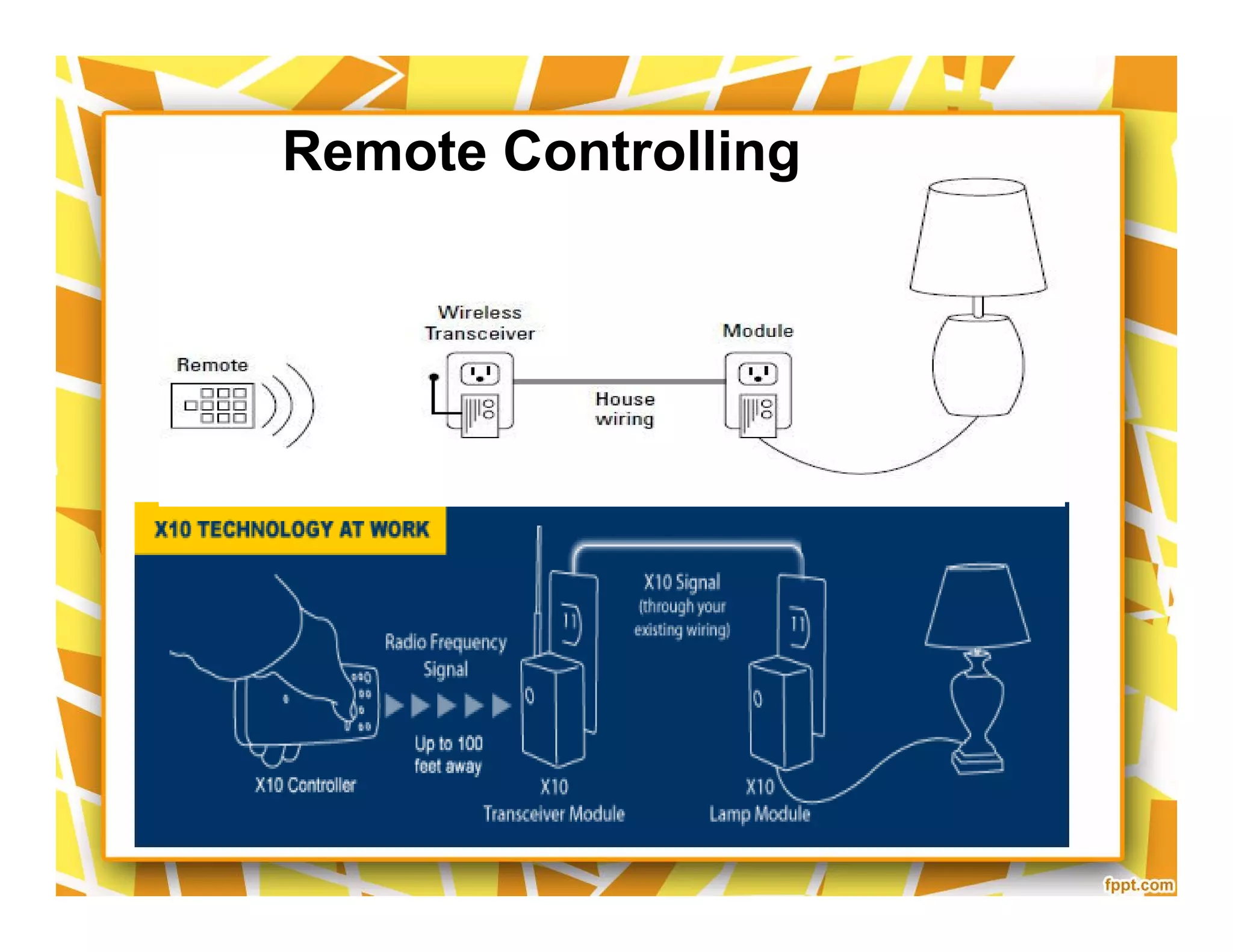
Remote Controlling
Software Control Hierarchy
Web Application
Command
processor
Database
Thermostat
command
processor
Command
processor
Device
driver
Thermostat
device driver
Database
Thermostat
command
processor
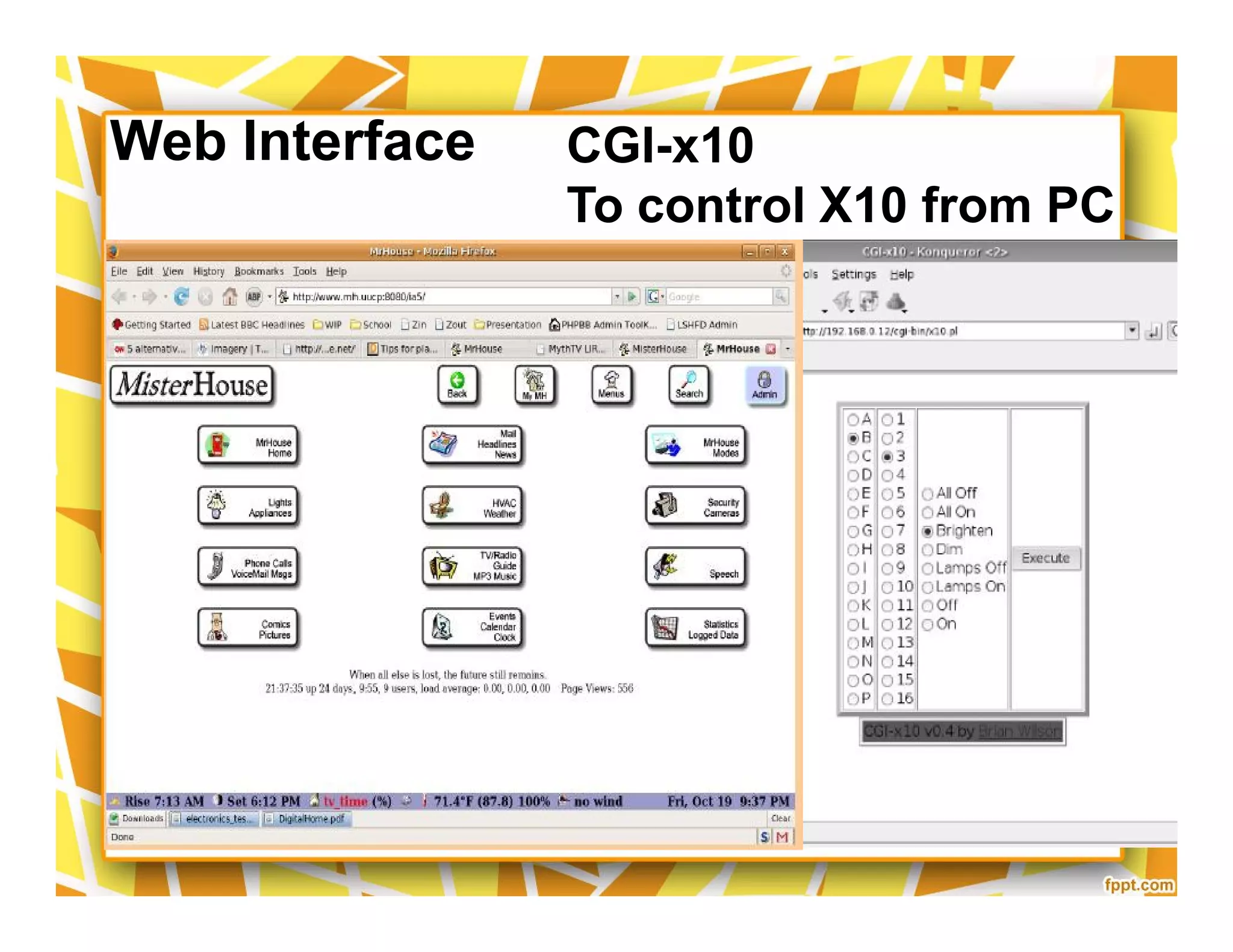
Web Interface CGI-x10
To control X10 from PC
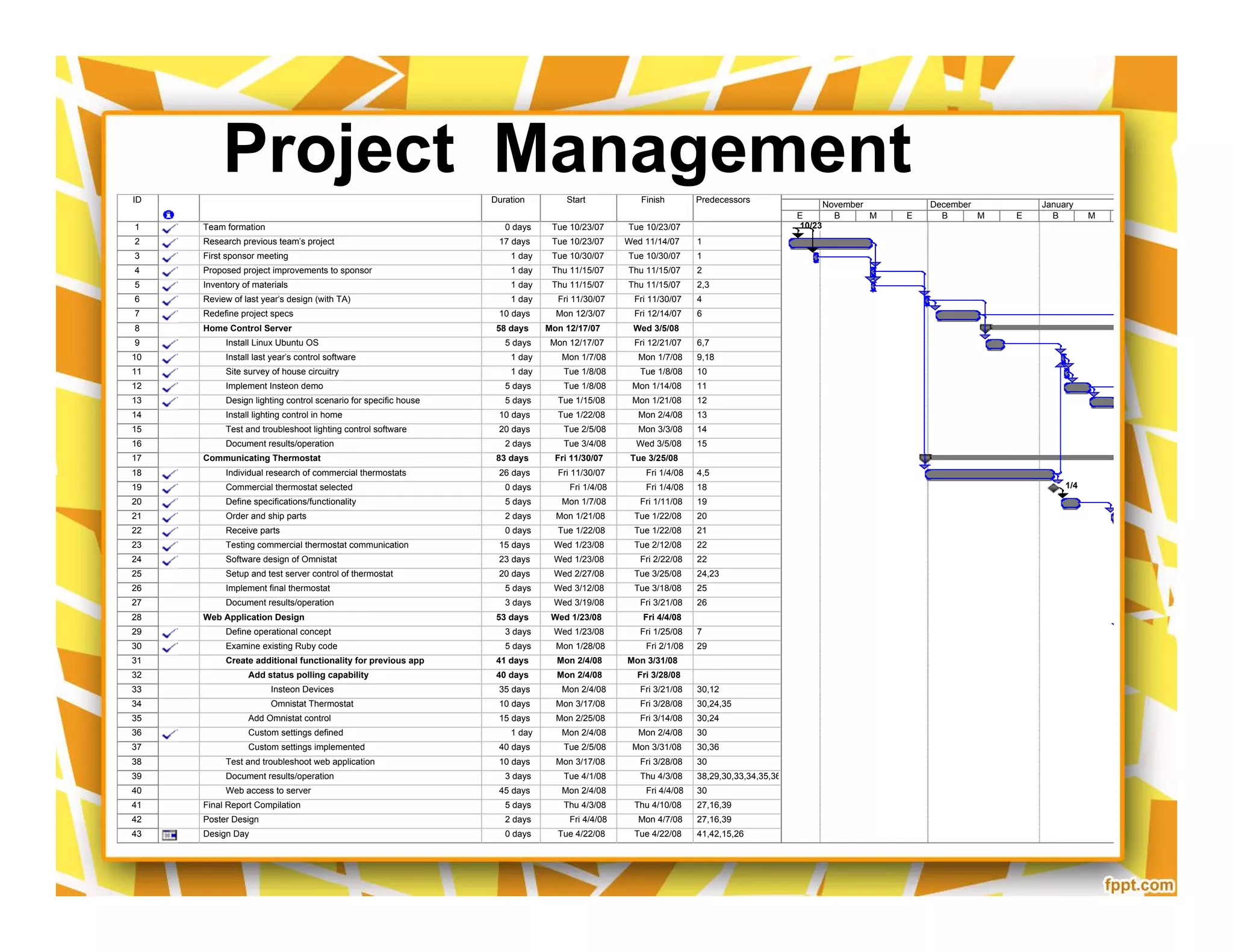
ID Task Name Duration Start Finish Predecessors
1 Team formation 0 days Tue 10/23/07 Tue 10/23/07
2 Research previous team's project 17 days Tue 10/23/07 Wed 11/14/07 1
3 First sponsor meeting 1 day Tue 10/30/07 Tue 10/30/07 1
4 Proposed project improvements to sponsor 1 day Thu 11/15/07 Thu 11/15/07 2
5 Inventory of materials 1 day Thu 11/15/07 Thu 11/15/07 2,3
6 Review of last year's design (with TA) 1 day Fri 11/30/07 Fri 11/30/07 4
7 Redefine project specs 10 days Mon 12/3/07 Fri 12/14/07 6
8 Home Control Server 58 days Mon 12/17/07 Wed 3/5/08
9 Install Linux Ubuntu OS 5 days Mon 12/17/07 Fri 12/21/07 6,7
10 Install last year's control software 1 day Mon 1/7/08 Mon 1/7/08 9,18
11 Site survey of house circuitry 1 day Tue 1/8/08 Tue 1/8/08 10
12 Implement Insteon demo 5 days Tue 1/8/08 Mon 1/14/08 11
13 Design lighting control scenario for specific house 5 days Tue 1/15/08 Mon 1/21/08 12
14 Install lighting control in home 10 days Tue 1/22/08 Mon 2/4/08 13
15 Test and troubleshoot lighting control software 20 days Tue 2/5/08 Mon 3/3/08 14
16 Document results/operation 2 days Tue 3/4/08 Wed 3/5/08 15
17 Communicating Thermostat 83 days Fri 11/30/07 Tue 3/25/08
18 Individual research of commercial thermostats 26 days Fri 11/30/07 Fri 1/4/08 4,5
19 Commercial thermostat selected 0 days Fri 1/4/08 Fri 1/4/08 18
20 Define specifications/functionality 5 days Mon 1/7/08 Fri 1/11/08 19
21 Order and ship parts 2 days Mon 1/21/08 Tue 1/22/08 20
22 Receive parts 0 days Tue 1/22/08 Tue 1/22/08 21
23 Testing commercial thermostat communication 15 days Wed 1/23/08 Tue 2/12/08 22
24 Software design of Omnistat 23 days Wed 1/23/08 Fri 2/22/08 22
25 Setup and test server control of thermostat 20 days Wed 2/27/08 Tue 3/25/08 24,23
26 Implement final thermostat 5 days Wed 3/12/08 Tue 3/18/08 25
27 Document results/operation 3 days Wed 3/19/08 Fri 3/21/08 26
28 Web Application Design 53 days Wed 1/23/08 Fri 4/4/08
29 Define operational concept 3 days Wed 1/23/08 Fri 1/25/08 7
30 Examine existing Ruby code 5 days Mon 1/28/08 Fri 2/1/08 29
31 Create additional functionality for previous app 41 days Mon 2/4/08 Mon 3/31/08
32 Add status polling capability 40 days Mon 2/4/08 Fri 3/28/08
33 Insteon Devices 35 days Mon 2/4/08 Fri 3/21/08 30,12
34 Omnistat Thermostat 10 days Mon 3/17/08 Fri 3/28/08 30,24,35
35 Add Omnistat control 15 days Mon 2/25/08 Fri 3/14/08 30,24
36 Custom settings defined 1 day Mon 2/4/08 Mon 2/4/08 30
37 Custom settings implemented 40 days Tue 2/5/08 Mon 3/31/08 30,36
38 Test and troubleshoot web application 10 days Mon 3/17/08 Fri 3/28/08 30
39 Document results/operation 3 days Tue 4/1/08 Thu 4/3/08 38,29,30,33,34,35,36,37
40 Web access to server 45 days Mon 2/4/08 Fri 4/4/08 30
41 Final Report Compilation 5 days Thu 4/3/08 Thu 4/10/08 27,16,39
42 Poster Design 2 days Fri 4/4/08 Mon 4/7/08 27,16,39
43 Design Day 0 days Tue 4/22/08 Tue 4/22/08 41,42,15,26
10/23
1/4
1/22
E B M E B M E B M E
October November December January
Project ManagementID Task Name Duration Start Finish Predecessors
1 Team formation 0 days Tue 10/23/07 Tue 10/23/07
2 Research previous team's project 17 days Tue 10/23/07 Wed 11/14/07 1
3 First sponsor meeting 1 day Tue 10/30/07 Tue 10/30/07 1
4 Proposed project improvements to sponsor 1 day Thu 11/15/07 Thu 11/15/07 2
5 Inventory of materials 1 day Thu 11/15/07 Thu 11/15/07 2,3
6 Review of last year's design (with TA) 1 day Fri 11/30/07 Fri 11/30/07 4
7 Redefine project specs 10 days Mon 12/3/07 Fri 12/14/07 6
8 Home Control Server 58 days Mon 12/17/07 Wed 3/5/08
9 Install Linux Ubuntu OS 5 days Mon 12/17/07 Fri 12/21/07 6,7
10 Install last year's control software 1 day Mon 1/7/08 Mon 1/7/08 9,18
11 Site survey of house circuitry 1 day Tue 1/8/08 Tue 1/8/08 10
12 Implement Insteon demo 5 days Tue 1/8/08 Mon 1/14/08 11
13 Design lighting control scenario for specific house 5 days Tue 1/15/08 Mon 1/21/08 12
14 Install lighting control in home 10 days Tue 1/22/08 Mon 2/4/08 13
15 Test and troubleshoot lighting control software 20 days Tue 2/5/08 Mon 3/3/08 14
16 Document results/operation 2 days Tue 3/4/08 Wed 3/5/08 15
17 Communicating Thermostat 83 days Fri 11/30/07 Tue 3/25/08
18 Individual research of commercial thermostats 26 days Fri 11/30/07 Fri 1/4/08 4,5
19 Commercial thermostat selected 0 days Fri 1/4/08 Fri 1/4/08 18
20 Define specifications/functionality 5 days Mon 1/7/08 Fri 1/11/08 19
21 Order and ship parts 2 days Mon 1/21/08 Tue 1/22/08 20
22 Receive parts 0 days Tue 1/22/08 Tue 1/22/08 21
23 Testing commercial thermostat communication 15 days Wed 1/23/08 Tue 2/12/08 22
24 Software design of Omnistat 23 days Wed 1/23/08 Fri 2/22/08 22
25 Setup and test server control of thermostat 20 days Wed 2/27/08 Tue 3/25/08 24,23
26 Implement final thermostat 5 days Wed 3/12/08 Tue 3/18/08 25
27 Document results/operation 3 days Wed 3/19/08 Fri 3/21/08 26
28 Web Application Design 53 days Wed 1/23/08 Fri 4/4/08
29 Define operational concept 3 days Wed 1/23/08 Fri 1/25/08 7
30 Examine existing Ruby code 5 days Mon 1/28/08 Fri 2/1/08 29
31 Create additional functionality for previous app 41 days Mon 2/4/08 Mon 3/31/08
32 Add status polling capability 40 days Mon 2/4/08 Fri 3/28/08
33 Insteon Devices 35 days Mon 2/4/08 Fri 3/21/08 30,12
34 Omnistat Thermostat 10 days Mon 3/17/08 Fri 3/28/08 30,24,35
35 Add Omnistat control 15 days Mon 2/25/08 Fri 3/14/08 30,24
36 Custom settings defined 1 day Mon 2/4/08 Mon 2/4/08 30
37 Custom settings implemented 40 days Tue 2/5/08 Mon 3/31/08 30,36
38 Test and troubleshoot web application 10 days Mon 3/17/08 Fri 3/28/08 30
39 Document results/operation 3 days Tue 4/1/08 Thu 4/3/08 38,29,30,33,34,35,36,37
40 Web access to server 45 days Mon 2/4/08 Fri 4/4/08 30
41 Final Report Compilation 5 days Thu 4/3/08 Thu 4/10/08 27,16,39
42 Poster Design 2 days Fri 4/4/08 Mon 4/7/08 27,16,39
43 Design Day 0 days Tue 4/22/08 Tue 4/22/08 41,42,15,26
10/23
1/4
1/22
E B M E B M E B M E
October November December January
Technology
20
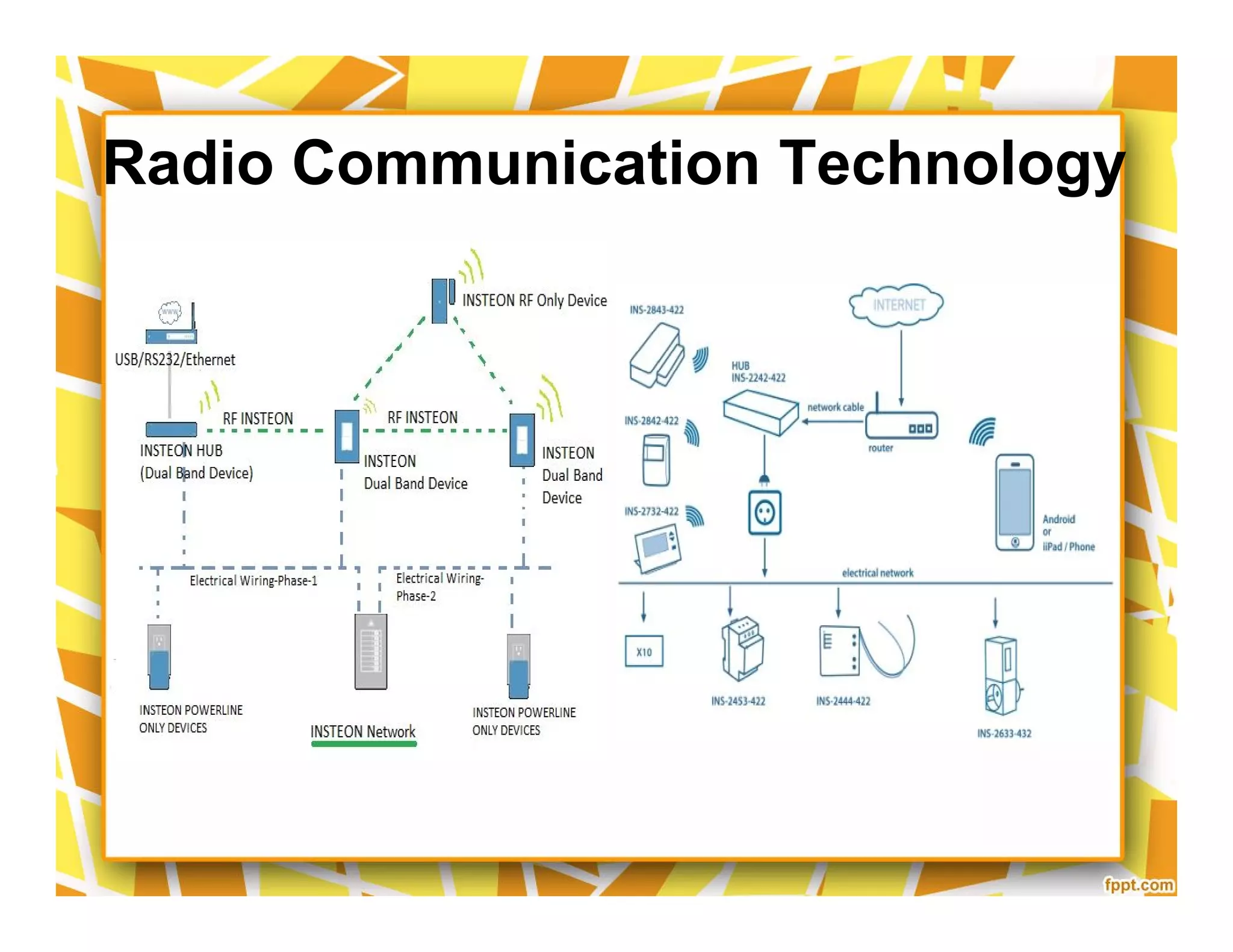
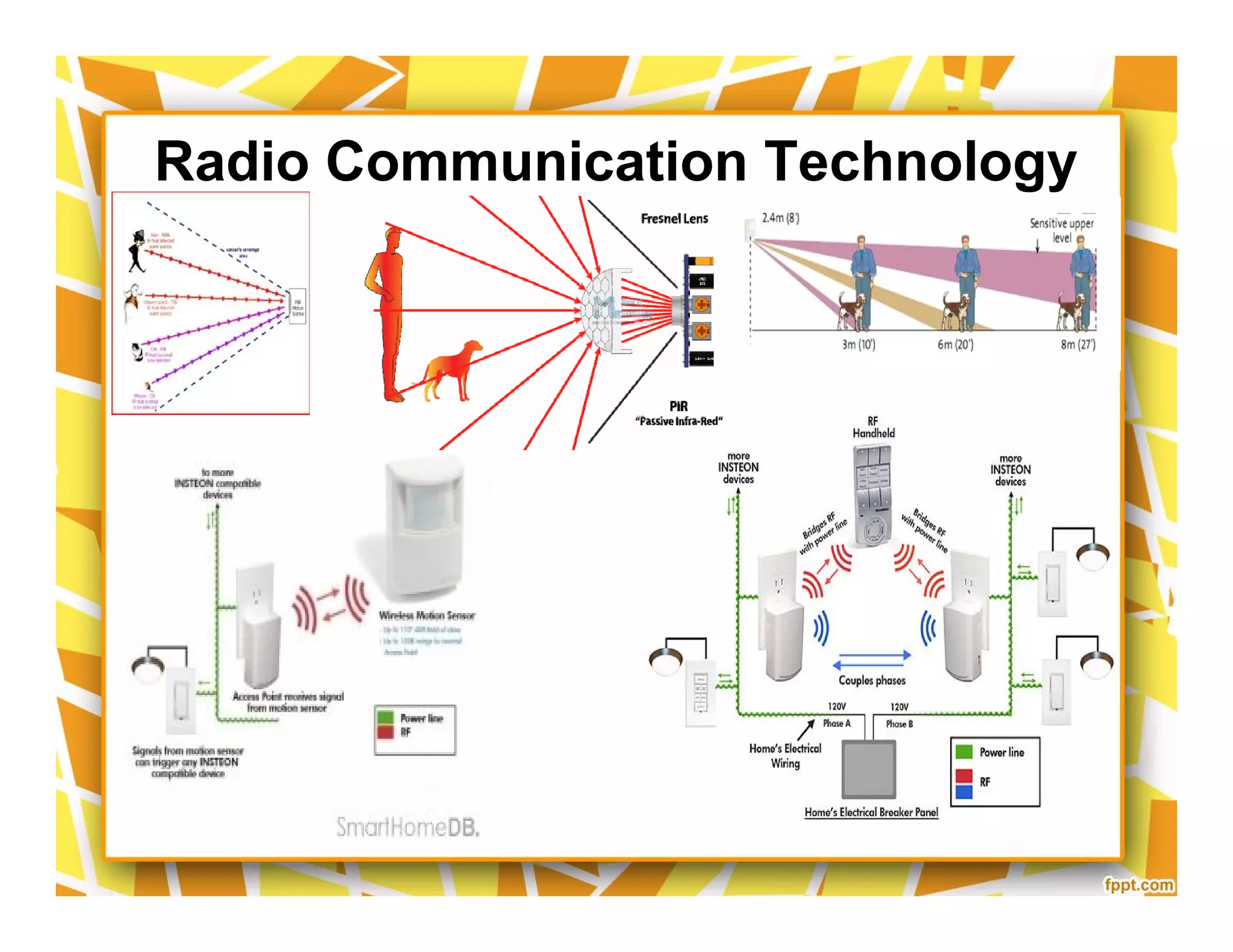
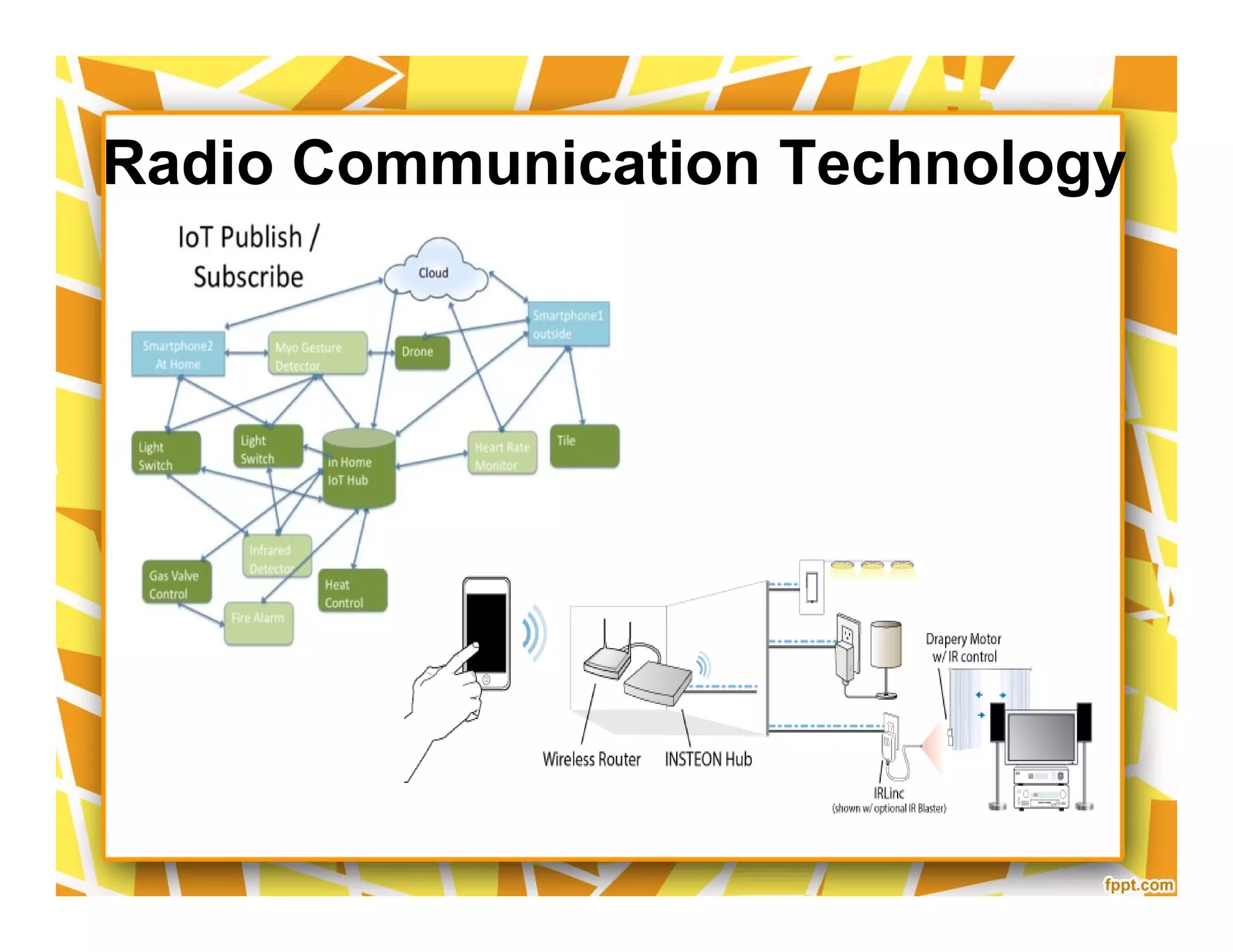
Radio Communication Technology
How it works
How it works
Radio Communication Technology
Control Lights w/ SmartPhone
Control Thermostat Remotely
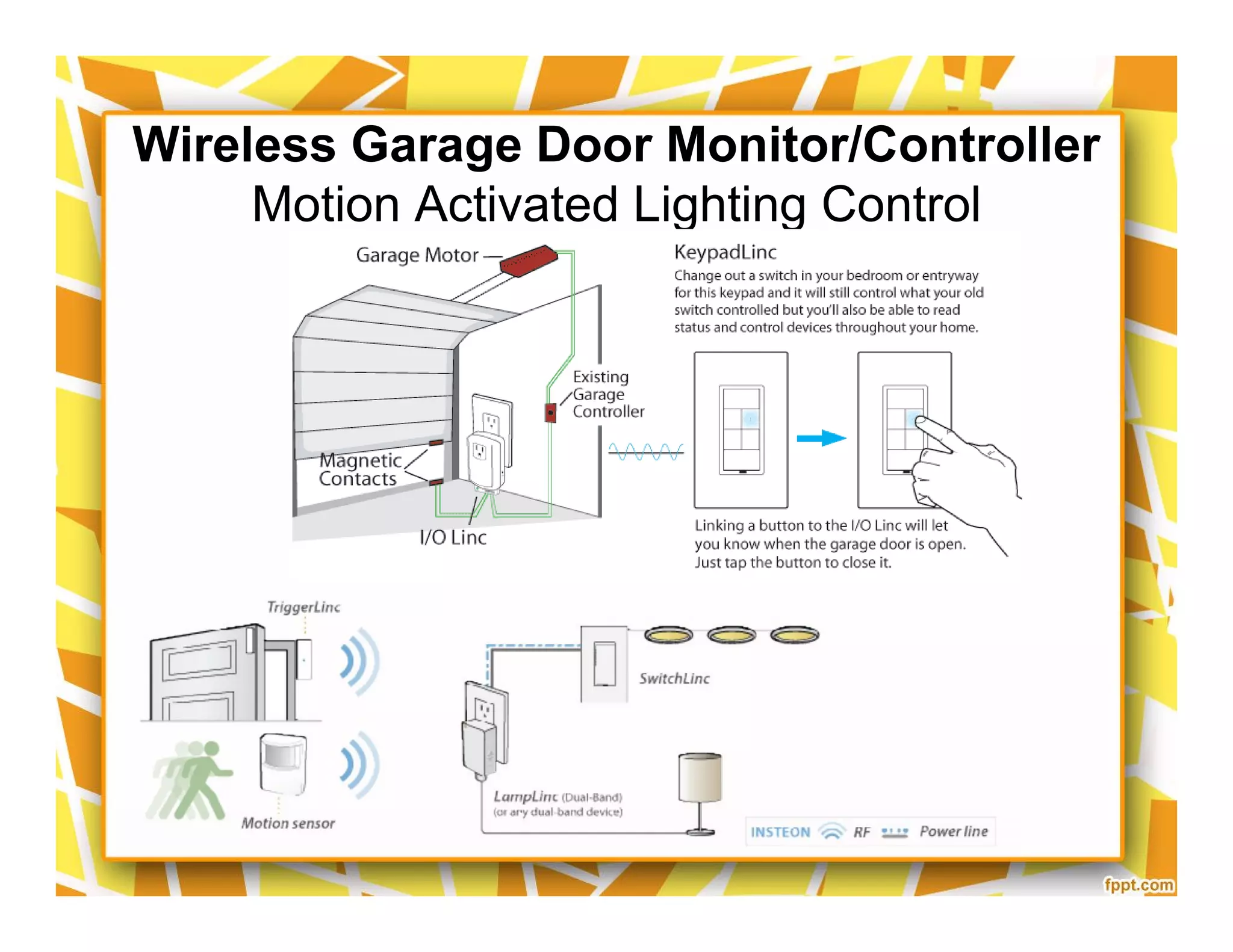
Wireless Garage Door Monitor/Controller
Motion Activated Lighting Control
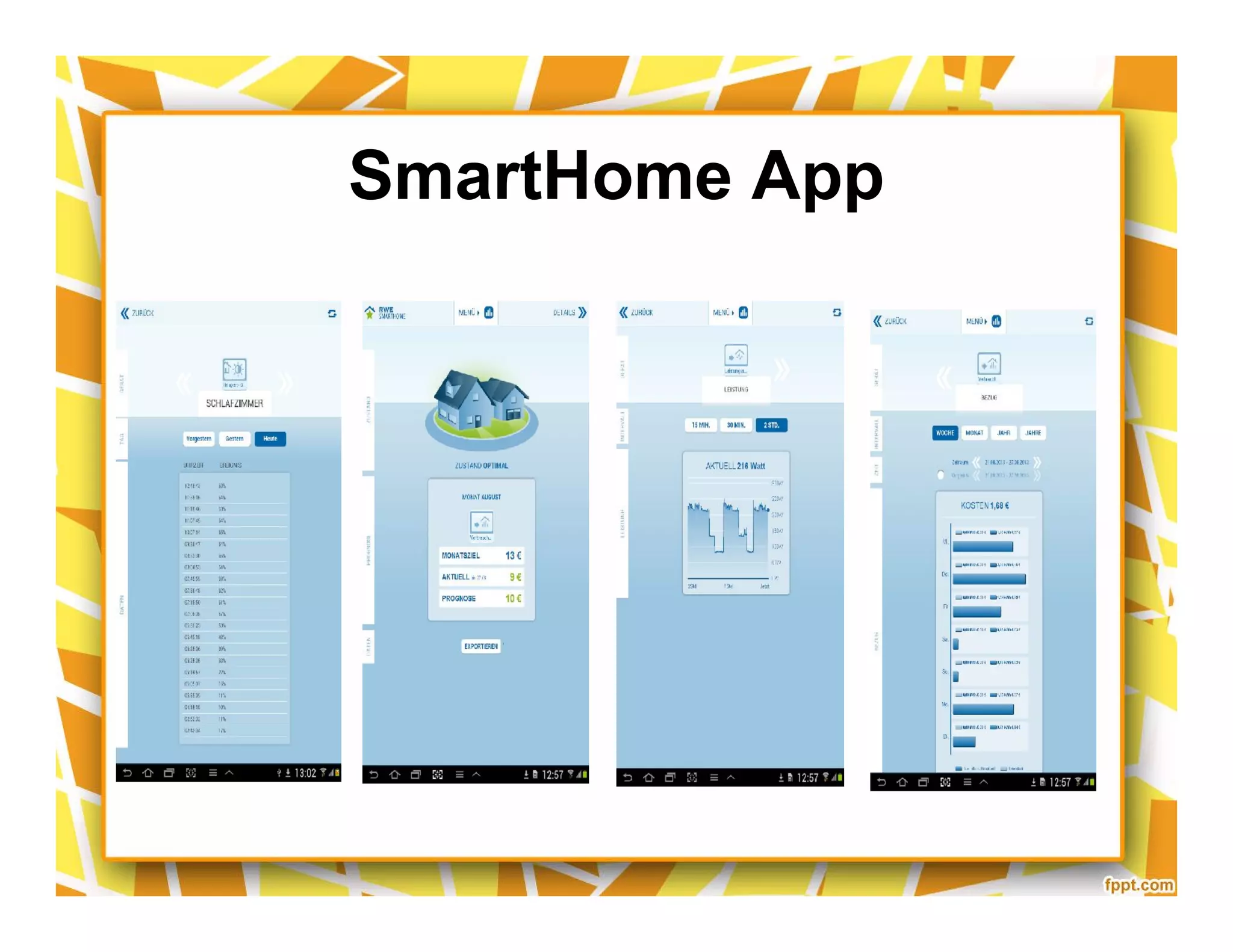
SmartHome App
Smart Home Control Central
Smart Home LED Bulbs
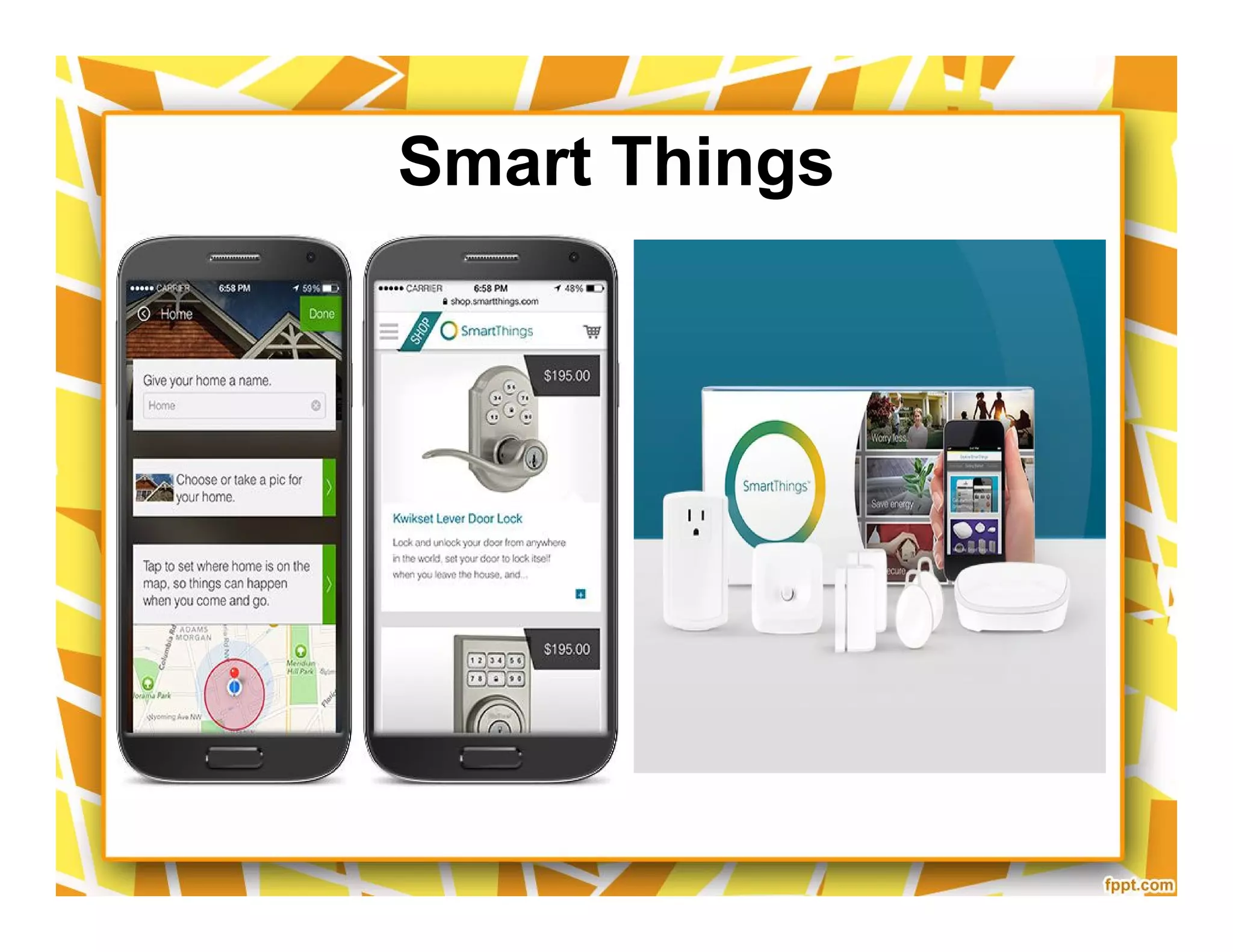
Smart Things
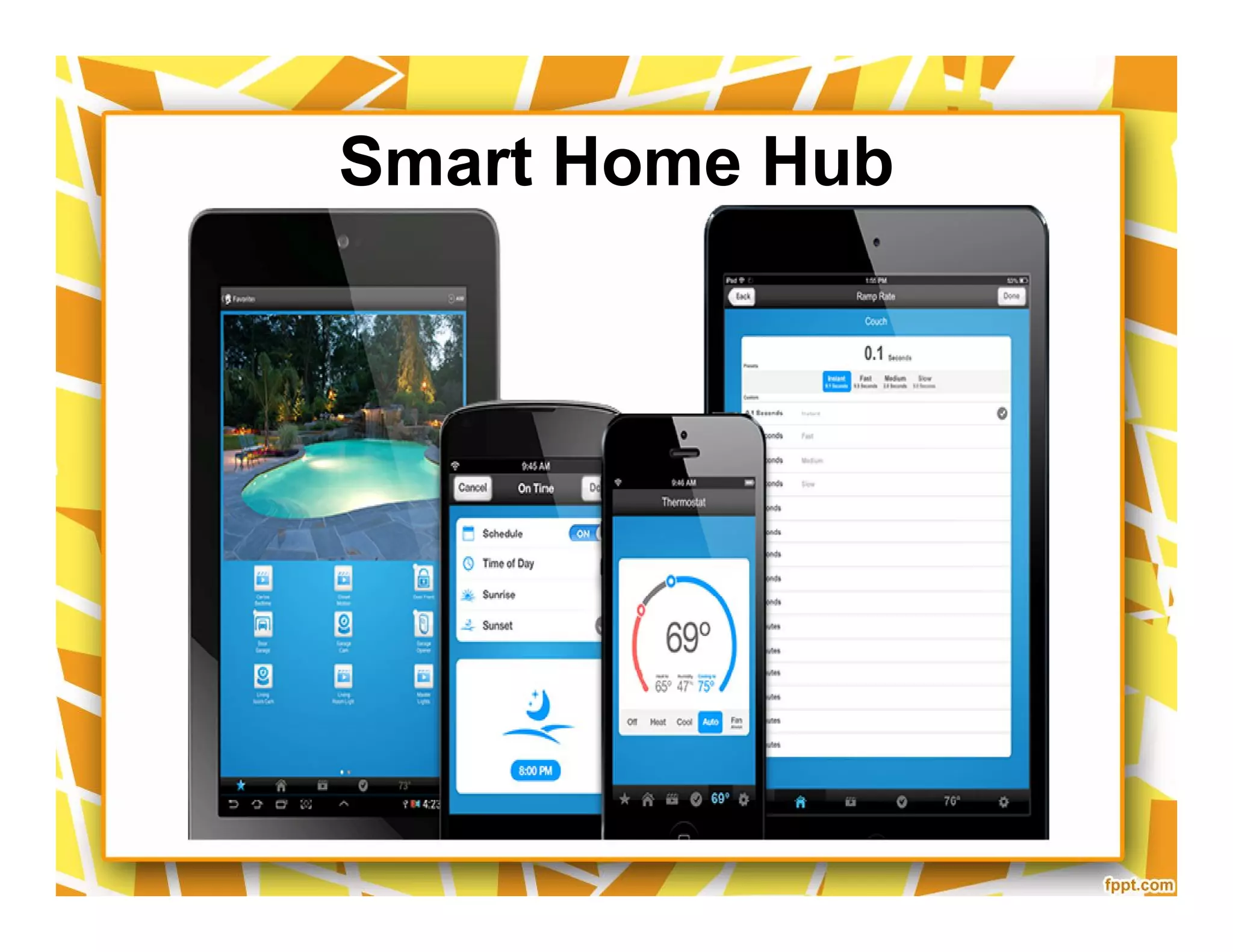
Smart Home Hub
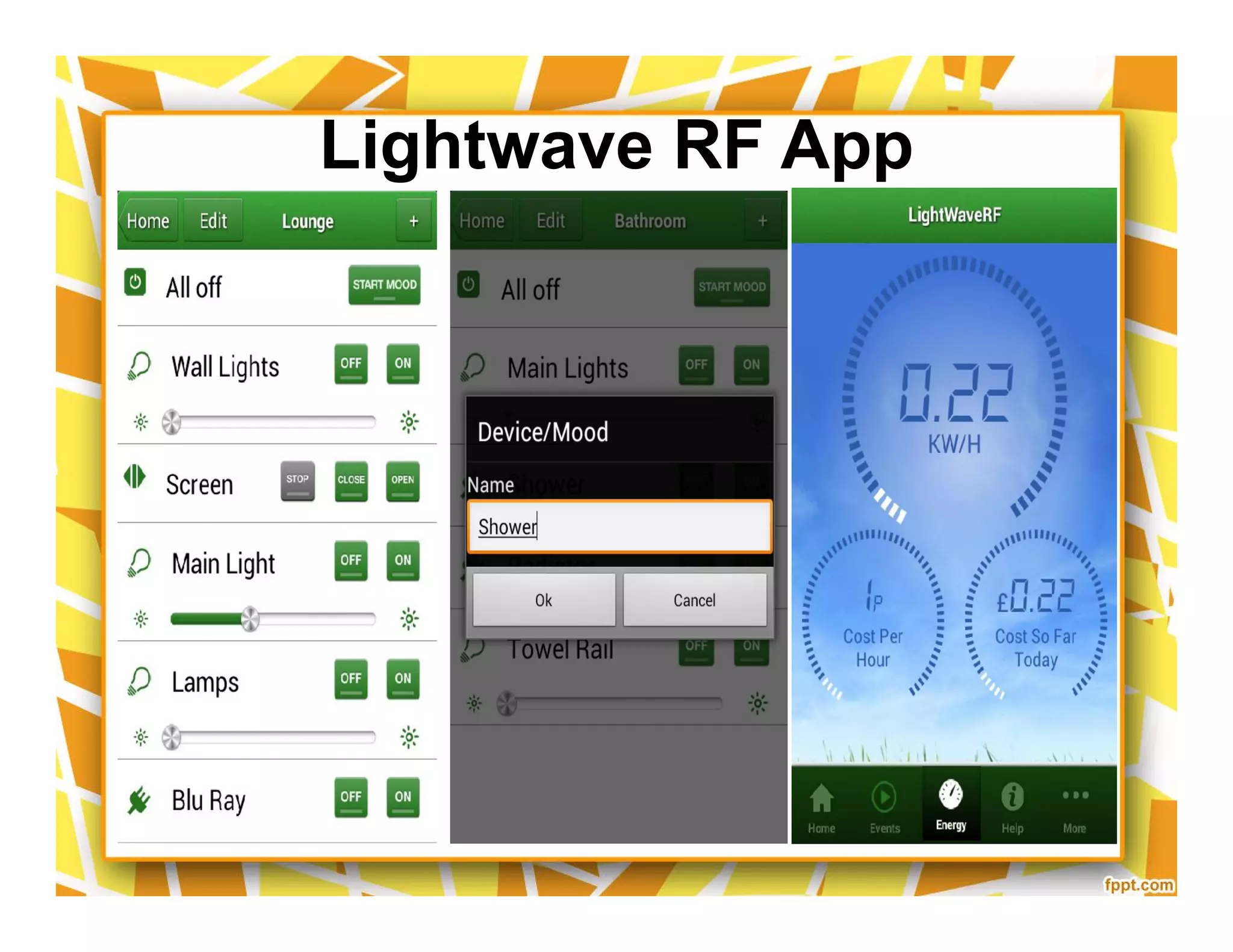
Lightwave RF App
Config
Config
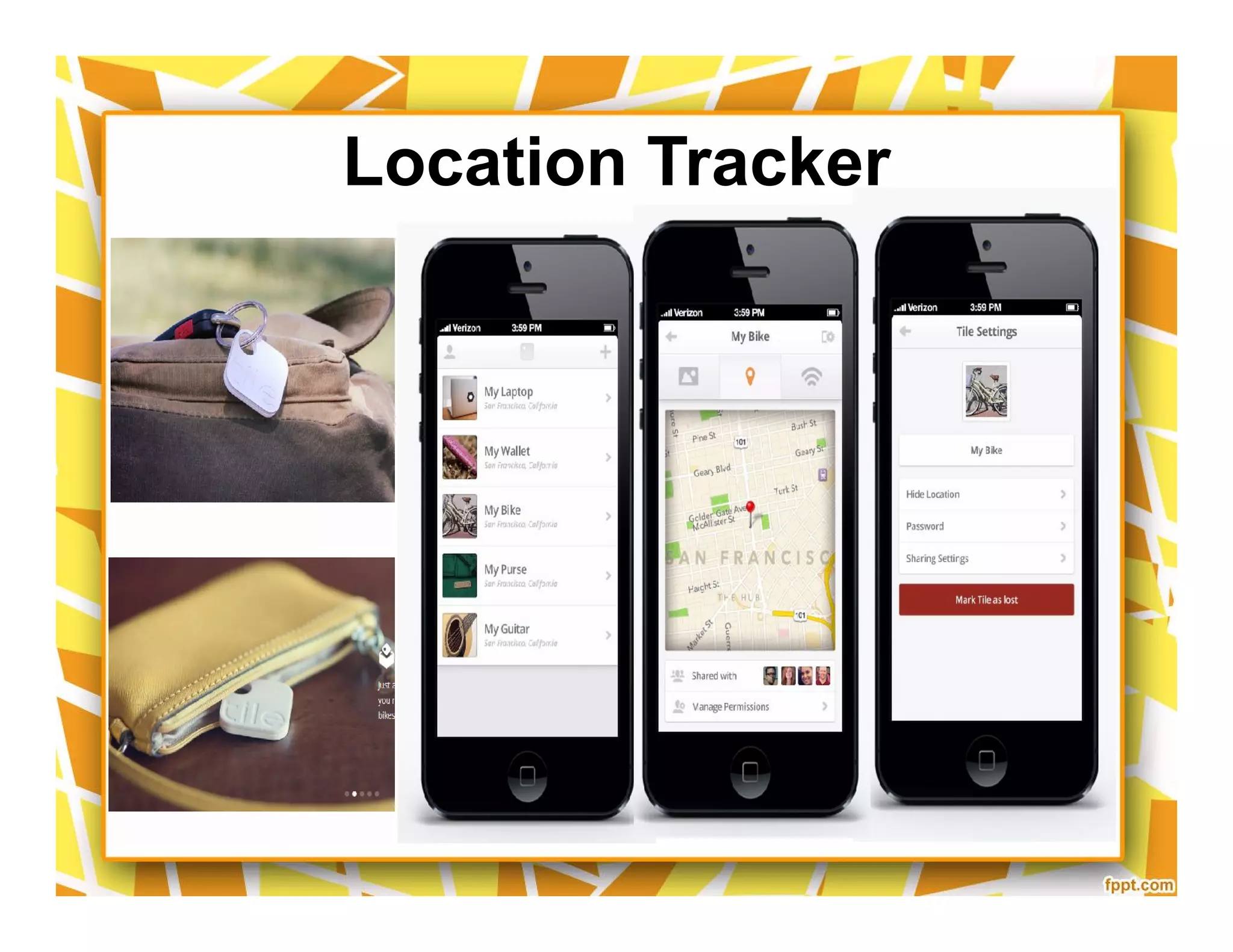
Location Tracker
AlertMe
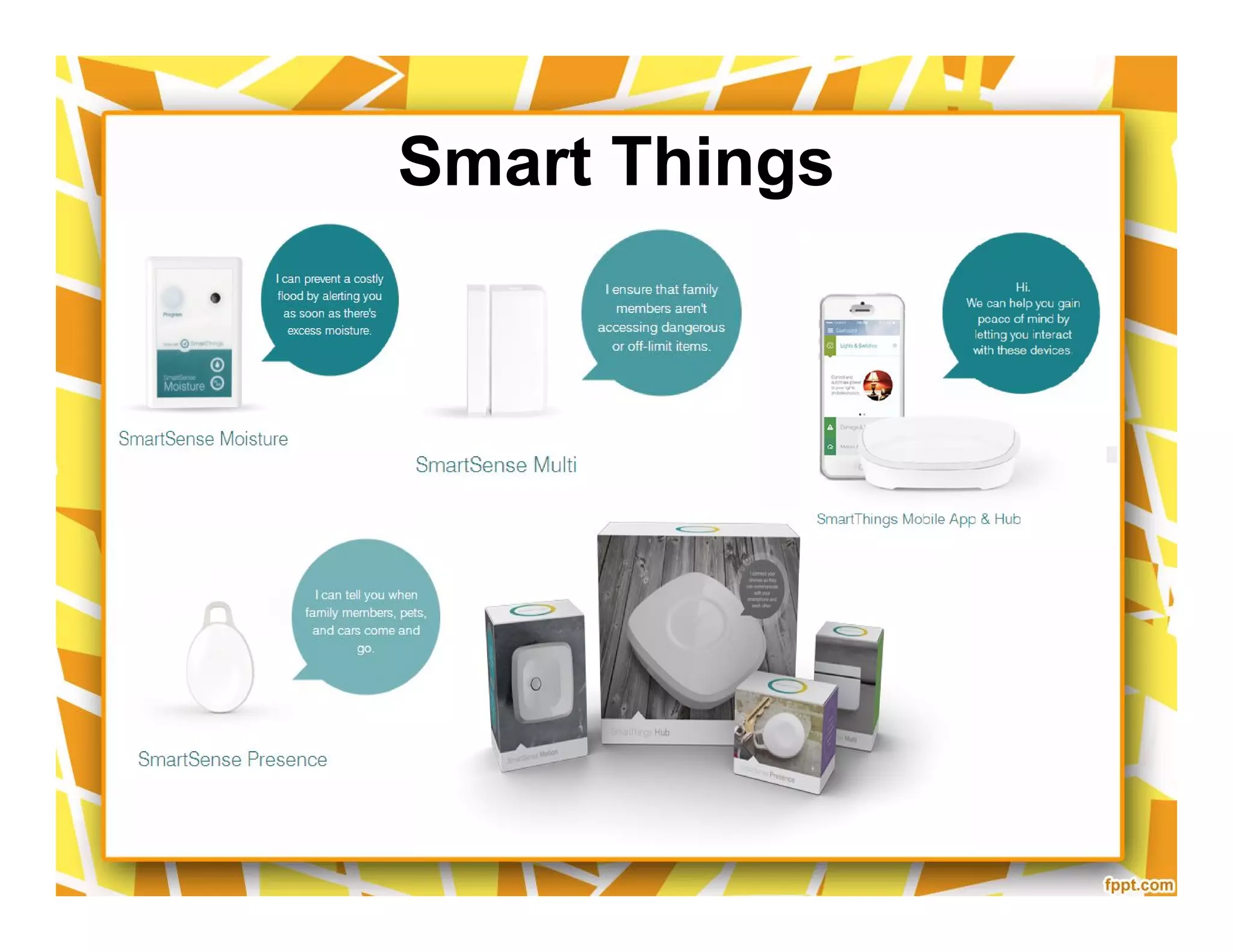
Sensors & Modules
39
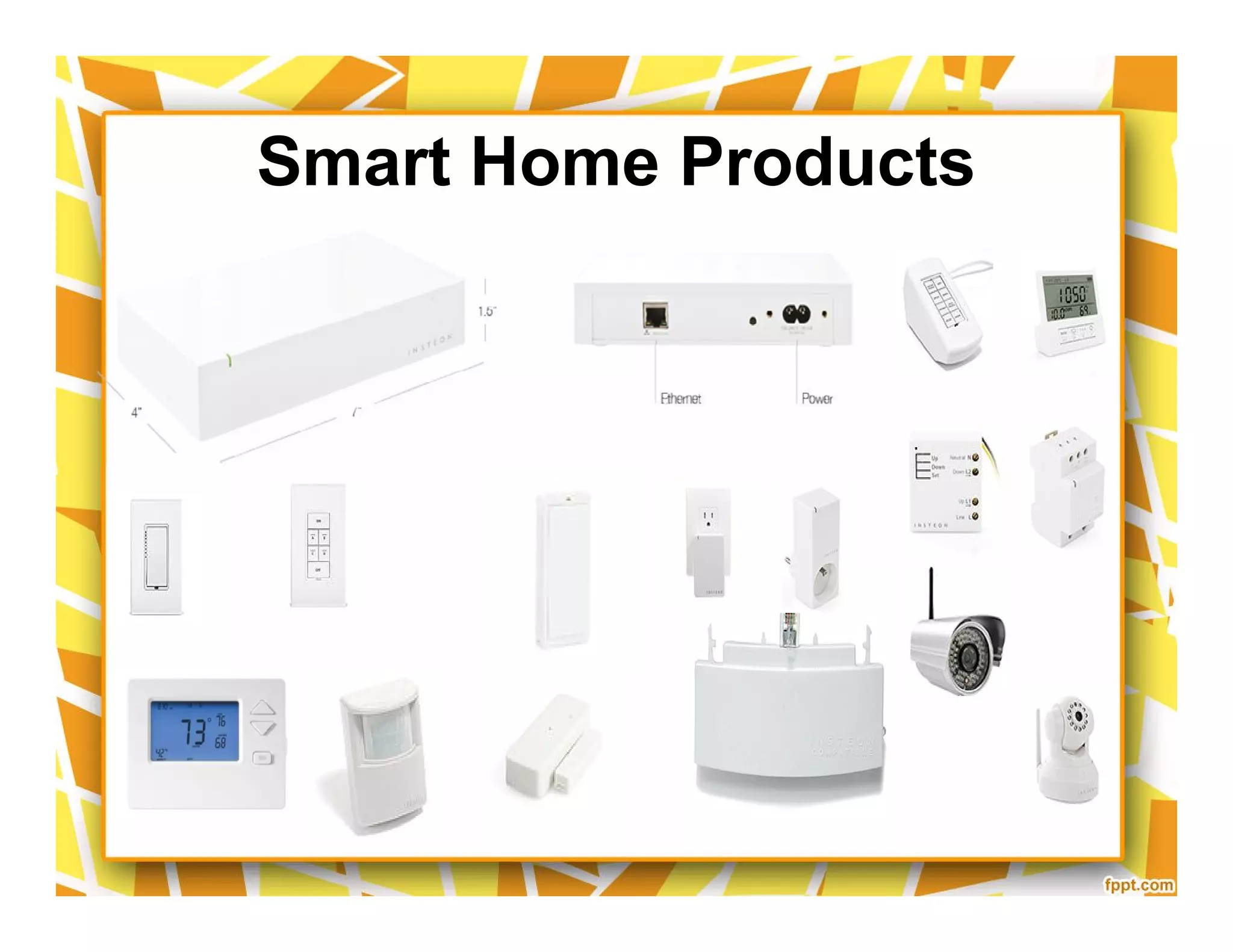
Smart Home Products
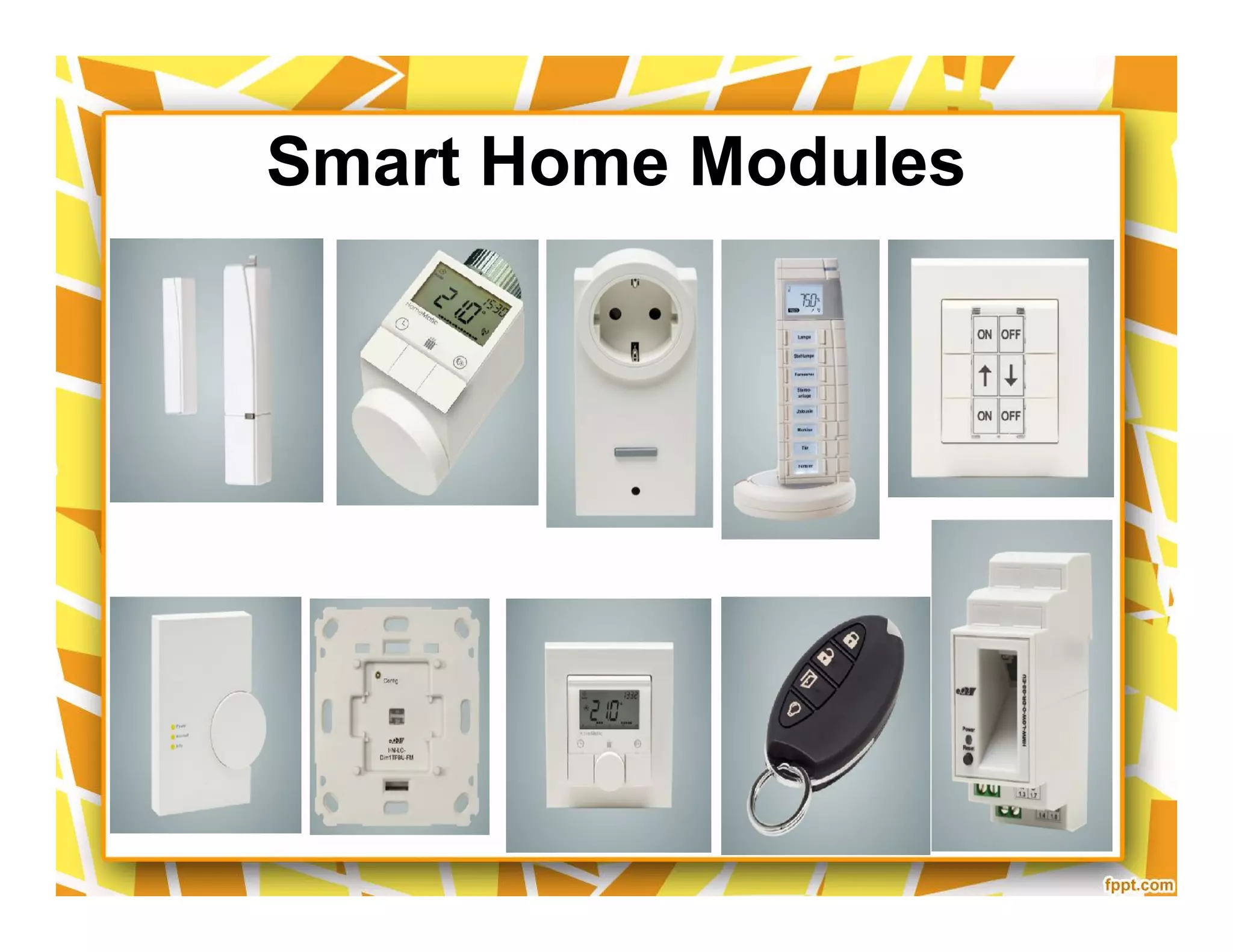
SmartHome Modules
Smart Home Modules
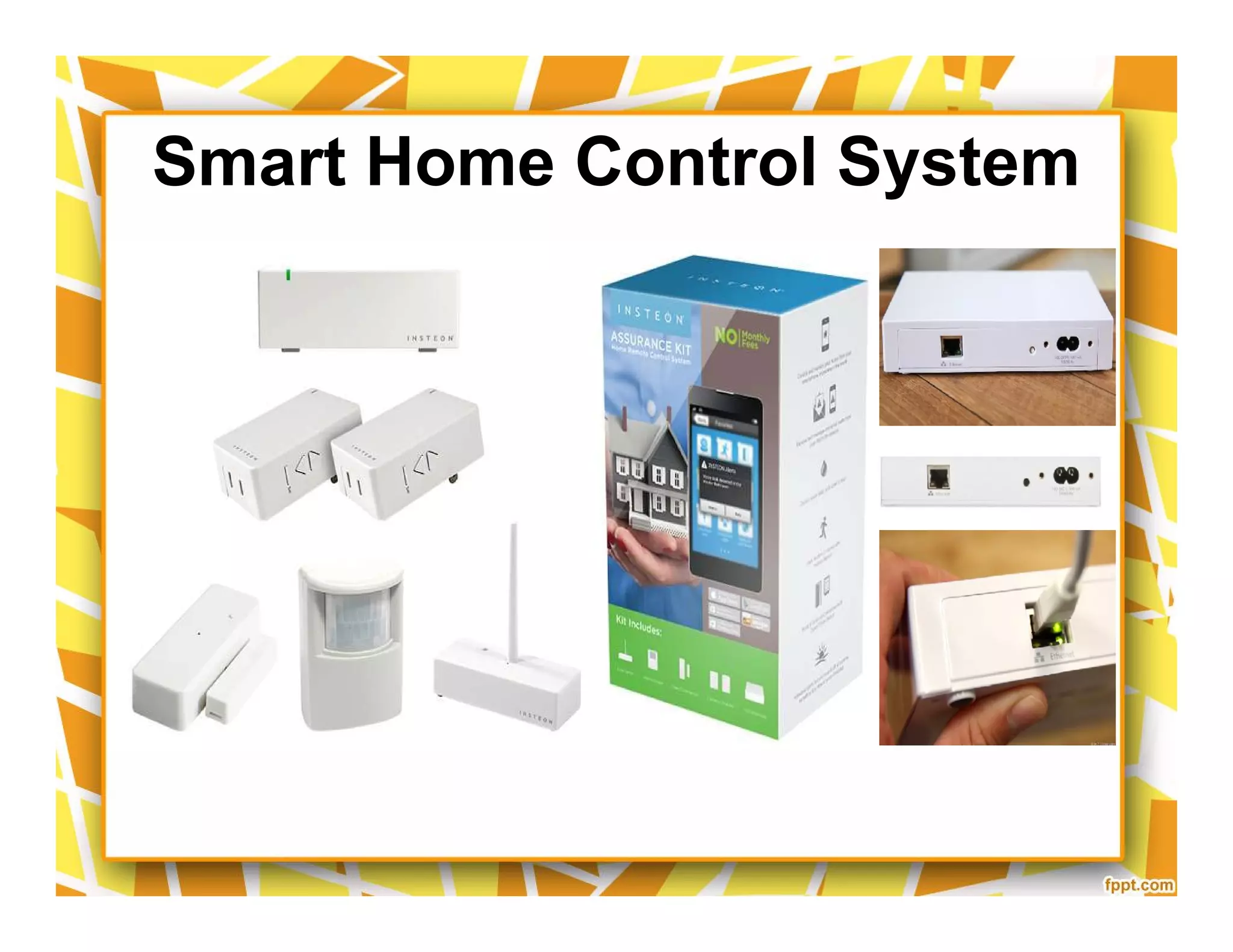
Smart Home Control System
Telekom Hardware
Lightwave RF
Smarthome Wireless IP Security Camera
Nest Learning Thermostat
Compatible w/ iPhone/iPad,
Android, Blackberry
($250)
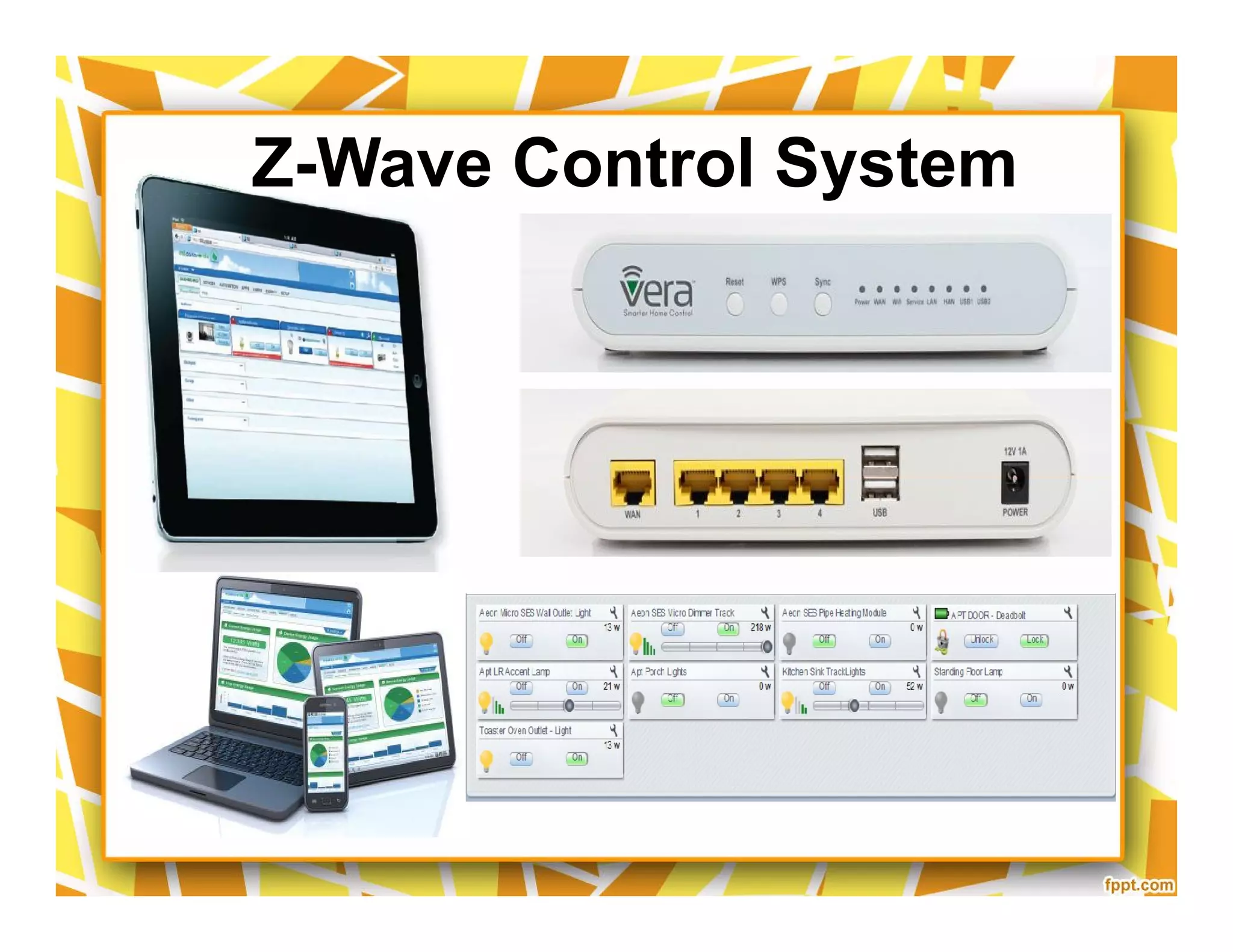
Z-Wave Control System
Z-Wave Products
Smart Things
Smart Things
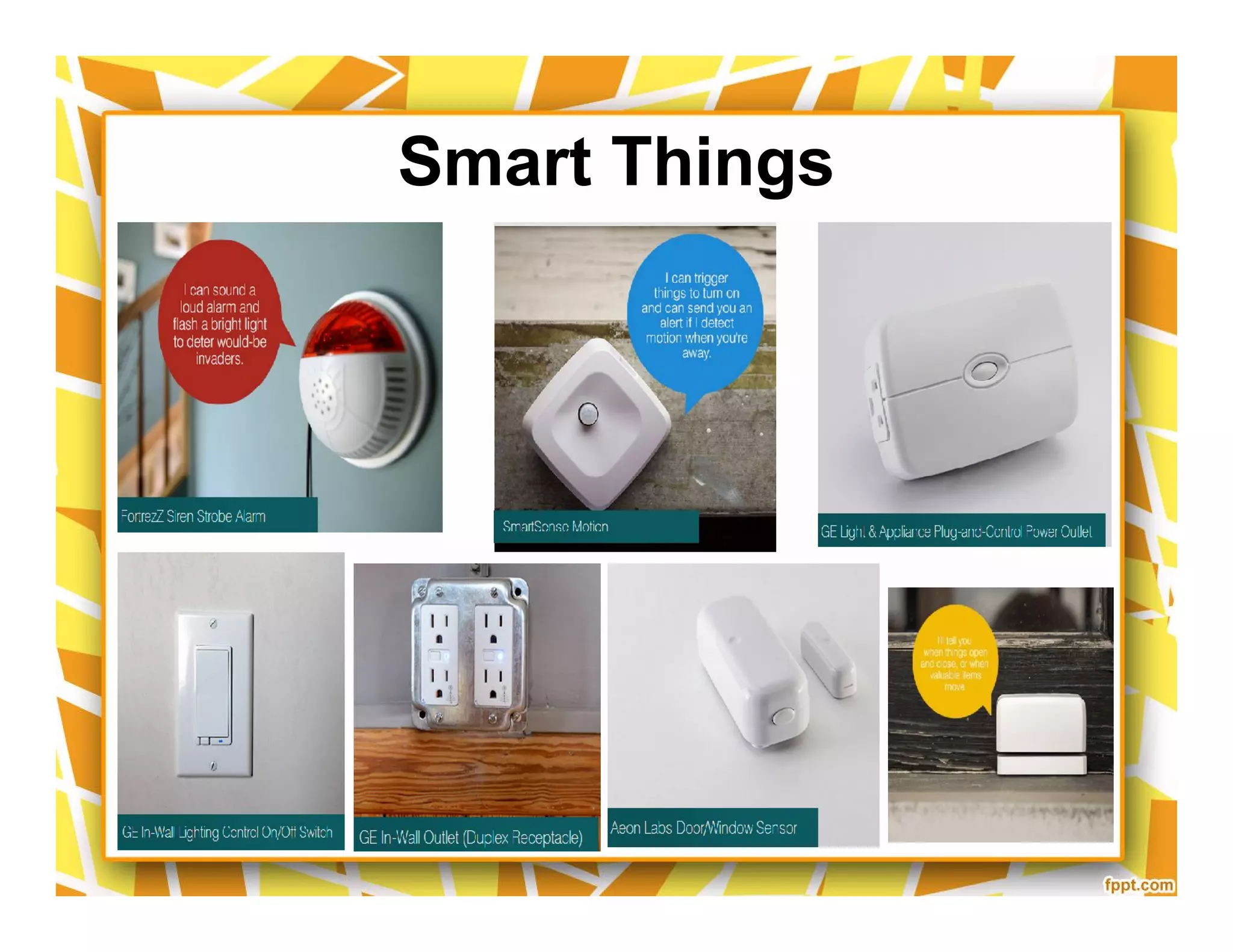
Smart Things
Systems
52
Smart Home Appliance
• http://www.youtube.com/watch?v=_rhBfh-4aOs
Smarthome Design
• http://www.youtube.com/watch?v=_rhBfh-4aOs
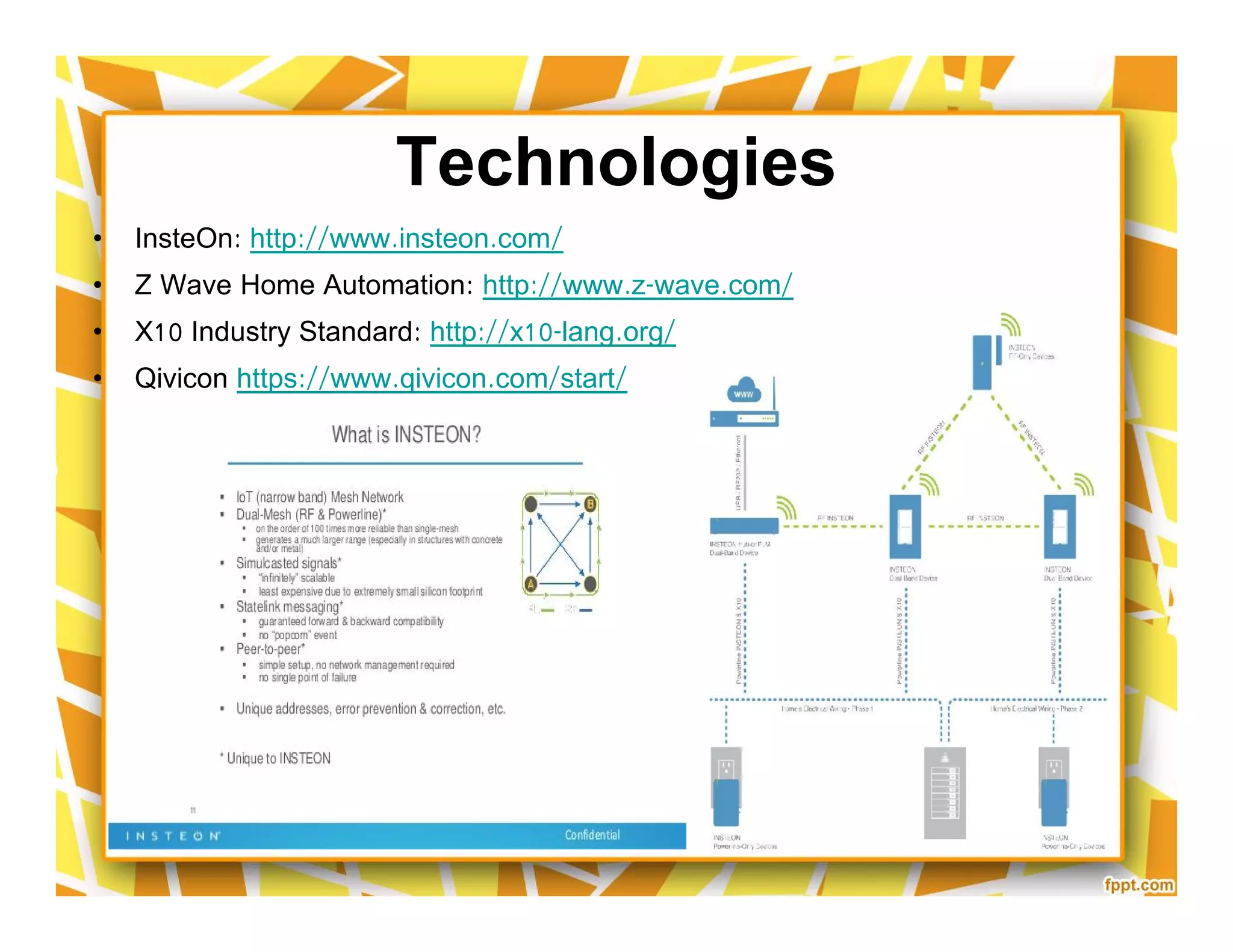
Technologies
• InsteOn: http://www.insteon.com/
• Z Wave Home Automation: http://www.z-wave.com/
• X10 Industry Standard: http://x10-lang.org/
• Qivicon https://www.qivicon.com/start/
• InsteOn: http://www.insteon.com/
• Z Wave Home Automation: http://www.z-wave.com/
• X10 Industry Standard: http://x10-lang.org/
• Qivicon https://www.qivicon.com/start/
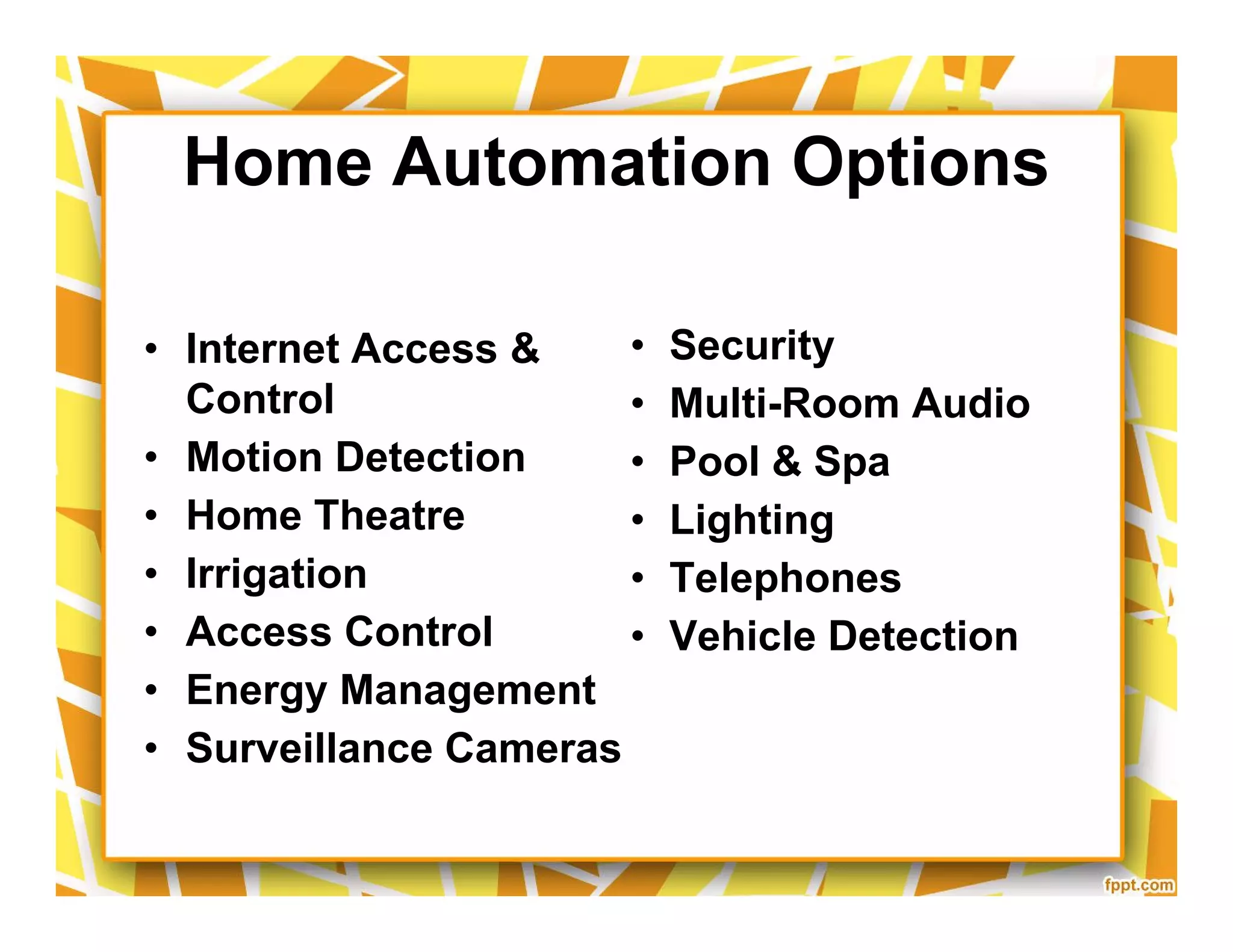
Home Automation Options
• Internet Access &
Control
• Motion Detection
• Home Theatre
• Irrigation
• Access Control
• Energy Management
• Surveillance Cameras
• Security
• Multi-Room Audio
• Pool & Spa
• Lighting
• Telephones
• Vehicle Detection
• Internet Access &
Control
• Motion Detection
• Home Theatre
• Irrigation
• Access Control
• Energy Management
• Surveillance Cameras
• Security
• Multi-Room Audio
• Pool & Spa
• Lighting
• Telephones
• Vehicle Detection
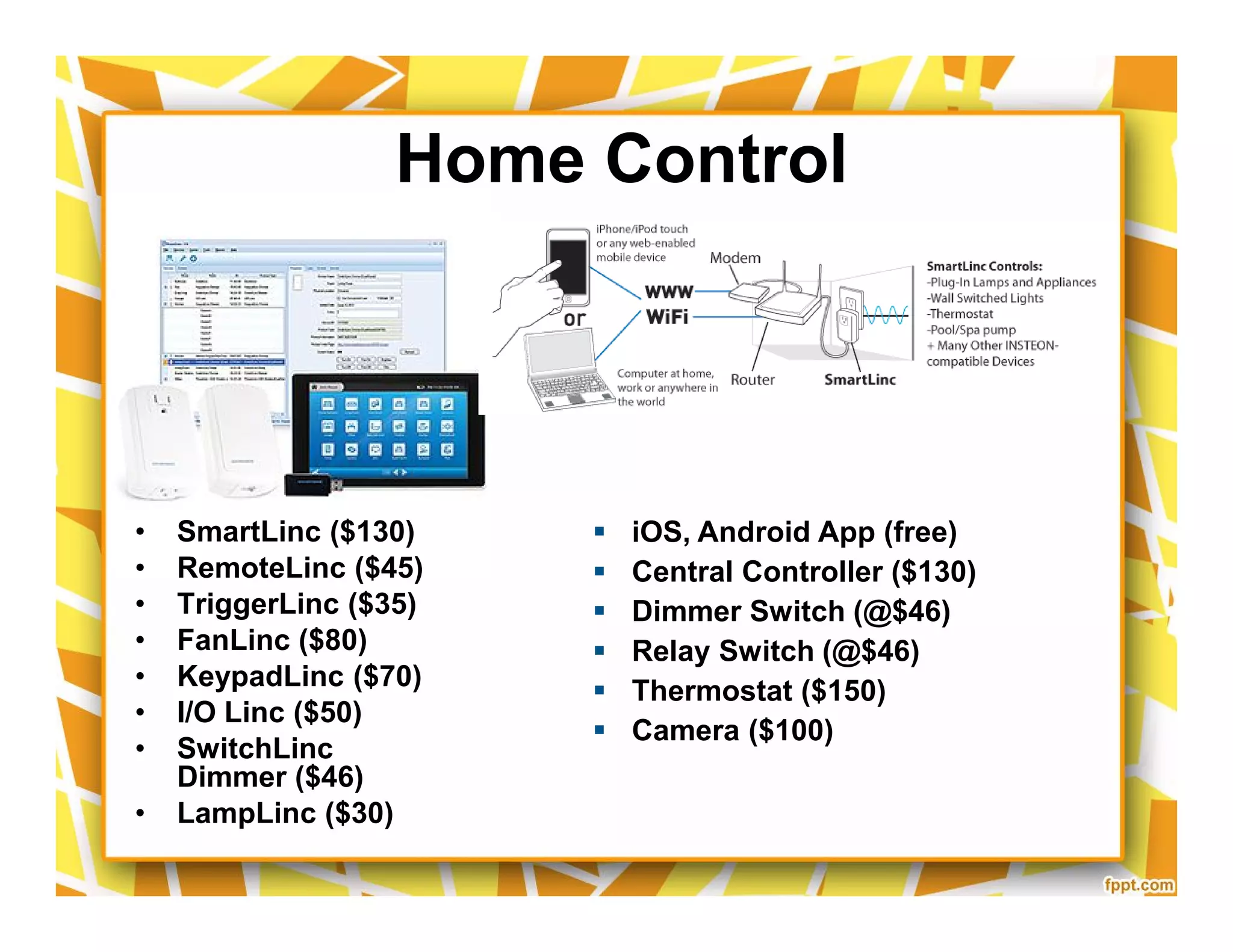
Home Control
• SmartLinc ($130)
• RemoteLinc ($45)
• TriggerLinc ($35)
• FanLinc ($80)
• KeypadLinc ($70)
• I/O Linc ($50)
• SwitchLinc
Dimmer ($46)
• LampLinc ($30)
 iOS, Android App (free)
 Central Controller ($130)
 Dimmer Switch (@$46)
 Relay Switch (@$46)
 Thermostat ($150)
 Camera ($100)
Popular Products
•
What Can Be Controlled?
Lighting Irrigation
HVAC Security
A/V Pool/Spa
Blinds Whole House
Lighting Irrigation
HVAC Security
A/V Pool/Spa
Blinds Whole House
Summary
60
Home Automation Options
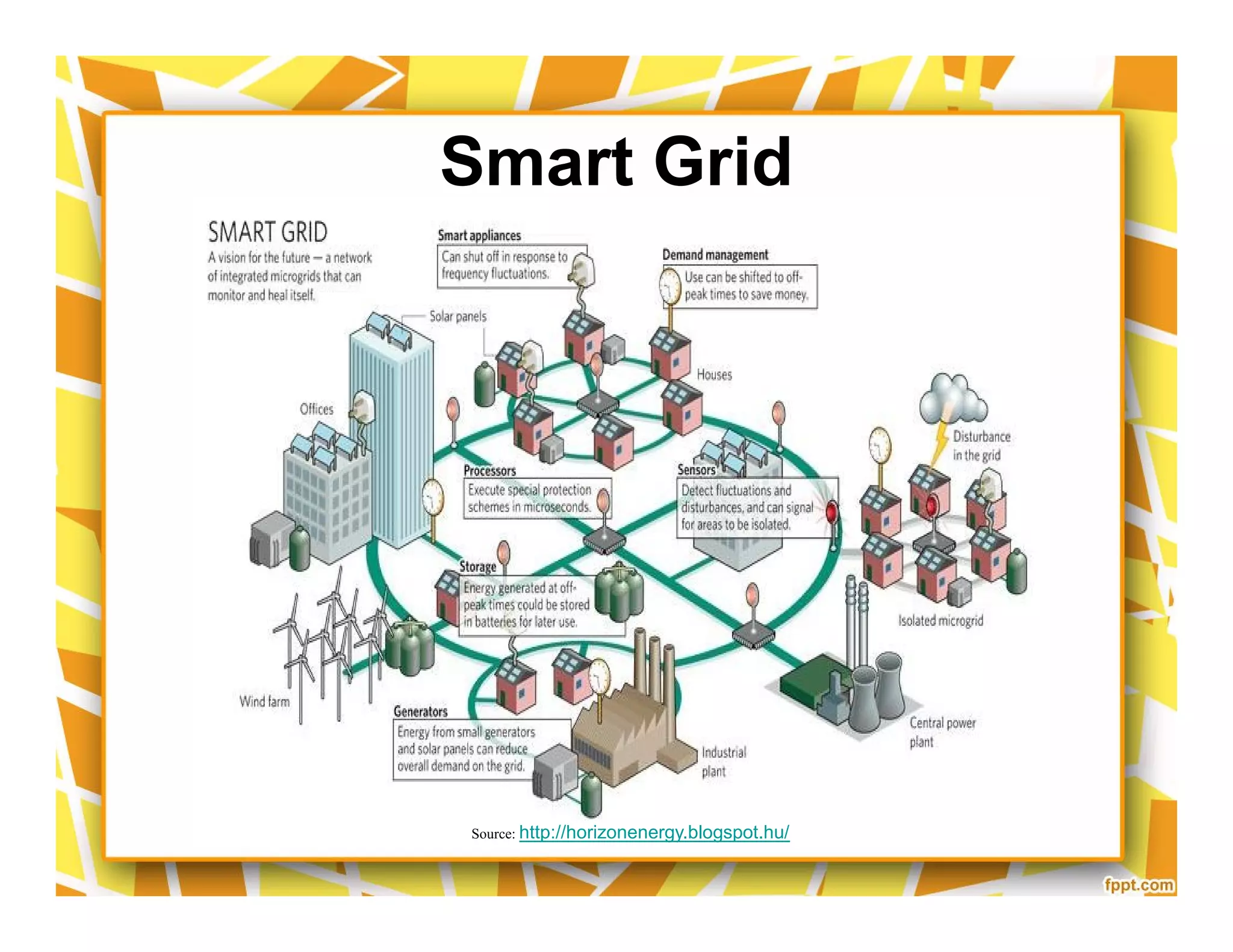
Smart Grid
Source: Hitachi
Smart Grid
Source: http://horizonenergy.blogspot.hu/
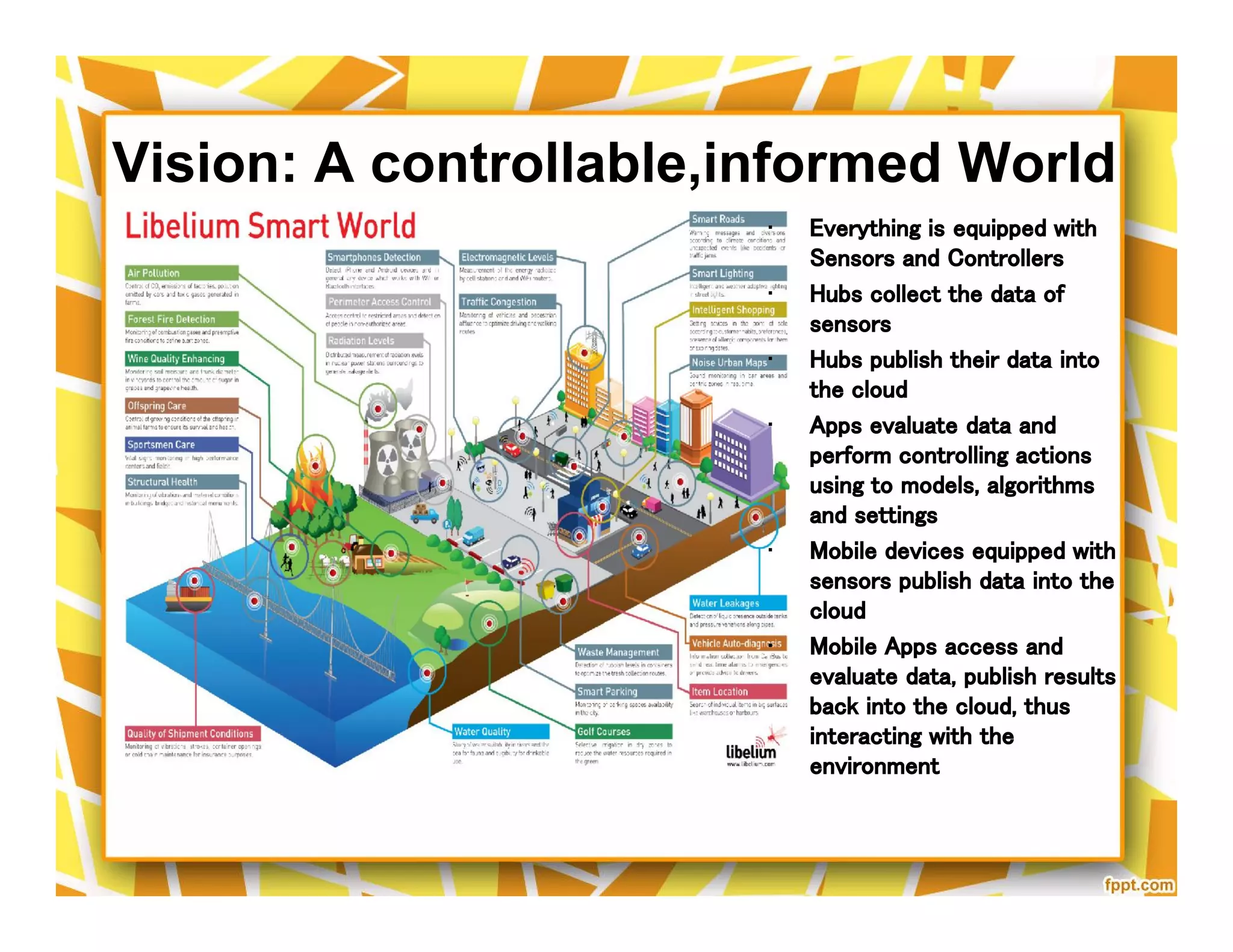
Vision: A controllable,informed World
• Everything is equipped with
Sensors and Controllers
• Hubs collect the data of
sensors
• Hubs publish their data into
the cloud
• Apps evaluate data and
perform controlling actions
using to models, algorithms
and settings
• Mobile devices equipped with
sensors publish data into the
cloud
• Mobile Apps access and
evaluate data, publish results
back into the cloud, thus
interacting with the
environment
• Everything is equipped with
Sensors and Controllers
• Hubs collect the data of
sensors
• Hubs publish their data into
the cloud
• Apps evaluate data and
perform controlling actions
using to models, algorithms
and settings
• Mobile devices equipped with
sensors publish data into the
cloud
• Mobile Apps access and
evaluate data, publish results
back into the cloud, thus
interacting with the
environment
65
Smart Home Technology Comparison
InsteOn
Z-Wave
X10
PhysicalName
RadioFreq +
Powerline
RadioFreq
Powerline
Pro
High Reliability, Many
Products
Many Products
Cheap
Con
Controller needed,
Network Size Limits
Old, Low Realiability, Slow
$30
+
$32
+
$17
+
Price
ZigBee (Alliance)
WiFi
Bluetooth
UPB
RadioFreq
RadioFreq
RadioFreq
Powerline
Gaining Momentum
Ubiquitous
Ubiquitous
Better than X10
Expensive
Network Size Limits
Range Limits (10 Meter)
Limited Range
220
$+
$50
+
$30
+
$40
+
QiviCon (Alliance) RadioFreq Many Products Local (German) Market $40+
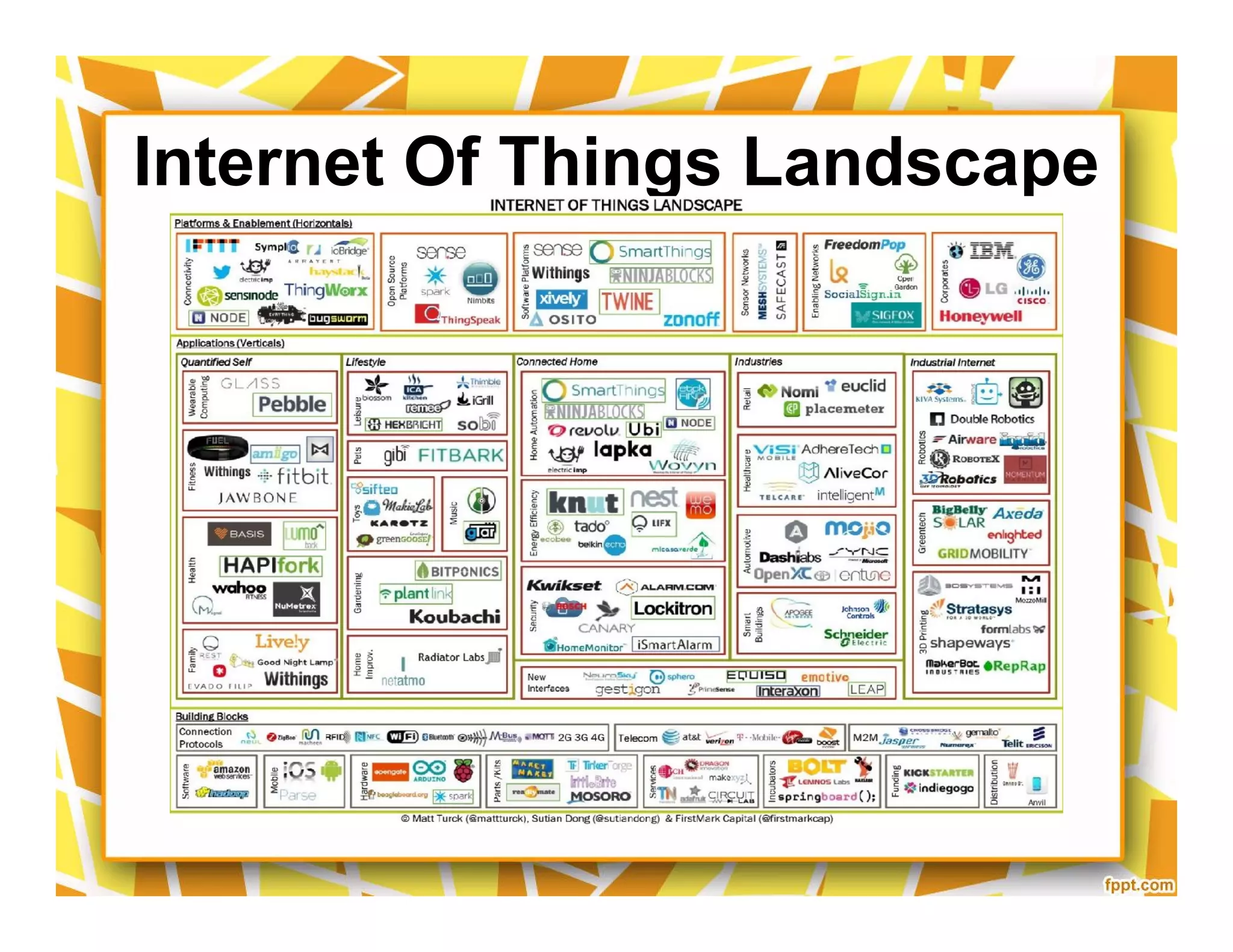
Internet Of Things Landscape
THANK YOUTHANK YOU
68

Mozilla iot smart home dwika v5

  • 1.
    Let’s Get toKnow Mozilla’s Internet of Things (IoT) dan Smart Home Dwika Sudrajat vide.inc@gmail.com IT Consultant Florida - Hong Kong – Jakarta Office: +62-8161108571 Mobile: +852-54152971, +1-407-2502812 Dwika Sudrajat vide.inc@gmail.com IT Consultant Florida - Hong Kong – Jakarta Office: +62-8161108571 Mobile: +852-54152971, +1-407-2502812
  • 2.
    Internet of Things(IoT) A Seminar by Dwika Sudrajat. IT Consultant Florida - Hong Kong - Jakarta
  • 3.
  • 4.
  • 5.
  • 6.
  • 7.
  • 8.
  • 10.
  • 11.
  • 12.
  • 13.
    Light Sensors Thermostat Module Module X10 Wired Connectivity BetweenDevices Fan Thermostat Module Module Linux ServerInternet IP Camera
  • 14.
  • 15.
    Internal Networking (Wireless) Linux(as a server) Web Interface Web Interface written in Perl. Control X10 Devive a command-line control home’s via X10 devices. written in the C Software's:
  • 16.
  • 17.
    Software Control Hierarchy WebApplication Command processor Database Thermostat command processor Command processor Device driver Thermostat device driver Database Thermostat command processor
  • 18.
    Web Interface CGI-x10 Tocontrol X10 from PC
  • 19.
    ID Task NameDuration Start Finish Predecessors 1 Team formation 0 days Tue 10/23/07 Tue 10/23/07 2 Research previous team's project 17 days Tue 10/23/07 Wed 11/14/07 1 3 First sponsor meeting 1 day Tue 10/30/07 Tue 10/30/07 1 4 Proposed project improvements to sponsor 1 day Thu 11/15/07 Thu 11/15/07 2 5 Inventory of materials 1 day Thu 11/15/07 Thu 11/15/07 2,3 6 Review of last year's design (with TA) 1 day Fri 11/30/07 Fri 11/30/07 4 7 Redefine project specs 10 days Mon 12/3/07 Fri 12/14/07 6 8 Home Control Server 58 days Mon 12/17/07 Wed 3/5/08 9 Install Linux Ubuntu OS 5 days Mon 12/17/07 Fri 12/21/07 6,7 10 Install last year's control software 1 day Mon 1/7/08 Mon 1/7/08 9,18 11 Site survey of house circuitry 1 day Tue 1/8/08 Tue 1/8/08 10 12 Implement Insteon demo 5 days Tue 1/8/08 Mon 1/14/08 11 13 Design lighting control scenario for specific house 5 days Tue 1/15/08 Mon 1/21/08 12 14 Install lighting control in home 10 days Tue 1/22/08 Mon 2/4/08 13 15 Test and troubleshoot lighting control software 20 days Tue 2/5/08 Mon 3/3/08 14 16 Document results/operation 2 days Tue 3/4/08 Wed 3/5/08 15 17 Communicating Thermostat 83 days Fri 11/30/07 Tue 3/25/08 18 Individual research of commercial thermostats 26 days Fri 11/30/07 Fri 1/4/08 4,5 19 Commercial thermostat selected 0 days Fri 1/4/08 Fri 1/4/08 18 20 Define specifications/functionality 5 days Mon 1/7/08 Fri 1/11/08 19 21 Order and ship parts 2 days Mon 1/21/08 Tue 1/22/08 20 22 Receive parts 0 days Tue 1/22/08 Tue 1/22/08 21 23 Testing commercial thermostat communication 15 days Wed 1/23/08 Tue 2/12/08 22 24 Software design of Omnistat 23 days Wed 1/23/08 Fri 2/22/08 22 25 Setup and test server control of thermostat 20 days Wed 2/27/08 Tue 3/25/08 24,23 26 Implement final thermostat 5 days Wed 3/12/08 Tue 3/18/08 25 27 Document results/operation 3 days Wed 3/19/08 Fri 3/21/08 26 28 Web Application Design 53 days Wed 1/23/08 Fri 4/4/08 29 Define operational concept 3 days Wed 1/23/08 Fri 1/25/08 7 30 Examine existing Ruby code 5 days Mon 1/28/08 Fri 2/1/08 29 31 Create additional functionality for previous app 41 days Mon 2/4/08 Mon 3/31/08 32 Add status polling capability 40 days Mon 2/4/08 Fri 3/28/08 33 Insteon Devices 35 days Mon 2/4/08 Fri 3/21/08 30,12 34 Omnistat Thermostat 10 days Mon 3/17/08 Fri 3/28/08 30,24,35 35 Add Omnistat control 15 days Mon 2/25/08 Fri 3/14/08 30,24 36 Custom settings defined 1 day Mon 2/4/08 Mon 2/4/08 30 37 Custom settings implemented 40 days Tue 2/5/08 Mon 3/31/08 30,36 38 Test and troubleshoot web application 10 days Mon 3/17/08 Fri 3/28/08 30 39 Document results/operation 3 days Tue 4/1/08 Thu 4/3/08 38,29,30,33,34,35,36,37 40 Web access to server 45 days Mon 2/4/08 Fri 4/4/08 30 41 Final Report Compilation 5 days Thu 4/3/08 Thu 4/10/08 27,16,39 42 Poster Design 2 days Fri 4/4/08 Mon 4/7/08 27,16,39 43 Design Day 0 days Tue 4/22/08 Tue 4/22/08 41,42,15,26 10/23 1/4 1/22 E B M E B M E B M E October November December January Project ManagementID Task Name Duration Start Finish Predecessors 1 Team formation 0 days Tue 10/23/07 Tue 10/23/07 2 Research previous team's project 17 days Tue 10/23/07 Wed 11/14/07 1 3 First sponsor meeting 1 day Tue 10/30/07 Tue 10/30/07 1 4 Proposed project improvements to sponsor 1 day Thu 11/15/07 Thu 11/15/07 2 5 Inventory of materials 1 day Thu 11/15/07 Thu 11/15/07 2,3 6 Review of last year's design (with TA) 1 day Fri 11/30/07 Fri 11/30/07 4 7 Redefine project specs 10 days Mon 12/3/07 Fri 12/14/07 6 8 Home Control Server 58 days Mon 12/17/07 Wed 3/5/08 9 Install Linux Ubuntu OS 5 days Mon 12/17/07 Fri 12/21/07 6,7 10 Install last year's control software 1 day Mon 1/7/08 Mon 1/7/08 9,18 11 Site survey of house circuitry 1 day Tue 1/8/08 Tue 1/8/08 10 12 Implement Insteon demo 5 days Tue 1/8/08 Mon 1/14/08 11 13 Design lighting control scenario for specific house 5 days Tue 1/15/08 Mon 1/21/08 12 14 Install lighting control in home 10 days Tue 1/22/08 Mon 2/4/08 13 15 Test and troubleshoot lighting control software 20 days Tue 2/5/08 Mon 3/3/08 14 16 Document results/operation 2 days Tue 3/4/08 Wed 3/5/08 15 17 Communicating Thermostat 83 days Fri 11/30/07 Tue 3/25/08 18 Individual research of commercial thermostats 26 days Fri 11/30/07 Fri 1/4/08 4,5 19 Commercial thermostat selected 0 days Fri 1/4/08 Fri 1/4/08 18 20 Define specifications/functionality 5 days Mon 1/7/08 Fri 1/11/08 19 21 Order and ship parts 2 days Mon 1/21/08 Tue 1/22/08 20 22 Receive parts 0 days Tue 1/22/08 Tue 1/22/08 21 23 Testing commercial thermostat communication 15 days Wed 1/23/08 Tue 2/12/08 22 24 Software design of Omnistat 23 days Wed 1/23/08 Fri 2/22/08 22 25 Setup and test server control of thermostat 20 days Wed 2/27/08 Tue 3/25/08 24,23 26 Implement final thermostat 5 days Wed 3/12/08 Tue 3/18/08 25 27 Document results/operation 3 days Wed 3/19/08 Fri 3/21/08 26 28 Web Application Design 53 days Wed 1/23/08 Fri 4/4/08 29 Define operational concept 3 days Wed 1/23/08 Fri 1/25/08 7 30 Examine existing Ruby code 5 days Mon 1/28/08 Fri 2/1/08 29 31 Create additional functionality for previous app 41 days Mon 2/4/08 Mon 3/31/08 32 Add status polling capability 40 days Mon 2/4/08 Fri 3/28/08 33 Insteon Devices 35 days Mon 2/4/08 Fri 3/21/08 30,12 34 Omnistat Thermostat 10 days Mon 3/17/08 Fri 3/28/08 30,24,35 35 Add Omnistat control 15 days Mon 2/25/08 Fri 3/14/08 30,24 36 Custom settings defined 1 day Mon 2/4/08 Mon 2/4/08 30 37 Custom settings implemented 40 days Tue 2/5/08 Mon 3/31/08 30,36 38 Test and troubleshoot web application 10 days Mon 3/17/08 Fri 3/28/08 30 39 Document results/operation 3 days Tue 4/1/08 Thu 4/3/08 38,29,30,33,34,35,36,37 40 Web access to server 45 days Mon 2/4/08 Fri 4/4/08 30 41 Final Report Compilation 5 days Thu 4/3/08 Thu 4/10/08 27,16,39 42 Poster Design 2 days Fri 4/4/08 Mon 4/7/08 27,16,39 43 Design Day 0 days Tue 4/22/08 Tue 4/22/08 41,42,15,26 10/23 1/4 1/22 E B M E B M E B M E October November December January
  • 20.
  • 21.
  • 22.
  • 23.
  • 24.
  • 25.
  • 26.
  • 27.
    Control Lights w/SmartPhone Control Thermostat Remotely
  • 28.
    Wireless Garage DoorMonitor/Controller Motion Activated Lighting Control
  • 29.
  • 30.
  • 31.
  • 32.
  • 33.
  • 34.
  • 35.
  • 36.
  • 37.
  • 38.
  • 39.
  • 40.
  • 41.
  • 42.
  • 43.
  • 44.
  • 45.
  • 46.
    Smarthome Wireless IPSecurity Camera Nest Learning Thermostat Compatible w/ iPhone/iPad, Android, Blackberry ($250)
  • 47.
  • 48.
  • 49.
  • 50.
  • 51.
  • 52.
  • 53.
    Smart Home Appliance •http://www.youtube.com/watch?v=_rhBfh-4aOs
  • 54.
  • 55.
    Technologies • InsteOn: http://www.insteon.com/ •Z Wave Home Automation: http://www.z-wave.com/ • X10 Industry Standard: http://x10-lang.org/ • Qivicon https://www.qivicon.com/start/ • InsteOn: http://www.insteon.com/ • Z Wave Home Automation: http://www.z-wave.com/ • X10 Industry Standard: http://x10-lang.org/ • Qivicon https://www.qivicon.com/start/
  • 56.
    Home Automation Options •Internet Access & Control • Motion Detection • Home Theatre • Irrigation • Access Control • Energy Management • Surveillance Cameras • Security • Multi-Room Audio • Pool & Spa • Lighting • Telephones • Vehicle Detection • Internet Access & Control • Motion Detection • Home Theatre • Irrigation • Access Control • Energy Management • Surveillance Cameras • Security • Multi-Room Audio • Pool & Spa • Lighting • Telephones • Vehicle Detection
  • 57.
    Home Control • SmartLinc($130) • RemoteLinc ($45) • TriggerLinc ($35) • FanLinc ($80) • KeypadLinc ($70) • I/O Linc ($50) • SwitchLinc Dimmer ($46) • LampLinc ($30)  iOS, Android App (free)  Central Controller ($130)  Dimmer Switch (@$46)  Relay Switch (@$46)  Thermostat ($150)  Camera ($100)
  • 58.
  • 59.
    What Can BeControlled? Lighting Irrigation HVAC Security A/V Pool/Spa Blinds Whole House Lighting Irrigation HVAC Security A/V Pool/Spa Blinds Whole House
  • 60.
  • 61.
  • 62.
  • 63.
  • 64.
    Vision: A controllable,informedWorld • Everything is equipped with Sensors and Controllers • Hubs collect the data of sensors • Hubs publish their data into the cloud • Apps evaluate data and perform controlling actions using to models, algorithms and settings • Mobile devices equipped with sensors publish data into the cloud • Mobile Apps access and evaluate data, publish results back into the cloud, thus interacting with the environment • Everything is equipped with Sensors and Controllers • Hubs collect the data of sensors • Hubs publish their data into the cloud • Apps evaluate data and perform controlling actions using to models, algorithms and settings • Mobile devices equipped with sensors publish data into the cloud • Mobile Apps access and evaluate data, publish results back into the cloud, thus interacting with the environment
  • 65.
  • 66.
    Smart Home TechnologyComparison InsteOn Z-Wave X10 PhysicalName RadioFreq + Powerline RadioFreq Powerline Pro High Reliability, Many Products Many Products Cheap Con Controller needed, Network Size Limits Old, Low Realiability, Slow $30 + $32 + $17 + Price ZigBee (Alliance) WiFi Bluetooth UPB RadioFreq RadioFreq RadioFreq Powerline Gaining Momentum Ubiquitous Ubiquitous Better than X10 Expensive Network Size Limits Range Limits (10 Meter) Limited Range 220 $+ $50 + $30 + $40 + QiviCon (Alliance) RadioFreq Many Products Local (German) Market $40+
  • 67.
  • 68.