Motherboard Parts and
Functions
A motherboard (also called
main board or system board)
is a basic foundation of a
computer that connects all
the crucial components or
parts of a system.
CONTENTS
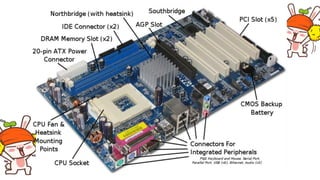
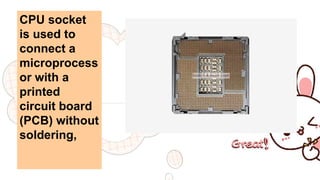
CPU socket
is used to
connect a
microprocess
or with a
printed
circuit board
(PCB) without
soldering,
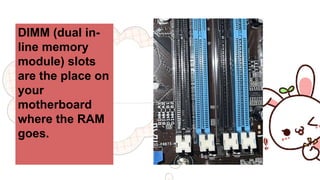
DIMM (dual in-
line memory
module) slots
are the place on
your
motherboard
where the RAM
goes.
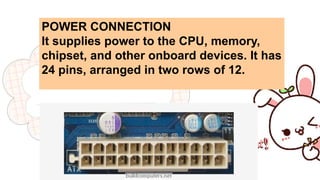
POWER CONNECTION
It supplies power to the CPU, memory,
chipset, and other onboard devices. It has
24 pins, arranged in two rows of 12.
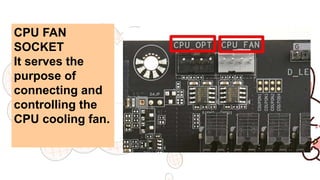
CPU FAN
SOCKET
It serves the
purpose of
connecting and
controlling the
CPU cooling fan.
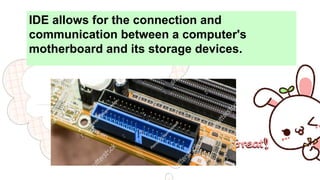
IDE allows for the connection and
communication between a computer's
motherboard and its storage devices.
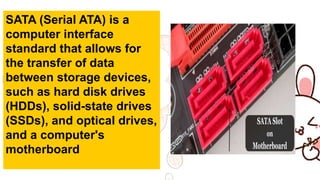
SATA (Serial ATA) is a
computer interface
standard that allows for
the transfer of data
between storage devices,
such as hard disk drives
(HDDs), solid-state drives
(SSDs), and optical drives,
and a computer's
motherboard
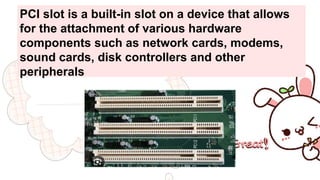
PCI slot is a built-in slot on a device that allows
for the attachment of various hardware
components such as network cards, modems,
sound cards, disk controllers and other
peripherals
PCIe, or peripheral
component
interconnect
express, is an
interface standard
for connecting high-
speed input output
(HSIO) components.
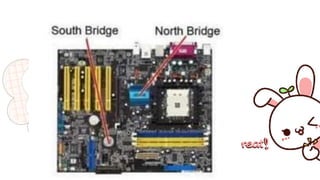
The northbridge manages the
speed at which the CPU
communicates with the
components. It also controls the
processor, the AGP video slot,
and the RAM.
The southbridge chipset controls
the rest of the components
connected to the computer,
including communication between
the processor and expansion ports
such as USB ports and sound
cards.
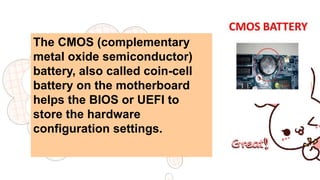
The CMOS (complementary
metal oxide semiconductor)
battery, also called coin-cell
battery on the motherboard
helps the BIOS or UEFI to
store the hardware
configuration settings.
BIOS instructs the computer
on how to perform basic
functions like booting and
keyboard control; it is also
used to identify and configure
the hardware in a computer
such as the hard drive, CPU,
memory, and related
equipment.
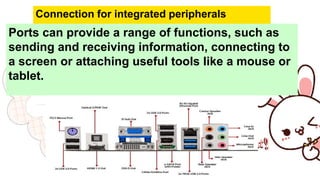
Ports can provide a range of functions, such as
sending and receiving information, connecting to
a screen or attaching useful tools like a mouse or
tablet.
Connection for integrated peripherals
THANK YOU
!!!

Motherboard.pptx...,.......,..............

  • 1.
  • 2.
    A motherboard (alsocalled main board or system board) is a basic foundation of a computer that connects all the crucial components or parts of a system.
  • 3.
  • 4.
    CPU socket is usedto connect a microprocess or with a printed circuit board (PCB) without soldering,
  • 5.
    DIMM (dual in- linememory module) slots are the place on your motherboard where the RAM goes.
  • 6.
    POWER CONNECTION It suppliespower to the CPU, memory, chipset, and other onboard devices. It has 24 pins, arranged in two rows of 12.
  • 7.
    CPU FAN SOCKET It servesthe purpose of connecting and controlling the CPU cooling fan.
  • 8.
    IDE allows forthe connection and communication between a computer's motherboard and its storage devices.
  • 9.
    SATA (Serial ATA)is a computer interface standard that allows for the transfer of data between storage devices, such as hard disk drives (HDDs), solid-state drives (SSDs), and optical drives, and a computer's motherboard
  • 10.
    PCI slot isa built-in slot on a device that allows for the attachment of various hardware components such as network cards, modems, sound cards, disk controllers and other peripherals
  • 11.
    PCIe, or peripheral component interconnect express,is an interface standard for connecting high- speed input output (HSIO) components.
  • 13.
    The northbridge managesthe speed at which the CPU communicates with the components. It also controls the processor, the AGP video slot, and the RAM.
  • 14.
    The southbridge chipsetcontrols the rest of the components connected to the computer, including communication between the processor and expansion ports such as USB ports and sound cards.
  • 15.
    The CMOS (complementary metaloxide semiconductor) battery, also called coin-cell battery on the motherboard helps the BIOS or UEFI to store the hardware configuration settings.
  • 16.
    BIOS instructs thecomputer on how to perform basic functions like booting and keyboard control; it is also used to identify and configure the hardware in a computer such as the hard drive, CPU, memory, and related equipment.
  • 17.
    Ports can providea range of functions, such as sending and receiving information, connecting to a screen or attaching useful tools like a mouse or tablet. Connection for integrated peripherals
  • 18.