







SCENE


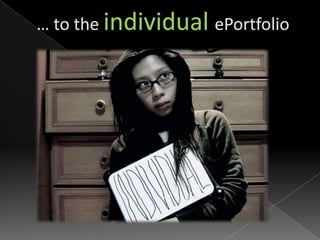
       LMS                      ePortfolio


Owned by the class        Owned by Student
Layout chosen by          Layout chosen by
teacher                   Student
Goals chosen by teacher   Goals chosen by Student
Content chosen by         Content chosen by
teacher                   Student
Feedback by teacher       Feedback by teacher +
Assignment and            students
deadlines by teacher      Student decides on
                          publishing
Ying and Yang …
…the perfect combination
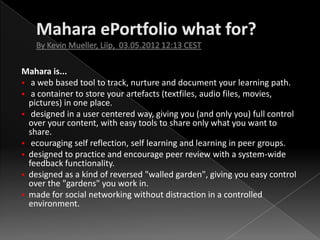
Mahara is...
 a web based tool to track, nurture and document your learning path.
 a container to store your artefacts (textfiles, audio files, movies,
  pictures) in one place.
 designed in a user centered way, giving you (and only you) full control
  over your content, with easy tools to share only what you want to
  share.
 ecouraging self reflection, self learning and learning in peer groups.
 designed to practice and encourage peer review with a system-wide
  feedback functionality.
 designed as a kind of reversed "walled garden", giving you easy control
  over the "gardens" you work in.
 made for social networking without distraction in a controlled
  environment.
 Education …. throughout an educational career, from
  primary school, higher education to further education
  and vocational training. Mahara is made for life long
  learning.
 Since you have your CV, diplomas, awards, journals,
  feedback and discussions all inside Mahara, a job
  application is easily assembled, choosing from the
  elements in your Mahara that fit the job you're
  applying for. This leads to the use case of Mahara as a
  software for job agencies , - to manage and "sell" their
  clients. …..
Read more
Hier geht’s zur Ansicht
Source: Mahara User Maual
Hier geht’s zur Ansicht
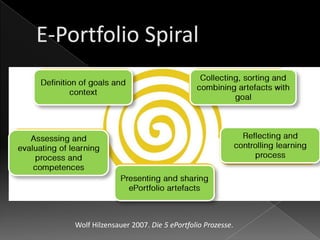
Wolf Hilzensauer 2007. Die 5 ePortfolio Prozesse.











= mobile upload


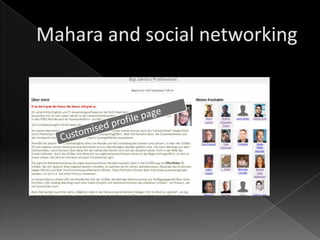
Demo by Kristina Hoeppner












Sigi Jakob-Kühn, OStR‘in
Heinrich-Lanz-Schule II
Mannheim


sigi@jakob-weinheim.de
www.school-networking.de
Twitter: Networking_Lady

Moodle mahara

  • 5.
  • 7.
  • 10.
    SCENE LMS ePortfolio Owned by the class Owned by Student Layout chosen by Layout chosen by teacher Student Goals chosen by teacher Goals chosen by Student Content chosen by Content chosen by teacher Student Feedback by teacher Feedback by teacher + Assignment and students deadlines by teacher Student decides on publishing
  • 11.
  • 12.
  • 13.
    Mahara is...  aweb based tool to track, nurture and document your learning path.  a container to store your artefacts (textfiles, audio files, movies, pictures) in one place.  designed in a user centered way, giving you (and only you) full control over your content, with easy tools to share only what you want to share.  ecouraging self reflection, self learning and learning in peer groups.  designed to practice and encourage peer review with a system-wide feedback functionality.  designed as a kind of reversed "walled garden", giving you easy control over the "gardens" you work in.  made for social networking without distraction in a controlled environment.
  • 14.
     Education ….throughout an educational career, from primary school, higher education to further education and vocational training. Mahara is made for life long learning.  Since you have your CV, diplomas, awards, journals, feedback and discussions all inside Mahara, a job application is easily assembled, choosing from the elements in your Mahara that fit the job you're applying for. This leads to the use case of Mahara as a software for job agencies , - to manage and "sell" their clients. ….. Read more
  • 18.
  • 20.
  • 21.
  • 22.
    Wolf Hilzensauer 2007.Die 5 ePortfolio Prozesse.
  • 23.
  • 26.
    = mobile upload Demoby Kristina Hoeppner
  • 32.
  • 33.
    Sigi Jakob-Kühn, OStR‘in Heinrich-Lanz-SchuleII Mannheim sigi@jakob-weinheim.de www.school-networking.de Twitter: Networking_Lady