Les Jeudis du Libre – Mons 
18 septembre 2014 
Une façon OUVERTE d’apprendre 
LIBREMENT ? 
Par Bruno De Lièvre et Philippe Verstichel
1)Philippe : MOOC Kesako (avec 
petits exemples) en 3 points 
2)Bruno : MOOC 10 idées 
3)Et les outils ? 
INTERACTIONS – DEBAT 
« Open »
QUESTION A LA SALLE 
 QUI A DÉJÀ PRODUIT DU CONTENU DANS 
WIKIPEDIA ? (écrire un article, ajouter des 
informations, mettre une photo) 
 POUR VOUS DES RESSOURCES EDUCATIVES 
OUVERTES (DROITS) ET LIBRES (ACCES) 
FAVORISENT D’ABORD: 
◦ L’amélioration continue de la qualité de 
l’enseignement / apprentissage 
◦ L’inclusion sociale et l’élimination de la fracture 
numérique 
◦ Créations de nouveaux savoirs et d’intelligence 
collective 
(une seule réponse possible - choisir la plus
« Managing 
educational resources 
as a common can 
make learning more 
affordable and 
exciting » 
D. Bollier – L. Lessig http://itypa.net/
Commençons par un chiffre 
http://www.moocs.co/
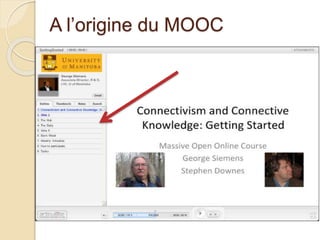
A l’origine du MOOC
Un MOOC sur Technologies de 
l’apprentissage 
 « Connectivism and Connective Knowledge » (2008) 
 George Siemens and Stephen Downes ushering 
roughly 1900 students through a 12 week online course 
 Offered through the University of Manitoba 
◦ 12 weeks long 
◦ credit in Certificate in Adult and Continuing Education and 
Certificate in Emerging Technologies for Learning 
◦ will explore the concepts of connectivism and connective 
knowledge 
“At its heart, connectivism is the thesis that 
knowledge is distributed across a network 
of connections, and therefore that learning 
consists of the ability to construct and 
traverse those networks.” 
http://halfanhour.blogspot.com/2007/02/what-connectivism-is.html
Ecole, Unifs … EAD, FAD … e-Leaning, didacticiel … 
MOOC 
NEW TECHNOLOGY - 
MEDIA
EVOLUTION DE « l’apprentissage » (learning) à distance
Autrefois …
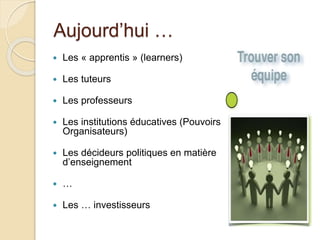
Aujourd’hui … 
 Les « apprentis » (learners) 
 Les tuteurs 
 Les professeurs 
 Les institutions éducatives (Pouvoirs 
Organisateurs) 
 Les décideurs politiques en matière 
d’enseignement 
 … 
 Les … investisseurs
Et donc … des « tribus » MOOC 
!
Une approche « globale »
MOOC avec quoi ? MULTI-MEDIA 
 DU DIDACTICIEL AU CONTENU 
INTERACTIF 
 WEB 2.0: Sémantique, blogs, wikis, 
RSS, … 
 Réseaux Sociaux : Twitter, Facebook, 
Instagram, … 
 Contenus classiques : papers, video, 
documents sonores, livres, … 
 Streaming …
Connaissances 
« pertinentes »
Intelligence collective ? 
1992
Certification ou non ? Mécanisme des 
badges 
Auto / Self / Peer / Continuous … 
EVALUATION
CONTENUS « OPEN » ? 
edX MOOC Software Goes Open Source 
Non-profit massive open online course startup is open sourcing the software 
for building interactive course modules. 
Educational 'Technology' Across the Ages 
The non-profit pioneer in the phenomenon of massive open online courses 
(MOOCs) is releasing a core element of its platform for offering online 
courses as open-source software. 
On Thursday, edX announced it was releasing the source code to its XBlock 
software on GitHub under the Affero General Public License, a GPL variant 
designed for network server software. This is a first step toward open 
sourcing the entire edX software platform. 
Already a MOOC sensation, edX offers courses from leading universities for 
free, with many of the supporting textbooks and other materials published as 
open educational resources. Now, edX is opening up access to the software 
used to create interactive learning tools like the circuit simulator in its popular 
Circuits and Electronics course and the molecular manipulator in Introduction 
to Biology – The Secret of Life.
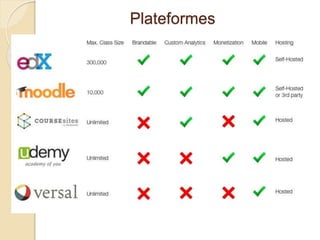
Plateformes
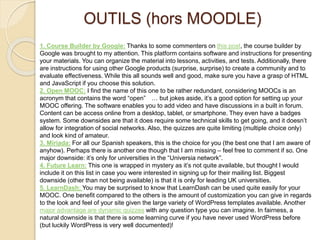
OUTILS (hors MOODLE) 
1. Course Builder by Google: Thanks to some commenters on this post, the course builder by 
Google was brought to my attention. This platform contains software and instructions for presenting 
your materials. You can organize the material into lessons, activities, and tests. Additionally, there 
are instructions for using other Google products (surprise, surprise) to create a community and to 
evaluate effectiveness. While this all sounds well and good, make sure you have a grasp of HTML 
and JavaScript if you choose this solution. 
2. Open MOOC: I find the name of this one to be rather redundant, considering MOOCs is an 
acronym that contains the word “open” … but jokes aside, it’s a good option for setting up your 
MOOC offering. The software enables you to add video and have discussions in a built in forum. 
Content can be access online from a desktop, tablet, or smartphone. They even have a badges 
system. Some downsides are that it does require some technical skills to get going, and it doesn’t 
allow for integration of social networks. Also, the quizzes are quite limiting (multiple choice only) 
and look kind of amateur. 
3. Miriada: For all our Spanish speakers, this is the choice for you (the best one that I am aware of 
anyhow). Perhaps there is another one though that I am missing – feel free to comment if so. One 
major downside: it’s only for universities in the “Universia network”. 
4. Future Learn: This one is wrapped in mystery as it’s not quite available, but thought I would 
include it on this list in case you were interested in signing up for their mailing list. Biggest 
downside (other than not being available) is that it is only for leading UK universities. 
5. LearnDash: You may be surprised to know that LearnDash can be used quite easily for your 
MOOC. One benefit compared to the others is the amount of customization you can give in regards 
to the look and feel of your site given the large variety of WordPress templates available. Another 
major advantage are dynamic quizzes with any question type you can imagine. In fairness, a 
natural downside is that there is some learning curve if you have never used WordPress before 
(but luckily WordPress is very well documented)!
ANNEXE 
S
Quelques principes de base 
… 
1. Diversity 
We want to encourage students to 
engage in diverse readings, diverse 
environments, diverse discussions
Quelques principes de base 
… 
2. Autonomy 
We want students to chart their own 
course, to select their own software, to 
pursue their own learning
Quelques principes de base 
… 
3. Interaction / Connectedness 
The knowledge in this course emerges 
as a result of the connections among 
the students and staff – and is not 
some ‘content’ shoveled from experts 
to recipients
Quelques principes de base 
… 
4. Openness 
We don’t drawe barriers between ‘in’ 
and ‘out’ – which means we can 
accommodate the full engaged, the 
partially engaged, and the rest – 
creating strong ties and weak ties
Course Components 
 The Wiki… 
http://ltc.umanitoba.ca/wiki/Connectivism
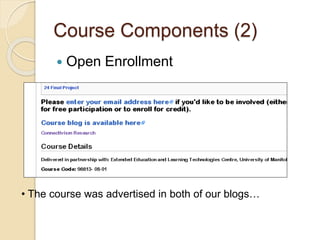
Course Components (2) 
 Open Enrollment 
• The course was advertised in both of our blogs…
Course Components 
 Readings….
Course Components (3) 
 The Blog 
http://ltc.umanitoba.ca/connectivism/
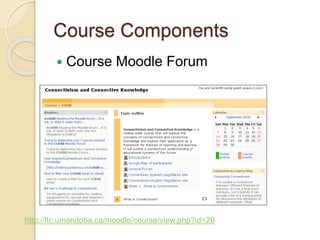
Course Components 
 Course Moodle Forum 
http://ltc.umanitoba.ca/moodle/course/view.php?id=20
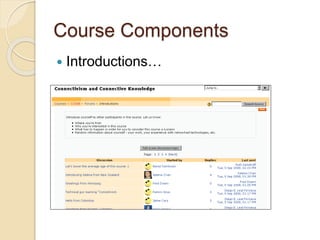
Course Components 
 Introductions…
Course Components 
 Pageflakes Site 
http://www.pageflakes.com/ltc
Course Components 
 Elluminate Discussions (Wednesdays)
Course Components 
 Ustream 
http://www.ustream.tv/recorded/688902
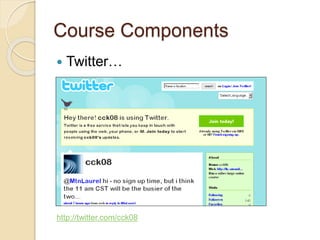
Course Components 
 Twitter… 
http://twitter.com/cck08
Course Components 
 gRSShopper…
Course Components 
 The Daily 
http://connect.downes.ca/
Course Components 
 Managing Content
Course Components 
 Feed Harvesting
Course Components 
 OPML…

MOOC - Une façon ouverte d'apprendre librement ?

  • 1.
    Les Jeudis duLibre – Mons 18 septembre 2014 Une façon OUVERTE d’apprendre LIBREMENT ? Par Bruno De Lièvre et Philippe Verstichel
  • 2.
    1)Philippe : MOOCKesako (avec petits exemples) en 3 points 2)Bruno : MOOC 10 idées 3)Et les outils ? INTERACTIONS – DEBAT « Open »
  • 3.
    QUESTION A LASALLE  QUI A DÉJÀ PRODUIT DU CONTENU DANS WIKIPEDIA ? (écrire un article, ajouter des informations, mettre une photo)  POUR VOUS DES RESSOURCES EDUCATIVES OUVERTES (DROITS) ET LIBRES (ACCES) FAVORISENT D’ABORD: ◦ L’amélioration continue de la qualité de l’enseignement / apprentissage ◦ L’inclusion sociale et l’élimination de la fracture numérique ◦ Créations de nouveaux savoirs et d’intelligence collective (une seule réponse possible - choisir la plus
  • 4.
    « Managing educationalresources as a common can make learning more affordable and exciting » D. Bollier – L. Lessig http://itypa.net/
  • 5.
    Commençons par unchiffre http://www.moocs.co/
  • 6.
  • 7.
    Un MOOC surTechnologies de l’apprentissage  « Connectivism and Connective Knowledge » (2008)  George Siemens and Stephen Downes ushering roughly 1900 students through a 12 week online course  Offered through the University of Manitoba ◦ 12 weeks long ◦ credit in Certificate in Adult and Continuing Education and Certificate in Emerging Technologies for Learning ◦ will explore the concepts of connectivism and connective knowledge “At its heart, connectivism is the thesis that knowledge is distributed across a network of connections, and therefore that learning consists of the ability to construct and traverse those networks.” http://halfanhour.blogspot.com/2007/02/what-connectivism-is.html
  • 8.
    Ecole, Unifs …EAD, FAD … e-Leaning, didacticiel … MOOC NEW TECHNOLOGY - MEDIA
  • 9.
    EVOLUTION DE «l’apprentissage » (learning) à distance
  • 10.
  • 11.
    Aujourd’hui … Les « apprentis » (learners)  Les tuteurs  Les professeurs  Les institutions éducatives (Pouvoirs Organisateurs)  Les décideurs politiques en matière d’enseignement  …  Les … investisseurs
  • 12.
    Et donc …des « tribus » MOOC !
  • 13.
    Une approche «globale »
  • 14.
    MOOC avec quoi? MULTI-MEDIA  DU DIDACTICIEL AU CONTENU INTERACTIF  WEB 2.0: Sémantique, blogs, wikis, RSS, …  Réseaux Sociaux : Twitter, Facebook, Instagram, …  Contenus classiques : papers, video, documents sonores, livres, …  Streaming …
  • 15.
  • 16.
  • 17.
    Certification ou non? Mécanisme des badges Auto / Self / Peer / Continuous … EVALUATION
  • 18.
    CONTENUS « OPEN» ? edX MOOC Software Goes Open Source Non-profit massive open online course startup is open sourcing the software for building interactive course modules. Educational 'Technology' Across the Ages The non-profit pioneer in the phenomenon of massive open online courses (MOOCs) is releasing a core element of its platform for offering online courses as open-source software. On Thursday, edX announced it was releasing the source code to its XBlock software on GitHub under the Affero General Public License, a GPL variant designed for network server software. This is a first step toward open sourcing the entire edX software platform. Already a MOOC sensation, edX offers courses from leading universities for free, with many of the supporting textbooks and other materials published as open educational resources. Now, edX is opening up access to the software used to create interactive learning tools like the circuit simulator in its popular Circuits and Electronics course and the molecular manipulator in Introduction to Biology – The Secret of Life.
  • 19.
  • 20.
    OUTILS (hors MOODLE) 1. Course Builder by Google: Thanks to some commenters on this post, the course builder by Google was brought to my attention. This platform contains software and instructions for presenting your materials. You can organize the material into lessons, activities, and tests. Additionally, there are instructions for using other Google products (surprise, surprise) to create a community and to evaluate effectiveness. While this all sounds well and good, make sure you have a grasp of HTML and JavaScript if you choose this solution. 2. Open MOOC: I find the name of this one to be rather redundant, considering MOOCs is an acronym that contains the word “open” … but jokes aside, it’s a good option for setting up your MOOC offering. The software enables you to add video and have discussions in a built in forum. Content can be access online from a desktop, tablet, or smartphone. They even have a badges system. Some downsides are that it does require some technical skills to get going, and it doesn’t allow for integration of social networks. Also, the quizzes are quite limiting (multiple choice only) and look kind of amateur. 3. Miriada: For all our Spanish speakers, this is the choice for you (the best one that I am aware of anyhow). Perhaps there is another one though that I am missing – feel free to comment if so. One major downside: it’s only for universities in the “Universia network”. 4. Future Learn: This one is wrapped in mystery as it’s not quite available, but thought I would include it on this list in case you were interested in signing up for their mailing list. Biggest downside (other than not being available) is that it is only for leading UK universities. 5. LearnDash: You may be surprised to know that LearnDash can be used quite easily for your MOOC. One benefit compared to the others is the amount of customization you can give in regards to the look and feel of your site given the large variety of WordPress templates available. Another major advantage are dynamic quizzes with any question type you can imagine. In fairness, a natural downside is that there is some learning curve if you have never used WordPress before (but luckily WordPress is very well documented)!
  • 21.
  • 22.
    Quelques principes debase … 1. Diversity We want to encourage students to engage in diverse readings, diverse environments, diverse discussions
  • 23.
    Quelques principes debase … 2. Autonomy We want students to chart their own course, to select their own software, to pursue their own learning
  • 24.
    Quelques principes debase … 3. Interaction / Connectedness The knowledge in this course emerges as a result of the connections among the students and staff – and is not some ‘content’ shoveled from experts to recipients
  • 25.
    Quelques principes debase … 4. Openness We don’t drawe barriers between ‘in’ and ‘out’ – which means we can accommodate the full engaged, the partially engaged, and the rest – creating strong ties and weak ties
  • 26.
    Course Components The Wiki… http://ltc.umanitoba.ca/wiki/Connectivism
  • 27.
    Course Components (2)  Open Enrollment • The course was advertised in both of our blogs…
  • 28.
  • 29.
    Course Components (3)  The Blog http://ltc.umanitoba.ca/connectivism/
  • 30.
    Course Components Course Moodle Forum http://ltc.umanitoba.ca/moodle/course/view.php?id=20
  • 31.
    Course Components Introductions…
  • 32.
    Course Components Pageflakes Site http://www.pageflakes.com/ltc
  • 33.
    Course Components Elluminate Discussions (Wednesdays)
  • 34.
    Course Components Ustream http://www.ustream.tv/recorded/688902
  • 35.
    Course Components Twitter… http://twitter.com/cck08
  • 36.
    Course Components gRSShopper…
  • 37.
    Course Components The Daily http://connect.downes.ca/
  • 38.
    Course Components Managing Content
  • 39.
    Course Components Feed Harvesting
  • 40.

Editor's Notes

  • #6 QU’ALLONS NOUS VOUS APPRENDRE QUE VOUS NE SACHIEZ DÉJÀ ?