


8th December 2015 UKOUG Tech15
Matt Brasier
Monitoring Oracle SOA Suite
About me
• Head of Consulting at C2B2
• 14 years WebLogic experience
• 12 in a consultancy role
• Author
– Oracle SOA Suite 11g Performance Tuning
Cookbook
About C2B2
• The leading independent middleware experts
• Middleware professional services
– Consultancy
– On-site Support
• Independent
– Oracle partner
– Red hat partner
Agenda
• Intro
• Why Monitor?
• How to Monitor?
• What to Monitor?
Introduction
Oracle SOA Suite
• Evolved rather than designed
– BPMN
– BPEL
– Mediator
– Rules
– Workflow
– BAM/B2B/Event Processor
• This has an impact on the ability to monitor it
Oracle SOA Suite
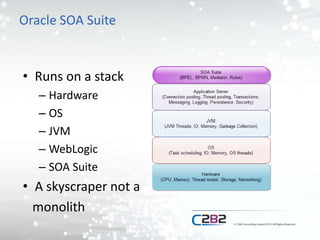
• Runs on a stack
– Hardware
– OS
– JVM
– WebLogic
– SOA Suite
• A skyscraper not a
monolith
Monitoring
• Monitoring
– Capturing of metrics
– Visualising of metric trends
• Alerting
– Generating a notification when a condition is met
• Out of bounds metric
The Java Monitoring world
• Still developing
– Going backwards?
• Lots of tools
• Monitoring for deployments of all sizes
• Monitoring frameworks vs Alerting
frameworks
• Java focussed frameworks vs frameworks that
can monitor java
Why Monitor?
Six reasons to monitor SOA Suite
• Detect problems early
• Capacity planning
• Resolve problems faster
• Understand your system better
• Understand your business
• Save money
Detect problems early
• Locate areas of resource contention
• Identify unusual workloads
• Identify failed components or services
• Detect problems in other systems
– Middleware is often the best place to start
• Alerting is key
– Alerts to the right people at the right time
Capacity planning
• Detect trends in usage
• Understand how changes in use will affect
capacity
• Increase capacity before it causes a problem
– Hardware and upgrade lead times
Resolve problems faster
• Post incident analysis
• What resources were at their limits?
• What was the system doing before it failed?
• What were other systems doing at the time?
• What can we do to alert before failure next
time?
Understand your system better
• What does a normal day look like on the
system?
– Resource usage
– Use case load
• Which resources are key to system operation?
• What improvements can you make?
Understand your business
• Classic MI
– How do “transactions” flow through your
systems?
– When are your busiest periods?
– When are your quiet periods?
– How much impact did the latest advertising
campaign have?
Save money
• The bottom line
– Less outages
– Faster resolutions
– Less repeated failures
– Target capacity correctly
– More knowledgeable and better prepared
administrators
How to Monitor?
Ways to monitor Oracle SOA Suite
• Manual monitoring
• Scripts
• Monitoring tools
• Log scraping tools
• Alerting
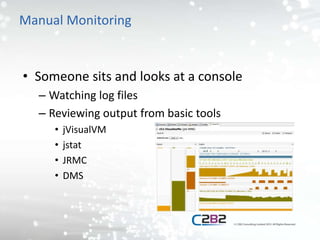
Manual Monitoring
• Someone sits and looks at a console
– Watching log files
– Reviewing output from basic tools
• jVisualVM
• jstat
• JRMC
• DMS
Manual monitoring tools
• JVisualVM
– Graphical monitoring for Hotspot
– Plugin based
– Monitors key attributes
• JRockit Mission Control
– Graphical monitoring for JRockit
– Similar to JVisualVM
– Flight recorder
Manual monitoring tools
• JStat
– Command line output
– Memory
– Garbage collection
– Compilation
Manual monitoring tools
• DMS
– Oracle store of monitoring information
– Stored in the database
– DMSSpy servlet to view the data
• Or interrogate the database
Scripts
• Collect data from manual tools and store it
somewhere using a script
– WLST
– jstat
• Analyse data in tools such as excel when
required
Scripts
• Provide a diagnostic script to second line
support
– Before restarting a “stuck” server, run this script
– Capture metrics before they are lost
– Better than nothing
• Not as good as a real monitoring tool
Monitoring Tools
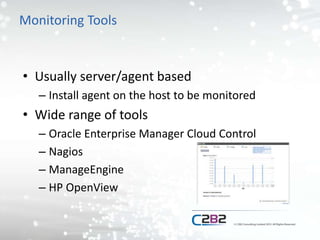
• Usually server/agent based
– Install agent on the host to be monitored
• Wide range of tools
– Oracle Enterprise Manager Cloud Control
– Nagios
– ManageEngine
– HP OpenView
Monitoring Tools
• Specific vs Generic
– Specific tools often provide more out of the box
– Generic tools often need some configuration
• Auto discovery vs manual configuration
• Where do they store the data?
• How much information do they provide
– OS
– Hardware
Which monitoring tool?
• What infrastructure is in place already?
– Is OEM already being used to monitor databases?
– Is Nagios already in use by operating system
teams?
– Who controls the monitoring tools?
Which monitoring tools?
• No really great tools for SOA Suite
• Rough order of (personal) preference
– Oracle Enterprise Manager Cloud Control 12c
– Manage Engine
– HP Openview
– Nagios
Log Scraping Tools
• Splunk is the best known example
• Send metrics to a log file
• Log scraping tool reads and parses the
metrics
• Log scraping server integrates metrics
together and displays them
Monitoring best practices
• Capture key metrics (see later)
• Don’t alert on everything you capture
• Consider data retention periods
• Be open with access to monitoring data
• Monitoring configuration owned by support
teams who use it
Alerting best practices
• Who is in a position to do something about
the alert
• The people who have to deal with it should
own the alert
– Thresholds
– Enabling/disabling
– Damping
Enterprise Monitoring
• Architectural options
– Generic enterprise monitoring tool
– Specialist monitoring tool that sends alerts up
stream
– Multiple monitoring tools
• Network
• Hardware
• OS
• Middleware
Enterprise monitoring
• Best approach seems to be tiered tools
– SOA support team own their own tool
– SNMP to push alerts up to enterprise monitoring
solution
What to Monitor?
What to monitor?
• Hardware
• OS
• JVM
• WebLogic
• SOA Suite
• Log files
* Indicates alert candidate
Hardware
• Disk usage*
• Network IO*
• CPU Usage*
• Memory Usage
Operating System
• File handles*
• User CPU vs System CPU
• Modification dates on key files*
• Boot time *
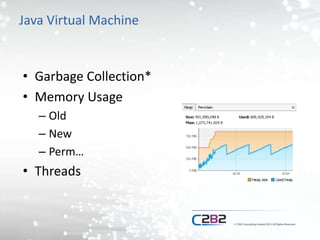
Java Virtual Machine
• Garbage Collection*
• Memory Usage
– Old
– New
– Perm…
• Threads
WebLogic
• Datasource connection pool size*
• JMS Queue/Topic depth*
• JMS Consumer count*
• Stuck threads*
• Work managers
SOA Suite
• Composite response times
Log Files
• Key exception or error types
– java.io.IOException
– oracle.jdbc.
– java.lang.OutOfMemoryError
– .
– .
– .
What Next?
What Next?
• Write a monitoring policy
• Review your existing monitoring against it
• Update your monitoring
• Improve your availability
• Resolve issues faster
What Next?
• Follow C2B2 on twitter
– @c2b2consulting
• Follow me on twitter
– @mbrasier
• View our SOA Suite resources page
– http://info.c2b2.co.uk/soa-suite-resources
Questions?

Monitoring Oracle SOA Suite - UKOUG Tech15 2015

  • 1.
    8th December 2015UKOUG Tech15 Matt Brasier Monitoring Oracle SOA Suite
  • 2.
    About me • Headof Consulting at C2B2 • 14 years WebLogic experience • 12 in a consultancy role • Author – Oracle SOA Suite 11g Performance Tuning Cookbook
  • 3.
    About C2B2 • Theleading independent middleware experts • Middleware professional services – Consultancy – On-site Support • Independent – Oracle partner – Red hat partner
  • 4.
    Agenda • Intro • WhyMonitor? • How to Monitor? • What to Monitor?
  • 5.
  • 6.
    Oracle SOA Suite •Evolved rather than designed – BPMN – BPEL – Mediator – Rules – Workflow – BAM/B2B/Event Processor • This has an impact on the ability to monitor it
  • 7.
    Oracle SOA Suite •Runs on a stack – Hardware – OS – JVM – WebLogic – SOA Suite • A skyscraper not a monolith
  • 8.
    Monitoring • Monitoring – Capturingof metrics – Visualising of metric trends • Alerting – Generating a notification when a condition is met • Out of bounds metric
  • 9.
    The Java Monitoringworld • Still developing – Going backwards? • Lots of tools • Monitoring for deployments of all sizes • Monitoring frameworks vs Alerting frameworks • Java focussed frameworks vs frameworks that can monitor java
  • 10.
  • 11.
    Six reasons tomonitor SOA Suite • Detect problems early • Capacity planning • Resolve problems faster • Understand your system better • Understand your business • Save money
  • 12.
    Detect problems early •Locate areas of resource contention • Identify unusual workloads • Identify failed components or services • Detect problems in other systems – Middleware is often the best place to start • Alerting is key – Alerts to the right people at the right time
  • 13.
    Capacity planning • Detecttrends in usage • Understand how changes in use will affect capacity • Increase capacity before it causes a problem – Hardware and upgrade lead times
  • 14.
    Resolve problems faster •Post incident analysis • What resources were at their limits? • What was the system doing before it failed? • What were other systems doing at the time? • What can we do to alert before failure next time?
  • 15.
    Understand your systembetter • What does a normal day look like on the system? – Resource usage – Use case load • Which resources are key to system operation? • What improvements can you make?
  • 16.
    Understand your business •Classic MI – How do “transactions” flow through your systems? – When are your busiest periods? – When are your quiet periods? – How much impact did the latest advertising campaign have?
  • 17.
    Save money • Thebottom line – Less outages – Faster resolutions – Less repeated failures – Target capacity correctly – More knowledgeable and better prepared administrators
  • 18.
  • 19.
    Ways to monitorOracle SOA Suite • Manual monitoring • Scripts • Monitoring tools • Log scraping tools • Alerting
  • 20.
    Manual Monitoring • Someonesits and looks at a console – Watching log files – Reviewing output from basic tools • jVisualVM • jstat • JRMC • DMS
  • 21.
    Manual monitoring tools •JVisualVM – Graphical monitoring for Hotspot – Plugin based – Monitors key attributes • JRockit Mission Control – Graphical monitoring for JRockit – Similar to JVisualVM – Flight recorder
  • 22.
    Manual monitoring tools •JStat – Command line output – Memory – Garbage collection – Compilation
  • 23.
    Manual monitoring tools •DMS – Oracle store of monitoring information – Stored in the database – DMSSpy servlet to view the data • Or interrogate the database
  • 24.
    Scripts • Collect datafrom manual tools and store it somewhere using a script – WLST – jstat • Analyse data in tools such as excel when required
  • 25.
    Scripts • Provide adiagnostic script to second line support – Before restarting a “stuck” server, run this script – Capture metrics before they are lost – Better than nothing • Not as good as a real monitoring tool
  • 26.
    Monitoring Tools • Usuallyserver/agent based – Install agent on the host to be monitored • Wide range of tools – Oracle Enterprise Manager Cloud Control – Nagios – ManageEngine – HP OpenView
  • 27.
    Monitoring Tools • Specificvs Generic – Specific tools often provide more out of the box – Generic tools often need some configuration • Auto discovery vs manual configuration • Where do they store the data? • How much information do they provide – OS – Hardware
  • 28.
    Which monitoring tool? •What infrastructure is in place already? – Is OEM already being used to monitor databases? – Is Nagios already in use by operating system teams? – Who controls the monitoring tools?
  • 29.
    Which monitoring tools? •No really great tools for SOA Suite • Rough order of (personal) preference – Oracle Enterprise Manager Cloud Control 12c – Manage Engine – HP Openview – Nagios
  • 30.
    Log Scraping Tools •Splunk is the best known example • Send metrics to a log file • Log scraping tool reads and parses the metrics • Log scraping server integrates metrics together and displays them
  • 31.
    Monitoring best practices •Capture key metrics (see later) • Don’t alert on everything you capture • Consider data retention periods • Be open with access to monitoring data • Monitoring configuration owned by support teams who use it
  • 32.
    Alerting best practices •Who is in a position to do something about the alert • The people who have to deal with it should own the alert – Thresholds – Enabling/disabling – Damping
  • 33.
    Enterprise Monitoring • Architecturaloptions – Generic enterprise monitoring tool – Specialist monitoring tool that sends alerts up stream – Multiple monitoring tools • Network • Hardware • OS • Middleware
  • 34.
    Enterprise monitoring • Bestapproach seems to be tiered tools – SOA support team own their own tool – SNMP to push alerts up to enterprise monitoring solution
  • 35.
  • 36.
    What to monitor? •Hardware • OS • JVM • WebLogic • SOA Suite • Log files * Indicates alert candidate
  • 37.
    Hardware • Disk usage* •Network IO* • CPU Usage* • Memory Usage
  • 38.
    Operating System • Filehandles* • User CPU vs System CPU • Modification dates on key files* • Boot time *
  • 39.
    Java Virtual Machine •Garbage Collection* • Memory Usage – Old – New – Perm… • Threads
  • 40.
    WebLogic • Datasource connectionpool size* • JMS Queue/Topic depth* • JMS Consumer count* • Stuck threads* • Work managers
  • 41.
  • 42.
    Log Files • Keyexception or error types – java.io.IOException – oracle.jdbc. – java.lang.OutOfMemoryError – . – . – .
  • 43.
  • 44.
    What Next? • Writea monitoring policy • Review your existing monitoring against it • Update your monitoring • Improve your availability • Resolve issues faster
  • 45.
    What Next? • FollowC2B2 on twitter – @c2b2consulting • Follow me on twitter – @mbrasier • View our SOA Suite resources page – http://info.c2b2.co.uk/soa-suite-resources
  • 46.