.MongoDB
Installation.
Presented by-
Goraksha S. Vedpathak
TE Computer
AISSMS COE ,Pune,India
What is MongoDB?
 MongoDB is a free & open source cross platform document-
oriented database.
 It is classified as a NoSQLdatabase, MongoDB avoids the
table-based relational database structure.
 MongoDB was founded in 2007 by the people behind
ShopWiki and Gilt Group.
 Mongo derives from the word ‘Humongous’, because of the
database’s ability to hold large amount of data
System Requirements
 No special req. needed to install the server
 Basically, MongoDB installation is depends on the type of Platform.
 For WINDOWS SERVER:
• Windows must be newer than WINDOWS XP
• Installation process is almost same in every windows version
except WINDOWS 7(it need more updates)
• Minimum 1024MB RAM is required & about 1GB of disk
space
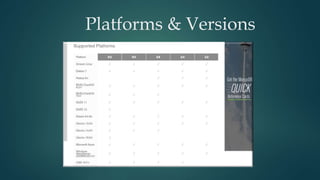
Platforms & Versions
Supported Platforms
 Mongo DB Supports variety of platforms, following operating
systems are recommended for production use:
Windows
Linux/Ubuntu
Debian 7.1
Apple OSX
Installation on Windows
1) Go to www.MongoDB.org
2) Locate the Windows installer & download it.(64/32bit)
3) If you are using WINDOWS 7 then you have to download some updates
from www.support.microsoft.com
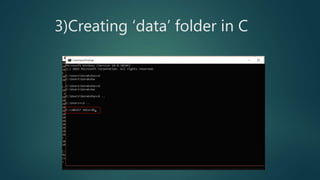
4) Create a dir. in C drive, name it ‘data’ & ‘db’ (ie. C:datadb)
5) Now run the downloaded installer file into above folder.
6) & run the Configure it from CMD.
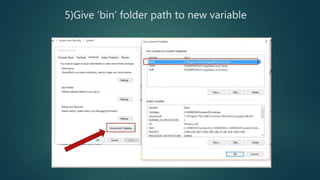
7) Create new variable in Env Variables.(Give bin folder path)
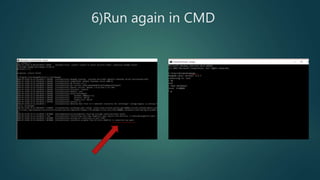
8) Open CMD & run ‘Mongo’ for new connection.
1)Go to MongoDB.com
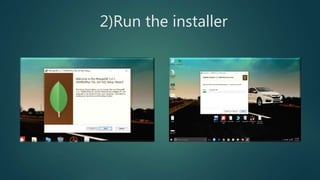
2)Run the installer
3)Creating ‘data’ folder in C
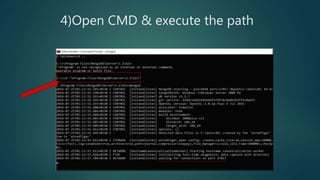
4)Open CMD & execute the path
5)Give ‘bin’ folder path to new variable
6)Run again in CMD
We have Successfully installed
MongoDB server on computer
Thank
You

Mongo db Introduction & installation on Windows

  • 1.
  • 2.
    Presented by- Goraksha S.Vedpathak TE Computer AISSMS COE ,Pune,India
  • 3.
    What is MongoDB? MongoDB is a free & open source cross platform document- oriented database.  It is classified as a NoSQLdatabase, MongoDB avoids the table-based relational database structure.  MongoDB was founded in 2007 by the people behind ShopWiki and Gilt Group.  Mongo derives from the word ‘Humongous’, because of the database’s ability to hold large amount of data
  • 4.
    System Requirements  Nospecial req. needed to install the server  Basically, MongoDB installation is depends on the type of Platform.  For WINDOWS SERVER: • Windows must be newer than WINDOWS XP • Installation process is almost same in every windows version except WINDOWS 7(it need more updates) • Minimum 1024MB RAM is required & about 1GB of disk space
  • 5.
  • 6.
    Supported Platforms  MongoDB Supports variety of platforms, following operating systems are recommended for production use: Windows Linux/Ubuntu Debian 7.1 Apple OSX
  • 7.
    Installation on Windows 1)Go to www.MongoDB.org 2) Locate the Windows installer & download it.(64/32bit) 3) If you are using WINDOWS 7 then you have to download some updates from www.support.microsoft.com 4) Create a dir. in C drive, name it ‘data’ & ‘db’ (ie. C:datadb) 5) Now run the downloaded installer file into above folder. 6) & run the Configure it from CMD. 7) Create new variable in Env Variables.(Give bin folder path) 8) Open CMD & run ‘Mongo’ for new connection.
  • 8.
  • 9.
  • 10.
  • 11.
    4)Open CMD &execute the path
  • 12.
    5)Give ‘bin’ folderpath to new variable
  • 13.
  • 14.
    We have Successfullyinstalled MongoDB server on computer
  • 15.