Introducing with MongoDB

Mahbub Tito
Sr. Software Engineer,
DataSoft Systems BD Ltd.
What is MongoDB?

It is a NoSQL database

Data is stored in documents, not tables / relations
(Schema free). It uses BSON (binary JSON) format

MongoDB is Implemented in C++ for best performance

Scalable with high-performance (scales horizontally)

Platforms 32/64 bit Windows, Linux, Mac OS-X, FreeBSD,
Solaris

Language drivers for :- PHP, Ruby/Ruby-on-Rails, Java,
C#, JavaScript, C / C++, Python, Perl and much more ! ..
Why ?

Cost - MongoDB is free

MongoDb is easily installable.

Super low latency access to your data
− Very little CPU overhead

No Additional caching layer required

Auto Sharding
− Automatic balancing for changes in load and data
distributed
− Easy addition of new machines
− Scaling out to one thousand nodes
− No single points of failure, Automatic fail-over

Built in Replication and Horizontal Scaling support
Some Users
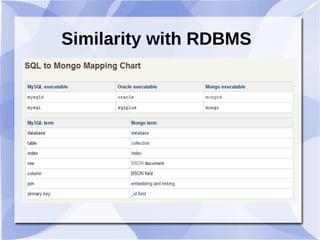
Similarity with RDBMS
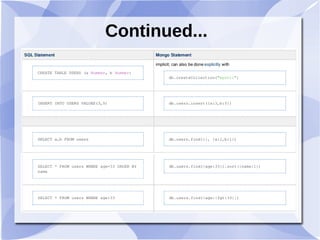
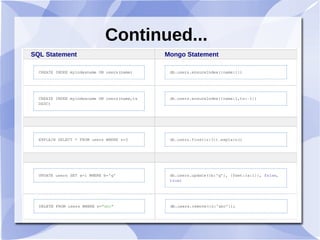
Continued...
Continued...
SQL Statement Mongo Statement
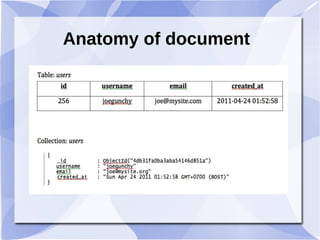
Anatomy of document
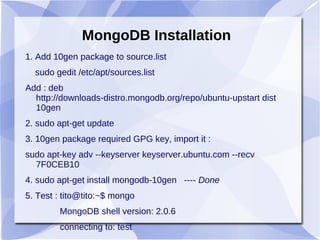
MongoDB Installation
1. Add 10gen package to source.list
sudo gedit /etc/apt/sources.list
Add : deb
http://downloads-distro.mongodb.org/repo/ubuntu-upstart dist
10gen
2. sudo apt-get update
3. 10gen package required GPG key, import it :
sudo apt-key adv --keyserver keyserver.ubuntu.com --recv
7F0CEB10
4. sudo apt-get install mongodb-10gen ---- Done
5. Test : tito@tito:~$ mongo
MongoDB shell version: 2.0.6
connecting to: test
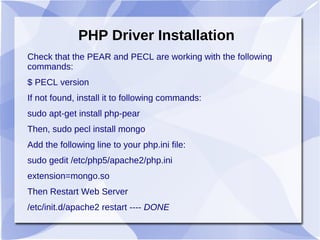
PHP Driver Installation
Check that the PEAR and PECL are working with the following
commands:
$ PECL version
If not found, install it to following commands:
sudo apt-get install php-pear
Then, sudo pecl install mongo
Add the following line to your php.ini file:
sudo gedit /etc/php5/apache2/php.ini
extension=mongo.so
Then Restart Web Server
/etc/init.d/apache2 restart ---- DONE
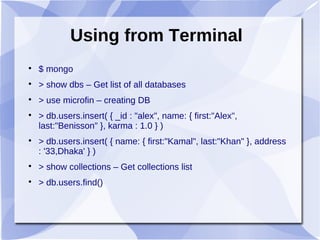
Using from Terminal

$ mongo

> show dbs – Get list of all databases

> use microfin – creating DB

> db.users.insert( { _id : "alex", name: { first:"Alex",
last:"Benisson" }, karma : 1.0 } )

> db.users.insert( { name: { first:"Kamal", last:"Khan" }, address
: '33,Dhaka' } )

> show collections – Get collections list

> db.users.find()
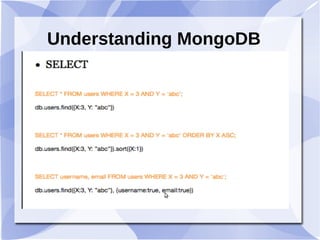
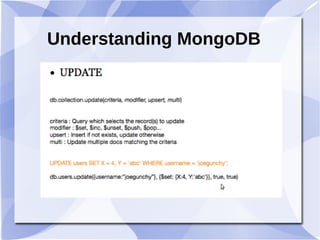
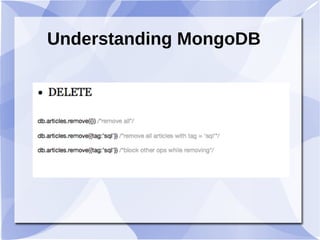
Understanding MongoDB
Reference
1. http://docs.mongodb.org/manual/contents/
2. PHP and MongoDB Web Development
Beginners Guide

Introducing with MongoDB

  • 1.
    Introducing with MongoDB  MahbubTito Sr. Software Engineer, DataSoft Systems BD Ltd.
  • 2.
    What is MongoDB?  Itis a NoSQL database  Data is stored in documents, not tables / relations (Schema free). It uses BSON (binary JSON) format  MongoDB is Implemented in C++ for best performance  Scalable with high-performance (scales horizontally)  Platforms 32/64 bit Windows, Linux, Mac OS-X, FreeBSD, Solaris  Language drivers for :- PHP, Ruby/Ruby-on-Rails, Java, C#, JavaScript, C / C++, Python, Perl and much more ! ..
  • 3.
    Why ?  Cost -MongoDB is free  MongoDb is easily installable.  Super low latency access to your data − Very little CPU overhead  No Additional caching layer required  Auto Sharding − Automatic balancing for changes in load and data distributed − Easy addition of new machines − Scaling out to one thousand nodes − No single points of failure, Automatic fail-over  Built in Replication and Horizontal Scaling support
  • 4.
  • 5.
  • 6.
  • 7.
  • 8.
  • 9.
    MongoDB Installation 1. Add10gen package to source.list sudo gedit /etc/apt/sources.list Add : deb http://downloads-distro.mongodb.org/repo/ubuntu-upstart dist 10gen 2. sudo apt-get update 3. 10gen package required GPG key, import it : sudo apt-key adv --keyserver keyserver.ubuntu.com --recv 7F0CEB10 4. sudo apt-get install mongodb-10gen ---- Done 5. Test : tito@tito:~$ mongo MongoDB shell version: 2.0.6 connecting to: test
  • 10.
    PHP Driver Installation Checkthat the PEAR and PECL are working with the following commands: $ PECL version If not found, install it to following commands: sudo apt-get install php-pear Then, sudo pecl install mongo Add the following line to your php.ini file: sudo gedit /etc/php5/apache2/php.ini extension=mongo.so Then Restart Web Server /etc/init.d/apache2 restart ---- DONE
  • 11.
    Using from Terminal  $mongo  > show dbs – Get list of all databases  > use microfin – creating DB  > db.users.insert( { _id : "alex", name: { first:"Alex", last:"Benisson" }, karma : 1.0 } )  > db.users.insert( { name: { first:"Kamal", last:"Khan" }, address : '33,Dhaka' } )  > show collections – Get collections list  > db.users.find()
  • 12.
  • 13.
  • 14.
  • 15.
    Reference 1. http://docs.mongodb.org/manual/contents/ 2. PHPand MongoDB Web Development Beginners Guide