OPENSHIFT
JEE6 and NoSQL in the Cloud
Workshop

PRESENTED
BY

Shekhar
Gulati
WHO AM I?

•

Shekhar Gulati -- OpenShift Developer Evangelist

•

Java / JavaScript / Python / NoSQL / Cloud Guy

•

Twitter Handle : shekhargulati

•

Github https://github.com/shekhargulati

•

Slides http://www.slideshare.net/shekhargulati
AGENDA

●

Get started with OpenShift

●

Develop a location aware application
–

Java EE 6 – Middleware
●

JAX-RS 1.1 – Java API for REST WS

●

CDI – Context and Dependency Injection

–

MongoDB – Database

–

OpenShift – Deployment choice

http://sharemylocation-shekhargulati.rhcloud.com/
CODE DU JOUR

https://github.com/shekhargulati/sharemylocation-demo
OpenShift

OPENSHIFT OVERVIEW
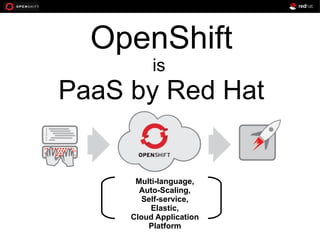
OpenShift
is

PaaS by Red Hat

Multi-language,
Auto-Scaling,
Self-service,
Elastic,
Cloud Application
Platform
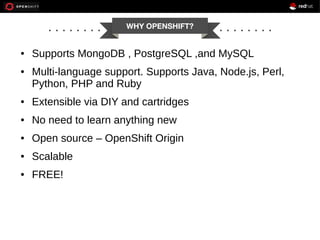
WHY OPENSHIFT?

●

●

Supports MongoDB , PostgreSQL ,and MySQL
Multi-language support. Supports Java, Node.js, Perl,
Python, PHP and Ruby

●

Extensible via DIY and cartridges

●

No need to learn anything new

●

Open source – OpenShift Origin

●

Scalable

●

FREE!
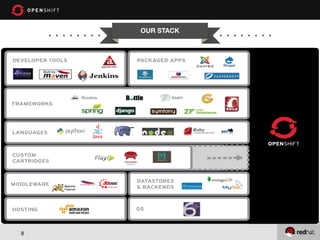
OUR STACK

8
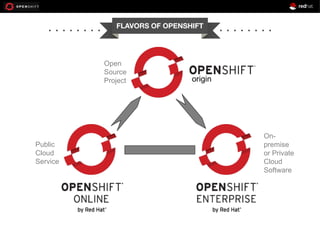
FLAVORS OF OPENSHIFT

Open
Source
Project

Public
Cloud
Service

origin

Onpremise
or Private
Cloud
Software
OPENSHIFT – GETTING
STARTED

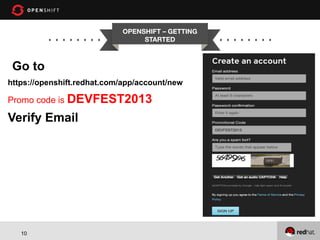
Go to
https://openshift.redhat.com/app/account/new

Promo code is DEVFEST2013

Verify Email

10
TOOLS REQUIRED

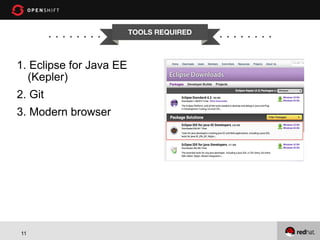
1. Eclipse for Java EE
(Kepler)
2. Git
3. Modern browser

11
LAB 1 : HELLO OPENSHIFT

1. Install OpenShift Eclipse plugin
2. Create new application with JBoss EAP and MongoDB
cartridges.
1. Sign up for OpenShift(if not already)
2. Create domain name or namespace
3. Upload SSH keys to OpenShift
4. Fill application creation wizard
5. Finish

3. Make a change in index.html
1. Commit the change using Git Staging view
2. Publish the change

4.View application in browser
12
LAB 2 : HOT DEPLOYMENT

1. Right click on your project and then go to
OpenShift > Configure Markers
2. Choose Hot Deploy marker
3. Commit to git repository
4. Go to servers view and publish your changes.

13
LAB 3 : SET UP JAX RS

14
LAB 3 : REST INTRODUCTION

1. HTTP used right
2. Defines set of RESTful constraints
1. Everything is a resource
1. Eg. Post , Tweet , User , etc.

2. Every resource has an identifier
1. Eg. http://api/twitter.com/tweets/1000011111

3. Resource can have multiple representations
1. JSON , XML , YAML , etc.

4. All resources expose a uniform interface
1. GET , POST , PUT , DELETE

5. Hypermedia as the engine of application state

15
LAB 3 JAX-RS INTRODUCTION

1. Java API for REST Services
2. POJO based
3. Annotation heavy
4. HTTP Centric
5. Format independent
6. Container independent
7. Included with Java EE 6
In this workshop we will be talking about JAX-RS 1.1

16
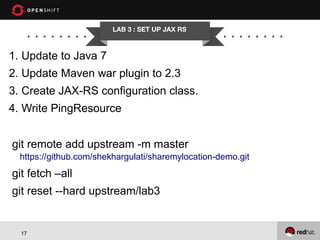
LAB 3 : SET UP JAX RS

1. Update to Java 7
2. Update Maven war plugin to 2.3
3. Create JAX-RS configuration class.
4. Write PingResource
git remote add upstream -m master
https://github.com/shekhargulati/sharemylocation-demo.git

git fetch –all
git reset --hard upstream/lab3

17
LAB 4 : CONFIGURE CDI AND
MONGODB

18
CDI

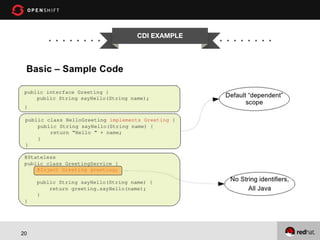
1. CDI stands for Context and Dependency Injection
2. CDI simplifies and sanitizes the API for DI and AOP
like JPA did for ORM -- CDI Tutorial by Rick Hightower
3. Type safe approach to Dependency Injection
4. Strong typing and loose coupling
5. To configure CDI add beans.xml to
1. WEB-INF of WAR
2. META-INF of JAR

6. Beans can be injected at method , field , or
constructor.
19
CDI EXAMPLE

20
MONGODB
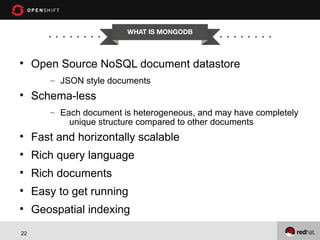
WHAT IS MONGODB



Open Source NoSQL document datastore
– JSON style documents



Schema-less
– Each document is heterogeneous, and may have completely
unique structure compared to other documents



Fast and horizontally scalable



Rich query language



Rich documents



Easy to get running



Geospatial indexing

22
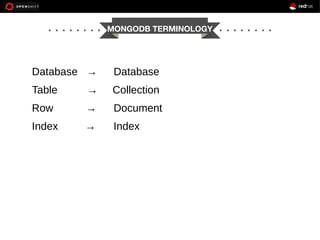
MONGODB TERMINOLOGY

Database →

Database

Table

→

Collection

Row

→

Document

Index

→

Index
SOME QUERIES

// Find all the jobs with skill as mongodb

db.jobs.find({"skills":"mongodb"})
// Find all the jobs with python as skill and
near to given location

db.jobs.find({"lngLat":{$near :
[139.69 , 35.68]},
"skills":"python"})
// Find all the python or mongodb jobs
near to given location

db.jobs.find({"lngLat":{$near :
[139.69 , 35.68]},
"skills":{$in :
["mongodb","python"]}})

24
LAB 4 : ENABLE CDI AND
MONGODB CONFIGURATION

1. Create beans.xml in src/main/WEB-INF folder
2. Create ApplicationScoped bean for configuring
MongoDB
3. PingResource writes a document to dummy collection
4. Open Eclipse Remote System Explorer perspective
and connect to gear.
Right click on project
1. Team > Reset > Remote Tracking > upstream/lab4

25
LAB 5 : IMPLEMENT CREATE
AND FIND ALL STATUS

1. Creates Status domain class
2. Creates converter for Status to DBObject and vice
versa
3. Creates StatusResource with create and find all
endpoints.
4. Creates ApplicationDao with create and findAll
methods.
5. Creates Twitter Bootstrap and Backbonejs front end for
create and find all functionalities.
Right click on project
–

26

Team > Reset > Remote Tracking > upstream/lab5
LAB 6 : IMPLEMENT NEAR AND
GEONEAR FEATURES

1. Creates findNear and findGeoNear methods in
ApplicationDao
2. Creates near and geonear search REST endpoints in
StatusResource
3. Implements backbone views for search endpoints
4. Create Index
1. db.statuses.ensureIndex({“location”:”2dsphere”})

Right click on project
–

27

Team > Reset > Remote Tracking > upstream/lab6
QUESTIONS?
DONE!
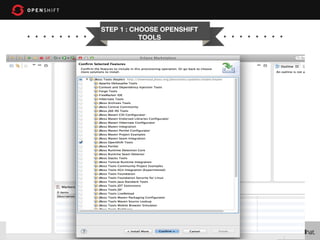
STEP 1 : CHOOSE OPENSHIFT
TOOLS

30
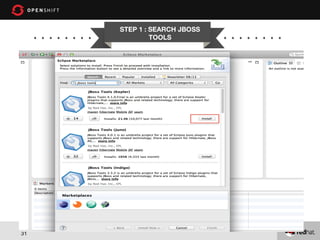
STEP 1 : SEARCH JBOSS
TOOLS

31
GEOSPATIAL INDEXING
BASICS



What is it for?





Find all the MongoDB jobs near me – Proximity Queries
Find all the MongoDB jobs within Bangalore – Bounded
Queries
Find all the MongoDB job at this location – Exact Queries

●

Supports only two dimensional indexes.



You can only have one geospatial index per collection.



By default, 2d geospatial indexes assume longitude
and latitude have boundaries of -180 inclusive and 180
non-inclusive (i.e. [-180, 180))
32
HOW TO MAKE IT WORK

1)

Put your coordinates into an array

{ loc : [ 50 , 30 ] } //SUGGESTED OPTION
{ loc : { x : 50 , y : 30 } }
{ loc : { foo : 50 , y : 30 } }
1) { loc : { lon : 40.739037, lat: 73.992964 } }
2)

Make a 2d index
db.places.ensureIndex( { loc : "2d" } )

3)

33

If you use latitude and longitude as your coordinate system,
always store longitude first. MongoDB’s 2d spherical index
operators only recognize [ longitude, latitude] ordering.

Java EE 6 and NoSQL Workshop DevFest Austria

  • 1.
    OPENSHIFT JEE6 and NoSQLin the Cloud Workshop PRESENTED BY Shekhar Gulati
  • 2.
    WHO AM I? • ShekharGulati -- OpenShift Developer Evangelist • Java / JavaScript / Python / NoSQL / Cloud Guy • Twitter Handle : shekhargulati • Github https://github.com/shekhargulati • Slides http://www.slideshare.net/shekhargulati
  • 3.
    AGENDA ● Get started withOpenShift ● Develop a location aware application – Java EE 6 – Middleware ● JAX-RS 1.1 – Java API for REST WS ● CDI – Context and Dependency Injection – MongoDB – Database – OpenShift – Deployment choice http://sharemylocation-shekhargulati.rhcloud.com/
  • 4.
  • 5.
  • 6.
    OpenShift is PaaS by RedHat Multi-language, Auto-Scaling, Self-service, Elastic, Cloud Application Platform
  • 7.
    WHY OPENSHIFT? ● ● Supports MongoDB, PostgreSQL ,and MySQL Multi-language support. Supports Java, Node.js, Perl, Python, PHP and Ruby ● Extensible via DIY and cartridges ● No need to learn anything new ● Open source – OpenShift Origin ● Scalable ● FREE!
  • 8.
  • 9.
  • 10.
    OPENSHIFT – GETTING STARTED Goto https://openshift.redhat.com/app/account/new Promo code is DEVFEST2013 Verify Email 10
  • 11.
    TOOLS REQUIRED 1. Eclipsefor Java EE (Kepler) 2. Git 3. Modern browser 11
  • 12.
    LAB 1 :HELLO OPENSHIFT 1. Install OpenShift Eclipse plugin 2. Create new application with JBoss EAP and MongoDB cartridges. 1. Sign up for OpenShift(if not already) 2. Create domain name or namespace 3. Upload SSH keys to OpenShift 4. Fill application creation wizard 5. Finish 3. Make a change in index.html 1. Commit the change using Git Staging view 2. Publish the change 4.View application in browser 12
  • 13.
    LAB 2 :HOT DEPLOYMENT 1. Right click on your project and then go to OpenShift > Configure Markers 2. Choose Hot Deploy marker 3. Commit to git repository 4. Go to servers view and publish your changes. 13
  • 14.
    LAB 3 :SET UP JAX RS 14
  • 15.
    LAB 3 :REST INTRODUCTION 1. HTTP used right 2. Defines set of RESTful constraints 1. Everything is a resource 1. Eg. Post , Tweet , User , etc. 2. Every resource has an identifier 1. Eg. http://api/twitter.com/tweets/1000011111 3. Resource can have multiple representations 1. JSON , XML , YAML , etc. 4. All resources expose a uniform interface 1. GET , POST , PUT , DELETE 5. Hypermedia as the engine of application state 15
  • 16.
    LAB 3 JAX-RSINTRODUCTION 1. Java API for REST Services 2. POJO based 3. Annotation heavy 4. HTTP Centric 5. Format independent 6. Container independent 7. Included with Java EE 6 In this workshop we will be talking about JAX-RS 1.1 16
  • 17.
    LAB 3 :SET UP JAX RS 1. Update to Java 7 2. Update Maven war plugin to 2.3 3. Create JAX-RS configuration class. 4. Write PingResource git remote add upstream -m master https://github.com/shekhargulati/sharemylocation-demo.git git fetch –all git reset --hard upstream/lab3 17
  • 18.
    LAB 4 :CONFIGURE CDI AND MONGODB 18
  • 19.
    CDI 1. CDI standsfor Context and Dependency Injection 2. CDI simplifies and sanitizes the API for DI and AOP like JPA did for ORM -- CDI Tutorial by Rick Hightower 3. Type safe approach to Dependency Injection 4. Strong typing and loose coupling 5. To configure CDI add beans.xml to 1. WEB-INF of WAR 2. META-INF of JAR 6. Beans can be injected at method , field , or constructor. 19
  • 20.
  • 21.
  • 22.
    WHAT IS MONGODB  OpenSource NoSQL document datastore – JSON style documents  Schema-less – Each document is heterogeneous, and may have completely unique structure compared to other documents  Fast and horizontally scalable  Rich query language  Rich documents  Easy to get running  Geospatial indexing 22
  • 23.
  • 24.
    SOME QUERIES // Findall the jobs with skill as mongodb db.jobs.find({"skills":"mongodb"}) // Find all the jobs with python as skill and near to given location db.jobs.find({"lngLat":{$near : [139.69 , 35.68]}, "skills":"python"}) // Find all the python or mongodb jobs near to given location db.jobs.find({"lngLat":{$near : [139.69 , 35.68]}, "skills":{$in : ["mongodb","python"]}}) 24
  • 25.
    LAB 4 :ENABLE CDI AND MONGODB CONFIGURATION 1. Create beans.xml in src/main/WEB-INF folder 2. Create ApplicationScoped bean for configuring MongoDB 3. PingResource writes a document to dummy collection 4. Open Eclipse Remote System Explorer perspective and connect to gear. Right click on project 1. Team > Reset > Remote Tracking > upstream/lab4 25
  • 26.
    LAB 5 :IMPLEMENT CREATE AND FIND ALL STATUS 1. Creates Status domain class 2. Creates converter for Status to DBObject and vice versa 3. Creates StatusResource with create and find all endpoints. 4. Creates ApplicationDao with create and findAll methods. 5. Creates Twitter Bootstrap and Backbonejs front end for create and find all functionalities. Right click on project – 26 Team > Reset > Remote Tracking > upstream/lab5
  • 27.
    LAB 6 :IMPLEMENT NEAR AND GEONEAR FEATURES 1. Creates findNear and findGeoNear methods in ApplicationDao 2. Creates near and geonear search REST endpoints in StatusResource 3. Implements backbone views for search endpoints 4. Create Index 1. db.statuses.ensureIndex({“location”:”2dsphere”}) Right click on project – 27 Team > Reset > Remote Tracking > upstream/lab6
  • 28.
  • 29.
  • 30.
    STEP 1 :CHOOSE OPENSHIFT TOOLS 30
  • 31.
    STEP 1 :SEARCH JBOSS TOOLS 31
  • 32.
    GEOSPATIAL INDEXING BASICS  What isit for?    Find all the MongoDB jobs near me – Proximity Queries Find all the MongoDB jobs within Bangalore – Bounded Queries Find all the MongoDB job at this location – Exact Queries ● Supports only two dimensional indexes.  You can only have one geospatial index per collection.  By default, 2d geospatial indexes assume longitude and latitude have boundaries of -180 inclusive and 180 non-inclusive (i.e. [-180, 180)) 32
  • 33.
    HOW TO MAKEIT WORK 1) Put your coordinates into an array { loc : [ 50 , 30 ] } //SUGGESTED OPTION { loc : { x : 50 , y : 30 } } { loc : { foo : 50 , y : 30 } } 1) { loc : { lon : 40.739037, lat: 73.992964 } } 2) Make a 2d index db.places.ensureIndex( { loc : "2d" } ) 3) 33 If you use latitude and longitude as your coordinate system, always store longitude first. MongoDB’s 2d spherical index operators only recognize [ longitude, latitude] ordering.