OWB Tuning Methods to tune OWB mappings and flows that leverage your existing Oracle tuning expertise!
Need - Common Situation System loads 100k records daily with no apparent issues (2 hour load time) 110k records = 4 hour load time 120k records = 12 hour load time 130k records =  MAJOR PROBLEM
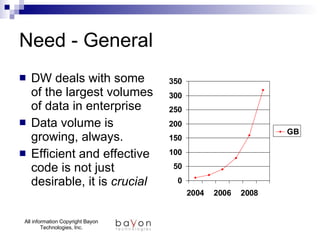
Need - General DW deals with some of the largest volumes of data in enterprise Data volume is growing, always. Efficient and effective code is not just desirable, it is  crucial
What is OWB Tuning? The process of Measuring Analyzing Diagnosing  Revising OWB solutions to Decrease loading times Increase efficiency
OWB Tuning Basics Goal = Tuned PL/SQL / Data Access OWB Tuning Methods provide: Monitoring, Measurements, and Diagnostic information OWB Tuning Methods augment existing Oracle tuning methods and expertise OWB Tuning = (Oracle tuning)++
Two General “Methods” OWB Runtime Data Analysis Macro level, elapsed time, throughput, growth of time, etc. Mapping/Process Flow Analysis Tracing specific mappings/process flows, explain plans, use of idxes, etc. Mark Rittman/Jon Mead with SolStonePlus developed the fundamentals of this method!
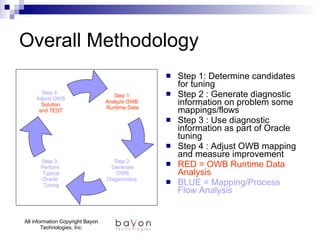
Overall Methodology Step 1: Determine candidates for tuning Step 2 : Generate diagnostic information on problem some mappings/flows Step 3 : Use diagnostic information as part of Oracle tuning Step 4 : Adjust OWB mapping and measure improvement RED = OWB Runtime Data Analysis BLUE = Mapping/Process Flow Analysis Step 1: Analyze OWB  Runtime Data Step 2: Generate OWB Diaganostics  Step 3:  Perform  Typical Oracle  Tuning Step 4:  Adjust OWB Solution and TEST
OWB Data Analysis Based on “Wall Clock” analysis Sample of actual runs Relatively fine level of detail Unobtrusive
OWB Data Analysis GOALS Establish baseline Monitor ongoing performance TUNING GOALS Identify Tuning Candidates Quantify ROI for tuning work Measure improvement
Views Look Like? ALL_RT_AUDIT_EXECUTIONS execution_audit_id  execution_name object_name elapse_time  updated_on  ALL_RT_AUDIT_MAP_RUNS execution_audit_id map_name  start_time elapse_time  number_records_inserted
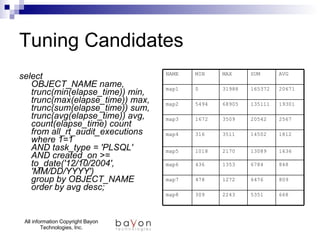
Tuning Candidates select  OBJECT_NAME name, trunc(min(elapse_time)) min, trunc(max(elapse_time)) max, trunc(sum(elapse_time)) sum, trunc(avg(elapse_time)) avg, count(elapse_time) count from all_rt_audit_executions where 1=1 AND task_type = 'PLSQL' AND created_on >= to_date('12/10/2004', 'MM/DD/YYYY') group by OBJECT_NAME order by avg desc;   668 5351 2243 309 map8 809 6476 1272 478 map7 848 6784 1353 436 map6 1636 13089 2170 1018 map5 1812 14502 3511 316 map4 2567 20542 3509 1672 map3 19301 135111 68905 5494 map2 20671 165372 31988 0 map1 AVG SUM MAX MIN NAME
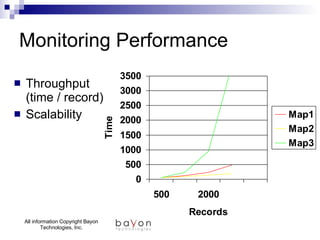
Monitoring Performance Throughput  (time / record) Scalability
OWB Tuning : Exercise 1
Mapping/Flow Analysis Candidate Mappings or Flows Generate Trace files “Plans” Wait Events Adjust Mapping/Objects Deploy and measure improvements
Mapping vs. Flows Parts of the Whole Flows on 10g Start with Mappings Mappings are actually tuned All Mapping Tuning is used in Flow tuning
Mapping Diagnostic Steps Steps Install enable/disable procedures Include them in required mappings Deploy/Execute mappings Collect files, generate reports
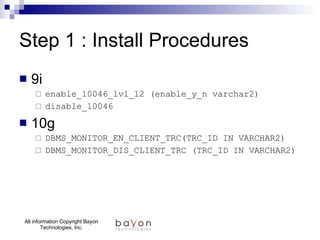
Step 1 : Install Procedures Add the following PL/SQL procedures to OWB DBMS_MONITOR_EN_CLIENT_TRC DBMS_MONITOR_DIS_CLIENT_TRC Uses 10g DBMS_MONITOR package Requires execute privs 9i equivalents enable_10046_lvl_12 disable_10046
Step 1 : Install Procedures 9i enable_10046_lvl_12 (enable_y_n varchar2) disable_10046 10g DBMS_MONITOR_EN_CLIENT_TRC(TRC_ID IN VARCHAR2) DBMS_MONITOR_DIS_CLIENT_TRC (TRC_ID IN VARCHAR2)
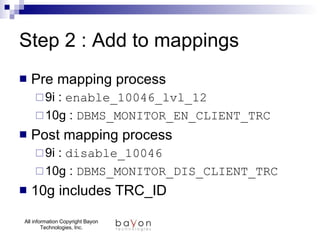
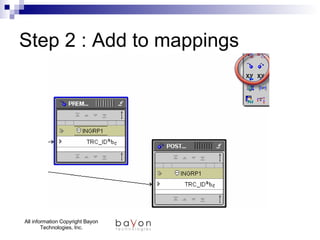
Step 2 : Add to mappings Pre mapping process 9i :  enable_10046_lvl_12 10g :  DBMS_MONITOR_EN_CLIENT_TRC Post mapping process 9i :  disable_10046  10g :  DBMS_MONITOR_DIS_CLIENT_TRC 10g includes TRC_ID
Step 2 : Add to mappings
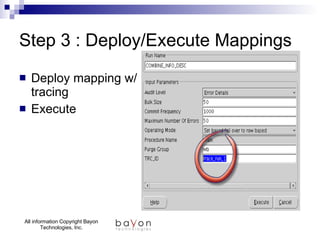
Step 3 : Deploy/Execute Mappings Deploy mapping w/ tracing Execute
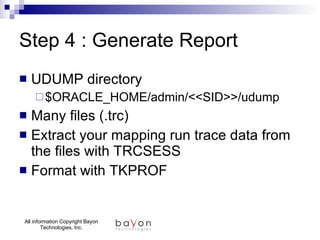
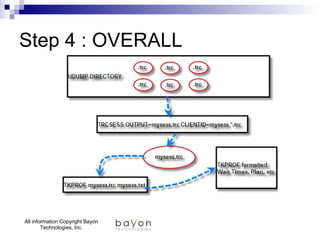
Step 4 : Generate Report UDUMP directory $ORACLE_HOME/admin/<<SID>>/udump Many files (.trc) Extract your mapping run trace data from the files with TRCSESS Format with TKPROF
Step 4 : OVERALL
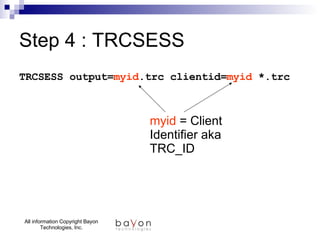
Step 4 : TRCSESS TRCSESS output= myid .trc clientid= myid  *.trc myid  = Client Identifier aka TRC_ID
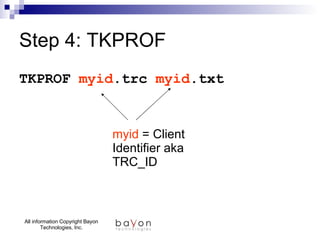
Step 4: TKPROF TKPROF  myid .trc  myid .txt myid  = Client Identifier aka TRC_ID
OWB Tuning : Exercises 2-3
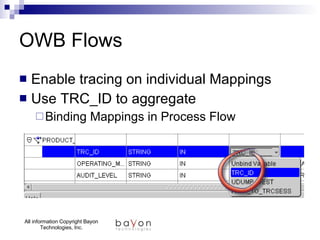
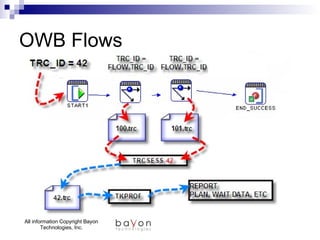
OWB Flows Enable tracing on individual Mappings Use TRC_ID to aggregate Binding Mappings in Process Flow
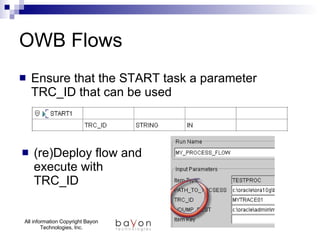
OWB Flows Ensure that the START task a parameter TRC_ID that can be used  (re)Deploy flow and execute with TRC_ID
OWB Flows
OWB Tuning : Exercise 4

Module Owb Tuning

  • 1.
    OWB Tuning Methodsto tune OWB mappings and flows that leverage your existing Oracle tuning expertise!
  • 2.
    Need - CommonSituation System loads 100k records daily with no apparent issues (2 hour load time) 110k records = 4 hour load time 120k records = 12 hour load time 130k records = MAJOR PROBLEM
  • 3.
    Need - GeneralDW deals with some of the largest volumes of data in enterprise Data volume is growing, always. Efficient and effective code is not just desirable, it is crucial
  • 4.
    What is OWBTuning? The process of Measuring Analyzing Diagnosing Revising OWB solutions to Decrease loading times Increase efficiency
  • 5.
    OWB Tuning BasicsGoal = Tuned PL/SQL / Data Access OWB Tuning Methods provide: Monitoring, Measurements, and Diagnostic information OWB Tuning Methods augment existing Oracle tuning methods and expertise OWB Tuning = (Oracle tuning)++
  • 6.
    Two General “Methods”OWB Runtime Data Analysis Macro level, elapsed time, throughput, growth of time, etc. Mapping/Process Flow Analysis Tracing specific mappings/process flows, explain plans, use of idxes, etc. Mark Rittman/Jon Mead with SolStonePlus developed the fundamentals of this method!
  • 7.
    Overall Methodology Step1: Determine candidates for tuning Step 2 : Generate diagnostic information on problem some mappings/flows Step 3 : Use diagnostic information as part of Oracle tuning Step 4 : Adjust OWB mapping and measure improvement RED = OWB Runtime Data Analysis BLUE = Mapping/Process Flow Analysis Step 1: Analyze OWB Runtime Data Step 2: Generate OWB Diaganostics Step 3: Perform Typical Oracle Tuning Step 4: Adjust OWB Solution and TEST
  • 8.
    OWB Data AnalysisBased on “Wall Clock” analysis Sample of actual runs Relatively fine level of detail Unobtrusive
  • 9.
    OWB Data AnalysisGOALS Establish baseline Monitor ongoing performance TUNING GOALS Identify Tuning Candidates Quantify ROI for tuning work Measure improvement
  • 10.
    Views Look Like?ALL_RT_AUDIT_EXECUTIONS execution_audit_id execution_name object_name elapse_time updated_on ALL_RT_AUDIT_MAP_RUNS execution_audit_id map_name start_time elapse_time number_records_inserted
  • 11.
    Tuning Candidates select OBJECT_NAME name, trunc(min(elapse_time)) min, trunc(max(elapse_time)) max, trunc(sum(elapse_time)) sum, trunc(avg(elapse_time)) avg, count(elapse_time) count from all_rt_audit_executions where 1=1 AND task_type = 'PLSQL' AND created_on >= to_date('12/10/2004', 'MM/DD/YYYY') group by OBJECT_NAME order by avg desc; 668 5351 2243 309 map8 809 6476 1272 478 map7 848 6784 1353 436 map6 1636 13089 2170 1018 map5 1812 14502 3511 316 map4 2567 20542 3509 1672 map3 19301 135111 68905 5494 map2 20671 165372 31988 0 map1 AVG SUM MAX MIN NAME
  • 12.
    Monitoring Performance Throughput (time / record) Scalability
  • 13.
    OWB Tuning :Exercise 1
  • 14.
    Mapping/Flow Analysis CandidateMappings or Flows Generate Trace files “Plans” Wait Events Adjust Mapping/Objects Deploy and measure improvements
  • 15.
    Mapping vs. FlowsParts of the Whole Flows on 10g Start with Mappings Mappings are actually tuned All Mapping Tuning is used in Flow tuning
  • 16.
    Mapping Diagnostic StepsSteps Install enable/disable procedures Include them in required mappings Deploy/Execute mappings Collect files, generate reports
  • 17.
    Step 1 :Install Procedures Add the following PL/SQL procedures to OWB DBMS_MONITOR_EN_CLIENT_TRC DBMS_MONITOR_DIS_CLIENT_TRC Uses 10g DBMS_MONITOR package Requires execute privs 9i equivalents enable_10046_lvl_12 disable_10046
  • 18.
    Step 1 :Install Procedures 9i enable_10046_lvl_12 (enable_y_n varchar2) disable_10046 10g DBMS_MONITOR_EN_CLIENT_TRC(TRC_ID IN VARCHAR2) DBMS_MONITOR_DIS_CLIENT_TRC (TRC_ID IN VARCHAR2)
  • 19.
    Step 2 :Add to mappings Pre mapping process 9i : enable_10046_lvl_12 10g : DBMS_MONITOR_EN_CLIENT_TRC Post mapping process 9i : disable_10046 10g : DBMS_MONITOR_DIS_CLIENT_TRC 10g includes TRC_ID
  • 20.
    Step 2 :Add to mappings
  • 21.
    Step 3 :Deploy/Execute Mappings Deploy mapping w/ tracing Execute
  • 22.
    Step 4 :Generate Report UDUMP directory $ORACLE_HOME/admin/<<SID>>/udump Many files (.trc) Extract your mapping run trace data from the files with TRCSESS Format with TKPROF
  • 23.
    Step 4 :OVERALL
  • 24.
    Step 4 :TRCSESS TRCSESS output= myid .trc clientid= myid *.trc myid = Client Identifier aka TRC_ID
  • 25.
    Step 4: TKPROFTKPROF myid .trc myid .txt myid = Client Identifier aka TRC_ID
  • 26.
    OWB Tuning :Exercises 2-3
  • 27.
    OWB Flows Enabletracing on individual Mappings Use TRC_ID to aggregate Binding Mappings in Process Flow
  • 28.
    OWB Flows Ensurethat the START task a parameter TRC_ID that can be used (re)Deploy flow and execute with TRC_ID
  • 29.
  • 30.
    OWB Tuning :Exercise 4