MODULE 8: TECHNOLOGICAL AND
COMMUNICATION SKILLS
CONTENTS
Technological Skills:
Using Apps and Platforms for Teaching,
Open Educational Resources (OER),
Developing Assignments and Learning Materials
Communication Skills:
Public Presentations,
Participating in Discussions,
Formal Meetings
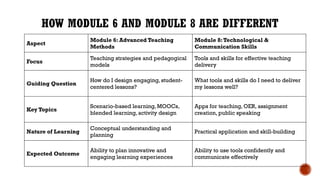
HOW MODULE 6 AND MODULE 8 ARE DIFFERENT
Aspect
Module 6: Advanced Teaching
Methods
Module 8:Technological &
Communication Skills
Focus
Teaching strategies and pedagogical
models
Tools and skills for effective teaching
delivery
Guiding Question
How do I design engaging, student-
centered lessons?
What tools and skills do I need to deliver
my lessons well?
Key Topics
Scenario-based learning, MOOCs,
blended learning, activity design
Apps for teaching, OER, assignment
creation, public speaking
Nature of Learning
Conceptual understanding and
planning
Practical application and skill-building
Expected Outcome
Ability to plan innovative and
engaging learning experiences
Ability to use tools confidently and
communicate effectively
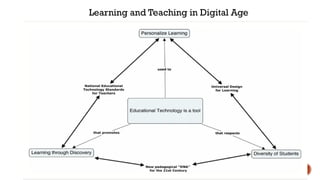
Learning and Teaching in Digital Age
TECH TOOLS FOR TEACHING-APPS & PLATFORMS
1. Classroom
 Students typically graduate with a set of technology-based skills that can enable them
to compete in the global job market.
 Classroom, a free resource for instructors, can help educators share resources and
study materials with their students, and also develop their students' capacity to work
with technology.
 This tool provides some simple approaches for helping children navigate technology.
 Because it is extremely user-friendly, it provides an excellent introduction for students
to technology.
 Classroom can also assist students in becoming more involved in their academic
engagements.
2. Kahoot!
Students can use Kahoot! on mobile devices to take quizzes. As a teacher, you can construct
your own quizzes on any subject and have students answer the questions individually or in
groups. Teachers use Kahoot! and similar apps to engage students in the learning process
and help them retain essential concepts.
3. MindMeister
Mind maps are a type of visual organisation tool that connects tasks, concepts and words
around a primary topic. Teachers and students can collaborate to create mind maps using
MindMeister. It provides a variety of aids to help you create and style mind maps around a
topic or subject. This platform also includes comment and notification systems that let
teachers engage in discussions with students and other faculty members.
4. EdApp
EdApp's new public microlearning courseware platform, Educate All, is free for instructors,
students and professionals who are interested in applying it to learning processes. EdApp's
content library includes courses on topics ranging from global sustainability to leadership and
entrepreneurship to hospitality and physical exercise. In order to improve learning
experiences, the platform also includes learner assessment tools that track measurable data.
5.Trello
Trello is a collaborative, professional and organised visual work management solution that
allows teams to brainstorm, plan, manage and organise their work collaboratively and
productively. Trello adapts to most types of projects ranging from business to education. It
enables professionals engaging in multiple workflows to document and organise resources
and materials, making it a useful accessory for teachers in a classroom setting.
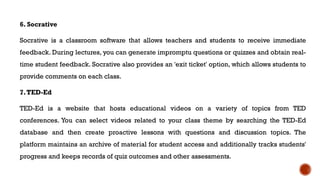
6. Socrative
Socrative is a classroom software that allows teachers and students to receive immediate
feedback. During lectures, you can generate impromptu questions or quizzes and obtain real-
time student feedback. Socrative also provides an 'exit ticket' option, which allows students to
provide comments on each class.
7.TED-Ed
TED-Ed is a website that hosts educational videos on a variety of topics from TED
conferences. You can select videos related to your class theme by searching the TED-Ed
database and then create proactive lessons with questions and discussion topics. The
platform maintains an archive of material for student access and additionally tracks students'
progress and keeps records of quiz outcomes and other assessments.
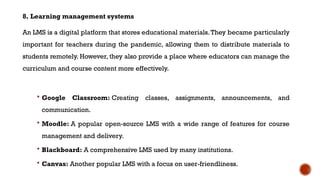
8. Learning management systems
An LMS is a digital platform that stores educational materials.They became particularly
important for teachers during the pandemic, allowing them to distribute materials to
students remotely. However, they also provide a place where educators can manage the
curriculum and course content more effectively.
 Google Classroom: Creating classes, assignments, announcements, and
communication.
 Moodle: A popular open-source LMS with a wide range of features for course
management and delivery.
 Blackboard: A comprehensive LMS used by many institutions.
 Canvas: Another popular LMS with a focus on user-friendliness.
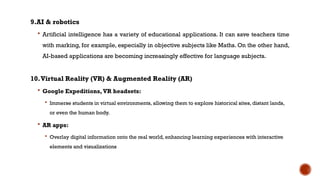
9.AI & robotics
 Artificial intelligence has a variety of educational applications. It can save teachers time
with marking, for example, especially in objective subjects like Maths. On the other hand,
AI-based applications are becoming increasingly effective for language subjects.
10.Virtual Reality (VR) & Augmented Reality (AR)
 Google Expeditions, VR headsets:
 Immerse students in virtual environments, allowing them to explore historical sites, distant lands,
or even the human body.
 AR apps:
 Overlay digital information onto the real world, enhancing learning experiences with interactive
elements and visualizations
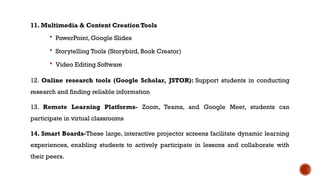
11. Multimedia & Content Creation Tools
 PowerPoint, Google Slides
 Storytelling Tools (Storybird, Book Creator)
 Video Editing Software
12. Online research tools (Google Scholar, JSTOR): Support students in conducting
research and finding reliable information
13. Remote Learning Platforms- Zoom, Teams, and Google Meet, students can
participate in virtual classrooms
14. Smart Boards-These large, interactive projector screens facilitate dynamic learning
experiences, enabling students to actively participate in lessons and collaborate with
their peers.
15. Digital Pads
 Digital pads are a dream come true for aspiring artists and students interested in
digital design. These handy devices, like the iPad Pro with Apple Pencil, the
Wacom Intuos, or the Huion H420, enable students to create digital drawings and
designs. Plus, they reduce paper waste by providing a limitless digital canvas
16. Virtual Laboratory Experiments
 For science classes, virtual laboratory experiments offer a practical solution.
Access to remote labs or virtual experiments allows students to conduct
experiments online, providing a safe and convenient way to explore scientific
concepts.
OPEN EDUCATIONAL
RESOURCES (OER)
Open Educational Resources (OER) hold transformative potential for
modern education.
These can significantly enhance accessibility and equity in education by
providing free, high-quality learning materials, which can be freely adapted
and shared.
In a 2002 conference, UNESCO defined Open Educational Resources (OER)
as “... learning, teaching and research materials in any format and medium
that reside in the public domain or are under copyright that have been
released under an open license, that permit no-cost access, re-use, re-
purpose,adaptation and redistribution by others.”
 Open Educational Resources (OER) are teaching and learning materials
that you may freely use and reuse at no cost, and without needing to ask
permission.
 Unlike traditional copyrighted resources, OER have been authored or
created by an individual or organization that chooses to allow for re-use
and adaptation of their work.
 In some cases, that means you can download a resource and share it with
colleagues and students. In other cases, you may be able to download a
resource, edit it in some way, and then re-post it as a remixed work.
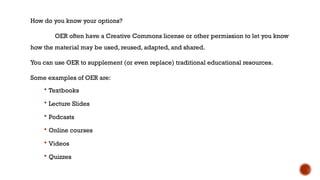
How do you know your options?
OER often have a Creative Commons license or other permission to let you know
how the material may be used, reused, adapted, and shared.
You can use OER to supplement (or even replace) traditional educational resources.
Some examples of OER are:
 Textbooks
 Lecture Slides
 Podcasts
 Online courses
 Videos
 Quizzes
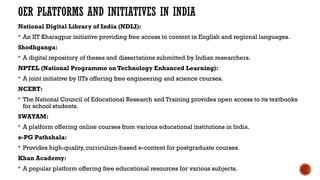
OER PLATFORMS AND INITIATIVES IN INDIA
National Digital Library of India (NDLI):
 An IIT Kharagpur initiative providing free access to content in English and regional languages.
Shodhganga:
 A digital repository of theses and dissertations submitted by Indian researchers.
NPTEL (National Programme on Technology Enhanced Learning):
 A joint initiative by IITs offering free engineering and science courses.
NCERT:
 The National Council of Educational Research and Training provides open access to its textbooks
for school students.
SWAYAM:
 A platform offering online courses from various educational institutions in India.
e-PG Pathshala:
 Provides high-quality, curriculum-based e-content for postgraduate courses.
Khan Academy:
 A popular platform offering free educational resources for various subjects.
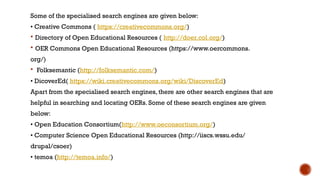
Some of the specialised search engines are given below:
• Creative Commons ( https://creativecommons.org/)
 Directory of Open Educational Resources ( http://doer.col.org/)
 OER Commons Open Educational Resources (https://www.oercommons.
org/)
 Folksemantic (http://folksemantic.com/)
• DicoverEd( https://wiki.creativecommons.org/wiki/DiscoverEd)
Apart from the specialised search engines, there are other search engines that are
helpful in searching and locating OERs. Some of these search engines are given
below:
• Open Education Consortium(http://www.oeconsortium.org/)
• Computer Science Open Educational Resources (http://iiscs.wssu.edu/
drupal/csoer)
• temoa (http://temoa.info/)
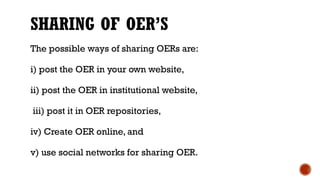
SHARING OF OER’S
The possible ways of sharing OERs are:
i) post the OER in your own website,
ii) post the OER in institutional website,
iii) post it in OER repositories,
iv) Create OER online, and
v) use social networks for sharing OER.
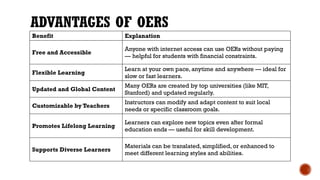
ADVANTAGES OF OERS
Benefit Explanation
Free and Accessible
Anyone with internet access can use OERs without paying
— helpful for students with financial constraints.
Flexible Learning
Learn at your own pace, anytime and anywhere — ideal for
slow or fast learners.
Updated and Global Content
Many OERs are created by top universities (like MIT,
Stanford) and updated regularly.
Customizable by Teachers
Instructors can modify and adapt content to suit local
needs or specific classroom goals.
Promotes Lifelong Learning
Learners can explore new topics even after formal
education ends — useful for skill development.
Supports Diverse Learners
Materials can be translated, simplified, or enhanced to
meet different learning styles and abilities.
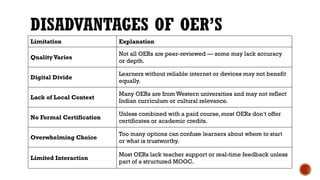
DISADVANTAGES OF OER’S
Limitation Explanation
QualityVaries
Not all OERs are peer-reviewed — some may lack accuracy
or depth.
Digital Divide
Learners without reliable internet or devices may not benefit
equally.
Lack of Local Context
Many OERs are from Western universities and may not reflect
Indian curriculum or cultural relevance.
No Formal Certification
Unless combined with a paid course, most OERs don’t offer
certificates or academic credits.
Overwhelming Choice
Too many options can confuse learners about where to start
or what is trustworthy.
Limited Interaction
Most OERs lack teacher support or real-time feedback unless
part of a structured MOOC.
DEVELOPING
ASSIGNMENTS
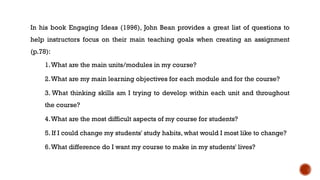
In his book Engaging Ideas (1996), John Bean provides a great list of questions to
help instructors focus on their main teaching goals when creating an assignment
(p.78):
1.What are the main units/modules in my course?
2.What are my main learning objectives for each module and for the course?
3. What thinking skills am I trying to develop within each unit and throughout
the course?
4.What are the most difficult aspects of my course for students?
5. If I could change my students' study habits, what would I most like to change?
6.What difference do I want my course to make in my students' lives?
PRE-REQUISITES OF INSTRUCTOR
 Your goals for the assignment. Why are you assigning this project, and what do you hope your students
will gain from completing it? What knowledge, skills, and abilities do you aim to measure with this
assignment?
 For instance, if you want your students to demonstrate critical thinking, perhaps asking them to simply summarize an article is not
the best match for that goal; a more appropriate option might be to ask for an analysis of a controversial issue in the discipline.
 The levels of your students. What do your students already know, and what can they do when they
enter your class?
 Do they know how to conduct research? Do they know the proper style format, documentation style,
acceptable resources, etc.? Do they know how to use the library (Fitzpatrick, 1989) or evaluate resources?
 What kinds of writing or work have they previously engaged in? For instance, have they completed long,
formal writing assignments or research projects before? Have they ever engaged in analysis, reflection, or
argumentation? Have they completed group assignments before? Do they know how to write a literature
review or scientific report?
WHAT YOUR STUDENTS NEED TO KNOW
 Explain the purpose of the assignment so students understand why they are doing it.
 State the learning outcomes clearly so students know what they should achieve.
 Provide a detailed description of the task and what is expected.
 Specify the deadline and any important milestones or phases.
 Share the evaluation criteria or rubric so students know how their work will be assessed.
 Give clear instructions on the format, length, and how to submit the assignment.
 Clarify whether the work is to be done individually or in groups.
 Provide access to any required resources, readings, or support materials.
 Remind students about academic integrity and expectations regarding plagiarism.
 Let them know how and where to ask questions or seek clarifications.
LEARNING ACTIVITIES AND ASSIGNMENTS: HOW TO MAXIMIZE THEIR
EFFECTIVENESS
 Clearly communicate to students your goals for any assignment or learning activity.
Don't assume that students will know what the pedagogical purpose of the assignment is.
Have a discussion about your goals and desired learning outcomes, and help students
understand how specific aspects of the assignment fit these goals. Be open to making some
changes if students have ideas to offer. After the discussion has taken place, summarize it and
post it in the learning management system for students to revisit as they work on their
assignments.
 Inform your students of assignments as early as possible in a semester, and help them
schedule and plan for them.
 Give your students examples of "typical" exemplary assignments from past students,
but also of submissions that were both exemplary and unique, so that students can see
what you are looking for, but also so that they realize a range of possibilities.
 Consider creating flexible intermediate deadlines. That is, provide deadlines for when
particular stages or parts of the assignment should be completed, so that students can
understand the ideal pace of their work flow.
 If possible, allow students to share draft work with you and with their peers. They can then
use your feedback, and their peer's feedback, to revise and improve their work.
 Offer students performative options. In other words, allow students to demonstrate their
understanding or skill acquisition in alternative or diverse ways. For example, rather than a
traditional essay, could a student create a podcast or screencast? Instead of submitting a written
assignment, could a student do an in-class poster presentation?
 Scaffold smaller activities and assignments towards large assignments so that students
understand the trajectory of their work. This helps students build on their growing knowledge,
but also helps them move forward: it's easier for them to continue a learning process than to start
a new one. It also combats procrastination and plagiarism, and encourages time on task.
 Help your students appreciate the importance of formative feedback. Many students are
interested only in the grade that an assignment receives (the summative assessment), and will spend
little time on the formative feedback that you also provide on their assignments. Help them understand
that carefully reviewing the formative feedback will improve their performance in the future.
 Use the learning management system to support students as they work on their
assignments. For example, create on online discussion forum where students can ask questions about
their assignments, or where they can post drafts of their work in order to receive feedback from
peers.
 Consider providing verbal feedback on student assignments using new technologies. For
example, the latest (free) version of Adobe Acrobat makes it easy to add audio comments to specific
parts of a document. Narrating your comments might be easier than typing them, and you can also be
more nuanced with verbal comments than with written comments.
DEVELOPING LEARNING
MATERIALS
What Are Learning Materials?
Any resource used to deliver knowledge, reinforce concepts, or support
student learning.
Types:
 Text-based: Notes, handouts, worksheets
 Visual: Diagrams, charts, infographics
 Audio/Video: Lectures, animations, podcasts
 Interactive: Simulations, quizzes, lab manuals
Example (B.Tech – Mechanical):
A PPT on Fluid Mechanics with labeled diagrams, animations, and practice
questions.
STEPS TO DEVELOP EFFECTIVE LEARNING MATERIALS
 Define Learning Outcomes
What should students be able to do after using the material?
→
 Understand Learner Needs
Their level, background, learning style
→
 Choose the Right Format
Visual, text, video, etc., depending on content
→
 Design with Clarity
Use headings, bullets, spacing, visuals for easier understanding
→
 Include Examples and Activities
Helps reinforce application of concepts
→
 Example (B.Tech – CSE):
Creating a code-along PDF for Python loops with step-by-step examples and a practice task.
TOOLS TO CREATE LEARNING MATERIALS
Text & Visuals:
MS Word, PowerPoint, Canva
Google Docs/Slides
Interactive Content:
H5P, Quizizz, Kahoot
Edpuzzle (for video-based quizzes)
Video & Screencasts:
OBS Studio, Loom, Screencast-O-Matic
Example (B.Tech – ECE):
Use Canva to create an infographic on Signal Modulation Types, with QR links to video lectures.
BEST PRACTICES AND FINAL TIPS
 Align material with syllabus and outcomes
 Use simple, accessible language
 Add practice exercises or reflection prompts
 Test the material with a sample student or peer
 Use OERs (Open Educational Resources) where needed
Example (B.Tech – Civil):
Combine a YouTube tutorial, your custom flowchart, and a worksheet on
Concrete Mix Design using NPTEL as a reference.
COMMUNICATION SKILLS: PUBLIC PRESENTATIONS,
PARTICIPATING IN DISCUSSIONS, FORMAL MEETINGS
This is self study topic. Given below are the references for yo
ur study
 https://egyankosh.ac.in/bitstream/123456789/69593/1/Unit-4.pdf
 https://www.some.education/blog/role-of-communication-in-effective-public-spea
king
 https://sgc.edu.in/assets/docs/e-resources/communication-skills.pdf
 https://slideplayer.com/slide/16071538/
 https://slideplayer.com/slide/6372580/
 https://fellow.app/blog/guide-to-proper-formal-meetings/
 https://uwaterloo.ca/centre-for-teaching-excellence/catalogs/tip-sheets/facilitatin
g-effective-discussions
FURTHER LEARNING
 https://www.education.gov.in/sites/upload_files/mhrd/files/upload_document/20
130808_CSFConceptPaper_OER_MHRDConference_v0.7.pdf
 How to create Learning material
 https://youtu.be/2W2B3HuB7Hg?si=iGHz-juPI3V3nKVc
 https://www.cultofpedagogy.com/speaking-listening-techniques/
Module 8- Technological and Communication Skills.pptx

Module 8- Technological and Communication Skills.pptx

  • 1.
    MODULE 8: TECHNOLOGICALAND COMMUNICATION SKILLS
  • 3.
    CONTENTS Technological Skills: Using Appsand Platforms for Teaching, Open Educational Resources (OER), Developing Assignments and Learning Materials Communication Skills: Public Presentations, Participating in Discussions, Formal Meetings
  • 4.
    HOW MODULE 6AND MODULE 8 ARE DIFFERENT Aspect Module 6: Advanced Teaching Methods Module 8:Technological & Communication Skills Focus Teaching strategies and pedagogical models Tools and skills for effective teaching delivery Guiding Question How do I design engaging, student- centered lessons? What tools and skills do I need to deliver my lessons well? Key Topics Scenario-based learning, MOOCs, blended learning, activity design Apps for teaching, OER, assignment creation, public speaking Nature of Learning Conceptual understanding and planning Practical application and skill-building Expected Outcome Ability to plan innovative and engaging learning experiences Ability to use tools confidently and communicate effectively
  • 14.
    Learning and Teachingin Digital Age
  • 17.
    TECH TOOLS FORTEACHING-APPS & PLATFORMS 1. Classroom  Students typically graduate with a set of technology-based skills that can enable them to compete in the global job market.  Classroom, a free resource for instructors, can help educators share resources and study materials with their students, and also develop their students' capacity to work with technology.  This tool provides some simple approaches for helping children navigate technology.  Because it is extremely user-friendly, it provides an excellent introduction for students to technology.  Classroom can also assist students in becoming more involved in their academic engagements.
  • 18.
    2. Kahoot! Students canuse Kahoot! on mobile devices to take quizzes. As a teacher, you can construct your own quizzes on any subject and have students answer the questions individually or in groups. Teachers use Kahoot! and similar apps to engage students in the learning process and help them retain essential concepts. 3. MindMeister Mind maps are a type of visual organisation tool that connects tasks, concepts and words around a primary topic. Teachers and students can collaborate to create mind maps using MindMeister. It provides a variety of aids to help you create and style mind maps around a topic or subject. This platform also includes comment and notification systems that let teachers engage in discussions with students and other faculty members.
  • 19.
    4. EdApp EdApp's newpublic microlearning courseware platform, Educate All, is free for instructors, students and professionals who are interested in applying it to learning processes. EdApp's content library includes courses on topics ranging from global sustainability to leadership and entrepreneurship to hospitality and physical exercise. In order to improve learning experiences, the platform also includes learner assessment tools that track measurable data. 5.Trello Trello is a collaborative, professional and organised visual work management solution that allows teams to brainstorm, plan, manage and organise their work collaboratively and productively. Trello adapts to most types of projects ranging from business to education. It enables professionals engaging in multiple workflows to document and organise resources and materials, making it a useful accessory for teachers in a classroom setting.
  • 20.
    6. Socrative Socrative isa classroom software that allows teachers and students to receive immediate feedback. During lectures, you can generate impromptu questions or quizzes and obtain real- time student feedback. Socrative also provides an 'exit ticket' option, which allows students to provide comments on each class. 7.TED-Ed TED-Ed is a website that hosts educational videos on a variety of topics from TED conferences. You can select videos related to your class theme by searching the TED-Ed database and then create proactive lessons with questions and discussion topics. The platform maintains an archive of material for student access and additionally tracks students' progress and keeps records of quiz outcomes and other assessments.
  • 21.
    8. Learning managementsystems An LMS is a digital platform that stores educational materials.They became particularly important for teachers during the pandemic, allowing them to distribute materials to students remotely. However, they also provide a place where educators can manage the curriculum and course content more effectively.  Google Classroom: Creating classes, assignments, announcements, and communication.  Moodle: A popular open-source LMS with a wide range of features for course management and delivery.  Blackboard: A comprehensive LMS used by many institutions.  Canvas: Another popular LMS with a focus on user-friendliness.
  • 22.
    9.AI & robotics Artificial intelligence has a variety of educational applications. It can save teachers time with marking, for example, especially in objective subjects like Maths. On the other hand, AI-based applications are becoming increasingly effective for language subjects. 10.Virtual Reality (VR) & Augmented Reality (AR)  Google Expeditions, VR headsets:  Immerse students in virtual environments, allowing them to explore historical sites, distant lands, or even the human body.  AR apps:  Overlay digital information onto the real world, enhancing learning experiences with interactive elements and visualizations
  • 23.
    11. Multimedia &Content Creation Tools  PowerPoint, Google Slides  Storytelling Tools (Storybird, Book Creator)  Video Editing Software 12. Online research tools (Google Scholar, JSTOR): Support students in conducting research and finding reliable information 13. Remote Learning Platforms- Zoom, Teams, and Google Meet, students can participate in virtual classrooms 14. Smart Boards-These large, interactive projector screens facilitate dynamic learning experiences, enabling students to actively participate in lessons and collaborate with their peers.
  • 24.
    15. Digital Pads Digital pads are a dream come true for aspiring artists and students interested in digital design. These handy devices, like the iPad Pro with Apple Pencil, the Wacom Intuos, or the Huion H420, enable students to create digital drawings and designs. Plus, they reduce paper waste by providing a limitless digital canvas 16. Virtual Laboratory Experiments  For science classes, virtual laboratory experiments offer a practical solution. Access to remote labs or virtual experiments allows students to conduct experiments online, providing a safe and convenient way to explore scientific concepts.
  • 25.
  • 26.
    Open Educational Resources(OER) hold transformative potential for modern education. These can significantly enhance accessibility and equity in education by providing free, high-quality learning materials, which can be freely adapted and shared. In a 2002 conference, UNESCO defined Open Educational Resources (OER) as “... learning, teaching and research materials in any format and medium that reside in the public domain or are under copyright that have been released under an open license, that permit no-cost access, re-use, re- purpose,adaptation and redistribution by others.”
  • 27.
     Open EducationalResources (OER) are teaching and learning materials that you may freely use and reuse at no cost, and without needing to ask permission.  Unlike traditional copyrighted resources, OER have been authored or created by an individual or organization that chooses to allow for re-use and adaptation of their work.  In some cases, that means you can download a resource and share it with colleagues and students. In other cases, you may be able to download a resource, edit it in some way, and then re-post it as a remixed work.
  • 28.
    How do youknow your options? OER often have a Creative Commons license or other permission to let you know how the material may be used, reused, adapted, and shared. You can use OER to supplement (or even replace) traditional educational resources. Some examples of OER are:  Textbooks  Lecture Slides  Podcasts  Online courses  Videos  Quizzes
  • 29.
    OER PLATFORMS ANDINITIATIVES IN INDIA National Digital Library of India (NDLI):  An IIT Kharagpur initiative providing free access to content in English and regional languages. Shodhganga:  A digital repository of theses and dissertations submitted by Indian researchers. NPTEL (National Programme on Technology Enhanced Learning):  A joint initiative by IITs offering free engineering and science courses. NCERT:  The National Council of Educational Research and Training provides open access to its textbooks for school students. SWAYAM:  A platform offering online courses from various educational institutions in India. e-PG Pathshala:  Provides high-quality, curriculum-based e-content for postgraduate courses. Khan Academy:  A popular platform offering free educational resources for various subjects.
  • 30.
    Some of thespecialised search engines are given below: • Creative Commons ( https://creativecommons.org/)  Directory of Open Educational Resources ( http://doer.col.org/)  OER Commons Open Educational Resources (https://www.oercommons. org/)  Folksemantic (http://folksemantic.com/) • DicoverEd( https://wiki.creativecommons.org/wiki/DiscoverEd) Apart from the specialised search engines, there are other search engines that are helpful in searching and locating OERs. Some of these search engines are given below: • Open Education Consortium(http://www.oeconsortium.org/) • Computer Science Open Educational Resources (http://iiscs.wssu.edu/ drupal/csoer) • temoa (http://temoa.info/)
  • 31.
    SHARING OF OER’S Thepossible ways of sharing OERs are: i) post the OER in your own website, ii) post the OER in institutional website, iii) post it in OER repositories, iv) Create OER online, and v) use social networks for sharing OER.
  • 32.
    ADVANTAGES OF OERS BenefitExplanation Free and Accessible Anyone with internet access can use OERs without paying — helpful for students with financial constraints. Flexible Learning Learn at your own pace, anytime and anywhere — ideal for slow or fast learners. Updated and Global Content Many OERs are created by top universities (like MIT, Stanford) and updated regularly. Customizable by Teachers Instructors can modify and adapt content to suit local needs or specific classroom goals. Promotes Lifelong Learning Learners can explore new topics even after formal education ends — useful for skill development. Supports Diverse Learners Materials can be translated, simplified, or enhanced to meet different learning styles and abilities.
  • 33.
    DISADVANTAGES OF OER’S LimitationExplanation QualityVaries Not all OERs are peer-reviewed — some may lack accuracy or depth. Digital Divide Learners without reliable internet or devices may not benefit equally. Lack of Local Context Many OERs are from Western universities and may not reflect Indian curriculum or cultural relevance. No Formal Certification Unless combined with a paid course, most OERs don’t offer certificates or academic credits. Overwhelming Choice Too many options can confuse learners about where to start or what is trustworthy. Limited Interaction Most OERs lack teacher support or real-time feedback unless part of a structured MOOC.
  • 34.
  • 35.
    In his bookEngaging Ideas (1996), John Bean provides a great list of questions to help instructors focus on their main teaching goals when creating an assignment (p.78): 1.What are the main units/modules in my course? 2.What are my main learning objectives for each module and for the course? 3. What thinking skills am I trying to develop within each unit and throughout the course? 4.What are the most difficult aspects of my course for students? 5. If I could change my students' study habits, what would I most like to change? 6.What difference do I want my course to make in my students' lives?
  • 36.
    PRE-REQUISITES OF INSTRUCTOR Your goals for the assignment. Why are you assigning this project, and what do you hope your students will gain from completing it? What knowledge, skills, and abilities do you aim to measure with this assignment?  For instance, if you want your students to demonstrate critical thinking, perhaps asking them to simply summarize an article is not the best match for that goal; a more appropriate option might be to ask for an analysis of a controversial issue in the discipline.  The levels of your students. What do your students already know, and what can they do when they enter your class?  Do they know how to conduct research? Do they know the proper style format, documentation style, acceptable resources, etc.? Do they know how to use the library (Fitzpatrick, 1989) or evaluate resources?  What kinds of writing or work have they previously engaged in? For instance, have they completed long, formal writing assignments or research projects before? Have they ever engaged in analysis, reflection, or argumentation? Have they completed group assignments before? Do they know how to write a literature review or scientific report?
  • 37.
    WHAT YOUR STUDENTSNEED TO KNOW  Explain the purpose of the assignment so students understand why they are doing it.  State the learning outcomes clearly so students know what they should achieve.  Provide a detailed description of the task and what is expected.  Specify the deadline and any important milestones or phases.  Share the evaluation criteria or rubric so students know how their work will be assessed.  Give clear instructions on the format, length, and how to submit the assignment.  Clarify whether the work is to be done individually or in groups.  Provide access to any required resources, readings, or support materials.  Remind students about academic integrity and expectations regarding plagiarism.  Let them know how and where to ask questions or seek clarifications.
  • 38.
    LEARNING ACTIVITIES ANDASSIGNMENTS: HOW TO MAXIMIZE THEIR EFFECTIVENESS  Clearly communicate to students your goals for any assignment or learning activity. Don't assume that students will know what the pedagogical purpose of the assignment is. Have a discussion about your goals and desired learning outcomes, and help students understand how specific aspects of the assignment fit these goals. Be open to making some changes if students have ideas to offer. After the discussion has taken place, summarize it and post it in the learning management system for students to revisit as they work on their assignments.  Inform your students of assignments as early as possible in a semester, and help them schedule and plan for them.  Give your students examples of "typical" exemplary assignments from past students, but also of submissions that were both exemplary and unique, so that students can see what you are looking for, but also so that they realize a range of possibilities.
  • 39.
     Consider creatingflexible intermediate deadlines. That is, provide deadlines for when particular stages or parts of the assignment should be completed, so that students can understand the ideal pace of their work flow.  If possible, allow students to share draft work with you and with their peers. They can then use your feedback, and their peer's feedback, to revise and improve their work.  Offer students performative options. In other words, allow students to demonstrate their understanding or skill acquisition in alternative or diverse ways. For example, rather than a traditional essay, could a student create a podcast or screencast? Instead of submitting a written assignment, could a student do an in-class poster presentation?  Scaffold smaller activities and assignments towards large assignments so that students understand the trajectory of their work. This helps students build on their growing knowledge, but also helps them move forward: it's easier for them to continue a learning process than to start a new one. It also combats procrastination and plagiarism, and encourages time on task.
  • 40.
     Help yourstudents appreciate the importance of formative feedback. Many students are interested only in the grade that an assignment receives (the summative assessment), and will spend little time on the formative feedback that you also provide on their assignments. Help them understand that carefully reviewing the formative feedback will improve their performance in the future.  Use the learning management system to support students as they work on their assignments. For example, create on online discussion forum where students can ask questions about their assignments, or where they can post drafts of their work in order to receive feedback from peers.  Consider providing verbal feedback on student assignments using new technologies. For example, the latest (free) version of Adobe Acrobat makes it easy to add audio comments to specific parts of a document. Narrating your comments might be easier than typing them, and you can also be more nuanced with verbal comments than with written comments.
  • 41.
  • 42.
    What Are LearningMaterials? Any resource used to deliver knowledge, reinforce concepts, or support student learning. Types:  Text-based: Notes, handouts, worksheets  Visual: Diagrams, charts, infographics  Audio/Video: Lectures, animations, podcasts  Interactive: Simulations, quizzes, lab manuals Example (B.Tech – Mechanical): A PPT on Fluid Mechanics with labeled diagrams, animations, and practice questions.
  • 43.
    STEPS TO DEVELOPEFFECTIVE LEARNING MATERIALS  Define Learning Outcomes What should students be able to do after using the material? →  Understand Learner Needs Their level, background, learning style →  Choose the Right Format Visual, text, video, etc., depending on content →  Design with Clarity Use headings, bullets, spacing, visuals for easier understanding →  Include Examples and Activities Helps reinforce application of concepts →  Example (B.Tech – CSE): Creating a code-along PDF for Python loops with step-by-step examples and a practice task.
  • 44.
    TOOLS TO CREATELEARNING MATERIALS Text & Visuals: MS Word, PowerPoint, Canva Google Docs/Slides Interactive Content: H5P, Quizizz, Kahoot Edpuzzle (for video-based quizzes) Video & Screencasts: OBS Studio, Loom, Screencast-O-Matic Example (B.Tech – ECE): Use Canva to create an infographic on Signal Modulation Types, with QR links to video lectures.
  • 45.
    BEST PRACTICES ANDFINAL TIPS  Align material with syllabus and outcomes  Use simple, accessible language  Add practice exercises or reflection prompts  Test the material with a sample student or peer  Use OERs (Open Educational Resources) where needed Example (B.Tech – Civil): Combine a YouTube tutorial, your custom flowchart, and a worksheet on Concrete Mix Design using NPTEL as a reference.
  • 47.
    COMMUNICATION SKILLS: PUBLICPRESENTATIONS, PARTICIPATING IN DISCUSSIONS, FORMAL MEETINGS This is self study topic. Given below are the references for yo ur study  https://egyankosh.ac.in/bitstream/123456789/69593/1/Unit-4.pdf  https://www.some.education/blog/role-of-communication-in-effective-public-spea king  https://sgc.edu.in/assets/docs/e-resources/communication-skills.pdf  https://slideplayer.com/slide/16071538/  https://slideplayer.com/slide/6372580/  https://fellow.app/blog/guide-to-proper-formal-meetings/  https://uwaterloo.ca/centre-for-teaching-excellence/catalogs/tip-sheets/facilitatin g-effective-discussions
  • 48.
    FURTHER LEARNING  https://www.education.gov.in/sites/upload_files/mhrd/files/upload_document/20 130808_CSFConceptPaper_OER_MHRDConference_v0.7.pdf How to create Learning material  https://youtu.be/2W2B3HuB7Hg?si=iGHz-juPI3V3nKVc  https://www.cultofpedagogy.com/speaking-listening-techniques/