Migrate your custom components
to the SharePoint Framework
Vincent Biret
Azure and Office 365 developer @ 2toLead
Microsoft Office Dev MVP
@baywet
Bit.ly/vince365
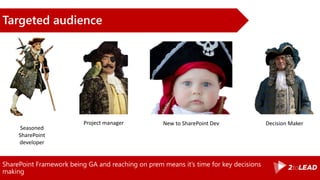
SharePoint Framework being GA and reaching on prem means it’s time for key decisions
making
Targeted audience
Seasoned
SharePoint
developer
Project manager New to SharePoint Dev Decision Maker
Agenda
•Introduction
•Our scenario
•About Data
•About Processes
•About Users
•Conclusion
Ready?
Our scenario
The Pirates Company
« We locate, document and collect
treasures all around the globe »
S.L, CEO
Our Pirates
*You might recognize some of them
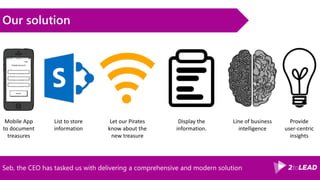
Mobile App
to document
treasures
Our solution
Seb, the CEO has tasked us with delivering a comprehensive and modern solution
List to store
information
Let our Pirates
know about the
new treasure
Display the
information.
Line of business

intelligence
Provide
user-centric
insights
Data Entry
SharePoint designer has been the go to solution for data entry, it’s now time to transition
In the past
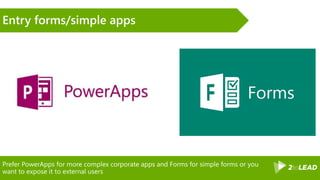
Prefer PowerApps for more complex corporate apps and Forms for simple forms or you
want to expose it to external users
Entry forms/simple apps
PowerApps Form
Demo
Provisioning
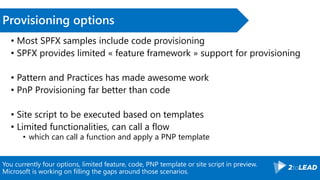
You currently four options, limited feature, code, PNP template or site script in preview.
Microsoft is working on filling the gaps around those scenarios.
Provisioning options
• Most SPFX samples include code provisioning
• SPFX provides limited « feature framework » support for provisioning
• Pattern and Practices has made awesome work
• PnP Provisioning far better than code
• Site script to be executed based on templates
• Limited functionalities, can call a flow
• which can call a function and apply a PNP template
The provisioning template for Pirates Treasure App, and the site script for Pirate
Community
Demo
Business Process
Automation
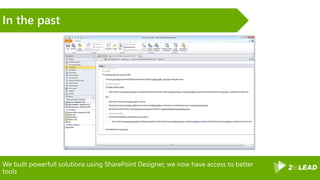
We built powerfull solutions using SharePoint Designer, we now have access to better
tools
In the past
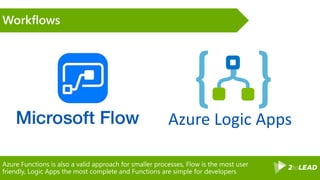
Azure Functions is also a valid approach for smaller processes, Flow is the most user
friendly, Logic Apps the most complete and Functions are simple for developers
Workflows
Azure Logic Apps
Flow workflow
Demo
Displaying
information
The options you get
• Column formatters
• JSON based definition
• Limited
• No UI yet (OOTB)
• Field Customizers
• Part of SPFX
• Custom webpart…
Column formatter, Chris Kent webpart, Field customizer
Demos
Batch jobs
& Line of business
intelligence
Azure functions are becoming Microsoft’s default answer to backend processing for cloud
enabled solutions
Azure functions
Azure function computing
Demo
User centric
information
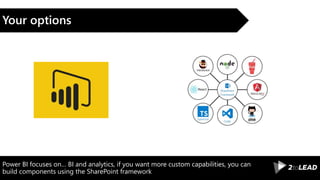
Power BI focuses on… BI and analytics, if you want more custom capabilities, you can
build components using the SharePoint framework
Your options
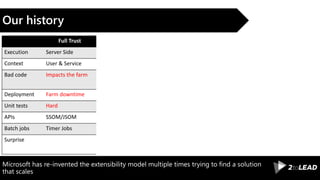
Microsoft has re-invented the extensibility model multiple times trying to find a solution
that scales
Our history
Full Trust Sandbox Add-ins (SP) Add-ins (PH)
Execution Server Side Server Side Front End Server Side out of SP
Context User & Service User Only User Only User & App
Bad code Impacts the farm Impacts the solution Impacts the user Impacts the solution
Deployment Farm downtime Solution downtime Solution downtime Solution downtime
Unit tests Hard Hard Better Better
APIs SSOM/JSOM SSOM/JSOM JSOM/REST CSOM/REST
Batch jobs Timer Jobs No No Your own
Surprise Throttling, API limitations Iframes Iframes
And the general feeling of an average SharePoint developer was either bitterness or
frustration, especially when we compared with other developers and the tools they had.
SharePoint Add-ins/Sandbox
Some developers felt the winds turning and started gearing for that as well as changing
their approach.
Workarounds
•Content Script Editor
Webpart
•Display templates
•JSLink
•ScriptLink
•PowerShell
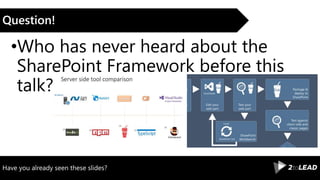
Have you already seen these slides?
Question!
•Who has never heard about the
SharePoint Framework before this
talk?
The Short Version
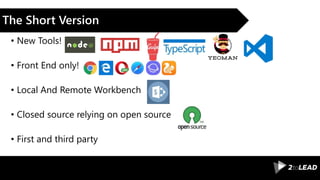
• New Tools!
• Front End only!
• Local And Remote Workbench
• Closed source relying on open source
• First and third party
The product team is working to get a good on premises story so you can develop
solutions working on both environments with little to no changes
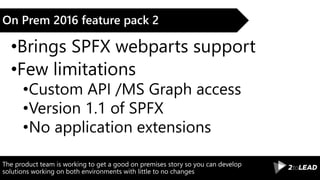
On Prem 2016 feature pack 2
•Brings SPFX webparts support
•Few limitations
•Custom API /MS Graph access
•Version 1.1 of SPFX
•No application extensions
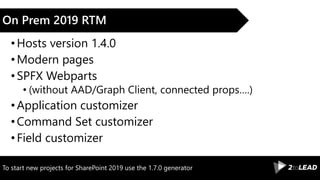
To start new projects for SharePoint 2019 use the 1.7.0 generator
On Prem 2019 RTM
•Hosts version 1.4.0
•Modern pages
•SPFX Webparts
• (without AAD/Graph Client, connected props….)
•Application customizer
•Command Set customizer
•Field customizer
The webpart project
Demo
Accessing data
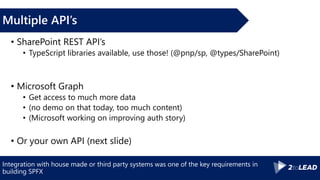
Integration with house made or third party systems was one of the key requirements in
building SPFX
Multiple API’s
• SharePoint REST API’s
• TypeScript libraries available, use those! (@pnp/sp, @types/SharePoint)
• Microsoft Graph
• Get access to much more data
• (no demo on that today, too much content)
• (Microsoft working on improving auth story)
• Or your own API (next slide)
Event receivers were some kind of predecessors of the modern webhooks, SharePoint
developers won’t be un-familiar with those.
Reacting on data events
• We used to have Event Receivers
• SP Provider Hosted Add-ins have RER’s (same thing
over HTTP)
• SharePoint API /MS Graph provides webhooks
support
• GA: Better integration between Azure Functions and
Microsoft Graph
Getting treasure Data
Demo
Conclusion
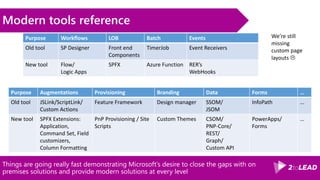
Things are going really fast demonstrating Microsoft’s desire to close the gaps with on
premises solutions and provide modern solutions at every level
Modern tools reference
Purpose Workflows LOB Batch Events
Old tool SP Designer Front end
Components
TimerJob Event Receivers
New tool Flow/
Logic Apps
SPFX Azure Function RER’s
WebHooks
Purpose Augmentations Provisioning Branding Data Forms …
Old tool JSLink/ScriptLink/
Custom Actions
Feature Framework Design manager SSOM/
JSOM
InfoPath …
New tool SPFX Extensions:
Application,
Command Set, Field
customizers,
Column Formatting
PnP Provisioning / Site
Scripts
Custom Themes CSOM/
PNP-Core/
REST/
Graph/
Custom API
PowerApps/
Forms
…
We’re still
missing
custom page
layouts 
Conclusion
• We have a modern tooling
• The SharePoint Framework is one item of our pirate gear
• Add-ins are still relevant in some scenarios
• Leverage other tools to have a full spectrum
• SharePoint dev cost will decrease because bigger community
• SharePoint devs’ life just became better
• Happy coding 
Bit.ly/vince365 @baywet slideshare.net/VincentBIRET
Thanks! Questions?

#ESPC18 how to migrate to the #SharePoint Framework?

  • 1.
    Migrate your customcomponents to the SharePoint Framework Vincent Biret Azure and Office 365 developer @ 2toLead Microsoft Office Dev MVP @baywet Bit.ly/vince365
  • 2.
    SharePoint Framework beingGA and reaching on prem means it’s time for key decisions making Targeted audience Seasoned SharePoint developer Project manager New to SharePoint Dev Decision Maker
  • 3.
  • 4.
  • 5.
  • 6.
    The Pirates Company «We locate, document and collect treasures all around the globe » S.L, CEO
  • 7.
    Our Pirates *You mightrecognize some of them
  • 8.
    Mobile App to document treasures Oursolution Seb, the CEO has tasked us with delivering a comprehensive and modern solution List to store information Let our Pirates know about the new treasure Display the information. Line of business intelligence Provide user-centric insights
  • 9.
  • 10.
    SharePoint designer hasbeen the go to solution for data entry, it’s now time to transition In the past
  • 11.
    Prefer PowerApps formore complex corporate apps and Forms for simple forms or you want to expose it to external users Entry forms/simple apps
  • 12.
  • 13.
  • 14.
    You currently fouroptions, limited feature, code, PNP template or site script in preview. Microsoft is working on filling the gaps around those scenarios. Provisioning options • Most SPFX samples include code provisioning • SPFX provides limited « feature framework » support for provisioning • Pattern and Practices has made awesome work • PnP Provisioning far better than code • Site script to be executed based on templates • Limited functionalities, can call a flow • which can call a function and apply a PNP template
  • 15.
    The provisioning templatefor Pirates Treasure App, and the site script for Pirate Community Demo
  • 16.
  • 17.
    We built powerfullsolutions using SharePoint Designer, we now have access to better tools In the past
  • 18.
    Azure Functions isalso a valid approach for smaller processes, Flow is the most user friendly, Logic Apps the most complete and Functions are simple for developers Workflows Azure Logic Apps
  • 19.
  • 20.
  • 21.
    The options youget • Column formatters • JSON based definition • Limited • No UI yet (OOTB) • Field Customizers • Part of SPFX • Custom webpart…
  • 22.
    Column formatter, ChrisKent webpart, Field customizer Demos
  • 23.
    Batch jobs & Lineof business intelligence
  • 24.
    Azure functions arebecoming Microsoft’s default answer to backend processing for cloud enabled solutions Azure functions
  • 25.
  • 26.
  • 27.
    Power BI focuseson… BI and analytics, if you want more custom capabilities, you can build components using the SharePoint framework Your options
  • 28.
    Microsoft has re-inventedthe extensibility model multiple times trying to find a solution that scales Our history Full Trust Sandbox Add-ins (SP) Add-ins (PH) Execution Server Side Server Side Front End Server Side out of SP Context User & Service User Only User Only User & App Bad code Impacts the farm Impacts the solution Impacts the user Impacts the solution Deployment Farm downtime Solution downtime Solution downtime Solution downtime Unit tests Hard Hard Better Better APIs SSOM/JSOM SSOM/JSOM JSOM/REST CSOM/REST Batch jobs Timer Jobs No No Your own Surprise Throttling, API limitations Iframes Iframes
  • 29.
    And the generalfeeling of an average SharePoint developer was either bitterness or frustration, especially when we compared with other developers and the tools they had. SharePoint Add-ins/Sandbox
  • 30.
    Some developers feltthe winds turning and started gearing for that as well as changing their approach. Workarounds •Content Script Editor Webpart •Display templates •JSLink •ScriptLink •PowerShell
  • 31.
    Have you alreadyseen these slides? Question! •Who has never heard about the SharePoint Framework before this talk?
  • 32.
    The Short Version •New Tools! • Front End only! • Local And Remote Workbench • Closed source relying on open source • First and third party
  • 33.
    The product teamis working to get a good on premises story so you can develop solutions working on both environments with little to no changes On Prem 2016 feature pack 2 •Brings SPFX webparts support •Few limitations •Custom API /MS Graph access •Version 1.1 of SPFX •No application extensions
  • 34.
    To start newprojects for SharePoint 2019 use the 1.7.0 generator On Prem 2019 RTM •Hosts version 1.4.0 •Modern pages •SPFX Webparts • (without AAD/Graph Client, connected props….) •Application customizer •Command Set customizer •Field customizer
  • 35.
  • 36.
  • 37.
    Integration with housemade or third party systems was one of the key requirements in building SPFX Multiple API’s • SharePoint REST API’s • TypeScript libraries available, use those! (@pnp/sp, @types/SharePoint) • Microsoft Graph • Get access to much more data • (no demo on that today, too much content) • (Microsoft working on improving auth story) • Or your own API (next slide)
  • 38.
    Event receivers weresome kind of predecessors of the modern webhooks, SharePoint developers won’t be un-familiar with those. Reacting on data events • We used to have Event Receivers • SP Provider Hosted Add-ins have RER’s (same thing over HTTP) • SharePoint API /MS Graph provides webhooks support • GA: Better integration between Azure Functions and Microsoft Graph
  • 39.
  • 40.
  • 41.
    Things are goingreally fast demonstrating Microsoft’s desire to close the gaps with on premises solutions and provide modern solutions at every level Modern tools reference Purpose Workflows LOB Batch Events Old tool SP Designer Front end Components TimerJob Event Receivers New tool Flow/ Logic Apps SPFX Azure Function RER’s WebHooks Purpose Augmentations Provisioning Branding Data Forms … Old tool JSLink/ScriptLink/ Custom Actions Feature Framework Design manager SSOM/ JSOM InfoPath … New tool SPFX Extensions: Application, Command Set, Field customizers, Column Formatting PnP Provisioning / Site Scripts Custom Themes CSOM/ PNP-Core/ REST/ Graph/ Custom API PowerApps/ Forms … We’re still missing custom page layouts 
  • 42.
    Conclusion • We havea modern tooling • The SharePoint Framework is one item of our pirate gear • Add-ins are still relevant in some scenarios • Leverage other tools to have a full spectrum • SharePoint dev cost will decrease because bigger community • SharePoint devs’ life just became better • Happy coding 
  • 43.

Editor's Notes

  • #2 To add your image, please insert your picture and scale it to be bigger than the size of the white box shown.
  • #5 Gestion des questions, interaction, ok avec ce programme?
  • #13 https://us.create.powerapps.com
  • #15 https://docs.microsoft.com/en-us/sharepoint/dev/declarative-customization/site-design-overview
  • #19 TIP: you can now export a Flow in a logic app to build/take ownership of what a poweruser has built
  • #20 https://flow.microsoft.com
  • #26 http://www.sharepointnutsandbolts.com/2017/04/calling-azure-function-from-sharepoint.html
  • #39 https://blogs.technet.microsoft.com/stefan_gossner/2017/09/12/feature-pack-2-for-sharepoint-server-2016-aka-september-2017-cu-is-available-for-download/
  • #41 Show the solution in code, gulp serve https://baywet.sharepoint.com/sites/sessionmigratespfx/_layouts/15/workbench.aspx gulp –tasks https://docs.microsoft.com/en-us/sharepoint/dev/declarative-customization/column-formatting
  • #48 PowerShell management support (6906.1200): https://aka.ms/spsitetheming Theme builder tool (hosted on Fabric site): https://aka.ms/spthemebuilder
  • #53 This is the Pre-Title Screen. Please do not place any content on this screen.