POWER AUTOMATE DESKTOP
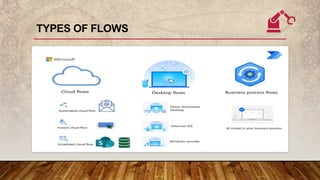
TYPES OF FLOWS
WHAT IS POWER AUTOMATE DESKTOP?
Power Automate for desktop is
a tool to build your desktop
flows.
PAD- can help to create, edit,
and run your automations.
Desktop flows broaden the
existing robotic process
automation (RPA) capabilities
in Power Automate
Power Automate app allows
you to connect your machine
to the Power Automate cloud.
WHY WE USE POWER AUTOMATE DESKTOP?
• To streamline workflows in both modern and legacy applications.
• It receives input via mouse and keyboard, the actions are recorded.
• The repetitive actions are tracked and recorded by the technology across several
applications .
• The process of automation can be carried over to other sources such as
databases, Excel files Pdfs and lot more.
• With this technology, it is possible to build automation across organizations,
enabling more than 400 connectors across the cloud.
• It make it equally accessible to all in multiple languages
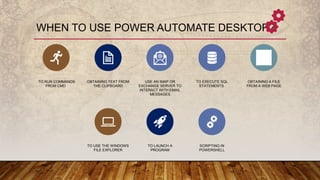
WHEN TO USE POWER AUTOMATE DESKTOP?
TO RUN COMMANDS
FROM CMD
OBTAINING TEXT FROM
THE CLIPBOARD
USE AN IMAP OR
EXCHANGE SERVER TO
INTERACT WITH EMAIL
MESSAGES
TO EXECUTE SQL
STATEMENTS
OBTAINING A FILE
FROM A WEB PAGE
TO USE THE WINDOWS
FILE EXPLORER
TO LAUNCH A
PROGRAM
SCRIPTING IN
POWERSHELL
BENEFITS OF DESKTOP FLOWS
Desktop apps Automation
Easy to create.
When APIs are not available.
Helps when Dependency on device .
Quick to test and immediate returns as expected.
To connect to Legacy Apps with no available APIs.
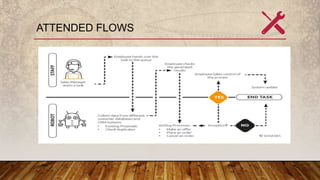
ATTENDED FLOWS
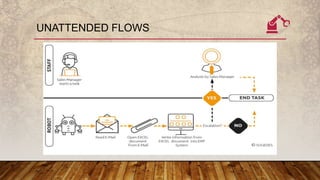
UNATTENDED FLOWS
COMPONENTS OF POWER AUTOMATE
DESKTOP
Console - the main control
panel of the platform from
which you can launch the
flow designer to create or
edit flows. Through the
console's options, you can
also delete, rename, and
run existing flows.
Flow designer - the
development environment
of Power Automate for
desktop, where you can
build flows and perform
debugging.
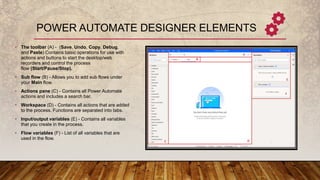
POWER AUTOMATE DESIGNER ELEMENTS
• The toolbar (A) - (Save, Undo, Copy, Debug,
and Paste) Contains basic operations for use with
actions and buttons to start the desktop/web
recorders and control the process
flow (Start/Pause/Stop).
• Sub flow (B) - Allows you to add sub flows under
your Main flow.
• Actions pane (C) - Contains all Power Automate
actions and includes a search bar.
• Workspace (D) - Contains all actions that are added
to the process. Functions are separated into tabs.
• Input/output variables (E) - Contains all variables
that you create in the process.
• Flow variables (F) - List of all variables that are
used in the flow.

Power Automate Desktop.pptx

  • 1.
  • 2.
  • 3.
    WHAT IS POWERAUTOMATE DESKTOP? Power Automate for desktop is a tool to build your desktop flows. PAD- can help to create, edit, and run your automations. Desktop flows broaden the existing robotic process automation (RPA) capabilities in Power Automate Power Automate app allows you to connect your machine to the Power Automate cloud.
  • 4.
    WHY WE USEPOWER AUTOMATE DESKTOP? • To streamline workflows in both modern and legacy applications. • It receives input via mouse and keyboard, the actions are recorded. • The repetitive actions are tracked and recorded by the technology across several applications . • The process of automation can be carried over to other sources such as databases, Excel files Pdfs and lot more. • With this technology, it is possible to build automation across organizations, enabling more than 400 connectors across the cloud. • It make it equally accessible to all in multiple languages
  • 5.
    WHEN TO USEPOWER AUTOMATE DESKTOP? TO RUN COMMANDS FROM CMD OBTAINING TEXT FROM THE CLIPBOARD USE AN IMAP OR EXCHANGE SERVER TO INTERACT WITH EMAIL MESSAGES TO EXECUTE SQL STATEMENTS OBTAINING A FILE FROM A WEB PAGE TO USE THE WINDOWS FILE EXPLORER TO LAUNCH A PROGRAM SCRIPTING IN POWERSHELL
  • 6.
    BENEFITS OF DESKTOPFLOWS Desktop apps Automation Easy to create. When APIs are not available. Helps when Dependency on device . Quick to test and immediate returns as expected. To connect to Legacy Apps with no available APIs.
  • 7.
  • 8.
  • 9.
    COMPONENTS OF POWERAUTOMATE DESKTOP Console - the main control panel of the platform from which you can launch the flow designer to create or edit flows. Through the console's options, you can also delete, rename, and run existing flows. Flow designer - the development environment of Power Automate for desktop, where you can build flows and perform debugging.
  • 10.
    POWER AUTOMATE DESIGNERELEMENTS • The toolbar (A) - (Save, Undo, Copy, Debug, and Paste) Contains basic operations for use with actions and buttons to start the desktop/web recorders and control the process flow (Start/Pause/Stop). • Sub flow (B) - Allows you to add sub flows under your Main flow. • Actions pane (C) - Contains all Power Automate actions and includes a search bar. • Workspace (D) - Contains all actions that are added to the process. Functions are separated into tabs. • Input/output variables (E) - Contains all variables that you create in the process. • Flow variables (F) - List of all variables that are used in the flow.