Claims-Based Authentication
      SharePoint 2010


 Jonathan Schultz (@SharePointValue)
       Skyline Technologies, Inc.


              11/15/2011
About Skyline Technologies
•   Leading Microsoft solutions provider
     – Develops and tailors IT applications to meet the business and
       technical objectives of customers
     – Serves clients in the manufacturing and retail to healthcare,
       transportation, and logistics industries
•   Microsoft Partner with Gold competencies in Business Intelligence,
    Content Management, Portals and Collaboration, and Web Development
    and Silver competencies in Data Platform, Project and Portfolio
    Management, Search, and Software Development.
•   Provides a pathway to speed your company toward its vision.
•   Recognized by businesses nationwide as a team of smart, experienced
    people and a Microsoft Gold Certified Partner organization specializing in
    adapting Microsoft solutions to individual client’s needs.
Agenda
• What are Claims?
• Why would you use them?
• Claims-Based Authentication
  – Basic Architecture
  – Trusted Identity Providers
  – Advanced Concepts
• Claims Development Tasks
• Reality of Claims Based Authentication
• Reference Materials
What are Claims?
• Attributes about a User
• Need to Come from Someone You Trust

• Driver’s License Example
  – Trusted Provider = State of Wisconsin
  – Claims
     • Name = Jonathan Schultz
     • Age = 35
     • Organ Donor = No
Why Use Claims?
• Claim Augmentation
  – Security Groups from Active Directory
  – HRMS/CRM Attributes
     • Title/Role
• Federation
  – Partner Network
     • Business to Business
  – Subsidiaries
  – Web 2.0 (Windows Live, Facebook, etc.)
• Advanced Authentication & Authorization
Basic Claims Scenario
Claims Based Architecture
Terminology
• Security Token Service (STS)
  – Identity Provider (IP-STS)
  – Relying Party (RP-STS)
• Security Assertion Markup Language (SAML)
• Windows Identity Framework (formerly Geneva)
• Trusted Login Provider
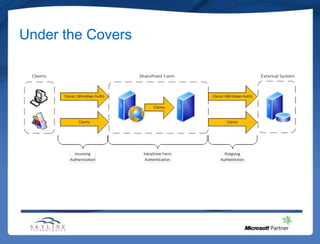
Under the Covers
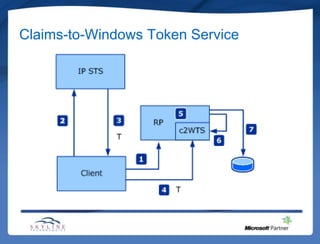
Claims-to-Windows Token Service
Claims Based Architecture Notes
• New in SharePoint 2010
• Authentication Prompt for Multiple Providers
• All Intra/Inter Farm Calls are Claims Based
  – i.e. Service Applications
• Claims-to-Windows Token Service Needed for
  Some Service Applications, i.e. PerformancePoint
  Services
Claims Development Tasks
• Custom Login Pages
  –   Extranet Scenarios
  –   Branding
  –   “Remember Me” Capability
  –   Home Realm Discovery
• Custom Claim Providers
  – Claims Augmentation
  – Claims Picking / Resolution
• Trusted Login Providers
  – WIF SDK
Reality of Claims Based Authentication
• Claims Authorization uses OR logic, not AND
  – Scenario: Authorize US HR User
     • Location Claim = US
     • Department Claim = HR
     • Will also succeed for US IT because of US OR HR
• Trusted Identity Providers
  – Cookie Driven (Watch out for domains/paths)
  – Time Based Expiration (Server Times)
• Claims + Kerberos + SSRS = Problem
Reference Materials
• Claims and Security Technical Articles for
  SharePoint 2010
• Implementing Claims-Based Authentication with
  SharePoint Server 2010 – White Paper
• A Guide to Claims-Based Identity and Access
  Control – Patterns & Practices
• Custom Claims-Based Security in SharePoint
  2010
• Steve Peschka’s Blog: Share-n-dipity

Claims Based Authentication in SharePoint 2010

  • 1.
    Claims-Based Authentication SharePoint 2010 Jonathan Schultz (@SharePointValue) Skyline Technologies, Inc. 11/15/2011
  • 2.
    About Skyline Technologies • Leading Microsoft solutions provider – Develops and tailors IT applications to meet the business and technical objectives of customers – Serves clients in the manufacturing and retail to healthcare, transportation, and logistics industries • Microsoft Partner with Gold competencies in Business Intelligence, Content Management, Portals and Collaboration, and Web Development and Silver competencies in Data Platform, Project and Portfolio Management, Search, and Software Development. • Provides a pathway to speed your company toward its vision. • Recognized by businesses nationwide as a team of smart, experienced people and a Microsoft Gold Certified Partner organization specializing in adapting Microsoft solutions to individual client’s needs.
  • 3.
    Agenda • What areClaims? • Why would you use them? • Claims-Based Authentication – Basic Architecture – Trusted Identity Providers – Advanced Concepts • Claims Development Tasks • Reality of Claims Based Authentication • Reference Materials
  • 4.
    What are Claims? •Attributes about a User • Need to Come from Someone You Trust • Driver’s License Example – Trusted Provider = State of Wisconsin – Claims • Name = Jonathan Schultz • Age = 35 • Organ Donor = No
  • 5.
    Why Use Claims? •Claim Augmentation – Security Groups from Active Directory – HRMS/CRM Attributes • Title/Role • Federation – Partner Network • Business to Business – Subsidiaries – Web 2.0 (Windows Live, Facebook, etc.) • Advanced Authentication & Authorization
  • 6.
  • 7.
  • 8.
    Terminology • Security TokenService (STS) – Identity Provider (IP-STS) – Relying Party (RP-STS) • Security Assertion Markup Language (SAML) • Windows Identity Framework (formerly Geneva) • Trusted Login Provider
  • 9.
  • 10.
  • 11.
    Claims Based ArchitectureNotes • New in SharePoint 2010 • Authentication Prompt for Multiple Providers • All Intra/Inter Farm Calls are Claims Based – i.e. Service Applications • Claims-to-Windows Token Service Needed for Some Service Applications, i.e. PerformancePoint Services
  • 12.
    Claims Development Tasks •Custom Login Pages – Extranet Scenarios – Branding – “Remember Me” Capability – Home Realm Discovery • Custom Claim Providers – Claims Augmentation – Claims Picking / Resolution • Trusted Login Providers – WIF SDK
  • 13.
    Reality of ClaimsBased Authentication • Claims Authorization uses OR logic, not AND – Scenario: Authorize US HR User • Location Claim = US • Department Claim = HR • Will also succeed for US IT because of US OR HR • Trusted Identity Providers – Cookie Driven (Watch out for domains/paths) – Time Based Expiration (Server Times) • Claims + Kerberos + SSRS = Problem
  • 14.
    Reference Materials • Claimsand Security Technical Articles for SharePoint 2010 • Implementing Claims-Based Authentication with SharePoint Server 2010 – White Paper • A Guide to Claims-Based Identity and Access Control – Patterns & Practices • Custom Claims-Based Security in SharePoint 2010 • Steve Peschka’s Blog: Share-n-dipity