A quick guide to
The SharePoint Framework
and Modern Intranet
Development
Why is SharePoint introducing the client-side development model?
With the evolution of
Office 365 and cloud SaaS solutions,
and the increasingly web-based
world, existing development models
for SharePoint encounter
constraints of the Iframe, a reduced
set of APIs and inability to integrate
across Office 365 workloads.
Developers need a more efficient
toolchain and model that allows
them to scale beyond the current
constraints. The client-side
development framework will deliver
capabilities that will help Microsoft
engineers, partners, customers and
developers throughout the
community build powerful, rich
applications that are both intuitive
and simple to consume
Will new document libraries support customization?
When we launch the new document
library experience, we will continue to
support declarative CustomActions that
represent menu and command actions.
Many first release customers are
currently reporting issues around this
functionality; we will address these issues
before broad worldwide release of the
new experience, or making the new
experience the default experience in any
library.
Yes.
Solutions that are currently deployed that make use of this mechanism should continue to
work as before, with actions appearing in the new command surface in addition to the
Ribbon in classic mode. CustomActions that deploy script, JSLinks, and additional web
parts on the page are currently not supported. Environments that require these
unsupported features should continue using classic mode for the time being.
Throughout this year, we will be addressing critical scenario gaps to make the new
document library experience support custom processes, commands and other
functionality required for complex, business-critical workflows in complex organizations.
Specific capabilities we are investigating building include the ability to host web parts on
the page, the ability to define custom view layouts and conditional formatting, and the
ability to be visually customized and branded with client-side design packages.
Will new document libraries support customization?
Microsoft have plans to bring the SharePoint
Framework to SharePoint Server 2016
through their Feature Pack model
Will this be available only in SharePoint 2016 on premise?
We currently have a SharePoint 2013 farm on premise.
Coming soon.
The SharePoint Framework does not
make obsolete nor deprecate the
existing Add-In Model for SharePoint.
What does this mean for App model? Is that deprecated?
No.
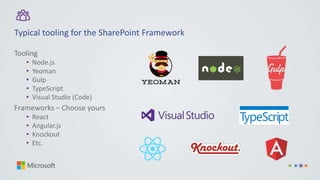
Tooling
• Node.js
• Yeoman
• Gulp
• TypeScript
• Visual Studio (Code)
Frameworks – Choose yours
• React
• Angular.js
• Knockout
• Etc.
Typical tooling for the SharePoint Framework
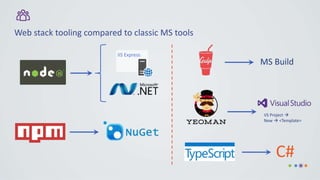
Web stack tooling compared to classic MS tools
IIS Express
VS Project 
New  <Template>
C#
Learn more about the SharePoint Framework with this video
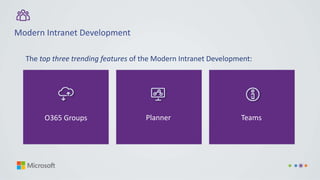
Modern Intranet Development
O365 Groups Planner Teams
The top three trending features of the Modern Intranet Development:
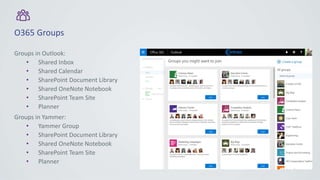
O365 Groups
Groups in Outlook:
• Shared Inbox
• Shared Calendar
• SharePoint Document Library
• Shared OneNote Notebook
• SharePoint Team Site
• Planner
Groups in Yammer:
• Yammer Group
• SharePoint Document Library
• Shared OneNote Notebook
• SharePoint Team Site
• Planner
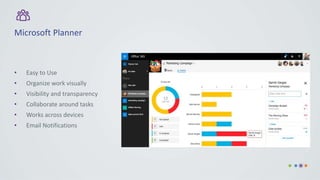
Microsoft Planner
• Easy to Use
• Organize work visually
• Visibility and transparency
• Collaborate around tasks
• Works across devices
• Email Notifications
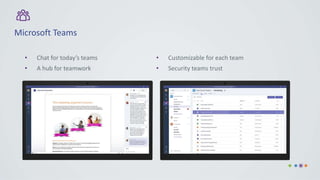
Microsoft Teams
• Chat for today’s teams
• A hub for teamwork
• Customizable for each team
• Security teams trust
Or email info@mintgroup.tech to sign-up for a 90-minute presentation with our team of experts
Who is Mint?
Mint Group is a global IT consultancy that is in the top 5% of global CRM providers, Microsoft
Gold Cloud Productivity partner, member of the Microsoft President Club, and employer of two
of only 40 ALM Rangers worldwide.
The company enables better business by digitally leading its clients through Customer
Centricity, Employee Engagement and Smarter Systems in the digital space.
Mint. Create tomorrow.
The SharePoint Framework and Modern Intranet Development
Access the quick guide today. Click here.
w us.mintgroup.tech
t +1 512.501.5900
e info@mintgroup.tech
a 101 W 6th Street, Suite 402, Scarborough
Building, Austin TX 78701
Mint Management Technologies LLC

Modern SharePoint Development - A quick guide

  • 1.
    A quick guideto The SharePoint Framework and Modern Intranet Development
  • 2.
    Why is SharePointintroducing the client-side development model? With the evolution of Office 365 and cloud SaaS solutions, and the increasingly web-based world, existing development models for SharePoint encounter constraints of the Iframe, a reduced set of APIs and inability to integrate across Office 365 workloads. Developers need a more efficient toolchain and model that allows them to scale beyond the current constraints. The client-side development framework will deliver capabilities that will help Microsoft engineers, partners, customers and developers throughout the community build powerful, rich applications that are both intuitive and simple to consume
  • 3.
    Will new documentlibraries support customization? When we launch the new document library experience, we will continue to support declarative CustomActions that represent menu and command actions. Many first release customers are currently reporting issues around this functionality; we will address these issues before broad worldwide release of the new experience, or making the new experience the default experience in any library. Yes.
  • 4.
    Solutions that arecurrently deployed that make use of this mechanism should continue to work as before, with actions appearing in the new command surface in addition to the Ribbon in classic mode. CustomActions that deploy script, JSLinks, and additional web parts on the page are currently not supported. Environments that require these unsupported features should continue using classic mode for the time being. Throughout this year, we will be addressing critical scenario gaps to make the new document library experience support custom processes, commands and other functionality required for complex, business-critical workflows in complex organizations. Specific capabilities we are investigating building include the ability to host web parts on the page, the ability to define custom view layouts and conditional formatting, and the ability to be visually customized and branded with client-side design packages. Will new document libraries support customization?
  • 5.
    Microsoft have plansto bring the SharePoint Framework to SharePoint Server 2016 through their Feature Pack model Will this be available only in SharePoint 2016 on premise? We currently have a SharePoint 2013 farm on premise. Coming soon.
  • 6.
    The SharePoint Frameworkdoes not make obsolete nor deprecate the existing Add-In Model for SharePoint. What does this mean for App model? Is that deprecated? No.
  • 7.
    Tooling • Node.js • Yeoman •Gulp • TypeScript • Visual Studio (Code) Frameworks – Choose yours • React • Angular.js • Knockout • Etc. Typical tooling for the SharePoint Framework
  • 8.
    Web stack toolingcompared to classic MS tools IIS Express VS Project  New  <Template> C#
  • 9.
    Learn more aboutthe SharePoint Framework with this video
  • 10.
    Modern Intranet Development O365Groups Planner Teams The top three trending features of the Modern Intranet Development:
  • 11.
    O365 Groups Groups inOutlook: • Shared Inbox • Shared Calendar • SharePoint Document Library • Shared OneNote Notebook • SharePoint Team Site • Planner Groups in Yammer: • Yammer Group • SharePoint Document Library • Shared OneNote Notebook • SharePoint Team Site • Planner
  • 12.
    Microsoft Planner • Easyto Use • Organize work visually • Visibility and transparency • Collaborate around tasks • Works across devices • Email Notifications
  • 13.
    Microsoft Teams • Chatfor today’s teams • A hub for teamwork • Customizable for each team • Security teams trust
  • 14.
    Or email info@mintgroup.techto sign-up for a 90-minute presentation with our team of experts Who is Mint? Mint Group is a global IT consultancy that is in the top 5% of global CRM providers, Microsoft Gold Cloud Productivity partner, member of the Microsoft President Club, and employer of two of only 40 ALM Rangers worldwide. The company enables better business by digitally leading its clients through Customer Centricity, Employee Engagement and Smarter Systems in the digital space. Mint. Create tomorrow. The SharePoint Framework and Modern Intranet Development Access the quick guide today. Click here.
  • 15.
    w us.mintgroup.tech t +1512.501.5900 e info@mintgroup.tech a 101 W 6th Street, Suite 402, Scarborough Building, Austin TX 78701 Mint Management Technologies LLC