
MODEL-VIEW-CONTROLLER
(MVC) PATTERN IN DJANGO
www.studysection.com
INTRODUCTION
Django uses the Model-View-Controller (MVC) pattern, with slight variations,
primarily following the Model-Template-View (MTV) pattern. This structure
enhances developer productivity and maintainability. Models represent the
data layer, View handles presentation logic, and Controller coordinates
interactions. MTV maintains data-related tasks, while Views serve as
Controllers, promoting maintainable code and modularity in Django web
applications. the data layer, View handles presentation logic, and Controller
coordinates interactions. MTV maintains data-related tasks, while Views
serve as Controllers, promoting maintainable code and modularity in Django
web applications.
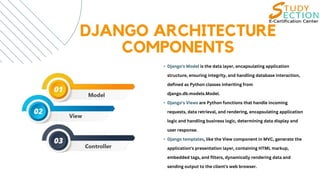
DJANGO ARCHITECTURE
COMPONENTS
• Django's Model is the data layer, encapsulating application
structure, ensuring integrity, and handling database interaction,
defined as Python classes inheriting from
django.db.models.Model.
• Django's Views are Python functions that handle incoming
requests, data retrieval, and rendering, encapsulating application
logic and handling business logic, determining data display and
user response.
• Django templates, like the View component in MVC, generate the
application's presentation layer, containing HTML markup,
embedded tags, and filters, dynamically rendering data and
sending output to the client's web browser.
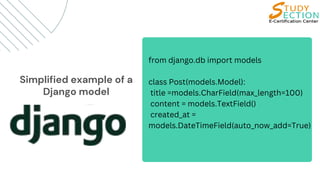
Simplified example of a
Django model
from django.db import models
class Post(models.Model):
title =models.CharField(max_length=100)
content = models.TextField()
created_at =
models.DateTimeField(auto_now_add=True)
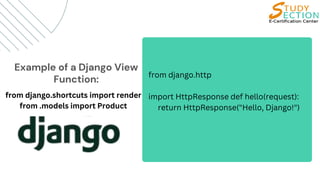
Example of a Django View
Function: from django.http
import HttpResponse def hello(request):
return HttpResponse("Hello, Django!")
from django.shortcuts import render
from .models import Product
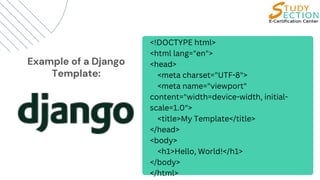
Example of a Django
Template:
<!DOCTYPE html>
<html lang="en">
<head>
<meta charset="UTF-8">
<meta name="viewport"
content="width=device-width, initial-
scale=1.0">
<title>My Template</title>
</head>
<body>
<h1>Hello, World!</h1>
</body>
</html>
TO READ MORE ON THIS TOPIC
Do visit: https://studysection.com/blog
www.studysection.com

Model-View-Controller (MVC) Pattern in Django

  • 1.
    MODEL-VIEW-CONTROLLER (MVC) PATTERN INDJANGO www.studysection.com
  • 2.
    INTRODUCTION Django uses theModel-View-Controller (MVC) pattern, with slight variations, primarily following the Model-Template-View (MTV) pattern. This structure enhances developer productivity and maintainability. Models represent the data layer, View handles presentation logic, and Controller coordinates interactions. MTV maintains data-related tasks, while Views serve as Controllers, promoting maintainable code and modularity in Django web applications. the data layer, View handles presentation logic, and Controller coordinates interactions. MTV maintains data-related tasks, while Views serve as Controllers, promoting maintainable code and modularity in Django web applications.
  • 3.
    DJANGO ARCHITECTURE COMPONENTS • Django'sModel is the data layer, encapsulating application structure, ensuring integrity, and handling database interaction, defined as Python classes inheriting from django.db.models.Model. • Django's Views are Python functions that handle incoming requests, data retrieval, and rendering, encapsulating application logic and handling business logic, determining data display and user response. • Django templates, like the View component in MVC, generate the application's presentation layer, containing HTML markup, embedded tags, and filters, dynamically rendering data and sending output to the client's web browser.
  • 4.
    Simplified example ofa Django model from django.db import models class Post(models.Model): title =models.CharField(max_length=100) content = models.TextField() created_at = models.DateTimeField(auto_now_add=True)
  • 5.
    Example of aDjango View Function: from django.http import HttpResponse def hello(request): return HttpResponse("Hello, Django!") from django.shortcuts import render from .models import Product
  • 6.
    Example of aDjango Template: <!DOCTYPE html> <html lang="en"> <head> <meta charset="UTF-8"> <meta name="viewport" content="width=device-width, initial- scale=1.0"> <title>My Template</title> </head> <body> <h1>Hello, World!</h1> </body> </html>
  • 7.
    TO READ MOREON THIS TOPIC Do visit: https://studysection.com/blog www.studysection.com