1
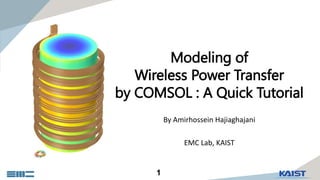
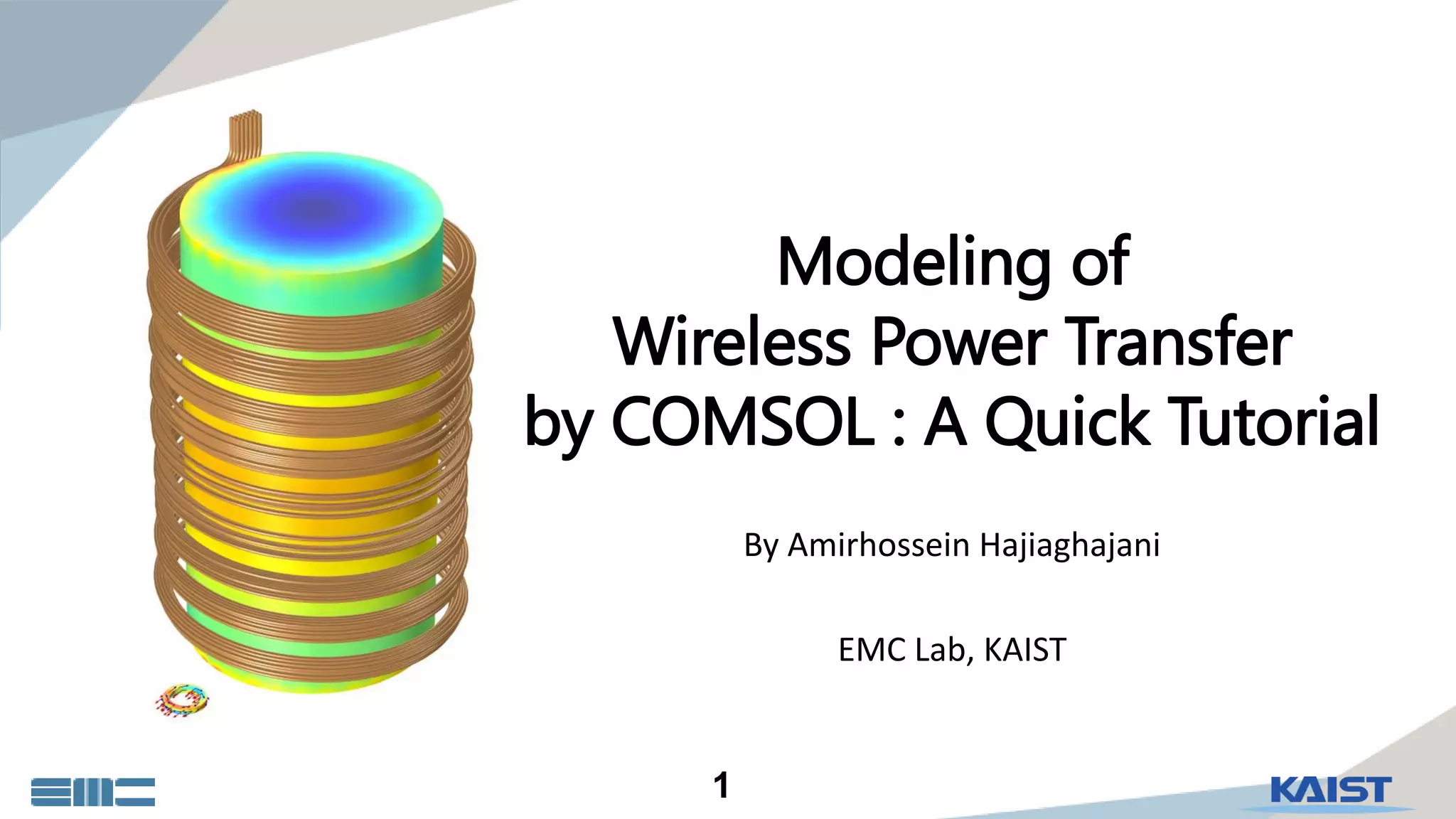
Modeling of
Wireless Power Transfer
by COMSOL : A Quick Tutorial
By Amirhossein Hajiaghajani
EMC Lab, KAIST
2
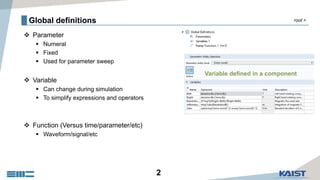
Global definitions
 Parameter
 Numeral
 Fixed
 Used for parameter sweep
 Variable
 Can change during simulation
 To simplify expressions and operators
 Function (Versus time/parameter/etc)
 Waveform/signal/etc
root >
3
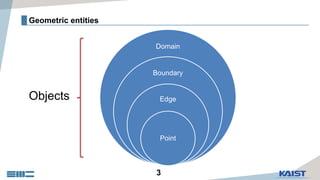
Geometric entities
Domain
Boundary
Edge
Point
Objects
4
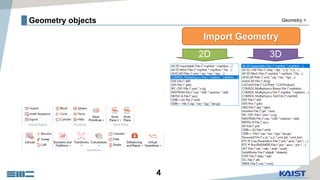
Geometry objects
2D 3D
Import Geometry
Geometry >
5
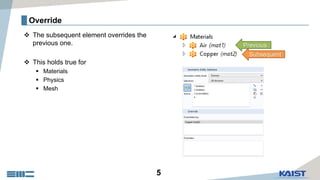
Override
 The subsequent element overrides the
previous one.
 This holds true for
 Materials
 Physics
 Mesh
Previous
Subsequent
6
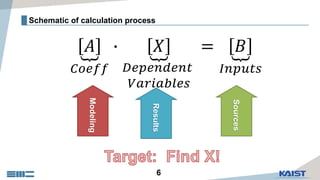
Schematic of calculation process
ด𝐴
𝐶𝑜𝑒𝑓𝑓
∙ ด𝑋
𝐷𝑒𝑝𝑒𝑛𝑑𝑒𝑛𝑡
𝑉𝑎𝑟𝑖𝑎𝑏𝑙𝑒𝑠
= ด𝐵
𝐼𝑛𝑝𝑢𝑡𝑠
Modeling
Results
Sources
7
1Modeling
8
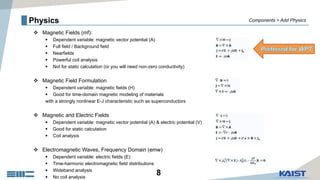
Physics
 Magnetic Fields (mf):
 Dependent variable: magnetic vector potential (A)
 Full field / Background field
 Nearfields
 Powerful coil analysis
 Not for static calculation (or you will need non-zero conductivity)
 Magnetic Field Formulation
 Dependent variable: magnetic fields (H)
 Good for time-domain magnetic modeling of materials
with a strongly nonlinear E-J characteristic such as superconductors
 Magnetic and Electric Fields
 Dependent variable: magnetic vector potential (A) & electric potential (V)
 Good for static calculation
 Coil analysis
 Electromagnetic Waves, Frequency Domain (emw)
 Dependent variable: electric fields (E)
 Time-harmonic electromagnetic field distributions
 Wideband analysis
 No coil analysis
Components > Add Physics
9
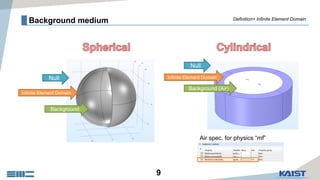
Background medium
Infinite Element Domain
Background
Null
Definition> Infinite Element Domain
Infinite Element Domain
Background (Air)
Null
Air spec. for physics “mf”
10
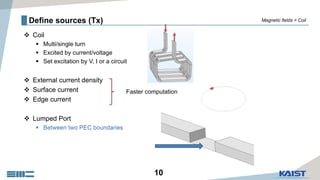
Define sources (Tx)
 Coil
 Multi/single turn
 Excited by current/voltage
 Set excitation by V, I or a circuit
 External current density
 Surface current
 Edge current
 Lumped Port
 Between two PEC boundaries
Faster computation
Magnetic fields > Coil
11
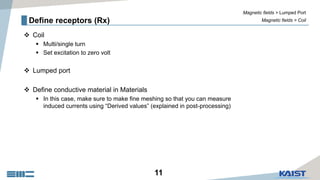
Define receptors (Rx)
 Coil
 Multi/single turn
 Set excitation to zero volt
 Lumped port
 Define conductive material in Materials
 In this case, make sure to make fine meshing so that you can measure
induced currents using “Derived values” (explained in post-processing)
Magnetic fields > Coil
Magnetic fields > Lumped Port
12
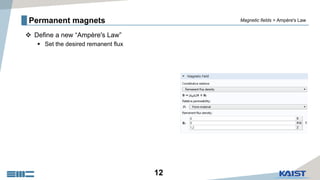
Permanent magnets
 Define a new “Ampère's Law”
 Set the desired remanent flux
Magnetic fields > Ampère's Law
13
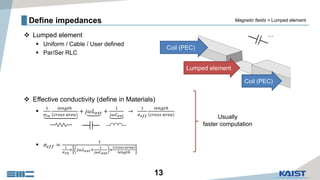
Define impedances
 Lumped element
 Uniform / Cable / User defined
 Par/Ser RLC
 Effective conductivity (define in Materials)

1
𝜎 𝑐𝑢
𝑙𝑒𝑛𝑔𝑡ℎ
𝑐𝑟𝑜𝑠𝑠 𝑎𝑟𝑒𝑎
+ 𝑗𝜔𝐿 𝑒𝑥𝑡 +
1
𝑗𝜔𝐶 𝑒𝑥𝑡
→
1
𝜎 𝑒𝑓𝑓
𝑙𝑒𝑛𝑔𝑡ℎ
𝑐𝑟𝑜𝑠𝑠 𝑎𝑟𝑒𝑎
 𝜎𝑒𝑓𝑓 =
1
1
𝜎 𝑐𝑢
+ 𝑗𝜔𝐿 𝑒𝑥𝑡+
1
𝑗𝜔𝐶 𝑒𝑥𝑡
×
𝑐𝑟𝑜𝑠𝑠 𝑎𝑟𝑒𝑎
𝑙𝑒𝑛𝑔𝑡ℎ
Lumped element
Coil (PEC)
Coil (PEC)
Usually
faster computation
…
Magnetic fields > Lumped element
14
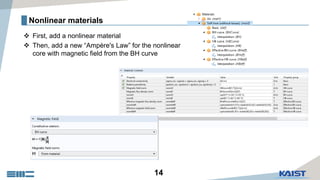
Nonlinear materials
 First, add a nonlinear material
 Then, add a new “Ampère's Law” for the nonlinear
core with magnetic field from the BH curve
15
Processing
2
16
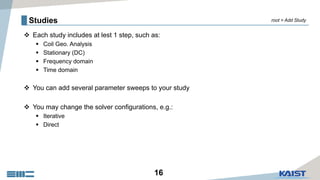
Studies
 Each study includes at lest 1 step, such as:
 Coil Geo. Analysis
 Stationary (DC)
 Frequency domain
 Time domain
 You can add several parameter sweeps to your study
 You may change the solver configurations, e.g.:
 Iterative
 Direct
root > Add Study
17
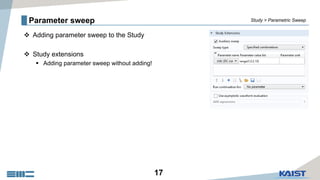
Parameter sweep
 Adding parameter sweep to the Study
 Study extensions
 Adding parameter sweep without adding!
Study > Parametric Sweep
18
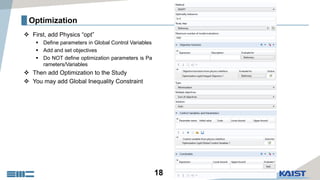
Optimization
 First, add Physics “opt”
 Define parameters in Global Control Variables
 Add and set objectives
 Do NOT define optimization parameters is Pa
rameters/Variables
 Then add Optimization to the Study
 You may add Global Inequality Constraint
19
3Post-processing
20
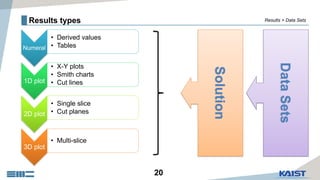
Results types
Numeral
• Derived values
• Tables
1D plot
• X-Y plots
• Smith charts
• Cut lines
2D plot
• Single slice
• Cut planes
3D plot
• Multi-slice
DataSets
Results > Data Sets
Solution
21
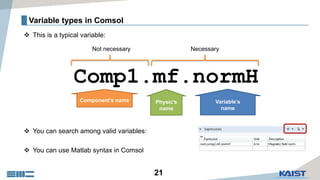
Variable types in Comsol
 This is a typical variable:
 You can search among valid variables:
 You can use Matlab syntax in Comsol
Comp1.mf.normH
Component’s name Physic’s
name
Variable’s
name
NecessaryNot necessary
22
Buckle down,
do it yourself.
And feel free to ask me your questions!
meemar@gmail.com

Modeling of Wireless Power Transfer by COMSOL: A Quick Tutorial

  • 1.
    1 Modeling of Wireless PowerTransfer by COMSOL : A Quick Tutorial By Amirhossein Hajiaghajani EMC Lab, KAIST
  • 2.
    2 Global definitions  Parameter Numeral  Fixed  Used for parameter sweep  Variable  Can change during simulation  To simplify expressions and operators  Function (Versus time/parameter/etc)  Waveform/signal/etc root >
  • 3.
  • 4.
  • 5.
    5 Override  The subsequentelement overrides the previous one.  This holds true for  Materials  Physics  Mesh Previous Subsequent
  • 6.
    6 Schematic of calculationprocess ด𝐴 𝐶𝑜𝑒𝑓𝑓 ∙ ด𝑋 𝐷𝑒𝑝𝑒𝑛𝑑𝑒𝑛𝑡 𝑉𝑎𝑟𝑖𝑎𝑏𝑙𝑒𝑠 = ด𝐵 𝐼𝑛𝑝𝑢𝑡𝑠 Modeling Results Sources
  • 7.
  • 8.
    8 Physics  Magnetic Fields(mf):  Dependent variable: magnetic vector potential (A)  Full field / Background field  Nearfields  Powerful coil analysis  Not for static calculation (or you will need non-zero conductivity)  Magnetic Field Formulation  Dependent variable: magnetic fields (H)  Good for time-domain magnetic modeling of materials with a strongly nonlinear E-J characteristic such as superconductors  Magnetic and Electric Fields  Dependent variable: magnetic vector potential (A) & electric potential (V)  Good for static calculation  Coil analysis  Electromagnetic Waves, Frequency Domain (emw)  Dependent variable: electric fields (E)  Time-harmonic electromagnetic field distributions  Wideband analysis  No coil analysis Components > Add Physics
  • 9.
    9 Background medium Infinite ElementDomain Background Null Definition> Infinite Element Domain Infinite Element Domain Background (Air) Null Air spec. for physics “mf”
  • 10.
    10 Define sources (Tx) Coil  Multi/single turn  Excited by current/voltage  Set excitation by V, I or a circuit  External current density  Surface current  Edge current  Lumped Port  Between two PEC boundaries Faster computation Magnetic fields > Coil
  • 11.
    11 Define receptors (Rx) Coil  Multi/single turn  Set excitation to zero volt  Lumped port  Define conductive material in Materials  In this case, make sure to make fine meshing so that you can measure induced currents using “Derived values” (explained in post-processing) Magnetic fields > Coil Magnetic fields > Lumped Port
  • 12.
    12 Permanent magnets  Definea new “Ampère's Law”  Set the desired remanent flux Magnetic fields > Ampère's Law
  • 13.
    13 Define impedances  Lumpedelement  Uniform / Cable / User defined  Par/Ser RLC  Effective conductivity (define in Materials)  1 𝜎 𝑐𝑢 𝑙𝑒𝑛𝑔𝑡ℎ 𝑐𝑟𝑜𝑠𝑠 𝑎𝑟𝑒𝑎 + 𝑗𝜔𝐿 𝑒𝑥𝑡 + 1 𝑗𝜔𝐶 𝑒𝑥𝑡 → 1 𝜎 𝑒𝑓𝑓 𝑙𝑒𝑛𝑔𝑡ℎ 𝑐𝑟𝑜𝑠𝑠 𝑎𝑟𝑒𝑎  𝜎𝑒𝑓𝑓 = 1 1 𝜎 𝑐𝑢 + 𝑗𝜔𝐿 𝑒𝑥𝑡+ 1 𝑗𝜔𝐶 𝑒𝑥𝑡 × 𝑐𝑟𝑜𝑠𝑠 𝑎𝑟𝑒𝑎 𝑙𝑒𝑛𝑔𝑡ℎ Lumped element Coil (PEC) Coil (PEC) Usually faster computation … Magnetic fields > Lumped element
  • 14.
    14 Nonlinear materials  First,add a nonlinear material  Then, add a new “Ampère's Law” for the nonlinear core with magnetic field from the BH curve
  • 15.
  • 16.
    16 Studies  Each studyincludes at lest 1 step, such as:  Coil Geo. Analysis  Stationary (DC)  Frequency domain  Time domain  You can add several parameter sweeps to your study  You may change the solver configurations, e.g.:  Iterative  Direct root > Add Study
  • 17.
    17 Parameter sweep  Addingparameter sweep to the Study  Study extensions  Adding parameter sweep without adding! Study > Parametric Sweep
  • 18.
    18 Optimization  First, addPhysics “opt”  Define parameters in Global Control Variables  Add and set objectives  Do NOT define optimization parameters is Pa rameters/Variables  Then add Optimization to the Study  You may add Global Inequality Constraint
  • 19.
  • 20.
    20 Results types Numeral • Derivedvalues • Tables 1D plot • X-Y plots • Smith charts • Cut lines 2D plot • Single slice • Cut planes 3D plot • Multi-slice DataSets Results > Data Sets Solution
  • 21.
    21 Variable types inComsol  This is a typical variable:  You can search among valid variables:  You can use Matlab syntax in Comsol Comp1.mf.normH Component’s name Physic’s name Variable’s name NecessaryNot necessary
  • 22.
    22 Buckle down, do ityourself. And feel free to ask me your questions! meemar@gmail.com