MobileIron Confidential
MobileIron
Threat Defense
MobileIron ConfidentialMobileIron Confidential
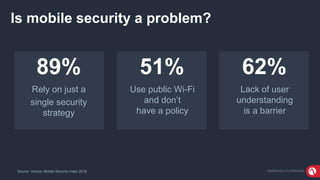
51%
Use public Wi-Fi
and don’t
have a policy
62%
Lack of user
understanding
is a barrier
89%
Rely on just a
single security
strategy
Source: Verizon Mobile Security Index 2018
Is mobile security a problem?
MobileIron ConfidentialMobileIron Confidential
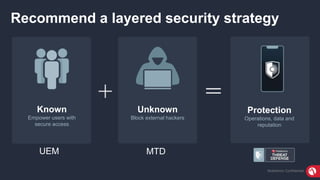
Recommend a layered security strategy
Known
Empower users with
secure access
Unknown
Block external hackers
Protection
Operations, data and
reputation
UEM MTD
MobileIron ConfidentialMobileIron Confidential
0
100
200
300
400
500
600
700
2007 2008 2009 2010 2011 2012 2013 2014 2015 2016 2017 2018
Linear (ios) Linear (Android)
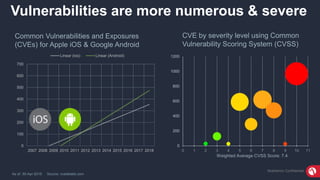
Vulnerabilities are more numerous & severe
Common Vulnerabilities and Exposures
(CVEs) for Apple iOS & Google Android
As of: 30-Apr-2018 Source: cvedetails.com
0
200
400
600
800
1000
1200
0 1 2 3 4 5 6 7 8 9 10 11
Weighted Average CVSS Score: 7.4
CVE by severity level using Common
Vulnerability Scoring System (CVSS)
MobileIron ConfidentialMobileIron Confidential
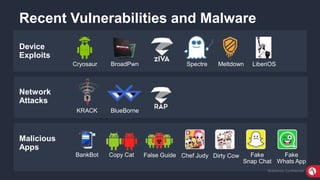
Recent Vulnerabilities and Malware
Malicious
Apps
Device
Exploits
Network
Attacks
Cryosaur BroadPwn
KRACK BlueBorne
BankBot Copy Cat False Guide Chef Judy Dirty Cow Fake
Snap Chat
Fake
Whats App
Spectre Meltdown LiberiOS
MobileIron ConfidentialMobileIron Confidential
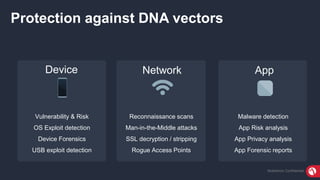
Protection against DNA vectors
Reconnaissance scans
Man-in-the-Middle attacks
SSL decryption / stripping
Rogue Access Points
Vulnerability & Risk
OS Exploit detection
Device Forensics
USB exploit detection
Malware detection
App Risk analysis
App Privacy analysis
App Forensic reports
Device Network App
MobileIron ConfidentialMobileIron Confidential
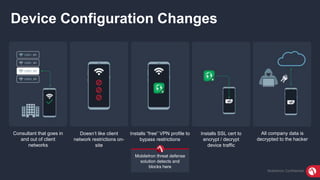
Device Configuration Changes
Consultant that goes in
and out of client
networks
Doesn’t like client
network restrictions on-
site
Installs “free” VPN profile to
bypass restrictions
Installs SSL cert to
encrypt / decrypt
device traffic
All company data is
decrypted to the hacker
MobileIron threat defense
solution detects and
blocks here
MobileIron ConfidentialMobileIron Confidential
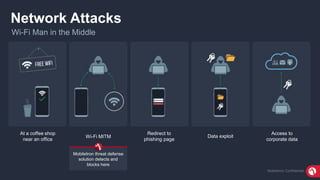
Network Attacks
Wi-Fi Man in the Middle
At a coffee shop
near an office
Wi-Fi MITM
Redirect to
phishing page
Data exploit
Access to
corporate data
MobileIron threat defense
solution detects and
blocks here
MobileIron ConfidentialMobileIron Confidential
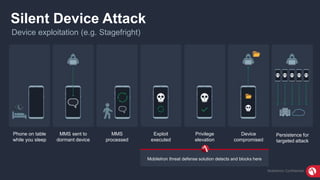
Silent Device Attack
Device exploitation (e.g. Stagefright)
Phone on table
while you sleep
MMS sent to
dormant device
MMS
processed
Exploit
executed
Privilege
elevation
Device
compromised
Persistence for
targeted attack
MobileIron threat defense solution detects and blocks here
MobileIron ConfidentialMobileIron Confidential
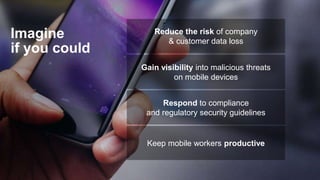
Imagine
if you could
Reduce the risk of company
& customer data loss
Gain visibility into malicious threats
on mobile devices
Respond to compliance
and regulatory security guidelines
Keep mobile workers productive
MobileIron ConfidentialMobileIron Confidential
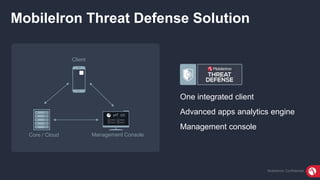
MobileIron Threat Defense Solution
One integrated client
Advanced apps analytics engine
Management console
Client
Core / Cloud Management Console
MobileIron ConfidentialMobileIron Confidential
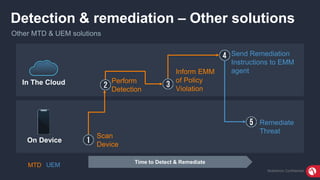
Detection & remediation – Other solutions
Other MTD & UEM solutions
In The Cloud
On Device
Scan
Device
Perform
Detection
Inform EMM
of Policy
Violation
Send Remediation
Instructions to EMM
agent
Remediate
Threat
Time to Detect & Remediate
MTD UEM
MobileIron ConfidentialMobileIron Confidential
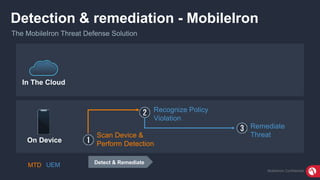
Detection & remediation - MobileIron
The MobileIron Threat Defense Solution
Scan Device &
Perform Detection
Recognize Policy
Violation
Remediate
Threat
Detect & Remediate
MTD UEM
In The Cloud
On Device
MobileIron ConfidentialMobileIron Confidential
Differentiators
1 app
No user
action
required
Zero-day On-device
MobileIron ConfidentialMobileIron Confidential
Do nothing Loss of critical business data
Damage to reputation
Loss of customer revenue
Fines
Loss of resources
$3.2M
Avg total cost of data breach
Source: 2017 Cost of Data Breach Study, Ponemon Institute
MobileIron ConfidentialMobileIron Confidential
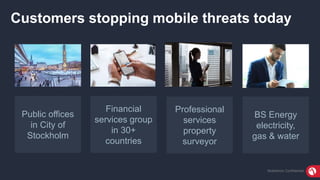
Customers stopping mobile threats today
Public offices
in City of
Stockholm
Financial
services group
in 30+
countries
Professional
services
property
surveyor
BS Energy
electricity,
gas & water
MobileIron ConfidentialMobileIron Confidential
Benefits of MobileIron Threat Defense
Zero-day detection & remediation
of device, network & app threats
Local user notification
No network connectivity needed
On-Device
Immediate and
ongoing visibility
Risky app analyses
Summarized & detailed reports
Insightful
1 app of threat protection
built into UEM
No user action required to
download or activate app,
and it cannot be removed
Easy
MobileIron ConfidentialMobileIron Confidential
Availability
Vectors
Device Network App
MobileIron Confidential
Thank You
www.mobileiron.com/threatdefense
MobileIron Confidential

MobileIron Threat Defense

Editor's Notes

  • #3 The increased use of cloud computing and web apps is driving a modern way of working together, and it allows users to access large amounts of data on mobile devices. This is good news to help users work from anywhere, make quick decisions, and be more productive, which will help grow the company. Although, research is showing that many organizations aren’t fully prepared for the security challenges caused by the increased use of mobile connectivity and devices—and the increased access to information. When we’re asked if mobile security really is a problem, we turn to the latest research to learn what organizations are doing today to mitigate risks and protect their data and their customer’s data. The Verizon Mobile Security Index 2018 provides peer responses of people who buy and manage mobile devices for their company. Your peers are saying that mobile security risks are increasing. 89% of companies rely on just a single security strategy to keep mobile networks safe. 51% say they do not have a policy for public Wi-Fi and don’t encrypt sensitive data when it’s transmitted across open, public networks. 62% said lack of user understanding about security threats is a barrier to mobile security. When you combine the input that organizations believe they are at moderate-to-high risk of a mobile security threat, rely on just a single security strategy, don’t have a policy for using public Wi-Fi, and users’ lack of understanding about what is a mobile threat, we suggest a layered security strategy.
  • #4 Our recommendation is a layered mobile security strategy. A layered security model is about multiple types of security measures, each protecting against a different vector for attack. The central idea behind layered security is that in order to protect systems from a broad range of attacks, using multiple strategies will be more effective. Therefore our approach is to offer unified endpoint management (UEM) to enable internal users with secure access to data from mobile devices AND MobileIron Threat Defense to provide protection against unknown, external hackers. Together, UEM +MTD delivers protection of your operations, data and reputation with MobileIron Threat Defense. This recommendation aligns to the Verizon research study in which organizations no longer need to sacrifice speed and profitability for security (32% said they do today).
  • #5 We’re seeing an overall trend that vulnerabilities are more numerous and severe. The Common Vulnerabilities and Exposures (CVEs) are increasing for both Apple iOS and Google Android, and you can see the chart on the left shows the exponential increase from 2015-2016 and then a dramatic increase in 2016. Overall there were over 600 new CVEs for Android and over 300 for iOS. Although, the number of CVEs isn’t always the best way to look at your security exposure. Let’s look at the severity level on the right chart. The Common Vulnerability Scoring System (CVSS) shows the severity level on a scale of 0 to 10, with 10 being the most severe. The weighted average CVSS score is 7.4, and anything above a 7.0 score is considered high, and should have been patched “yesterday”. By the size of the circle you can see that the vulnerabilities are increasing in severity above 7.0 and they are getting more severe (especially at 10).
  • #6 Here are some examples of the more highly visible attacks over the last few years. You can see that the threats are real and they are sophisticated. There are ongoing exploits being discovered, and they are named and given a character icon after being discovered. Both Apple iOS and Google Android experience attacks. This is big business for people, who have been paid millions of dollars to come up with exploits. And, it becomes increasingly important to put a solution in place to secure against these mobile threats.
  • #7 Organizations should consider a solution that protects not only against malicious apps but also device and network threats. Here are some examples of the types of attacks by device, network, and app vectors. MobileIron Threat Defense can detect and remediate these threats.
  • #8 Let’s take a look at the device configuration changes scenario. Here we have a typical scenario where a consultant or contractor is working at a client’s office and goes in and out of the client’s network. The consultant doesn’t like the client network restrictions on site or refuses to install the client’s MDM agent so they install a “free” VPN profile on their device to bypass the restrictions. As commonly happens, this “free” app is malicious and installs an untrusted SSL cert that enables an attacker to encrypt/decrypt device traffic and redirect it to their site so they can gather intelligence, extract confidential data and carry out more damaging exploits in the future. If the company was using MobileIron’s threat defense solution, the attack would have been detected and blocked when the free app was installed or when the unauthorized VPN configuration was used.
  • #9 The second scenario is network attacks, such as a Wi-Fi man-in-the-middle attack. A typical scenario is an employee working in a coffee shop or in the lobby of a hotel, and he/she connects to the free Wi-Fi. Unknkown to the employee, a person sitting nearby is operating a rogue Wi-Fi Access Point (e.g. a Pineapple) that responds back to the signal broadcast from the employee's mobile device. Wireless devices are designed to actively scan their neighborhood and try to connect to networks they were on and remember. This is how we connect to our home or work network as soon as we arrive. The rogue access point connects to the employee’s device, intercepts communications between the device and your corporate network, harvesting username, password and collecting potentially confidential corporate data that can be used later to gain access to your corporate network. Alternately, a hacker could intercept the communication between the employee’s device and the Wi-Fi hotspot, down-grade the connection from HTTPS to HTTP or create a new SSL connection between the device and the access point so they can intercept and read the communication. If the company was using MobileIron’s threat defense solution, the rogue access point and MITM attack would have been detected and blocked before any damage was done.
  • #10 And lastly scenario is a silent device attack. Here we have a scenario where the user is relaxing or sleeping and the phone is nearby. An SMS or MMS message is sent to the inactive device by an attacker. When the user checks their phone, sees they received a message and opens it, malware in the message is launched which elevates the privilege of the malware on the device. The device is now compromised and now the hacker has access to all kinds of sensitive data on the device, such as contacts and phone numbers. Once the exploit is there, it can remain persistent and a silent weapon for when the hacker can go back and take advantage later or spread the malware to other systems and users in the network. If the company was using MobileIron Threat Defense solution, the attack would have been detected and blocked at the time of the privilege elevation. To minimize the damage caused by this type of attack, the sooner the malware can be detected and stopped in the “kill chain” the better.
  • #11 With the threat knowledge in mind and how our solution works, imagine if you could protect data loss before a mobile threat occurs? Imagine if you could: Mitigate the risk of company and your customer’s data loss by acting ahead of mobile threats and not cleaning up after an attack. Gain visibility into potential threats and attacks to make informed and timely decisions to remediate, or not. Respond to compliance and regulatory security guidelines with reports that meet compliance mandates, such as for HIPAA, PCI or GDPR. Reassure users privacy would not be invaded so they have instant access to corporate data on a device of their choice, without disrupting their productivity. Imagine if you could deliver all of this from a single application.
  • #12 With MobileIron Threat Defense you can. The solution includes: 1 single integrated client of threat protection built into MobileIron unified endpoint management (UEM) client. MobileIron server for deployment on-premises or in the cloud. A management console. The solution also includes detailed mobile threat intelligence with an advanced app analytics engine that will analyze privacy and security risks, forensic reporting, and a management dashboard.
  • #13 Let’s take a look at a workflow of a threat, and we’ll start with how other threat defense solutions operate. When a compromise occurs on a mobile device, a race starts between the hacker and the ability to defend the devices’ data to stop the access to the hacker. The hacker’s actions can take just seconds to perform the attack, and the problem is the hacker can win the race. The flow starts like this: 1. The threat detection agent needs to be on the device for it to work. The agent scans the device. The data will flow up into a cloud-based service to perform the detection. 2. The cloud service does the detection for industry known threats using a deterministic approach. This typically does not detect unknown zero-day threats using behavior-based machine learning algorithms. 3. When something is detected, it goes to a cloud-based console and informs the endpoint mobile management that there is a policy violation. 4. The request is received, a look up of the threat matrix is done, UEM says there is a remediation plan for the policy violation. 5. Then there is a connection to the UEM provider to take action and remediate the threat. Most other solutions perform the threat detection in the cloud. By the time they know the device is under attack, and try informing the device, the device has had “years of machine time” to perform the attack. In fact, the first thing a hacker should do is turn off all the mobile threat defense network connections. Disable those network connections so the device and mobile threat defense product can’t communicate in the cloud. There are 3 problems with this approach: Delay – the process requires going through several hops and changes. You will lose the race against the hacker. Sensitive data is exfiltrated – sensitive data, like location, is transferred, and this is a GDPR issue. In a threat situation, the man-in-the-middle would cut off everything from step 2, 3, 4 & 5. The MITM hacker would never let them get to the cloud, and therefore none of the protection would exist after that. Let’s compare this to how the MobileIron Threat Defense solution works.
  • #14 The MobileIron Threat Defense solution can do detection on the device and trigger policy remediation on the device. This solution can win the race against the hacker before the hacker disables the network connection. The integrated solution has already informed the cloud that the device is under attack and taken steps to remove assets and close down access. The agent is on the device and no action needed to be taken by the user for the detection and remediation to work. The flow includes: Detect known AND unknown zero-day detection of device, network, and mobile threats. The same agent knows there is a policy violation on the device. And remediates the threat on-the device (quickly). The MobileIron Threat Defense solution detects and remediates the threat on the device and can’t get undercut by man-in-the-middle attacks.
  • #15 To summarize with MobileIron Threat Defense, you get: 1 single application of threat protection built into enterprise mobile management. Users don’t need to take any action to deploy the client, activate the client, and they cannot remove it. Alternative solutions require a second app for threat defense that needs to be deployed and requires the user to be involved to activate the solution. This means that in many instances the threat detection is never working. With MobileIron Threat defense it is zero-touch deployment and 100% adoption as soon as the technology is turned on. Zero-day detection of device, network, and app threats across Apple iOS and Google Android mobile devices. On-device detection and remediation of DNA threats using machine learning algorithms and without network connectivity required Are you familiar with any other vendor solution that can do all of these in one app, on-device, and without users needing to take any action?
  • #16 Let’s take a look at how this affects you if you choose to do nothing. In 2017, the average total cost of a data breach was $3.2 million as reported by the “2017 Cost of Data Breach Study: Global Overview”, by Ponemon Institute of 419 companies in 13 countries. The study also showed that companies in the 2017 study are having larger breaches, and the average size of the data breaches in this research increased 1.8 percent. If you do nothing, it means you’re faced with financial consequences: Loss of critical business data. Damage to reputation. Loss of customer revenue. Fines from regulatory agencies, such as GDPR. Loss of financial and human resources, including productivity of employees to patch the attack, attrition, etc. We’ve also seen that the senior staff experiences a cut in bonuses due to lost profits.
  • #17 Organizations are choosing to stop mobile threats today. A few examples include: City of Stockholm - Capital city of European country. An asia-based financial services group spanning 30+ countries. A professional firm of chartered surveyors and property consultants. BS Energy - Electricity, gas, water, drainage and infrastructure.
  • #18 With MobileIron Threat Defense, you can protect your organization’s data and your customer’s data because it is: Easy - One app makes it easy for IT with the threat protection (MTD) built into the unified endpoint management (UEM) MobileIron client. For IT administrators this lowers the total cost of ownership (TCO) because it is zero-touch deployment. Organizations don’t need to send multiple emails and track user responsiveness. Just turn on the technology. It is also easy for users because they are not required to take any action to download or activate the app, and they cannot remove it. The best security is invisible to the user and does not interrupt their productivity. Insightful – Organizations can gain immediate and ongoing visibility into malicious threats across all mobile devices as soon as they turn on the technology. The solution provides detailed threat intelligence with granular analytics of risky apps so IT can make informed decisions, and they can choose from a summarized or detailed report to send to teams. On-device – The solution includes unmatched detection of known and zero-day mobile – device, network, and app - threats with machine learning algorithms on the device. Threats are remediated with local compliance actions on-device across Apple iOS and Google Android devices, including notifications sent to users. And network connectivity is not required.
  • #19 The solution is available on-premises and in the cloud with MobileIron Core and Cloud across Apple iOS and Google Android devices. The solution is focused at protecting against device, network AND app threat vectors.