BT9	
Concurrent	Session	
11/9/17	1:30	PM	


Mobile	Testing:	What—and	What	Not—
to	Automate	
	
Presented	by:	
	
David	Dang	
Zenergy	Technologies	
	
	
Brought	to	you	by:		


350	Corporate	Way,	Suite	400,	Orange	Park,	FL	32073		
888---268---8770	··	904---278---0524	-	info@techwell.com	-	https://www.techwell.com/
David	Dang	
Zenergy	Technologies	
	
VP	of	automated	solutions	for	Zenergy	Technologies	David	Dang	has	been	a	
leading	figure	in	the	test	automation	industry	for	more	than	eighteen	years.	At	
Zenergy,	David	spearheads	test	automation	by	developing	advanced	frameworks	
that	emphasize	reusability	and	reduce	maintenance	efforts.	An	expert	in	
commercial	automation	tools	and	open-source	toolsets,	he	works	with	more	than	
130	companies,	helping	them	to	mature	their	UI,	services,	and	mobile	test	
automation.	With	his	foundation	in	software	development,	David	can	quickly	
grasp	complex	IT	architectures,	critical	business	functions	and	processes,	and	
cultural	dynamics	to	provide	customized	automation	solutions	that	provide	
significant	savings	for	Zenergy's	clients.
10/25/17
1
Mobile Testing: What to
Automate and What Not to
Automate
Better Software East 2017
Presented By: David Dang
A Testing Partner You Can Trust
A Testing Partner You Can TrustOverview
Ø  Introduction
Ø  What is mobile testing?
Ø  What are key aspects of mobile testing?
Ø  Factors to consider when determining if there is
value to automation
Ø  Common test automation tools
Ø  Conclusion
10/25/17
2
A Testing Partner You Can TrustIntroduction
Companies are moving into mobile technology at a
rapid pace, which has significantly increased the
need for manual testing in that area. Companies
are turning to automation to help ease the
workload, but it is not always obvious what should
be automated. Mobile has its own set of
complications, compounded by a huge variety of
devices and OS platforms.
A Testing Partner You Can TrustDefinition
Ø  Mobile Web – Access to the world wide web from a
handheld mobile device, such as a smartphone or a
tablet, that is connected to a mobile or wireless
network
Ø  Mobile App – software applications developed
specifically for using on wireless computing devices,
such as smartphones and tablets, rather than
desktop or laptop computers. For iOS, the
programming language is Objective C. For Android,
the programming language is Java
10/25/17
3
A Testing Partner You Can TrustDefinition
Ø  Mobile Hybrid App – combines elements of both
native and Web applications
Ø  Responsive Design – approach to web page creation
that makes use of flexible layouts, flexible images
and cascading style sheet media queries. The goal
of responsive design is to build web pages that
detect the visitor's screen size and orientation and
change the layout accordingly
A Testing Partner You Can TrustWhat is Mobile Testing?
Ø The process of testing software developed for use
on a mobile device, such as a smartphone or tablet
Ø  Includes installed mobile apps (i.e., from the app
store), as well as mobile or responsive web apps
Ø  Can be done with manual and automated
techniques
10/25/17
4
A Testing Partner You Can TrustDiscussion
Ø  Why is mobile testing challenging?
Ø  How to minimize mobile testing challenges?
A Testing Partner You Can TrustWhat is Mobile Test Automation?
Ø Test automation that is run on real or simulated
mobile devices
Ø  Many tools and frameworks have been developed
for mobile automation, such as Appium, Calaba.sh,
Robotium, Selendroid, and UiAutomator
10/25/17
5
A Testing Partner You Can TrustQA/Testing Best Practices
Ø Unit testing
Ø  Functional testing
Ø  System testing
Ø  Integration testing
Ø  Business process testing
Ø  Data verification
Ø  Etc.
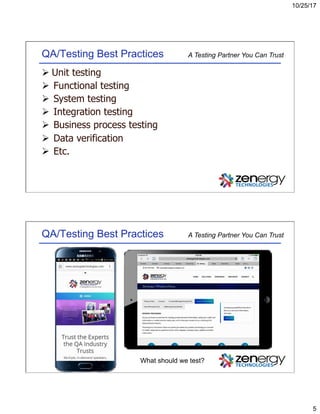
A Testing Partner You Can TrustQA/Testing Best Practices
What should we test?
10/25/17
6
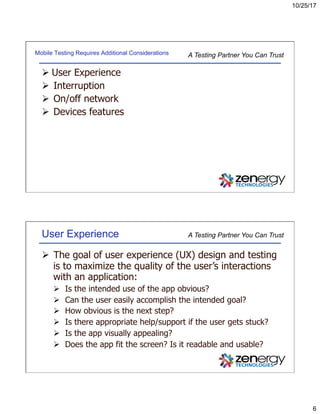
A Testing Partner You Can TrustMobile Testing Requires Additional Considerations
Ø User Experience
Ø  Interruption
Ø  On/off network
Ø  Devices features
A Testing Partner You Can TrustUser Experience
Ø  The goal of user experience (UX) design and testing
is to maximize the quality of the user’s interactions
with an application:
Ø  Is the intended use of the app obvious?
Ø  Can the user easily accomplish the intended goal?
Ø  How obvious is the next step?
Ø  Is there appropriate help/support if the user gets stuck?
Ø  Is the app visually appealing?
Ø  Does the app fit the screen? Is it readable and usable?
10/25/17
7
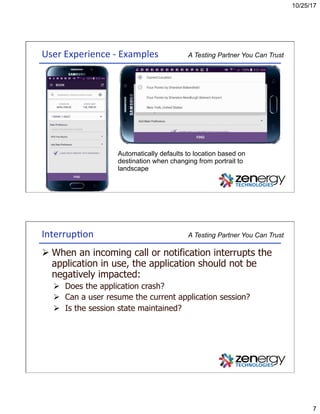
A Testing Partner You Can TrustUser	Experience	-	Examples	
Automatically defaults to location based on
destination when changing from portrait to
landscape
A Testing Partner You Can TrustInterrup3on	
Ø When an incoming call or notification interrupts the
application in use, the application should not be
negatively impacted:
Ø  Does the application crash?
Ø  Can a user resume the current application session?
Ø  Is the session state maintained?
10/25/17
8
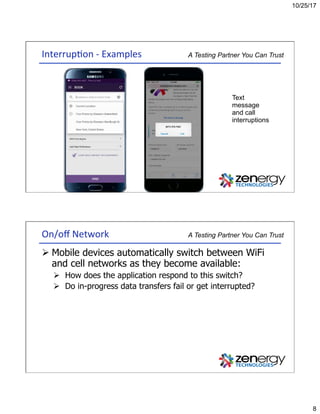
A Testing Partner You Can TrustInterrup3on	-	Examples	
Text
message
and call
interruptions
A Testing Partner You Can TrustOn/off	Network	
Ø Mobile devices automatically switch between WiFi
and cell networks as they become available:
Ø  How does the application respond to this switch?
Ø  Do in-progress data transfers fail or get interrupted?
10/25/17
9
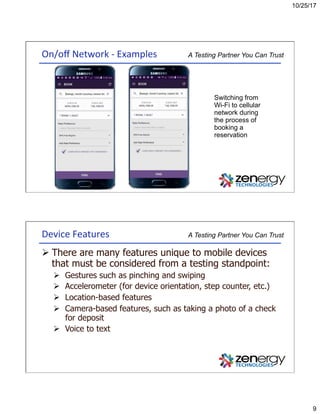
A Testing Partner You Can TrustOn/off	Network	-	Examples	
Switching from
Wi-Fi to cellular
network during
the process of
booking a
reservation
A Testing Partner You Can TrustDevice	Features	
Ø There are many features unique to mobile devices
that must be considered from a testing standpoint:
Ø  Gestures such as pinching and swiping
Ø  Accelerometer (for device orientation, step counter, etc.)
Ø  Location-based features
Ø  Camera-based features, such as taking a photo of a check
for deposit
Ø  Voice to text
10/25/17
10
A Testing Partner You Can TrustKey	Considera3ons	for	Mobile	Automa3on	
Ø  Is there any ROI to automate the manual test case?
Ø  For example, automating pinch and zoom
Ø  What is the risk for not automating the test?
Ø  What are the test automation development efforts to
automate the test?
Ø  How much maintenance time is needed if the automated test
needs to be changed?
Ø  Does the automation tool support the necessary features?
A Testing Partner You Can TrustDiscussion	
Ø  What should be automated?
Ø  What should not be automated?
10/25/17
11
A Testing Partner You Can TrustFactors	for	Test	Automa3on	Considera3on	
Ø To Automate
Ø  Smoke testing of the mobile website or native app
Ø  Key application functionality
Ø  e.g., login, search
Ø  Data intensive application features
Ø  e.g., loan or insurance quotes or pre-approvals
Ø  Repeatable flows
Ø  e.g., branching logic or options
Ø  Static content
Ø  e.g., links and text
A Testing Partner You Can TrustFactors	for	Test	Automa3on	Considera3on	
Ø Not to Automate (In most cases)
Ø  Look and feel
Ø  e.g., application layout, element spacing
Ø  Device orientation
Ø  OS level features
Ø  e.g., camera, voice to text, Accelerometer, etc…
Ø  Interrupt testing
Ø  On/off network
Ø  Deviation across all devices/platforms
Ø  User Experience
10/25/17
12
A Testing Partner You Can TrustTest	Automa3on	Tools	
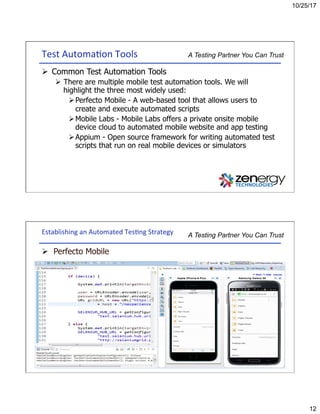
Ø  Common Test Automation Tools
Ø  There are multiple mobile test automation tools. We will
highlight the three most widely used:
Ø Perfecto Mobile - A web-based tool that allows users to
create and execute automated scripts
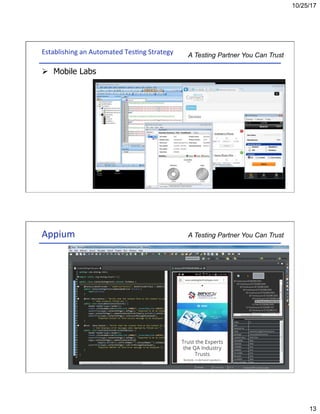
Ø Mobile Labs - Mobile Labs offers a private onsite mobile
device cloud to automated mobile website and app testing
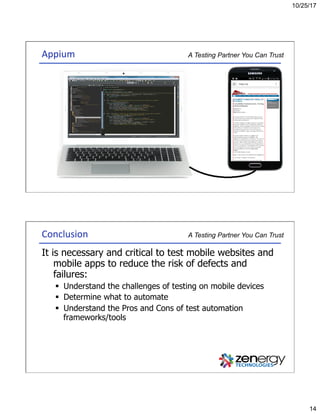
Ø Appium - Open source framework for writing automated test
scripts that run on real mobile devices or simulators
A Testing Partner You Can TrustEstablishing	an	Automated	Tes3ng	Strategy	
Ø  Perfecto Mobile
10/25/17
13
A Testing Partner You Can TrustEstablishing	an	Automated	Tes3ng	Strategy	
Ø  Mobile Labs
A Testing Partner You Can TrustAppium
10/25/17
14
A Testing Partner You Can TrustAppium	
A Testing Partner You Can TrustConclusion	
It is necessary and critical to test mobile websites and
mobile apps to reduce the risk of defects and
failures:
§  Understand the challenges of testing on mobile devices
§  Determine what to automate
§  Understand the Pros and Cons of test automation
frameworks/tools

Mobile Testing: What—and What Not—to Automate

  • 1.
  • 2.
  • 3.
    10/25/17 1 Mobile Testing: Whatto Automate and What Not to Automate Better Software East 2017 Presented By: David Dang A Testing Partner You Can Trust A Testing Partner You Can TrustOverview Ø  Introduction Ø  What is mobile testing? Ø  What are key aspects of mobile testing? Ø  Factors to consider when determining if there is value to automation Ø  Common test automation tools Ø  Conclusion
  • 4.
    10/25/17 2 A Testing PartnerYou Can TrustIntroduction Companies are moving into mobile technology at a rapid pace, which has significantly increased the need for manual testing in that area. Companies are turning to automation to help ease the workload, but it is not always obvious what should be automated. Mobile has its own set of complications, compounded by a huge variety of devices and OS platforms. A Testing Partner You Can TrustDefinition Ø  Mobile Web – Access to the world wide web from a handheld mobile device, such as a smartphone or a tablet, that is connected to a mobile or wireless network Ø  Mobile App – software applications developed specifically for using on wireless computing devices, such as smartphones and tablets, rather than desktop or laptop computers. For iOS, the programming language is Objective C. For Android, the programming language is Java
  • 5.
    10/25/17 3 A Testing PartnerYou Can TrustDefinition Ø  Mobile Hybrid App – combines elements of both native and Web applications Ø  Responsive Design – approach to web page creation that makes use of flexible layouts, flexible images and cascading style sheet media queries. The goal of responsive design is to build web pages that detect the visitor's screen size and orientation and change the layout accordingly A Testing Partner You Can TrustWhat is Mobile Testing? Ø The process of testing software developed for use on a mobile device, such as a smartphone or tablet Ø  Includes installed mobile apps (i.e., from the app store), as well as mobile or responsive web apps Ø  Can be done with manual and automated techniques
  • 6.
    10/25/17 4 A Testing PartnerYou Can TrustDiscussion Ø  Why is mobile testing challenging? Ø  How to minimize mobile testing challenges? A Testing Partner You Can TrustWhat is Mobile Test Automation? Ø Test automation that is run on real or simulated mobile devices Ø  Many tools and frameworks have been developed for mobile automation, such as Appium, Calaba.sh, Robotium, Selendroid, and UiAutomator
  • 7.
    10/25/17 5 A Testing PartnerYou Can TrustQA/Testing Best Practices Ø Unit testing Ø  Functional testing Ø  System testing Ø  Integration testing Ø  Business process testing Ø  Data verification Ø  Etc. A Testing Partner You Can TrustQA/Testing Best Practices What should we test?
  • 8.
    10/25/17 6 A Testing PartnerYou Can TrustMobile Testing Requires Additional Considerations Ø User Experience Ø  Interruption Ø  On/off network Ø  Devices features A Testing Partner You Can TrustUser Experience Ø  The goal of user experience (UX) design and testing is to maximize the quality of the user’s interactions with an application: Ø  Is the intended use of the app obvious? Ø  Can the user easily accomplish the intended goal? Ø  How obvious is the next step? Ø  Is there appropriate help/support if the user gets stuck? Ø  Is the app visually appealing? Ø  Does the app fit the screen? Is it readable and usable?
  • 9.
    10/25/17 7 A Testing PartnerYou Can TrustUser Experience - Examples Automatically defaults to location based on destination when changing from portrait to landscape A Testing Partner You Can TrustInterrup3on Ø When an incoming call or notification interrupts the application in use, the application should not be negatively impacted: Ø  Does the application crash? Ø  Can a user resume the current application session? Ø  Is the session state maintained?
  • 10.
    10/25/17 8 A Testing PartnerYou Can TrustInterrup3on - Examples Text message and call interruptions A Testing Partner You Can TrustOn/off Network Ø Mobile devices automatically switch between WiFi and cell networks as they become available: Ø  How does the application respond to this switch? Ø  Do in-progress data transfers fail or get interrupted?
  • 11.
    10/25/17 9 A Testing PartnerYou Can TrustOn/off Network - Examples Switching from Wi-Fi to cellular network during the process of booking a reservation A Testing Partner You Can TrustDevice Features Ø There are many features unique to mobile devices that must be considered from a testing standpoint: Ø  Gestures such as pinching and swiping Ø  Accelerometer (for device orientation, step counter, etc.) Ø  Location-based features Ø  Camera-based features, such as taking a photo of a check for deposit Ø  Voice to text
  • 12.
    10/25/17 10 A Testing PartnerYou Can TrustKey Considera3ons for Mobile Automa3on Ø  Is there any ROI to automate the manual test case? Ø  For example, automating pinch and zoom Ø  What is the risk for not automating the test? Ø  What are the test automation development efforts to automate the test? Ø  How much maintenance time is needed if the automated test needs to be changed? Ø  Does the automation tool support the necessary features? A Testing Partner You Can TrustDiscussion Ø  What should be automated? Ø  What should not be automated?
  • 13.
    10/25/17 11 A Testing PartnerYou Can TrustFactors for Test Automa3on Considera3on Ø To Automate Ø  Smoke testing of the mobile website or native app Ø  Key application functionality Ø  e.g., login, search Ø  Data intensive application features Ø  e.g., loan or insurance quotes or pre-approvals Ø  Repeatable flows Ø  e.g., branching logic or options Ø  Static content Ø  e.g., links and text A Testing Partner You Can TrustFactors for Test Automa3on Considera3on Ø Not to Automate (In most cases) Ø  Look and feel Ø  e.g., application layout, element spacing Ø  Device orientation Ø  OS level features Ø  e.g., camera, voice to text, Accelerometer, etc… Ø  Interrupt testing Ø  On/off network Ø  Deviation across all devices/platforms Ø  User Experience
  • 14.
    10/25/17 12 A Testing PartnerYou Can TrustTest Automa3on Tools Ø  Common Test Automation Tools Ø  There are multiple mobile test automation tools. We will highlight the three most widely used: Ø Perfecto Mobile - A web-based tool that allows users to create and execute automated scripts Ø Mobile Labs - Mobile Labs offers a private onsite mobile device cloud to automated mobile website and app testing Ø Appium - Open source framework for writing automated test scripts that run on real mobile devices or simulators A Testing Partner You Can TrustEstablishing an Automated Tes3ng Strategy Ø  Perfecto Mobile
  • 15.
    10/25/17 13 A Testing PartnerYou Can TrustEstablishing an Automated Tes3ng Strategy Ø  Mobile Labs A Testing Partner You Can TrustAppium
  • 16.
    10/25/17 14 A Testing PartnerYou Can TrustAppium A Testing Partner You Can TrustConclusion It is necessary and critical to test mobile websites and mobile apps to reduce the risk of defects and failures: §  Understand the challenges of testing on mobile devices §  Determine what to automate §  Understand the Pros and Cons of test automation frameworks/tools