






Mobile Mastery How to master your new mobile phone Thom Poole January 2008
Agenda The basics Phone menus Address book Mobile phone safety WAP/Internet Texting
Why me? A quick biography
Thom Poole Web & e-marketing trailblazer since 1992 Taught e-marketing for 9 years  e-Commerce Web design for marketers (and the terrified!) CRM Used to work for O2, building the ‘mobile Internet’ A Fellow of the Chartered Institute of Marketing, and Chartered Marketer. Former Chairman of the West Surrey branch
The Basics
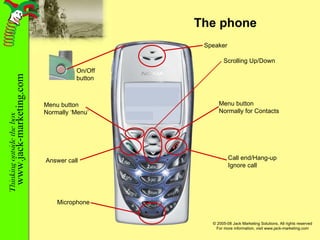
The phone Speaker Scrolling Up/Down On/Off button Menu button Normally for Contacts Call end/Hang-up Ignore call Menu button Normally ‘Menu’ Answer call Microphone
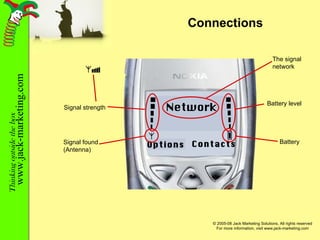
Connections Contacts Options Network Signal found (Antenna) Signal strength Battery Battery level The signal network
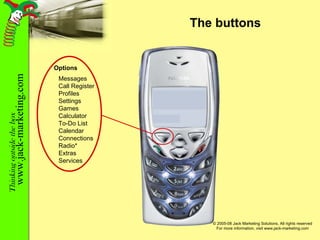
The buttons Options Messages Call Register Profiles Settings Games Calculator To-Do List Calendar Connections Radio* Extras Services
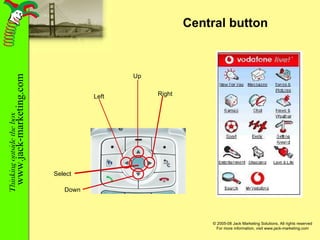
Central button Up Down Left Right Select
Phone menus
Menu list 1 Messages Write and receive text or picture messages Call Register See the last 10 calls you have missed; the last 10 you dialled and the last 10 you answered Profile Your chance to personalise your phone - the background (wallpaper); volume, ringtone, and whether you want the phone to vibrate when it rings
Menu list 2 Settings Set the date, time and alarm clock Extras Games, if you have any games on your mobile Calculator Calendar Task list Radio Voice recorder Connections WAP or Internet connections Infrared connections
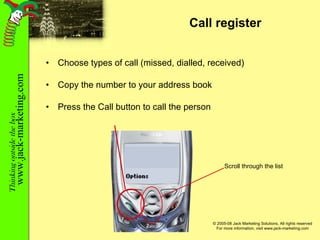
Call register Choose types of call (missed, dialled, received) Copy the number to your address book Press the Call button to call the person Scroll through the list
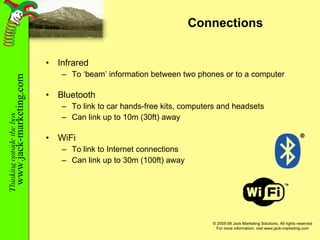
Connections Infrared To ‘beam’ information between two phones or to a computer Bluetooth To link to car hands-free kits, computers and headsets Can link up to 10m (30ft) away WiFi To link to Internet connections Can link up to 30m (100ft) away
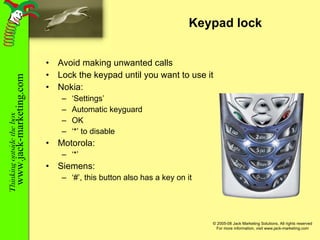
Keypad lock Avoid making unwanted calls Lock the keypad until you want to use it Nokia: ‘ Settings’ Automatic keyguard OK ‘ *’ to disable Motorola: ‘ *’ Siemens: ‘ #’, this button also has a key on it
Address Book
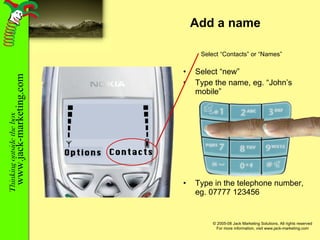
Add a name Select “new” Type the name, eg. “John’s mobile” Type in the telephone number, eg. 07777 123456 Contacts Options Select “Contacts” or “Names”
Deleting & Editing names Select the entry you want to change or remove Select ‘delete’ or ‘edit’ If editing, clear the part of the entry and retype Please note: You may be asked to decide whether the entry goes into the Phone memory or SIM memory  If you are planning to switch phones, save them onto the SIM If you are planning to switch network provider, and keep the phone, save them there If in doubt - save them to the SIM
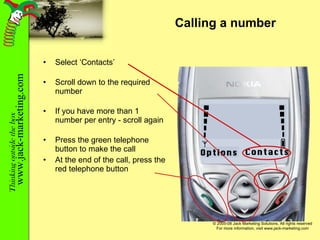
Calling a number Select ‘Contacts’ Scroll down to the required number If you have more than 1 number per entry - scroll again Press the green telephone button to make the call At the end of the call, press the red telephone button Contacts Options
Mobile Phone Safety
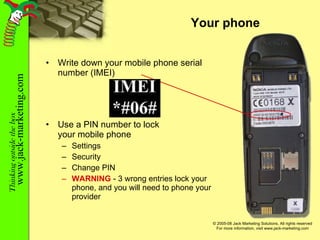
Your phone Write down your mobile phone serial number (IMEI) Use a PIN number to lock your mobile phone Settings Security Change PIN WARNING  - 3 wrong entries lock your phone, and you will need to phone your provider
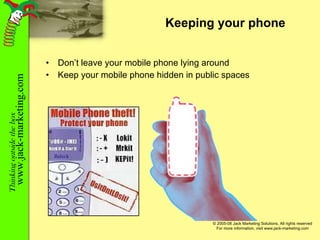
Keeping your phone Don’t leave your mobile phone lying around Keep your mobile phone hidden in public spaces
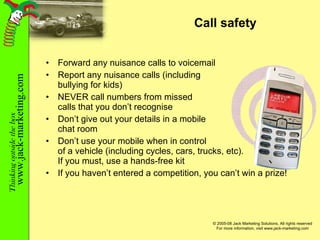
Call safety Forward any nuisance calls to voicemail Report any nuisance calls (including bullying for kids) NEVER call numbers from missed calls that you don’t recognise Don’t give out your details in a mobile chat room Don’t use your mobile when in control of a vehicle (including cycles, cars, trucks, etc). If you must, use a hands-free kit If you haven’t entered a competition, you can’t win a prize!
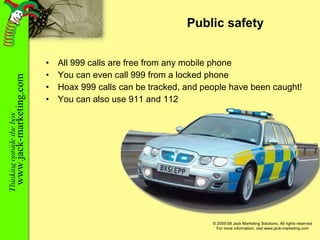
Public safety All 999 calls are free from any mobile phone You can even call 999 from a locked phone Hoax 999 calls can be tracked, and people have been caught! You can also use 911 and 112
The Mobile Internet
What is WAP? Wireless Application Protocol (WAP) or the Internet on your mobile phone I-mode is similar You can access news, email, pictures, games on your mobile phone, anywhere you get a signal Some mobile phones can also access any Internet pages too
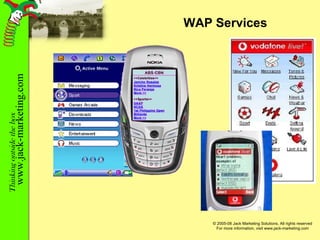
WAP Services
Some WAP sites mobile.google.com   http://wapmarks.net  -  Directory of user-submitted WAP links,  & a f ree personal start page www.metoffice.com/services  -  Weathercall WAP - access ハ w eather forecasts   www.pubquizhelp.34sp.com/ WAP.wml  -  look up fun facts and interesting trivia   www.okemob.com  -  download full-length tracks with karaoke style lyric prompts   www.curryhouse.net  -  find a curry   wap.beachwizard.com  -  surf information on any beach in Europe   uk.mobile.yahoo.com  -  Yahoo! Services www.bbc.co.uk/mobile  -  information from the BBC www.amazon.co.uk/mobile wap.football365.com  -  football results and news wap.5minutesaway.co.uk wap.citiwiz.com www.hotelguide.com www.wirelessgames.com mobile.nationalrail.co.uk  -  national rail timetables (visit  www.nres.mytrains.kizoom.co.uk  to set up) mobile.tfl.gov.uk  -  Transport for London's WAP site www.shazam.com/music/portal  -  Mobile music recognition service
Text Messages tXt m$ges
How to send SMS Select ‘Messages’ Create a new message Use the keypad to write your message Enter the number (or select it from your contacts) Press ‘Send’ You have just sent an SMS! You can also reply to messages you receive Try it now - send a message to a mobile number l%k, mor info …
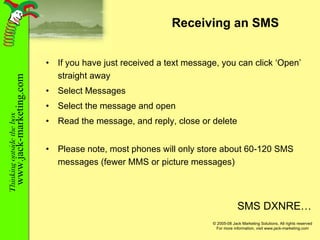
Receiving an SMS If you have just received a text message, you can click ‘Open’ straight away Select Messages Select the message and open Read the message, and reply, close or delete Please note, most phones will only store about 60-120 SMS messages (fewer MMS or picture messages) SMS DXNRE…
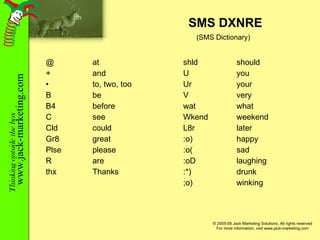
SMS DXNRE @ at + and to, two, too B be B4 before C see Cld could Gr8 great Plse please R are thx Thanks shld should U you Ur your V very wat what Wkend weekend L8r later :o) happy :o( sad :oD laughing :*) drunk ;o) winking (SMS Dictionary)
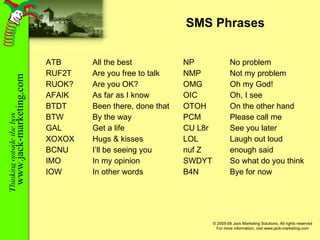
SMS Phrases ATB All the best RUF2T Are you free to talk RUOK? Are you OK? AFAIK As far as I know BTDT Been there, done that BTW By the way GAL Get a life XOXOX Hugs & kisses BCNU I’ll be seeing you IMO In my opinion IOW In other words NP No problem NMP Not my problem OMG Oh my God! OIC Oh, I see OTOH On the other hand PCM Please call me CU L8r See you later LOL Laugh out loud nuf Z enough said SWDYT So what do you think B4N Bye for now
Thank you Any questions?

Mobile Mastery

  • 1.
    Mobile Mastery Howto master your new mobile phone Thom Poole January 2008
  • 2.
    Agenda The basicsPhone menus Address book Mobile phone safety WAP/Internet Texting
  • 3.
    Why me? Aquick biography
  • 4.
    Thom Poole Web& e-marketing trailblazer since 1992 Taught e-marketing for 9 years e-Commerce Web design for marketers (and the terrified!) CRM Used to work for O2, building the ‘mobile Internet’ A Fellow of the Chartered Institute of Marketing, and Chartered Marketer. Former Chairman of the West Surrey branch
  • 5.
  • 6.
    The phone SpeakerScrolling Up/Down On/Off button Menu button Normally for Contacts Call end/Hang-up Ignore call Menu button Normally ‘Menu’ Answer call Microphone
  • 7.
    Connections Contacts OptionsNetwork Signal found (Antenna) Signal strength Battery Battery level The signal network
  • 8.
    The buttons OptionsMessages Call Register Profiles Settings Games Calculator To-Do List Calendar Connections Radio* Extras Services
  • 9.
    Central button UpDown Left Right Select
  • 10.
  • 11.
    Menu list 1Messages Write and receive text or picture messages Call Register See the last 10 calls you have missed; the last 10 you dialled and the last 10 you answered Profile Your chance to personalise your phone - the background (wallpaper); volume, ringtone, and whether you want the phone to vibrate when it rings
  • 12.
    Menu list 2Settings Set the date, time and alarm clock Extras Games, if you have any games on your mobile Calculator Calendar Task list Radio Voice recorder Connections WAP or Internet connections Infrared connections
  • 13.
    Call register Choosetypes of call (missed, dialled, received) Copy the number to your address book Press the Call button to call the person Scroll through the list
  • 14.
    Connections Infrared To‘beam’ information between two phones or to a computer Bluetooth To link to car hands-free kits, computers and headsets Can link up to 10m (30ft) away WiFi To link to Internet connections Can link up to 30m (100ft) away
  • 15.
    Keypad lock Avoidmaking unwanted calls Lock the keypad until you want to use it Nokia: ‘ Settings’ Automatic keyguard OK ‘ *’ to disable Motorola: ‘ *’ Siemens: ‘ #’, this button also has a key on it
  • 16.
  • 17.
    Add a nameSelect “new” Type the name, eg. “John’s mobile” Type in the telephone number, eg. 07777 123456 Contacts Options Select “Contacts” or “Names”
  • 18.
    Deleting & Editingnames Select the entry you want to change or remove Select ‘delete’ or ‘edit’ If editing, clear the part of the entry and retype Please note: You may be asked to decide whether the entry goes into the Phone memory or SIM memory If you are planning to switch phones, save them onto the SIM If you are planning to switch network provider, and keep the phone, save them there If in doubt - save them to the SIM
  • 19.
    Calling a numberSelect ‘Contacts’ Scroll down to the required number If you have more than 1 number per entry - scroll again Press the green telephone button to make the call At the end of the call, press the red telephone button Contacts Options
  • 20.
  • 21.
    Your phone Writedown your mobile phone serial number (IMEI) Use a PIN number to lock your mobile phone Settings Security Change PIN WARNING - 3 wrong entries lock your phone, and you will need to phone your provider
  • 22.
    Keeping your phoneDon’t leave your mobile phone lying around Keep your mobile phone hidden in public spaces
  • 23.
    Call safety Forwardany nuisance calls to voicemail Report any nuisance calls (including bullying for kids) NEVER call numbers from missed calls that you don’t recognise Don’t give out your details in a mobile chat room Don’t use your mobile when in control of a vehicle (including cycles, cars, trucks, etc). If you must, use a hands-free kit If you haven’t entered a competition, you can’t win a prize!
  • 24.
    Public safety All999 calls are free from any mobile phone You can even call 999 from a locked phone Hoax 999 calls can be tracked, and people have been caught! You can also use 911 and 112
  • 25.
  • 26.
    What is WAP?Wireless Application Protocol (WAP) or the Internet on your mobile phone I-mode is similar You can access news, email, pictures, games on your mobile phone, anywhere you get a signal Some mobile phones can also access any Internet pages too
  • 27.
  • 28.
    Some WAP sitesmobile.google.com http://wapmarks.net - Directory of user-submitted WAP links, & a f ree personal start page www.metoffice.com/services - Weathercall WAP - access ハ w eather forecasts www.pubquizhelp.34sp.com/ WAP.wml - look up fun facts and interesting trivia www.okemob.com - download full-length tracks with karaoke style lyric prompts www.curryhouse.net - find a curry wap.beachwizard.com - surf information on any beach in Europe uk.mobile.yahoo.com - Yahoo! Services www.bbc.co.uk/mobile - information from the BBC www.amazon.co.uk/mobile wap.football365.com - football results and news wap.5minutesaway.co.uk wap.citiwiz.com www.hotelguide.com www.wirelessgames.com mobile.nationalrail.co.uk - national rail timetables (visit www.nres.mytrains.kizoom.co.uk to set up) mobile.tfl.gov.uk - Transport for London's WAP site www.shazam.com/music/portal - Mobile music recognition service
  • 29.
  • 30.
    How to sendSMS Select ‘Messages’ Create a new message Use the keypad to write your message Enter the number (or select it from your contacts) Press ‘Send’ You have just sent an SMS! You can also reply to messages you receive Try it now - send a message to a mobile number l%k, mor info …
  • 31.
    Receiving an SMSIf you have just received a text message, you can click ‘Open’ straight away Select Messages Select the message and open Read the message, and reply, close or delete Please note, most phones will only store about 60-120 SMS messages (fewer MMS or picture messages) SMS DXNRE…
  • 32.
    SMS DXNRE @at + and to, two, too B be B4 before C see Cld could Gr8 great Plse please R are thx Thanks shld should U you Ur your V very wat what Wkend weekend L8r later :o) happy :o( sad :oD laughing :*) drunk ;o) winking (SMS Dictionary)
  • 33.
    SMS Phrases ATBAll the best RUF2T Are you free to talk RUOK? Are you OK? AFAIK As far as I know BTDT Been there, done that BTW By the way GAL Get a life XOXOX Hugs & kisses BCNU I’ll be seeing you IMO In my opinion IOW In other words NP No problem NMP Not my problem OMG Oh my God! OIC Oh, I see OTOH On the other hand PCM Please call me CU L8r See you later LOL Laugh out loud nuf Z enough said SWDYT So what do you think B4N Bye for now
  • 34.
    Thank you Anyquestions?

Editor's Notes

  • #18 If you are going to travel abroad, then store your numbers as ‘+ 44’, the ‘+’ is from the ‘0’ pressed twice in quick succession.