Canvas
         Ivano Malavolta
    ivano.malavolta@univaq.it
http://www.di.univaq.it/malavolta
Roadmap

•   Intro
•   Colors & Style
•   Drawings
•   Images & Pixels
•   Transformations
•   Text
•   Compositing
•   Animations
Canvas

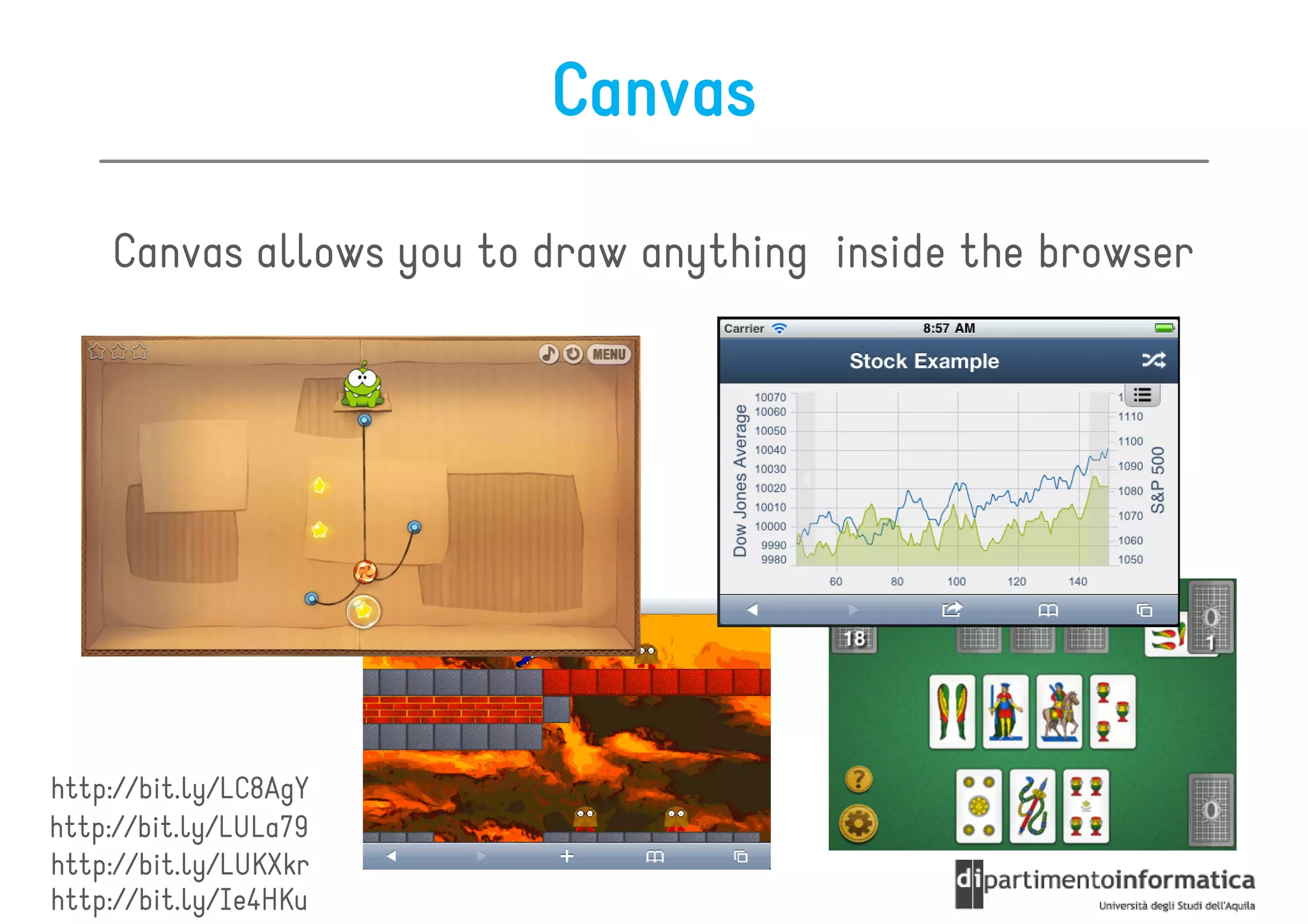
    Canvas allows you to draw anything inside the browser


http://bit.ly/LC8AgY
http://bit.ly/LULa79
http://bit.ly/LUKXkr
http://bit.ly/Ie4HKu
Canvas
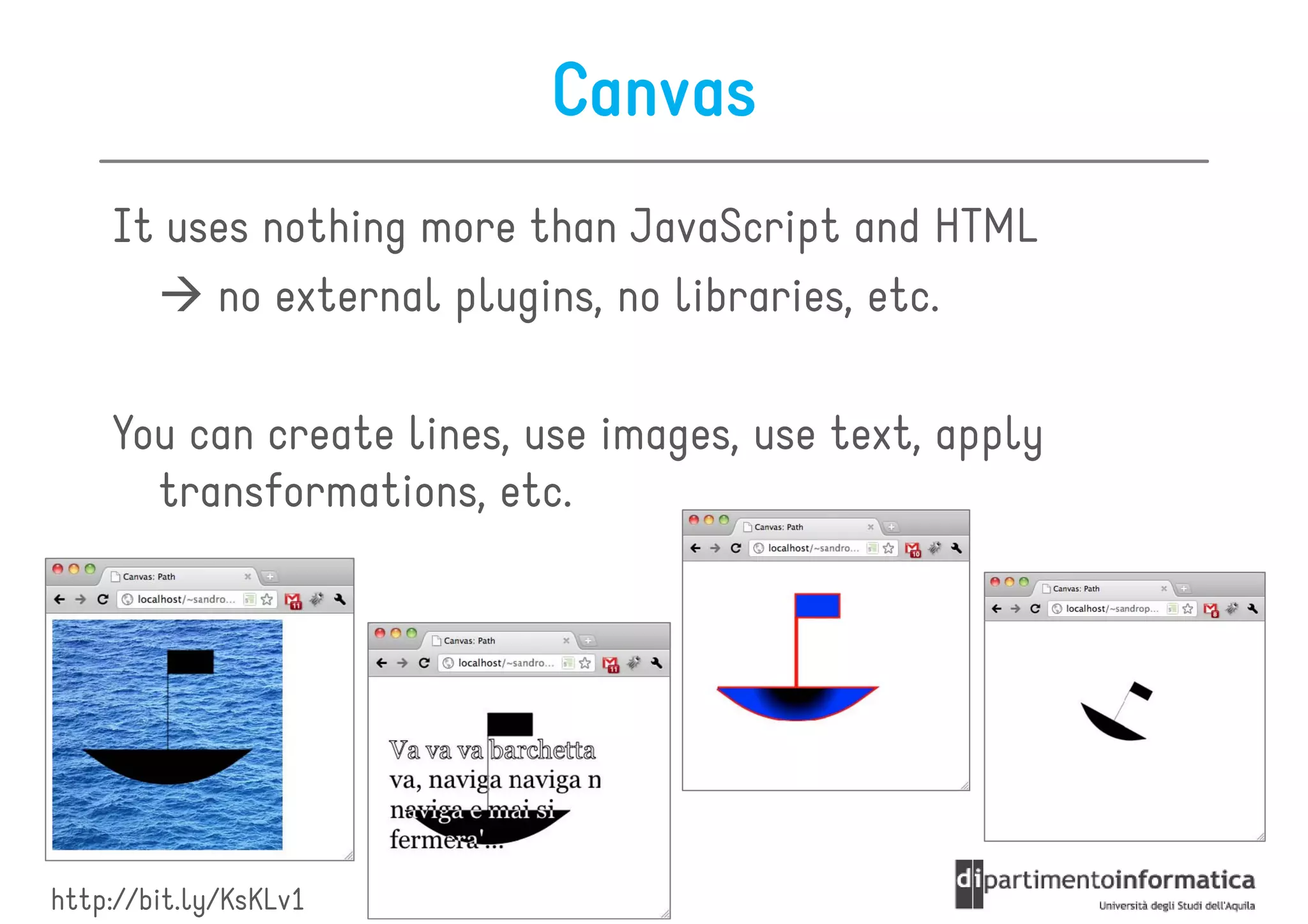
    It uses nothing more than JavaScript and HTML
         no external plugins, no libraries, etc.

    You can create lines, use images, use text, apply
      transformations, etc.


http://bit.ly/KsKLv1
Canvas


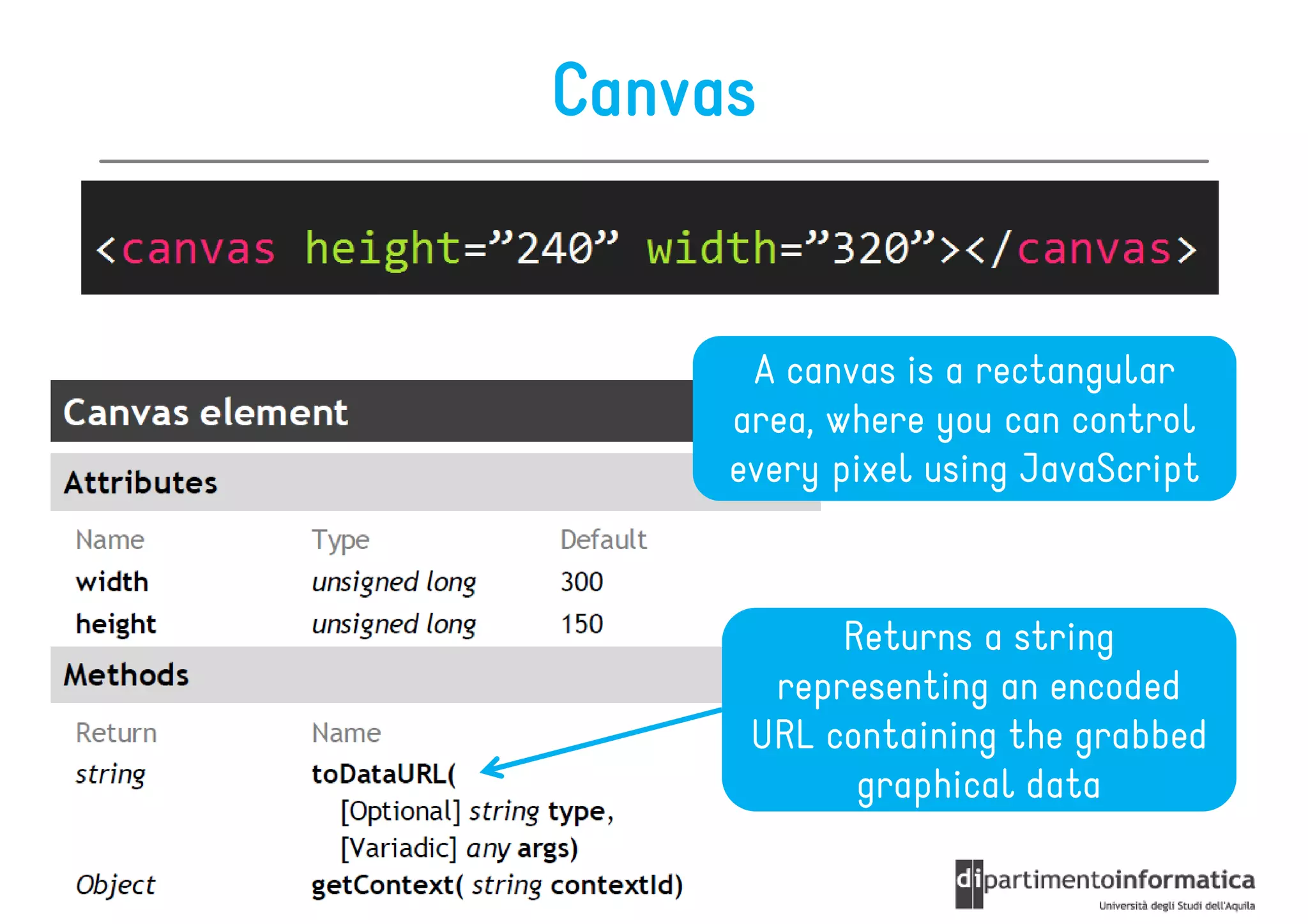
      A canvas is a rectangular
     area, where you can control
     every pixel using JavaScript


           Returns a string
       representing an encoded
      URL containing the grabbed
            graphical data
Coordinate System

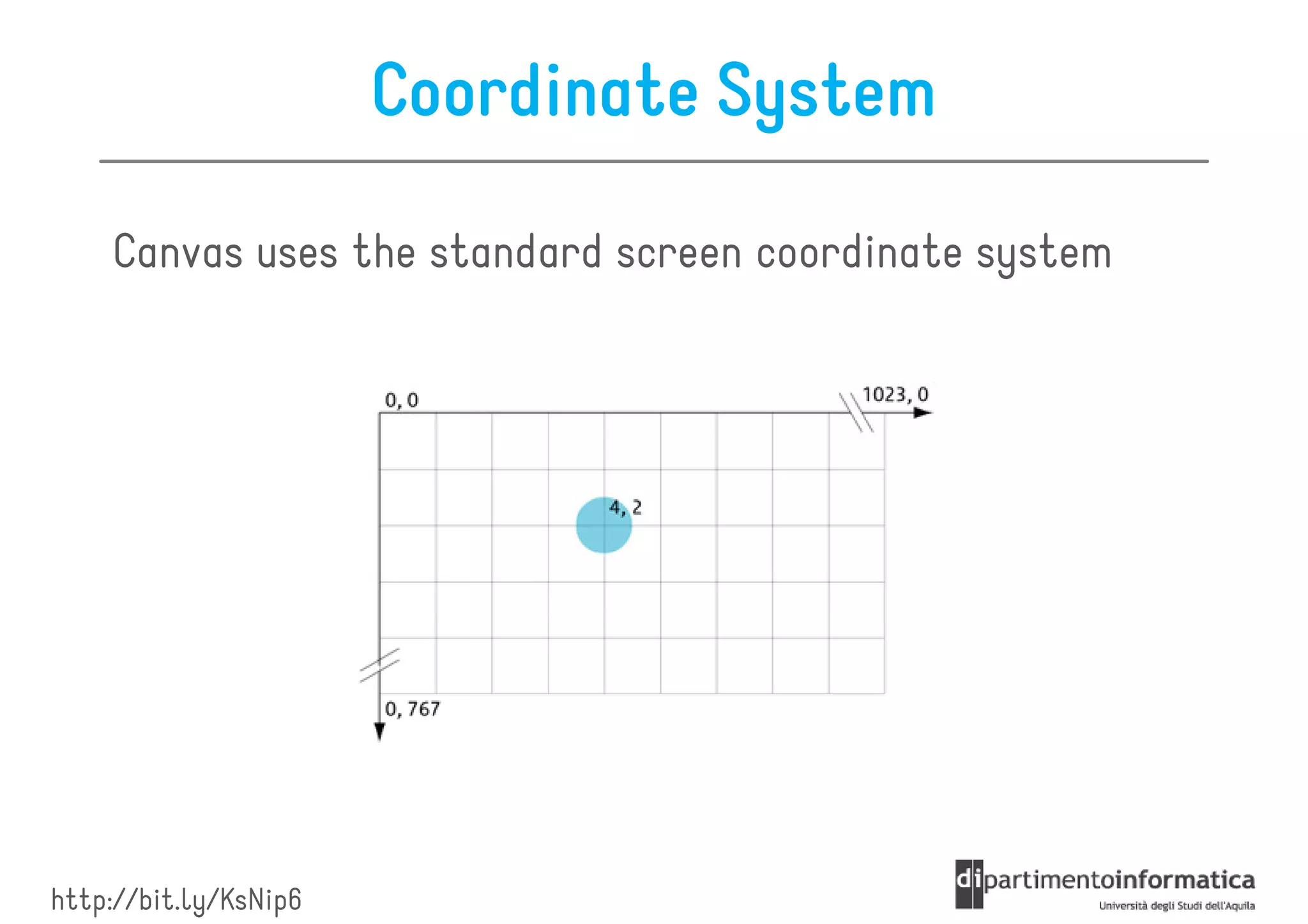
    Canvas uses the standard screen coordinate system


http://bit.ly/KsNip6
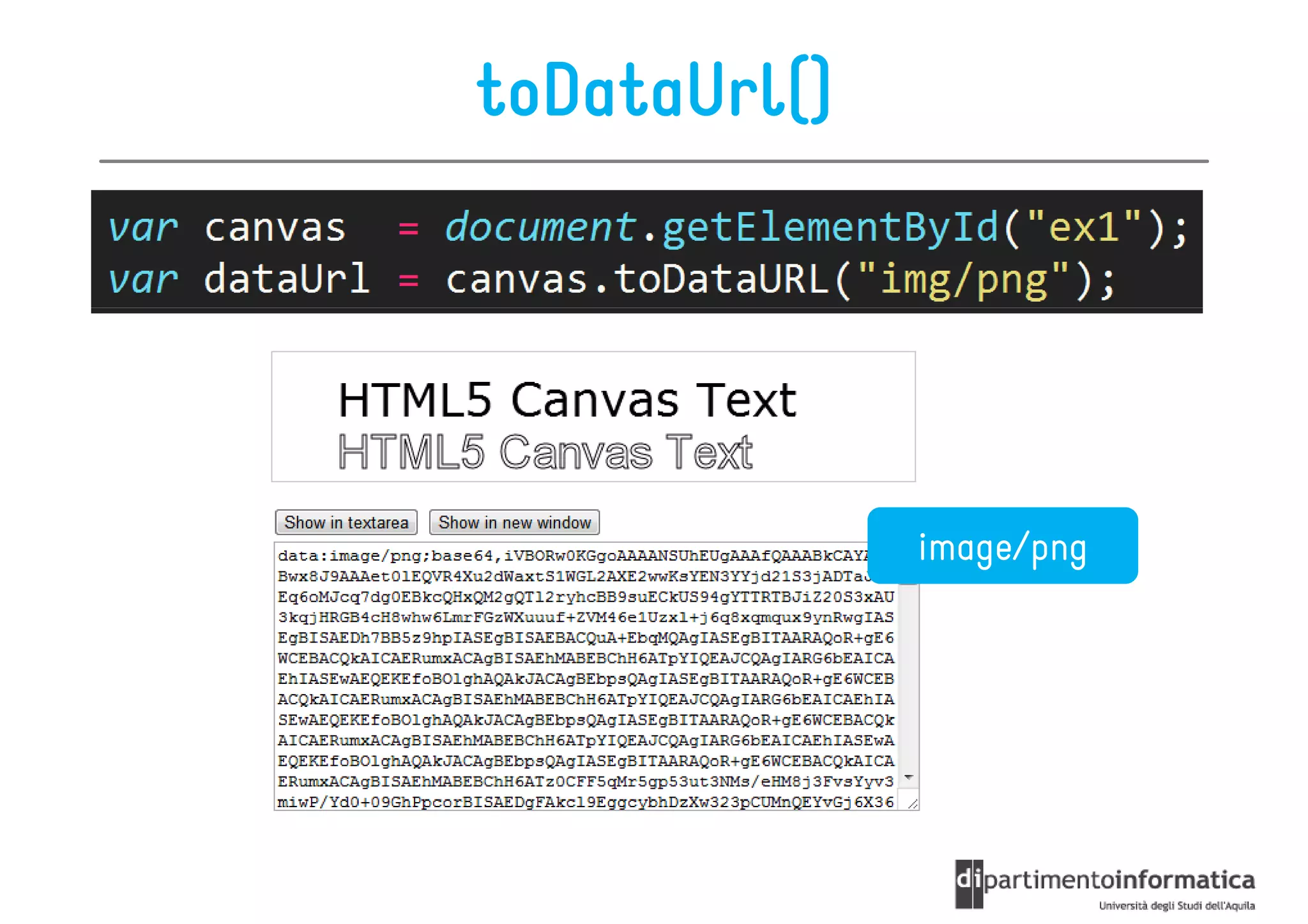
toDataUrl()


              image/png
Context


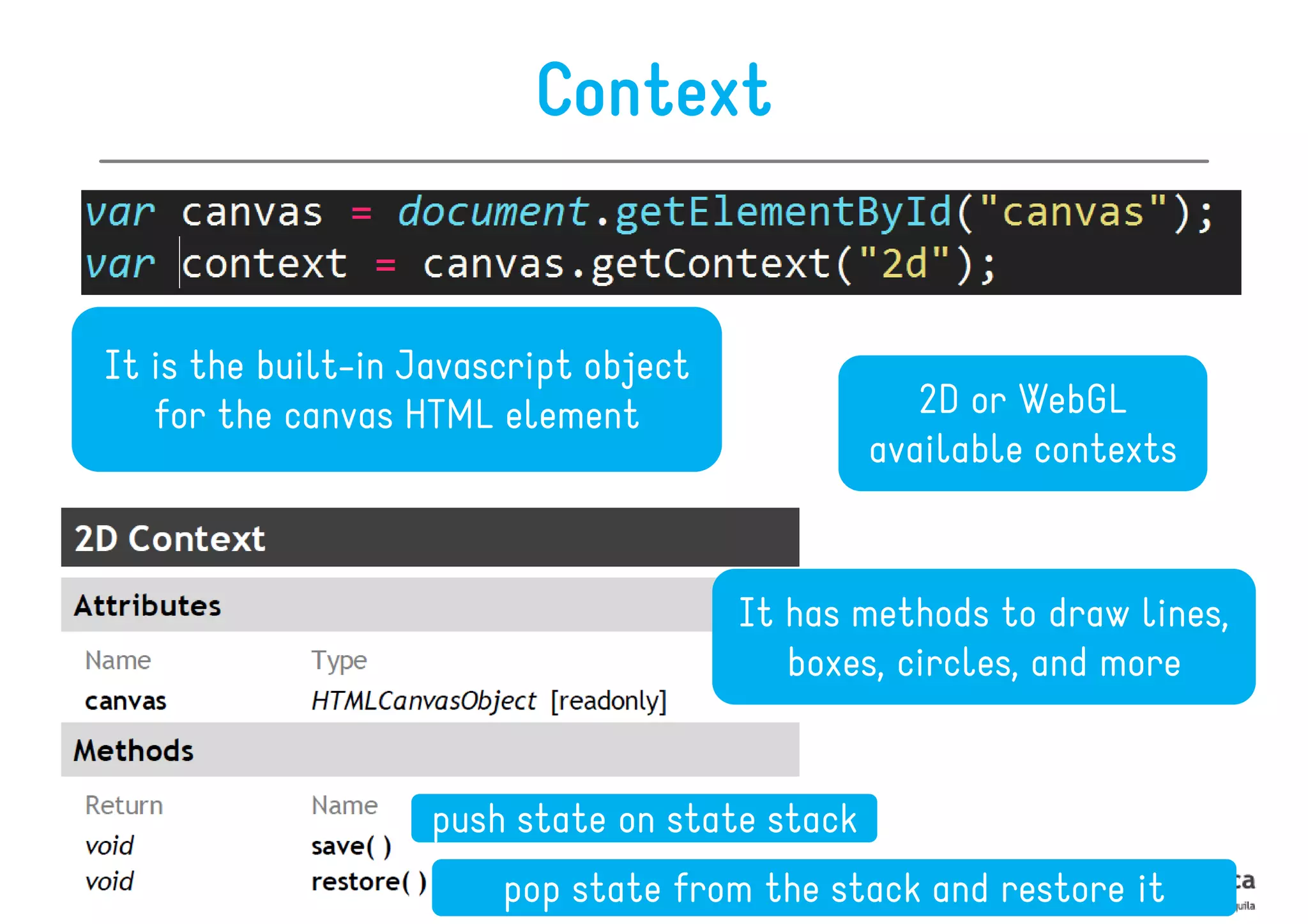
It is the built-in Javascript object
   for the canvas HTML element                     2D or WebGL
                                                available contexts


                                       It has methods to draw lines,
                                          boxes, circles, and more


                    push state on state stack
                        pop state from the stack and restore it
Roadmap

•   Intro
•   Colors & Style
•   Drawings
•   Images & Pixels
•   Transformations
•   Text
•   Compositing
•   Animations
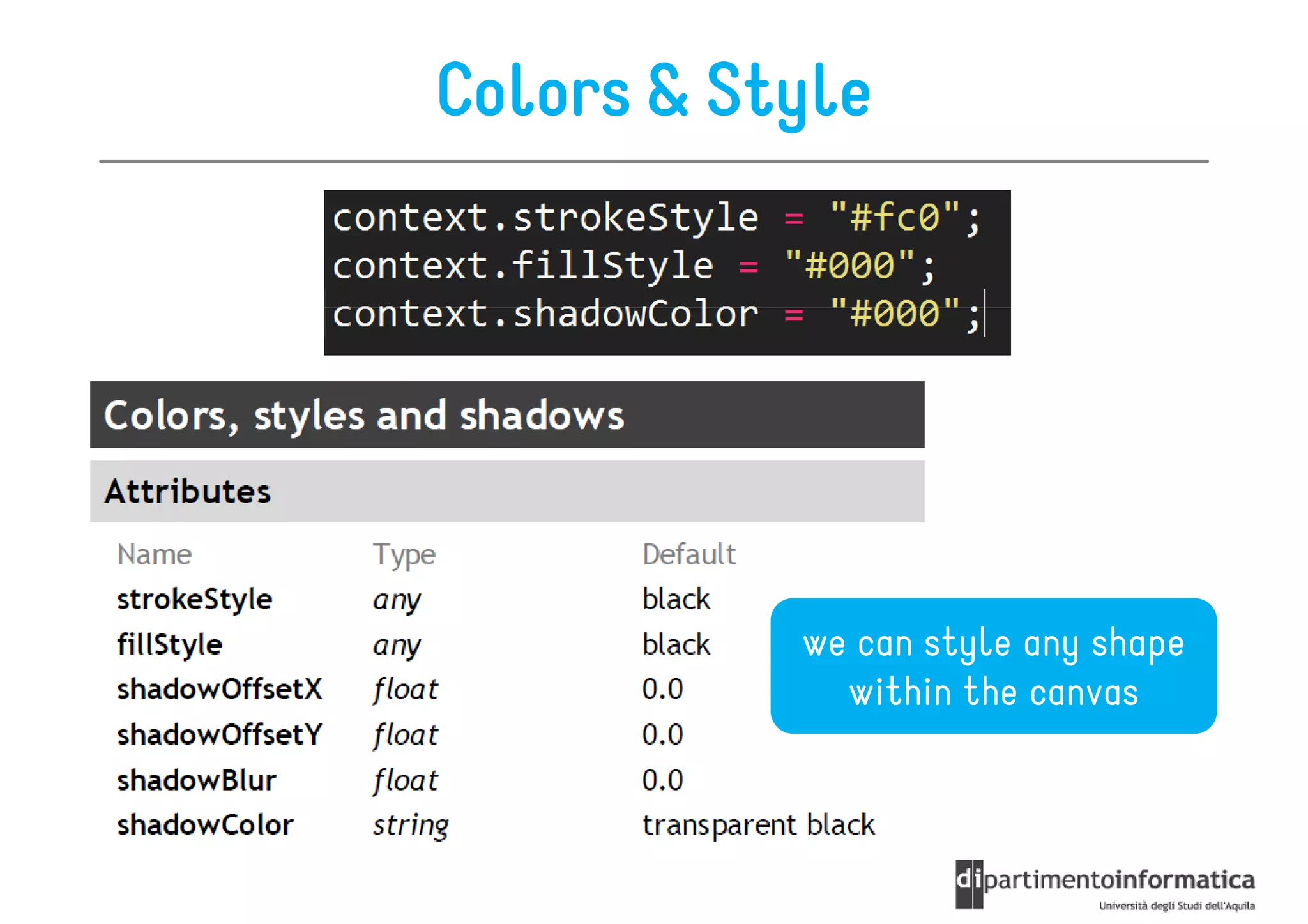
Colors & Style


           we can style any shape
             within the canvas
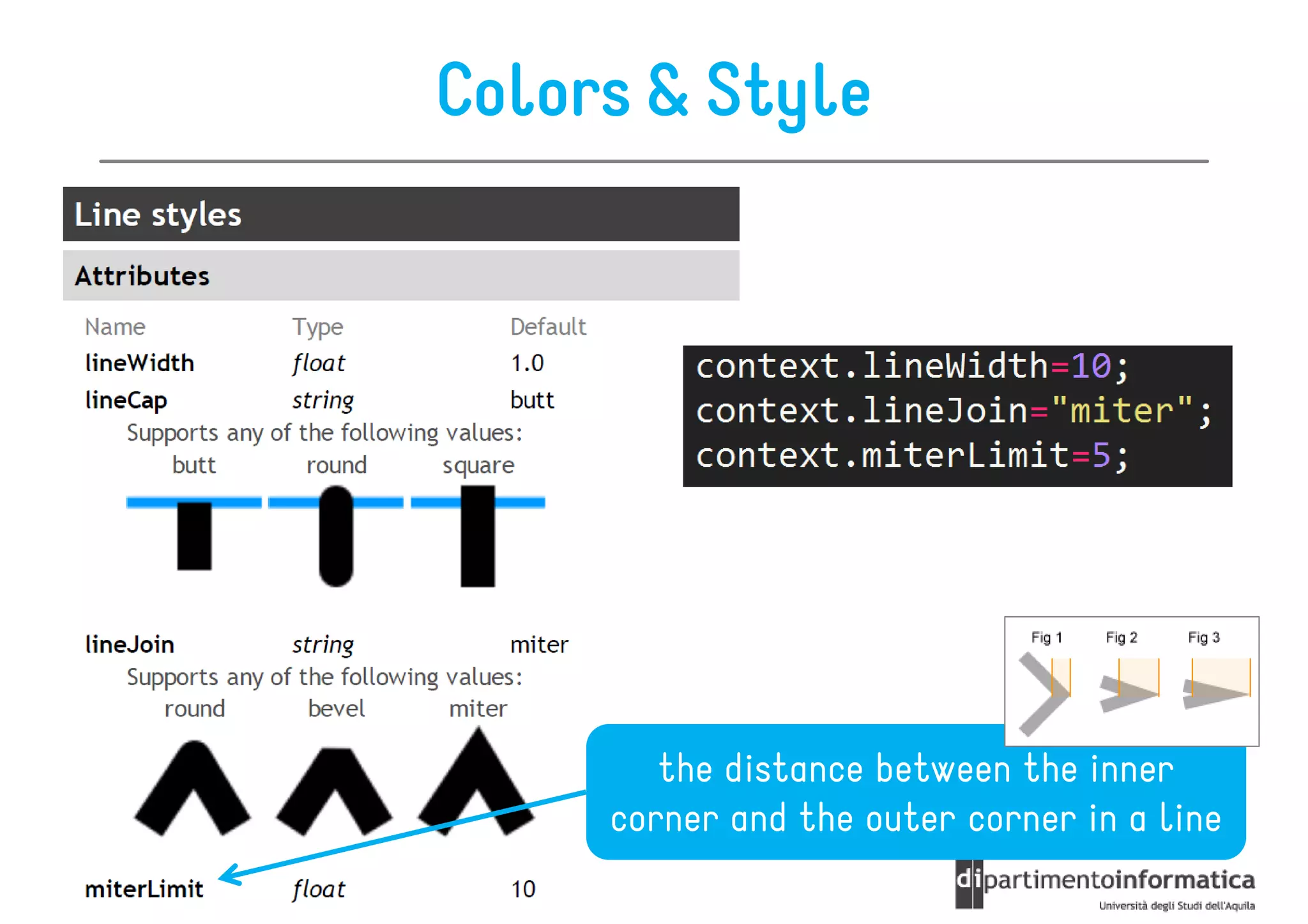
Colors & Style


        the distance between the inner
     corner and the outer corner in a line
Colors & Style
                           you can use this objects as a value
                              to strokeStyle or fillStyle


                                         creates a pattern
                                           from an image

                                              [repeat |
                                             repeat-x |
                                              repeat-y
Specifies the gradient's
                                            | no-repeat]
  position and color
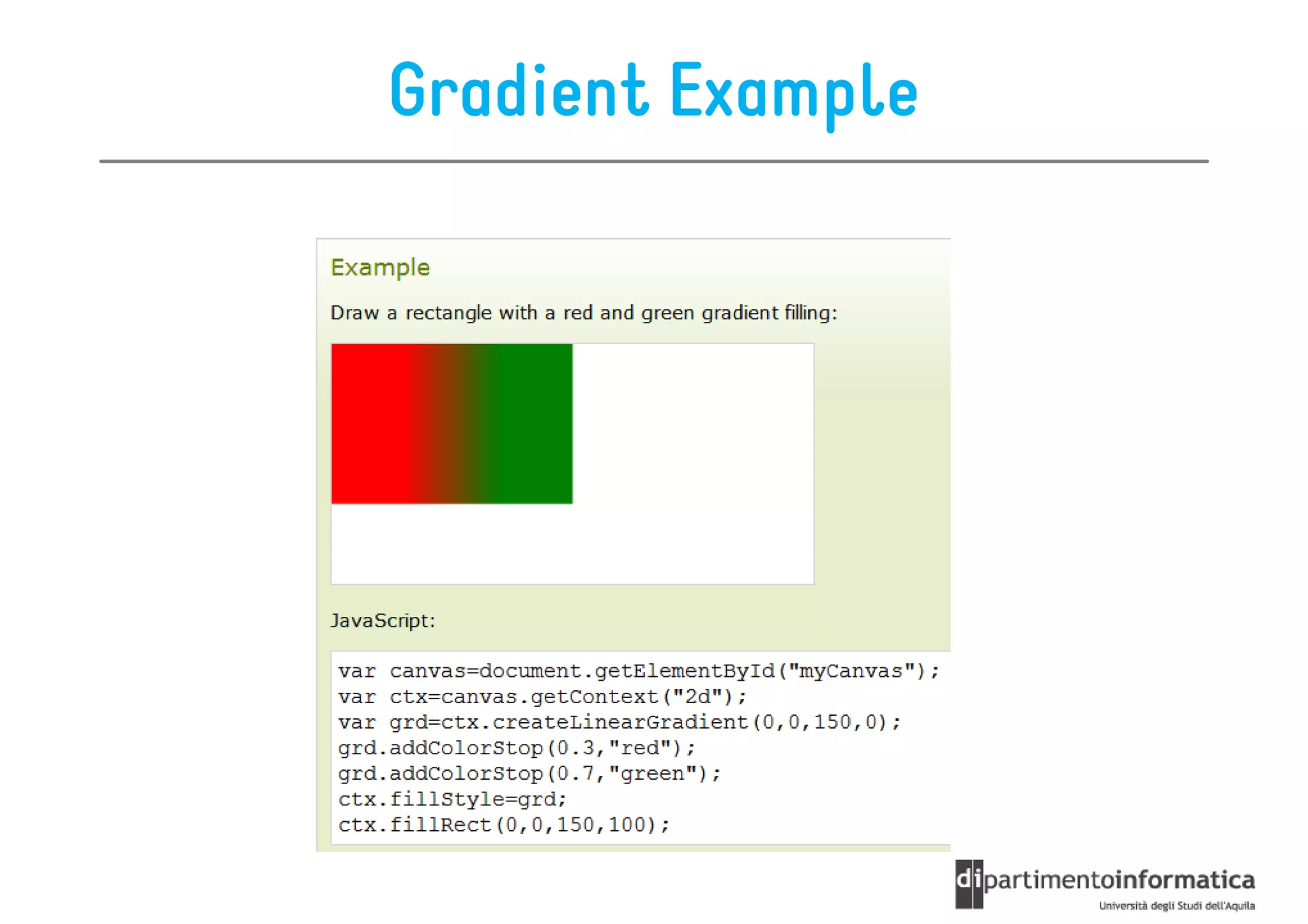
Gradient Example
Roadmap

•   Intro
•   Colors & Style
•   Drawings
•   Images & Pixels
•   Transformations
•   Text
•   Compositing
•   Animations
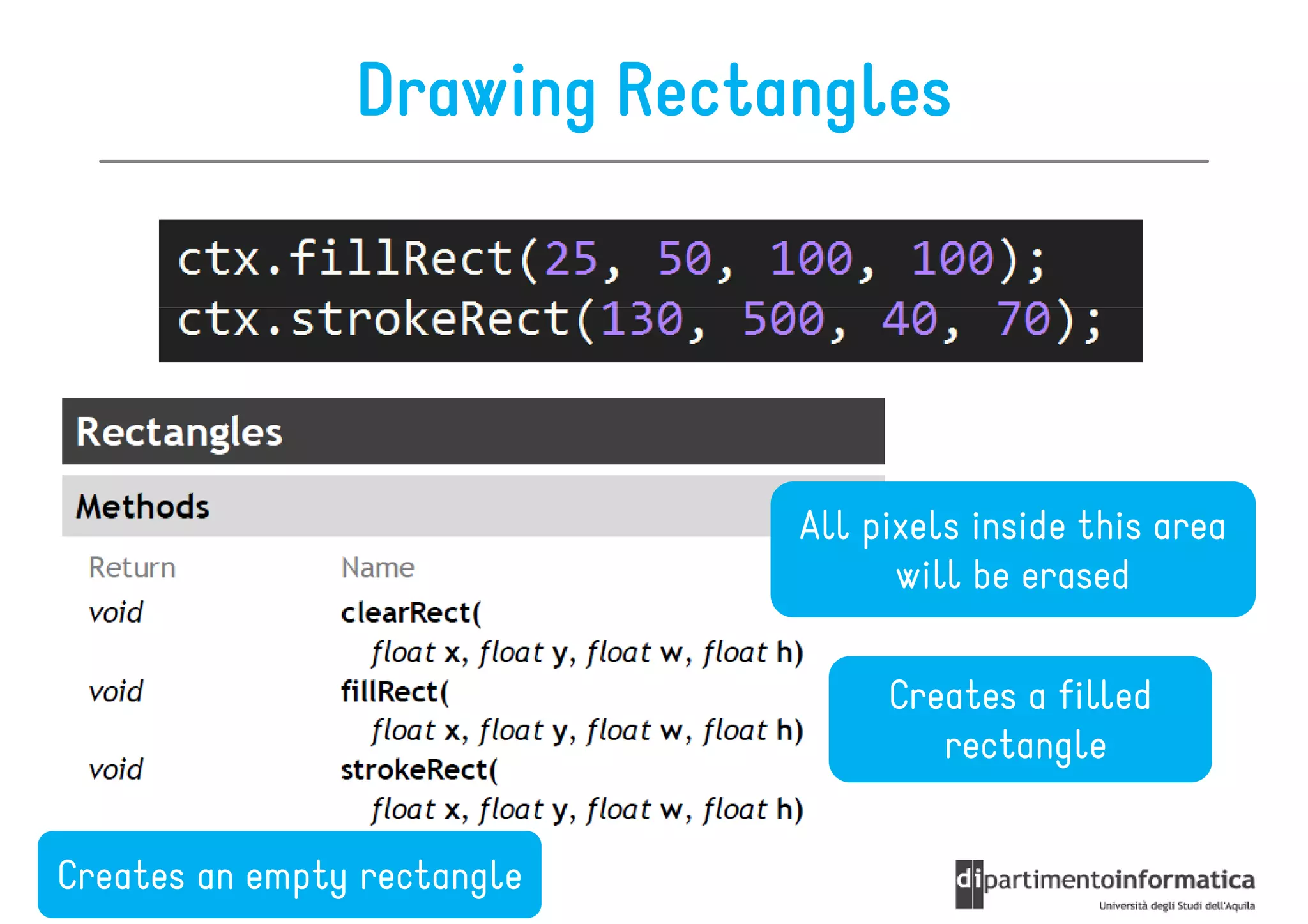
Drawing Rectangles


                             All pixels inside this area
                                   will be erased

                                  Creates a filled
                                     rectangle


Creates an empty rectangle
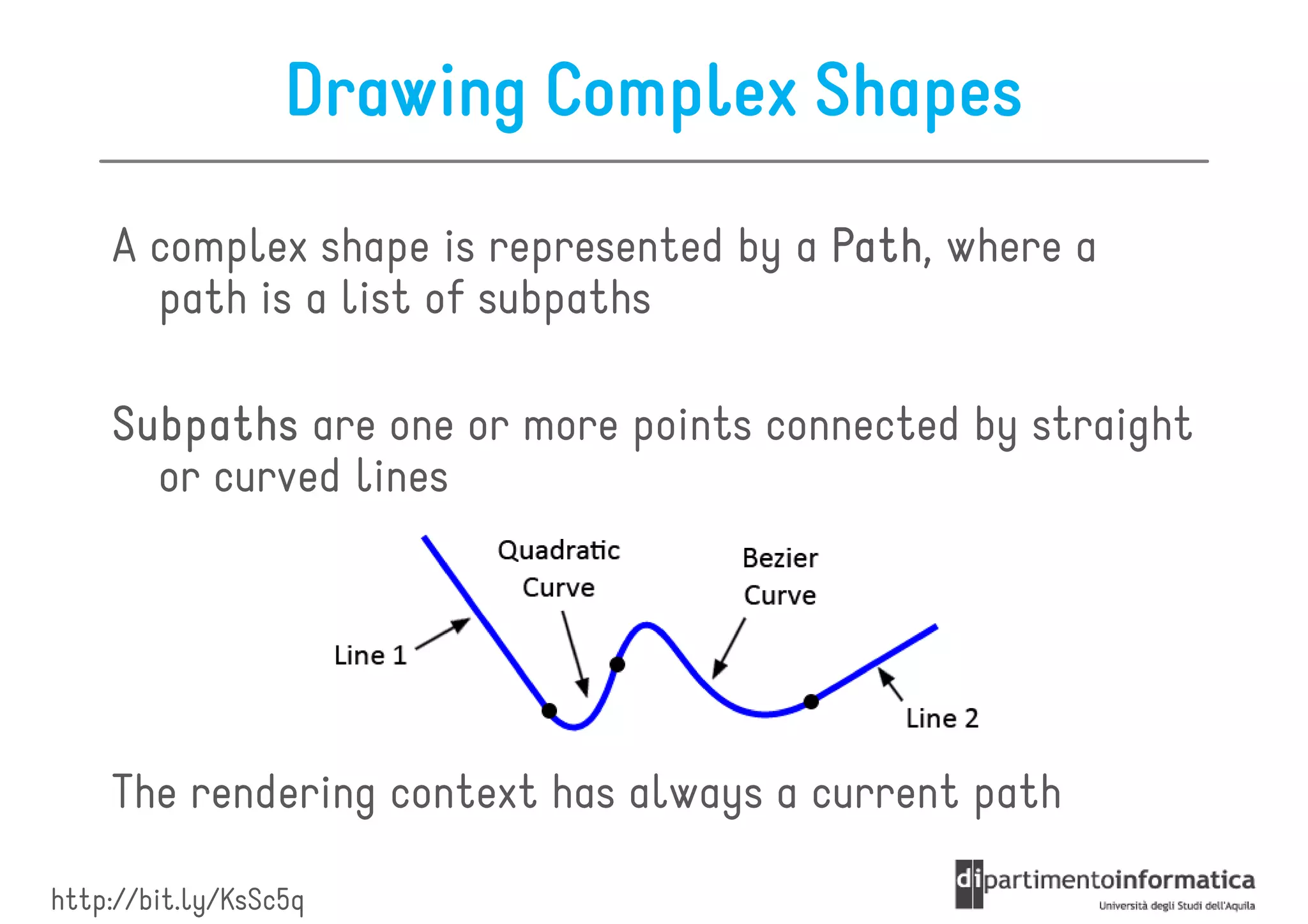
Drawing Complex Shapes
    A complex shape is represented by a Path where a
                                        Path,
      path is a list of subpaths

    Subpaths are one or more points connected by straight
      or curved lines


    The rendering context has always a current path

http://bit.ly/KsSc5q
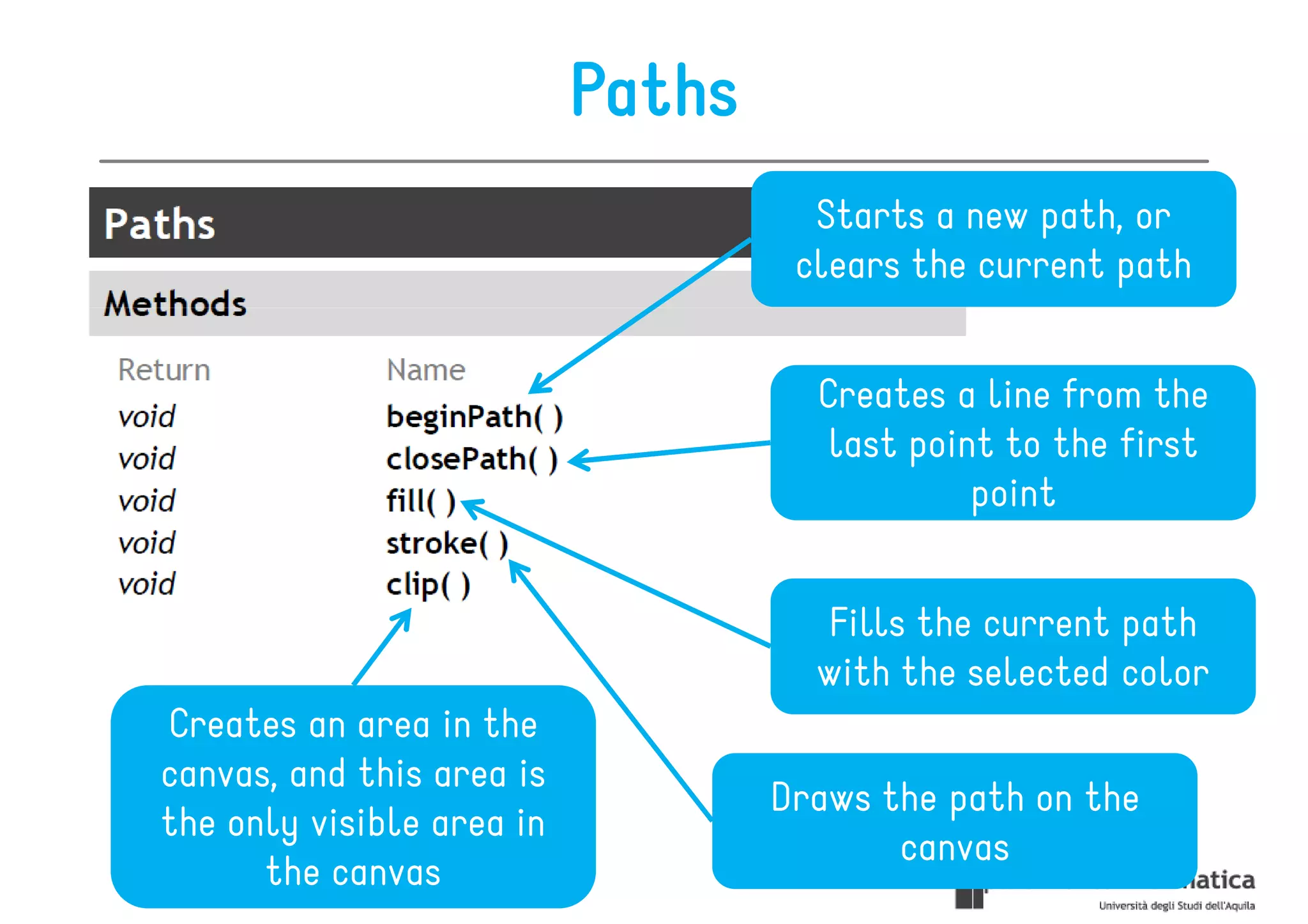
Paths
                                     Starts a new path, or
                                    clears the current path


                                     Creates a line from the
                                      last point to the first
                                               point


                                     Fills the current path
                                     with the selected color
Creates an area in the
canvas, and this area is
                                   Draws the path on the
the only visible area in
                                          canvas
      the canvas
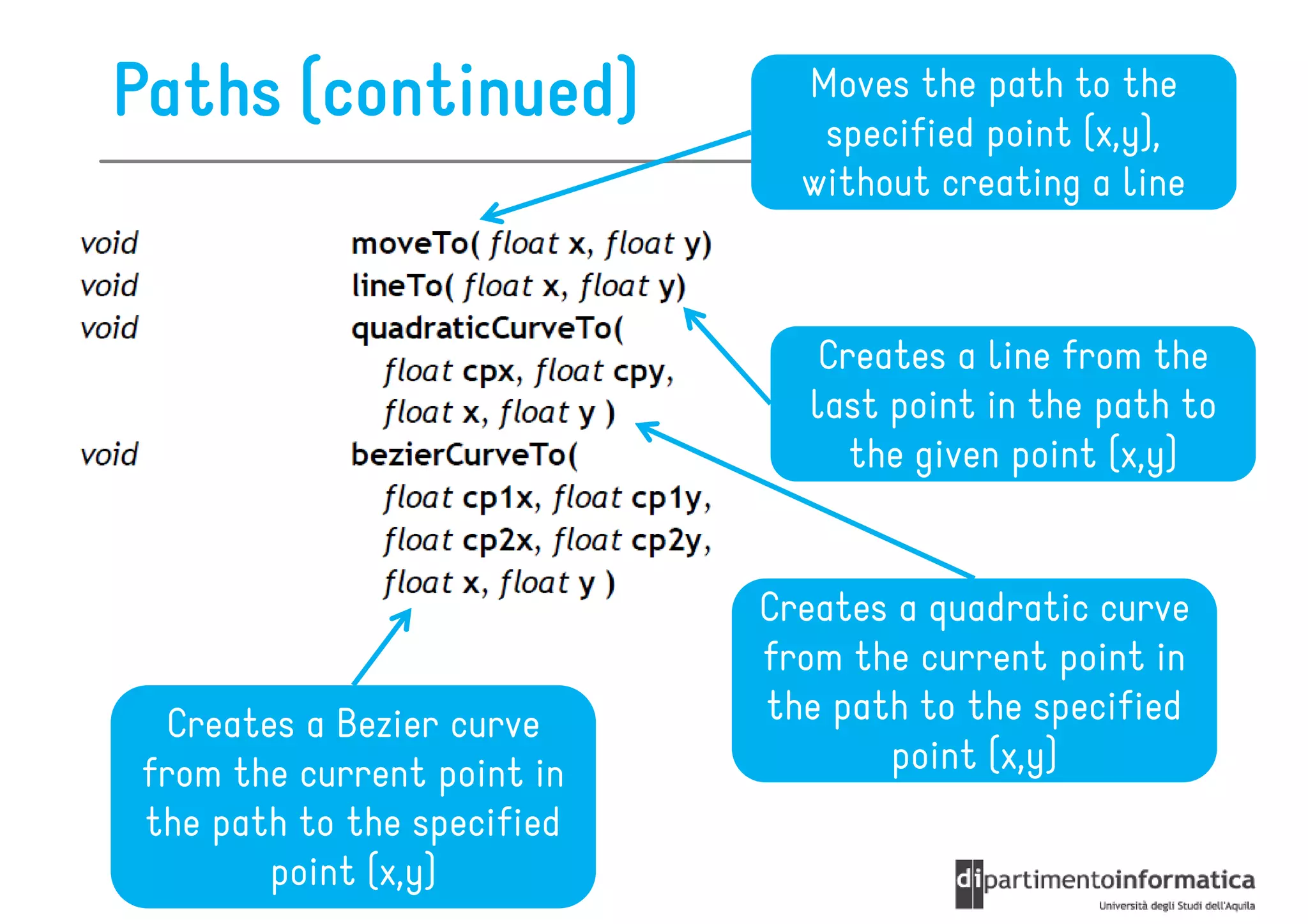
Paths (continued)             Moves the path to the
                               specified point (x,y),
                              without creating a line


                               Creates a line from the
                              last point in the path to
                                 the given point (x,y)


                            Creates a quadratic curve
                            from the current point in
 Creates a Bezier curve     the path to the specified
from the current point in          point (x,y)
the path to the specified
       point (x,y)
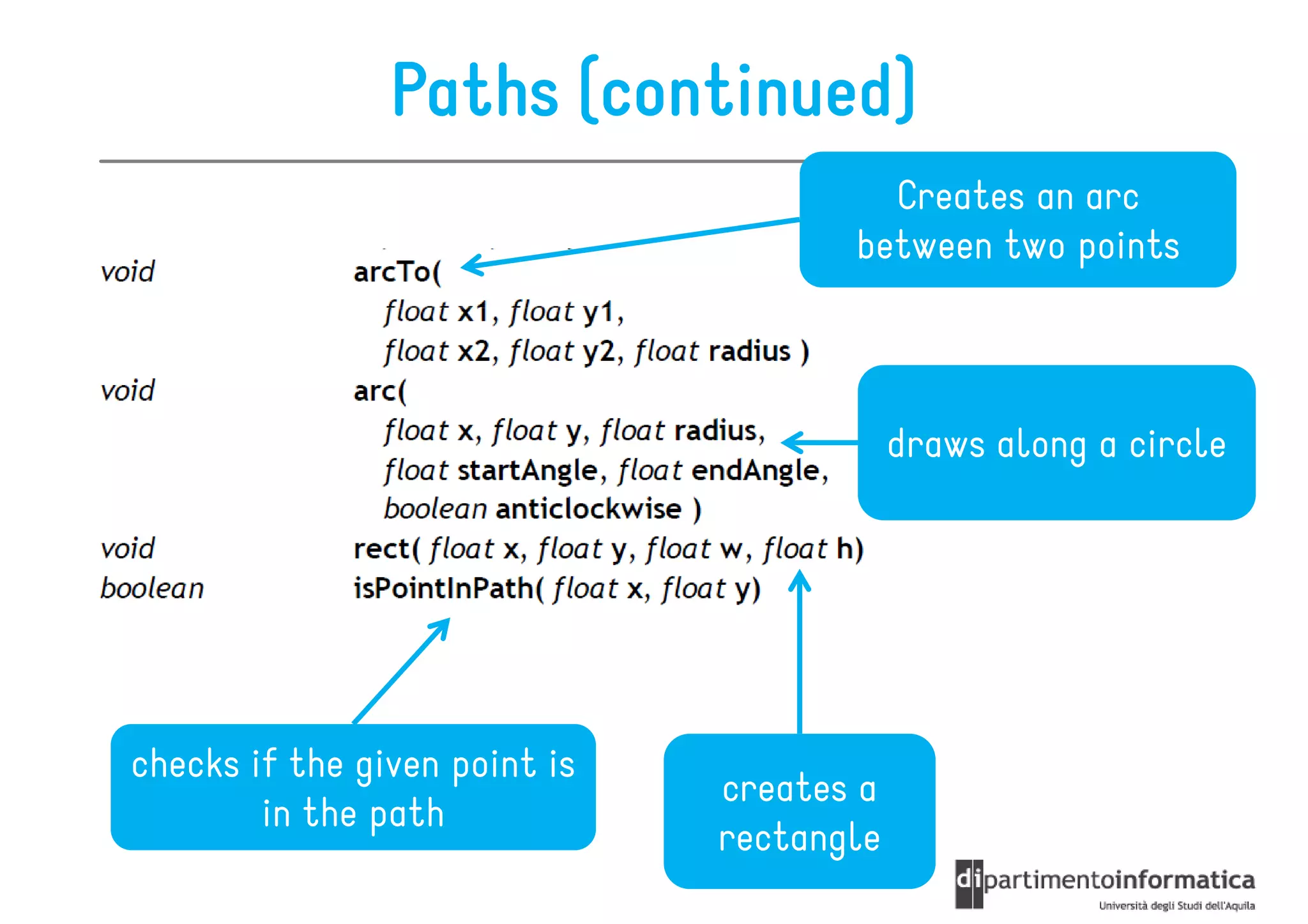
Paths (continued)
                                        Creates an arc
                                      between two points


                                           draws along a circle


checks if the given point is
                               creates a
        in the path
                               rectangle
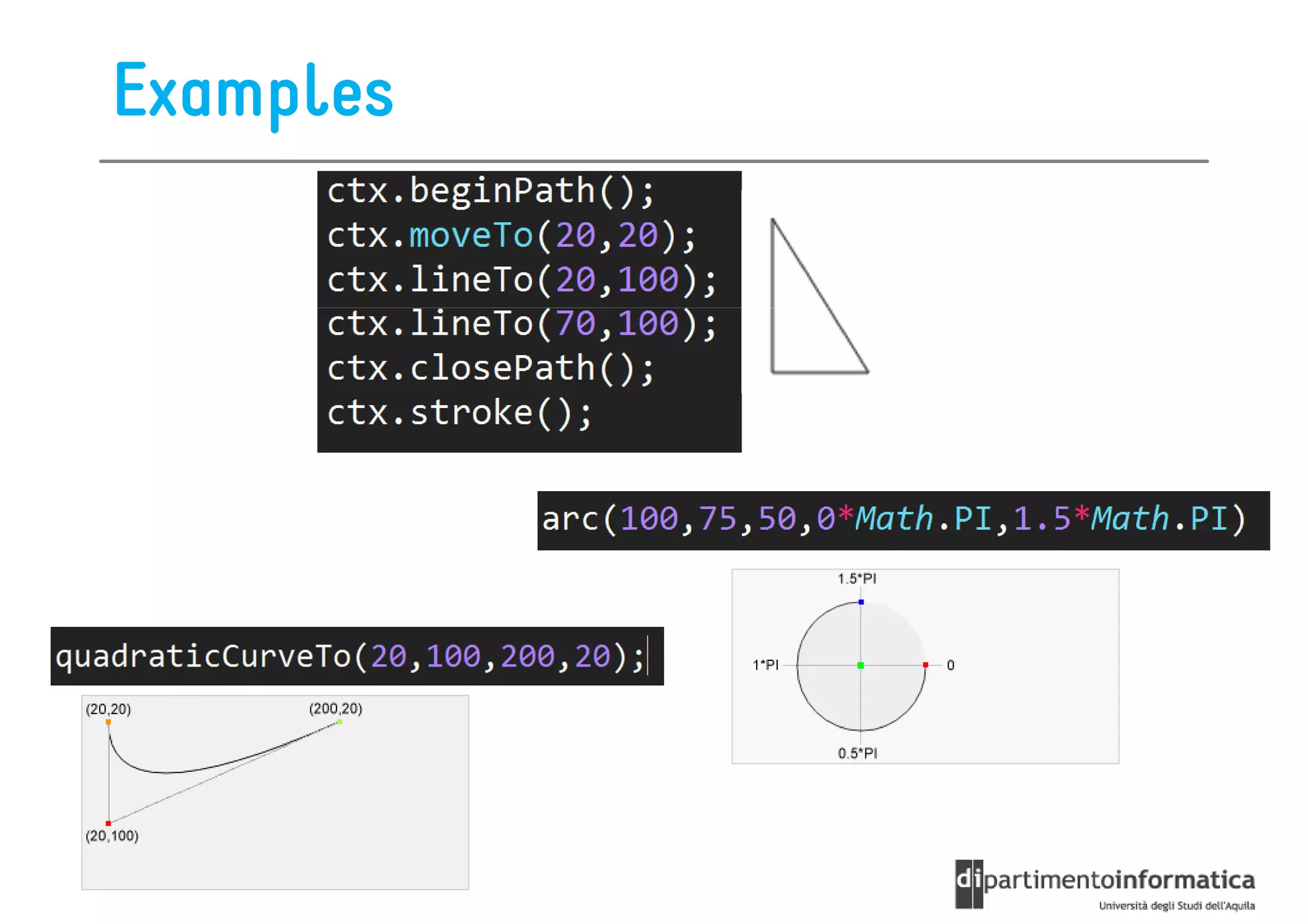
Examples
Roadmap

•   Intro
•   Colors & Style
•   Drawings
•   Images & Pixels
•   Transformations
•   Text
•   Compositing
•   Animations
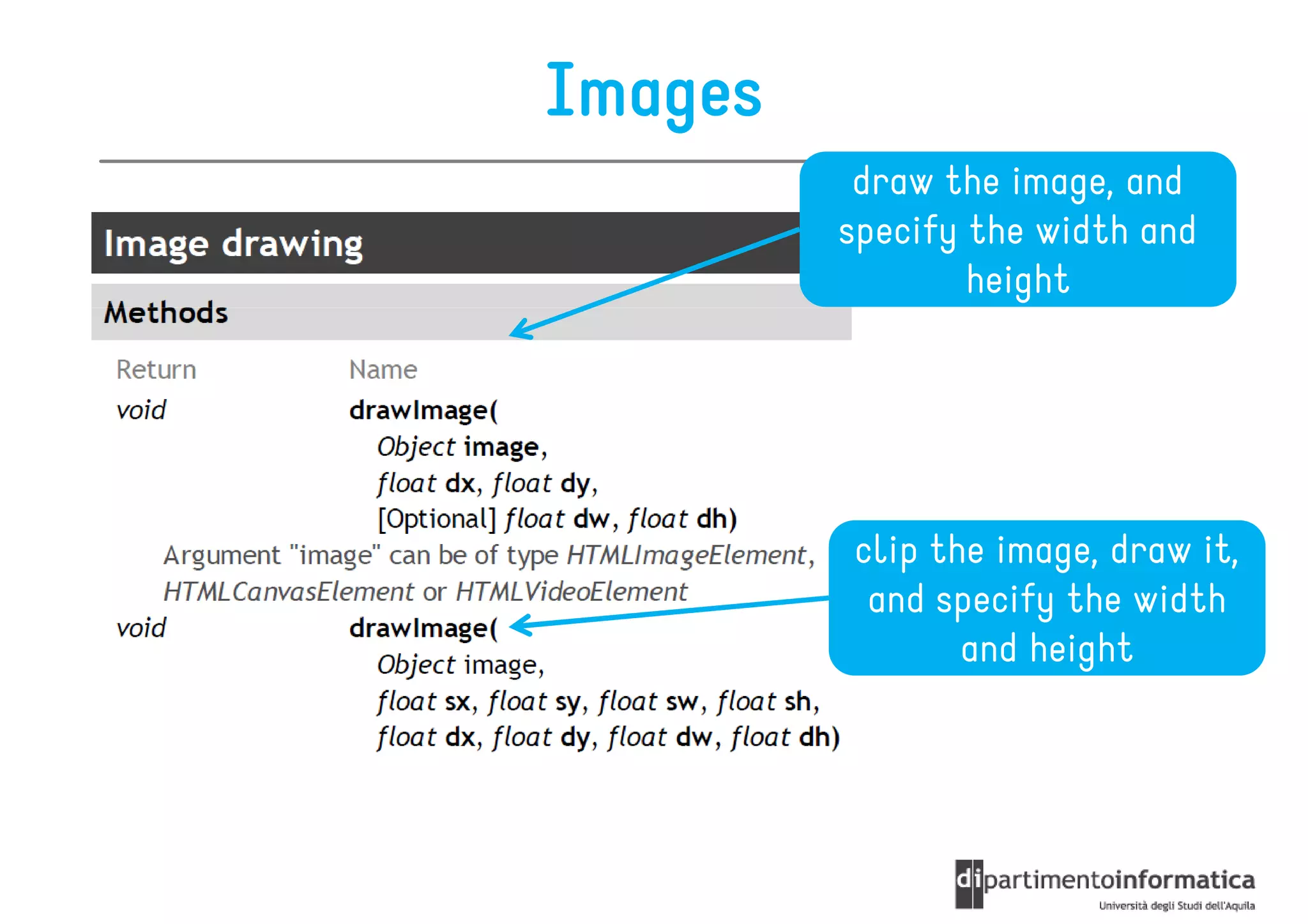
Images
          draw the image, and
         specify the width and
                 height


         clip the image, draw it,
          and specify the width
                and height
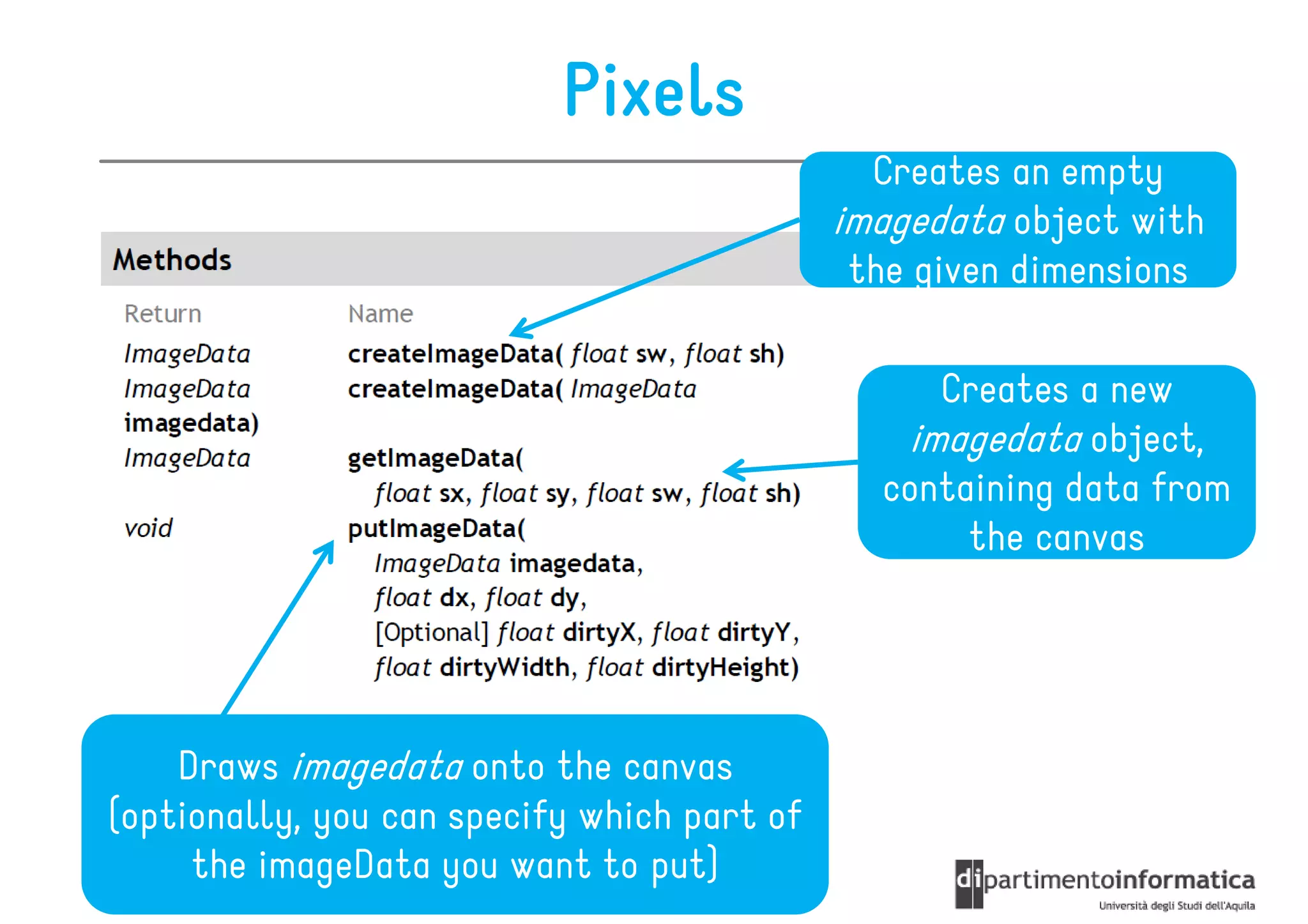
Pixels
                                               Creates an empty
                                             imagedata object with
                                              the given dimensions

                                                  Creates a new
                                                imagedata object,
                                               containing data from
                                                    the canvas


    Draws imagedata onto the canvas
(optionally, you can specify which part of
     the imageData you want to put)
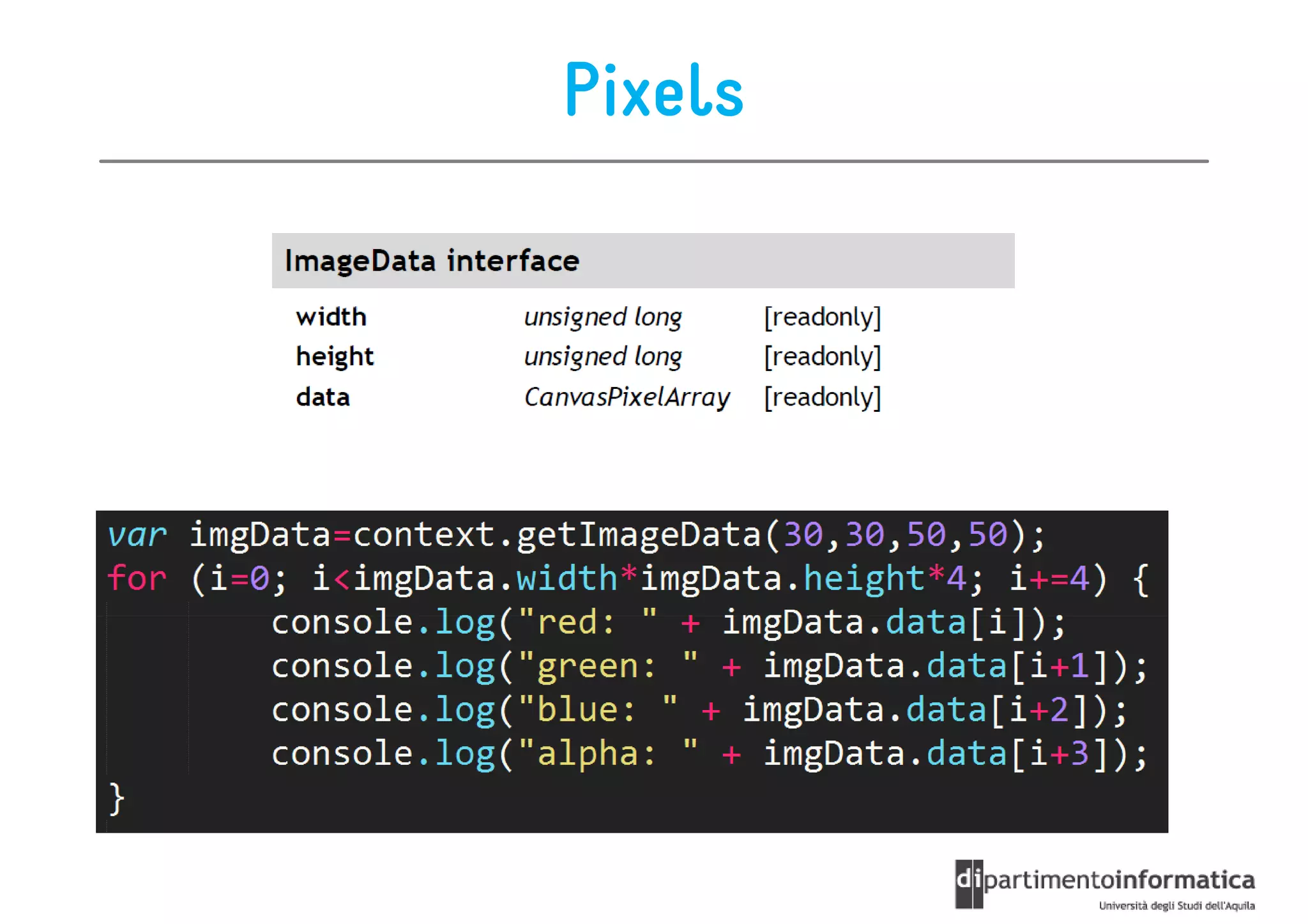
Pixels
Roadmap

•   Intro
•   Colors & Style
•   Drawings
•   Images & Pixels
•   Transformations
•   Text
•   Compositing
•   Animations
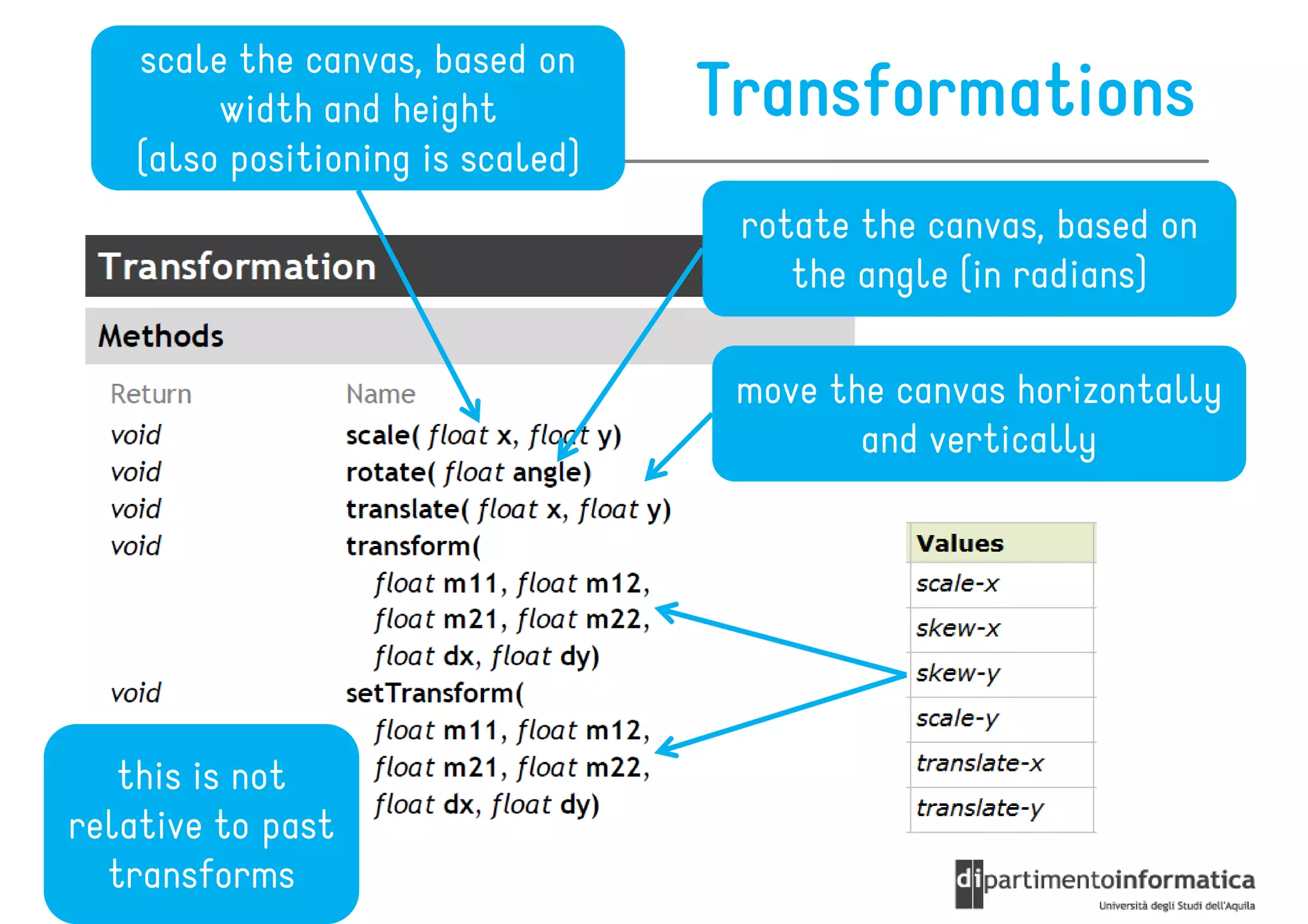
scale the canvas, based on
         width and height          Transformations
    (also positioning is scaled)
                                    rotate the canvas, based on
                                       the angle (in radians)

                                    move the canvas horizontally
                                           and vertically


   this is not
relative to past
  transforms
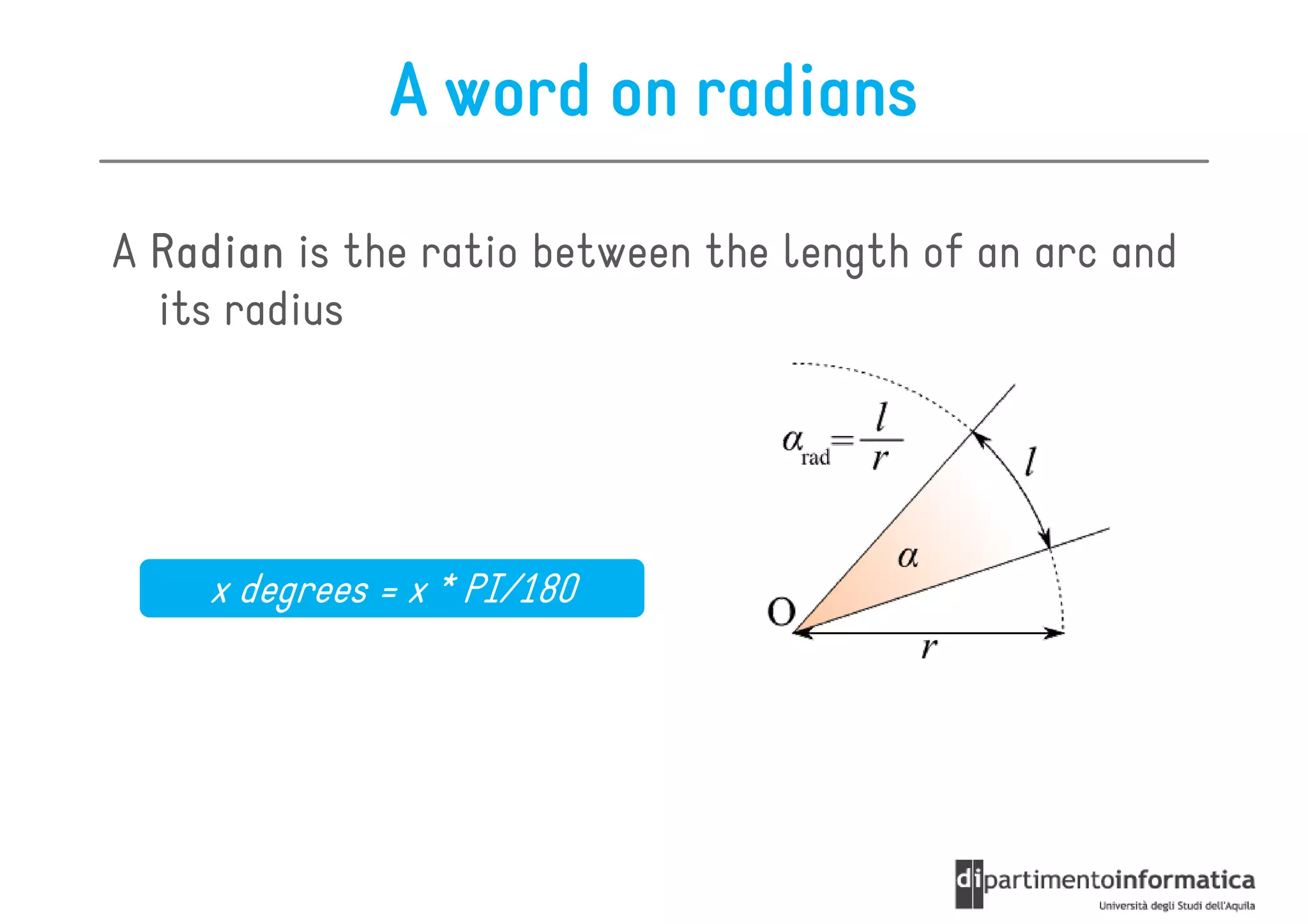
A word on radians

A Radian is the ratio between the length of an arc and
  its radius


    x degrees = x * PI/180
Roadmap

•   Intro
•   Colors & Style
•   Drawings
•   Images & Pixels
•   Transformations
•   Text
•   Compositing
•   Animations
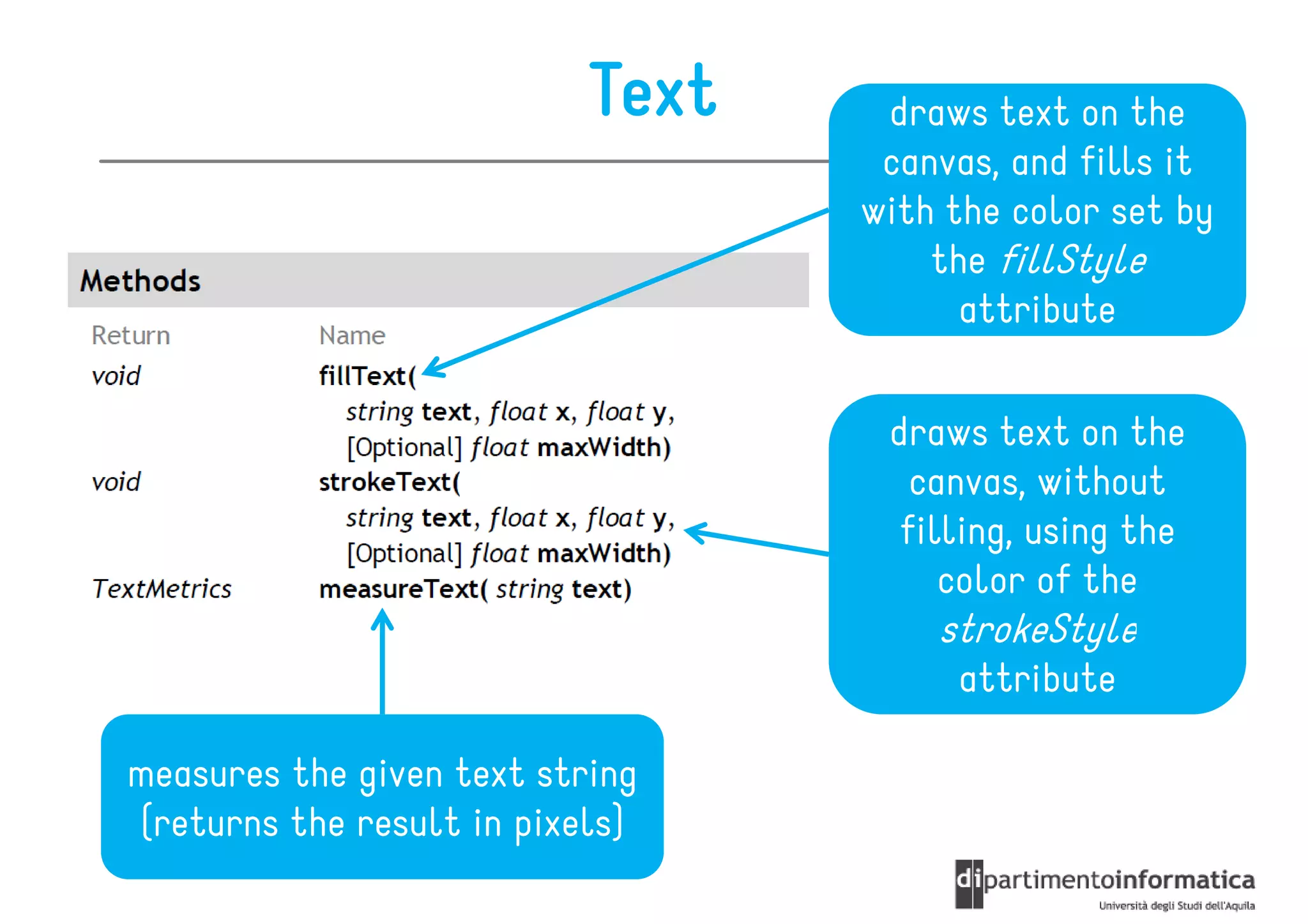
Text    draws text on the
                                   canvas, and fills it
                                  with the color set by
                                      the fillStyle
                                        attribute

                                   draws text on the
                                     canvas, without
                                    filling, using the
                                       color of the
                                      strokeStyle
                                       attribute

measures the given text string
(returns the result in pixels)
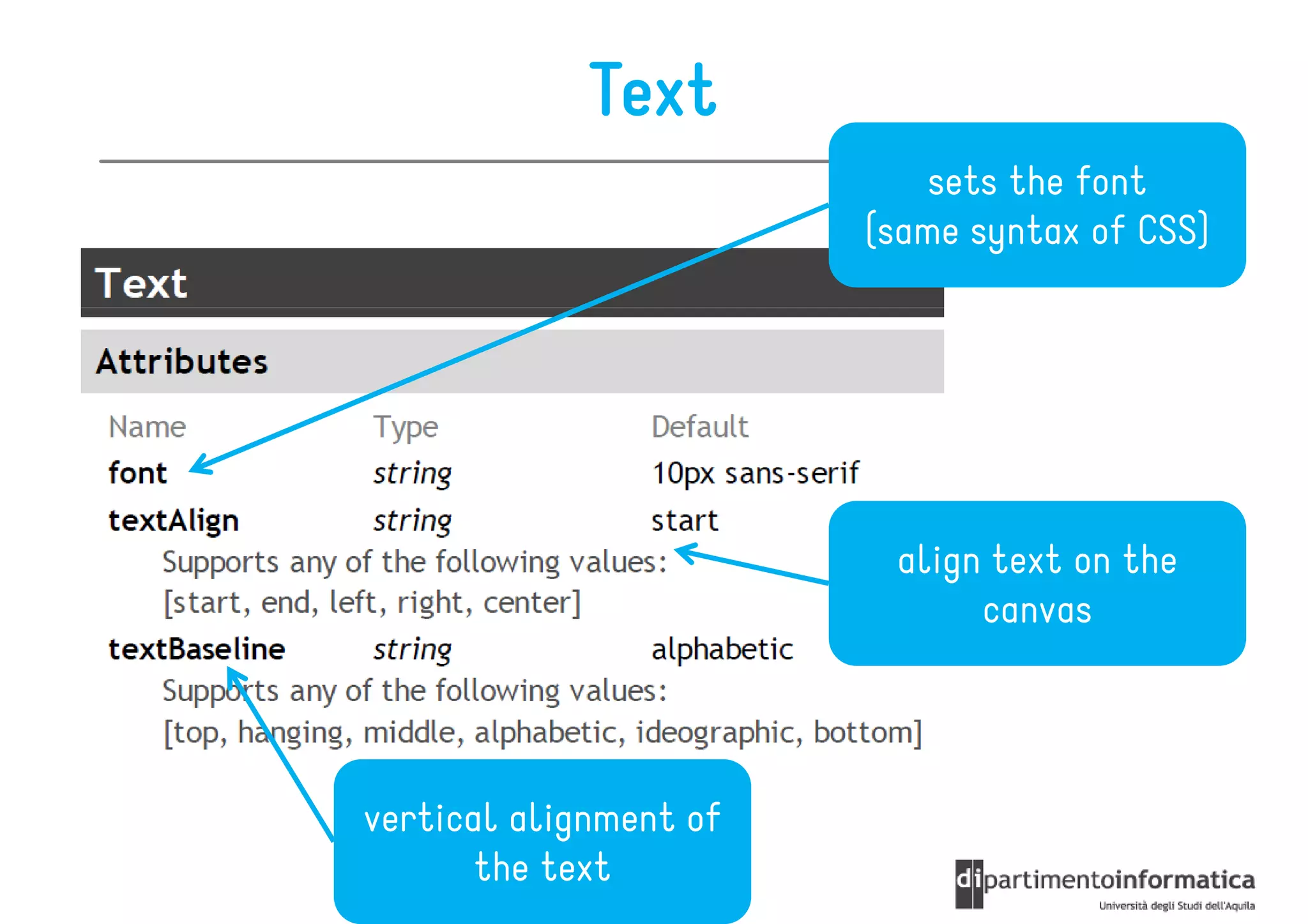
Text
                            sets the font
                        (same syntax of CSS)


                         align text on the
                              canvas


vertical alignment of
       the text
Roadmap

•   Intro
•   Colors & Style
•   Drawings
•   Images & Pixels
•   Transformations
•   Text
•   Compositing
•   Animations
Compositing

   transparency
  of the drawings


  how drawings are
 positioned onto the
        canvas
Roadmap

•   Intro
•   Colors & Style
•   Drawings
•   Images & Pixels
•   Transformations
•   Text
•   Compositing
•   Animations
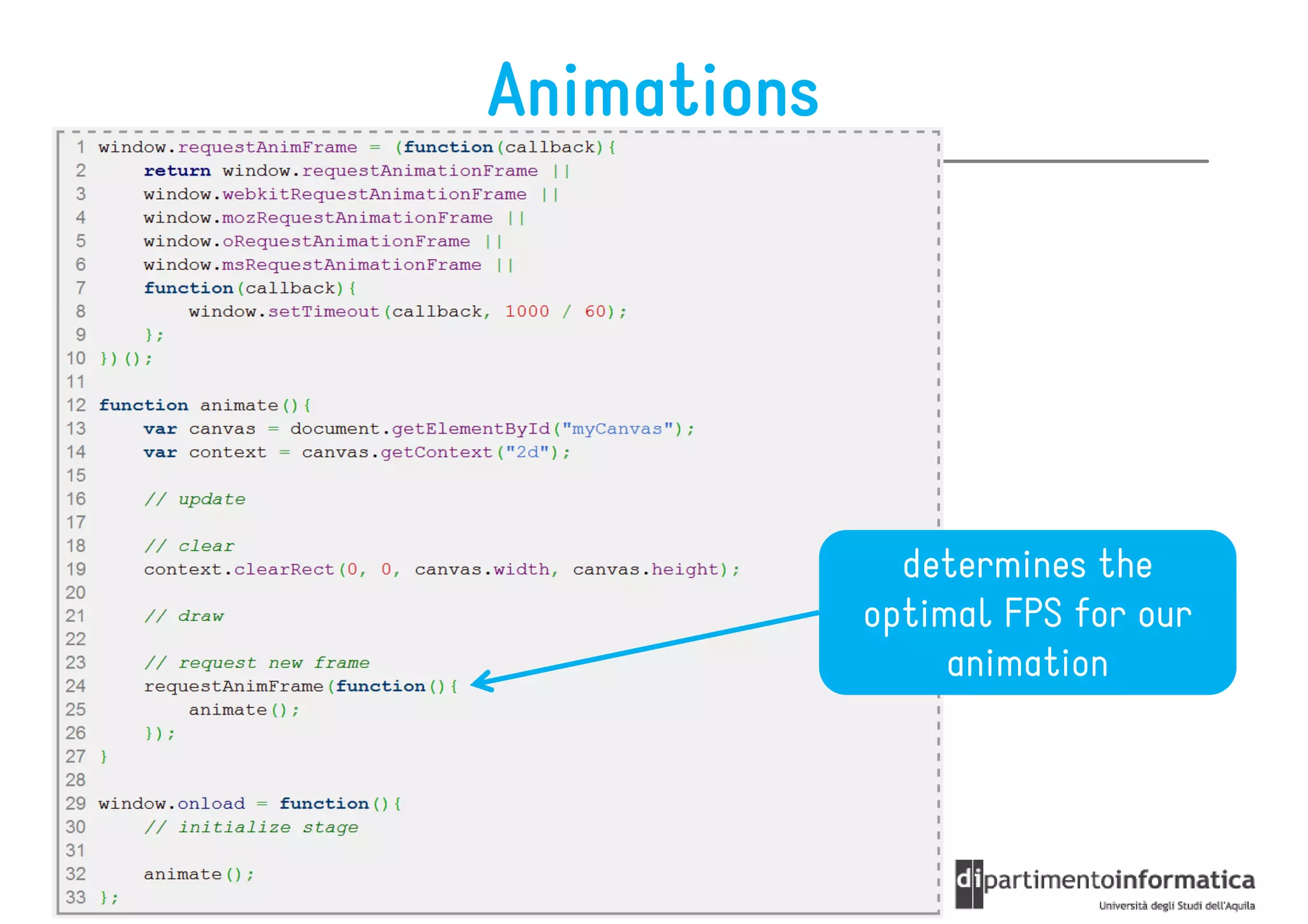
Animations


               determines the
             optimal FPS for our
                  animation
References


http://www.w3schools.com/html5/html5_ref_canvas.asp
http://www.nihilogic.dk/labs/canvas_sheet/HTML5_Canvas_Cheat_Sheet.pdf

HTML5 Canvas

  • 1.
    Canvas Ivano Malavolta ivano.malavolta@univaq.it http://www.di.univaq.it/malavolta
  • 2.
    Roadmap • Intro • Colors & Style • Drawings • Images & Pixels • Transformations • Text • Compositing • Animations
  • 3.
    Canvas Canvas allows you to draw anything inside the browser http://bit.ly/LC8AgY http://bit.ly/LULa79 http://bit.ly/LUKXkr http://bit.ly/Ie4HKu
  • 4.
    Canvas It uses nothing more than JavaScript and HTML no external plugins, no libraries, etc. You can create lines, use images, use text, apply transformations, etc. http://bit.ly/KsKLv1
  • 5.
    Canvas A canvas is a rectangular area, where you can control every pixel using JavaScript Returns a string representing an encoded URL containing the grabbed graphical data
  • 6.
    Coordinate System Canvas uses the standard screen coordinate system http://bit.ly/KsNip6
  • 7.
    toDataUrl() image/png
  • 8.
    Context It is thebuilt-in Javascript object for the canvas HTML element 2D or WebGL available contexts It has methods to draw lines, boxes, circles, and more push state on state stack pop state from the stack and restore it
  • 9.
    Roadmap • Intro • Colors & Style • Drawings • Images & Pixels • Transformations • Text • Compositing • Animations
  • 10.
    Colors & Style we can style any shape within the canvas
  • 11.
    Colors & Style the distance between the inner corner and the outer corner in a line
  • 12.
    Colors & Style you can use this objects as a value to strokeStyle or fillStyle creates a pattern from an image [repeat | repeat-x | repeat-y Specifies the gradient's | no-repeat] position and color
  • 13.
  • 14.
    Roadmap • Intro • Colors & Style • Drawings • Images & Pixels • Transformations • Text • Compositing • Animations
  • 15.
    Drawing Rectangles All pixels inside this area will be erased Creates a filled rectangle Creates an empty rectangle
  • 16.
    Drawing Complex Shapes A complex shape is represented by a Path where a Path, path is a list of subpaths Subpaths are one or more points connected by straight or curved lines The rendering context has always a current path http://bit.ly/KsSc5q
  • 17.
    Paths Starts a new path, or clears the current path Creates a line from the last point to the first point Fills the current path with the selected color Creates an area in the canvas, and this area is Draws the path on the the only visible area in canvas the canvas
  • 18.
    Paths (continued) Moves the path to the specified point (x,y), without creating a line Creates a line from the last point in the path to the given point (x,y) Creates a quadratic curve from the current point in Creates a Bezier curve the path to the specified from the current point in point (x,y) the path to the specified point (x,y)
  • 19.
    Paths (continued) Creates an arc between two points draws along a circle checks if the given point is creates a in the path rectangle
  • 20.
  • 21.
    Roadmap • Intro • Colors & Style • Drawings • Images & Pixels • Transformations • Text • Compositing • Animations
  • 22.
    Images draw the image, and specify the width and height clip the image, draw it, and specify the width and height
  • 23.
    Pixels Creates an empty imagedata object with the given dimensions Creates a new imagedata object, containing data from the canvas Draws imagedata onto the canvas (optionally, you can specify which part of the imageData you want to put)
  • 24.
  • 25.
    Roadmap • Intro • Colors & Style • Drawings • Images & Pixels • Transformations • Text • Compositing • Animations
  • 26.
    scale the canvas,based on width and height Transformations (also positioning is scaled) rotate the canvas, based on the angle (in radians) move the canvas horizontally and vertically this is not relative to past transforms
  • 27.
    A word onradians A Radian is the ratio between the length of an arc and its radius x degrees = x * PI/180
  • 28.
    Roadmap • Intro • Colors & Style • Drawings • Images & Pixels • Transformations • Text • Compositing • Animations
  • 29.
    Text draws text on the canvas, and fills it with the color set by the fillStyle attribute draws text on the canvas, without filling, using the color of the strokeStyle attribute measures the given text string (returns the result in pixels)
  • 30.
    Text sets the font (same syntax of CSS) align text on the canvas vertical alignment of the text
  • 31.
    Roadmap • Intro • Colors & Style • Drawings • Images & Pixels • Transformations • Text • Compositing • Animations
  • 32.
    Compositing transparency of the drawings how drawings are positioned onto the canvas
  • 33.
    Roadmap • Intro • Colors & Style • Drawings • Images & Pixels • Transformations • Text • Compositing • Animations
  • 34.
    Animations determines the optimal FPS for our animation
  • 35.