Kahoot application - a game
that teaches
game-based learning
• Learning by game has always had its place in
education
• One of the best tools you can use to
implement the principles of learning by
playing in your pedagogical work is Kahoot
• Kahoot is an application whose roots go back
to 2013, when after a long testing it was
launched by experts from the Norwegian
pedagogical environment.
Principles and conditions of using the
Kahoot application
• Its principle is simple, but veryeffective
• it is a transformation of traditional verification of
knowledge through a quiz in a new, more deeply
activating form with the use of digital
technologies, computers, data projector, and
mobile devices, such as tablets or smartphones
with an Internet connection, that serve as voting
devices
• required knowledge of English -Basics of English -
very low level
Benefits of Kahoot
• The teacher is able to create knowledge games
on any topic in a short time
• The attractiveness of the games created in this
way for students lies in the creation of an exciting
atmosphere of competition, surprises and the
opportunity to experience success
• Kahoot's fascination also stems from the fact that
students compete with each other
• After each question, they have immediate
feedback on their answer and see how they stand
in the game compared to their classmates
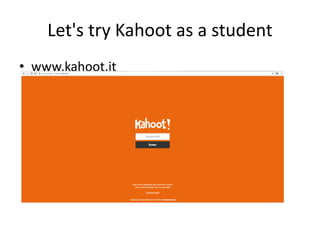
Let's try Kahoot as a student
• www.kahoot.it
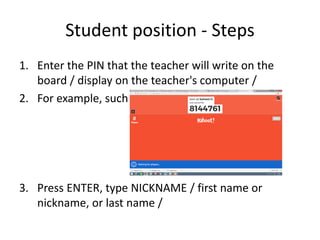
Student position - Steps
1. Enter the PIN that the teacher will write on the
board / display on the teacher's computer /
2. For example, such a Pin :
3. Press ENTER, type NICKNAME / first name or
nickname, or last name /
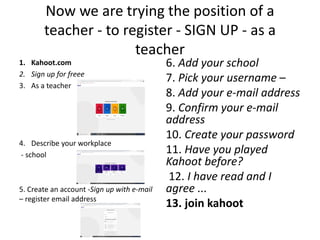
Now we are trying the position of a
teacher - to register - SIGN UP - as a
teacher
1. Kahoot.com
2. Sign up for freee
3. As a teacher
4. Describe your workplace
- school
5. Create an account -Sign up with e-mail
– register email address
6. Add your school
7. Pick your username –
8. Add your e-mail address
9. Confirm your e-mail
address
10. Create your password
11. Have you played
Kahoot before?
12. I have read and I
agree ...
13. join kahoot
• Welcome
• Personalize
• What age students do you teach - next
• Add your interests
• Finish
• Log in
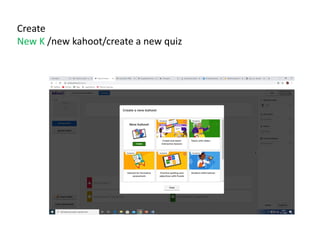
Create
New K /new kahoot/create a new quiz
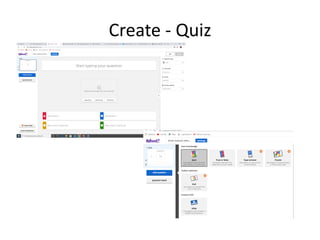
Create - Quiz
.
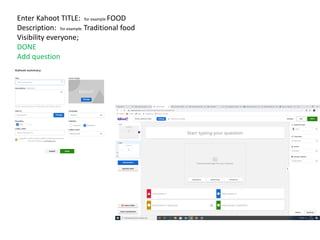
Enter Kahoot TITLE: for example FOOD
Description: for example Traditional food
Visibility everyone;
DONE
Add question
.
Create Kahoot
• We will write the first question, write 4
answers and tick the correct answer and
continue with questions; We can write 10 or
more questions, but if we don't want to add
more questions, we press DONE
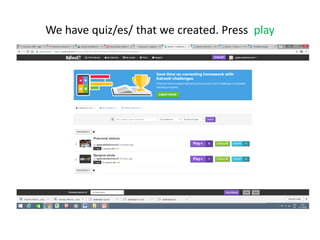
We have quiz/es/ that we created. Press play
.
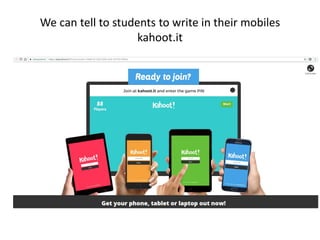
We can tell to students to write in their mobiles
kahoot.it
-
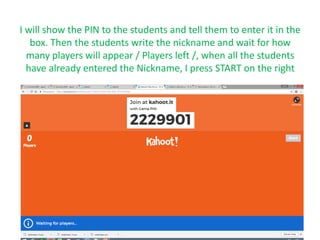
I will show the PIN to the students and tell them to enter it in the
box. Then the students write the nickname and wait for how
many players will appear / Players left /, when all the students
have already entered the Nickname, I press START on the right
.
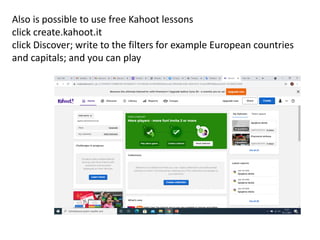
Also is possible to use free Kahoot lessons
click create.kahoot.it
click Discover; write to the filters for example European countries
and capitals; and you can play

Mobile application you can use by learning

  • 1.
    Kahoot application -a game that teaches
  • 2.
    game-based learning • Learningby game has always had its place in education • One of the best tools you can use to implement the principles of learning by playing in your pedagogical work is Kahoot • Kahoot is an application whose roots go back to 2013, when after a long testing it was launched by experts from the Norwegian pedagogical environment.
  • 3.
    Principles and conditionsof using the Kahoot application • Its principle is simple, but veryeffective • it is a transformation of traditional verification of knowledge through a quiz in a new, more deeply activating form with the use of digital technologies, computers, data projector, and mobile devices, such as tablets or smartphones with an Internet connection, that serve as voting devices • required knowledge of English -Basics of English - very low level
  • 4.
    Benefits of Kahoot •The teacher is able to create knowledge games on any topic in a short time • The attractiveness of the games created in this way for students lies in the creation of an exciting atmosphere of competition, surprises and the opportunity to experience success • Kahoot's fascination also stems from the fact that students compete with each other • After each question, they have immediate feedback on their answer and see how they stand in the game compared to their classmates
  • 5.
    Let's try Kahootas a student • www.kahoot.it
  • 6.
    Student position -Steps 1. Enter the PIN that the teacher will write on the board / display on the teacher's computer / 2. For example, such a Pin : 3. Press ENTER, type NICKNAME / first name or nickname, or last name /
  • 7.
    Now we aretrying the position of a teacher - to register - SIGN UP - as a teacher 1. Kahoot.com 2. Sign up for freee 3. As a teacher 4. Describe your workplace - school 5. Create an account -Sign up with e-mail – register email address 6. Add your school 7. Pick your username – 8. Add your e-mail address 9. Confirm your e-mail address 10. Create your password 11. Have you played Kahoot before? 12. I have read and I agree ... 13. join kahoot
  • 8.
    • Welcome • Personalize •What age students do you teach - next • Add your interests • Finish • Log in
  • 9.
    Create New K /newkahoot/create a new quiz
  • 10.
  • 11.
    Enter Kahoot TITLE:for example FOOD Description: for example Traditional food Visibility everyone; DONE Add question .
  • 12.
    Create Kahoot • Wewill write the first question, write 4 answers and tick the correct answer and continue with questions; We can write 10 or more questions, but if we don't want to add more questions, we press DONE
  • 13.
    We have quiz/es/that we created. Press play .
  • 14.
    We can tellto students to write in their mobiles kahoot.it -
  • 15.
    I will showthe PIN to the students and tell them to enter it in the box. Then the students write the nickname and wait for how many players will appear / Players left /, when all the students have already entered the Nickname, I press START on the right .
  • 16.
    Also is possibleto use free Kahoot lessons click create.kahoot.it click Discover; write to the filters for example European countries and capitals; and you can play