Using LINQ
ML Learning Notes – FH2020
Why Do I need to use LINQ
 During my attempt to learn Machine Learning, I figured that I need to be able to easily select
data based on certain conditions and just focus on the ML algorithms rather than the data
manipulation itself.
 When I searched about SQL like query in C#, I noticed LINQ
 The syntax and concept is easy to understand (having SQL query knowledge definitely helps)
 It is available using System.Linq
Data Design
 I want to create my own light weight data table (instead of using DataTable class from
System.Data)
 My Data Table (called MLDataTable) is basically Dictionary of Row Data.
 RowData class is a dictionary of FieldDatas
 FieldData contains 3 members: Name, Value and Masked
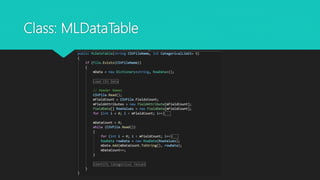
Class: MLDataTable
Class: RowData
Struct: FieldData
Populate Data
 Data loaded from fast CSV reader
 Each Field Data is added into the RowData
 Then each Row data is added into the MLDataTable
Notes
 I can use LINQ to query dictionary of custom class
 In a table – like implementation I can use Dictionary in Dictionary to accommodate dynamic
structure from training CSV (number of columns)
 I like the Dictionary Key pair, where I can use the column name as Key string and pass it
dynamically when creating the query
 Can use Aggregation such as sum and average, Group By
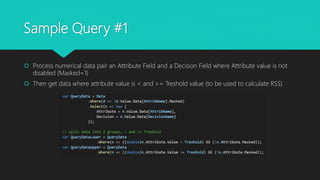
Sample Query #1
 Process numerical data pair an Attribute Field and a Decision Field where Attribute value is not
disabled (Masked=1)
 Then get data where attribute value is < and >= Treshold value (to be used to calculate RSS)
Sample Query #2
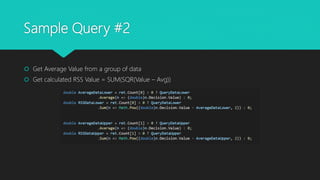
 Get Average Value from a group of data
 Get calculated RSS Value = SUM(SQR(Value – Avg))
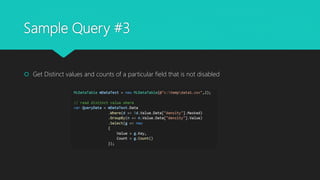
Sample Query #3
 Get Distinct values and counts of a particular field that is not disabled
Some interesting stuff
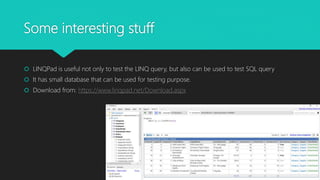
 LINQPad is useful not only to test the LINQ query, but also can be used to test SQL query
 It has small database that can be used for testing purpose.
 Download from: https://www.linqpad.net/Download.aspx

Ml study notes linq

  • 1.
    Using LINQ ML LearningNotes – FH2020
  • 2.
    Why Do Ineed to use LINQ  During my attempt to learn Machine Learning, I figured that I need to be able to easily select data based on certain conditions and just focus on the ML algorithms rather than the data manipulation itself.  When I searched about SQL like query in C#, I noticed LINQ  The syntax and concept is easy to understand (having SQL query knowledge definitely helps)  It is available using System.Linq
  • 3.
    Data Design  Iwant to create my own light weight data table (instead of using DataTable class from System.Data)  My Data Table (called MLDataTable) is basically Dictionary of Row Data.  RowData class is a dictionary of FieldDatas  FieldData contains 3 members: Name, Value and Masked
  • 4.
  • 5.
  • 6.
  • 7.
    Populate Data  Dataloaded from fast CSV reader  Each Field Data is added into the RowData  Then each Row data is added into the MLDataTable
  • 8.
    Notes  I canuse LINQ to query dictionary of custom class  In a table – like implementation I can use Dictionary in Dictionary to accommodate dynamic structure from training CSV (number of columns)  I like the Dictionary Key pair, where I can use the column name as Key string and pass it dynamically when creating the query  Can use Aggregation such as sum and average, Group By
  • 9.
    Sample Query #1 Process numerical data pair an Attribute Field and a Decision Field where Attribute value is not disabled (Masked=1)  Then get data where attribute value is < and >= Treshold value (to be used to calculate RSS)
  • 10.
    Sample Query #2 Get Average Value from a group of data  Get calculated RSS Value = SUM(SQR(Value – Avg))
  • 11.
    Sample Query #3 Get Distinct values and counts of a particular field that is not disabled
  • 12.
    Some interesting stuff LINQPad is useful not only to test the LINQ query, but also can be used to test SQL query  It has small database that can be used for testing purpose.  Download from: https://www.linqpad.net/Download.aspx