R Data Structures
WMG Training
Sept 2016
National Environmental Standards and Regulations Enforcement Agency
(NESREA)
Facilitator: Victor Ordu
Source: H Wickham (2014). Advanced R. Chapman & Hall, Boca Raton. http://adv-r.had.co.nz/
Recap
Recap
• Caveat
– Not everything I will tell you will be 100% correct
– Why?
• Stupid mistakes
• Updates
• New knowledge
• Multiple approaches, some better than others
• Continuous learning
– Moral: commit to personal growth
Notation
• Regular text with look like this…
• Highlighted items will look like this…
• this <- R_code(“will look like”)
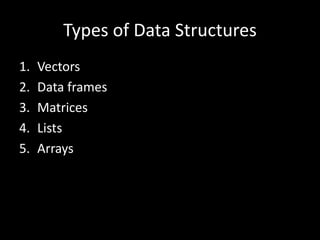
Types of Data Structures
1. Vectors
2. Data frames
3. Matrices
4. Lists
5. Arrays
Types of Data Structures
1. Vectors
2. Data frames
3. Matrices
4. Lists
5. Arrays
Kinds of Vectors
• Six (6) kinds:
1. Character
2. Integer
3. Double (or numeric)
4. Logical
Vectors
• Common characteristics
– All elements are of a particular data type (in lay
language, “type” would be numbers, words, etc.)
– One-dimensional
– The lowest vector is of length 1
– The largest … well, depends on the .Machine
Making vectors
• By assignment
– The concatenate function
• Latin: con – caten – atus (chain)
• Some call it “combine” function
• Indispensible in creating vectors
• You can ‘grow’ a vector
– You may ask how, much, much, much, much later
• Character vectors
– Strings are always placed in quotation marks when
coding i.e. “boy”, “NESREA”, “R is easy to
learn”, “A string can be a whole
sentence!”, “9”.
– Some character vectors are inbuilt into R e.g.
letters, LETTERS, month.abb, month.name
– Remember use quotation marks: “ ” or ‘ ’.
– We can create empty vectors with specific lengths e.g.
character(length = 10) or character(10)
– Limit approx. 231 (about 2 billion)
characters!
– Exercise
• Start a clean slate with rm(list = ls())
• Make a character vector Name containing full names
(both Surname and Given Name) of 10 adults
• Make a second vector Facility of names of 10
facilities (imaginary, please!)
• Use typeof() to check what type of vector Name is
• Confirm the type of Facility using
is.character()
• Note: We can use as.character() to convert
another vector to a character vector.
• Integer vectors
– 1L, 2L, 3L
• Why the ‘L’?
– Not numerical per se
– Wide range – max up to 2,147,483,647
– Exercise
• Make an integer vector Age of 10 adult subjects
• Make an integer vector StaffStrength for 10 facilities
• Numeric (double) vectors
– These are real numbers
– Story of the term double
– Some numeric vectors are inbuilt – mathematical
constants e.g. pi, exp(1),
• Logical vectors
– TRUE/FALSE (not true/false); T/F
– Zero is FALSE; any non-zero is TRUE
– Exercise
• Make a logical vector PermitSighted for 10 facilities.
• Make another one usingPPE for 10 individuals.
• Use str(), typeof(), is.logical(), to explore them.
Stats brief
• Types of variables
– Quantitative
– Qualitative
• Levels of measurement
– Nominal
– Ordinal
– Interval
– Ratio
Factors
• Integer values that are mapped to “strings”
• Used to represent categorical data
• Each category is called a level
• One of the most powerful uses of R
– Exercise
• Make a vector industryType using 3 categories – small,
medium, large – for 10 facilities only.
• Make a factor industryCategory by calling the function
factor() on industryType.
• Now use typeof(), is.factor, is.character,
is.integer() to review these 2 objects.
Things to note…
• Legal names
• Coercion
• Limits
• Common mistakes
– Confusing factors with characters
Homogenous Heterogeneous
1-dimension Atomic vectors Lists
2-dimensions Matrices Data frames
N-dimensions Arrays
> R toolbox
› help() or ?
› getwd(); setwd()
› ls()
› rm()
› save(); load()
> R toolbox
• An example – ls()
– It’s relatively easy to see all the objects at a glance
– Note that this function is called without any
arguments
> R toolbox
• But how do you deal with this?
Long list beyond screen
> R toolbox
– Extend use of functions by defining other
parameters (optional)
– Use ? to learn about a function’s uses &
arguments
– When more familiar, use others like args()
> R toolbox
Types of Data Structures
1. Vectors
2. Data frames
3. Matrices
4. Lists
5. Arrays

R Data Structures (Part 1)

  • 1.
    R Data Structures WMGTraining Sept 2016 National Environmental Standards and Regulations Enforcement Agency (NESREA) Facilitator: Victor Ordu
  • 2.
    Source: H Wickham(2014). Advanced R. Chapman & Hall, Boca Raton. http://adv-r.had.co.nz/
  • 3.
  • 4.
  • 5.
    • Caveat – Noteverything I will tell you will be 100% correct – Why? • Stupid mistakes • Updates • New knowledge • Multiple approaches, some better than others • Continuous learning – Moral: commit to personal growth
  • 6.
    Notation • Regular textwith look like this… • Highlighted items will look like this… • this <- R_code(“will look like”)
  • 7.
    Types of DataStructures 1. Vectors 2. Data frames 3. Matrices 4. Lists 5. Arrays
  • 8.
    Types of DataStructures 1. Vectors 2. Data frames 3. Matrices 4. Lists 5. Arrays
  • 10.
    Kinds of Vectors •Six (6) kinds: 1. Character 2. Integer 3. Double (or numeric) 4. Logical
  • 11.
    Vectors • Common characteristics –All elements are of a particular data type (in lay language, “type” would be numbers, words, etc.) – One-dimensional – The lowest vector is of length 1 – The largest … well, depends on the .Machine
  • 12.
    Making vectors • Byassignment – The concatenate function • Latin: con – caten – atus (chain) • Some call it “combine” function • Indispensible in creating vectors • You can ‘grow’ a vector – You may ask how, much, much, much, much later
  • 13.
    • Character vectors –Strings are always placed in quotation marks when coding i.e. “boy”, “NESREA”, “R is easy to learn”, “A string can be a whole sentence!”, “9”. – Some character vectors are inbuilt into R e.g. letters, LETTERS, month.abb, month.name – Remember use quotation marks: “ ” or ‘ ’. – We can create empty vectors with specific lengths e.g. character(length = 10) or character(10) – Limit approx. 231 (about 2 billion) characters!
  • 14.
    – Exercise • Starta clean slate with rm(list = ls()) • Make a character vector Name containing full names (both Surname and Given Name) of 10 adults • Make a second vector Facility of names of 10 facilities (imaginary, please!) • Use typeof() to check what type of vector Name is • Confirm the type of Facility using is.character() • Note: We can use as.character() to convert another vector to a character vector.
  • 15.
    • Integer vectors –1L, 2L, 3L • Why the ‘L’? – Not numerical per se – Wide range – max up to 2,147,483,647 – Exercise • Make an integer vector Age of 10 adult subjects • Make an integer vector StaffStrength for 10 facilities
  • 16.
    • Numeric (double)vectors – These are real numbers – Story of the term double – Some numeric vectors are inbuilt – mathematical constants e.g. pi, exp(1),
  • 17.
    • Logical vectors –TRUE/FALSE (not true/false); T/F – Zero is FALSE; any non-zero is TRUE – Exercise • Make a logical vector PermitSighted for 10 facilities. • Make another one usingPPE for 10 individuals. • Use str(), typeof(), is.logical(), to explore them.
  • 18.
    Stats brief • Typesof variables – Quantitative – Qualitative • Levels of measurement – Nominal – Ordinal – Interval – Ratio
  • 19.
    Factors • Integer valuesthat are mapped to “strings” • Used to represent categorical data • Each category is called a level • One of the most powerful uses of R – Exercise • Make a vector industryType using 3 categories – small, medium, large – for 10 facilities only. • Make a factor industryCategory by calling the function factor() on industryType. • Now use typeof(), is.factor, is.character, is.integer() to review these 2 objects.
  • 20.
    Things to note… •Legal names • Coercion • Limits • Common mistakes – Confusing factors with characters
  • 21.
    Homogenous Heterogeneous 1-dimension Atomicvectors Lists 2-dimensions Matrices Data frames N-dimensions Arrays
  • 22.
    > R toolbox ›help() or ? › getwd(); setwd() › ls() › rm() › save(); load()
  • 23.
    > R toolbox •An example – ls() – It’s relatively easy to see all the objects at a glance – Note that this function is called without any arguments
  • 24.
    > R toolbox •But how do you deal with this? Long list beyond screen
  • 25.
    > R toolbox –Extend use of functions by defining other parameters (optional) – Use ? to learn about a function’s uses & arguments – When more familiar, use others like args()
  • 26.
  • 27.
    Types of DataStructures 1. Vectors 2. Data frames 3. Matrices 4. Lists 5. Arrays

Editor's Notes

  • #14 In the Bible (presumably KJV): 3,566,480 letters 31,102 verses 1,189 chapters