E-learning 2.0:  you are We-LCoME! Stefano Ferretti Silvia Mirri Ludovico A. Muratori Marco Roccetti Paola Salomoni Department of  Computer Science UniversitĆ  di Bologna
Summary  Introduction E-learning + Web 2.0 = E-learning 2.0 Our approach Our prototype:  Design issues Architecture Use case Conclusions
Introduction E-learning: Standards (SCORM, IMS LIP, IMS ACCLIP, IMS ACCMD, …) Platforms (Moodle, ATutor, Claroline, …) Tools ( E-mailing lists, Newsgroups, Whiteboards, Chats, Forums, Online presentations ) Actors (teachers, tutors, learners, …)
Introduction Accessible ā€œtraditionalā€ e-learning: allows distance and flexible educational activities  decreases the risk of excluding individuals with particular access capabilities increases the social inclusion of  non-typical learners
Introduction Web 2.0 Open participation  Data decentralization Assembly from diverse sources Freedom to share and re-use  Users’ Cooperation and Collaboration New Applications and technologies (Blogs, Wikis, Podcasting, Media sharing, …)
E-learning 2.0 E-learning + Web 2.0 = E-learning 2.0 new tools and methodologies to work as in an on line community Learning objects may be dinamically created, aggregated, classified, syndicated and shared by each e-learning actor Learner may become ā€œ prosumer ā€ (consumer+producer)
E-learning 2.0 If I hear it, I will forget it. If I see it, I will remember it.   If I do it, I will understand it. ~Chinese Proverb And what about if I collaborate?     Collective intelligence
E-learning 2.0: accessibility Dangers for accessibility may be embedded in every   innovation The complexity and the technologies of collaborative 2.0 tools represents a risk of exclusion for people with disabilities  The participation of people to the creation and management of contents is a great potential for e-learning accessibility
E-learning 2.0: accessibility Lecturers and learning technologies are charged with accessibility of ā€œtraditionalā€  e-learning contents New e-learning 2.0 methodologies and tools could be used to make accessible  e-learning in practice, by supporting processes that engage all the different actors, from lecturers to students, including people with disabilities, join to work together
Our approach Exploit  users’ contribution  to cooperatively  produce learning objects Improve learning objects  accessibility  by allowing users to add  textual annotations  and  alternative contents  Collaboration on the Web    Wiki Wikitext used to produce  HTML  pages No rich media contents
Our approach No  collaborative  editing system available for multimedia contents A wiki-like system needed To add  text-based  data Captions Annotations To add media data Contribution:  collaborative system for (multimedia) e-learning contents  SMIL documents
Our prototype We-LCoME  ( Wiki e-Learning Compound Multimedia Environment) allows the cooperative creation and sharing of SMIL-based multimedia resources makes each user able to create, add, modify, delete each single media composing a didactical resourse and its alternatives provides suitable workflows to bind users adding meta information about media contents and their accessibility
Design issues SMIL: allows to describe the spatial and temporal relations inside compound multimedia DokuWiki: extended to allow accessible collaborative editing enhanced wiki-syntax accessible SMIL and HTML documents generation IMS ACCMD: Accessibility MetaData
Actors and functions phase 2: captioning phase 3: add resources content repository editing system adaptation system Ac2 Ac3 client We-LCoME phase 1: add raw video lecture Ac1
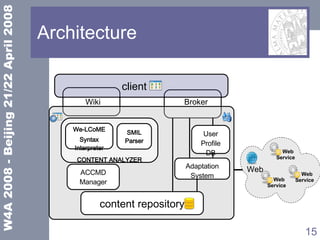
Architecture Wiki CONTENT ANALYZER We-LCoME Syntax Interpreter SMIL Parser Adaptation System Web Web  Service Web  Service Web  Service client  Broker ACCMD Manager User Profile DB content repository
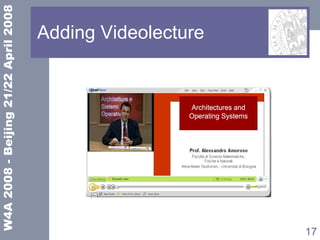
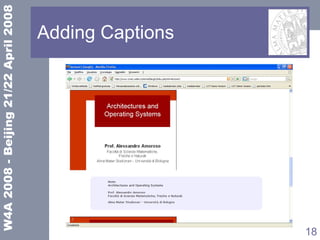
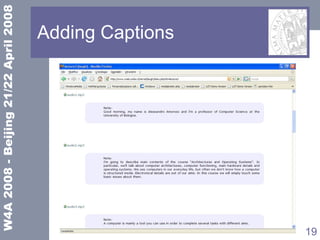
Use case The lecturer adds a video lecture Elements are provided by the students support service staff and the teacher Learners enjoy the lecture and spontaneously enrich it The lecturer corrects and confirms the notes of the previous item of the list
Adding Videolecture
Adding Captions
Adding Captions
Adding Captions
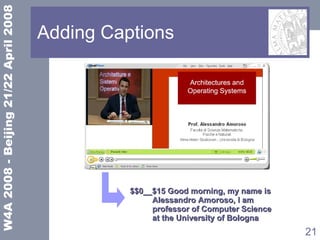
Adding Captions $$0__$15 Good morning, my name is  Alessandro Amoroso, I am  professor of Computer Science  at the University of Bologna
Adding Captions $$0__$15 Good morning, my name is  Alessandro Amoroso, I am  professor of Computer Science  at the University of Bologna SMIL file <textstream src=&quot;captions.rt&quot;  region=&quot;region_caption&quot; …/> captions.rt <Time begin=&quot;0:00:00.0&quot;  end=&quot;0:00:15.0&quot;/><clear/>  Good morning, my name is ...
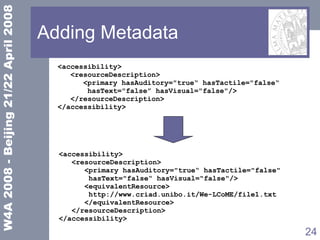
Adding Metadata
Adding Metadata <accessibility> <resourceDescription> <primary hasAuditory=&quot;trueā€œ hasTactile=&quot;falseā€œ hasText=&quot;falseā€ hasVisual=&quot;false&quot;/> </resourceDescription> </accessibility> <accessibility> <resourceDescription> <primary hasAuditory=&quot;trueā€œ hasTactile=&quot;false&quot;  hasText=&quot;falseā€œ hasVisual=&quot;false&quot;/> <equivalentResource> http://www.criad.unibo.it/We-LCoME/file1.txt </equivalentResource> </resourceDescription> </accessibility>
Conclusions  We-LCoME aim is to  mashup  compound multimedia potentials with the ā€œ collective intelligence ā€  Final e-learning media contents represent a sort of added value, coming from the iterated process of noting and enriching contents.  We-LCoME provides a simple interface (based on the wiki way) to access each media of SMIL based video lectures.  A suitable interface is provided to manage the ACCMD metadata about the accessibility of added contents.
Future Works  Improving the authoring interface spatial dimension of SMIL based video lectures tagging research content (tags and metadata) Adaptation system: Sharing transcoding loads Assessment: Wider group of user Longer period Evaluation of:  accessibility of didactical materials availability of didactical materials metadata
Contacts Thank you for your attention! For further information: silvia.mirri@unibo.it

E-learning 2.0: you are We-LCoME

  • 1.
    E-learning 2.0: you are We-LCoME! Stefano Ferretti Silvia Mirri Ludovico A. Muratori Marco Roccetti Paola Salomoni Department of Computer Science UniversitĆ  di Bologna
  • 2.
    Summary IntroductionE-learning + Web 2.0 = E-learning 2.0 Our approach Our prototype: Design issues Architecture Use case Conclusions
  • 3.
    Introduction E-learning: Standards(SCORM, IMS LIP, IMS ACCLIP, IMS ACCMD, …) Platforms (Moodle, ATutor, Claroline, …) Tools ( E-mailing lists, Newsgroups, Whiteboards, Chats, Forums, Online presentations ) Actors (teachers, tutors, learners, …)
  • 4.
    Introduction Accessible ā€œtraditionalā€e-learning: allows distance and flexible educational activities decreases the risk of excluding individuals with particular access capabilities increases the social inclusion of non-typical learners
  • 5.
    Introduction Web 2.0Open participation Data decentralization Assembly from diverse sources Freedom to share and re-use Users’ Cooperation and Collaboration New Applications and technologies (Blogs, Wikis, Podcasting, Media sharing, …)
  • 6.
    E-learning 2.0 E-learning+ Web 2.0 = E-learning 2.0 new tools and methodologies to work as in an on line community Learning objects may be dinamically created, aggregated, classified, syndicated and shared by each e-learning actor Learner may become ā€œ prosumer ā€ (consumer+producer)
  • 7.
    E-learning 2.0 IfI hear it, I will forget it. If I see it, I will remember it. If I do it, I will understand it. ~Chinese Proverb And what about if I collaborate?  Collective intelligence
  • 8.
    E-learning 2.0: accessibilityDangers for accessibility may be embedded in every innovation The complexity and the technologies of collaborative 2.0 tools represents a risk of exclusion for people with disabilities The participation of people to the creation and management of contents is a great potential for e-learning accessibility
  • 9.
    E-learning 2.0: accessibilityLecturers and learning technologies are charged with accessibility of ā€œtraditionalā€ e-learning contents New e-learning 2.0 methodologies and tools could be used to make accessible e-learning in practice, by supporting processes that engage all the different actors, from lecturers to students, including people with disabilities, join to work together
  • 10.
    Our approach Exploit users’ contribution to cooperatively produce learning objects Improve learning objects accessibility by allowing users to add textual annotations and alternative contents Collaboration on the Web  Wiki Wikitext used to produce HTML pages No rich media contents
  • 11.
    Our approach No collaborative editing system available for multimedia contents A wiki-like system needed To add text-based data Captions Annotations To add media data Contribution: collaborative system for (multimedia) e-learning contents SMIL documents
  • 12.
    Our prototype We-LCoME ( Wiki e-Learning Compound Multimedia Environment) allows the cooperative creation and sharing of SMIL-based multimedia resources makes each user able to create, add, modify, delete each single media composing a didactical resourse and its alternatives provides suitable workflows to bind users adding meta information about media contents and their accessibility
  • 13.
    Design issues SMIL:allows to describe the spatial and temporal relations inside compound multimedia DokuWiki: extended to allow accessible collaborative editing enhanced wiki-syntax accessible SMIL and HTML documents generation IMS ACCMD: Accessibility MetaData
  • 14.
    Actors and functionsphase 2: captioning phase 3: add resources content repository editing system adaptation system Ac2 Ac3 client We-LCoME phase 1: add raw video lecture Ac1
  • 15.
    Architecture Wiki CONTENTANALYZER We-LCoME Syntax Interpreter SMIL Parser Adaptation System Web Web Service Web Service Web Service client Broker ACCMD Manager User Profile DB content repository
  • 16.
    Use case Thelecturer adds a video lecture Elements are provided by the students support service staff and the teacher Learners enjoy the lecture and spontaneously enrich it The lecturer corrects and confirms the notes of the previous item of the list
  • 17.
  • 18.
  • 19.
  • 20.
  • 21.
    Adding Captions $$0__$15Good morning, my name is Alessandro Amoroso, I am professor of Computer Science at the University of Bologna
  • 22.
    Adding Captions $$0__$15Good morning, my name is Alessandro Amoroso, I am professor of Computer Science at the University of Bologna SMIL file <textstream src=&quot;captions.rt&quot; region=&quot;region_caption&quot; …/> captions.rt <Time begin=&quot;0:00:00.0&quot; end=&quot;0:00:15.0&quot;/><clear/> Good morning, my name is ...
  • 23.
  • 24.
    Adding Metadata <accessibility><resourceDescription> <primary hasAuditory=&quot;trueā€œ hasTactile=&quot;falseā€œ hasText=&quot;falseā€ hasVisual=&quot;false&quot;/> </resourceDescription> </accessibility> <accessibility> <resourceDescription> <primary hasAuditory=&quot;trueā€œ hasTactile=&quot;false&quot; hasText=&quot;falseā€œ hasVisual=&quot;false&quot;/> <equivalentResource> http://www.criad.unibo.it/We-LCoME/file1.txt </equivalentResource> </resourceDescription> </accessibility>
  • 25.
    Conclusions We-LCoMEaim is to mashup compound multimedia potentials with the ā€œ collective intelligence ā€ Final e-learning media contents represent a sort of added value, coming from the iterated process of noting and enriching contents. We-LCoME provides a simple interface (based on the wiki way) to access each media of SMIL based video lectures. A suitable interface is provided to manage the ACCMD metadata about the accessibility of added contents.
  • 26.
    Future Works Improving the authoring interface spatial dimension of SMIL based video lectures tagging research content (tags and metadata) Adaptation system: Sharing transcoding loads Assessment: Wider group of user Longer period Evaluation of: accessibility of didactical materials availability of didactical materials metadata
  • 27.
    Contacts Thank youfor your attention! For further information: silvia.mirri@unibo.it