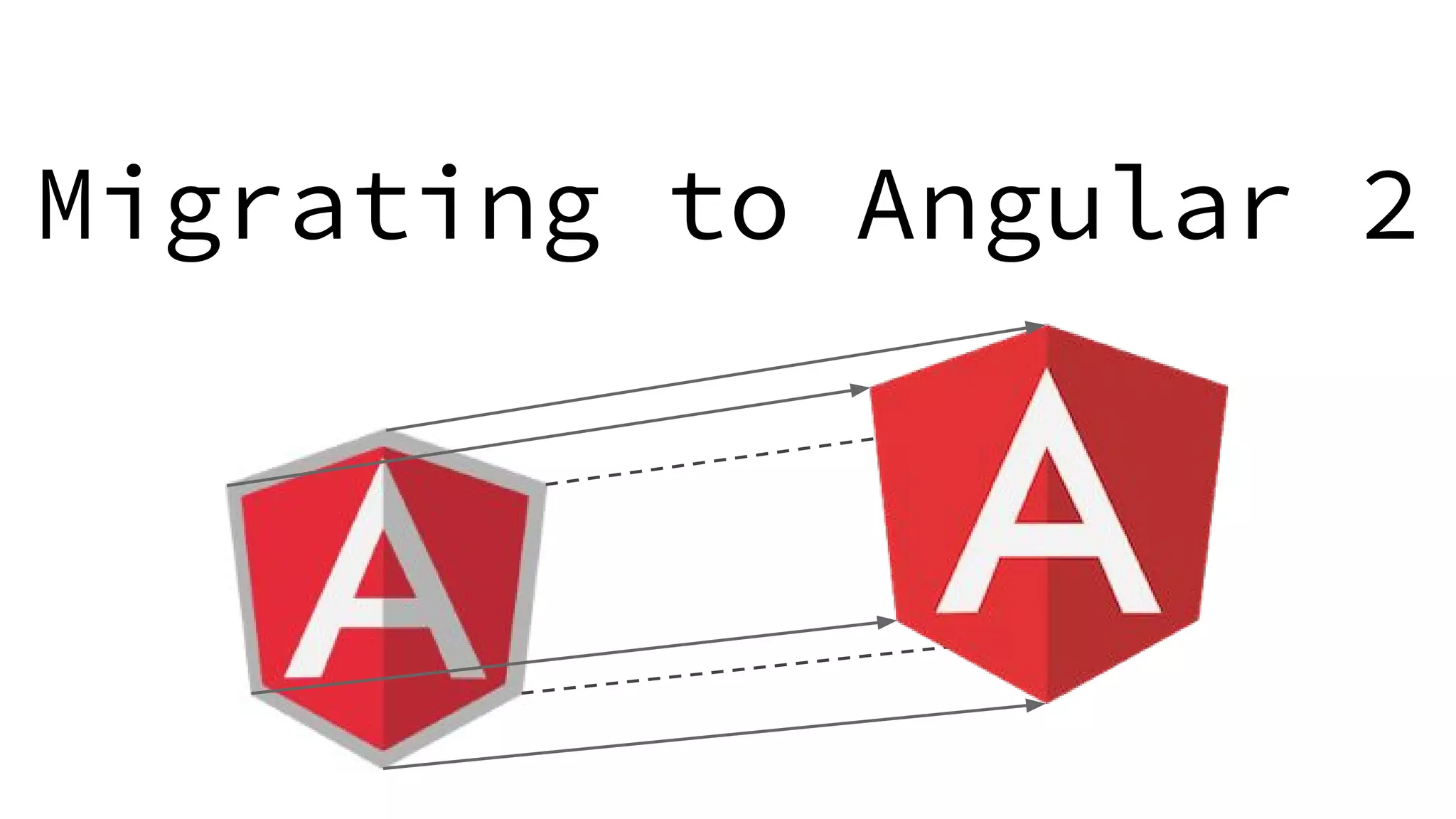
Migrating to Angular 2
Why use Angular 2
● Takes advantage of modern web standards
○ ES6
○ TypeScript
○ Web Components
○ Observables
○ Module Loaders
○ ZoneJS
● Removes many unnecessary concepts from Angular 1
● Performance
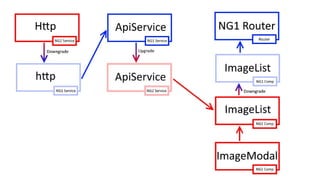
What is ng-upgrade?
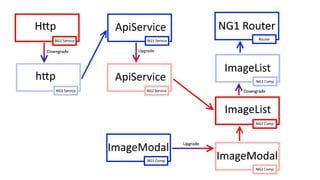
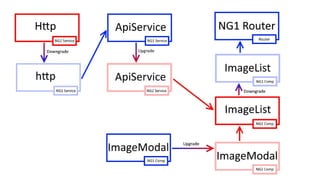
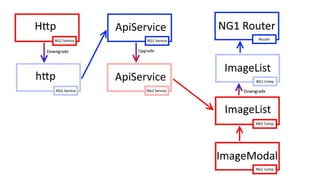
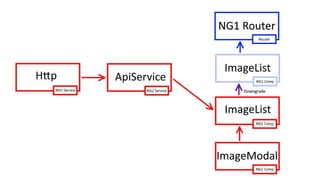
● Lets you run angular 1 and 2 in the same app
● Use Angular 1 service in Angular 2
● Use Angular 1 component in Angular 2
● Use Angular 2 service in Angular 1
● Use Angular 2 component in Angular 1
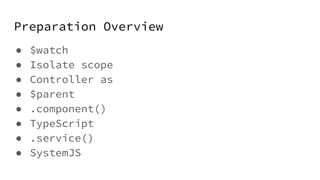
Preparation Overview
● $watch
● Isolate scope
● Controller as
● $parent
● .component()
● TypeScript
● .service()
● SystemJS
$watch
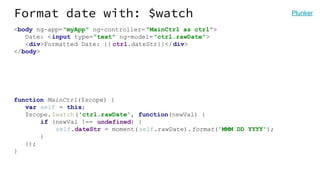
Format date with: $watch
<body ng-app="myApp" ng-controller= "MainCtrl as ctrl">
Date: <input type="text" ng-model="ctrl.rawDate">
<div>Formatted Date: {{ ctrl.dateStr}}</div>
</body>
function MainCtrl($scope) {
var self = this;
$scope.$watch('ctrl.rawDate', function(newVal) {
if (newVal !== undefined) {
self.dateStr = moment(self.rawDate).format('MMM DD YYYY');
}
});
}
Plunker
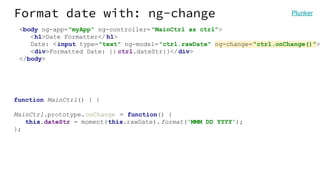
Format date with: ng-change
<body ng-app="myApp" ng-controller= "MainCtrl as ctrl">
<h1>Date Formatter</ h1>
Date: <input type="text" ng-model="ctrl.rawDate" ng-change="ctrl.onChange()">
<div>Formatted Date: {{ ctrl.dateStr}}</div>
</body>
function MainCtrl() { }
MainCtrl.prototype.onChange = function() {
this.dateStr = moment(this.rawDate).format('MMM DD YYYY');
};
Plunker
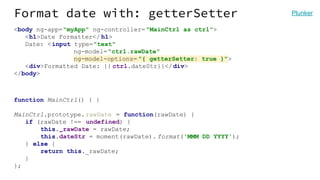
Format date with: getterSetter
<body ng-app="myApp" ng-controller= "MainCtrl as ctrl">
<h1>Date Formatter</ h1>
Date: <input type="text"
ng-model="ctrl.rawDate"
ng-model-options= "{ getterSetter: true }">
<div>Formatted Date: {{ ctrl.dateStr}}</div>
</body>
function MainCtrl() { }
MainCtrl.prototype.rawDate = function(rawDate) {
if (rawDate !== undefined) {
this._rawDate = rawDate;
this.dateStr = moment(rawDate). format('MMM DD YYYY');
} else {
return this._rawDate;
}
};
Plunker
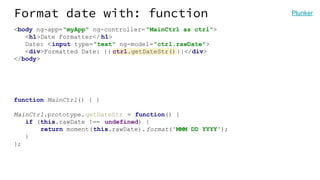
Format date with: function
<body ng-app="myApp" ng-controller= "MainCtrl as ctrl">
<h1>Date Formatter</ h1>
Date: <input type="text" ng-model="ctrl.rawDate">
<div>Formatted Date: {{ ctrl.getDateStr()}}</div>
</body>
function MainCtrl() { }
MainCtrl.prototype.getDateStr = function() {
if (this.rawDate !== undefined) {
return moment(this.rawDate).format('MMM DD YYYY');
}
};
Plunker
Image Share Demo
github.com/robianmcd/angular-migration
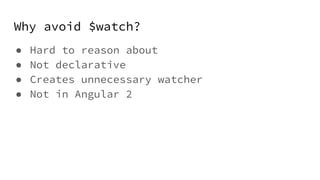
Why avoid $watch?
● Hard to reason about
● Not declarative
● Creates unnecessary watcher
● Not in Angular 2
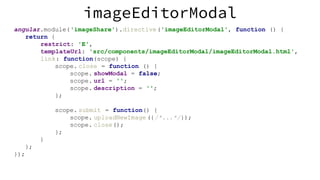
isolate scope
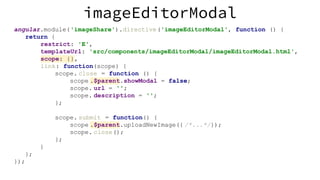
angular.module('imageShare').directive('imageEditorModal', function () {
return {
restrict: 'E',
templateUrl: 'src/components/imageEditorModal/imageEditorModal.html',
link: function(scope) {
scope. close = function () {
scope. showModal = false;
scope. url = '';
scope. description = '';
};
scope. submit = function() {
scope. uploadNewImage ({/*...*/});
scope. close();
};
}
};
});
imageEditorModal
angular.module('imageShare').directive('imageEditorModal', function () {
return {
restrict: 'E',
templateUrl: 'src/components/imageEditorModal/imageEditorModal.html',
scope: {},
link: function(scope) {
scope. close = function () {
scope .$parent.showModal = false;
scope. url = '';
scope. description = '';
};
scope. submit = function() {
scope .$parent.uploadNewImage({ /*...*/});
scope. close();
};
}
};
});
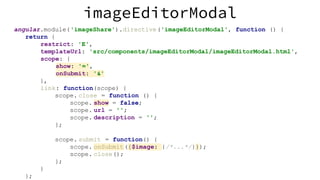
imageEditorModal
angular.module('imageShare').directive('imageEditorModal', function () {
return {
restrict: 'E',
templateUrl: 'src/components/imageEditorModal/imageEditorModal.html',
scope: {
show: '=',
onSubmit: '&'
},
link: function(scope) {
scope. close = function () {
scope. show = false;
scope. url = '';
scope. description = '';
};
scope. submit = function() {
scope. onSubmit({$image: {/*...*/}});
scope. close();
};
}
};
imageEditorModal
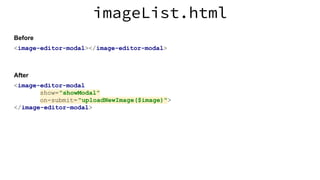
<image-editor-modal></image-editor-modal>
imageList.html
Before
<image-editor-modal
show="showModal"
on-submit="uploadNewImage($image)">
</image-editor-modal>
After
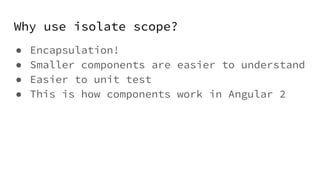
Why use isolate scope?
● Encapsulation!
● Smaller components are easier to understand
● Easier to unit test
● This is how components work in Angular 2
controller as syntax
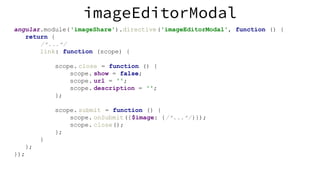
imageEditorModal
angular.module('imageShare').directive('imageEditorModal', function () {
return {
/*...*/
link: function (scope) {
scope. close = function () {
scope. show = false;
scope. url = '';
scope. description = '';
};
scope. submit = function () {
scope. onSubmit({$image: {/*...*/}});
scope. close();
};
}
};
});
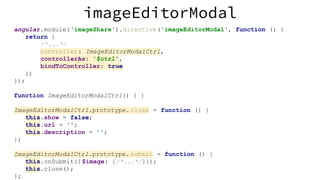
imageEditorModal
angular.module('imageShare').directive('imageEditorModal', function () {
return {
/*...*/
controller: ImageEditorModalCtrl,
controllerAs: '$ctrl',
bindToController: true
};
});
function ImageEditorModalCtrl() { }
ImageEditorModalCtrl.prototype.close = function () {
this.show = false;
this.url = '';
this.description = '';
};
ImageEditorModalCtrl.prototype.submit = function () {
this.onSubmit({$image: {/*...*/}});
this.close();
};
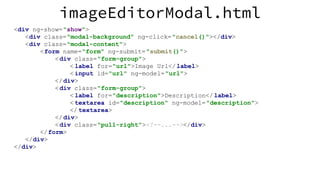
imageEditorModal.html
<div ng-show="show">
<div class="modal-background" ng-click="cancel()"></div>
<div class="modal-content">
<form name="form" ng-submit="submit()">
<div class="form-group">
< label for="url">Image Url</label>
< input id="url" ng-model="url">
</div>
<div class="form-group">
< label for="description">Description</ label>
< textarea id="description" ng-model="description">
</ textarea>
</div>
<div class="pull-right"><!--...--></div>
</form>
</div>
</div>
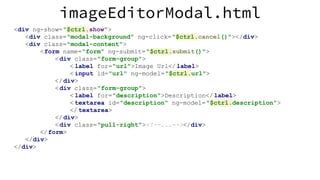
imageEditorModal.html
<div ng-show="$ctrl.show">
<div class="modal-background" ng-click="$ctrl.cancel()"></div>
<div class="modal-content">
<form name="form" ng-submit="$ctrl.submit()">
<div class="form-group">
< label for="url">Image Url</label>
< input id="url" ng-model="$ctrl.url">
</div>
<div class="form-group">
< label for="description">Description</ label>
< textarea id="description" ng-model="$ctrl.description">
</ textarea>
</div>
<div class="pull-right"><!--...--></div>
</form>
</div>
</div>
Why use controllers over link?
● Removes redundant concept
● Let’s you use the “controller as” syntax
● Link functions don’t exist in Angular 2
Why use “controller as”?
● Don’t have to worry about scope inheritance
● Better organization
● Works well with ES6 classes
● This is how components work in Angular 2
Why use bindToController?
● Lets you use your controller for everything
● Don’t need to use $scope anymore, which
isn’t in Angular 2
● This is how components work in Angular 2
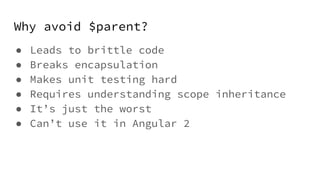
Why avoid $parent?
● Leads to brittle code
● Breaks encapsulation
● Makes unit testing hard
● Requires understanding scope inheritance
● It’s just the worst
● Can’t use it in Angular 2
.component()
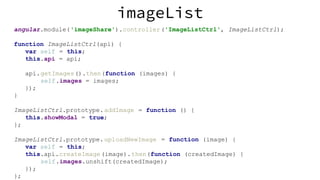
imageList
angular.module('imageShare').controller('ImageListCtrl', ImageListCtrl);
function ImageListCtrl(api) {
var self = this;
this.api = api;
api.getImages().then(function (images) {
self.images = images;
});
}
ImageListCtrl.prototype.addImage = function () {
this.showModal = true;
};
ImageListCtrl.prototype.uploadNewImage = function (image) {
var self = this;
this.api.createImage(image).then(function (createdImage) {
self.images.unshift(createdImage);
});
};
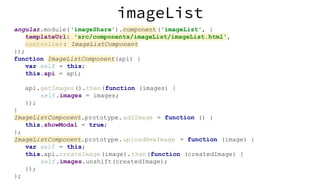
imageList
angular.module('imageShare').component('imageList', {
templateUrl: 'src/components/imageList/imageList.html',
controller: ImageListComponent
});
function ImageListComponent(api) {
var self = this;
this.api = api;
api.getImages().then(function (images) {
self.images = images;
});
}
ImageListComponent.prototype.addImage = function () {
this.showModal = true;
};
ImageListComponent.prototype.uploadNewImage = function (image) {
var self = this;
this.api.createImage(image).then(function (createdImage) {
self.images.unshift(createdImage);
});
};
app.js
var app = angular.module('imageShare', ['ngRoute']);
app.config(['$routeProvider', function ($routeProvider) {
$routeProvider
.when('/images', {
templateUrl: 'src/components/imageList/imageList.html',
controller: 'ImageListCtrl as $ctrl'
})
.otherwise({
redirectTo: '/images'
});
}]);
app.js
var app = angular.module('imageShare', ['ngRoute']);
app.config(['$routeProvider', function ($routeProvider) {
$routeProvider
.when('/images', {
template: '<image-list></image-list>'
})
.otherwise({
redirectTo: '/images'
});
}]);
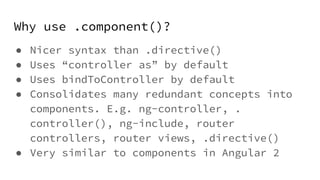
Why use .component()?
● Nicer syntax than .directive()
● Uses “controller as” by default
● Uses bindToController by default
● Consolidates many redundant concepts into
components. E.g. ng-controller, .
controller(), ng-include, router
controllers, router views, .directive()
● Very similar to components in Angular 2
TypeScript
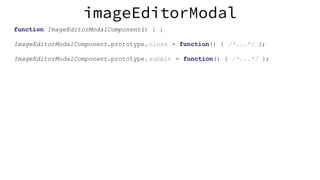
imageEditorModal
function ImageEditorModalComponent() { }
ImageEditorModalComponent.prototype.close = function() { /*...*/ };
ImageEditorModalComponent.prototype.submit = function() { /*...*/ };
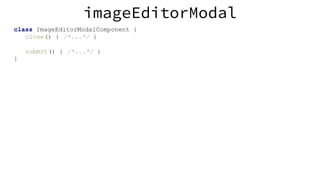
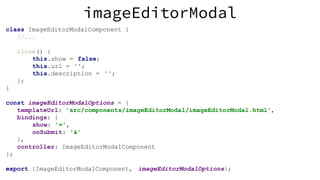
imageEditorModal
class ImageEditorModalComponent {
close() { /*...*/ }
submit() { /*...*/ }
}
.service()
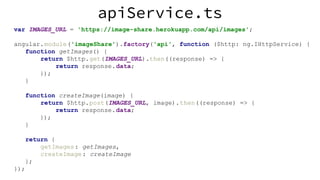
apiService.ts
var IMAGES_URL = 'https://image-share.herokuapp.com/api/images';
angular.module('imageShare').factory('api', function ($http: ng.IHttpService) {
function getImages() {
return $http.get(IMAGES_URL).then((response) => {
return response.data;
});
}
function createImage(image) {
return $http.post(IMAGES_URL, image).then((response) => {
return response.data;
});
}
return {
getImages: getImages,
createImage: createImage
};
});
apiService.ts
var IMAGES_URL = 'https://image-share.herokuapp.com/api/images';
class ApiService {
constructor(private $http: ng.IHttpService) {
}
getImages(): ng.IPromise<Image[]> {
return this.$http.get(IMAGES_URL).then((response) => {
return response.data;
});
}
createImage(image): ng.IPromise<Image> {
return this.$http.post(IMAGES_URL, image).then((response) => {
return response.data;
});
}
}
angular.module('imageShare').service('api', ApiService);
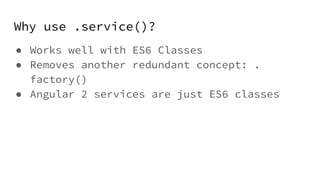
Why use .service()?
● Works well with ES6 Classes
● Removes another redundant concept: .
factory()
● Angular 2 services are just ES6 classes
SystemJS
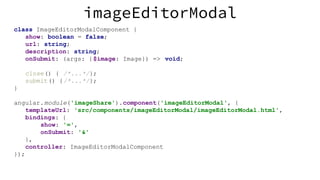
imageEditorModal
class ImageEditorModalComponent {
show: boolean = false;
url: string;
description: string;
onSubmit: (args: {$image: Image}) => void;
close() { /*...*/};
submit() {/*...*/};
}
angular.module('imageShare').component('imageEditorModal', {
templateUrl: 'src/components/imageEditorModal/imageEditorModal.html',
bindings: {
show: '=',
onSubmit: '&'
},
controller: ImageEditorModalComponent
});
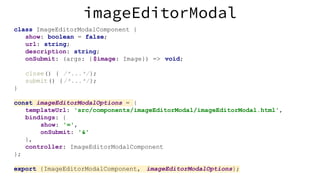
imageEditorModal
class ImageEditorModalComponent {
show: boolean = false;
url: string;
description: string;
onSubmit: (args: {$image: Image}) => void;
close() { /*...*/};
submit() {/*...*/};
}
const imageEditorModalOptions = {
templateUrl: 'src/components/imageEditorModal/imageEditorModal.html',
bindings: {
show: '=',
onSubmit: '&'
},
controller: ImageEditorModalComponent
};
export {ImageEditorModalComponent, imageEditorModalOptions};
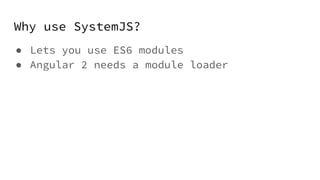
Why use SystemJS?
● Lets you use ES6 modules
● Angular 2 needs a module loader
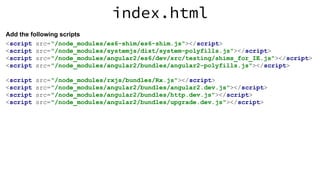
Add ng-upgrade
index.html
<script src="/node_modules/es6-shim/es6-shim.js"></script>
<script src="/node_modules/systemjs/dist/system-polyfills.js"></script>
<script src="/node_modules/angular2/es6/dev/src/testing/shims_for_IE.js"></script>
<script src="/node_modules/angular2/bundles/angular2-polyfills.js"></script>
<script src="/node_modules/rxjs/bundles/Rx.js"></script>
<script src="/node_modules/angular2/bundles/angular2.dev.js"></script>
<script src="/node_modules/angular2/bundles/http.dev.js"></script>
<script src="/node_modules/angular2/bundles/upgrade.dev.js"></script>
Add the following scripts
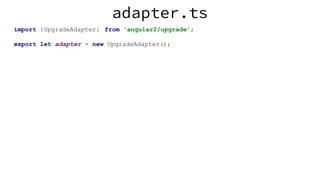
adapter.ts
import {UpgradeAdapter} from 'angular2/upgrade';
export let adapter = new UpgradeAdapter();
app.ts
import {adapter} from "../../adapter";
//...
adapter.bootstrap(document.documentElement , ['imageShare']);
gulpfile.js
var gulp = require('gulp');
var ts = require('gulp-typescript');
gulp.task('ts', function () {
return gulp.src([
'src/**/*.ts',
'typings/**/*.ts',
//Taken from https://github.com/angular/angular/issues/7280
'node_modules/angular2/typings/browser.d.ts'
])
.pipe( ts({
target: 'ES5',
module: 'system',
emitDecoratorMetadata: true,
experimentalDecorators: true,
moduleResolution: 'node'
}))
.pipe( gulp.dest('src'));
});
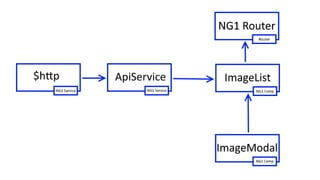
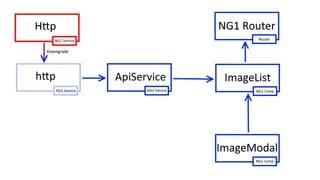
Replace $http with Http
app.ts
import {adapter} from "../../adapter";
import {HTTP_PROVIDERS, Http} from "angular2/http";
import 'rxjs/add/operator/map';
adapter.addProvider(HTTP_PROVIDERS);
angular.module('imageShare', ['ngRoute'])
.factory('http', adapter.downgradeNg2Provider(Http));
apiService.ts
import {Http, Headers} from "angular2/http";
import {Observable} from "rxjs/Observable";
const IMAGES_URL = 'https://image-share.herokuapp.com/api/images';
export default class ApiService {
constructor(private http: Http) { }
getImages(): Observable<Image[]> {
return this.http.get(IMAGES_URL)
. map(res => res.json());
}
createImage(image): Observable<Image> {
var headers = new Headers();
headers.append('Content-Type', 'application/json');
return this.http.post(IMAGES_URL,JSON.stringify(image), { headers:
headers})
.map(res => res.json());
}
}
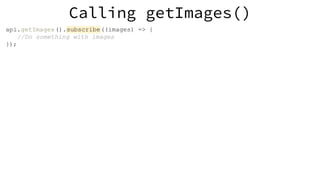
Calling getImages()
api.getImages().subscribe((images) => {
//Do something with images
});
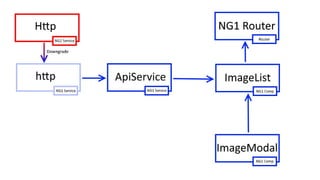
Migrate ImageList to Angular 2
ImageListComponent.ts
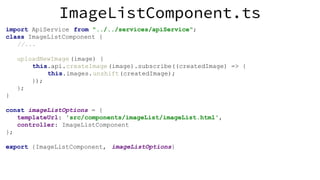
import ApiService from "../../services/apiService";
class ImageListComponent {
//...
uploadNewImage (image) {
this.api.createImage(image).subscribe((createdImage) => {
this.images.unshift(createdImage);
});
};
}
const imageListOptions = {
templateUrl: 'src/components/imageList/imageList.html',
controller: ImageListComponent
};
export {ImageListComponent, imageListOptions}
ImageListComponent.ts
import ApiService from "../../services/apiService";
import {adapter} from "../../adapter";
import {Component} from "angular2/core";
@Component({
templateUrl: 'src/components/imageList/imageList.html',
selector: 'image-list',
directives: [adapter.upgradeNg1Component( 'imageEditorModal')]
})
export class ImageListComponent {
//...
uploadNewImage (event) {
this.api.createImage(event.$image).subscribe((createdImage) => {
this.images.unshift(createdImage);
});
};
}
ImageList.html
<div>
<div class="input-group">
<button class="btn btn-primary" (click)="addImage()">Add Image</button>
</div>
<ul class="list-group">
<li *ngFor="#image of images" class="list-group-item">
<div class="media">
< div class="media-left">
< img [src]="image.url">
</ div>
< div class="media-body">
{{image. description}}
</ div>
</div>
</li>
</ul>
</div>
<image-editor-modal
[(show)]="showModal"
(onSubmit)="uploadNewImage($event)">
</image-editor-modal>
app.ts
import {adapter} from "../../adapter";
import {ImageListComponent} from "../imageList/imageListComponent";
import ApiService from "../../services/apiService";
angular.module('imageShare', ['ngRoute'])
.directive('imageList', adapter.downgradeNg2Component(ImageListComponent));
adapter.upgradeNg1Provider( 'api', {asToken: ApiService});
Migrate Modal to Angular 2
imageEditorModal
class ImageEditorModalComponent {
//...
close() {
this.show = false;
this.url = '';
this.description = '';
};
}
const imageEditorModalOptions = {
templateUrl: 'src/components/imageEditorModal/imageEditorModal.html',
bindings: {
show: '=',
onSubmit: '&'
},
controller: ImageEditorModalComponent
};
export {ImageEditorModalComponent, imageEditorModalOptions};
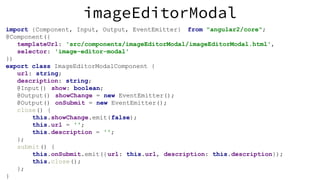
imageEditorModal
import {Component, Input, Output, EventEmitter} from "angular2/core";
@Component({
templateUrl: 'src/components/imageEditorModal/imageEditorModal.html',
selector: 'image-editor-modal'
})
export class ImageEditorModalComponent {
url: string;
description: string;
@Input() show: boolean;
@Output() showChange = new EventEmitter();
@Output() onSubmit = new EventEmitter();
close() {
this.showChange.emit(false);
this.url = '';
this.description = '';
};
submit() {
this.onSubmit.emit({url: this.url, description: this.description});
this.close();
};
}
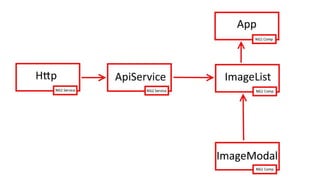
Migrate ApiService to Angular 2
ApiService.ts
import {Injectable} from "angular2/core";
const IMAGES_URL = 'https://image-share.herokuapp.com/api/images';
@Injectable()
export default class ApiService {
constructor(private http: Http) {
}
getImages(): Observable<Image[]> {
return this.http.get(IMAGES_URL)
. map(res => res.json());
}
createImage(image): Observable<Image> {
var headers = new Headers();
headers.append('Content-Type', 'application/json');
return this.http.post(IMAGES_URL,JSON.stringify(image), { headers:
headers})
. map(res => res.json());
}
App.ts
angular.module('imageShare', ['ngRoute'])
.service('api', ApiService)
.factory('http', adapter.downgradeNg2Provider(Http))
adapter.addProvider(ApiService);
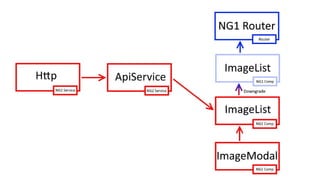
Remove AngularJs 1
ApiService.ts
import {ROUTER_DIRECTIVES, RouteConfig, Route, ROUTER_PROVIDERS} from
"angular2/router";
import {Component} from "angular2/core";
import {bootstrap} from "angular2/platform/browser";
@Component({
selector: 'app',
template: '<router-outlet></router-outlet>',
directives: [ROUTER_DIRECTIVES]
})
@RouteConfig([
new Route({
path: '/home',
name: 'ImageList',
component: ImageListComponent,
useAsDefault: true
})
])
class App { }
bootstrap(App, [HTTP_PROVIDERS, ROUTER_PROVIDERS, ApiService]);
Summary
● Angular 2 is based on components and
services
● Incremental migration
● Angular 1 best practices
● Not all Angular 1 apps need to be upgraded
Rob McDiarmid
Slides: tinyurl.com/ng1-to-ng2
@robianmcd

Migrating to Angular 2

  • 1.
  • 2.
    Why use Angular2 ● Takes advantage of modern web standards ○ ES6 ○ TypeScript ○ Web Components ○ Observables ○ Module Loaders ○ ZoneJS ● Removes many unnecessary concepts from Angular 1 ● Performance
  • 3.
    What is ng-upgrade? ●Lets you run angular 1 and 2 in the same app ● Use Angular 1 service in Angular 2 ● Use Angular 1 component in Angular 2 ● Use Angular 2 service in Angular 1 ● Use Angular 2 component in Angular 1
  • 4.
    Preparation Overview ● $watch ●Isolate scope ● Controller as ● $parent ● .component() ● TypeScript ● .service() ● SystemJS
  • 5.
  • 6.
    Format date with:$watch <body ng-app="myApp" ng-controller= "MainCtrl as ctrl"> Date: <input type="text" ng-model="ctrl.rawDate"> <div>Formatted Date: {{ ctrl.dateStr}}</div> </body> function MainCtrl($scope) { var self = this; $scope.$watch('ctrl.rawDate', function(newVal) { if (newVal !== undefined) { self.dateStr = moment(self.rawDate).format('MMM DD YYYY'); } }); } Plunker
  • 7.
    Format date with:ng-change <body ng-app="myApp" ng-controller= "MainCtrl as ctrl"> <h1>Date Formatter</ h1> Date: <input type="text" ng-model="ctrl.rawDate" ng-change="ctrl.onChange()"> <div>Formatted Date: {{ ctrl.dateStr}}</div> </body> function MainCtrl() { } MainCtrl.prototype.onChange = function() { this.dateStr = moment(this.rawDate).format('MMM DD YYYY'); }; Plunker
  • 8.
    Format date with:getterSetter <body ng-app="myApp" ng-controller= "MainCtrl as ctrl"> <h1>Date Formatter</ h1> Date: <input type="text" ng-model="ctrl.rawDate" ng-model-options= "{ getterSetter: true }"> <div>Formatted Date: {{ ctrl.dateStr}}</div> </body> function MainCtrl() { } MainCtrl.prototype.rawDate = function(rawDate) { if (rawDate !== undefined) { this._rawDate = rawDate; this.dateStr = moment(rawDate). format('MMM DD YYYY'); } else { return this._rawDate; } }; Plunker
  • 9.
    Format date with:function <body ng-app="myApp" ng-controller= "MainCtrl as ctrl"> <h1>Date Formatter</ h1> Date: <input type="text" ng-model="ctrl.rawDate"> <div>Formatted Date: {{ ctrl.getDateStr()}}</div> </body> function MainCtrl() { } MainCtrl.prototype.getDateStr = function() { if (this.rawDate !== undefined) { return moment(this.rawDate).format('MMM DD YYYY'); } }; Plunker
  • 10.
  • 11.
    Why avoid $watch? ●Hard to reason about ● Not declarative ● Creates unnecessary watcher ● Not in Angular 2
  • 12.
  • 13.
    angular.module('imageShare').directive('imageEditorModal', function (){ return { restrict: 'E', templateUrl: 'src/components/imageEditorModal/imageEditorModal.html', link: function(scope) { scope. close = function () { scope. showModal = false; scope. url = ''; scope. description = ''; }; scope. submit = function() { scope. uploadNewImage ({/*...*/}); scope. close(); }; } }; }); imageEditorModal
  • 14.
    angular.module('imageShare').directive('imageEditorModal', function (){ return { restrict: 'E', templateUrl: 'src/components/imageEditorModal/imageEditorModal.html', scope: {}, link: function(scope) { scope. close = function () { scope .$parent.showModal = false; scope. url = ''; scope. description = ''; }; scope. submit = function() { scope .$parent.uploadNewImage({ /*...*/}); scope. close(); }; } }; }); imageEditorModal
  • 15.
    angular.module('imageShare').directive('imageEditorModal', function (){ return { restrict: 'E', templateUrl: 'src/components/imageEditorModal/imageEditorModal.html', scope: { show: '=', onSubmit: '&' }, link: function(scope) { scope. close = function () { scope. show = false; scope. url = ''; scope. description = ''; }; scope. submit = function() { scope. onSubmit({$image: {/*...*/}}); scope. close(); }; } }; imageEditorModal
  • 16.
  • 17.
    Why use isolatescope? ● Encapsulation! ● Smaller components are easier to understand ● Easier to unit test ● This is how components work in Angular 2
  • 18.
  • 19.
    imageEditorModal angular.module('imageShare').directive('imageEditorModal', function (){ return { /*...*/ link: function (scope) { scope. close = function () { scope. show = false; scope. url = ''; scope. description = ''; }; scope. submit = function () { scope. onSubmit({$image: {/*...*/}}); scope. close(); }; } }; });
  • 20.
    imageEditorModal angular.module('imageShare').directive('imageEditorModal', function (){ return { /*...*/ controller: ImageEditorModalCtrl, controllerAs: '$ctrl', bindToController: true }; }); function ImageEditorModalCtrl() { } ImageEditorModalCtrl.prototype.close = function () { this.show = false; this.url = ''; this.description = ''; }; ImageEditorModalCtrl.prototype.submit = function () { this.onSubmit({$image: {/*...*/}}); this.close(); };
  • 21.
    imageEditorModal.html <div ng-show="show"> <div class="modal-background"ng-click="cancel()"></div> <div class="modal-content"> <form name="form" ng-submit="submit()"> <div class="form-group"> < label for="url">Image Url</label> < input id="url" ng-model="url"> </div> <div class="form-group"> < label for="description">Description</ label> < textarea id="description" ng-model="description"> </ textarea> </div> <div class="pull-right"><!--...--></div> </form> </div> </div>
  • 22.
    imageEditorModal.html <div ng-show="$ctrl.show"> <div class="modal-background"ng-click="$ctrl.cancel()"></div> <div class="modal-content"> <form name="form" ng-submit="$ctrl.submit()"> <div class="form-group"> < label for="url">Image Url</label> < input id="url" ng-model="$ctrl.url"> </div> <div class="form-group"> < label for="description">Description</ label> < textarea id="description" ng-model="$ctrl.description"> </ textarea> </div> <div class="pull-right"><!--...--></div> </form> </div> </div>
  • 23.
    Why use controllersover link? ● Removes redundant concept ● Let’s you use the “controller as” syntax ● Link functions don’t exist in Angular 2
  • 24.
    Why use “controlleras”? ● Don’t have to worry about scope inheritance ● Better organization ● Works well with ES6 classes ● This is how components work in Angular 2
  • 25.
    Why use bindToController? ●Lets you use your controller for everything ● Don’t need to use $scope anymore, which isn’t in Angular 2 ● This is how components work in Angular 2
  • 26.
    Why avoid $parent? ●Leads to brittle code ● Breaks encapsulation ● Makes unit testing hard ● Requires understanding scope inheritance ● It’s just the worst ● Can’t use it in Angular 2
  • 27.
  • 28.
    imageList angular.module('imageShare').controller('ImageListCtrl', ImageListCtrl); function ImageListCtrl(api){ var self = this; this.api = api; api.getImages().then(function (images) { self.images = images; }); } ImageListCtrl.prototype.addImage = function () { this.showModal = true; }; ImageListCtrl.prototype.uploadNewImage = function (image) { var self = this; this.api.createImage(image).then(function (createdImage) { self.images.unshift(createdImage); }); };
  • 29.
    imageList angular.module('imageShare').component('imageList', { templateUrl: 'src/components/imageList/imageList.html', controller:ImageListComponent }); function ImageListComponent(api) { var self = this; this.api = api; api.getImages().then(function (images) { self.images = images; }); } ImageListComponent.prototype.addImage = function () { this.showModal = true; }; ImageListComponent.prototype.uploadNewImage = function (image) { var self = this; this.api.createImage(image).then(function (createdImage) { self.images.unshift(createdImage); }); };
  • 30.
    app.js var app =angular.module('imageShare', ['ngRoute']); app.config(['$routeProvider', function ($routeProvider) { $routeProvider .when('/images', { templateUrl: 'src/components/imageList/imageList.html', controller: 'ImageListCtrl as $ctrl' }) .otherwise({ redirectTo: '/images' }); }]);
  • 31.
    app.js var app =angular.module('imageShare', ['ngRoute']); app.config(['$routeProvider', function ($routeProvider) { $routeProvider .when('/images', { template: '<image-list></image-list>' }) .otherwise({ redirectTo: '/images' }); }]);
  • 32.
    Why use .component()? ●Nicer syntax than .directive() ● Uses “controller as” by default ● Uses bindToController by default ● Consolidates many redundant concepts into components. E.g. ng-controller, . controller(), ng-include, router controllers, router views, .directive() ● Very similar to components in Angular 2
  • 33.
  • 34.
    imageEditorModal function ImageEditorModalComponent() {} ImageEditorModalComponent.prototype.close = function() { /*...*/ }; ImageEditorModalComponent.prototype.submit = function() { /*...*/ };
  • 35.
  • 36.
  • 37.
    apiService.ts var IMAGES_URL ='https://image-share.herokuapp.com/api/images'; angular.module('imageShare').factory('api', function ($http: ng.IHttpService) { function getImages() { return $http.get(IMAGES_URL).then((response) => { return response.data; }); } function createImage(image) { return $http.post(IMAGES_URL, image).then((response) => { return response.data; }); } return { getImages: getImages, createImage: createImage }; });
  • 38.
    apiService.ts var IMAGES_URL ='https://image-share.herokuapp.com/api/images'; class ApiService { constructor(private $http: ng.IHttpService) { } getImages(): ng.IPromise<Image[]> { return this.$http.get(IMAGES_URL).then((response) => { return response.data; }); } createImage(image): ng.IPromise<Image> { return this.$http.post(IMAGES_URL, image).then((response) => { return response.data; }); } } angular.module('imageShare').service('api', ApiService);
  • 39.
    Why use .service()? ●Works well with ES6 Classes ● Removes another redundant concept: . factory() ● Angular 2 services are just ES6 classes
  • 40.
  • 41.
    imageEditorModal class ImageEditorModalComponent { show:boolean = false; url: string; description: string; onSubmit: (args: {$image: Image}) => void; close() { /*...*/}; submit() {/*...*/}; } angular.module('imageShare').component('imageEditorModal', { templateUrl: 'src/components/imageEditorModal/imageEditorModal.html', bindings: { show: '=', onSubmit: '&' }, controller: ImageEditorModalComponent });
  • 42.
    imageEditorModal class ImageEditorModalComponent { show:boolean = false; url: string; description: string; onSubmit: (args: {$image: Image}) => void; close() { /*...*/}; submit() {/*...*/}; } const imageEditorModalOptions = { templateUrl: 'src/components/imageEditorModal/imageEditorModal.html', bindings: { show: '=', onSubmit: '&' }, controller: ImageEditorModalComponent }; export {ImageEditorModalComponent, imageEditorModalOptions};
  • 43.
    Why use SystemJS? ●Lets you use ES6 modules ● Angular 2 needs a module loader
  • 44.
  • 45.
    index.html <script src="/node_modules/es6-shim/es6-shim.js"></script> <script src="/node_modules/systemjs/dist/system-polyfills.js"></script> <scriptsrc="/node_modules/angular2/es6/dev/src/testing/shims_for_IE.js"></script> <script src="/node_modules/angular2/bundles/angular2-polyfills.js"></script> <script src="/node_modules/rxjs/bundles/Rx.js"></script> <script src="/node_modules/angular2/bundles/angular2.dev.js"></script> <script src="/node_modules/angular2/bundles/http.dev.js"></script> <script src="/node_modules/angular2/bundles/upgrade.dev.js"></script> Add the following scripts
  • 46.
    adapter.ts import {UpgradeAdapter} from'angular2/upgrade'; export let adapter = new UpgradeAdapter();
  • 47.
    app.ts import {adapter} from"../../adapter"; //... adapter.bootstrap(document.documentElement , ['imageShare']);
  • 48.
    gulpfile.js var gulp =require('gulp'); var ts = require('gulp-typescript'); gulp.task('ts', function () { return gulp.src([ 'src/**/*.ts', 'typings/**/*.ts', //Taken from https://github.com/angular/angular/issues/7280 'node_modules/angular2/typings/browser.d.ts' ]) .pipe( ts({ target: 'ES5', module: 'system', emitDecoratorMetadata: true, experimentalDecorators: true, moduleResolution: 'node' })) .pipe( gulp.dest('src')); });
  • 49.
  • 52.
    app.ts import {adapter} from"../../adapter"; import {HTTP_PROVIDERS, Http} from "angular2/http"; import 'rxjs/add/operator/map'; adapter.addProvider(HTTP_PROVIDERS); angular.module('imageShare', ['ngRoute']) .factory('http', adapter.downgradeNg2Provider(Http));
  • 53.
    apiService.ts import {Http, Headers}from "angular2/http"; import {Observable} from "rxjs/Observable"; const IMAGES_URL = 'https://image-share.herokuapp.com/api/images'; export default class ApiService { constructor(private http: Http) { } getImages(): Observable<Image[]> { return this.http.get(IMAGES_URL) . map(res => res.json()); } createImage(image): Observable<Image> { var headers = new Headers(); headers.append('Content-Type', 'application/json'); return this.http.post(IMAGES_URL,JSON.stringify(image), { headers: headers}) .map(res => res.json()); } }
  • 54.
  • 55.
  • 58.
    ImageListComponent.ts import ApiService from"../../services/apiService"; class ImageListComponent { //... uploadNewImage (image) { this.api.createImage(image).subscribe((createdImage) => { this.images.unshift(createdImage); }); }; } const imageListOptions = { templateUrl: 'src/components/imageList/imageList.html', controller: ImageListComponent }; export {ImageListComponent, imageListOptions}
  • 59.
    ImageListComponent.ts import ApiService from"../../services/apiService"; import {adapter} from "../../adapter"; import {Component} from "angular2/core"; @Component({ templateUrl: 'src/components/imageList/imageList.html', selector: 'image-list', directives: [adapter.upgradeNg1Component( 'imageEditorModal')] }) export class ImageListComponent { //... uploadNewImage (event) { this.api.createImage(event.$image).subscribe((createdImage) => { this.images.unshift(createdImage); }); }; }
  • 60.
    ImageList.html <div> <div class="input-group"> <button class="btnbtn-primary" (click)="addImage()">Add Image</button> </div> <ul class="list-group"> <li *ngFor="#image of images" class="list-group-item"> <div class="media"> < div class="media-left"> < img [src]="image.url"> </ div> < div class="media-body"> {{image. description}} </ div> </div> </li> </ul> </div> <image-editor-modal [(show)]="showModal" (onSubmit)="uploadNewImage($event)"> </image-editor-modal>
  • 61.
    app.ts import {adapter} from"../../adapter"; import {ImageListComponent} from "../imageList/imageListComponent"; import ApiService from "../../services/apiService"; angular.module('imageShare', ['ngRoute']) .directive('imageList', adapter.downgradeNg2Component(ImageListComponent)); adapter.upgradeNg1Provider( 'api', {asToken: ApiService});
  • 62.
  • 65.
    imageEditorModal class ImageEditorModalComponent { //... close(){ this.show = false; this.url = ''; this.description = ''; }; } const imageEditorModalOptions = { templateUrl: 'src/components/imageEditorModal/imageEditorModal.html', bindings: { show: '=', onSubmit: '&' }, controller: ImageEditorModalComponent }; export {ImageEditorModalComponent, imageEditorModalOptions};
  • 66.
    imageEditorModal import {Component, Input,Output, EventEmitter} from "angular2/core"; @Component({ templateUrl: 'src/components/imageEditorModal/imageEditorModal.html', selector: 'image-editor-modal' }) export class ImageEditorModalComponent { url: string; description: string; @Input() show: boolean; @Output() showChange = new EventEmitter(); @Output() onSubmit = new EventEmitter(); close() { this.showChange.emit(false); this.url = ''; this.description = ''; }; submit() { this.onSubmit.emit({url: this.url, description: this.description}); this.close(); }; }
  • 67.
  • 70.
    ApiService.ts import {Injectable} from"angular2/core"; const IMAGES_URL = 'https://image-share.herokuapp.com/api/images'; @Injectable() export default class ApiService { constructor(private http: Http) { } getImages(): Observable<Image[]> { return this.http.get(IMAGES_URL) . map(res => res.json()); } createImage(image): Observable<Image> { var headers = new Headers(); headers.append('Content-Type', 'application/json'); return this.http.post(IMAGES_URL,JSON.stringify(image), { headers: headers}) . map(res => res.json()); }
  • 71.
    App.ts angular.module('imageShare', ['ngRoute']) .service('api', ApiService) .factory('http',adapter.downgradeNg2Provider(Http)) adapter.addProvider(ApiService);
  • 72.
  • 75.
    ApiService.ts import {ROUTER_DIRECTIVES, RouteConfig,Route, ROUTER_PROVIDERS} from "angular2/router"; import {Component} from "angular2/core"; import {bootstrap} from "angular2/platform/browser"; @Component({ selector: 'app', template: '<router-outlet></router-outlet>', directives: [ROUTER_DIRECTIVES] }) @RouteConfig([ new Route({ path: '/home', name: 'ImageList', component: ImageListComponent, useAsDefault: true }) ]) class App { } bootstrap(App, [HTTP_PROVIDERS, ROUTER_PROVIDERS, ApiService]);
  • 76.
    Summary ● Angular 2is based on components and services ● Incremental migration ● Angular 1 best practices ● Not all Angular 1 apps need to be upgraded
  • 77.