

Angular 2 - The Next Framework
Angular 2 – The Next Framework
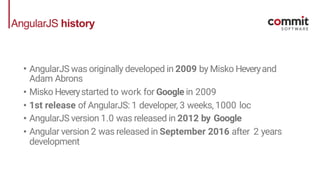
AngularJS history
• AngularJS was originally developed in 2009 by Misko Heveryand
Adam Abrons
• Misko Heverystarted to work for Google in 2009
• 1st release of AngularJS: 1 developer, 3 weeks, 1000 loc
• AngularJS version 1.0 was released in 2012 by Google
• Angular version 2 was released in September 2016 after 2 years
development
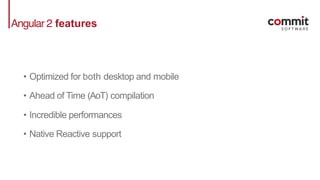
Angular 2 features
• Optimized for both desktop and mobile
• Ahead of Time (AoT) compilation
• Incredible performances
• Native Reactive support
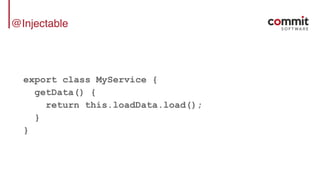
@Injectable
@Injectable
export class MyService {
getData() {
return this.loadData.load();
}
}
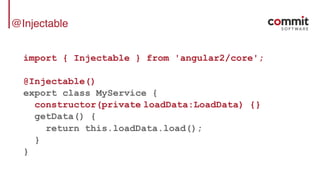
@Injectable
import { Injectable } from 'angular2/core';
@Injectable()
export class MyService {
constructor(private loadData:LoadData) {}
getData() {
return this.loadData.load();
}
}
@Component
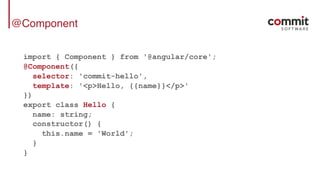
@Component
import { Component } from '@angular/core';
@Component({
selector: 'commit-hello',
template: '<p>Hello, {{name}}</p>'
})
export class Hello {
name: string;
constructor() {
this.name = 'World';
}
}
@Directive
@Directive
import { Directive, HostListener } from '@angular/core';
@Directive({
selector: '[confirm]'
})
export class ConfirmDirective {
@HostListener('click', ['$event'])
confirmFirst(event: Event) {
return window.confirm(
'Are you sure you want to do this?');
}
}
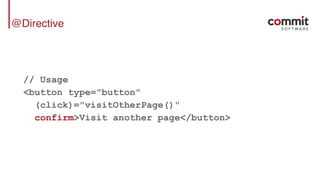
@Directive
// Usage
<button type="button"
(click)="visitOtherPage()"
confirm>Visit another page</button>
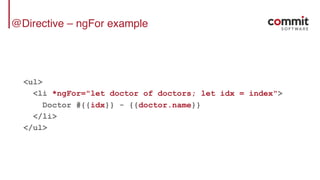
@Directive – ngFor example
<ul>
<li *ngFor="let doctor of doctors; let idx = index">
Doctor #{{idx}} - {{doctor.name}}
</li>
</ul>
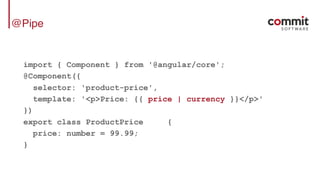
@Pipe
@Pipe
import { Component } from '@angular/core';
@Component({
selector: 'product-price',
template: '<p>Price: {{ price | currency }}</p>'
})
export class ProductPrice {
price: number = 99.99;
}
@Pipe
import { Pipe, PipeTransform } from '@angular/core';
const UNITS = ['B', 'KB', 'MB', 'GB'];
@Pipe({ name: 'formatFileSize' })
export class FormatSize implements PipeTransform {
transform(bytes: number=0, precision: number=2) : string {
if (!isFinite(bytes)) return '?';
let unit = 0;
while ( bytes >= 1024 ) {
bytes /= 1024;
unit ++;
}
return bytes.toFixed(precision) + ' ' + UNITS[unit];
}
}
HTTP services
HTTP services
import {Injectable} from '@angular/core';
import {Http, Response} from '@angular/http';
import {Observable} from 'rxjs';
import {Hero} from './hero';
@Injectable()
export class LoadDataService {
constructor(private http: Http) {}
search(term: string): Observable<Hero[]> {
return this.http
.get(`app/heroes/?name=${term}`)
.map((r: Response) => r.json().data as Hero[] );
}
}
TypeScript
Why TypeScript?
• Angular2 Dependency Injection system is based on type
reflection
• Annotations offer a powerful and very expressive way to
describe elements
Pros
• Improve developer experience with better tools
• Compile time error check
• Type safety
• Better documentation
• Easy to adopt for backend developers
Cons
• Slower learning curve for traditional javascript developer
• Impossible to remove without a complete rewrite
Thinking Components
Modern web is all about components
• Thinking of components instead of views improves decoupling
and separation of concerns
• Components are composable and highly reusable
• Easier to test
• UX and UI teams integrate better
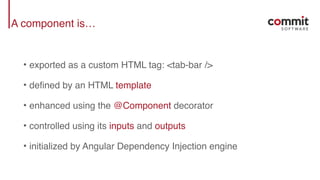
A component is…
• exported as a custom HTML tag: <tab-bar />
• defined by an HTML template
• enhanced using the @Component decorator
• controlled using its inputs and outputs
• initialized by Angular Dependency Injection engine
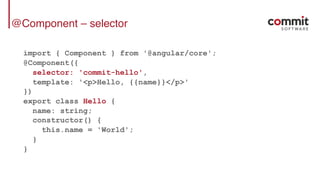
@Component – selector
import { Component } from '@angular/core';
@Component({
selector: 'commit-hello',
template: '<p>Hello, {{name}}</p>'
})
export class Hello {
name: string;
constructor() {
this.name = 'World';
}
}
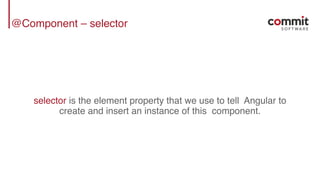
@Component – selector
selector is the element property that we use to tell Angular to
create and insert an instance of this component.
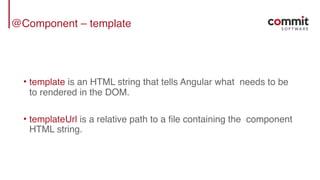
@Component – template
• template is an HTML string that tells Angular what needs to be
to rendered in the DOM.
• templateUrl is a relative path to a file containing the component
HTML string.
Template syntax
• template tags {{expression}} – Execute arbitrary
expressions, e.g. {{1+1}}
• property binding [attribute]="propertyName" – Used to
pass data to a component.
• event binding (event)="expression" – Expression executed
anytime the registered event fires.
• 2-way binding <input [(ngModel)]="u.name"> – Requires
to import 'FormsModule' to be used.
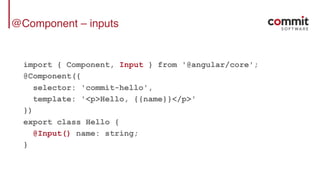
@Component – inputs
import { Component, Input } from '@angular/core';
@Component({
selector: 'commit-hello',
template: '<p>Hello, {{name}}</p>'
})
export class Hello {
@Input() name: string;
}
@Component – inputs
import { Component } from '@angular/core';
@Component({
selector: 'commit-hello',
inputs: ['name']
template: '<p>Hello, {{name}}</p>'
})
export class Hello {
}
@Component – inputs
// To bind to a raw string
<commit-hello name="World"></commit-hello>
// To bind to a variable in the parent component
<commit-hello [name]="userName"></commit-hello>
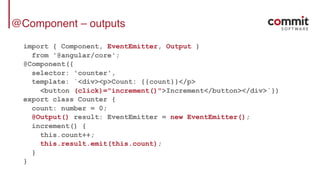
@Component – outputs
import { Component, EventEmitter, Output }
from '@angular/core';
@Component({
selector: 'counter',
template: `<div><p>Count: {{count}}</p>
<button (click)="increment()">Increment</button></div>`})
export class Counter {
count: number = 0;
@Output() result: EventEmitter = new EventEmitter();
increment() {
this.count++;
this.result.emit(this.count);
}
}
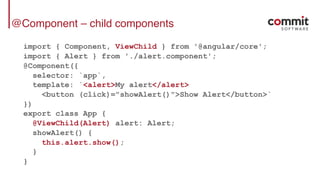
@Component – child components
import { Component, ViewChild } from '@angular/core';
import { Alert } from './alert.component';
@Component({
selector: `app`,
template: `<alert>My alert</alert>
<button (click)="showAlert()">Show Alert</button>`
})
export class App {
@ViewChild(Alert) alert: Alert;
showAlert() {
this.alert.show();
}
}
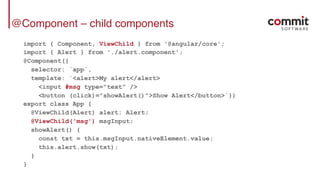
@Component – child components
import { Component, ViewChild } from '@angular/core';
import { Alert } from './alert.component';
@Component({
selector: `app`,
template: `<alert>My alert</alert>
<input #msg type="text" />
<button (click)="showAlert()">Show Alert</button>`})
export class App {
@ViewChild(Alert) alert: Alert;
@ViewChild('msg') msgInput;
showAlert() {
const txt = this.msgInput.nativeElement.value;
this.alert.show(txt);
}
}
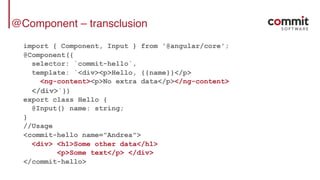
@Component – transclusion
import { Component, Input } from '@angular/core';
@Component({
selector: `commit-hello`,
template: `<div><p>Hello, {{name}}</p>
<ng-content><p>No extra data</p></ng-content>
</div>`})
export class Hello {
@Input() name: string;
}
//Usage
<commit-hello name="Andrea">
<div> <h1>Some other data</h1>
<p>Some text</p> </div>
</commit-hello>
Component lifecycle
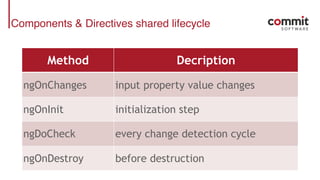
Components & Directives shared lifecycle
Method Decription
ngOnChanges input property value changes
ngOnInit initialization step
ngDoCheck every change detection cycle
ngOnDestroy before destruction
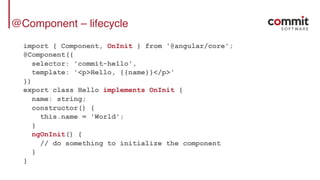
@Component – lifecycle
import { Component, OnInit } from '@angular/core';
@Component({
selector: 'commit-hello',
template: '<p>Hello, {{name}}</p>'
})
export class Hello implements OnInit {
name: string;
constructor() {
this.name = 'World';
}
ngOnInit() {
// do something to initialize the component
}
}
@Directive – lifecycle
import { Directive, OnInit, OnDestroy } from '@angular/core';
@Directive({selector: '[mySpy]'})
export class SpyDirective implements OnInit, OnDestroy {
constructor(private logger: LoggerService) { }
ngOnInit() { this.logIt(`onInit`); }
ngOnDestroy() { this.logIt(`onDestroy`); }
private logIt(msg: string) {
this.logger.log(`Spy ${msg}`);
}
}
//Usage
<div mySpy>...</div>
Lifecycle
“Angular only calls a directive/component hook method if
it is defined.”
– Angular official docs
Component styles
Inline styles
import { Component } from '@angular/core';
const baseStyle = {
backgroundColor: 'green',
padding: '10px'
};
@Component({
selector: 'commit-hello',
template: '<p [ngStyle]="style">Hello!</p>'
})
export class Hello {
style: any = baseStyle;
}
View encapsulation
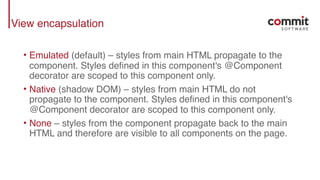
• Emulated (default) – styles from main HTML propagate to the
component. Styles defined in this component's @Component
decorator are scoped to this component only.
• Native (shadow DOM) – styles from main HTML do not
propagate to the component. Styles defined in this component's
@Component decorator are scoped to this component only.
• None – styles from the component propagate back to the main
HTML and therefore are visible to all components on the page.
View encapsulation – example (1/2)
import { Component, ViewEncapsulation } from '@angular/core';
@Component({
selector: 'commit-hello',
styles:[`
.main {
background-color: green;
padding: 10px;
}
`],
encapsulation: ViewEncapsulation.Emulated,
template: '<p class="main">Hello!</p>'
})
export class Hello { }
View encapsulation – example (2/2)
//Output HTML
<p class="main" _ngcontent-yok-5="">
Hello!
</p>
//Output CSS (inside <head>)
.main[_ngcontent-yok-5] {
background-color: green;
padding: 10px;
}
Be Reactive!
Observables
“Observables open up a continuous channel of
communication in which multiple values of data can be
emitted over time […] Angular 2 uses observables
extensively - you'll see them in the HTTP service and the
event system…”
– Angular official docs
Stream
“A stream is a sequence of ongoing events ordered in
time. It can emit 3 different things: a value, an error, or a
«completed» signal.
Consider that the «completed» takes place, for instance,
when the current window is closed.”
– A. Staltz
Observables vs. Promises
• Both provide us with abstractions that help us deal with the
asynchronous nature of our applications.
• Observables are cancellable.
• Observables can be retried using one of the retry operators
provided by the API, such as retry and retryWhen.
• Promises require the caller to have access to the original
function that returned the promise in order to have a retry
capability.
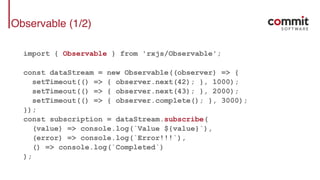
Observable (1/2)
import { Observable } from 'rxjs/Observable';
const dataStream = new Observable((observer) => {
setTimeout(() => { observer.next(42); }, 1000);
setTimeout(() => { observer.next(43); }, 2000);
setTimeout(() => { observer.complete(); }, 3000);
});
const subscription = dataStream.subscribe(
(value) => console.log(`Value ${value}`),
(error) => console.log(`Error!!!`),
() => console.log(`Completed`)
);
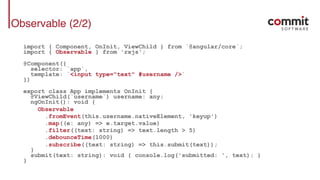
Observable (2/2)
import { Component, OnInit, ViewChild } from `@angular/core`;
import { Observable } from 'rxjs';
@Component({
selector: `app`,
template: `<input type="text" #username />`
})
export class App implements OnInit {
@ViewChild(`username`) username: any;
ngOnInit(): void {
Observable
.fromEvent(this.username.nativeElement, 'keyup')
.map((e: any) => e.target.value)
.filter((text: string) => text.length > 5)
.debounceTime(1000)
.subscribe((text: string) => this.submit(text));
}
submit(text: string): void { console.log('submitted: ', text); }
}
Bootstrapping Angular
• Bootstrapping is an essential process in Angular – it is where
the application is loaded when Angular comes to life.
• Bootstrapping Angular 2 applications is certainly different from
Angular 1.x, but is still a straightforward procedure.
Define a module
// app.modules.ts
import { BrowserModule } from '@angular/platformbrowser';
import { NgModule } from '@angular/core';
import { HttpModule } from '@angular/http';
import { AppComponent } from './[PATH]/app.component';
import { MyComponent } from './[PATH]/some.component';
import { SomeService } from './[PATH]/some.service';
@NgModule({
declarations: [AppComponent, MyComponent],
providers: [SomeService],
imports: [BrowserModule, HttpModule],
bootstrap: [AppComponent]
})
class AppModule {}
Bootstrapping Angular
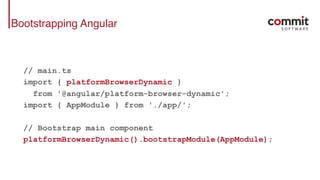
// main.ts
import { platformBrowserDynamic }
from '@angular/platform-browser-dynamic';
import { AppModule } from './app/';
// Bootstrap main component
platformBrowserDynamic().bootstrapModule(AppModule);
angular-cli
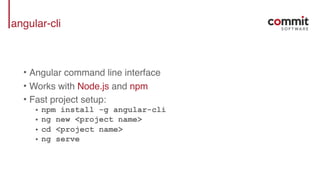
• Angular command line interface
• Works with Node.js and npm
• Fast project setup:
• npm install -g angular-cli
• ng new <project name>
• cd <project name>
• ng serve
Under the hood
AngularJS $digest cycle
• AngularJS engine is built using a dirty checking algorithm.
• Application state is a single entity connected to every visual
component and calculated every time a component mutates
some data
• It’s very easy to trigger unwanted $digest cycles impacting
performances
• Very difficult to debug
Angular 2 Change Detection engine
• Based on ngZone
• Recalculate the components tree state after every async
interaction (events, timers, observables..)
• Every component has its own Change Detector
• Component’s Change Detector is generated at runtime to
improve performances
• Developers can control how and when components are
recalculated
Change Detection
“When one of the components change, no matter where
in the tree it is, a change detection pass is triggered for
the whole tree, from top to bottom.”
– ngBook2
Change Detection
@Component({
template: '<v-card [vData]="vData"></v-card>'
})
class VCardApp {
constructor() {
this.vData = {
name: 'Andrea Vallotti',
email: 'andrea.Vallotti@commitsoftware.it'
}
}
changeData() {
this.vData.name = 'Pascal Precht';
}
}
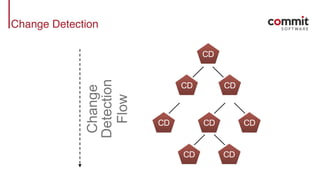
Change Detection
CD
CD CD
CD CDCD
CD CD
Change
Detection
Flow
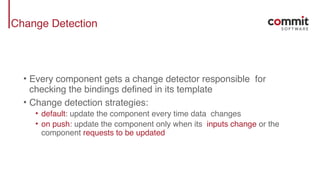
Change Detection
• Every component gets a change detector responsible for
checking the bindings defined in its template
• Change detection strategies:
• default: update the component every time data changes
• on push: update the component only when its inputs change or the
component requests to be updated
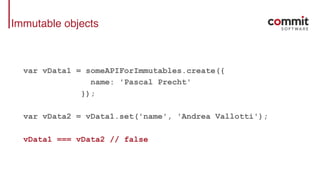
Immutable objects
var vData1 = someAPIForImmutables.create({
name: 'Pascal Precht'
});
var vData2 = vData1.set('name', 'Andrea Vallotti');
vData1 === vData2 // false
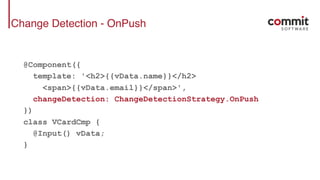
Change Detection - OnPush
@Component({
template: '<h2>{{vData.name}}</h2>
<span>{{vData.email}}</span>',
changeDetection: ChangeDetectionStrategy.OnPush
})
class VCardCmp {
@Input() vData;
}
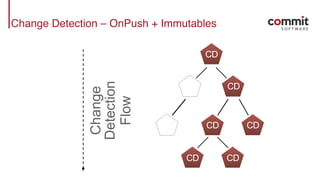
Change Detection – OnPush + Immutables
CD
CD
CD CD
CD CD
Change
Detection
Flow
Change Detection - OnPush
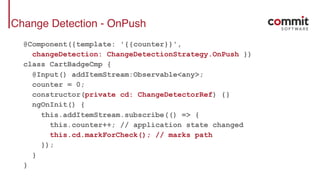
@Component({template: '{{counter}}',
changeDetection: ChangeDetectionStrategy.OnPush })
class CartBadgeCmp {
@Input() addItemStream:Observable<any>;
counter = 0;
constructor(private cd: ChangeDetectorRef) {}
ngOnInit() {
this.addItemStream.subscribe(() => {
this.counter++; // application state changed
this.cd.markForCheck(); // marks path
});
}
}
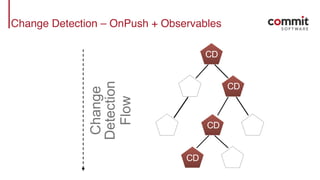
Change Detection – OnPush + Observables
CD
CD
CD
CD
Change
Detection
Flow
Links & credits
• Matteo Ronchi – @cef62, https://github.com/cef62
• https://github.com/commit-university/exploring-angular-2
• http://pascalprecht.github.io/slides/angular-2-change-detection-
explained/#/
• https://angular.io/docs/ts/latest/
thank you for your attention
Andrea Vallotti, ph.D
andrea.vallotti@commitsoftware.it

Angular 2 - The Next Framework

  • 1.
    Angular 2 -The Next Framework
  • 2.
    Angular 2 –The Next Framework
  • 3.
    AngularJS history • AngularJSwas originally developed in 2009 by Misko Heveryand Adam Abrons • Misko Heverystarted to work for Google in 2009 • 1st release of AngularJS: 1 developer, 3 weeks, 1000 loc • AngularJS version 1.0 was released in 2012 by Google • Angular version 2 was released in September 2016 after 2 years development
  • 4.
    Angular 2 features •Optimized for both desktop and mobile • Ahead of Time (AoT) compilation • Incredible performances • Native Reactive support
  • 5.
  • 6.
    @Injectable export class MyService{ getData() { return this.loadData.load(); } }
  • 7.
    @Injectable import { Injectable} from 'angular2/core'; @Injectable() export class MyService { constructor(private loadData:LoadData) {} getData() { return this.loadData.load(); } }
  • 8.
  • 9.
    @Component import { Component} from '@angular/core'; @Component({ selector: 'commit-hello', template: '<p>Hello, {{name}}</p>' }) export class Hello { name: string; constructor() { this.name = 'World'; } }
  • 10.
  • 11.
    @Directive import { Directive,HostListener } from '@angular/core'; @Directive({ selector: '[confirm]' }) export class ConfirmDirective { @HostListener('click', ['$event']) confirmFirst(event: Event) { return window.confirm( 'Are you sure you want to do this?'); } }
  • 12.
  • 13.
    @Directive – ngForexample <ul> <li *ngFor="let doctor of doctors; let idx = index"> Doctor #{{idx}} - {{doctor.name}} </li> </ul>
  • 14.
  • 15.
    @Pipe import { Component} from '@angular/core'; @Component({ selector: 'product-price', template: '<p>Price: {{ price | currency }}</p>' }) export class ProductPrice { price: number = 99.99; }
  • 16.
    @Pipe import { Pipe,PipeTransform } from '@angular/core'; const UNITS = ['B', 'KB', 'MB', 'GB']; @Pipe({ name: 'formatFileSize' }) export class FormatSize implements PipeTransform { transform(bytes: number=0, precision: number=2) : string { if (!isFinite(bytes)) return '?'; let unit = 0; while ( bytes >= 1024 ) { bytes /= 1024; unit ++; } return bytes.toFixed(precision) + ' ' + UNITS[unit]; } }
  • 17.
  • 18.
    HTTP services import {Injectable}from '@angular/core'; import {Http, Response} from '@angular/http'; import {Observable} from 'rxjs'; import {Hero} from './hero'; @Injectable() export class LoadDataService { constructor(private http: Http) {} search(term: string): Observable<Hero[]> { return this.http .get(`app/heroes/?name=${term}`) .map((r: Response) => r.json().data as Hero[] ); } }
  • 19.
  • 20.
    Why TypeScript? • Angular2Dependency Injection system is based on type reflection • Annotations offer a powerful and very expressive way to describe elements
  • 21.
    Pros • Improve developerexperience with better tools • Compile time error check • Type safety • Better documentation • Easy to adopt for backend developers
  • 22.
    Cons • Slower learningcurve for traditional javascript developer • Impossible to remove without a complete rewrite
  • 23.
  • 24.
    Modern web isall about components • Thinking of components instead of views improves decoupling and separation of concerns • Components are composable and highly reusable • Easier to test • UX and UI teams integrate better
  • 25.
    A component is… •exported as a custom HTML tag: <tab-bar /> • defined by an HTML template • enhanced using the @Component decorator • controlled using its inputs and outputs • initialized by Angular Dependency Injection engine
  • 26.
    @Component – selector import{ Component } from '@angular/core'; @Component({ selector: 'commit-hello', template: '<p>Hello, {{name}}</p>' }) export class Hello { name: string; constructor() { this.name = 'World'; } }
  • 27.
    @Component – selector selectoris the element property that we use to tell Angular to create and insert an instance of this component.
  • 28.
    @Component – template •template is an HTML string that tells Angular what needs to be to rendered in the DOM. • templateUrl is a relative path to a file containing the component HTML string.
  • 29.
    Template syntax • templatetags {{expression}} – Execute arbitrary expressions, e.g. {{1+1}} • property binding [attribute]="propertyName" – Used to pass data to a component. • event binding (event)="expression" – Expression executed anytime the registered event fires. • 2-way binding <input [(ngModel)]="u.name"> – Requires to import 'FormsModule' to be used.
  • 30.
    @Component – inputs import{ Component, Input } from '@angular/core'; @Component({ selector: 'commit-hello', template: '<p>Hello, {{name}}</p>' }) export class Hello { @Input() name: string; }
  • 31.
    @Component – inputs import{ Component } from '@angular/core'; @Component({ selector: 'commit-hello', inputs: ['name'] template: '<p>Hello, {{name}}</p>' }) export class Hello { }
  • 32.
    @Component – inputs //To bind to a raw string <commit-hello name="World"></commit-hello> // To bind to a variable in the parent component <commit-hello [name]="userName"></commit-hello>
  • 33.
    @Component – outputs import{ Component, EventEmitter, Output } from '@angular/core'; @Component({ selector: 'counter', template: `<div><p>Count: {{count}}</p> <button (click)="increment()">Increment</button></div>`}) export class Counter { count: number = 0; @Output() result: EventEmitter = new EventEmitter(); increment() { this.count++; this.result.emit(this.count); } }
  • 34.
    @Component – childcomponents import { Component, ViewChild } from '@angular/core'; import { Alert } from './alert.component'; @Component({ selector: `app`, template: `<alert>My alert</alert> <button (click)="showAlert()">Show Alert</button>` }) export class App { @ViewChild(Alert) alert: Alert; showAlert() { this.alert.show(); } }
  • 35.
    @Component – childcomponents import { Component, ViewChild } from '@angular/core'; import { Alert } from './alert.component'; @Component({ selector: `app`, template: `<alert>My alert</alert> <input #msg type="text" /> <button (click)="showAlert()">Show Alert</button>`}) export class App { @ViewChild(Alert) alert: Alert; @ViewChild('msg') msgInput; showAlert() { const txt = this.msgInput.nativeElement.value; this.alert.show(txt); } }
  • 36.
    @Component – transclusion import{ Component, Input } from '@angular/core'; @Component({ selector: `commit-hello`, template: `<div><p>Hello, {{name}}</p> <ng-content><p>No extra data</p></ng-content> </div>`}) export class Hello { @Input() name: string; } //Usage <commit-hello name="Andrea"> <div> <h1>Some other data</h1> <p>Some text</p> </div> </commit-hello>
  • 37.
  • 38.
    Components & Directivesshared lifecycle Method Decription ngOnChanges input property value changes ngOnInit initialization step ngDoCheck every change detection cycle ngOnDestroy before destruction
  • 39.
    @Component – lifecycle import{ Component, OnInit } from '@angular/core'; @Component({ selector: 'commit-hello', template: '<p>Hello, {{name}}</p>' }) export class Hello implements OnInit { name: string; constructor() { this.name = 'World'; } ngOnInit() { // do something to initialize the component } }
  • 40.
    @Directive – lifecycle import{ Directive, OnInit, OnDestroy } from '@angular/core'; @Directive({selector: '[mySpy]'}) export class SpyDirective implements OnInit, OnDestroy { constructor(private logger: LoggerService) { } ngOnInit() { this.logIt(`onInit`); } ngOnDestroy() { this.logIt(`onDestroy`); } private logIt(msg: string) { this.logger.log(`Spy ${msg}`); } } //Usage <div mySpy>...</div>
  • 41.
    Lifecycle “Angular only callsa directive/component hook method if it is defined.” – Angular official docs
  • 42.
  • 43.
    Inline styles import {Component } from '@angular/core'; const baseStyle = { backgroundColor: 'green', padding: '10px' }; @Component({ selector: 'commit-hello', template: '<p [ngStyle]="style">Hello!</p>' }) export class Hello { style: any = baseStyle; }
  • 44.
    View encapsulation • Emulated(default) – styles from main HTML propagate to the component. Styles defined in this component's @Component decorator are scoped to this component only. • Native (shadow DOM) – styles from main HTML do not propagate to the component. Styles defined in this component's @Component decorator are scoped to this component only. • None – styles from the component propagate back to the main HTML and therefore are visible to all components on the page.
  • 45.
    View encapsulation –example (1/2) import { Component, ViewEncapsulation } from '@angular/core'; @Component({ selector: 'commit-hello', styles:[` .main { background-color: green; padding: 10px; } `], encapsulation: ViewEncapsulation.Emulated, template: '<p class="main">Hello!</p>' }) export class Hello { }
  • 46.
    View encapsulation –example (2/2) //Output HTML <p class="main" _ngcontent-yok-5=""> Hello! </p> //Output CSS (inside <head>) .main[_ngcontent-yok-5] { background-color: green; padding: 10px; }
  • 47.
  • 48.
    Observables “Observables open upa continuous channel of communication in which multiple values of data can be emitted over time […] Angular 2 uses observables extensively - you'll see them in the HTTP service and the event system…” – Angular official docs
  • 49.
    Stream “A stream isa sequence of ongoing events ordered in time. It can emit 3 different things: a value, an error, or a «completed» signal. Consider that the «completed» takes place, for instance, when the current window is closed.” – A. Staltz
  • 50.
    Observables vs. Promises •Both provide us with abstractions that help us deal with the asynchronous nature of our applications. • Observables are cancellable. • Observables can be retried using one of the retry operators provided by the API, such as retry and retryWhen. • Promises require the caller to have access to the original function that returned the promise in order to have a retry capability.
  • 51.
    Observable (1/2) import {Observable } from 'rxjs/Observable'; const dataStream = new Observable((observer) => { setTimeout(() => { observer.next(42); }, 1000); setTimeout(() => { observer.next(43); }, 2000); setTimeout(() => { observer.complete(); }, 3000); }); const subscription = dataStream.subscribe( (value) => console.log(`Value ${value}`), (error) => console.log(`Error!!!`), () => console.log(`Completed`) );
  • 52.
    Observable (2/2) import {Component, OnInit, ViewChild } from `@angular/core`; import { Observable } from 'rxjs'; @Component({ selector: `app`, template: `<input type="text" #username />` }) export class App implements OnInit { @ViewChild(`username`) username: any; ngOnInit(): void { Observable .fromEvent(this.username.nativeElement, 'keyup') .map((e: any) => e.target.value) .filter((text: string) => text.length > 5) .debounceTime(1000) .subscribe((text: string) => this.submit(text)); } submit(text: string): void { console.log('submitted: ', text); } }
  • 53.
  • 54.
    Bootstrapping Angular • Bootstrappingis an essential process in Angular – it is where the application is loaded when Angular comes to life. • Bootstrapping Angular 2 applications is certainly different from Angular 1.x, but is still a straightforward procedure.
  • 55.
    Define a module //app.modules.ts import { BrowserModule } from '@angular/platformbrowser'; import { NgModule } from '@angular/core'; import { HttpModule } from '@angular/http'; import { AppComponent } from './[PATH]/app.component'; import { MyComponent } from './[PATH]/some.component'; import { SomeService } from './[PATH]/some.service'; @NgModule({ declarations: [AppComponent, MyComponent], providers: [SomeService], imports: [BrowserModule, HttpModule], bootstrap: [AppComponent] }) class AppModule {}
  • 56.
    Bootstrapping Angular // main.ts import{ platformBrowserDynamic } from '@angular/platform-browser-dynamic'; import { AppModule } from './app/'; // Bootstrap main component platformBrowserDynamic().bootstrapModule(AppModule);
  • 57.
    angular-cli • Angular commandline interface • Works with Node.js and npm • Fast project setup: • npm install -g angular-cli • ng new <project name> • cd <project name> • ng serve
  • 58.
  • 59.
    AngularJS $digest cycle •AngularJS engine is built using a dirty checking algorithm. • Application state is a single entity connected to every visual component and calculated every time a component mutates some data • It’s very easy to trigger unwanted $digest cycles impacting performances • Very difficult to debug
  • 60.
    Angular 2 ChangeDetection engine • Based on ngZone • Recalculate the components tree state after every async interaction (events, timers, observables..) • Every component has its own Change Detector • Component’s Change Detector is generated at runtime to improve performances • Developers can control how and when components are recalculated
  • 61.
    Change Detection “When oneof the components change, no matter where in the tree it is, a change detection pass is triggered for the whole tree, from top to bottom.” – ngBook2
  • 62.
    Change Detection @Component({ template: '<v-card[vData]="vData"></v-card>' }) class VCardApp { constructor() { this.vData = { name: 'Andrea Vallotti', email: 'andrea.Vallotti@commitsoftware.it' } } changeData() { this.vData.name = 'Pascal Precht'; } }
  • 63.
    Change Detection CD CD CD CDCDCD CD CD Change Detection Flow
  • 64.
    Change Detection • Everycomponent gets a change detector responsible for checking the bindings defined in its template • Change detection strategies: • default: update the component every time data changes • on push: update the component only when its inputs change or the component requests to be updated
  • 65.
    Immutable objects var vData1= someAPIForImmutables.create({ name: 'Pascal Precht' }); var vData2 = vData1.set('name', 'Andrea Vallotti'); vData1 === vData2 // false
  • 66.
    Change Detection -OnPush @Component({ template: '<h2>{{vData.name}}</h2> <span>{{vData.email}}</span>', changeDetection: ChangeDetectionStrategy.OnPush }) class VCardCmp { @Input() vData; }
  • 67.
    Change Detection –OnPush + Immutables CD CD CD CD CD CD Change Detection Flow
  • 68.
    Change Detection -OnPush @Component({template: '{{counter}}', changeDetection: ChangeDetectionStrategy.OnPush }) class CartBadgeCmp { @Input() addItemStream:Observable<any>; counter = 0; constructor(private cd: ChangeDetectorRef) {} ngOnInit() { this.addItemStream.subscribe(() => { this.counter++; // application state changed this.cd.markForCheck(); // marks path }); } }
  • 69.
    Change Detection –OnPush + Observables CD CD CD CD Change Detection Flow
  • 70.
    Links & credits •Matteo Ronchi – @cef62, https://github.com/cef62 • https://github.com/commit-university/exploring-angular-2 • http://pascalprecht.github.io/slides/angular-2-change-detection- explained/#/ • https://angular.io/docs/ts/latest/
  • 71.
    thank you foryour attention Andrea Vallotti, ph.D andrea.vallotti@commitsoftware.it