Angular 2
Sami Suo-Heikki
19.5.2016
What is Angular 2?
What is Angular 2?
JavaScript Framework
Cross platform
Fully component based
Built from the ground up with TypeScript
Native ES6 modules
Supports server-side prerendering
One framework.
Mobile and Desktop.
Agenda for today
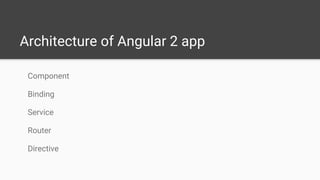
Architecture of Angular 2 app
Build your application with Angular CLI
Comparison to other JS frameworks
Useful tools
Architecture of Angular 2 app
Component
Binding
Service
Router
Directive
Component
Encapsulate the template,
data and the behaviour of a
view.
Component
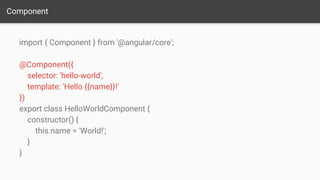
import { Component } from '@angular/core';
@Component({
selector: 'hello-world',
template: 'Hello {{name}}!'
})
export class HelloWorldComponent {
constructor() {
this.name = 'World!';
}
}
Component
import { Component } from '@angular/core';
@Component({
selector: 'hello-world',
template: 'Hello {{name}}!'
})
export class HelloWorldComponent {
constructor() {
this.name = 'World!';
}
}
Component
import { Component } from '@angular/core';
@Component({
selector: 'hello-world',
template: 'Hello {{name}}!'
})
export class HelloWorldComponent {
constructor() {
this.name = 'World!';
}
}
Component
import { Component } from '@angular/core';
@Component({
selector: 'hello-world',
template: 'Hello {{name}}!'
})
export class HelloWorldComponent {
constructor() {
this.name = 'World!';
}
}
Component
Component Dom
Binding
Component Dom
name = “World” <h1> {{name}} </h1>
Binding
Component Dom
onClick() {
...
}
<input (click)=”onClick()”>
Two-way data binding
<input [(value)]="todo.text">
Service
Reusable data service in your
application.
Service
Data Access
Logging
Business Logic
Configuration
Router
Responsible for navigation.
Router
@Routes([
{path: '/my-route', component: MyRouteComponent},
{path: '/my-other-route', component: MyOtherComponent},
])
Router
@Routes([
{path: '/my-route', component: MyRouteComponent},
{path: '/my-other-route', component: MyOtherComponent},
])
Router
@Routes([
{path: '/my-route', component: MyRouteComponent},
{path: '/my-other-route', component: MyOtherComponent},
])
Directive
Modify DOM elements and/or
extend their behaviour.
@Component({
selector: 'my-app',
template: `
<vaadin-pie-chart>
…
</vaadin-pie-chart>
`
})
@Component({
selector: 'my-app',
template: `
<vaadin-pie-chart>
…
</vaadin-pie-chart>
`,
directives: [VaadinCharts,
DataSeries]
})
@Component({
selector: 'my-app',
template: `
<vaadin-pie-chart>
…
</vaadin-pie-chart>
`,
directives: [VaadinCharts,
DataSeries]
})
Build your app
with Angular CLI
cli.angular.io
Angular CLI
1. npm install -g angular-cli
2. ng new PROJECT_NAME
3. ng serve
4. ng generate route my-hero
5. ng build
(Demo with Angular CLI)
Comparison to other frameworks
vs
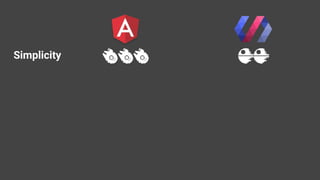
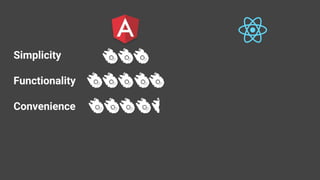
Simplicity
Simplicity
Simplicity
Simplicity
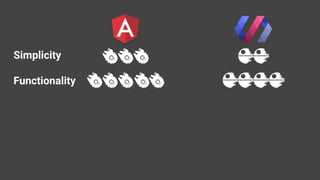
Functionality
Simplicity
Functionality
Simplicity
Functionality
Simplicity
Functionality
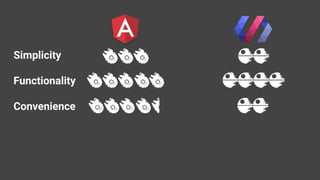
Convenience
Simplicity
Functionality
Convenience
Simplicity
Functionality
Convenience
vs
Simplicity
Functionality
Convenience
Simplicity
Functionality
Convenience
Simplicity
Functionality
Convenience
Simplicity
Functionality
Convenience
Useful tools
augury.angular.io
angular.io/styleguide
cli.angular.io
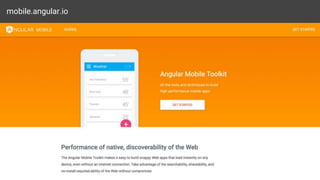
mobile.angular.io
May the
be with you

Angular 2 - a New Hope

Editor's Notes

  • #2 Hello and welcome to this tech lunch about Angular 2-. In one mapa couple of weeks ago Jens and Jouni did a small presentation about angular 2 and this is how they portrated it. Being this evil empire that is gathering followers througout the galaxy. But I like to see things differently, and hopefully after this tech lunch so will you. muista että atomissa on valkoinen teema
  • #3 And this is how I see the current situation. There are a lot of different frameworks all around the galaxy fighting for supremacy. And here in the middle we can see this old princess called AngularJs. And she pretty much started this whole fight back in the year 2010. And after that she gotten a lot different rivals, like React and Polymer. But no worries, a new hope has emerged in the galaxy and that is of course Angular 2. (click) Being the new hope and restoring some balance to the internet.
  • #4 So yeah, topic of today is Angular 2 and for those who don’t know me, my name is Sami Suo-Heikki and this is actually my first tech lunch.
  • #5 So to the first question in hand, what is Angular 2? I’m assuming that most of you already know what Angular 2 is and what its used for. But still lets make a small recap about it.
  • #6 Javascript framework: For building awesome and lighting fast applications. Cross platform: Meaning that you can use it to build other stuff than just web apps, but I’ll soon tell you a bit more about that. Fully component based:framework is component based. When you are loading angular 2, you are just loading the core of it. Meaning that you don’t have to load every feature that is has, but only the things that you really need. And also with Angular you easily build your own application to be a component based and that is a best practice. Built from the ground up with TypeScript: meaning Types are a first class construct. Native ES6 modules: -no more endless script tags. -The ES6 module standard has two parts: -Declarative syntax (for importing and exporting) -Programmatic loader API: to configure how modules are loaded and to conditionally load modules Server side prerendering: Just like other JS framework called React, Angular 2 also supports server-side prerendering. This means that you can render the first view of your application in the server-side, meaning that the first view the user sees is loaded with a speed of lighting. And you can easily do this like with Node.js
  • #7 They promote themselves as one framework which can be used for basically creating any application. But that’s kinda marketing bullshit of course. But yeah one framework for mobile and desktop, and when I say mobile and desktop I don’t just mean mobile and desktop sized web applications. But real mobile and desktop applications. Even native mobile applications. But in these cases you need to use a library of your choosing.
  • #8 and when i say one framework for mobile and desktop, I don’t just mean responsive web applications that looks nice on mobile and desktop. But with Angular 2 you can even create desktop and mobile applications. And here couple of examples like Ionic: And how ionic works is that you are working with web views and Ionic gives you tools on bulding UIs that look native on iOS, android and Windows phone. But use web views like you use on the web. But it also gives you the access to all the native features that you propably want like the camera and gps. And another example is NativeScript and they give a renderer that actually uses the native UI elements on Android, ios and windows. So you can build your app using javascript in Angular 2 but having fully native UI. And for desktop applications you can use Electron. and what they give you is a part of chrome for rendering and node for processing in one package. and with it you can get access to all platform APIs like hardware.
  • #10 and these are not all features that are in Angular 2, but due to a limited time, this is what we are going to check out next.
  • #11 Encapsulate the template, data and the behaviour of a view. So it would be more accurate to call it a view component. Every angular 2 app has at least one component which can be called the root component. And inside components can be several other components. It will help breaking up a big application into a smaller and managable components. And these components can be re-used in different places in our app or in a totally different application. A Component controls a patch of screen real estate that we could call a view. We define a Component's application logic - what it does to support the view - inside a class. The class interacts with the view through an API of properties and methods.
  • #12 And now you might be thinking that what do these components look like? They are actually just a plain typescript classes. And it can have properties and methods. And these properties hold the data for the view and the methods implement the behavior of the view. A Component controls a patch of screen real estate that we could call a view. We define a Component's application logic - what it does to support the view - inside a class. The class interacts with the view through an API of properties and methods.
  • #13 And not you might be thinking that what do these components look like? They are actually just a plain typescript classes. And it can have properties and methods. And these properties hold the data for the view and the methods implement the behavior of the view. A Component controls a patch of screen real estate that we could call a view. We define a Component's application logic - what it does to support the view - inside a class. The class interacts with the view through an API of properties and methods.
  • #14 And not you might be thinking that what do these components look like? They are actually just a plain typescript classes. And it can have properties and methods. And these properties hold the data for the view and the methods implement the behavior of the view. A Component controls a patch of screen real estate that we could call a view. We define a Component's application logic - what it does to support the view - inside a class. The class interacts with the view through an API of properties and methods.
  • #15 And not you might be thinking that what do these components look like? They are actually just a plain typescript classes. And it can have properties and methods. And these properties hold the data for the view and the methods implement the behavior of the view. A Component controls a patch of screen real estate that we could call a view. We define a Component's application logic - what it does to support the view - inside a class. The class interacts with the view through an API of properties and methods.
  • #16 And one key thing to realize is that these components are totally decoupled from the DOM. So please, no jQuery in Angular 2 applications. So instead of accessing the dom, we use binding
  • #17 So instead of accessing the dom, we use binding. If we example change the name, the dom element attached to this property would automatically update. So we don’t need a reference for that dom element in order to update it.
  • #18 Similarly to handle an event raised from the dom element like click or keyInput, we can bind it to a method in our component. And decoupling our component from the dom makes our component a unit testable. Because if you just have a class with no references to elements we can easily test it and don’t require the dom.
  • #19 And how to two way data binding is handled in Angular 2? Pretty easy actually. Application’s and user's changes flows both ways, handling both property changes and event binding. Without a framework, we would be responsible for pushing data values into the HTML controls and turning user responses into actions and value updates. Writing such push/pull logic by hand would be hard and a nightmare as any experienced jQuery programmer can confirm.
  • #20 And the next thing is services, which actually not Angular 2 specific thing, but actually just a resuable data service that you can build in between your application and backend service. So a good thing is to delegate everything that is not needed for the view to the service. So a service is just a plain class that can encapsulate different non-ui logic of your application.
  • #21 For example Data access, making http calls, logging, business logic and configurations of your application.
  • #22 And another key player in our Angular 2 application is the router, which suprise suprise responsible for navigation. So it will subscribe to changes in the url and to figure out what component to present to the user.
  • #26 And the last key player in Angular is the Directive. And similary as to components is that we use them to work with the UI. But unlike the component, the directive doesn’t have a template or any HTML itself. It is just for modifying the existing DOM elements. And one example of a directive is what the Elements and the pro team here has built for the Vaadin Elements.