Microsoft Product Licensing – SQL Server
Beat Weissenberger (MS Schweiz)
Alexander Egli (MS Schweiz)
Detlef Werner (SoftwareONE)
Copyrights & Warranties
This document contains proprietary information that is protected by copyright.
SoftwareONE reserves all rights thereto.
SoftwareONE shall not be liable for possible errors in this document. Liability for damages directly and
indirectly associated with the supply or use of this document is excluded as far as legally permissible.
The information presented herein is intended exclusively as a guide offered by SoftwareONE. The
publishers product use rights, agreement terms and conditions and other definitions prevail over the
information provided herein. The content must not be copied, reproduced, passed to third parties or used
for any other purposes without written permission of SoftwareONE.
Copyright © 2016 by SoftwareONE
1 EEvvoolluuttiioonn ooff SSQQLL SSeerrvveerr LLiicceennssiinngg
Agenda
2 TTrraannssiittiioonn ffrroomm pprroocceessssoorr bbaasseedd ttoo ccoorree lliicceennssiinngg
3 HHyybbrriiddee SScceennaarriiooss
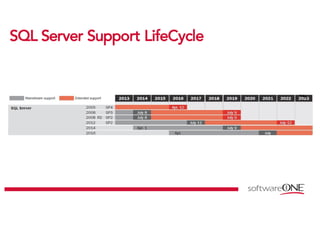
SSQQLL SSeerrvveerr SSuuppppoorrtt LLiiffeeCCyyccllee
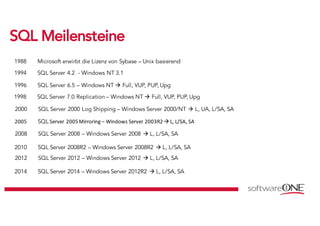
SSQQLL MMeeiilleennsstteeiinnee
1988 Microsoft erwirbt die Lizenz von Sybase – Unix basierend
1994 SQL Server 4.2 - Windows NT 3.1
1996 SQL Server 6.5 – Windows NT à Full, VUP, PUP, Upg
1998 SQL Server 7.0 Replication – Windows NT à Full, VUP, PUP, Upg
2000 SQL Server 2000 Log Shipping – Windows Server 2000/NT à L, UA, L/SA, SA
2005	 SQL Server	2005	Mirroring – Windows	Server	2003R2	à L,	L/SA,	SA
2008 SQL Server 2008 – Windows Server 2008 à L, L/SA, SA
2010 SQL Server 2008R2 – Windows Server 2008R2 à L, L/SA, SA
2012 SQL Server 2012 – Windows Server 2012 à L, L/SA, SA
2014 SQL Server 2014 – Windows Server 2012R2 à L, L/SA, SA
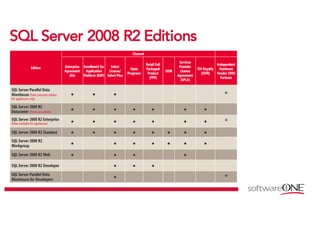
SSQQLL SSeerrvveerr 22000088 RR22 EEddiittiioonnss
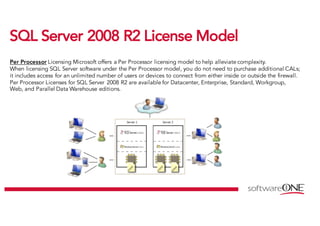
SSQQLL SSeerrvveerr 22000088 RR22 LLiicceennssee MMooddeell
Per Processor Licensing Microsoft offers a Per Processor licensing model to help alleviate complexity.
When licensing SQL Server software under the Per Processor model, you do not need to purchase additional CALs;
it includes access for an unlimited number of users or devices to connect from either inside or outside the firewall.
Per Processor Licenses for SQL Server 2008 R2 are available for Datacenter, Enterprise, Standard, Workgroup,
Web, and Parallel Data Warehouse editions.
SSQQLL SSeerrvveerr 22000088 RR22 LLiicceennssee MMooddeell
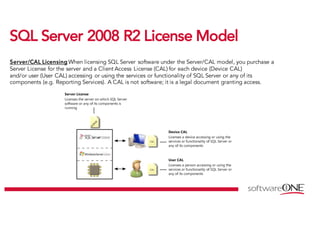
Server/CAL Licensing When licensing SQL Server software under the Server/CAL model, you purchase a
Server License for the server and a Client Access License (CAL) for each device (Device CAL)
and/or user (User CAL) accessing or using the services or functionality of SQL Server or any of its
components (e.g. Reporting Services). A CAL is not software; it is a legal document granting access.
SSQQLL SSeerrvveerr 22000088 RR22 MMuullttiipplleexxiinngg
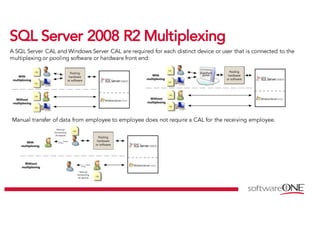
A SQL Server CAL and Windows Server CAL are required for each distinct device or user that is connected to the
multiplexing or pooling software or hardware front end:
Manual transfer of data from employee to employee does not require a CAL for the receiving employee.
SSQQLL SSeerrvveerr 22000088 RR22 VViirrtt.. SScceennaarriiooss
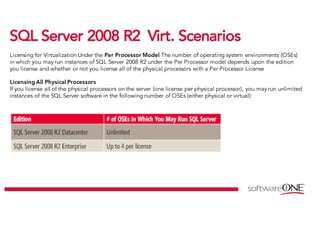
Licensing for Virtualization Under the Per Processor Model The number of operating system environments (OSEs)
in which you may run instances of SQL Server 2008 R2 under the Per Processor model depends upon the edition
you license and whether or not you license all of the physical processors with a Per Processor License
Licensing All Physical Processors
If you license all of the physical processors on the server (one license per physical processor), you may run unlimited
instances of the SQL Server software in the following number of OSEs (either physical or virtual):
SSQQLL SSeerrvveerr 22000088 RR22 VViirrtt.. SScceennaarriiooss
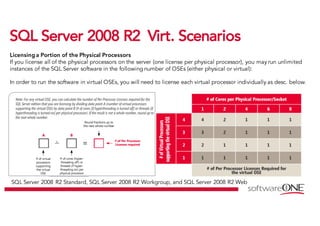
Licensing a Portion of the Physical Processors
If you license all of the physical processors on the server (one license per physical processor), you may run unlimited
instances of the SQL Server software in the following number of OSEs (either physical or virtual):
In order to run the software in virtual OSEs, you will need to license each virtual processor individually as desc. below.
SQL Server 2008 R2 Standard, SQL Server 2008 R2 Workgroup, and SQL Server 2008 R2 Web
SSQQLL 22000088RR22 LLiicceennssee ggrraannttss
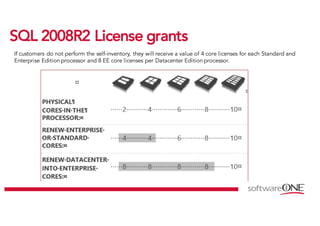
If customers do not perform the self-inventory, they will receive a value of 4 core licenses for each Standard and
Enterprise Edition processor and 8 EE core licenses per Datacenter Edition processor.
SSQQLL 22000088RR22 LLiicceennssee ggrraannttss
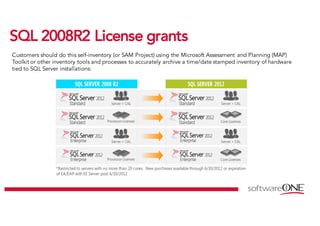
Customers should do this self-inventory (or SAM Project) using the Microsoft Assessment and Planning (MAP)
Toolkit or other inventory tools and processes to accurately archive a time/date stamped inventory of hardware
tied to SQL Server installations:
Core Based Licensing – SQL 2014
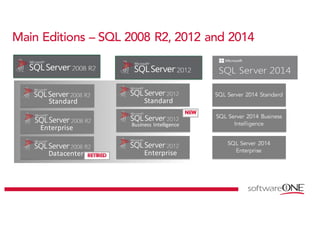
Main Editions – SQL 2008 R2, 2012 and 2014
Standard Standard
Enterprise Business	Intelligence
Datacenter Enterprise
SQL Server 2014 Standard
SQL Server 2014 Business
Intelligence
SQL Server 2014
Enterprise
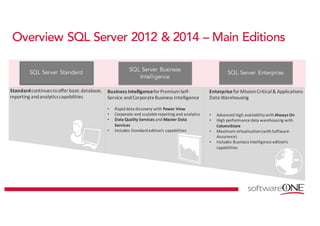
Overview SQL Server 2012 & 2014 – Main Editions
SQL Server Standard
SQL Server Business
Intelligence
SQL Server Enterprise
Standardcontinues	to	offer	basic	database,	
reporting	and	analytics	capabilities
Business	Intelligencefor	Premium	Self-
Service	and	Corporate	Business	Intelligence
• Rapid	data	discovery	with	Power	View
• Corporate	and	scalable	reporting	and	analytics
• Data	Quality	Services	and	Master	Data	
Services
• Includes	Standard	edition’s	capabilities
Enterprisefor	Mission	Critical	&	Applications	
Data	Warehousing
• Advanced	high	availability	with	Always	On
• High	performance	data	warehousing	with	
ColumnStore
• Maximum	virtualization	(with	Software
Assurance)
• Includes	Business	Intelligence	edition’s	
capabilities
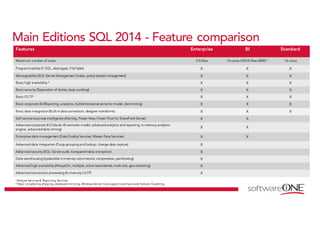
Main Editions SQL 2014 - Feature comparison
Features Enterprise BI Standard
Maximum number of cores OS Max 16 cores-DBOS Max-S&RS ¹ 16 cores
Programmability (T-SQL, datatypes, FileTable) X X X
Manageability (SQL Server Management Studio, policy-based management) X X X
Basic high availability ² X X X
Basic security (Separation of duties, basic auditing) X X X
Basic OLTP X X X
Basic corporate BI (Reporting, analytics, multidimensional semantic model, datamining) X X X
Basic data integration(Built-indataconnectors, designer transforms) X X X
Self-service business intelligence (Alerting, Power View, Power Pivot for SharePoint Server) X X
Advanced corporate BI (Tabular BI semantic model, advanced analytics and reporting, in-memory analytics
engine, advanced data mining)
X X
Enterprise data management (DataQuality Services, Master DataServices) X X
Advanced data integration (Fuzzy grouping and lookup, change data capture) X
Advanced security (SQL Server audit, transparentdata encryption) X
Data warehousing (Updatable in-memory columnstore, compression, partitioning) X
Advanced high availability (AlwaysOn, multiple, active secondaries; multi-site, geo-clustering) X
Advanced transaction processing (In-memory OLTP) X
¹Analysis Services & Reporting Services.
² Basic includes log shipping, database mirroring, Windows Server Core support and two-node Failover Clustering.
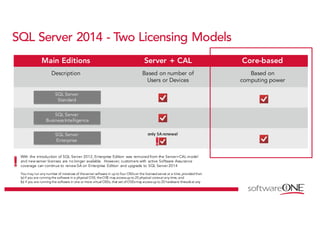
SQL Server 2014 - Two Licensing Models
Main Editions Server + CAL Core-based
Description Based on number of
Users or Devices
Based on
computing power
SQL Server
Standard
SQL Server
Business Intelligence
SQL Server
Enterprise
only	SA	renewal
With the introduction of SQL Server 2012, Enterprise Edition was removed from the Server+CAL model
and new server licenses are no longer available. However, customers with active Software Assurance
coverage can continue to renew SA on Enterprise Edition and upgrade to SQL Server 2014
You may run any number of instances of theserver software in up to four OSEson the licensed server at a time, provided that:
(a) if you are running the software in a physical OSE, theOSE may accessup to 20 physical coresat any time, and
(b) if you are running the software in one or more virtual OSEs, that set ofOSEsmay accessup to 20 hardware threadsat any
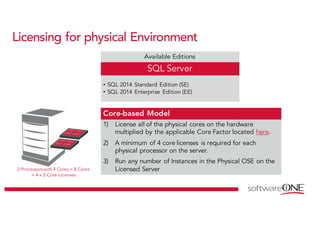
Licensing for physical Environment
Available Editions
SQL Server
• SQL 2014 Standard Edition (SE)
• SQL 2014 Enterprise Edition (EE)
Core-based Model
1) License all of the physical cores on the hardware
multiplied by the applicable Core Factor located here.
2) A minimum of 4 core licenses is required for each
physical processor on the server.
3) Run any number of Instances in the Physical OSE on the
Licensed Server2 Processors with 4 Cores = 8 Cores
= 4 x 2-Core-Licenses
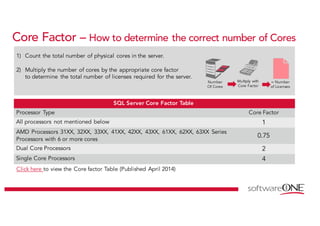
Core Factor – How to determine the correct number of Cores
1) Count the total number of physical cores in the server.
2) Multiply the number of cores by the appropriate core factor
to determine the total number of licenses required for the server.
SQL Server Core Factor Table
Processor Type Core Factor
All processors not mentioned below 1
AMD Processors 31XX, 32XX, 33XX, 41XX, 42XX, 43XX, 61XX, 62XX, 63XX Series
Processors with 6 or more cores
0.75
Dual Core Processors 2
Single Core Processors 4
Click here to view the Core factor Table (Published April 2014)
Number
Of Cores
Multiply with
Core Factor
= Number
of Licenses
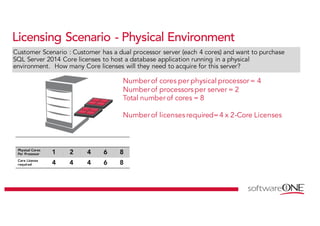
Licensing Scenario - Physical Environment
Physical Cores
Per Processor 1 2 4 6 8
Core License
required 4 4 4 6 8
Numberof cores per physical processor= 4
Numberof processors per server = 2
Total numberof cores = 8
Numberof licenses required=4 x 2-Core Licenses
Customer Scenario : Customer has a dual processor server (each 4 cores) and want to purchase
SQL Server 2014 Core licenses to host a database application running in a physical
environment. How many Core licenses will they need to acquire for this server?
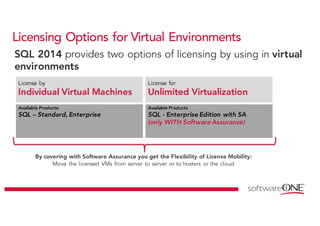
Licensing Options for Virtual Environments
SQL 2014 provides two options of licensing by using in virtual
environments
By covering with Software Assurance you get the Flexibility of License Mobility:
Move the licensed VMs from server to server or to hosters or the cloud
License by
Individual Virtual Machines
Available Products
SQL - Enterprise Edition with SA
(only WITH Software Assurance)
Available Products:
SQL – Standard, Enterprise
License for
Unlimited Virtualization
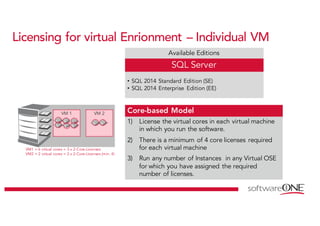
Licensing for virtual Enrionment – Individual VM
Available Editions
SQL Server
• SQL 2014 Standard Edition (SE)
• SQL 2014 Enterprise Edition (EE)
Core-based Model
1) License the virtual cores in each virtual machine
in which you run the software.
2) There is a minimum of 4 core licenses required
for each virtual machine
3) Run any number of Instances in any Virtual OSE
for which you have assigned the required
number of licenses.
VM1 = 6 virtual cores = 3 x 2-Core-Licenses
VM2 = 2 virtual cores = 2 x 2-Core-Licenses (min. 4)
VM 1 VM 2
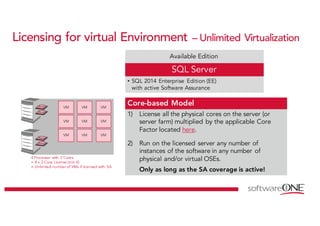
Licensing for virtual Environment – Unlimited Virtualization
Available Edition
SQL Server
• SQL 2014 Enterprise Edition (EE)
with active Software Assurance
Core-based Model
1) License all the physical cores on the server (or
server farm) multiplied by the applicable Core
Factor located here.
2) Run on the licensed server any number of
instances of the software in any number of
physical and/or virtual OSEs.
Only as long as the SA coverage is active!
VM
VM
VM
VM
VM
VM
VM
VM
VM
4 Processor with 2 Cores
= 8 x 2-Core License (min 4)
= Unlimited number of VMs if licensed with SA
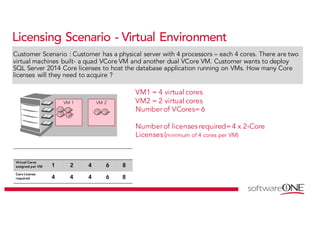
Licensing Scenario - Virtual Environment
Customer Scenario : Customer has a physical server with 4 processors – each 4 cores. There are two
virtual machines built- a quad VCore VM and another dual VCore VM. Customer wants to deploy
SQL Server 2014 Core licenses to host the database application running on VMs. How many Core
licenses will they need to acquire ?
Virtual Cores
assigned per VM 1 2 4 6 8
Core License
required 4 4 4 6 8
VM 1 VM 2
VM1 = 4 virtual cores
VM2 = 2 virtual cores
Numberof VCores= 6
Numberof licenses required=4 x 2-Core
Licenses (minimum of 4 cores per VM)
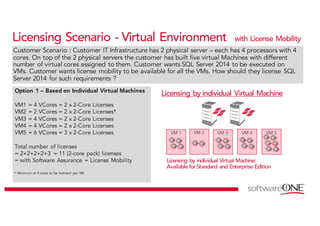
Licensing Scenario - Virtual Environment with License Mobility
Customer Scenario : Customer IT Infrastructure has 2 physical server – each has 4 processors with 4
cores. On top of the 2 physical servers the customer has built five virtual Machines with different
number of virtual cores assigned to them. Customer wants SQL Server 2014 to be executed on
VMs. Customer wants license mobility to be available for all the VMs. How should they license SQL
Server 2014 for such requirements ?
Option 1 – Based on Individual Virtual Machines
VM1 = 4 VCores = 2 x 2-Core Licenses
VM2 = 2 VCores = 2 x 2-Core Licenses*
VM3 = 4 VCores = 2 x 2-Core Licenses
VM4 = 4 VCores = 2 x 2-Core Licenses
VM5 = 6 VCores = 3 x 2-Core Licenses
Total number of licenses
= 2+2+2+2+3 = 11 (2-core pack) licenses
= with Software Assurance = License Mobility
* Minimum of 4 cores to be licensed per VM
Licensing by individual Virtual Machine
Licensing by individual Virtual Machine:
Available for Standard and Enterprise Edition
VM 1 VM 3 VM 4VM 2 VM 5
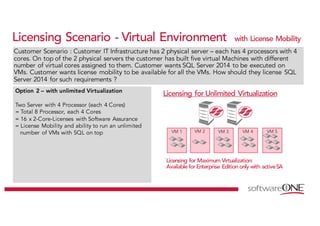
Licensing Scenario - Virtual Environment with License Mobility
Customer Scenario : Customer IT Infrastructure has 2 physical server – each has 4 processors with 4
cores. On top of the 2 physical servers the customer has built five virtual Machines with different
number of virtual cores assigned to them. Customer wants SQL Server 2014 to be executed on
VMs. Customer wants license mobility to be available for all the VMs. How should they license SQL
Server 2014 for such requirements ?
Option 2 – with unlimited Virtualization
Two Server with 4 Processor (each 4 Cores)
= Total 8 Processor, each 4 Cores
= 16 x 2-Core-Licenses with Software Assurance
= License Mobility and ability to run an unlimited
number of VMs with SQL on top
Licensing for Unlimited Virtualization
Licensing for Maximum Virtualization:
Available for Enterprise Edition only with activeSA
VM 1 VM 3 VM 4VM 2 VM 5
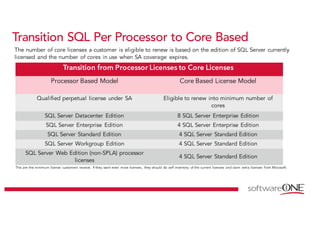
Transition SQL Per Processor to Core Based
The number of core licenses a customer is eligible to renew is based on the edition of SQL Server currently
licensed and the number of cores in use when SA coverage expires.
Transition from Processor Licenses to Core Licenses
Processor Based Model Core Based License Model
Qualified perpetual license under SA Eligible to renew into minimum number of
cores
SQL Server Datacenter Edition 8 SQL Server Enterprise Edition
SQL Server Enterprise Edition 4 SQL Server Enterprise Edition
SQL Server Standard Edition 4 SQL Server Standard Edition
SQL Server Workgroup Edition 4 SQL Server Standard Edition
SQL Server Web Edition (non-SPLA) processor
licenses
4 SQL Server Standard Edition
This are the minimum license customers receive. If they want even more licenses, they should do self inventory of the current licenses and claim extra licenses from Microsoft.
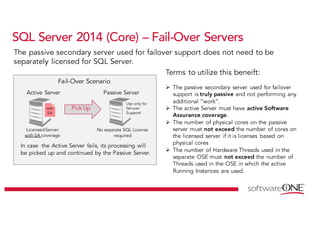
SQL Server 2014 (Core) – Fail-Over Servers
Terms to utilize this beneift:
Ø The passive secondary server used for failover
support is truly passive and not performing any
additional “work”.
Ø The active Server must have active Software
Assurance coverage.
Ø The number of physical cores on the passive
server must not exceed the number of cores on
the licensed server if it is licenses based on
physical cores
Ø The number of Hardware Threads used in the
separate OSE must not exceed the number of
Threads used in the OSE in which the active
Running Instances are used.
Pick Up
LicensedServer
with SA coverage
Active Server
with
SA
Passive Server
Use only for
fail-over
Support!
No separate SQL License
required
Fail-Over Scenario
In case the Active Server fails, its processing will
be picked up and continued by the Passive Server.
The passive secondary server used for failover support does not need to be
separately licensed for SQL Server.
Value Engagement
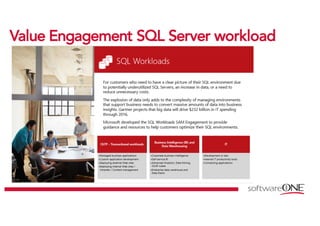
VVaalluuee EEnnggaaggeemmeenntt SSQQLL SSeerrvveerr wwoorrkkllooaadd
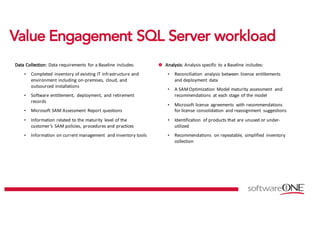
DDaattaa		CCoolllleeccttiioonn::		 Data	requirements	 for	a	Baseline	 includes:
• Completed	 inventory	of	existing	IT	infrastructure	and	
environment	including	on-premises,	 cloud,	and	
outsourced	installations
• Software	entitlement,	 deployment,	 and	retirement	
records	
• Microsoft	SAM	Assessment	 Report	questions	
• Information	related	to	the	maturity	 level	of	the	
customer’s	 SAM	policies,	 procedures	and	practices
• Information	on	current	management	 and	inventory	tools
AAnnaallyyssiiss:: Analysis	specific	 to	a	Baseline	 includes:	
• Reconciliation	 analysis	between	 license	 entitlements	
and	deployment	 data
• A	SAM	Optimization	 Model	maturity	assessment	 and	
recommendations	 at	each	stage	 of	the	model	
• Microsoft	license	 agreements	 with	recommendations	
for	license	 consolidation	 and	reassignment	 suggestions
• Identification	 of	products	that	are	unused	or	under-
utilized
• Recommendations	 on	repeatable,	 simplified	 inventory	
collection
VVaalluuee EEnnggaaggeemmeenntt SSQQLL SSeerrvveerr wwoorrkkllooaadd
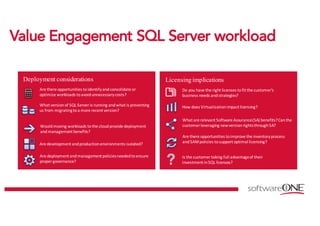
Deployment considerations
Are	deployment	and	management	policies	needed	to	ensure	
proper	governance?	
Would	moving	workloads	to	the	cloud	provide	deployment	
and	management	benefits?		
Are	development	and	production	environments	isolated?
Licensingimplications
How	does	Virtualization	impact	licensing?
Do	you	have	the	right	licenses	to	fit	the	customer’s	
business	needs	and	strategies?
What	are	relevant	Software	Assurance	(SA)	benefits?	Can	the	
customer	leveraging	new	version	rights	through	SA?
Is	the	customer	taking	full	advantage	of	their	
investment	in	SQL	licenses?
Are	there	opportunities	to	identify	and	consolidate	or	
optimize	workloads	to	avoid	unnecessary	costs?
Are	there	opportunities	to	improve	the	inventory	process	
and	SAM	policies	to	support	optimal	licensing?
What	version	of	SQL	Server	is	running	and	what	is	preventing	
us	from	migrating	to	a	more	recent	version?
Microsoft Azure
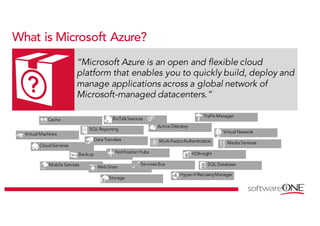
What is Microsoft Azure?
“Microsoft Azure is an open and flexible cloud
platform that enables you to quickly build, deploy and
manage applications across a global network of
Microsoft-managed datacenters.”
Virtual Machines
CloudServices
Mobile Services
Storage
HDInsight
SQL Reporting
Cache
SQL Database
Backup
Hyper-VRecoveryManager
MediaServices
Notification Hubs
BizTalkServices
Multi-FactorAuthentication
Virtual Network
DataTransfers
Active Directory
TrafficManager
WebSites
Services Bus
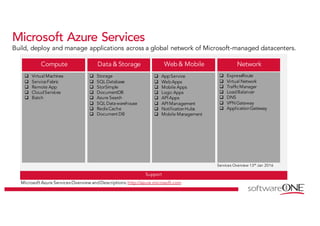
Microsoft Azure Services
Build, deploy and manage applications across a global network of Microsoft-managed datacenters.
Microsoft Azure Services Overview andDescriptions:http://azure.microsoft.com
Compute
q Virtual Machines
q ServiceFabric
q Remote App
q CloudServices
q Batch
Data & Storage
q Storage
q SQL Database
q StorSimple
q DocumentDB
q Azure Search
q SQL Datawarehouse
q Redis Cache
q Document DB
Support
Network
q ExpressRoute
q Virtual Network
q TrafficManager
q LoadBalancer
q DNS
q VPNGateway
q ApplicationGateway
q AppService
q WebApps
q Mobile Apps
q Logic Apps
q API Apps
q API Management
q NotificationHubs
q Mobile Management
Web & Mobile
Services Overview 13th Jan 2016
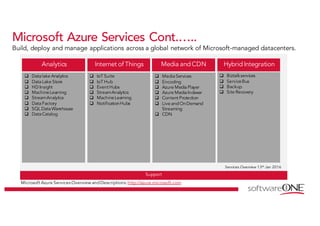
Microsoft Azure Services Cont.…..
Build, deploy and manage applications across a global network of Microsoft-managed datacenters.
Microsoft Azure Services Overview andDescriptions:http://azure.microsoft.com
Analytics
q Datalake Analytics
q DataLake Store
q HD Insight
q MachineLearning
q StreamAnalytics
q DataFactory
q SQL DataWarehouse
q DataCatalog
Internet of Things
q IoT Suite
q IoT Hub
q Event Hubs
q StreamAnalytics
q MachineLearning
q NotificationHubs
Support
Services Overview 13th Jan 2016
Hybrid Integration
q Biztalkservices
q ServiceBus
q Backup
q Site Recovery
q MediaServices
q Encoding
q Azure MediaPlayer
q Azure MediaIndexer
q Content Protection
q Live andOnDemand
Streaming
q CDN
Media and CDN
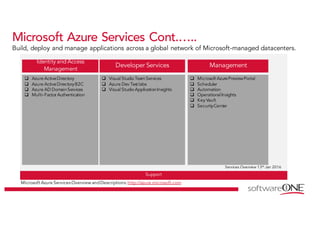
Microsoft Azure Services Cont.…..
Build, deploy and manage applications across a global network of Microsoft-managed datacenters.
Microsoft Azure Services Overview andDescriptions:http://azure.microsoft.com
Identity and Access
Management
q Azure ActiveDirectory
q Azure ActiveDirectoryB2C
q Azure AD DomainServices
q Multi-Factor Authentication
Developer Services
q Visual Studio TeamServices
q Azure Dev Test labs
q Visual Studio ApplicationInsights
Support
Services Overview 13th Jan 2016
q Microsoft AzurePreviewPortal
q Scheduler
q Automation
q OperationalInsights
q Key Vault
q SecurityCenter
Management
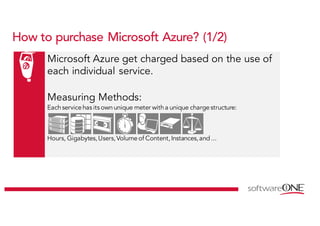
Microsoft Azure get charged based on the use of
each individual service.
Measuring Methods:
Eachservicehas its ownunique meter witha unique chargestructure:
Hours, Gigabytes,Users,Volume of Content,Instances,and ...
How to purchase Microsoft Azure? (1/2)
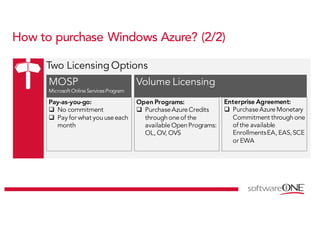
How to purchase Windows Azure? (2/2)
Two Licensing Options
MOSP
Microsoft Online ServicesProgram
Volume Licensing
Pay-as-you-go:
q No commitment
q Pay for what youuseeach
month
Open Programs:
q PurchaseAzureCredits
through one of the
availableOpenPrograms:
OL, OV, OVS
Enterprise Agreement:
q PurchaseAzureMonetary
Commitment through one
of the available
EnrollmentsEA, EAS,SCE
or EWA
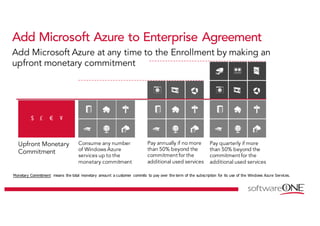
Add Microsoft Azure to Enterprise Agreement
Upfront Monetary
Commitment
Consume any number
of Windows Azure
services up to the
monetary commitment
Pay annually if no more
than 50% beyond the
commitment for the
additional used services
Pay quarterly if more
than 50% beyond the
commitment for the
additional used services
Add Microsoft Azure at any time to the Enrollment by making an
upfront monetary commitment
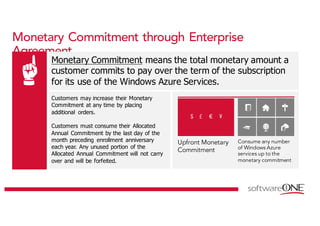
Monetary Commitment means the total monetary amount a customer commits to pay over the term of the subscription for its use of the Windows Azure Services.
Customers may increase their Monetary
Commitment at any time by placing
additional orders.
Customers must consume their Allocated
Annual Commitment by the last day of the
month preceding enrollment anniversary
each year. Any unused portion of the
Allocated Annual Commitment will not carry
over and will be forfeited.
Monetary Commitment through Enterprise
Agreement
Upfront Monetary
Commitment
Consume any number
of Windows Azure
services up to the
monetary commitment
Monetary Commitment means the total monetary amount a
customer commits to pay over the term of the subscription
for its use of the Windows Azure Services.
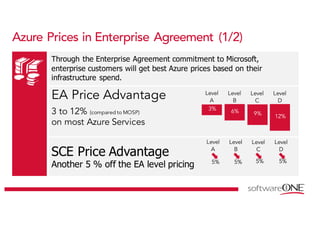
Azure Prices in Enterprise Agreement (1/2)
Through the Enterprise Agreement commitment to Microsoft,
enterprise customers will get best Azure prices based on their
infrastructure spend.
EA Price Advantage
3 to 12% (compared to MOSP)
on most Azure Services
Level
A
Level
B
Level
C
Level
D
SCE Price Advantage
Another 5 % off the EA level pricing
Level
A
Level
B
Level
C
Level
D
5% 5% 5% 5%
Azure Prices in Enterprise Agreement (2/2)
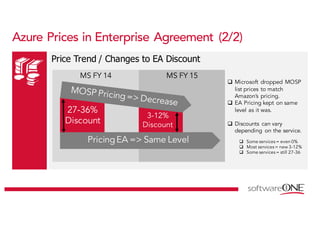
Price Trend / Changes to EA Discount
27-36% 3-12 %
MS FY 15MS FY 14
3-12%
Discount
q Microsoft dropped MOSP
list prices to match
Amazon’s pricing.
q EA Pricing kept on same
level as it was.
q Discounts can vary
depending on the service.
q Some services = even 0%
q Most services = new 3-12%
q Some services = still 27-36
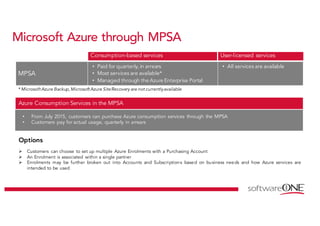
Microsoft Azure through MPSA
MPSA
• Paid for quarterly, in arrears
• Most services are available*
• Managed through the Azure Enterprise Portal
• All services are available
Consumption-based services User-licensed services
* Microsoft Azure Backup,Microsoft Azure SiteRecovery are not currentlyavailable
• From July 2015, customers can purchase Azure consumption services through the MPSA
• Customers pay for actual usage, quarterly in arrears
Azure Consumption Services in the MPSA
Options
Ø Customers can choose to set up multiple Azure Enrolments with a Purchasing Account
Ø An Enrolment is associated within a single partner
Ø Enrolments may be further broken out into Accounts and Subscriptions based on business needs and how Azure services are
intended to be used
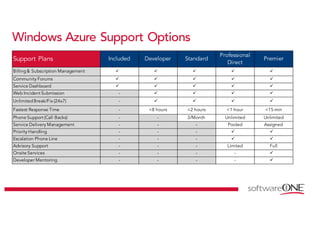
Windows Azure Support Options
Support Plans Included Developer Standard
Professional
Direct
Premier
Billing& Subscription Management ü ü ü ü ü
Community Forums ü ü ü ü ü
Service Dashboard ü ü ü ü ü
Web Incident Submission - ü ü ü ü
UnlimitedBreak/Fix (24x7) - ü ü ü ü
Fastest Response Time - <8 hours <2 hours <1 hour <15 min
Phone Support (Call Backs) - - 3/Month Unlimited Unlimited
Service Delivery Management - - - Pooled Assigned
Priority Handling - - - ü ü
Escalation Phone Line - - - ü ü
Advisory Support - - - Limited Full
Onsite Services - - - - ü
Developer Mentoring - - - - ü
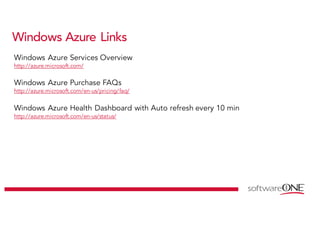
Windows Azure Links
Windows Azure Health Dashboard with Auto refresh every 10 min
http://azure.microsoft.com/en-us/status/
Windows Azure Services Overview
http://azure.microsoft.com/
Windows Azure Purchase FAQs
http://azure.microsoft.com/en-us/pricing/faq/
www.softwareone.com

Microsoft SQL Licensing Workshop - Software ONE

  • 1.
    Microsoft Product Licensing– SQL Server Beat Weissenberger (MS Schweiz) Alexander Egli (MS Schweiz) Detlef Werner (SoftwareONE)
  • 2.
    Copyrights & Warranties Thisdocument contains proprietary information that is protected by copyright. SoftwareONE reserves all rights thereto. SoftwareONE shall not be liable for possible errors in this document. Liability for damages directly and indirectly associated with the supply or use of this document is excluded as far as legally permissible. The information presented herein is intended exclusively as a guide offered by SoftwareONE. The publishers product use rights, agreement terms and conditions and other definitions prevail over the information provided herein. The content must not be copied, reproduced, passed to third parties or used for any other purposes without written permission of SoftwareONE. Copyright © 2016 by SoftwareONE
  • 3.
    1 EEvvoolluuttiioonn ooffSSQQLL SSeerrvveerr LLiicceennssiinngg Agenda 2 TTrraannssiittiioonn ffrroomm pprroocceessssoorr bbaasseedd ttoo ccoorree lliicceennssiinngg 3 HHyybbrriiddee SScceennaarriiooss
  • 4.
  • 5.
    SSQQLL MMeeiilleennsstteeiinnee 1988 Microsofterwirbt die Lizenz von Sybase – Unix basierend 1994 SQL Server 4.2 - Windows NT 3.1 1996 SQL Server 6.5 – Windows NT à Full, VUP, PUP, Upg 1998 SQL Server 7.0 Replication – Windows NT à Full, VUP, PUP, Upg 2000 SQL Server 2000 Log Shipping – Windows Server 2000/NT à L, UA, L/SA, SA 2005 SQL Server 2005 Mirroring – Windows Server 2003R2 à L, L/SA, SA 2008 SQL Server 2008 – Windows Server 2008 à L, L/SA, SA 2010 SQL Server 2008R2 – Windows Server 2008R2 à L, L/SA, SA 2012 SQL Server 2012 – Windows Server 2012 à L, L/SA, SA 2014 SQL Server 2014 – Windows Server 2012R2 à L, L/SA, SA
  • 6.
    SSQQLL SSeerrvveerr 22000088RR22 EEddiittiioonnss
  • 7.
    SSQQLL SSeerrvveerr 22000088RR22 LLiicceennssee MMooddeell Per Processor Licensing Microsoft offers a Per Processor licensing model to help alleviate complexity. When licensing SQL Server software under the Per Processor model, you do not need to purchase additional CALs; it includes access for an unlimited number of users or devices to connect from either inside or outside the firewall. Per Processor Licenses for SQL Server 2008 R2 are available for Datacenter, Enterprise, Standard, Workgroup, Web, and Parallel Data Warehouse editions.
  • 8.
    SSQQLL SSeerrvveerr 22000088RR22 LLiicceennssee MMooddeell Server/CAL Licensing When licensing SQL Server software under the Server/CAL model, you purchase a Server License for the server and a Client Access License (CAL) for each device (Device CAL) and/or user (User CAL) accessing or using the services or functionality of SQL Server or any of its components (e.g. Reporting Services). A CAL is not software; it is a legal document granting access.
  • 9.
    SSQQLL SSeerrvveerr 22000088RR22 MMuullttiipplleexxiinngg A SQL Server CAL and Windows Server CAL are required for each distinct device or user that is connected to the multiplexing or pooling software or hardware front end: Manual transfer of data from employee to employee does not require a CAL for the receiving employee.
  • 10.
    SSQQLL SSeerrvveerr 22000088RR22 VViirrtt.. SScceennaarriiooss Licensing for Virtualization Under the Per Processor Model The number of operating system environments (OSEs) in which you may run instances of SQL Server 2008 R2 under the Per Processor model depends upon the edition you license and whether or not you license all of the physical processors with a Per Processor License Licensing All Physical Processors If you license all of the physical processors on the server (one license per physical processor), you may run unlimited instances of the SQL Server software in the following number of OSEs (either physical or virtual):
  • 11.
    SSQQLL SSeerrvveerr 22000088RR22 VViirrtt.. SScceennaarriiooss Licensing a Portion of the Physical Processors If you license all of the physical processors on the server (one license per physical processor), you may run unlimited instances of the SQL Server software in the following number of OSEs (either physical or virtual): In order to run the software in virtual OSEs, you will need to license each virtual processor individually as desc. below. SQL Server 2008 R2 Standard, SQL Server 2008 R2 Workgroup, and SQL Server 2008 R2 Web
  • 12.
    SSQQLL 22000088RR22 LLiicceennsseeggrraannttss If customers do not perform the self-inventory, they will receive a value of 4 core licenses for each Standard and Enterprise Edition processor and 8 EE core licenses per Datacenter Edition processor.
  • 13.
    SSQQLL 22000088RR22 LLiicceennsseeggrraannttss Customers should do this self-inventory (or SAM Project) using the Microsoft Assessment and Planning (MAP) Toolkit or other inventory tools and processes to accurately archive a time/date stamped inventory of hardware tied to SQL Server installations:
  • 14.
  • 15.
    Main Editions –SQL 2008 R2, 2012 and 2014 Standard Standard Enterprise Business Intelligence Datacenter Enterprise SQL Server 2014 Standard SQL Server 2014 Business Intelligence SQL Server 2014 Enterprise
  • 16.
    Overview SQL Server2012 & 2014 – Main Editions SQL Server Standard SQL Server Business Intelligence SQL Server Enterprise Standardcontinues to offer basic database, reporting and analytics capabilities Business Intelligencefor Premium Self- Service and Corporate Business Intelligence • Rapid data discovery with Power View • Corporate and scalable reporting and analytics • Data Quality Services and Master Data Services • Includes Standard edition’s capabilities Enterprisefor Mission Critical & Applications Data Warehousing • Advanced high availability with Always On • High performance data warehousing with ColumnStore • Maximum virtualization (with Software Assurance) • Includes Business Intelligence edition’s capabilities
  • 17.
    Main Editions SQL2014 - Feature comparison Features Enterprise BI Standard Maximum number of cores OS Max 16 cores-DBOS Max-S&RS ¹ 16 cores Programmability (T-SQL, datatypes, FileTable) X X X Manageability (SQL Server Management Studio, policy-based management) X X X Basic high availability ² X X X Basic security (Separation of duties, basic auditing) X X X Basic OLTP X X X Basic corporate BI (Reporting, analytics, multidimensional semantic model, datamining) X X X Basic data integration(Built-indataconnectors, designer transforms) X X X Self-service business intelligence (Alerting, Power View, Power Pivot for SharePoint Server) X X Advanced corporate BI (Tabular BI semantic model, advanced analytics and reporting, in-memory analytics engine, advanced data mining) X X Enterprise data management (DataQuality Services, Master DataServices) X X Advanced data integration (Fuzzy grouping and lookup, change data capture) X Advanced security (SQL Server audit, transparentdata encryption) X Data warehousing (Updatable in-memory columnstore, compression, partitioning) X Advanced high availability (AlwaysOn, multiple, active secondaries; multi-site, geo-clustering) X Advanced transaction processing (In-memory OLTP) X ¹Analysis Services & Reporting Services. ² Basic includes log shipping, database mirroring, Windows Server Core support and two-node Failover Clustering.
  • 18.
    SQL Server 2014- Two Licensing Models Main Editions Server + CAL Core-based Description Based on number of Users or Devices Based on computing power SQL Server Standard SQL Server Business Intelligence SQL Server Enterprise only SA renewal With the introduction of SQL Server 2012, Enterprise Edition was removed from the Server+CAL model and new server licenses are no longer available. However, customers with active Software Assurance coverage can continue to renew SA on Enterprise Edition and upgrade to SQL Server 2014 You may run any number of instances of theserver software in up to four OSEson the licensed server at a time, provided that: (a) if you are running the software in a physical OSE, theOSE may accessup to 20 physical coresat any time, and (b) if you are running the software in one or more virtual OSEs, that set ofOSEsmay accessup to 20 hardware threadsat any
  • 19.
    Licensing for physicalEnvironment Available Editions SQL Server • SQL 2014 Standard Edition (SE) • SQL 2014 Enterprise Edition (EE) Core-based Model 1) License all of the physical cores on the hardware multiplied by the applicable Core Factor located here. 2) A minimum of 4 core licenses is required for each physical processor on the server. 3) Run any number of Instances in the Physical OSE on the Licensed Server2 Processors with 4 Cores = 8 Cores = 4 x 2-Core-Licenses
  • 20.
    Core Factor –How to determine the correct number of Cores 1) Count the total number of physical cores in the server. 2) Multiply the number of cores by the appropriate core factor to determine the total number of licenses required for the server. SQL Server Core Factor Table Processor Type Core Factor All processors not mentioned below 1 AMD Processors 31XX, 32XX, 33XX, 41XX, 42XX, 43XX, 61XX, 62XX, 63XX Series Processors with 6 or more cores 0.75 Dual Core Processors 2 Single Core Processors 4 Click here to view the Core factor Table (Published April 2014) Number Of Cores Multiply with Core Factor = Number of Licenses
  • 21.
    Licensing Scenario -Physical Environment Physical Cores Per Processor 1 2 4 6 8 Core License required 4 4 4 6 8 Numberof cores per physical processor= 4 Numberof processors per server = 2 Total numberof cores = 8 Numberof licenses required=4 x 2-Core Licenses Customer Scenario : Customer has a dual processor server (each 4 cores) and want to purchase SQL Server 2014 Core licenses to host a database application running in a physical environment. How many Core licenses will they need to acquire for this server?
  • 22.
    Licensing Options forVirtual Environments SQL 2014 provides two options of licensing by using in virtual environments By covering with Software Assurance you get the Flexibility of License Mobility: Move the licensed VMs from server to server or to hosters or the cloud License by Individual Virtual Machines Available Products SQL - Enterprise Edition with SA (only WITH Software Assurance) Available Products: SQL – Standard, Enterprise License for Unlimited Virtualization
  • 23.
    Licensing for virtualEnrionment – Individual VM Available Editions SQL Server • SQL 2014 Standard Edition (SE) • SQL 2014 Enterprise Edition (EE) Core-based Model 1) License the virtual cores in each virtual machine in which you run the software. 2) There is a minimum of 4 core licenses required for each virtual machine 3) Run any number of Instances in any Virtual OSE for which you have assigned the required number of licenses. VM1 = 6 virtual cores = 3 x 2-Core-Licenses VM2 = 2 virtual cores = 2 x 2-Core-Licenses (min. 4) VM 1 VM 2
  • 24.
    Licensing for virtualEnvironment – Unlimited Virtualization Available Edition SQL Server • SQL 2014 Enterprise Edition (EE) with active Software Assurance Core-based Model 1) License all the physical cores on the server (or server farm) multiplied by the applicable Core Factor located here. 2) Run on the licensed server any number of instances of the software in any number of physical and/or virtual OSEs. Only as long as the SA coverage is active! VM VM VM VM VM VM VM VM VM 4 Processor with 2 Cores = 8 x 2-Core License (min 4) = Unlimited number of VMs if licensed with SA
  • 25.
    Licensing Scenario -Virtual Environment Customer Scenario : Customer has a physical server with 4 processors – each 4 cores. There are two virtual machines built- a quad VCore VM and another dual VCore VM. Customer wants to deploy SQL Server 2014 Core licenses to host the database application running on VMs. How many Core licenses will they need to acquire ? Virtual Cores assigned per VM 1 2 4 6 8 Core License required 4 4 4 6 8 VM 1 VM 2 VM1 = 4 virtual cores VM2 = 2 virtual cores Numberof VCores= 6 Numberof licenses required=4 x 2-Core Licenses (minimum of 4 cores per VM)
  • 26.
    Licensing Scenario -Virtual Environment with License Mobility Customer Scenario : Customer IT Infrastructure has 2 physical server – each has 4 processors with 4 cores. On top of the 2 physical servers the customer has built five virtual Machines with different number of virtual cores assigned to them. Customer wants SQL Server 2014 to be executed on VMs. Customer wants license mobility to be available for all the VMs. How should they license SQL Server 2014 for such requirements ? Option 1 – Based on Individual Virtual Machines VM1 = 4 VCores = 2 x 2-Core Licenses VM2 = 2 VCores = 2 x 2-Core Licenses* VM3 = 4 VCores = 2 x 2-Core Licenses VM4 = 4 VCores = 2 x 2-Core Licenses VM5 = 6 VCores = 3 x 2-Core Licenses Total number of licenses = 2+2+2+2+3 = 11 (2-core pack) licenses = with Software Assurance = License Mobility * Minimum of 4 cores to be licensed per VM Licensing by individual Virtual Machine Licensing by individual Virtual Machine: Available for Standard and Enterprise Edition VM 1 VM 3 VM 4VM 2 VM 5
  • 27.
    Licensing Scenario -Virtual Environment with License Mobility Customer Scenario : Customer IT Infrastructure has 2 physical server – each has 4 processors with 4 cores. On top of the 2 physical servers the customer has built five virtual Machines with different number of virtual cores assigned to them. Customer wants SQL Server 2014 to be executed on VMs. Customer wants license mobility to be available for all the VMs. How should they license SQL Server 2014 for such requirements ? Option 2 – with unlimited Virtualization Two Server with 4 Processor (each 4 Cores) = Total 8 Processor, each 4 Cores = 16 x 2-Core-Licenses with Software Assurance = License Mobility and ability to run an unlimited number of VMs with SQL on top Licensing for Unlimited Virtualization Licensing for Maximum Virtualization: Available for Enterprise Edition only with activeSA VM 1 VM 3 VM 4VM 2 VM 5
  • 28.
    Transition SQL PerProcessor to Core Based The number of core licenses a customer is eligible to renew is based on the edition of SQL Server currently licensed and the number of cores in use when SA coverage expires. Transition from Processor Licenses to Core Licenses Processor Based Model Core Based License Model Qualified perpetual license under SA Eligible to renew into minimum number of cores SQL Server Datacenter Edition 8 SQL Server Enterprise Edition SQL Server Enterprise Edition 4 SQL Server Enterprise Edition SQL Server Standard Edition 4 SQL Server Standard Edition SQL Server Workgroup Edition 4 SQL Server Standard Edition SQL Server Web Edition (non-SPLA) processor licenses 4 SQL Server Standard Edition This are the minimum license customers receive. If they want even more licenses, they should do self inventory of the current licenses and claim extra licenses from Microsoft.
  • 29.
    SQL Server 2014(Core) – Fail-Over Servers Terms to utilize this beneift: Ø The passive secondary server used for failover support is truly passive and not performing any additional “work”. Ø The active Server must have active Software Assurance coverage. Ø The number of physical cores on the passive server must not exceed the number of cores on the licensed server if it is licenses based on physical cores Ø The number of Hardware Threads used in the separate OSE must not exceed the number of Threads used in the OSE in which the active Running Instances are used. Pick Up LicensedServer with SA coverage Active Server with SA Passive Server Use only for fail-over Support! No separate SQL License required Fail-Over Scenario In case the Active Server fails, its processing will be picked up and continued by the Passive Server. The passive secondary server used for failover support does not need to be separately licensed for SQL Server.
  • 30.
  • 31.
    VVaalluuee EEnnggaaggeemmeenntt SSQQLLSSeerrvveerr wwoorrkkllooaadd
  • 32.
    VVaalluuee EEnnggaaggeemmeenntt SSQQLLSSeerrvveerr wwoorrkkllooaadd DDaattaa CCoolllleeccttiioonn:: Data requirements for a Baseline includes: • Completed inventory of existing IT infrastructure and environment including on-premises, cloud, and outsourced installations • Software entitlement, deployment, and retirement records • Microsoft SAM Assessment Report questions • Information related to the maturity level of the customer’s SAM policies, procedures and practices • Information on current management and inventory tools AAnnaallyyssiiss:: Analysis specific to a Baseline includes: • Reconciliation analysis between license entitlements and deployment data • A SAM Optimization Model maturity assessment and recommendations at each stage of the model • Microsoft license agreements with recommendations for license consolidation and reassignment suggestions • Identification of products that are unused or under- utilized • Recommendations on repeatable, simplified inventory collection
  • 33.
    VVaalluuee EEnnggaaggeemmeenntt SSQQLLSSeerrvveerr wwoorrkkllooaadd Deployment considerations Are deployment and management policies needed to ensure proper governance? Would moving workloads to the cloud provide deployment and management benefits? Are development and production environments isolated? Licensingimplications How does Virtualization impact licensing? Do you have the right licenses to fit the customer’s business needs and strategies? What are relevant Software Assurance (SA) benefits? Can the customer leveraging new version rights through SA? Is the customer taking full advantage of their investment in SQL licenses? Are there opportunities to identify and consolidate or optimize workloads to avoid unnecessary costs? Are there opportunities to improve the inventory process and SAM policies to support optimal licensing? What version of SQL Server is running and what is preventing us from migrating to a more recent version?
  • 34.
  • 35.
    What is MicrosoftAzure? “Microsoft Azure is an open and flexible cloud platform that enables you to quickly build, deploy and manage applications across a global network of Microsoft-managed datacenters.” Virtual Machines CloudServices Mobile Services Storage HDInsight SQL Reporting Cache SQL Database Backup Hyper-VRecoveryManager MediaServices Notification Hubs BizTalkServices Multi-FactorAuthentication Virtual Network DataTransfers Active Directory TrafficManager WebSites Services Bus
  • 36.
    Microsoft Azure Services Build,deploy and manage applications across a global network of Microsoft-managed datacenters. Microsoft Azure Services Overview andDescriptions:http://azure.microsoft.com Compute q Virtual Machines q ServiceFabric q Remote App q CloudServices q Batch Data & Storage q Storage q SQL Database q StorSimple q DocumentDB q Azure Search q SQL Datawarehouse q Redis Cache q Document DB Support Network q ExpressRoute q Virtual Network q TrafficManager q LoadBalancer q DNS q VPNGateway q ApplicationGateway q AppService q WebApps q Mobile Apps q Logic Apps q API Apps q API Management q NotificationHubs q Mobile Management Web & Mobile Services Overview 13th Jan 2016
  • 37.
    Microsoft Azure ServicesCont.….. Build, deploy and manage applications across a global network of Microsoft-managed datacenters. Microsoft Azure Services Overview andDescriptions:http://azure.microsoft.com Analytics q Datalake Analytics q DataLake Store q HD Insight q MachineLearning q StreamAnalytics q DataFactory q SQL DataWarehouse q DataCatalog Internet of Things q IoT Suite q IoT Hub q Event Hubs q StreamAnalytics q MachineLearning q NotificationHubs Support Services Overview 13th Jan 2016 Hybrid Integration q Biztalkservices q ServiceBus q Backup q Site Recovery q MediaServices q Encoding q Azure MediaPlayer q Azure MediaIndexer q Content Protection q Live andOnDemand Streaming q CDN Media and CDN
  • 38.
    Microsoft Azure ServicesCont.….. Build, deploy and manage applications across a global network of Microsoft-managed datacenters. Microsoft Azure Services Overview andDescriptions:http://azure.microsoft.com Identity and Access Management q Azure ActiveDirectory q Azure ActiveDirectoryB2C q Azure AD DomainServices q Multi-Factor Authentication Developer Services q Visual Studio TeamServices q Azure Dev Test labs q Visual Studio ApplicationInsights Support Services Overview 13th Jan 2016 q Microsoft AzurePreviewPortal q Scheduler q Automation q OperationalInsights q Key Vault q SecurityCenter Management
  • 39.
    Microsoft Azure getcharged based on the use of each individual service. Measuring Methods: Eachservicehas its ownunique meter witha unique chargestructure: Hours, Gigabytes,Users,Volume of Content,Instances,and ... How to purchase Microsoft Azure? (1/2)
  • 40.
    How to purchaseWindows Azure? (2/2) Two Licensing Options MOSP Microsoft Online ServicesProgram Volume Licensing Pay-as-you-go: q No commitment q Pay for what youuseeach month Open Programs: q PurchaseAzureCredits through one of the availableOpenPrograms: OL, OV, OVS Enterprise Agreement: q PurchaseAzureMonetary Commitment through one of the available EnrollmentsEA, EAS,SCE or EWA
  • 41.
    Add Microsoft Azureto Enterprise Agreement Upfront Monetary Commitment Consume any number of Windows Azure services up to the monetary commitment Pay annually if no more than 50% beyond the commitment for the additional used services Pay quarterly if more than 50% beyond the commitment for the additional used services Add Microsoft Azure at any time to the Enrollment by making an upfront monetary commitment Monetary Commitment means the total monetary amount a customer commits to pay over the term of the subscription for its use of the Windows Azure Services.
  • 42.
    Customers may increasetheir Monetary Commitment at any time by placing additional orders. Customers must consume their Allocated Annual Commitment by the last day of the month preceding enrollment anniversary each year. Any unused portion of the Allocated Annual Commitment will not carry over and will be forfeited. Monetary Commitment through Enterprise Agreement Upfront Monetary Commitment Consume any number of Windows Azure services up to the monetary commitment Monetary Commitment means the total monetary amount a customer commits to pay over the term of the subscription for its use of the Windows Azure Services.
  • 43.
    Azure Prices inEnterprise Agreement (1/2) Through the Enterprise Agreement commitment to Microsoft, enterprise customers will get best Azure prices based on their infrastructure spend. EA Price Advantage 3 to 12% (compared to MOSP) on most Azure Services Level A Level B Level C Level D SCE Price Advantage Another 5 % off the EA level pricing Level A Level B Level C Level D 5% 5% 5% 5%
  • 44.
    Azure Prices inEnterprise Agreement (2/2) Price Trend / Changes to EA Discount 27-36% 3-12 % MS FY 15MS FY 14 3-12% Discount q Microsoft dropped MOSP list prices to match Amazon’s pricing. q EA Pricing kept on same level as it was. q Discounts can vary depending on the service. q Some services = even 0% q Most services = new 3-12% q Some services = still 27-36
  • 45.
    Microsoft Azure throughMPSA MPSA • Paid for quarterly, in arrears • Most services are available* • Managed through the Azure Enterprise Portal • All services are available Consumption-based services User-licensed services * Microsoft Azure Backup,Microsoft Azure SiteRecovery are not currentlyavailable • From July 2015, customers can purchase Azure consumption services through the MPSA • Customers pay for actual usage, quarterly in arrears Azure Consumption Services in the MPSA Options Ø Customers can choose to set up multiple Azure Enrolments with a Purchasing Account Ø An Enrolment is associated within a single partner Ø Enrolments may be further broken out into Accounts and Subscriptions based on business needs and how Azure services are intended to be used
  • 46.
    Windows Azure SupportOptions Support Plans Included Developer Standard Professional Direct Premier Billing& Subscription Management ü ü ü ü ü Community Forums ü ü ü ü ü Service Dashboard ü ü ü ü ü Web Incident Submission - ü ü ü ü UnlimitedBreak/Fix (24x7) - ü ü ü ü Fastest Response Time - <8 hours <2 hours <1 hour <15 min Phone Support (Call Backs) - - 3/Month Unlimited Unlimited Service Delivery Management - - - Pooled Assigned Priority Handling - - - ü ü Escalation Phone Line - - - ü ü Advisory Support - - - Limited Full Onsite Services - - - - ü Developer Mentoring - - - - ü
  • 47.
    Windows Azure Links WindowsAzure Health Dashboard with Auto refresh every 10 min http://azure.microsoft.com/en-us/status/ Windows Azure Services Overview http://azure.microsoft.com/ Windows Azure Purchase FAQs http://azure.microsoft.com/en-us/pricing/faq/
  • 48.