MICROSOFT POWERPOINT
AND. THEIR APPLICATION
NAME – SADIA ISLAM PROMEE
ID- 0242410007121151
SECTION – C
DEPARTMENT OF NUTRITION AND FOOD
ENGINEERING
DAFFODIL INTERNATIONAL UNIVERSITY
WHAT IS MICROSOFT POWERPOINT
• Microsoft PowerPoint is
a presentation software
developed by Microsoft.
It allows users to create
slideshows,
presentations, and
interactive content.
SOMECOMMON APPLICATIONSOFPOWERPOINT
• Business Presentations: PowerPoint is widely used in the business
world for creating presentations for meetings, conferences, sales
pitches, and training sessions.
• Educational Use: Teachers and students utilize PowerPoint for
creating educational materials such as lectures, classroom
presentations, project presentations, and reports.
• Marketing and Advertising: Marketers and advertisers use PowerPoint
to design visually appealing presentations for promoting products,
services, and brands
• Personal Use: Individuals use PowerPoint for various personal
projects such as creating photo albums, designing invitations,
TOOLS OF MICROSOFT POWERPOINT
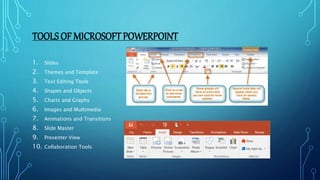
1. Slides
2. Themes and Template
3. Text Editing Tools
4. Shapes and Objects
5. Charts and Graphs
6. Images and Multimedia
7. Animations and Transitions
8. Slide Master
9. Presenter View
10. Collaboration Tools
BENEFITS OF MICROSOFT POWERPOINT
• Visual Communication : PowerPoint enables users to convey
information visually through slides, graphics, and multimedia
elements.
• Organization and Structure: PowerPoint provides a structured
framework for organizing content into cohesive presentations.
• Efficiency and Time-saving: PowerPoint offers pre-designed
templates, themes, and formatting tools that streamline the
presentation creation process
• Data Visualization: PowerPoint’s charting and graphing tools allow
users to visually represent data in a variety of formats
• Flexibility and Customization: PowerPoint offers a high degree of
flexibility and customization, allowing users to tailor their
presentations to suit their specific needs and preferences
CONCLUSIONS
In conclusion, Microsoft PowerPoint transcends its identity as
mere presentation software, emerging as a ubiquitous tool
with transformative applications across various spheres of
human endeavor. Its versatility, accessibility, and power to
communicate ideas visually make it an indispensable asset in
the digital age. Whether used for business presentations,
educational lectures, marketing campaigns, or personal
projects, PowerPoint empowers individuals and organizations
to inform, inspire, and connect with audiences worldwide.
THANK YOU

Microsoft PowerPoint and their application.pptx

  • 1.
    MICROSOFT POWERPOINT AND. THEIRAPPLICATION NAME – SADIA ISLAM PROMEE ID- 0242410007121151 SECTION – C DEPARTMENT OF NUTRITION AND FOOD ENGINEERING DAFFODIL INTERNATIONAL UNIVERSITY
  • 2.
    WHAT IS MICROSOFTPOWERPOINT • Microsoft PowerPoint is a presentation software developed by Microsoft. It allows users to create slideshows, presentations, and interactive content.
  • 3.
    SOMECOMMON APPLICATIONSOFPOWERPOINT • BusinessPresentations: PowerPoint is widely used in the business world for creating presentations for meetings, conferences, sales pitches, and training sessions. • Educational Use: Teachers and students utilize PowerPoint for creating educational materials such as lectures, classroom presentations, project presentations, and reports. • Marketing and Advertising: Marketers and advertisers use PowerPoint to design visually appealing presentations for promoting products, services, and brands • Personal Use: Individuals use PowerPoint for various personal projects such as creating photo albums, designing invitations,
  • 4.
    TOOLS OF MICROSOFTPOWERPOINT 1. Slides 2. Themes and Template 3. Text Editing Tools 4. Shapes and Objects 5. Charts and Graphs 6. Images and Multimedia 7. Animations and Transitions 8. Slide Master 9. Presenter View 10. Collaboration Tools
  • 5.
    BENEFITS OF MICROSOFTPOWERPOINT • Visual Communication : PowerPoint enables users to convey information visually through slides, graphics, and multimedia elements. • Organization and Structure: PowerPoint provides a structured framework for organizing content into cohesive presentations. • Efficiency and Time-saving: PowerPoint offers pre-designed templates, themes, and formatting tools that streamline the presentation creation process • Data Visualization: PowerPoint’s charting and graphing tools allow users to visually represent data in a variety of formats • Flexibility and Customization: PowerPoint offers a high degree of flexibility and customization, allowing users to tailor their presentations to suit their specific needs and preferences
  • 6.
    CONCLUSIONS In conclusion, MicrosoftPowerPoint transcends its identity as mere presentation software, emerging as a ubiquitous tool with transformative applications across various spheres of human endeavor. Its versatility, accessibility, and power to communicate ideas visually make it an indispensable asset in the digital age. Whether used for business presentations, educational lectures, marketing campaigns, or personal projects, PowerPoint empowers individuals and organizations to inform, inspire, and connect with audiences worldwide.
  • 7.