Universal Design for Learning Michell Glover
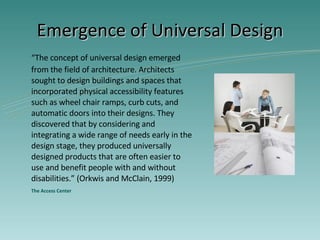
Emergence of Universal Design “ The concept of universal design emerged from the field of architecture. Architects sought to design buildings and spaces that incorporated physical accessibility features such as wheel chair ramps, curb cuts, and automatic doors into their designs. They discovered that by considering and integrating a wide range of needs early in the design stage, they produced universally designed products that are often easier to use and benefit people with and without disabilities.” (Orkwis and McClain, 1999) The Access Center
Universal Design for Learning Developed by the  Center for Applied Special Technology (CAST) “ Mission to expand learning opportunities for all learners” CAST  – ( www.cast.org/about/index.html)
Essentials of UDL developed by CAST Universal Design for Learning calls for ... Multiple means of representation Multiple means of expression Multiple means of engagement
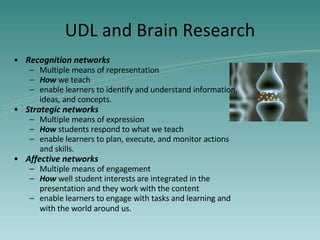
UDL and Brain Research Recognition networks   Multiple means of   representation How  we teach enable learners to identify and understand information, ideas, and concepts.  Strategic networks   Multiple means of expression How  students respond to what we teach enable learners to plan, execute, and monitor actions and skills.  Affective networks   Multiple means of engagement How  well student interests are integrated in the presentation and they work with the content enable learners to engage with tasks and learning and with the world around us.
UDL Calls for Curriculum Change Curriculum modifications should: Consider the use of specific material and media tools that facilitate learning Be flexibly designed with built-in support that allow teachers to accommodate diverse learners without having to adapt the curriculum repeatedly to meet special needs. The Council for Exceptional Children (CEC)
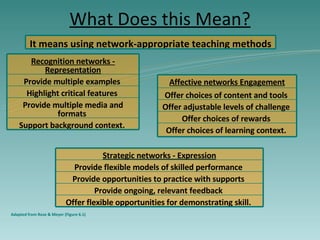
What Does this Mean? Adapted from Rose & Meyer (Figure 6.1) It means using network-appropriate teaching methods   Offer choices of learning context.  Offer choices of rewards  Offer adjustable levels of challenge  Offer choices of content and tools  Affective networks Engagement Offer flexible opportunities for demonstrating skill.  Provide ongoing, relevant feedback  Provide opportunities to practice with supports  Provide flexible models of skilled performance  Strategic networks - Expression Support background context.  Provide multiple media and formats  Highlight critical features  Provide multiple examples  Recognition networks - Representation
What Does this Look Like? It looks like teachers… General and special education teachers communicating with each other Knowing student strengths, weaknesses, preferences, and interests Knowing the curriculum as well as engaging instructional strategies to be able to formulate solutions (materials, methods, potential barriers, etc.)
What Does this Look Like? It looks like teachers… Planning instruction and assessments for all learners, regardless of ability/disability Using relevant, appropriate, and content specific technologies such as the internet, office productivity suites, assistive technologies, etc. For the benefit of all learners.
For more information, check out these useful resources: Rose, D. & Meyer, A. (2002).  Teaching every student in the digital age: Universal design for learning .  Alexandria, VA:  ASCD. The Access Center www.k8accesscenter.org/training_resources/UniversalDesign.asp T he  Center for Applied Special Technology (CAST) www.cast.org/about/index.html The Council for Exceptional Children (CEC) www.cec.sped.org/am/template.cfm?section=Home

Michell Udl Powerpoint

  • 1.
    Universal Design forLearning Michell Glover
  • 2.
    Emergence of UniversalDesign “ The concept of universal design emerged from the field of architecture. Architects sought to design buildings and spaces that incorporated physical accessibility features such as wheel chair ramps, curb cuts, and automatic doors into their designs. They discovered that by considering and integrating a wide range of needs early in the design stage, they produced universally designed products that are often easier to use and benefit people with and without disabilities.” (Orkwis and McClain, 1999) The Access Center
  • 3.
    Universal Design forLearning Developed by the Center for Applied Special Technology (CAST) “ Mission to expand learning opportunities for all learners” CAST – ( www.cast.org/about/index.html)
  • 4.
    Essentials of UDLdeveloped by CAST Universal Design for Learning calls for ... Multiple means of representation Multiple means of expression Multiple means of engagement
  • 5.
    UDL and BrainResearch Recognition networks Multiple means of representation How we teach enable learners to identify and understand information, ideas, and concepts. Strategic networks Multiple means of expression How students respond to what we teach enable learners to plan, execute, and monitor actions and skills. Affective networks Multiple means of engagement How well student interests are integrated in the presentation and they work with the content enable learners to engage with tasks and learning and with the world around us.
  • 6.
    UDL Calls forCurriculum Change Curriculum modifications should: Consider the use of specific material and media tools that facilitate learning Be flexibly designed with built-in support that allow teachers to accommodate diverse learners without having to adapt the curriculum repeatedly to meet special needs. The Council for Exceptional Children (CEC)
  • 7.
    What Does thisMean? Adapted from Rose & Meyer (Figure 6.1) It means using network-appropriate teaching methods Offer choices of learning context. Offer choices of rewards Offer adjustable levels of challenge Offer choices of content and tools Affective networks Engagement Offer flexible opportunities for demonstrating skill. Provide ongoing, relevant feedback Provide opportunities to practice with supports Provide flexible models of skilled performance Strategic networks - Expression Support background context. Provide multiple media and formats Highlight critical features Provide multiple examples Recognition networks - Representation
  • 8.
    What Does thisLook Like? It looks like teachers… General and special education teachers communicating with each other Knowing student strengths, weaknesses, preferences, and interests Knowing the curriculum as well as engaging instructional strategies to be able to formulate solutions (materials, methods, potential barriers, etc.)
  • 9.
    What Does thisLook Like? It looks like teachers… Planning instruction and assessments for all learners, regardless of ability/disability Using relevant, appropriate, and content specific technologies such as the internet, office productivity suites, assistive technologies, etc. For the benefit of all learners.
  • 10.
    For more information,check out these useful resources: Rose, D. & Meyer, A. (2002). Teaching every student in the digital age: Universal design for learning . Alexandria, VA: ASCD. The Access Center www.k8accesscenter.org/training_resources/UniversalDesign.asp T he Center for Applied Special Technology (CAST) www.cast.org/about/index.html The Council for Exceptional Children (CEC) www.cec.sped.org/am/template.cfm?section=Home

Editor's Notes

  • #2 This is a slide showing the title of the presentation.