Memory Management in Linux
Operating System
Presented by
Faizan Ayoub
Introduction to Memory Management in Linux
Overview of the Module
In this module, we will learn how memory management is handled in the
Linux operating system..
What is memory management?
Memory is a crucial part of any computer system, used for storing data.
Its management is critical to the computer system because the amount of
main memory available in a computer system is very limited. At any time,
many processes are competing for it.
Definition
Memory management is the process of controlling and coordinating
a computer's main memory, ensuring efficient allocation to various
processes.
Components of Memory Management in Linux
1:Physical Memory Management
Involves allocating and freeing physical memory/RAM: pages, groups of
pages, and small memory blocks within RAM. Ensures memory is
effectively managed among active processes.
2:Virtual Memory Management
Virtual Memory provides applications with the illusion of a large, continuous
memory block, independent of actual physical memory. This technique prevents
processes from interfering with each other.
Memory management under linux has 2 components:
Virtual Memory Management
What is Virtual Memory?
Virtual memory is a technique that provides applications with the illusion of a
large, continous memory block. Each process receives a unique address space,
giving the impression of dedicated memory.
Benefits of Virtual Memory
This technique allows applications to use more memory than is
physically available, preventing process interference and enabling
concurrent processing.
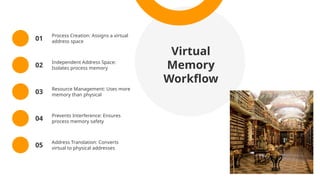
Library Analogy
Similar to a library where books are catalogued but stored on limited
shelves, virtual memory lets each process access 'shelf space' as needed,
efficiently managing resourc
Virtual
Memory
Workflow
01
Process Creation: Assigns a virtual
address space
02
Independent Address Space:
Isolates process memory
03
Resource Management: Uses more
memory than physical
04
Prevents Interference: Ensures
process memory safety
05
Address Translation: Converts
virtual to physical addresses
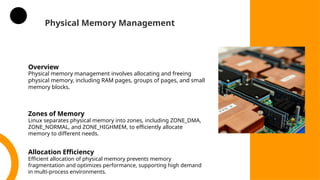
Physical Memory Management
Overview
Physical memory management involves allocating and freeing
physical memory, including RAM pages, groups of pages, and small
memory blocks.
Zones of Memory
Linux separates physical memory into zones, including ZONE_DMA,
ZONE_NORMAL, and ZONE_HIGHMEM, to efficiently allocate
memory to different needs.
Allocation Efficiency
Efficient allocation of physical memory prevents memory
fragmentation and optimizes performance, supporting high demand
in multi-process environments.
Physical Memory Zones in Linux
ZONE_DMA
Direct Memory Access (DMA) allows hardware components to access
system memory directly, bypassing the CPU. This zone is optimized for
specific hardware requirements.
ZONE_NORMAL
The Normal Zone is the primary region of physical memory used by the
kernel for user-space applications, kernel processes, and general-
purpose allocations.
ZONE_HIGHMEM
High Memory Zone is used for memory beyond the direct addressable
range of the kernel, requiring special handling to maximize available
memory on 32-bit systems.
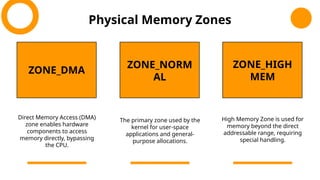
Physical Memory Zones
ZONE_DMA
ZONE_NORM
AL
ZONE_HIGH
MEM
Direct Memory Access (DMA)
zone enables hardware
components to access
memory directly, bypassing
the CPU.
The primary zone used by the
kernel for user-space
applications and general-
purpose allocations.
High Memory Zone is used for
memory beyond the direct
addressable range, requiring
special handling.
Page Allocator and Buddy System
Role of Page Allocator
For each of these zones, the kernel maintains a list of free pages. When a
request for physical memory arrives, the kernel satisfies the request using
the appropriate zone. The allocation of pages for the arriving requests is
done by the physical memory manager called the page allocator.
Each zone has its own allocator. The allocator allocates and frees all
physical pages for the zone. The allocator allocates physically contiguous
pages on request. This uses a buddy system to keep track of available
physical pages.
Buddy Heap Algorithm
Purpose of the Buddy System
The Buddy Heap Algorithm divides memory into blocks of varying sizes to
allow efficient allocation and deallocation. It minimizes fragmentation,
supporting dynamic memory allocation needs.
Binary Power of Two Allocation
Memory is divided into power-of-two blocks (e.g., 2 KB, 4 KB, 8 KB).
The smallest block that satisfies a request is allocated to optimize
memory use.
Splitting and Merging
Each memory block has a 'buddy'- a neighbouring block of the same
size. Blocks can be split or merged depending on allocation needs,
optimizing memory use and reducing fragmentation.
Key concepts of buddy Heap Algorithem
Buddy Heap Algorithm Concepts
Splitting: When the requested memory size is smaller than the available
block size, the larger block is split into two equal-sized “buddies” (half the
size of the original block). This continues recursively until a block of the
requested size is reached.
Merging: When a block is freed, the system checks if its buddy is also
free. If so, the two buddies are merged back into a larger block. This
merging continues up the hierarchy until no further merging is possible
or all buddies are allocated.
Free Lists:The system maintains a set of linked lists, one for each
block size (power of two). These lists keep track of available (free)
blocks at each size.
Buddy Heap Algorithm Continued
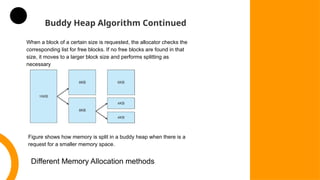
When a block of a certain size is requested, the allocator checks the
corresponding list for free blocks. If no free blocks are found in that
size, it moves to a larger block size and performs splitting as
necessary
Figure shows how memory is split in a buddy heap when there is a
request for a smaller memory space.
Different Memory Allocation methods
Introduction to Slab Allocation
The Slab Allocator in Linux plays a critical role in the physical
memory management system, particularly for handling small,
frequently used memory allocations for kernel objects. The Slab
Allocator helps manage physical memory efficiently by reducing
fragmentation, minimizing allocation overhead, and speeding up
memory operations for kernel data structures.
How the Slab Allocator Manages Physical Memory
Organization of Physical Memory into Slabs:
Physical memory in Linux is divided into pages (typically 4 KB each).
The Slab Allocator takes pages from the physical memory and
organizes them into slabs for efficient allocation.
Each slab is a contiguous set of pages dedicated to holding instances
(or “objects”) of a specific type
SLAB Allocation Strategy in Physical Memory Management
Object Caching and Reuse:
Instead of constantly allocating and freeing memory from the
broader physical memory pool, the Slab Allocator creates caches
(A cache consists of one or more slabs )for commonly used
kernel objects, such as file descriptors and process descriptors.
Once an object is allocated from a slab and later freed, it is
returned to the slab cache for potential reuse. This reuse saves
the kernel from repeatedly interacting with the page allocator and
minimizes the load on the physical memory.
Minimization of Fragmentation:
By organizing memory into slabs dedicated to specific object types,
the Slab Allocator helps reduce internal fragmentation (wasted
memory within allocated blocks) and external fragmentation
(scattered free memory that cannot be coalesced).
Key Concepts of Slab Allocation
Slabs may be in full, empty, or partial states, depending on usage. The
allocator prioritizes partial slabs to fill memory efficiently before using
empty slabs.
Stages of slabs
When a slab is full, all of its pages are fully occupied. When a slab
becomes empty, it can be returned to the physical memory pool. This
approach makes efficient use of physical memory and helps prevent
fragmentation.
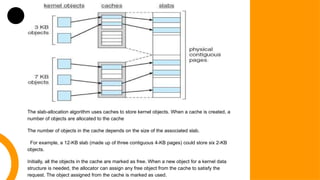
The slab-allocation algorithm uses caches to store kernel objects. When a cache is created, a
number of objects are allocated to the cache
The number of objects in the cache depends on the size of the associated slab.
For example, a 12-KB slab (made up of three contiguous 4-KB pages) could store six 2-KB
objects.
Initially, all the objects in the cache are marked as free. When a new object for a kernel data
structure is needed, the allocator can assign any free object from the cache to satisfy the
request. The object assigned from the cache is marked as used.
States of SLABs in Memory Management
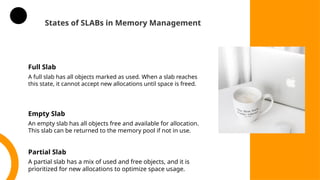
Full Slab
A full slab has all objects marked as used. When a slab reaches
this state, it cannot accept new allocations until space is freed.
Empty Slab
An empty slab has all objects free and available for allocation.
This slab can be returned to the memory pool if not in use.
Partial Slab
A partial slab has a mix of used and free objects, and it is
prioritized for new allocations to optimize space usage.
Principles of Slab
Allocation
Slab Allocation Strategy
The slab allocation aims to minimize
fragmentation in small memory blocks and
provide caches for commonly used kernel
objects, improving performance and
resource efficiency.
Main Goals
Virtual Memory Management
Virtual memory system maintains the address space visible
to each process.
Virtual Address Space: Each process in Linux has its own
virtual address space. This isolates processes from each
other and allows each process to think it has access to the
entire memory.
Virtual memory creates pages of virtual memory on demand,
and manages the loading of those pages from disk or their
swapping back out to disk as required.
The VM manager maintains two separate views of a
process's address space, logical view and physical
view.
Logical View
Logical view:A logical view describes instructions concerning
the layout of the address space
The address space consists of a set of non-overlapping regions
each representing a continuous, page-aligned subset . the
address spacions, each
Each region is described internally by a single vm _area_struct
structure that defines the properties of the region, including the
process's read, write, and execute permissions in the region as
well as information about any files associated with the region.
The regions for each address space are linked into a balanced
binary tree to allow fast lookup of the region corresponding to
any virtual address.
Physical View
The kernel also maintains a second, physical view of each address
space, stored in the hardware page tables for the process.
The page table entries identify the exact current location of each page
of virtual memory, whether it is on disk or in physical memory.
The physical view is managed by a set of routines, which are invoked
from the kernel's software-interrupt handlers whenever a process tries
to access a page that is not currently present in the page tables.
Each vm_area._struct in the address-space description contains a
field that
points to a table of functions that implement the key page-
management functions for any given virtual memory region.
All requests to read or write an unavailable page are eventually
dispatched to the appropriate handler in the function table for the vm
_area_struct.
Life-time of a virtual address space
The lifetime of a virtual address space is the duration during
which a process exists. This period spans from process creation
(where the kernel sets up the virtual memory structure) to
process termination (where the kernel reclaims and releases the
memory). This mechanism is essential for ensuring effective
multitasking, process isolation, and efficient memory use in a
Linux environment.
Conclusion
Linux Memory
Management
This module covered the essentials of memory
management in Linux, from virtual and physical
memory management to advanced strategies like the
Buddy and Slab allocators. Effective memory
handling is fundamental for stability and
performance in Linux systems.
Any Questions?

Memory Management in Linux-.ppt|FREE DOWNLOAD

  • 1.
    Memory Management inLinux Operating System Presented by Faizan Ayoub
  • 2.
    Introduction to MemoryManagement in Linux Overview of the Module In this module, we will learn how memory management is handled in the Linux operating system.. What is memory management? Memory is a crucial part of any computer system, used for storing data. Its management is critical to the computer system because the amount of main memory available in a computer system is very limited. At any time, many processes are competing for it. Definition Memory management is the process of controlling and coordinating a computer's main memory, ensuring efficient allocation to various processes.
  • 3.
    Components of MemoryManagement in Linux 1:Physical Memory Management Involves allocating and freeing physical memory/RAM: pages, groups of pages, and small memory blocks within RAM. Ensures memory is effectively managed among active processes. 2:Virtual Memory Management Virtual Memory provides applications with the illusion of a large, continuous memory block, independent of actual physical memory. This technique prevents processes from interfering with each other. Memory management under linux has 2 components:
  • 4.
    Virtual Memory Management Whatis Virtual Memory? Virtual memory is a technique that provides applications with the illusion of a large, continous memory block. Each process receives a unique address space, giving the impression of dedicated memory. Benefits of Virtual Memory This technique allows applications to use more memory than is physically available, preventing process interference and enabling concurrent processing. Library Analogy Similar to a library where books are catalogued but stored on limited shelves, virtual memory lets each process access 'shelf space' as needed, efficiently managing resourc
  • 5.
    Virtual Memory Workflow 01 Process Creation: Assignsa virtual address space 02 Independent Address Space: Isolates process memory 03 Resource Management: Uses more memory than physical 04 Prevents Interference: Ensures process memory safety 05 Address Translation: Converts virtual to physical addresses
  • 6.
    Physical Memory Management Overview Physicalmemory management involves allocating and freeing physical memory, including RAM pages, groups of pages, and small memory blocks. Zones of Memory Linux separates physical memory into zones, including ZONE_DMA, ZONE_NORMAL, and ZONE_HIGHMEM, to efficiently allocate memory to different needs. Allocation Efficiency Efficient allocation of physical memory prevents memory fragmentation and optimizes performance, supporting high demand in multi-process environments.
  • 7.
    Physical Memory Zonesin Linux ZONE_DMA Direct Memory Access (DMA) allows hardware components to access system memory directly, bypassing the CPU. This zone is optimized for specific hardware requirements. ZONE_NORMAL The Normal Zone is the primary region of physical memory used by the kernel for user-space applications, kernel processes, and general- purpose allocations. ZONE_HIGHMEM High Memory Zone is used for memory beyond the direct addressable range of the kernel, requiring special handling to maximize available memory on 32-bit systems.
  • 8.
    Physical Memory Zones ZONE_DMA ZONE_NORM AL ZONE_HIGH MEM DirectMemory Access (DMA) zone enables hardware components to access memory directly, bypassing the CPU. The primary zone used by the kernel for user-space applications and general- purpose allocations. High Memory Zone is used for memory beyond the direct addressable range, requiring special handling.
  • 9.
    Page Allocator andBuddy System Role of Page Allocator For each of these zones, the kernel maintains a list of free pages. When a request for physical memory arrives, the kernel satisfies the request using the appropriate zone. The allocation of pages for the arriving requests is done by the physical memory manager called the page allocator. Each zone has its own allocator. The allocator allocates and frees all physical pages for the zone. The allocator allocates physically contiguous pages on request. This uses a buddy system to keep track of available physical pages.
  • 10.
    Buddy Heap Algorithm Purposeof the Buddy System The Buddy Heap Algorithm divides memory into blocks of varying sizes to allow efficient allocation and deallocation. It minimizes fragmentation, supporting dynamic memory allocation needs. Binary Power of Two Allocation Memory is divided into power-of-two blocks (e.g., 2 KB, 4 KB, 8 KB). The smallest block that satisfies a request is allocated to optimize memory use. Splitting and Merging Each memory block has a 'buddy'- a neighbouring block of the same size. Blocks can be split or merged depending on allocation needs, optimizing memory use and reducing fragmentation. Key concepts of buddy Heap Algorithem
  • 11.
    Buddy Heap AlgorithmConcepts Splitting: When the requested memory size is smaller than the available block size, the larger block is split into two equal-sized “buddies” (half the size of the original block). This continues recursively until a block of the requested size is reached. Merging: When a block is freed, the system checks if its buddy is also free. If so, the two buddies are merged back into a larger block. This merging continues up the hierarchy until no further merging is possible or all buddies are allocated. Free Lists:The system maintains a set of linked lists, one for each block size (power of two). These lists keep track of available (free) blocks at each size.
  • 12.
    Buddy Heap AlgorithmContinued When a block of a certain size is requested, the allocator checks the corresponding list for free blocks. If no free blocks are found in that size, it moves to a larger block size and performs splitting as necessary Figure shows how memory is split in a buddy heap when there is a request for a smaller memory space. Different Memory Allocation methods
  • 13.
    Introduction to SlabAllocation The Slab Allocator in Linux plays a critical role in the physical memory management system, particularly for handling small, frequently used memory allocations for kernel objects. The Slab Allocator helps manage physical memory efficiently by reducing fragmentation, minimizing allocation overhead, and speeding up memory operations for kernel data structures. How the Slab Allocator Manages Physical Memory Organization of Physical Memory into Slabs: Physical memory in Linux is divided into pages (typically 4 KB each). The Slab Allocator takes pages from the physical memory and organizes them into slabs for efficient allocation. Each slab is a contiguous set of pages dedicated to holding instances (or “objects”) of a specific type
  • 14.
    SLAB Allocation Strategyin Physical Memory Management Object Caching and Reuse: Instead of constantly allocating and freeing memory from the broader physical memory pool, the Slab Allocator creates caches (A cache consists of one or more slabs )for commonly used kernel objects, such as file descriptors and process descriptors. Once an object is allocated from a slab and later freed, it is returned to the slab cache for potential reuse. This reuse saves the kernel from repeatedly interacting with the page allocator and minimizes the load on the physical memory. Minimization of Fragmentation: By organizing memory into slabs dedicated to specific object types, the Slab Allocator helps reduce internal fragmentation (wasted memory within allocated blocks) and external fragmentation (scattered free memory that cannot be coalesced).
  • 15.
    Key Concepts ofSlab Allocation Slabs may be in full, empty, or partial states, depending on usage. The allocator prioritizes partial slabs to fill memory efficiently before using empty slabs. Stages of slabs When a slab is full, all of its pages are fully occupied. When a slab becomes empty, it can be returned to the physical memory pool. This approach makes efficient use of physical memory and helps prevent fragmentation.
  • 16.
    The slab-allocation algorithmuses caches to store kernel objects. When a cache is created, a number of objects are allocated to the cache The number of objects in the cache depends on the size of the associated slab. For example, a 12-KB slab (made up of three contiguous 4-KB pages) could store six 2-KB objects. Initially, all the objects in the cache are marked as free. When a new object for a kernel data structure is needed, the allocator can assign any free object from the cache to satisfy the request. The object assigned from the cache is marked as used.
  • 17.
    States of SLABsin Memory Management Full Slab A full slab has all objects marked as used. When a slab reaches this state, it cannot accept new allocations until space is freed. Empty Slab An empty slab has all objects free and available for allocation. This slab can be returned to the memory pool if not in use. Partial Slab A partial slab has a mix of used and free objects, and it is prioritized for new allocations to optimize space usage.
  • 18.
    Principles of Slab Allocation SlabAllocation Strategy The slab allocation aims to minimize fragmentation in small memory blocks and provide caches for commonly used kernel objects, improving performance and resource efficiency. Main Goals
  • 19.
    Virtual Memory Management Virtualmemory system maintains the address space visible to each process. Virtual Address Space: Each process in Linux has its own virtual address space. This isolates processes from each other and allows each process to think it has access to the entire memory. Virtual memory creates pages of virtual memory on demand, and manages the loading of those pages from disk or their swapping back out to disk as required. The VM manager maintains two separate views of a process's address space, logical view and physical view.
  • 20.
    Logical View Logical view:Alogical view describes instructions concerning the layout of the address space The address space consists of a set of non-overlapping regions each representing a continuous, page-aligned subset . the address spacions, each Each region is described internally by a single vm _area_struct structure that defines the properties of the region, including the process's read, write, and execute permissions in the region as well as information about any files associated with the region. The regions for each address space are linked into a balanced binary tree to allow fast lookup of the region corresponding to any virtual address.
  • 21.
    Physical View The kernelalso maintains a second, physical view of each address space, stored in the hardware page tables for the process. The page table entries identify the exact current location of each page of virtual memory, whether it is on disk or in physical memory. The physical view is managed by a set of routines, which are invoked from the kernel's software-interrupt handlers whenever a process tries to access a page that is not currently present in the page tables. Each vm_area._struct in the address-space description contains a field that points to a table of functions that implement the key page- management functions for any given virtual memory region. All requests to read or write an unavailable page are eventually dispatched to the appropriate handler in the function table for the vm _area_struct.
  • 22.
    Life-time of avirtual address space The lifetime of a virtual address space is the duration during which a process exists. This period spans from process creation (where the kernel sets up the virtual memory structure) to process termination (where the kernel reclaims and releases the memory). This mechanism is essential for ensuring effective multitasking, process isolation, and efficient memory use in a Linux environment.
  • 23.
    Conclusion Linux Memory Management This modulecovered the essentials of memory management in Linux, from virtual and physical memory management to advanced strategies like the Buddy and Slab allocators. Effective memory handling is fundamental for stability and performance in Linux systems. Any Questions?