Material Design
1
 Prepared By:
Anup Majumder
Dept. Of CSE
Jahangirnagar University
2
Overview
 What is Material Design?
 Elements Of Material Design.
 Principle Of Material Design.
 Animation
 Contents Of Animation.
3
What is material design?
MATERIAL DESIGN CREATE A VISUAL LANGUAGE FOR USERS THAT SYNTHESIZES THE
CLASSIC PRINCIPLES OF GOOD DESIGN WITH THE INNOVATION AND POSSIBILITY OF
TECHNOLOGY AND SCIENCE. THIS IS MATERIAL DESIGN.
THE ANDROID L DEVELOPER PROVIDES THE FOLLOWING ELEMENTS FOR US TO BUILD
MATERIAL DESIGN APPS:
 A NEW THEME
 NEW WIDGETS FOR COMPLEX VIEWS
 NEW APIS FOR CUSTOM SHADOWS AND ANIMATIONS
4
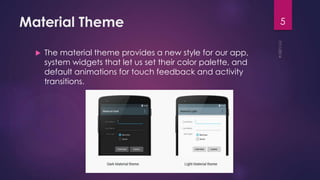
Material Theme
 The material theme provides a new style for our app,
system widgets that let us set their color palette, and
default animations for touch feedback and activity
transitions.
5
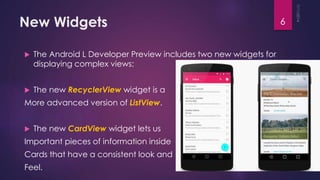
New Widgets
 The Android L Developer Preview includes two new widgets for
displaying complex views:
 The new RecyclerView widget is a
More advanced version of ListView.
 The new CardView widget lets us
Important pieces of information inside
Cards that have a consistent look and
Feel.
6
View Shadows
In addition to the X and Y properties, views in the Android L
Developer have a Z property. This new property represents the
elevation of a view, which determines:
 The size of the shadow - Views with higher Z values cast
bigger shadows.
 The drawing order - Views with higher Z values appear on
top of other views.
7
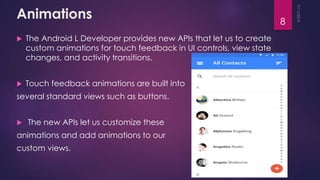
Animations
 The Android L Developer provides new APIs that let us to create
custom animations for touch feedback in UI controls, view state
changes, and activity transitions.
 Touch feedback animations are built into
several standard views such as buttons.
 The new APIs let us customize these
animations and add animations to our
custom views.
8
Continue…
The new animation APIs let us:
 Respond to touch events in our views with touch feedback
animations.
 Hide and show views with reveal effect animations.
 Switch between activities with custom activity transition animations.
 Create more natural animations with curved motion.
 Show animations in state list drawables between view state
changes.
9
Principles of Material Design
Material is the metaphor :
A material metaphor is the unifying theory of a rationalized space and
a system of motion.
Bold, graphic, intentional :
These elements do far more than please the eye; they create
hierarchy, meaning, and focus.
Motion provides meaning :
Motion is meaningful and appropriate, serving to focus attention and
maintain continuity.
10
Animation has four contents:
o Authentic Motion
o Responsive Interaction
o Meaningful Transitions
o Delightful Details
11
Animation
o Authentic Motion
 Perceiving an object's tangible form helps us understand how to manipulate it.
Observing an object's motion tells us whether it is light or heavy, flexible or rigid, small or
large.
Contents
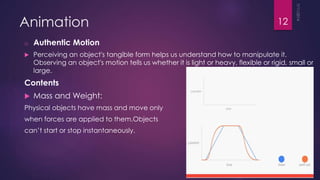
 Mass and Weight:
Physical objects have mass and move only
when forces are applied to them.Objects
can’t start or stop instantaneously.
12
Animation
o Responsive Interaction
 Responsive interaction builds trust with the user and engages them.
 It is thoughtful and purposeful, not random, and can be gently
whimsical but never distracting.
In material design, apps are responsive to and eager for user input:
 Touch, voice, mouse and keyboard are all first-class input methods
 Although UI elements appear tangible, they are locked behind a
layer of glass
13
Animation(Responsive Interaction)
Examples:
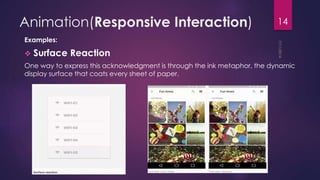
 Surface Reaction
One way to express this acknowledgment is through the ink metaphor, the dynamic
display surface that coats every sheet of paper.
14
Animation(Responsive Interaction)
 Material Response
 In addition to ink-like actions on the surface, the material itself can also respond
to interaction.
 The material can lift up when touched or clicked, indicating an active state.
 Material appears from touch point.
 Paper appears from center of screen, breaking relationship with input.
15
Animation(Responsive Interaction)
 Radial Action
 All user initiated actions have an epicenter; the place or places
where their intent enters the system.
 Actions should visually connect to their respective input epicenter.
Closer actions occur sooner than more distant ones, creating a
ripple of actions
16
Animation
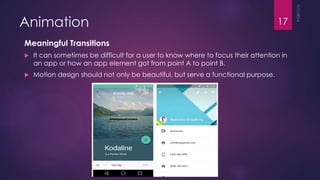
Meaningful Transitions
 It can sometimes be difficult for a user to know where to focus their attention in
an app or how an app element got from point A to point B.
 Motion design should not only be beautiful, but serve a functional purpose.
17
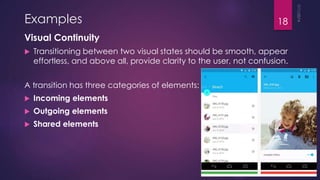
Examples
Visual Continuity
 Transitioning between two visual states should be smooth, appear
effortless, and above all, provide clarity to the user, not confusion.
A transition has three categories of elements:
 Incoming elements
 Outgoing elements
 Shared elements
18
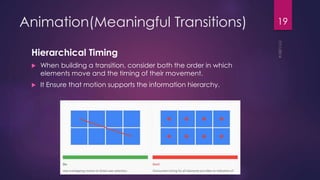
Animation(Meaningful Transitions)
Hierarchical Timing
 When building a transition, consider both the order in which
elements move and the timing of their movement.
 It Ensure that motion supports the information hierarchy.
19
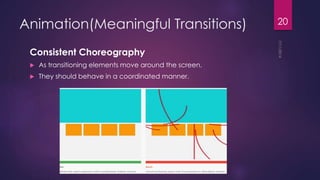
Animation(Meaningful Transitions)
Consistent Choreography
 As transitioning elements move around the screen.
 They should behave in a coordinated manner.
20
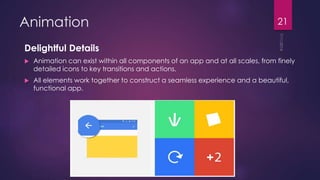
Animation
Delightful Details
 Animation can exist within all components of an app and at all scales, from finely
detailed icons to key transitions and actions.
 All elements work together to construct a seamless experience and a beautiful,
functional app.
21
Thank You
End

Material design full topics_animation

  • 1.
  • 2.
     Prepared By: AnupMajumder Dept. Of CSE Jahangirnagar University 2
  • 3.
    Overview  What isMaterial Design?  Elements Of Material Design.  Principle Of Material Design.  Animation  Contents Of Animation. 3
  • 4.
    What is materialdesign? MATERIAL DESIGN CREATE A VISUAL LANGUAGE FOR USERS THAT SYNTHESIZES THE CLASSIC PRINCIPLES OF GOOD DESIGN WITH THE INNOVATION AND POSSIBILITY OF TECHNOLOGY AND SCIENCE. THIS IS MATERIAL DESIGN. THE ANDROID L DEVELOPER PROVIDES THE FOLLOWING ELEMENTS FOR US TO BUILD MATERIAL DESIGN APPS:  A NEW THEME  NEW WIDGETS FOR COMPLEX VIEWS  NEW APIS FOR CUSTOM SHADOWS AND ANIMATIONS 4
  • 5.
    Material Theme  Thematerial theme provides a new style for our app, system widgets that let us set their color palette, and default animations for touch feedback and activity transitions. 5
  • 6.
    New Widgets  TheAndroid L Developer Preview includes two new widgets for displaying complex views:  The new RecyclerView widget is a More advanced version of ListView.  The new CardView widget lets us Important pieces of information inside Cards that have a consistent look and Feel. 6
  • 7.
    View Shadows In additionto the X and Y properties, views in the Android L Developer have a Z property. This new property represents the elevation of a view, which determines:  The size of the shadow - Views with higher Z values cast bigger shadows.  The drawing order - Views with higher Z values appear on top of other views. 7
  • 8.
    Animations  The AndroidL Developer provides new APIs that let us to create custom animations for touch feedback in UI controls, view state changes, and activity transitions.  Touch feedback animations are built into several standard views such as buttons.  The new APIs let us customize these animations and add animations to our custom views. 8
  • 9.
    Continue… The new animationAPIs let us:  Respond to touch events in our views with touch feedback animations.  Hide and show views with reveal effect animations.  Switch between activities with custom activity transition animations.  Create more natural animations with curved motion.  Show animations in state list drawables between view state changes. 9
  • 10.
    Principles of MaterialDesign Material is the metaphor : A material metaphor is the unifying theory of a rationalized space and a system of motion. Bold, graphic, intentional : These elements do far more than please the eye; they create hierarchy, meaning, and focus. Motion provides meaning : Motion is meaningful and appropriate, serving to focus attention and maintain continuity. 10
  • 11.
    Animation has fourcontents: o Authentic Motion o Responsive Interaction o Meaningful Transitions o Delightful Details 11
  • 12.
    Animation o Authentic Motion Perceiving an object's tangible form helps us understand how to manipulate it. Observing an object's motion tells us whether it is light or heavy, flexible or rigid, small or large. Contents  Mass and Weight: Physical objects have mass and move only when forces are applied to them.Objects can’t start or stop instantaneously. 12
  • 13.
    Animation o Responsive Interaction Responsive interaction builds trust with the user and engages them.  It is thoughtful and purposeful, not random, and can be gently whimsical but never distracting. In material design, apps are responsive to and eager for user input:  Touch, voice, mouse and keyboard are all first-class input methods  Although UI elements appear tangible, they are locked behind a layer of glass 13
  • 14.
    Animation(Responsive Interaction) Examples:  SurfaceReaction One way to express this acknowledgment is through the ink metaphor, the dynamic display surface that coats every sheet of paper. 14
  • 15.
    Animation(Responsive Interaction)  MaterialResponse  In addition to ink-like actions on the surface, the material itself can also respond to interaction.  The material can lift up when touched or clicked, indicating an active state.  Material appears from touch point.  Paper appears from center of screen, breaking relationship with input. 15
  • 16.
    Animation(Responsive Interaction)  RadialAction  All user initiated actions have an epicenter; the place or places where their intent enters the system.  Actions should visually connect to their respective input epicenter. Closer actions occur sooner than more distant ones, creating a ripple of actions 16
  • 17.
    Animation Meaningful Transitions  Itcan sometimes be difficult for a user to know where to focus their attention in an app or how an app element got from point A to point B.  Motion design should not only be beautiful, but serve a functional purpose. 17
  • 18.
    Examples Visual Continuity  Transitioningbetween two visual states should be smooth, appear effortless, and above all, provide clarity to the user, not confusion. A transition has three categories of elements:  Incoming elements  Outgoing elements  Shared elements 18
  • 19.
    Animation(Meaningful Transitions) Hierarchical Timing When building a transition, consider both the order in which elements move and the timing of their movement.  It Ensure that motion supports the information hierarchy. 19
  • 20.
    Animation(Meaningful Transitions) Consistent Choreography As transitioning elements move around the screen.  They should behave in a coordinated manner. 20
  • 21.
    Animation Delightful Details  Animationcan exist within all components of an app and at all scales, from finely detailed icons to key transitions and actions.  All elements work together to construct a seamless experience and a beautiful, functional app. 21
  • 22.