Intro to
Managed
Print
Services
Ken Cleveland
Tim Whitmore
Tony Barton
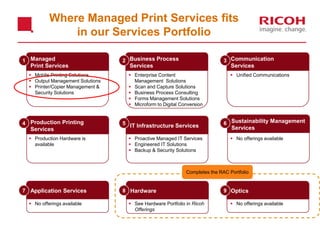
Managed
Print Services
Business Process
Services
Communication
Services
Sustainability Management
Services
Production Printing
Services
IT Infrastructure Services
OpticsHardwareApplication Services
1 2 3
4 5 6
7 8 9
 Proactive Managed IT Services
 Engineered IT Solutions
 Backup & Security Solutions
 Production Hardware is
available
 Mobile Printing Solutions
 Output Management Solutions
 Printer/Copier Management &
Security Solutions
 Enterprise Content
Management Solutions
 Scan and Capture Solutions
 Business Process Consulting
 Forms Management Solutions
 Microform to Digital Conversion
 Unified Communications
 No offerings available  See Hardware Portfolio in Ricoh
Offerings
 No offerings available
Completes the RAC Portfolio
Where Managed Print Services fits
in our Services Portfolio
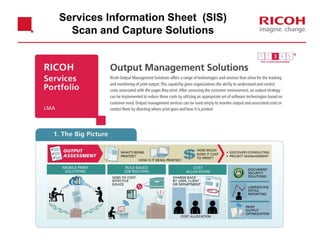
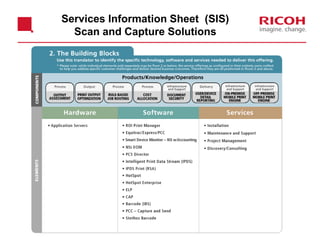
Services Information Sheet (SIS)
Scan and Capture Solutions
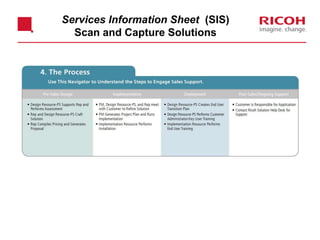
Services Information Sheet (SIS)
Scan and Capture Solutions
Services Information Sheet (SIS)
Scan and Capture Solutions
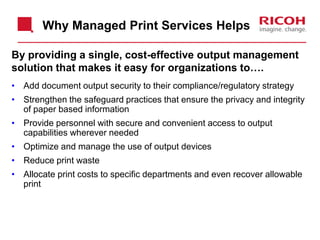
By providing a single, cost-effective output management
solution that makes it easy for organizations to….
• Add document output security to their compliance/regulatory strategy
• Strengthen the safeguard practices that ensure the privacy and integrity
of paper based information
• Provide personnel with secure and convenient access to output
capabilities wherever needed
• Optimize and manage the use of output devices
• Reduce print waste
• Allocate print costs to specific departments and even recover allowable
print
Why Managed Print Services Helps
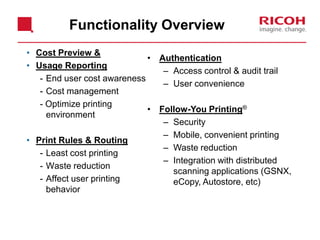
• Cost Preview &
• Usage Reporting
- End user cost awareness
- Cost management
- Optimize printing
environment
• Print Rules & Routing
- Least cost printing
- Waste reduction
- Affect user printing
behavior
• Authentication
– Access control & audit trail
– User convenience
• Follow-You Printing®
– Security
– Mobile, convenient printing
– Waste reduction
– Integration with distributed
scanning applications (GSNX,
eCopy, Autostore, etc)
Functionality Overview
Cost Preview
What it does:
-Calculates the cost of a print job, and displays it to the
end user
-Allows end users to cancel a print job, after reviewing
the cost
-Increases end user awareness of printing costs
Demo: Cost Preview Popup
Usage Reporting
What it does:
• Accurately charge documents to specific department to cost center codes
• Accurately charge documents to specific client or matter codes – Legal
• Tracks the costs of document attributes such as file or paper size, media
type, color, duplexing, stitching and more
• Creates different charging schedules for internal and external customers
• Provides better visibility into usage
• Increases revenue opportunities for the customer
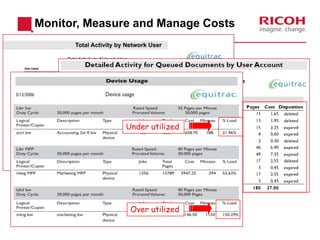
Monitor, Measure and Manage Costs
Excessive
Color Use
Over utilized
Under utilized
Demo: Running reports in Equitrac
Print Rules & Routing
What they do:
• Modify end user print behavior
• Gives administrator ability to predetermine who may print
to which devices, based on attributes of a print job (color,
number of pages, etc).
• Enables administrator to enforce duplex, black and white
or re-route jobs to more efficient print devices.
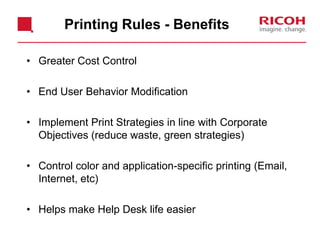
Printing Rules - Benefits
• Greater Cost Control
• End User Behavior Modification
• Implement Print Strategies in line with Corporate
Objectives (reduce waste, green strategies)
• Control color and application-specific printing (Email,
Internet, etc)
• Helps make Help Desk life easier
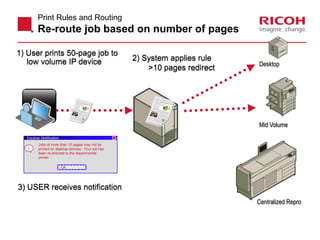
Print Rules and Routing
Re-route job based on number of pages
2) System applies rule
>10 pages redirect
1) User prints 50-page job to
low volume IP device
3) USER receives notification
Desktop
Mid Volume
Centralized Repro
Equitrac Notification X
Jobs of more than 10 pages may not be
printed on desktop devices. Your job has
been re-directed to the departmental
printer.
OK
i
Print Rules and Routing
Demo: Route job on page count
Print Rules and Routing
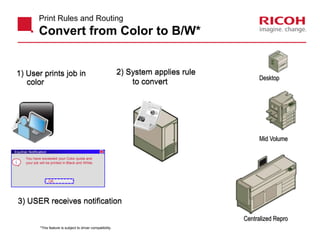
Convert from Color to B/W*
2) System applies rule
to convert
1) User prints job in
color
3) USER receives notification
Desktop
Mid Volume
Centralized Repro
Equitrac Notification X
You have exceeded your Color quota and
your job will be printed in Black and White.
OK
i
*This feature is subject to driver compatibility.
Print Rules and Routing
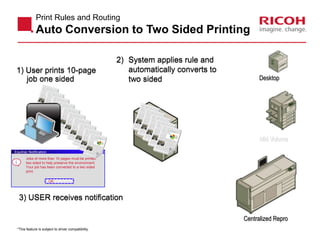
Auto Conversion to Two Sided Printing
2) System applies rule and
automatically converts to
two sided
1) User prints 10-page
job one sided
3) USER receives notification
Desktop
Mid Volume
Centralized Repro
Equitrac Notification X
Jobs of more than 10 pages must be printed
two sided to help preserve the environment.
Your job has been converted to a two sided
print.
OK
i
*This feature is subject to driver compatibility.
Print Rules and Routing
Demo: Rule: Convert color to B&W
Authentication
What it does:
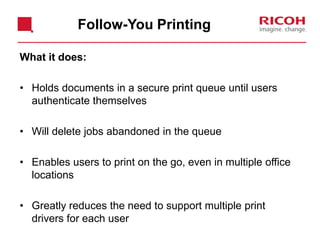
• Holds documents in a secure print queue until users
authenticate themselves
• Will delete jobs abandoned in the queue
• Enables users to print on the go, even in multiple office
locations
• Greatly reduces the need to support multiple print
drivers for each user
Follow-You Printing
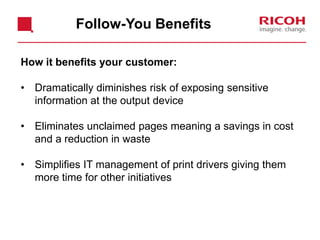
How it benefits your customer:
• Dramatically diminishes risk of exposing sensitive
information at the output device
• Eliminates unclaimed pages meaning a savings in cost
and a reduction in waste
• Simplifies IT management of print drivers giving them
more time for other initiatives
Follow-You Benefits
Users and
Groups
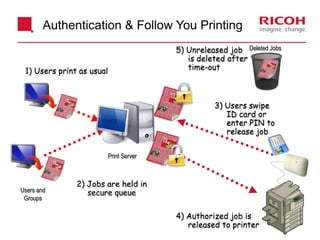
Authentication & Follow You Printing
Print Server
Deleted Jobs
3) Users swipe
ID card or
enter PIN to
release job
5) Unreleased job
is deleted after
time-out
4) Authorized job is
released to printer
2) Jobs are held in
secure queue
1) Users print as usual
Demo: Submitting a Follow-You Print Job
Embedded Software
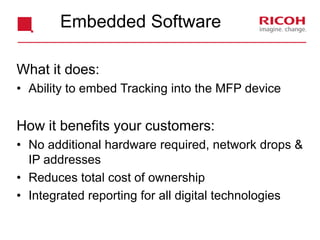
What it does:
• Ability to embed Tracking into the MFP device
How it benefits your customers:
• No additional hardware required, network drops &
IP addresses
• Reduces total cost of ownership
• Integrated reporting for all digital technologies
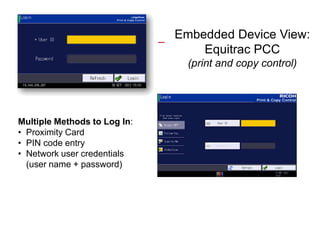
Embedded Device View:
Equitrac PCC
(print and copy control)
Multiple Methods to Log In:
• Proximity Card
• PIN code entry
• Network user credentials
(user name + password)

Manged print services 1

  • 1.
  • 2.
    Managed Print Services Business Process Services Communication Services SustainabilityManagement Services Production Printing Services IT Infrastructure Services OpticsHardwareApplication Services 1 2 3 4 5 6 7 8 9  Proactive Managed IT Services  Engineered IT Solutions  Backup & Security Solutions  Production Hardware is available  Mobile Printing Solutions  Output Management Solutions  Printer/Copier Management & Security Solutions  Enterprise Content Management Solutions  Scan and Capture Solutions  Business Process Consulting  Forms Management Solutions  Microform to Digital Conversion  Unified Communications  No offerings available  See Hardware Portfolio in Ricoh Offerings  No offerings available  No offerings available Completes the RAC Portfolio Where Managed Print Services fits in our Services Portfolio
  • 3.
    Services Information Sheet(SIS) Scan and Capture Solutions
  • 4.
    Services Information Sheet(SIS) Scan and Capture Solutions
  • 5.
    Services Information Sheet(SIS) Scan and Capture Solutions
  • 6.
    By providing asingle, cost-effective output management solution that makes it easy for organizations to…. • Add document output security to their compliance/regulatory strategy • Strengthen the safeguard practices that ensure the privacy and integrity of paper based information • Provide personnel with secure and convenient access to output capabilities wherever needed • Optimize and manage the use of output devices • Reduce print waste • Allocate print costs to specific departments and even recover allowable print Why Managed Print Services Helps
  • 7.
    • Cost Preview& • Usage Reporting - End user cost awareness - Cost management - Optimize printing environment • Print Rules & Routing - Least cost printing - Waste reduction - Affect user printing behavior • Authentication – Access control & audit trail – User convenience • Follow-You Printing® – Security – Mobile, convenient printing – Waste reduction – Integration with distributed scanning applications (GSNX, eCopy, Autostore, etc) Functionality Overview
  • 8.
    Cost Preview What itdoes: -Calculates the cost of a print job, and displays it to the end user -Allows end users to cancel a print job, after reviewing the cost -Increases end user awareness of printing costs
  • 9.
  • 10.
    Usage Reporting What itdoes: • Accurately charge documents to specific department to cost center codes • Accurately charge documents to specific client or matter codes – Legal • Tracks the costs of document attributes such as file or paper size, media type, color, duplexing, stitching and more • Creates different charging schedules for internal and external customers • Provides better visibility into usage • Increases revenue opportunities for the customer
  • 11.
    Monitor, Measure andManage Costs Excessive Color Use Over utilized Under utilized
  • 12.
  • 13.
    Print Rules &Routing What they do: • Modify end user print behavior • Gives administrator ability to predetermine who may print to which devices, based on attributes of a print job (color, number of pages, etc). • Enables administrator to enforce duplex, black and white or re-route jobs to more efficient print devices.
  • 14.
    Printing Rules -Benefits • Greater Cost Control • End User Behavior Modification • Implement Print Strategies in line with Corporate Objectives (reduce waste, green strategies) • Control color and application-specific printing (Email, Internet, etc) • Helps make Help Desk life easier
  • 15.
    Print Rules andRouting Re-route job based on number of pages 2) System applies rule >10 pages redirect 1) User prints 50-page job to low volume IP device 3) USER receives notification Desktop Mid Volume Centralized Repro Equitrac Notification X Jobs of more than 10 pages may not be printed on desktop devices. Your job has been re-directed to the departmental printer. OK i
  • 16.
    Print Rules andRouting Demo: Route job on page count
  • 17.
    Print Rules andRouting Convert from Color to B/W* 2) System applies rule to convert 1) User prints job in color 3) USER receives notification Desktop Mid Volume Centralized Repro Equitrac Notification X You have exceeded your Color quota and your job will be printed in Black and White. OK i *This feature is subject to driver compatibility.
  • 18.
    Print Rules andRouting Auto Conversion to Two Sided Printing 2) System applies rule and automatically converts to two sided 1) User prints 10-page job one sided 3) USER receives notification Desktop Mid Volume Centralized Repro Equitrac Notification X Jobs of more than 10 pages must be printed two sided to help preserve the environment. Your job has been converted to a two sided print. OK i *This feature is subject to driver compatibility.
  • 19.
    Print Rules andRouting Demo: Rule: Convert color to B&W
  • 20.
  • 21.
    What it does: •Holds documents in a secure print queue until users authenticate themselves • Will delete jobs abandoned in the queue • Enables users to print on the go, even in multiple office locations • Greatly reduces the need to support multiple print drivers for each user Follow-You Printing
  • 22.
    How it benefitsyour customer: • Dramatically diminishes risk of exposing sensitive information at the output device • Eliminates unclaimed pages meaning a savings in cost and a reduction in waste • Simplifies IT management of print drivers giving them more time for other initiatives Follow-You Benefits
  • 23.
    Users and Groups Authentication &Follow You Printing Print Server Deleted Jobs 3) Users swipe ID card or enter PIN to release job 5) Unreleased job is deleted after time-out 4) Authorized job is released to printer 2) Jobs are held in secure queue 1) Users print as usual
  • 24.
    Demo: Submitting aFollow-You Print Job
  • 25.
    Embedded Software What itdoes: • Ability to embed Tracking into the MFP device How it benefits your customers: • No additional hardware required, network drops & IP addresses • Reduces total cost of ownership • Integrated reporting for all digital technologies
  • 26.
    Embedded Device View: EquitracPCC (print and copy control) Multiple Methods to Log In: • Proximity Card • PIN code entry • Network user credentials (user name + password)