Managing Experiment Data Using
Excel and Friends: Digging Out
from Under the Avalanche
Yannick Pouliot, PhD
Bioresearch Informationist
Lane Medical Library & Knowledge Management Center
6/1/2006
© 2006 The Board of Trustees of The Leland Stanford Junior University

Lane Medical Library & Knowledge Management Center
http://lane.stanford.edu
Course Expectations
Objectives



Demonstrate







Windows vs. Mac
Structure










… good practices
… useful features
… the value of querying via Excel

Examples, use cases
Exercises
Resources

Class evaluation questionnaire:
http://www.surveymk.com/s.asp?u=915602161402

Lane Medical Library &
Knowledge Management Center
http://lane.stanford.edu

2
Contents
Complexity

+
Querying Web sites &
databases using Excel
Excel handy functions

Excel good practices

Lane Medical Library &
Knowledge Management Center
http://lane.stanford.edu

3
So Why Are We Here?


Lots of data


 Need for better management of these data








Need exceeds Excel
Excel never really meant for data management anyway

Applying common tools to ameliorate the problem
“In IT, there’s no problem that enough money
can’t solve”  not the philosophy here…
Instead: invest yourself and you’ll get a handsome
return 

Lane Medical Library &
Knowledge Management Center
http://lane.stanford.edu

4
Essential Tip
Clippy: not as dorky as
you might think

Lane Medical Library & Knowledge Management Center
http://lane.stanford.edu
How To Help Clippy Give You
Better Answers
 Read a (good) Excel manual cover to cover
Don’t try to understand everything




Just flip pages and let it impress into your brain

Not fun, but it will give you the requisite
vocabulary






Increases your odds of getting the right answer
Gives you an idea of what Excel can do

Lane Medical Library &
Knowledge Management Center
http://lane.stanford.edu

6
Part I: Essential Excel
Functions

Lane Medical Library & Knowledge Management Center
http://lane.stanford.edu
Essential Excel Functions
1.

2.
3.
4.
5.
6.

Conditional Formatting
Named ranges & Input validation
Custom Toolbar
PivotTable
Web Querying
MS Query

Lane Medical Library &
Knowledge Management Center
http://lane.stanford.edu

8
Excel Functions 1: Conditional
Formatting


Definition: A formatting (e.g., cell shading or
font color) applied automatically by Excel to
cells if a specified condition is true.







Example: applying green cell color to the cell if a
test result exceeds a threshold value
In: Format/Conditional Formatting
See Spreadsheet1.xls/ConditionalExample1 - try

Reference
Lane Medical Library &
Knowledge Management Center
http://lane.stanford.edu

9
Excel Functions 2: Named Ranges and
Validation




Named ranges are ranges of cells that
are…named!
Named ranges can be used for validating input
data


Important for ensuring data consistency









Essential for queryability

Also useful to avoid repetitive typing by using drop-down
menu
See: Spreadsheet1.xls/InputValidation - try

How to: here
Other references
Lane Medical Library &
Knowledge Management Center
http://lane.stanford.edu

10
Excel Functions 3: Custom Toolbar





Why? Bring often used functions together for faster
access
DEMO
How to? 50 min online tutorial


Section on custom toolbars here

Lane Medical Library &
Knowledge Management Center
http://lane.stanford.edu

11
Excel Functions 4: PivotTables


Automatic summarization of data





See: Spreadsheet3.xls/Summary1 - try





Converting same category data into summarized values
Tall/skinny  wide/fat

Underlying data can always be accessed by
clicking on a summary cell

Online demo (5 min)
How to? 30 min online tutorial
Lane Medical Library &
Knowledge Management Center
http://lane.stanford.edu

12
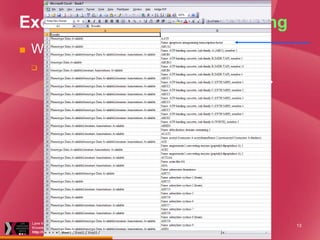
Excel Functions 5: Web Querying


Why Query the Web Using Excel?


Data in a Web page = first step


Need data stored in tool used for daily work 
Excel


E.g., with a list I can:
 Sort
 Annotate
 Edit

Lane Medical Library &
Knowledge Management Center
http://lane.stanford.edu

13
Excel Functions 5: Web Querying
Options



Copy/paste Web page into Excel - try
Run Web query from within Excel  more control try

1.
2.





Going one step further: creating a refreshable Web query

Excel Web querying is not perfect…





Still limited to how data are formatted on Web page 
requires editing
Some Web pages don’t work
No arbitrary querying capability (limited by Web interface)

 The answer: direct querying using e.g. SQL
Lane Medical Library &
Knowledge Management Center
http://lane.stanford.edu

14
BREAK

Lane Medical Library & Knowledge Management Center
http://lane.stanford.edu
Part II: Querying
Databases Using Excel

Lane Medical Library & Knowledge Management Center
http://lane.stanford.edu
Putting MSQuery to Work


MSQuery, an unknown hero






Free
Facilitates writing a SQL query  graphical
What is SQL?

First, need to find it!


Search for “MSQRY32.EXE” using “Search for Files or
Folders”






Search hidden files and folders

On my disk, it is located in C:Program FilesMicrosoft
OfficeOFFICE11
Once you find it, create a shortcut to it and rename it e.g.
MSQuery


move the shortcut to a desired location

Lane Medical Library &
Knowledge Management Center
http://lane.stanford.edu

17
Example: Network Querying of Ensembl
Database Using MS Query





Remote
Big database, lots of data to return from far away… DB

ult
s



What happens when you use MS Query
DEMO
query
qu
May take some time
e ry

re s



results

Lane Medical Library &
Knowledge Management Center
http://lane.stanford.edu

18
FYI - Bioinformatics Databases:
Direct
WhoQueryability of Selected Bioinformatics Databases Querying?
Supports Direct
Database

Internet SQL querying?

ArrayExpress

How?

Eventually

Modality

DB Engine

SOAP-based

Ensembl

Yes

http://www.ensembl.org
/info/data/download.ht SQL
ml

Mouse Genome
Database

Yes

ask for account

Yes

http://eutils.ncbi.nlm.nih
.gov/entrez/query/static SOAP-based
/esoap_help.html

SQL Server

Yes

http://www.pharmgkb.or
g/home/projects/webser SOAP-based
vices/

Oracle

NCBI Entrez

PharmGKB

SQL

MySQL

Sybase

Saccharomyces Genome
EventuallyMaybe
Database

Oracle

Stanford Microarray
Database

Oracle

Lane Medical Library &
Knowledge Management Center
http://lane.stanford.edu

No

19
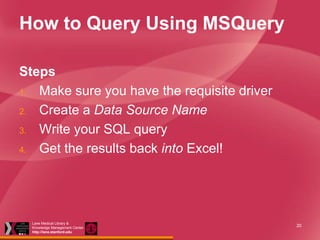
How to Query Using MSQuery
Steps
1. Make sure you have the requisite driver
2. Create a Data Source Name
3. Write your SQL query
4. Get the results back into Excel!

Lane Medical Library &
Knowledge Management Center
http://lane.stanford.edu

20
Step1: Getting Drivers
Essential for Querying




A driver is a piece of software that lets your
operating system talk to a database
Each database engine (Oracle, MySQL, etc)
requires its own driver






Generally must be installed by user

Drivers are needed by Data Source Name
tool and querying programs
Require (simple) installation
Lane Medical Library &
Knowledge Management Center
http://lane.stanford.edu

21
MySQL Driver: Needed to Query
MySQL Databases




Windows: Download MySQL
Connector/ODBC 3.51 here
Must be installed for direct querying using
e.g. Excel


Not necessary if you are using the MySQL Query
Browser

Lane Medical Library &
Knowledge Management Center
http://lane.stanford.edu

22
Oracle Driver: Needed to Query
Oracle Databases


Installing “client” software will install
driver





Windows: Download 10g Client here
Mac: Download 10g Client here

Must be installed if you are querying
using e.g. Excel

Lane Medical Library &
Knowledge Management Center
http://lane.stanford.edu

23
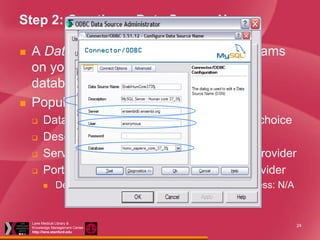
Step 2: Creating a Data Source Name




A Data Source Name (DSN) tells programs
on your PC where and how to query a
database
Populating the fields:





Data Source Name: Unique name of your choice
Description: anything
Server: exactly as given by the database provider
Port number: as specified by database provider


Defaults: MySQL: 3306; Oracle: 1521; MS Access: N/A

Lane Medical Library &
Knowledge Management Center
http://lane.stanford.edu

24
Step 3: Building a Query


DEMO

Lane Medical Library &
Knowledge Management Center
http://lane.stanford.edu

25
Resources – Excel
Summarizing Numerical Data



Data summarization (text):
http://office.microsoft.com/enus/assistance/HA011864391033.aspx

Lane Medical Library &
Knowledge Management Center
http://lane.stanford.edu

26
Resources – MS Access
Free Online Training Resources








Using an Access database to store and information (2 min)
http://office.microsoft.com/en-us/assistance/HA011709681033.aspx
Creating a database from Excel (5 min): http://office.microsoft.com/enus/assistance/HA012013211033.aspx
Creating tables in Access (50 min):
http://office.microsoft.com/training/training.aspx?AssetID=RC061183261033
Writing queries (50 min):
http://office.microsoft.com/training/training.aspx?AssetID=RC010776611033

Lane Medical Library &
Knowledge Management Center
http://lane.stanford.edu

27
Resources - Excel

Accessible from
Lane Library

Lane Medical Library &
Knowledge Management Center
http://lane.stanford.edu

Available
via Safari

Available
via Safari

28
Resources - Excel

Available from
Lane Library

Lane Medical Library &
Knowledge Management Center
http://lane.stanford.edu

29
MS Query Resources


Excellent tutorial:
http://office.microsoft.com/training/Training.as
px?AssetID=RP011856321033&CTT=6&Orig
in=RC011856161033

Lane Medical Library &
Knowledge Management Center
http://lane.stanford.edu

30
Resources – SQL


SQL=Structured Query Language







The Language to Query Relational Databases

Beginning SQL, Wilton P & Colby JW: E
http://jenson.stanford.edu/uhtbin/cgisirsi/5AG
uKeptoD/GREEN/59960102/9#holdings
Oracle SQL*Plus, Gennick, J.
Beginning MySQL: E
http://site.ebrary.com/lib/stanford/Doc?id=101
14227
Lane Medical Library &
Knowledge Management Center
http://lane.stanford.edu

31
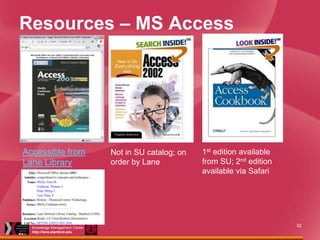
Resources – MS Access

Accessible from
Lane Library

Lane Medical Library &
Knowledge Management Center
http://lane.stanford.edu

Not in SU catalog; on
order by Lane

1st edition available
from SU; 2nd edition
available via Safari

32
Lane Medical Library & Knowledge Management Center
http://lane.stanford.edu

Managing experiment data using Excel and Friends

  • 1.
    Managing Experiment DataUsing Excel and Friends: Digging Out from Under the Avalanche Yannick Pouliot, PhD Bioresearch Informationist Lane Medical Library & Knowledge Management Center 6/1/2006 © 2006 The Board of Trustees of The Leland Stanford Junior University Lane Medical Library & Knowledge Management Center http://lane.stanford.edu
  • 2.
    Course Expectations Objectives  Demonstrate     Windows vs.Mac Structure       … good practices … useful features … the value of querying via Excel Examples, use cases Exercises Resources Class evaluation questionnaire: http://www.surveymk.com/s.asp?u=915602161402 Lane Medical Library & Knowledge Management Center http://lane.stanford.edu 2
  • 3.
    Contents Complexity + Querying Web sites& databases using Excel Excel handy functions Excel good practices Lane Medical Library & Knowledge Management Center http://lane.stanford.edu 3
  • 4.
    So Why AreWe Here?  Lots of data   Need for better management of these data      Need exceeds Excel Excel never really meant for data management anyway Applying common tools to ameliorate the problem “In IT, there’s no problem that enough money can’t solve”  not the philosophy here… Instead: invest yourself and you’ll get a handsome return  Lane Medical Library & Knowledge Management Center http://lane.stanford.edu 4
  • 5.
    Essential Tip Clippy: notas dorky as you might think Lane Medical Library & Knowledge Management Center http://lane.stanford.edu
  • 6.
    How To HelpClippy Give You Better Answers  Read a (good) Excel manual cover to cover Don’t try to understand everything   Just flip pages and let it impress into your brain Not fun, but it will give you the requisite vocabulary    Increases your odds of getting the right answer Gives you an idea of what Excel can do Lane Medical Library & Knowledge Management Center http://lane.stanford.edu 6
  • 7.
    Part I: EssentialExcel Functions Lane Medical Library & Knowledge Management Center http://lane.stanford.edu
  • 8.
    Essential Excel Functions 1. 2. 3. 4. 5. 6. ConditionalFormatting Named ranges & Input validation Custom Toolbar PivotTable Web Querying MS Query Lane Medical Library & Knowledge Management Center http://lane.stanford.edu 8
  • 9.
    Excel Functions 1:Conditional Formatting  Definition: A formatting (e.g., cell shading or font color) applied automatically by Excel to cells if a specified condition is true.     Example: applying green cell color to the cell if a test result exceeds a threshold value In: Format/Conditional Formatting See Spreadsheet1.xls/ConditionalExample1 - try Reference Lane Medical Library & Knowledge Management Center http://lane.stanford.edu 9
  • 10.
    Excel Functions 2:Named Ranges and Validation   Named ranges are ranges of cells that are…named! Named ranges can be used for validating input data  Important for ensuring data consistency      Essential for queryability Also useful to avoid repetitive typing by using drop-down menu See: Spreadsheet1.xls/InputValidation - try How to: here Other references Lane Medical Library & Knowledge Management Center http://lane.stanford.edu 10
  • 11.
    Excel Functions 3:Custom Toolbar    Why? Bring often used functions together for faster access DEMO How to? 50 min online tutorial  Section on custom toolbars here Lane Medical Library & Knowledge Management Center http://lane.stanford.edu 11
  • 12.
    Excel Functions 4:PivotTables  Automatic summarization of data    See: Spreadsheet3.xls/Summary1 - try    Converting same category data into summarized values Tall/skinny  wide/fat Underlying data can always be accessed by clicking on a summary cell Online demo (5 min) How to? 30 min online tutorial Lane Medical Library & Knowledge Management Center http://lane.stanford.edu 12
  • 13.
    Excel Functions 5:Web Querying  Why Query the Web Using Excel?  Data in a Web page = first step  Need data stored in tool used for daily work  Excel  E.g., with a list I can:  Sort  Annotate  Edit Lane Medical Library & Knowledge Management Center http://lane.stanford.edu 13
  • 14.
    Excel Functions 5:Web Querying Options  Copy/paste Web page into Excel - try Run Web query from within Excel  more control try 1. 2.   Going one step further: creating a refreshable Web query Excel Web querying is not perfect…    Still limited to how data are formatted on Web page  requires editing Some Web pages don’t work No arbitrary querying capability (limited by Web interface)  The answer: direct querying using e.g. SQL Lane Medical Library & Knowledge Management Center http://lane.stanford.edu 14
  • 15.
    BREAK Lane Medical Library& Knowledge Management Center http://lane.stanford.edu
  • 16.
    Part II: Querying DatabasesUsing Excel Lane Medical Library & Knowledge Management Center http://lane.stanford.edu
  • 17.
    Putting MSQuery toWork  MSQuery, an unknown hero     Free Facilitates writing a SQL query  graphical What is SQL? First, need to find it!  Search for “MSQRY32.EXE” using “Search for Files or Folders”    Search hidden files and folders On my disk, it is located in C:Program FilesMicrosoft OfficeOFFICE11 Once you find it, create a shortcut to it and rename it e.g. MSQuery  move the shortcut to a desired location Lane Medical Library & Knowledge Management Center http://lane.stanford.edu 17
  • 18.
    Example: Network Queryingof Ensembl Database Using MS Query   Remote Big database, lots of data to return from far away… DB ult s  What happens when you use MS Query DEMO query qu May take some time e ry re s  results Lane Medical Library & Knowledge Management Center http://lane.stanford.edu 18
  • 19.
    FYI - BioinformaticsDatabases: Direct WhoQueryability of Selected Bioinformatics Databases Querying? Supports Direct Database Internet SQL querying? ArrayExpress How? Eventually Modality DB Engine SOAP-based Ensembl Yes http://www.ensembl.org /info/data/download.ht SQL ml Mouse Genome Database Yes ask for account Yes http://eutils.ncbi.nlm.nih .gov/entrez/query/static SOAP-based /esoap_help.html SQL Server Yes http://www.pharmgkb.or g/home/projects/webser SOAP-based vices/ Oracle NCBI Entrez PharmGKB SQL MySQL Sybase Saccharomyces Genome EventuallyMaybe Database Oracle Stanford Microarray Database Oracle Lane Medical Library & Knowledge Management Center http://lane.stanford.edu No 19
  • 20.
    How to QueryUsing MSQuery Steps 1. Make sure you have the requisite driver 2. Create a Data Source Name 3. Write your SQL query 4. Get the results back into Excel! Lane Medical Library & Knowledge Management Center http://lane.stanford.edu 20
  • 21.
    Step1: Getting Drivers Essentialfor Querying   A driver is a piece of software that lets your operating system talk to a database Each database engine (Oracle, MySQL, etc) requires its own driver    Generally must be installed by user Drivers are needed by Data Source Name tool and querying programs Require (simple) installation Lane Medical Library & Knowledge Management Center http://lane.stanford.edu 21
  • 22.
    MySQL Driver: Neededto Query MySQL Databases   Windows: Download MySQL Connector/ODBC 3.51 here Must be installed for direct querying using e.g. Excel  Not necessary if you are using the MySQL Query Browser Lane Medical Library & Knowledge Management Center http://lane.stanford.edu 22
  • 23.
    Oracle Driver: Neededto Query Oracle Databases  Installing “client” software will install driver    Windows: Download 10g Client here Mac: Download 10g Client here Must be installed if you are querying using e.g. Excel Lane Medical Library & Knowledge Management Center http://lane.stanford.edu 23
  • 24.
    Step 2: Creatinga Data Source Name   A Data Source Name (DSN) tells programs on your PC where and how to query a database Populating the fields:     Data Source Name: Unique name of your choice Description: anything Server: exactly as given by the database provider Port number: as specified by database provider  Defaults: MySQL: 3306; Oracle: 1521; MS Access: N/A Lane Medical Library & Knowledge Management Center http://lane.stanford.edu 24
  • 25.
    Step 3: Buildinga Query  DEMO Lane Medical Library & Knowledge Management Center http://lane.stanford.edu 25
  • 26.
    Resources – Excel SummarizingNumerical Data  Data summarization (text): http://office.microsoft.com/enus/assistance/HA011864391033.aspx Lane Medical Library & Knowledge Management Center http://lane.stanford.edu 26
  • 27.
    Resources – MSAccess Free Online Training Resources     Using an Access database to store and information (2 min) http://office.microsoft.com/en-us/assistance/HA011709681033.aspx Creating a database from Excel (5 min): http://office.microsoft.com/enus/assistance/HA012013211033.aspx Creating tables in Access (50 min): http://office.microsoft.com/training/training.aspx?AssetID=RC061183261033 Writing queries (50 min): http://office.microsoft.com/training/training.aspx?AssetID=RC010776611033 Lane Medical Library & Knowledge Management Center http://lane.stanford.edu 27
  • 28.
    Resources - Excel Accessiblefrom Lane Library Lane Medical Library & Knowledge Management Center http://lane.stanford.edu Available via Safari Available via Safari 28
  • 29.
    Resources - Excel Availablefrom Lane Library Lane Medical Library & Knowledge Management Center http://lane.stanford.edu 29
  • 30.
    MS Query Resources  Excellenttutorial: http://office.microsoft.com/training/Training.as px?AssetID=RP011856321033&CTT=6&Orig in=RC011856161033 Lane Medical Library & Knowledge Management Center http://lane.stanford.edu 30
  • 31.
    Resources – SQL  SQL=StructuredQuery Language     The Language to Query Relational Databases Beginning SQL, Wilton P & Colby JW: E http://jenson.stanford.edu/uhtbin/cgisirsi/5AG uKeptoD/GREEN/59960102/9#holdings Oracle SQL*Plus, Gennick, J. Beginning MySQL: E http://site.ebrary.com/lib/stanford/Doc?id=101 14227 Lane Medical Library & Knowledge Management Center http://lane.stanford.edu 31
  • 32.
    Resources – MSAccess Accessible from Lane Library Lane Medical Library & Knowledge Management Center http://lane.stanford.edu Not in SU catalog; on order by Lane 1st edition available from SU; 2nd edition available via Safari 32
  • 33.
    Lane Medical Library& Knowledge Management Center http://lane.stanford.edu